



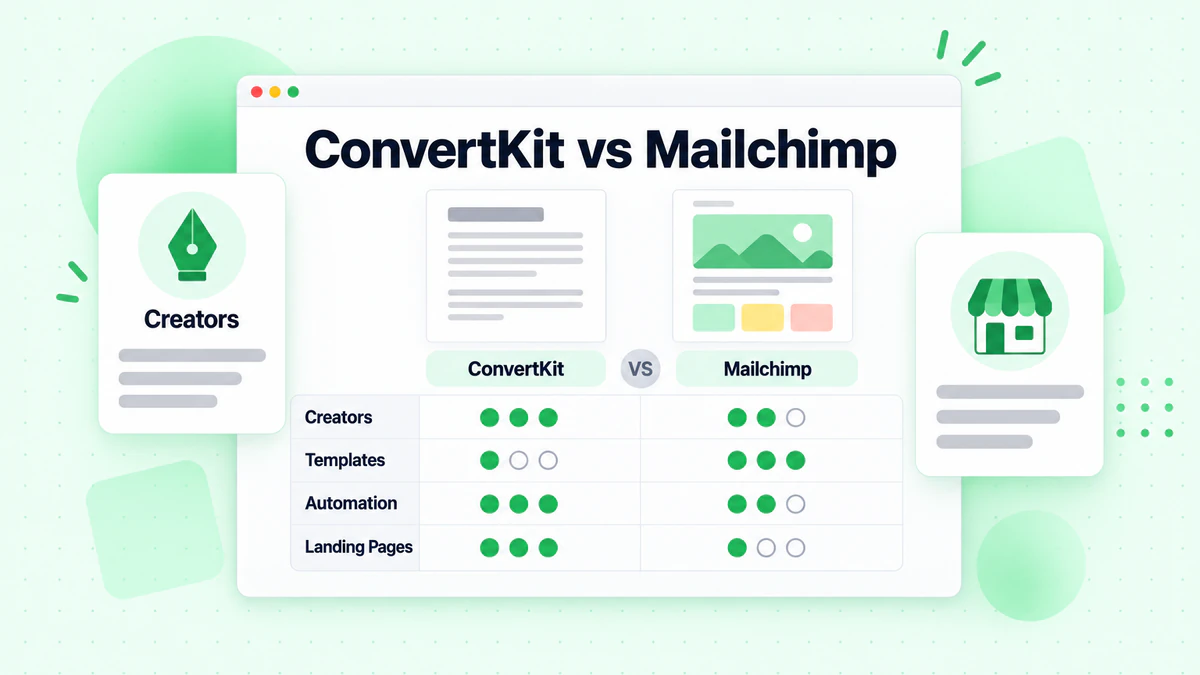
ConvertKit and Mailchimp represent different philosophies in email marketing. ConvertKit was built specifically for creators—bloggers, podcasters, YouTubers, and course sellers. Mailchimp evolved from a general email marketing tool into an all-in-one marketing platform. This comparison helps you choose the right tool for your specific needs.
Quick Comparison
| Factor | ConvertKit | Mailchimp |
|---|---|---|
| Best For | Creators, newsletters | Small businesses, broad use |
| Philosophy | Simple, focused | Feature-rich, all-in-one |
| Free Tier | 1,000 subscribers | 500 contacts |
| Starting Price | $9/month | $13/month |
| Ease of Use | Very easy | Easy |
| Email Design | Minimal/text | Rich templates |
| Automation | Good | Moderate |
| Deliverability | Excellent | Good |
Company Backgrounds
ConvertKit
Founded in 2013 by Nathan Barry, ConvertKit was built explicitly for creators. Barry, himself a designer and author, understood what bloggers and content creators needed: simple tools that didn't get in the way of publishing. ConvertKit's entire product philosophy prioritizes the creator economy.
Mailchimp
Founded in 2001, Mailchimp became synonymous with email marketing for small businesses. Acquired by Intuit in 2021, it's evolved into an all-in-one marketing platform with websites, social media, and e-commerce features beyond email. Its strength is accessibility for general business use.
Features Comparison
Email Builder
ConvertKit:
- Minimalist text-focused editor
- Simple formatting options
- Basic visual elements
- Code blocks for technical content
- Designed to look like personal emails
Mailchimp:
- Full drag-and-drop builder
- 100+ pre-designed templates
- Rich visual elements
- Content blocks and layouts
- Designed for branded newsletters
Winner: Depends on preference. ConvertKit for personal, text-focused emails. Mailchimp for branded, designed newsletters.
Why It Matters: ConvertKit's simplicity is intentional. Research shows text-like emails often perform better for personal content. But for retail, events, or branded communications, Mailchimp's design capabilities are superior.
Automation
ConvertKit:
- Visual automation builder
- Tag-based subscriber organization
- Sequence (email course) builder
- Conditional logic
- Event-based triggers
- Integration triggers
Mailchimp:
- Customer Journey Builder
- Pre-built automation templates
- Triggered emails
- Date-based automations
- E-commerce automations
Winner: ConvertKit for creators; Mailchimp for e-commerce/retail.
ConvertKit's automation is built around content creator workflows—delivering lead magnets, running email courses, nurturing newsletter subscribers. Mailchimp's automation serves broader business needs.
Subscriber Management
ConvertKit:
- Tag-based organization (not lists)
- Subscribers belong to one account
- Segments based on tags, activity, purchases
- Simple mental model
Mailchimp:
- List-based organization
- Subscribers can be on multiple lists
- Tags available within lists
- More complex but flexible
Winner: ConvertKit for simplicity; Mailchimp for complex organizations.
ConvertKit's tag-based system is cleaner for most creators. Mailchimp's list approach makes sense for businesses with truly separate audiences (different brands, etc.).
Landing Pages and Forms
ConvertKit:
- Landing page templates
- Inline and pop-up forms
- Creator Network for discovery
- Newsletter referral system
- Sell digital products and subscriptions
Mailchimp:
- Website builder
- Landing pages
- Pop-up forms
- Signup forms
- More design options
Winner: Tie. ConvertKit for creator-specific features (sales, referrals). Mailchimp for design flexibility.
Commerce Features
ConvertKit:
- Sell digital products (ebooks, courses)
- Paid newsletter subscriptions
- Tip jar
- No-code product delivery
- 3.5% + $0.30 per transaction
Mailchimp:
- E-commerce integrations (Shopify, WooCommerce)
- Product recommendations
- Revenue tracking
- More traditional retail focus
Winner: ConvertKit for digital products; Mailchimp for physical retail.
ConvertKit lets creators sell without separate e-commerce platforms. Mailchimp connects to existing stores but doesn't natively sell products.
Deliverability
ConvertKit:
- Consistently excellent deliverability
- Smaller, engaged sender base
- Proactive monitoring
- Strong anti-spam practices
Mailchimp:
- Good deliverability
- Larger, more varied sender base
- Omnivore abuse prevention
- Shared IP reputation varies
Winner: ConvertKit. Its focused creator audience maintains better collective reputation.
Integrations
ConvertKit:
- 100+ integrations
- Focus on creator tools
- Zapier support
- Teachable, Thinkific, Gumroad
- WordPress, Squarespace
Mailchimp:
- 300+ integrations
- Broader business tools
- Zapier support
- E-commerce, CRM, advertising
- More extensive ecosystem
Winner: Mailchimp has more integrations; ConvertKit has better creator-specific ones.
Pricing Comparison
ConvertKit Pricing
Free Plan:
- Up to 1,000 subscribers
- Unlimited emails
- Unlimited landing pages
- Unlimited forms
- Basic features
Creator ($9/month for 300 subscribers):
- Everything in Free
- Automated email sequences
- Visual automations
- 70+ integrations
- Free migration service
Creator Pro ($25/month for 300 subscribers):
- Everything in Creator
- Newsletter referral system
- Subscriber scoring
- Advanced reporting
- Deliverability reporting
Scaling Pricing:
| Subscribers | Creator | Creator Pro |
|---|---|---|
| 1,000 | $25/mo | $50/mo |
| 5,000 | $66/mo | $111/mo |
| 10,000 | $100/mo | $167/mo |
| 25,000 | $183/mo | $284/mo |
| 50,000 | $316/mo | $466/mo |
Mailchimp Pricing
Free Plan:
- Up to 500 contacts
- 1,000 emails/month
- Mailchimp branding
- Limited features
Essentials ($13/month starting):
- 5,000-50,000 contacts
- 10x contact email limit
- 24/7 email support
- A/B testing
Standard ($20/month starting):
- 6,000-100,000 contacts
- Customer Journey Builder
- Send Time Optimization
- Behavioral targeting
Premium ($350/month starting):
- 10,000-200,000+ contacts
- Advanced segmentation
- Comparative reporting
- Phone support
Scaling Pricing:
| Contacts | Essentials | Standard |
|---|---|---|
| 1,500 | $27/mo | $34/mo |
| 5,000 | $69/mo | $100/mo |
| 10,000 | $100/mo | $135/mo |
| 25,000 | $230/mo | $270/mo |
| 50,000 | $350/mo | $410/mo |
Pricing Winner
For Creators: ConvertKit offers better value with unlimited sends, better free tier (1,000 vs 500), and creator-focused features.
General Note: Mailchimp charges for all contacts including unsubscribed. ConvertKit only counts active subscribers. This can significantly impact costs.
Use Case Comparison
Choose ConvertKit If:
You're a content creator:
- Bloggers
- Podcasters
- YouTubers
- Newsletter writers
- Online course creators
- Authors
You prefer simplicity:
- Text-focused emails
- Clean, minimal design
- Tag-based organization
- Focused feature set
You sell digital products:
- Ebooks, courses, templates
- Paid newsletters
- Memberships
Deliverability is critical:
- ConvertKit's focused audience means better collective reputation
Example Users: Tim Ferriss, Pat Flynn, Amy Porterfield, James Clear
Choose Mailchimp If:
You're a small business:
- Local businesses
- Retail stores
- Non-profits
- Service businesses
You need designed emails:
- Branded newsletters
- Visual campaigns
- Product showcases
- Event invitations
You sell physical products:
- E-commerce integration
- Product recommendations
- Revenue tracking
You need all-in-one:
- Website + email
- Social media posting
- CRM basics
Example Users: Local restaurants, boutiques, non-profits, small retailers
Migration Considerations
Moving to ConvertKit
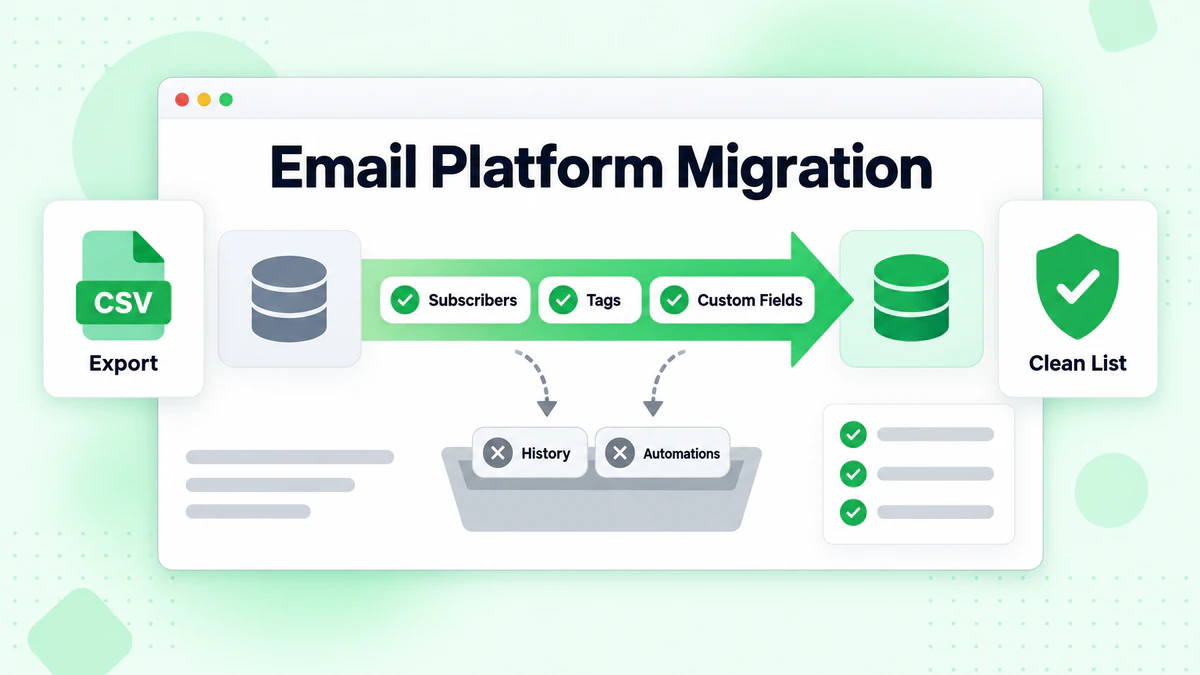
What Transfers:
- Subscriber data (email, name)
- Tags can be mapped
- Custom fields
What Doesn't Transfer:
- Engagement history
- Template designs
- Automation logic
ConvertKit Offers: Free concierge migration for Creator Pro subscribers.
Moving to Mailchimp
What Transfers:
- Subscriber data
- Basic subscriber info
What Doesn't Transfer:
- Engagement history
- Automations
- Templates
Best Practices for Both
Maintain List Quality
Regardless of platform, email verification is essential:
- Verify emails at signup
- Clean imported lists with bulk verification
- Remove bounced addresses promptly
BillionVerify integrates with both platforms.
Authentication
Both platforms support and require:
Follow each platform's authentication guides.
Segmentation
ConvertKit: Use tags liberally. Create tags for interests, lead magnets, purchases, and engagement levels.
Mailchimp: Use a combination of lists (for truly separate audiences) and tags (for interests within audiences).
Making Your Decision
Decision Framework
Content Type:
- Personal newsletters, courses → ConvertKit
- Branded, designed campaigns → Mailchimp
Business Type:
- Creator, author, educator → ConvertKit
- Retail, local business → Mailchimp
Product Type:
- Digital products → ConvertKit
- Physical products → Mailchimp
Technical Comfort:
- Want simplicity → ConvertKit
- Want options → Mailchimp
Try Before Deciding
Both offer free plans. Test each with your actual content:
- Import a small segment
- Build a campaign
- Create basic automation
- Evaluate the experience
The Right Answer
There's no universally "better" platform. ConvertKit excels for creators wanting focused, simple email tools. Mailchimp excels for small businesses wanting broad marketing capabilities.
Many successful businesses use each. Your choice should match your specific needs, not general popularity.
Conclusion
ConvertKit and Mailchimp serve different primary audiences. ConvertKit is purpose-built for creators prioritizing simplicity, deliverability, and text-focused communication. Mailchimp serves broader small business needs with more design options, integrations, and marketing features.
Key Takeaways:
Purpose Matters: ConvertKit = creators. Mailchimp = small businesses.
Simplicity vs. Options: ConvertKit is more focused; Mailchimp has more features.
Pricing Differences: ConvertKit charges for active subscribers only; Mailchimp includes all contacts.
Deliverability: ConvertKit has slight edge due to focused sender base.
Try Both: Use free tiers to test before committing.
List Quality: Both benefit from email verification to maintain deliverability.
Whatever you choose, maintain clean subscriber lists with BillionVerify's email verification to maximize performance on either platform.
For more comparisons, see: