


A bulk email address list can lose 16.9% of its messages before they reach the intended destination, even when recipients gave permission. The practical answer is to verify every address technically, confirm that your team can document lawful collection, and re-verify the list continuously instead of cleaning it once.
That finding comes from a 2026 cross-platform test of 15 email service providers, where average deliverability reached only 83.1%. The remaining messages either landed in spam or disappeared as undelivered, so list size alone says very little about campaign quality. A reliable workflow treats verification as an operating control, not as a last-minute spreadsheet task.
A useful way to think about the problem is to separate two questions. Technical verification asks whether an address appears able to receive mail. Compliance verification asks whether you can prove you collected and processed that address appropriately. BillionVerify fits into the first operational layer by helping teams identify risky or unusable email data before campaigns run, while your CRM and consent records must support the second.
Why Bulk Email Lists Fail Without Verification
In the 2026 test, average deliverability was 83.1%, which means 16.9% of messages never reached their intended destination. Of that undelivered share, 10.5% landed in spam and 6.4% disappeared as undelivered, according to the cross-platform deliverability test. Even permission-based mail can fail when the underlying bulk email address list contains stale, malformed, risky, or poorly maintained records.
The geography is also meaningful. Average deliverability reached 91.1% in Europe, 88.0% in Latin America, 87.9% in Asia Pacific, and 86.7% in North America, showing that mailbox ecosystems and list quality can produce materially different outcomes by region. A campaign that performs acceptably in one market can still expose problems in another.
The hidden cost of an unverified list
Old spreadsheets collect addresses that have changed owners, expired, or stopped accepting mail. Imports also bring in duplicates, formatting errors, shared inboxes, disposable domains, and catch-all domains. Each category creates a different operational risk, but the common result is that your sending platform receives weaker delivery signals.
A team might see a large send complete successfully and assume the list worked. That conclusion confuses accepted by the sending system with delivered to a useful recipient. Inbox placement, bounce handling, spam complaints, and engagement determine whether the list remains usable.
Operational rule: Treat every bulk list as temporary data. Its status changes as mailboxes close, people change jobs, and providers update their filtering decisions.
Cleaning also supports the broader discipline of building email lists that drive revenue. Acquisition and verification belong together because a growing list creates value only when its records remain reachable, permissioned, and appropriate for the campaign.
Before a cold campaign or high-volume send, teams should review bounce rate insights for cold outreach. The point isn't to chase a perfect number. It's to identify avoidable failures before they create a pattern that damages future inbox placement.
How Email Verification Actually Works
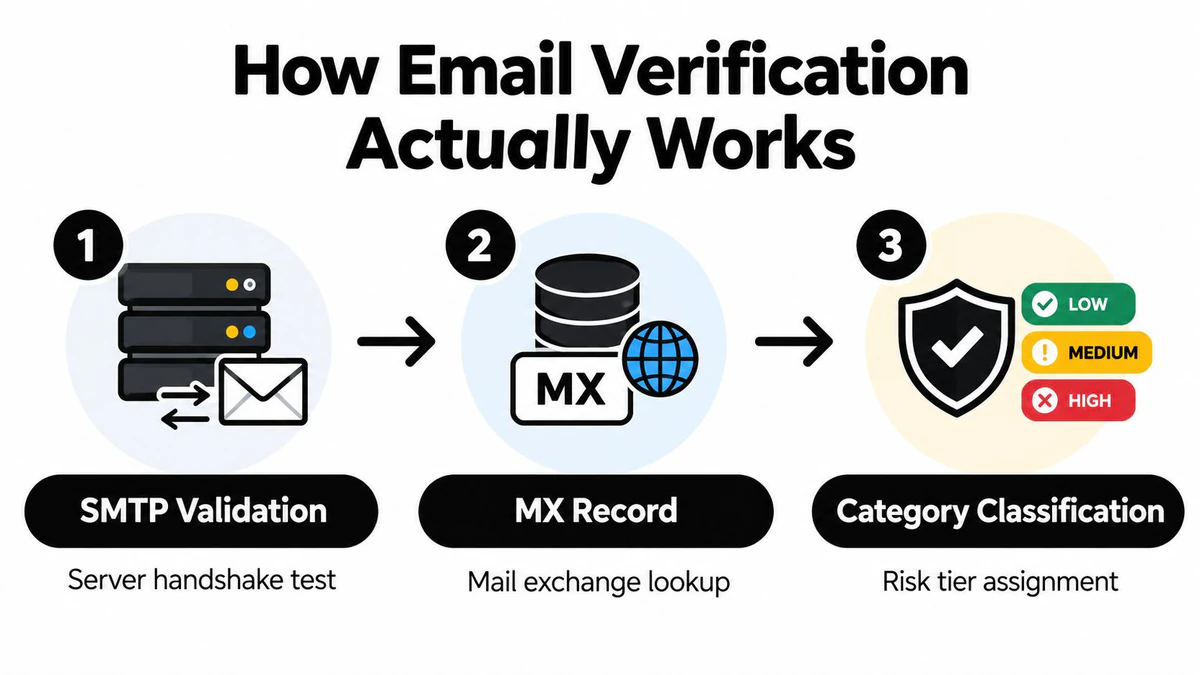
Verification tools don't all mean the same thing by “valid.” A useful result comes from several checks that answer different questions. SMTP validation tests the receiving server, MX lookup checks whether the domain has mail infrastructure, and category classification identifies structural risks that a simple server response can't explain.
First, inspect the mailbox response
SMTP validation connects to the recipient's mail server and performs a controlled handshake. It doesn't send the campaign message. Instead, the server may indicate that the mailbox appears accepted, rejected, or uncertain.
An accepted response is useful, but it isn't a guarantee. Mail systems can accept a message and filter it later, or change their policy between verification and sending. Treat the result as a risk signal, not as a promise of inbox placement.
Next, confirm the domain can receive mail
An MX lookup checks whether the domain publishes valid mail exchange records. If the domain has no usable MX record, it can't receive email, so the address is undeliverable regardless of the local mailbox name. Verification guidance commonly combines SMTP responses and MX records for this reason, as described in the email verification documentation.
This check catches a failure that mailbox testing alone may miss. A correctly formatted address at a domain with no receiving mail service still has no practical delivery path.
Finally, classify structural risk
A strong verifier also labels disposable domains, role-based addresses, and catch-all configurations. Catch-all servers are especially difficult because they may accept mail for almost any address, even when the individual mailbox doesn't exist. That uncertainty creates post-send bounce and sender-reputation risk.
BillionVerify is a professional email verification service built to solve one problem, bad email data costs businesses money. Teams can also connect verification to an Email Validation API when they need checks inside an application or data workflow.
The output should lead to a decision, not just a label. A “safe” result can enter a campaign, an uncertain result can receive review or suppression, and a clearly invalid result should leave the active sending pool.
From Cleaning to Segmentation for Campaign Performance
Verification removes obvious problems, but it doesn't make every remaining address equally valuable. A clean bulk email address list still contains recipients with different levels of risk, relevance, and likely engagement. Segmentation turns verification results into sending decisions.
Consider an address such as info@company.example or sales@company.example. Role-based accounts are shared inboxes, not individual decision-makers, and deliverability guidance treats addresses such as admin@, support@, info@, and sales@ as higher-risk recipients. They can be harder to personalize and more likely to produce filtering, soft bounces, or weak engagement, as outlined in this role-account deliverability guidance.
Disposable addresses need a separate treatment. They exist temporarily by design and are associated with very low opens and clicks, along with higher bounce and spam-trap exposure. A technically accepted disposable address can still undermine the usefulness of campaign reporting.
Use verification results as routing rules
A practical segmentation model might look like this:
| Segment | Typical action | Reason |
|---|---|---|
| High-confidence personal addresses | Use the normal campaign or sequence | The address passes core checks and doesn't show a major structural risk |
| Role-based addresses | Review or send a targeted message | A shared inbox may still be relevant, but it needs different expectations |
| Catch-all addresses | Hold for confirmation or cautious testing | The server response doesn't prove that the named mailbox exists |
| Disposable addresses | Suppress from standard campaigns | Temporary domains create poor engagement and added reputation risk |
| Invalid addresses | Remove from active sends | Continuing to send creates avoidable failures |
Don't apply one rule to every flagged record. A support inbox could be appropriate for a customer-service announcement, while it may be a poor target for a personalized sales sequence. The right decision depends on the purpose of the message, the relationship with the recipient, and the evidence stored in your CRM.
Segmentation principle: Verification tells you what an address looks like. Campaign context tells you what to do with it.
Teams that want to connect technical filtering with personalization can browse BillionVerify's guide. The important operational change is to preserve the category in your database rather than deleting every flagged record without explanation. Suppression, review, and targeted use are different decisions.
Why Continuous Re-Verification Replaces One-Time Cleaning
A list verified once is a snapshot, not a permanent asset. B2B data can decay by about 22% to 30% per year, according to current email-list guidance. People change employers, domains expire, providers close accounts, and company records become outdated.
The same source of verified data shows that a bulk list left unchecked for 12 months can contain 12% to 18% no-longer-deliverable addresses. That makes verification recency a direct operational concern. The older the list, the less confidently you can predict its bounce behavior.
Why the calendar changed
Gmail and Yahoo introduced stricter bulk-sender requirements in February 2024, including authentication and compliance expectations. Later reporting found that roughly 30% of senders remained partially non-compliant on at least one requirement two years after those rules began, while nearly 60.3% of businesses identified spam filtering as their top inbox barrier, according to Mailgun's deliverability reporting.
The operational lesson is straightforward. Mailbox providers increasingly judge senders by outcomes and behavior, not by the number of contacts in a database. List hygiene, authentication, complaint monitoring, and consent records now work as one system.
A 2026 survey found that 60% of senders regularly conduct list hygiene, but only 23.6% verify before every campaign. The same reporting says 48% struggle to stay out of spam. Those figures describe a gap between knowing that cleaning matters and making it part of every campaign process.
Build a recurring control
Re-verify new imports before they enter an active segment. Recheck older records before major sends, and create a review path for contacts that have shown no activity. Sunset policies for 6 to 12 months of inactivity are becoming standard, but suppression doesn't always mean immediate deletion. Preserve the reason and date so your team can restore a contact only when new, legitimate evidence supports it.
Use improve deliverability before sequences as a workflow checkpoint rather than waiting for a bounce spike. Continuous verification is less dramatic than emergency cleanup, but it gives marketing and sales teams a repeatable way to protect the sender reputation they already built.
Compliance Verification Beyond Technical Deliverability
A server can accept an address that your organization still shouldn't email. Deliverability answers whether mail may reach a mailbox. Compliance asks whether you have a lawful and documented basis for sending it. Treating those as the same question is one of the most damaging mistakes in bulk list management.
A technically valid address may come from an old event file, a purchased database, a scraped source, or an import with no consent history. The address can pass SMTP checks and still be pre-consent or GDPR-risky if your team can't show when and how the person opted in.
Keep evidence with the contact
Classify records by consent timing, collection source, purpose, and opt-in evidence. Store the timestamp and source attribution where your marketing and compliance teams can retrieve them. If those fields are missing, don't fill the gap with assumptions. Move the record into review or suppression until your legal basis is clear.
Recent privacy guidance also connects verification practices with privacy-policy disclosure, data minimization, retention, and processor obligations under GDPR. Verification can involve processing personal data, so your documentation should explain what happens to the address, why the check is necessary, how long results remain available, and which service providers process the data. The relevant compliance discussion is covered in this consent and list-audit guidance.
Technical verification and consent validation should therefore produce separate fields. One might say mailbox_status = deliverable, while another records consent_status = documented or consent_status = unknown. Combining them into a single “valid” label hides the exact risk your team needs to manage.
A useful internal test is simple: Could another person audit this record and understand why it was collected, why this message is permitted, and when the decision was last reviewed? If not, the address isn't operationally ready, even if the mail server accepts it.
Compliance isn't a substitute for verification, and verification isn't a substitute for permission. Both controls must pass before a record enters an active campaign.
Building a Practical Bulk List Verification Workflow
A workable process should be easy to repeat before every major campaign. It should also leave an audit trail, so your team knows why an address was included, suppressed, or held for review.
Start with a controlled source file
Export the current list from the CRM or marketing platform, then preserve the original export separately. Work from a copy that records the verification date, campaign purpose, consent source, and previous suppression status. This prevents an old spreadsheet from reactivating addresses your team already removed.
Normalize obvious formatting problems and duplicates before verification. Then run layered checks that cover SMTP responses, MX records, disposable domains, role accounts, and catch-all behavior. A single status field isn't enough when different risks require different actions.
Turn results into operating groups
Use a small number of explicit statuses:
- Verified and permissioned: The address passes the technical checks and has usable consent evidence. Keep it eligible for the appropriate campaign.
- Technically uncertain or structurally risky: This includes catch-all and selected role-based records. Hold, review, or use a more cautious campaign based on business context.
- Disposable or invalid: Suppress these records from normal sends and retain the reason for the decision.
- Consent unresolved: Don't mail until the source, timing, and lawful basis are documented.
The categories matter because teams often make the same mistake in reverse. They remove technically risky records but continue mailing addresses with no documented permission. A good workflow protects both sender reputation and the people in the database.
Schedule the next control before sending
Re-verify fresh imports and run a new check immediately before major sends. Suppress contacts inactive for 6 to 12 months when your policy calls for it, while keeping a documented retention decision. After the campaign, classify bounces and update the contact record instead of storing the result only in a report.
Customer stories report bounce rates dropping below 1% and improved inbox placement after continuous verification workflows, with measurable ROI from cleaner data and higher conversion rates across B2B and e-commerce campaigns. These reports don't make verification a guarantee of delivery, but they show why teams connect list quality to campaign economics.
For a broader comparison of available approaches, review the BillionVerify top tools. The specific provider matters less than whether your process checks the right signals, preserves consent evidence, and feeds every decision back into the system that sends your mail.
BillionVerify provides professional email verification for identifying bad email data before it costs your team through bounces, wasted sends, and poor list decisions. Use BillionVerify to evaluate your bulk email address list, separate usable records from risky categories, and build re-verification into your campaign workflow.