


A 2025 deliverability benchmark found that only 84.8% of messages reached the inbox, while 6.1% landed in spam and 9.1% went missing entirely. Mailgun's deliverability benchmark makes the uncomfortable point clear: learning how to cold email isn't mainly a copywriting exercise. You can write a sharp subject line and still lose a meaningful share of your campaign before a prospect sees it.
The practical order is different. Clean the data, authenticate the sending setup, protect sender reputation, then write a concise message and measure replies. BillionVerify fits into the first layer by helping teams check whether addresses are usable before they become a deliverability problem.
Why Most Cold Emails Never Reach the Inbox
Cold email performance starts before the first sentence. Inbox placement, list quality, authentication, mailbox reputation, and sending behavior determine whether your message gets a fair chance. Copy matters after those conditions are in place.
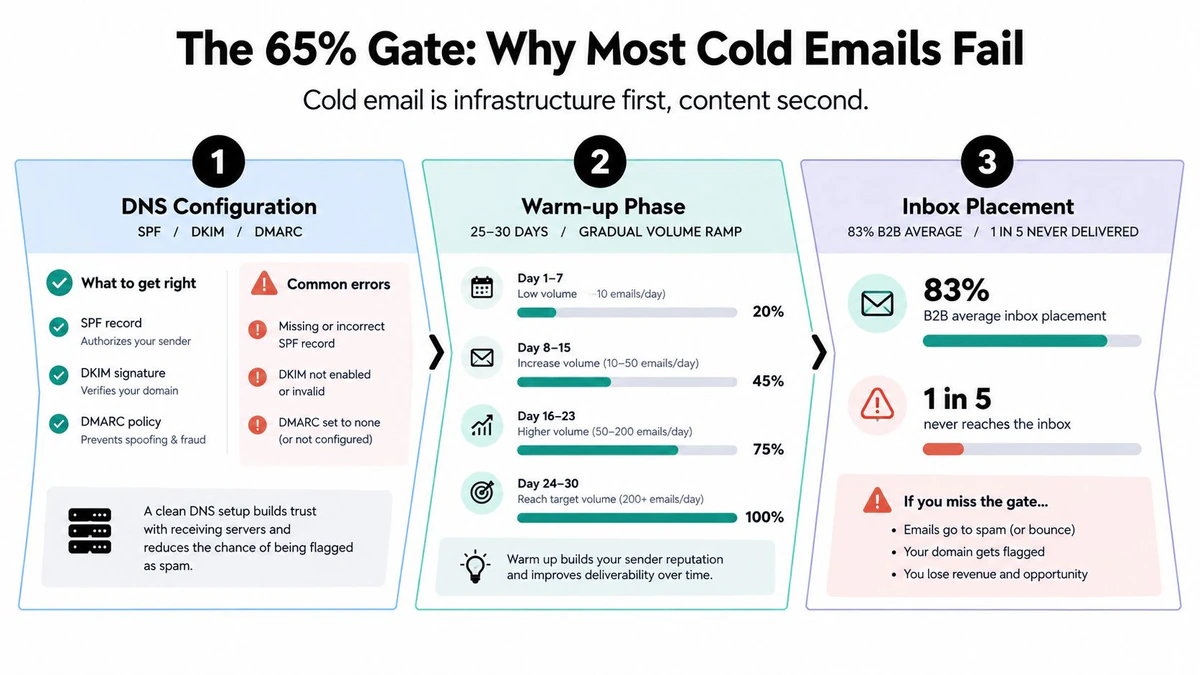
A 2026 benchmark reports 83.1% average inbox placement across tested providers, while another reports 87% for warmed domains compared with 12% for unwarmed domains. Instantly's cold email benchmark report shows why a weak sending foundation can overwhelm even relevant messaging.
Build the stack in the right order
Treat a campaign as a connected system:
- Verified list: Remove invalid, disposable, role-based, and risky addresses before sending.
- Authenticated domain: Configure SPF, DKIM, and DMARC, then check that the From domain aligns with the signing domain.
- Warmed mailboxes: Establish consistent sending behavior before adding campaign volume.
- Measured cadence: Send in controlled sequences instead of blasting a large untested audience.
- Reply tracking: Optimize positive replies, bounces, complaints, and meetings, not just opens.
The order matters because each layer protects the next. A large list with bad addresses creates bounces. A clean list sent from an unauthenticated domain can still lose inbox placement. A technically sound setup paired with generic targeting will produce low engagement and eventually weaken reputation.
Practical rule: Don't optimize copy until you know the message is reaching the inbox and the recipient belongs in the audience.
Before email one, confirm that the list has passed verification, the domain records pass authentication checks, the sending mailboxes have a controlled history, the campaign has a low-risk test segment, and the suppression process is ready. A BillionVerify inbox placement check can add another diagnostic step before you scale, but it shouldn't replace list verification or domain authentication.
Building a List That Will Actually Convert
The most high-impact cold email decision is who gets included. A smaller audience with a shared problem gives you room to write a relevant opening, choose a useful offer, and interpret replies correctly. A broad list forces one generic message onto people with different roles, priorities, and buying conditions.
Choose sources for fit, not volume
Different data sources serve different jobs. LinkedIn Sales Navigator is useful when role, seniority, company growth, and recent activity matter. Apollo can support structured prospecting and enrichment. ZoomInfo is often used when firmographic depth and organizational data are important. Intent providers such as Bombora can add timing signals, but intent should narrow a market rather than replace qualification.
| Channel | Match Rate | Cost / Record | Best For |
|---|---|---|---|
| LinkedIn Sales Navigator | Depends on manual qualification | Depends on plan and workflow | Role, seniority, company activity |
| Apollo | Depends on filters and data freshness | Depends on plan and export terms | Structured prospecting and enrichment |
| ZoomInfo | Depends on market and record coverage | Depends on contract and usage | Firmographic and organizational depth |
| Bombora and similar intent providers | Depends on topic signals and account fit | Depends on provider and access | Timing and account prioritization |
Don't treat any source as a guarantee that an address is deliverable. Source data identifies a possible prospect. Verification determines whether the address should enter the sending queue.
For a practical workflow, start with role and company criteria, then narrow by industry, size, geography, and buying stage. A finance leader at a growing SaaS company may care about a different outcome than a revenue operations manager at an established enterprise, even if both use the same software category.
Work from an explicit ICP
Suppose a raw export contains 5,000 contacts. The useful job isn't sending to all of them. Review the records against your ideal customer profile, retain the 1,200 contacts that fit, and export the first name, company, role, and one credible personalization hook for each. Those details give you enough context to create segments without pretending every prospect needs a bespoke essay.
Good personalization identifies a business reason to care. A recent hiring push, a new market, a funding announcement, a product launch, or a visible operational change can support an opening line. Personalization that only inserts a company name is decoration.
Use a documented workflow for how to build your mailing list, then pass the export to verification. Keep the source, segment, and collection date with the records so you can investigate performance later. List quality is not a one-time cleanup task. It becomes part of campaign operations whenever contacts are added, enriched, or reactivated.
Why Verification Beats a Bigger List Every Time
Verification is a risk filter, not a cosmetic cleanup step. A domain can have valid routing while individual mailboxes remain inactive, mistyped, or configured to reject delivery. DNS and MX checks confirm that a domain can receive mail, but they cannot establish that a particular address exists or that its server will accept it.
Catch-all domains require deeper testing. True catch-all detection uses a live SMTP handshake and a test message to a known invalid address. Mailtester's explanation of catch-all detection separates that process from an MX-only check, which confirms routing without confirming mailbox behavior.
A practical verifier should answer these questions in sequence:
- Syntax: Is the address structurally valid?
- MX: Does the domain publish mail-exchange records?
- Accept role: Does the server appear configured to receive mail?
- SMTP handshake: Does the receiving server respond to verification?
- SMTP RCPT TO: Does the server accept the specific mailbox during the handshake?
The last check offers the strongest signal available without sending a normal campaign message. It remains a signal, not a permanent guarantee. Mailboxes change, providers defer decisions, and catch-all systems intentionally hide whether an address is accepted.
The difference between domain checks and mailbox checks is material. An independent 2026 study found 12.3% of verified addresses were invalid, 33.1% of verification attempts reached catch-all domains, and only 0.3% failed at the DNS level because of missing MX records. BounceZero's verification benchmarks illustrate why routing data alone can leave outbound teams exposed.
| Verification Type | Invalid Caught | Catch-All Flagged | Role Addresses Caught |
|---|---|---|---|
| Free MX or basic verifier | Some syntax and routing failures | Limited or uncertain | Limited, depending on rules |
| SMTP-level verifier | Invalid addresses confirmed through mailbox checks | Catch-all behavior identified through SMTP signals | Role addresses identified when classification is supported |
Results vary by verifier and source data, so avoid claiming a precise recovery rate from a theoretical 10,000-contact file. The defensible takeaway is straightforward: free MX checks can allow risky records through, while SMTP-level verification gives stronger evidence before delivery.
If 8% of a campaign bounces, as a hypothetical but common failure rate, the cost extends beyond undelivered messages. Sender reputation, future inbox placement, and domain credibility can all suffer. BillionVerify provides email verification, and teams can place its Email Validation API between list collection and campaign delivery as an automated gate.
Setting Up Deliverability Infrastructure Before You Send
SPF, DKIM, and DMARC are baseline requirements for professional sending. Recent 2026 cold email guidance describes them as foundational in a stricter sender environment, alongside one-click unsubscribe for commercial outreach.
Configure the sending identity
SPF tells receiving providers which systems may send for a domain. DKIM adds a cryptographic signature to the message. DMARC tells providers how to handle authentication failures and gives the domain owner reporting visibility.
The important operational detail is alignment. The visible From domain, the domain used for DKIM signing, and the authenticated sending path should make sense together. A pass in one layer doesn't excuse a failure or mismatch in another. Check the records with tools such as MXToolbox, review authentication results in message headers, and use Google Postmaster where domain data is available.
Keep campaign mail separate from the primary corporate domain when the risk profile justifies it. This separation doesn't make poor sending safe, but it can prevent an outbound experiment from directly exposing the main employee and customer communication domain.
Warm behavior before campaign behavior
Warming is controlled reputation building, not a button that makes a domain trustworthy. Start with low volume, maintain consistent activity, and increase gradually only when bounces, complaints, and placement remain healthy. A two-to-three-week ramp can be a reasonable operating window, but the correct pace depends on domain history, mailbox age, audience quality, and provider response.
Tools such as Instantly and Lemwarm can automate parts of warm-up. Seed accounts at Gmail, Outlook, and Yahoo can help you inspect placement before a campaign expands. Look at whether messages reach the intended inbox category, not just whether a platform reports delivery.
Use how to generate a dkim key as one part of the authentication setup, then validate the resulting configuration independently. Keep mailbox behavior human and consistent. Sudden volume changes, repetitive content, high complaint levels, and poor addresses are stronger threats than a missing warm-up dashboard badge.
Writing the Email That Earns the Reply
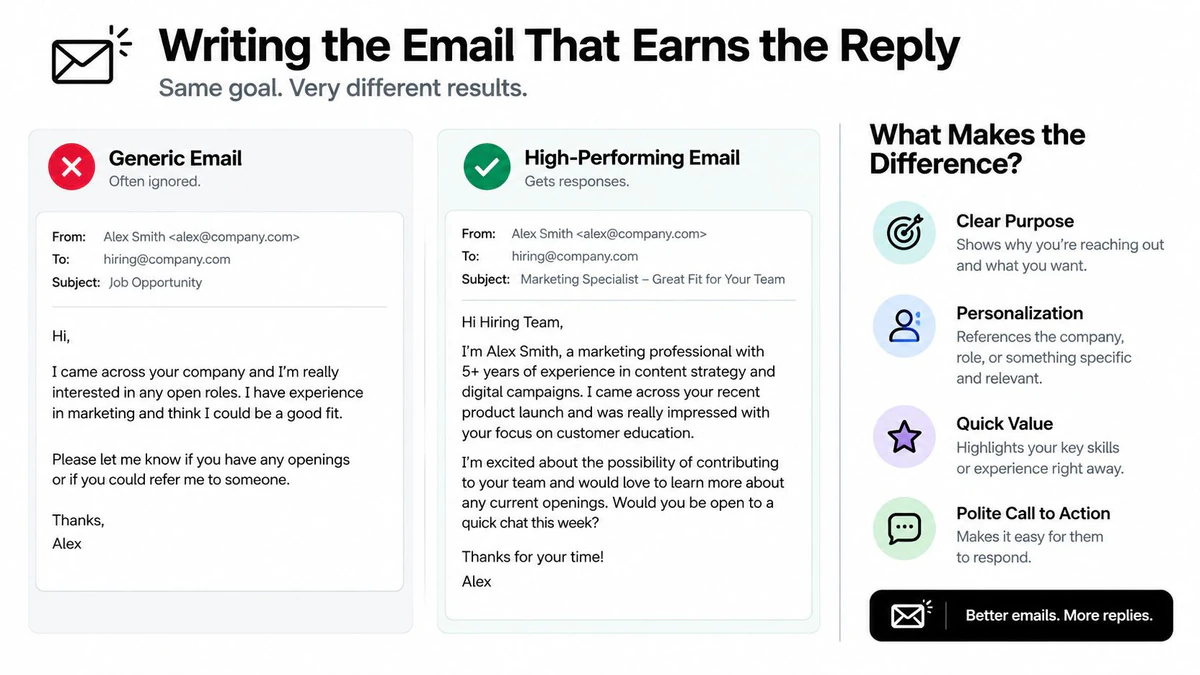
58% of replies came from the first email, according to Kickbox's email deliverability report, while follow-ups generated the remaining 42%. That makes the opening message worth careful testing, but copy cannot rescue an unverified list or weak sender reputation. Once inbox placement is under control, write for fast comprehension and one clear action.
A practical benchmark recommends messages under 80 words with one clear CTA. Amplemarket's cold email benchmarks also identifies poor list quality, weak deliverability setup, and generic personalization as major failure points. Keep the email specific enough to feel relevant without adding details the recipient has to decode.
Subject line: Use 3 to 5 words, lowercase where it feels natural, and a concrete topic rather than theatrical wording. Test patterns such as:
- “question about [specific initiative]”
- “[company] and [relevant problem]”
- “idea for [team or workflow]”
Opening line: Start with an observation tied to the recipient's role or company. A funding announcement, hiring push, product launch, or public operational change gives the message a reason to exist. Empty praise does not.
Body: Write one short paragraph, usually 60 to 70 words, linking a likely problem to a concrete outcome. Mention only the detail needed to establish relevance. Listing every feature increases reading effort and weakens the point.
CTA: Ask for one low-commitment action. A short call, a yes-or-no response, or a direct question is easier to answer than an immediate calendar demand.
Use these templates as starting points, then replace every bracket with evidence from the prospect's situation.
Template A
Subject: question about [initiative]
Hi [First Name],
I noticed [specific observation] at [Company]. Teams in this position often run into [specific problem], which can create [business consequence]. We help [role or team] improve [concrete outcome] without [common drawback]. Is [problem] on your roadmap, or should I close the loop?
Best, [Name]
Template B
Subject: [Company] and [problem]
Hi [First Name],
Your recent [trigger event] suggests [relevant business change]. That usually creates pressure around [pain point]. I have a short idea for improving [outcome] based on how similar teams approach it. Would a brief exchange be useful, or is this outside your priorities?
Best, [Name]
For more practical guidance on message construction, see BillionVerify's email copy tips. Personalization should change the reason for contacting this person, not just insert their first name.
Follow-Up Sequences That Pull Replies From Silence
One benchmark found that a single follow-up can lift replies by 65.8% Amplemarket's benchmark analysis, which makes sequencing one of the most practical levers after audience quality.
A five-touch sequence across 14 days gives each message a defined job. Change the schedule when the prospect replies, opts out, or signals a different status.
| Day | Touch # | Angle | Goal | Reply Share |
|---|---|---|---|---|
| 0 | 1 | Core problem and relevance | Earn the first response | 58% from email one, according to the Kickbox benchmark cited in the previous section |
| 3 | 2 | New value point | Add a reason to reconsider | 42% from follow-ups, according to the same benchmark |
| 7 | 3 | Proof asset or case study | Reduce perceived risk | Qualitative |
| 10 | 4 | Close-the-loop question | Make inaction easy to resolve | Qualitative |
| 14 | 5 | Final useful touch | End respectfully | Qualitative |
Each follow-up needs a different decision reason. On day three, add a practical observation, short resource, or alternative use case. On day seven, offer proof that matches the prospect's situation. On day ten, check whether the topic belongs with someone else. The final message should preserve the relationship rather than manufacture urgency.
Keep trigger branches simple:
- Opened but didn't reply: Change the angle and remove unnecessary explanation.
- Clicked a link: Address the asset's topic directly, without treating the click as buying intent.
- Out of office: Respect the return date, then send one relevant follow-up instead of restarting the sequence.
Use these as working drafts, then replace the brackets with evidence from the prospect's situation.
Follow-up A
Hi [First Name],
One additional thought on [problem]. If [specific outcome] is a priority this quarter, I can send the short outline I mentioned. Should I send it?
Follow-up B
Hi [First Name],
I may be reaching the wrong person. Is [topic] handled by you, or should I close the loop?
Stop when the prospect opts out, replies negatively, identifies a wrong contact, or shows no meaningful engagement after the final planned touch. Do not recycle the same address into future sequences without a new reason and a fresh permission assessment.
Tracking What Matters and Staying Compliant
Open rates are increasingly noisy because Apple Mail Privacy Protection can inflate them. Expandi's cold email KPI guidance recommends prioritizing inbox placement, bounce rate, and reply rate instead of treating opens as a dependable success signal.
Track positive replies per 1,000 sends, segmented by domain, persona, source, and sequence step. Add meetings booked, because replies can be curious, negative, automated, or unrelated to revenue. A campaign that produces opens without conversations is not performing well.
Monitor bounces and complaints as operational alarms. A 2026 deliverability summary notes that 0.1% spam complaints equals one complaint per 1,000 emails, which shows how little room a sender has for careless targeting. Mailgun's deliverability takeaways also connects verification, bounce control, and complaint minimization with sender reputation.
Run a compliance checklist
Before launch, confirm:
- Source records: Document where each segment came from and why it belongs in the audience.
- Consent assessment: Record consent where the applicable law or sending context requires it.
- Sender identity: Use accurate headers, subject lines, sender identification, and a valid physical mailing address.
- Unsubscribe path: Include a one-click unsubscribe mechanism for commercial outreach where required.
- Suppression control: Remove opt-outs from every future sequence and connected system.
- Audit routine: Review authentication, bounces, complaints, and inbox placement on a recurring basis.
Don't assume one jurisdiction's rules cover every recipient. CAN-SPAM, GDPR, CASL, and major mailbox-provider requirements can impose different obligations depending on the sender, recipient, message, and location. Consult qualified legal guidance for your specific program, then build compliance into the workflow rather than treating it as a final copy check.
A cold email system works when every layer reinforces the next. Verify the address, authenticate the sender, warm the infrastructure, segment the audience, write a short message, follow up with a new angle, and optimize for replies that lead to legitimate conversations.
BillionVerify helps teams verify email data before cold campaigns, using verification to reduce the risk created by invalid or uncertain addresses. Visit BillionVerify to evaluate its verification workflow for list cleaning and outbound operations before your next send.