



A 1.71% bounce rate sounds healthy until you scale it. In a 2025 cold-email dataset covering 7.5 million emails, that still meant 128,605 bounces and a 98.29% deliverability rate (Belkins deliverability benchmark). That's the mistake many make. They treat bounce rate as a cleanup metric when it's really a reach metric, a reputation metric, and an operating discipline.
If you want bounce rate reduction that holds, stop thinking about it as "clean the list once and move on." The teams that keep bounce rates low build a system. They verify before sending, validate at capture, segment by source, authenticate correctly, warm up inboxes with restraint, and pause the moment thresholds go sideways.
Why Bounce Rate Reduction Matters More Than You Think
A gap from 6.5%+ bounces to about 0.3% is the difference between a sender that keeps fighting preventable failures and one that reaches the inbox with far less waste (Cleverly deliverability statistics). If you run that math yourself, it works out to roughly a 95% relative reduction in failed deliveries from that baseline.
Treat bounce rate as an operating signal, not a cleanup metric.
Every bounce costs you reach. It also adds risk to the rest of your program. Mailbox providers do not judge list quality, authentication, and sending behavior in separate buckets. They judge the sending system as a whole. If your data intake is sloppy, your domain setup is incomplete, or your warm-up pace is careless, bounce rate is often the first metric that shows the strain.
Sender reputation is built by system quality
B2B teams often isolate bounce reduction inside list hygiene. That misses the problem. A high bounce rate usually points to one of four failures: bad source capture, weak verification controls, poor authentication, or volume pushed before the sender has earned trust. Cleaning a CSV helps once. Fixing those four inputs keeps the problem from coming back.
The benchmark guidance is clear on thresholds. Stay under 2% total bounce rate if you want to protect sender reputation. 2% to 5% needs intervention. Above 5% puts the program in a dangerous range (Verified Email benchmark guide).
Practical rule: If bounce rate is over 2%, stop asking whether subject lines or copy need work. Fix the sending system first.
That system includes source-level controls. A webinar list should not be trusted the same way as hand-entered CRM contacts or real-time validated demo requests. It includes infrastructure controls too. A verified address can still bounce if your domain authentication is broken, your subdomain is misconfigured, or your IP and domain reputation are still cold.
Bounce rate is an upstream control point
Low bounce rate makes every downstream metric more believable. Reply rate means more when dead addresses are removed before send. Inbox placement improves when your domain stops generating obvious failure signals. Forecasting gets easier when list quality, authentication, and warm-up are managed with hard thresholds instead of guesswork.
That is why bounce rate reduction belongs in deliverability operations, data governance, and acquisition QA at the same time. If you want the broader framework, the email marketing deliverability Bible covers the full stack. The short version is simpler. Bounce rate shows whether your email program is controlled or leaking at every stage.
Diagnose Your Current Bounce Rate Before You Fix Anything
A bounce rate over 2% is where deliverability stops being a list hygiene issue and starts becoming a sending systems issue. Diagnose the failure pattern before you clean anything, because bad addresses, weak authentication, poor warm-up, and unstable lead sources produce different bounce signatures and require different fixes.
Use a five-step diagnostic workflow
Use the last 90 days of sends. That window is recent enough to reflect your current acquisition and infrastructure setup, but large enough to expose repeat offenders.
Calculate the bounce rate
Pull all sends from the last 90 days and reconcile exported campaign data at the campaign level. Do not rely on a dashboard screenshot or a blended account summary. You need sent volume, total bounces, hard bounces, soft bounces, sending domain, and source tag in one sheet. If you want a fast reference point, use a bounce rate calculation tool.Split hard bounces from soft bounces
Hard bounces usually mean invalid or non-existent mailboxes. Soft bounces point to a different class of problem, such as throttling, temporary server failures, blocked mail, or reputation friction. If soft bounces are concentrated on a new domain or IP, examine authentication and warm-up before you touch the list.Segment by acquisition source
Break results out by form fills, lead magnets, events, CRM imports, purchased or rented data, partner lists, and outbound prospecting vendors. diagnosis happens. A webinar list with low hard bounces and high soft bounces has an infrastructure problem. An old CRM import with high hard bounces has a data decay problem. Treating both the same is how teams keep bouncing above target.Quarantine any risky source
Pause any source that is materially worse than the rest of the program. Do not let one event upload, one enrichment vendor, or one stale CRM segment keep hitting the same sender domain. Quarantine first, investigate second.Re-test after cleanup
Recalculate bounce rate after suppression and source isolation. Then compare by source, domain, and campaign type. If bounce rate stays high after obvious bad records are removed, the bottleneck is usually sender setup, reputation, or volume pacing.
Bounce Rate Diagnostic Thresholds
| Bounce Rate Range | Diagnosis | Required Action |
|---|---|---|
| Under 2% | Healthy | Keep sending, monitor by source |
| 2% to 5% | Needs attention | Clean the list, review source quality, inspect soft bounce causes |
| Above 5% | Dangerous for sender reputation | Quarantine the source, verify before any resend, review infrastructure immediately |
Mailbox providers start applying more scrutiny once bounce rate drifts past 2%, especially when the spike comes from one source, one new sender, or one cold segment.
If a campaign is above 5%, stop trying to optimize copy. You have a sending problem.
What to look for in the diagnostic output
Look for concentration, not averages.
One source usually causes a disproportionate share of the damage. Imported CRM records may be stale. Trade show leads may contain bad handwriting and fake entries. Cold outbound may look acceptable in aggregate but collapse once you split results by list vendor or domain cohort. Blended reporting hides this.
Also check whether soft bounces cluster around new infrastructure. If they do, list cleaning alone will not get you under target. You need to review SPF, DKIM, DMARC alignment, domain age, IP or domain warm-up, and whether you pushed volume too fast into unproven segments.
The goal of diagnosis is simple. Identify whether the primary failure sits in data quality, sender configuration, source mix, or volume control. Then fix the right layer instead of cleaning the whole database and hoping the number drops.
Verify Every Address Before It Hits Your Sender
Pre-send verification is the cleanest form of bounce rate reduction because it removes risk before mailbox providers ever see it. That matters more than any post-send cleanup. Once your infrastructure takes the hit, the damage is already in circulation.
SMTP verification is the core check
A technical guide on email verification puts SMTP verification accuracy around 95% to 98%, compared with 60% to 70% for syntax-only validation (BounceChecker SMTP verification guide). That aligns with real-world practice. Syntax checks are useful, but they only catch malformed strings. They don't tell you whether the mailbox can receive mail.
That's why bulk verification should happen before every campaign, not once per quarter. Export the list, run verification, score the records, and suppress the invalid and risky buckets before they touch your sender.
A straightforward workflow looks like this:
- Export your campaign list: Pull the exact audience you plan to send.
- Run bulk verification: Classify invalid, disposable, role-based, and catch-all results before send time.
- Score by risk tier: Don't treat every non-valid result the same. Risk needs routing.
- Suppress obvious failures: Invalid addresses should never reach your ESP.
- Re-import the cleaned segment: Send only to the records that clear your threshold.
A service like BillionVerify fits this layer because it's a professional email verification service built to solve one problem: bad email data costs businesses money.
Real-time validation stops future decay
Bulk cleaning is necessary. It's not enough. If your forms keep accepting typos, fakes, and disposable inboxes, your list will rot as fast as you clean it. You need validation at the point of entry.
That means API-driven checks on signup forms, lead capture pages, free trial registration, and manual CSV imports. A fast Email Validation API gives product and marketing teams a way to block bad addresses before they become tomorrow's hard bounces.
Field advice: The cheapest bounce is the one you never send.
This also improves your CRM downstream. If you're cleaning leads at capture, sales ops has less junk to deduplicate and fewer fake records to route. That's part of why it helps to look beyond verification alone and see how Cyndra enriches CRM data. Cleaner identity data and cleaner email data reinforce each other.
What to skip
Skip providers that brag about impossible certainty. Once claims go past the realistic 95% to 98% SMTP range already cited above, the marketing usually gets ahead of the method. Also skip one-time annual cleanup as your main process. Lists decay continuously. Your controls need to run continuously too.
Why Layered Verification Beats Single-Method Checks
Single-method validation misses too much. If you rely on one check, you'll either pass bad addresses or suppress good ones. Neither outcome is acceptable when sender reputation is on the line.
A better approach is layered verification. Each method catches a different failure mode, and the overlap is what makes the system reliable.
Verification Methods Compared
| Method | What It Checks | What It Misses | Best Use |
|---|---|---|---|
| Syntax check | Formatting errors in the address string | Whether the mailbox exists or can receive mail | Fast front-end screening |
| MX lookup | Whether the domain is configured to accept mail | Whether the specific mailbox is valid | Early domain-level filtering |
| SMTP verification | Whether the mailbox can likely receive mail | Some edge cases and ambiguous server responses | Core pre-send verification |
| Catch-all handling | Whether the domain accepts mail broadly | Which individual mailbox is truly valid | Risk scoring and routing |
What each layer does well
Syntax validation is your first gate. It removes obvious garbage fast. But it's weak on its own because most bad B2B data looks syntactically correct.
MX lookups tell you whether the domain is set up to receive email. Useful, but still incomplete. A valid mail server doesn't prove the mailbox exists.
SMTP verification is the workhorse. It's the closest thing to a true mailbox-level pre-send check, which is why it belongs at the center of your process.
Catch-all detection is where teams get sloppy. A catch-all domain may accept mail even when individual mailbox validity is uncertain, so it needs explicit routing rules instead of a simple pass or fail decision (Unify GTM verification guide).
Don't turn ambiguity into false confidence
Catch-all results are not clean. They are uncertain. Treat them as a separate risk class. That means stricter send rules, lower-volume testing, or suppression if the acquisition source is already questionable.
A layered stack is also the only sane way to work with scraped, rented, or old imported data. One guide reports that a multi-stage verification workflow can reduce bounce rates by 85% to 92% compared with syntax validation alone, and bring total bounce rate down to about 3.0% from 11.5% in an unverified baseline (How to Verify Emails guide). That doesn't mean every list will perform the same way. It does mean syntax-only checking is nowhere near enough.
If you're comparing vendors or methods, use that as the standard. Don't ask whether a tool validates email. Ask whether it layers checks in a way that helps you find high-accuracy email verification without pretending ambiguity doesn't exist.
Authentication and Reputation as Bounce Rate Levers
A clean list still bounces when your mail stack is misconfigured. Bounce rate reduction is a systems job. Verification lowers bad-address risk, but authentication, domain reputation, and sending infrastructure decide whether valid mail gets accepted, deferred, or blocked.
Postmastery's Q1 2025 benchmark shows how large the gap gets. Fully authenticated domains reached 89% inbox placement, while unauthenticated domains reached 44%. The same benchmark also found that only 13% of senders use inbox placement testing and 70% do not use Google Postmaster Tools (Postmastery benchmark PDF). That combination explains a lot of bounce problems. Teams verify contacts, then send through domains they have not properly authenticated or monitored.
Authentication changes bounce behavior
SPF, DKIM, and DMARC are not admin cleanup tasks. They are acceptance controls.
SPF defines which servers can send for your domain. Keep it under the 10 DNS lookup limit or receivers may fail the check (RFC 7208). DKIM signs the message so the receiver can confirm it was not altered in transit. DMARC ties those signals to domain alignment and policy, which is what mailbox providers use to separate legitimate mail from spoofed or low-trust traffic.
Get specific here. Your visible From domain should align with DKIM and DMARC. Your return-path setup should not drift across tools. If one platform signs with a different domain, fix it before you add more volume. Soft bounces caused by throttling, temporary deferrals, or policy failures often start here, not in the contact record.
Broken authentication corrupts bounce diagnosis. You end up blaming address quality for failures created by your own mail stack.
Roll out DMARC in order
Teams that enforce DMARC too early usually break legitimate mail. Teams that never enforce it leave reputation exposed. The right sequence is simple:
- Start at p=none to collect reports and find every sender using your domain.
- Fix alignment failures across sales engagement tools, CRMs, support platforms, and marketing systems.
- Move to quarantine after legitimate traffic passes consistently.
- Advance to reject only after the domain is under control.
This is not about checking a box. It is about preventing unauthorized traffic, misaligned tools, and broken routing from poisoning domain trust. If your acquisition sources are mixed, this matters even more. Weak source control plus weak authentication is how bounce spikes spread across the whole program.
Reputation needs thresholds and feedback
Reputation is not a vague brand metric. It is operational. If one source segment starts generating higher deferrals or blocks, isolate it fast instead of letting it contaminate your shared domain and IP history.
Monitor domain and IP health every week, and every time you change volume, providers, or source mix. Use infrastructure checks such as the BillionVerify IP reputation tool alongside Google Postmaster Tools and inbox placement testing. If reputation drops after a new import or a sending ramp, treat that as a source-level failure first, not a creative problem.
Good bounce reduction comes from stack control. Verify addresses before send, authenticate every stream correctly, and quarantine risky segments before they drag healthy traffic down with them.
Warm-Up, Segmentation, and the Thresholds That Save You
A clean list still bounces when the send system is sloppy. Bad pacing, mixed source quality, and shared infrastructure turn a small validation miss into a domain-wide problem fast.
Warm up by inbox, not by campaign
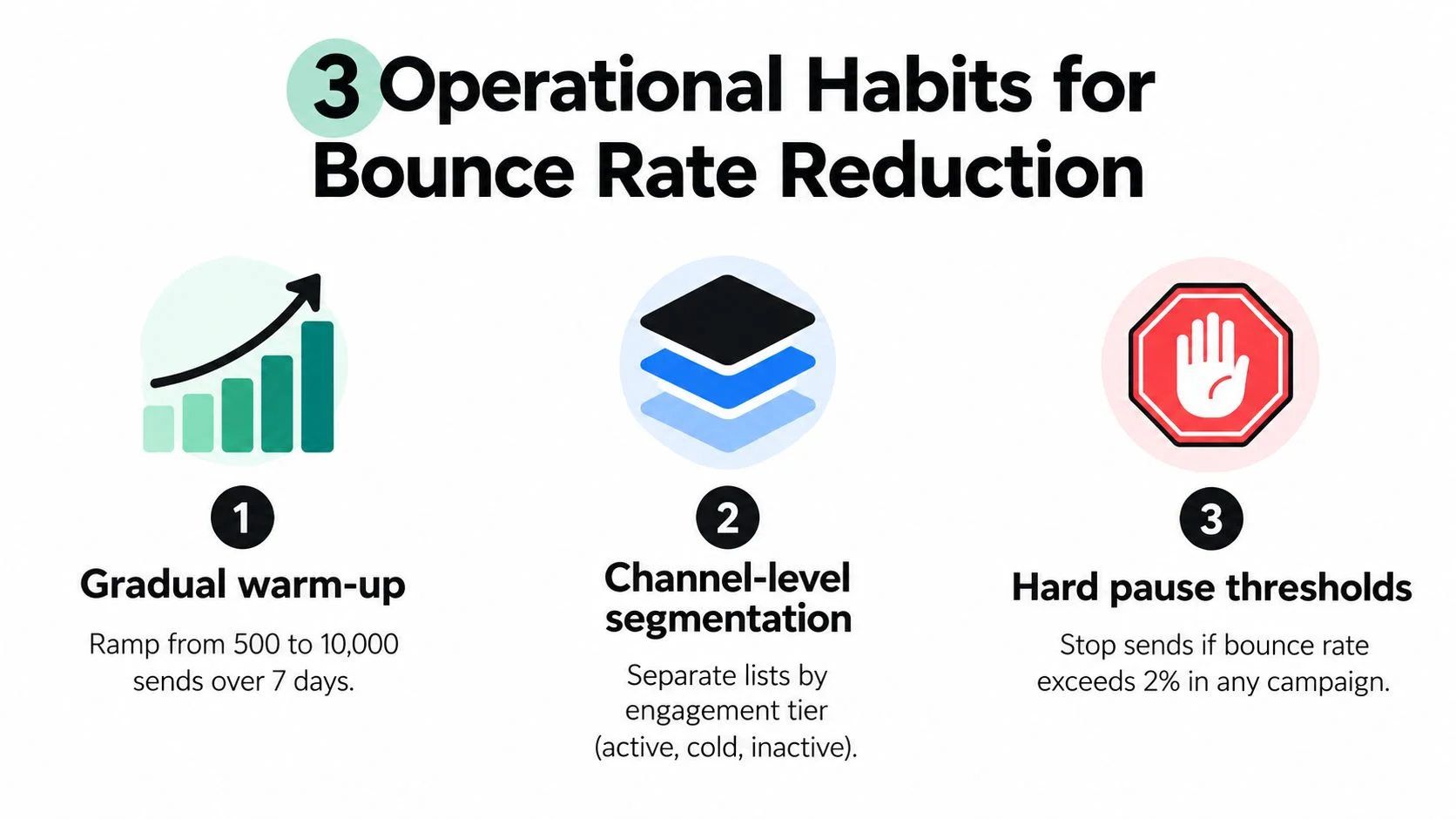
Warm-up fails when teams ramp a campaign target instead of controlling each sender. Set limits at the inbox level. For new or recently idle inboxes, start low, increase only after several stable sends, and cap cold outbound volume before it starts to distort reputation signals.
Use a simple rule. If an inbox or segment shows unstable bounce behavior, cut volume first, then inspect the source, verification path, and routing setup. Do not keep sending while you investigate. That is how one weak stream contaminates healthy traffic.
Segment by source before you send
Source-level segmentation is what keeps bounce reduction from turning into endless cleanup. Demo requests, product signups, partner lists, event scans, outbound prospecting files, and old CRM records should never share the same ramp plan or failure tolerance.
Tag every record at capture and send each source through its own lane:
- High-intent inbound: Standard verification, normal ramp, shared production streams if performance stays stable
- Event and partner imports: Hold in quarantine until verified, then release in controlled batches
- Cold outbound lists: Lower per-inbox limits, tighter suppressions, separate tracking from inbound and lifecycle mail
- Legacy CRM records: Re-verify before reuse and treat as high-risk if age or engagement history is unclear
This is a systems control issue. If one acquisition channel starts failing, isolate that channel. Do not let it borrow trust from healthier traffic.
Use a send-stream matrix, not a generic bounce chart
The earlier diagnostic thresholds tell you when a problem exists. The table below tells operators what to do next by stream, inbox load, and pause time.
| Send Stream | Bounce Signal | Max Daily Volume Per Inbox | Required Action | Minimum Pause |
|---|---|---|---|---|
| High-intent inbound follow-up | Under 2% | Normal planned volume | Continue. Review any isolated hard bounces for capture or routing issues | None |
| Cold outbound on warmed inboxes | Under 2% | Keep under 100 | Continue only if replies, deferrals, and spam complaints stay stable | None |
| Any stream with rising instability | 2% to under 5% | Cut by at least half | Pause the affected segment, check verification coverage, source tag, and mailbox configuration before resuming | 24 to 48 hours |
| Event, partner, or legacy imports | 2% to under 5% | Keep to small test batches only | Quarantine the remaining records and re-verify before any wider release | Until re-verification is complete |
| Any inbox or segment | 5% or higher | Zero | Stop sending from the affected stream. Audit source, authentication alignment, reply handling, and list age before restart | 72 hours minimum, or until root cause is fixed |
These thresholds work because they force operational separation. A bounce spike on a partner import should not slow your inbound hand-raisers. A cold outbound inbox that starts failing should not keep borrowing domain trust from cleaner traffic.
Speed matters here. The right move is usually obvious if you track performance by source, sender, and stream. Pause earlier, isolate faster, and resume only after the specific failure point is fixed.
Build a Monitoring Loop That Stays Under Two Percent
One cleanup won't keep you safe. Bounce rate reduction holds only when it becomes part of your weekly operating rhythm.
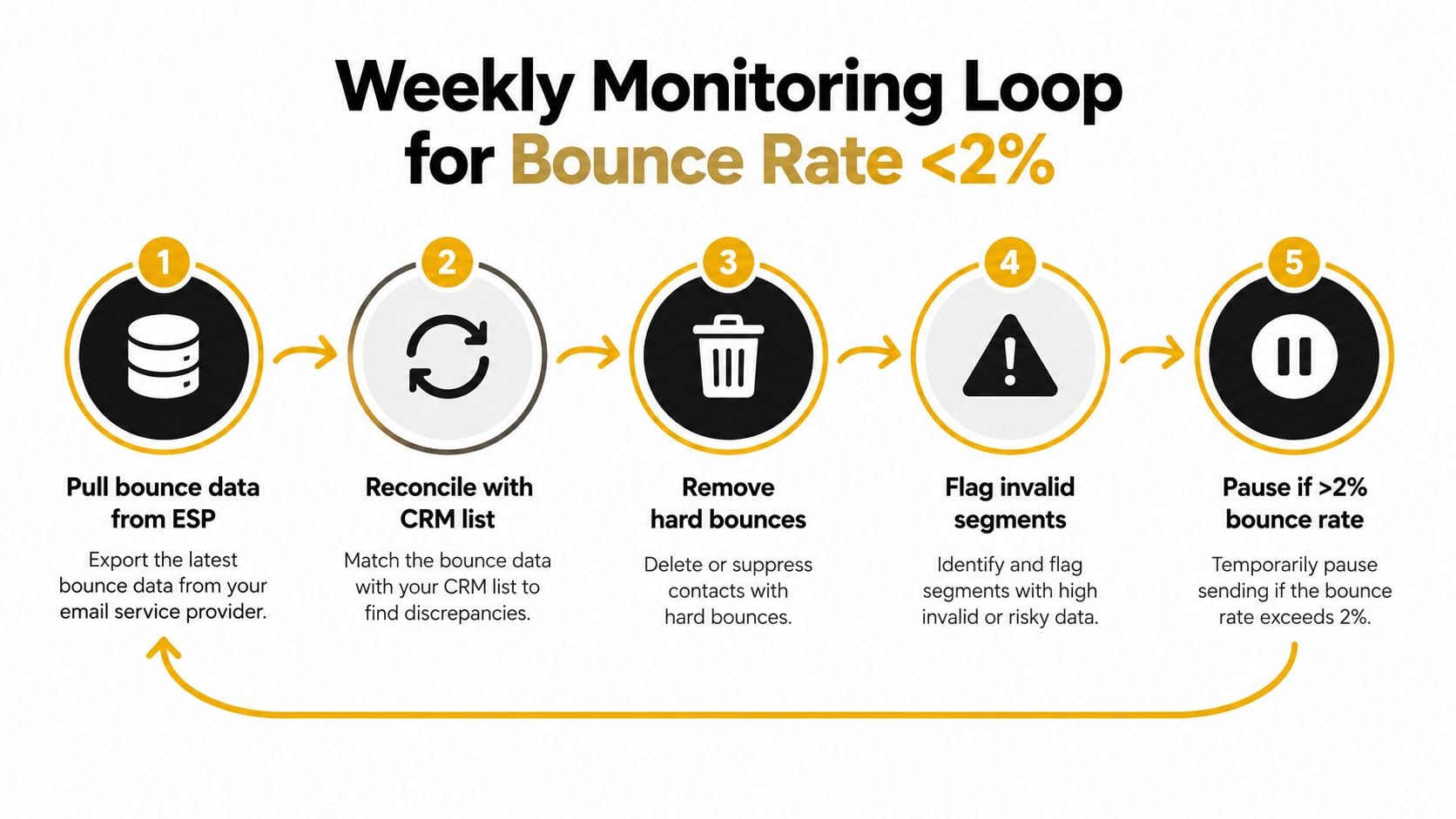
Run a weekly control cycle
Every week, pull bounce data from each sending source and reconcile it against suppression actions. If a segment starts creeping upward, intervene before it breaches your hard ceiling.
Use a simple loop:
- Pull bounce data from every ESP and outbound platform
- Reconcile bounced addresses with CRM and suppression lists
- Remove or quarantine invalid sources
- Check whether new imports were verified before launch
- Throttle or pause any stream showing instability
Put guardrails at the point of entry
Real-time verification belongs on every signup flow and every bulk import path. If new data enters the system unchecked, your weekly cleanup becomes a treadmill. Verification at capture is what keeps the loop from becoming endless rework.
That's also where a dashboard matters. Many teams don't need more metrics. They need the right few metrics displayed clearly by source, trend, and send stream. If you want a practical model, build a KPI dashboard that makes bounce spikes visible early instead of after a monthly review.
Monitor reputation, not just bounce totals
Raw bounce rate can look stable while domain health deteriorates. Watch provider-side reputation signals, especially in Google Postmaster Tools. If reputation drops, reduce volume temporarily and inspect recent list changes, authentication issues, and source mix.
A soft warning line below your hard ceiling also helps. Treat anything approaching the safe-range limit as a signal to inspect before the campaign becomes expensive. The exact value matters less than the discipline of acting early.
Reputation drops rarely come from one bad send alone. They come from teams ignoring weak signals for too long.
Keep suppression rules strict
Suppression discipline is where teams backslide. Once an address hard-bounces, treat it as untrusted. If an address keeps soft-bouncing across multiple sends, don't keep retrying out of hope. Move it out, wait, and re-verify before re-entry.
The goal is simple. Keep your active sendable pool sendable. That means every week you're trimming bad records, checking source quality, validating new entries, and watching reputation feedback together. That's the loop that keeps bounce rate reduction real instead of temporary.
BillionVerify gives teams the core controls this process depends on: bulk list cleaning before campaigns, real-time verification for signup flows, and structured deliverability signals that help separate safe records from risky ones. If you're serious about bounce rate reduction, use it to stop bad addresses before they hit your sender and to keep your list quality from decaying between sends.