



You've just received a reply from an unfamiliar address, found a form submission with no name attached, or inherited a CRM record that says little more than alex@company.com. The obvious question is, who owns this email address? The useful question is narrower: what level of confidence can you establish, and what are you legally allowed to do with that result?
A reliable answer rarely comes from one lookup. It comes from combining public traces, domain clues, technical verification, and careful judgment. This guide separates those methods so you can identify likely ownership without confusing a plausible match with proof.
Why Identifying an Email Owner Is Harder Than It Looks
An email address can look specific while revealing very little. A corporate address may expose a company domain and follow a recognizable naming pattern. A Gmail, Outlook, Proton, or other free mailbox may be an alias, a private account, a burner address, or a masked forwarding address with no meaningful public trail.
That difference determines your starting point. For a work address, the domain can help you infer an organization, identify common username patterns, and compare the address with public professional profiles. For a personal mailbox, the same search may produce no result at all. That absence doesn't prove the address is fake or anonymous. It only tells you that public evidence is limited.
A confidence-based investigation usually combines three evidence layers:
- Public signals: Search results, professional profiles, forum posts, repositories, and older registrations.
- Technical signals: Mail routing, authentication results, domain records, and mailbox behavior.
- Commercial signals: Reverse-lookup databases, enrichment tools, and verification APIs.
The first layer can suggest a person. The second can confirm that an address belongs to a functioning domain or can receive mail. The third can connect records, but it may rely on stale or inferred data. None of these layers should automatically be treated as a definitive ownership registry.
Practical rule: Treat every name returned by a lookup service as a hypothesis until another independent signal supports it.
Email history also matters. A YouGov-based survey summarized by Mailmeteor reported that U.S. adults with email commonly use either one address, 35%, or two, 38%. The survey also found that 37% still use the first email address they ever had as their main account, rising to 45% among adults aged 55 and older. Long-lived addresses have had more time to appear in profiles, registrations, and public records, while brand-new addresses may leave almost no trace.
Before searching for a name, classify the address and define the use case. Investigating a suspicious invoice, cleaning an existing CRM, and preparing cold outreach aren't the same task. In each case, you should validate email authenticity with BillionVerify separately from trying to infer who controls the mailbox.
Free Public Checks You Can Run in Minutes
Start with the address itself, not a people-search database. Put the complete email address in quotation marks in a search engine and review exact matches. Look for an employer page, conference listing, public document, support thread, marketplace profile, or old forum post that uses the same address.
Suppose you have maria@northstarconsulting.com. An exact search might reveal a company bio, a LinkedIn profile, and a speaker page using the same address. Those results reinforce one another because they connect the mailbox to a domain, a role, and a consistent name. A Gmail alias such as maria.projects@gmail.com may return nothing, even if the person uses it every day.
Read signals by strength
A result isn't useful merely because it contains the address. Check whether the identity, organization, and context agree.
- Strong signal: A public company profile or professional page displays the exact address and the same person's name.
- Moderate signal: A forum account, GitHub profile, or social handle uses the address but provides limited identity context.
- Weak signal: A scraped directory lists a name without showing how the address was connected.
- Negative signal: No exact result appears. This lowers confidence, but it doesn't establish that the address is invalid.
Search LinkedIn, X, and Facebook individually because indexing differs across platforms. Then check GitHub, industry forums, and relevant community sites. A developer address may appear in commit metadata or issue discussions, while a consultant's address may surface in a public event listing rather than a social profile.
Add lightweight identity clues
Gravatar can sometimes associate an email-derived MD5 profile image with a public account. Treat that as supporting evidence, not identification. A profile photo may be old, reused, or attached to an address that the current owner no longer controls.
WHOIS can also provide useful context for a corporate domain, particularly when registration details are public. Privacy services often hide registrant information, and the domain registrant may be a company, agency, or administrator rather than the person using the mailbox.
BillionVerify is a professional email verification service built to solve one problem: bad email data costs businesses money. For a basic technical check, use its free email validation tool, then keep the result separate from any identity conclusion.
Older addresses generally offer more public evidence because they've been reused across profiles and registrations for longer. Fresh leads, aliases, and privacy-focused addresses often produce little, so a blank search result should lower your confidence rather than tempt you to fill the gap with an assumption.
Technical Signals From Headers, DNS, and MX Records
Technical evidence can tell you how an email moved through the mail system, which services handle a domain, and whether the address appears deliverable. It usually can't tell you the legal or personal identity of the person sitting behind the mailbox.
Start with the full message header. In Gmail, open the message's detailed options and choose the option to show the original message. Outlook provides a similar full-header view through message properties. Paste the header into an email header analyzer tool and inspect the chain rather than focusing on a single line.
What to inspect
Received lines show the servers that handled the message and the sequence in which they handled it. The earliest trustworthy entry can help identify the sending infrastructure, but forwarded messages, privacy relays, and intermediary services can obscure the original source.
Return-Path identifies the envelope sender used for delivery handling. It may differ from the visible From address, so it doesn't automatically identify the person who wrote or controls the message. Authentication-Results can show outcomes for SPF, DKIM, and DMARC, which are useful for assessing whether the message passed domain-level authentication.
An authenticated message still doesn't prove that a named individual owns the address. It shows that a server or domain passed a particular authentication check. A compromised account can send authenticated mail, and an authorized employee can send mail from a shared mailbox.
Use domain records as context
MX records identify the mail servers responsible for receiving mail for a domain. They can tell you whether a company uses Google Workspace, Microsoft 365, a security gateway, or another provider. That helps confirm that the domain is configured for email, but it doesn't identify the mailbox user.
WHOIS may expose a registrant contact when privacy protection isn't enabled. Even then, interpret it carefully. The registrant might be a holding company, domain broker, web agency, or technical contact. Personal email addresses rarely provide the same useful domain context as corporate addresses.
| Signal | What it confirms | What it does not confirm |
|---|---|---|
Received lines | The servers and routing path visible in the message | The sender's personal identity |
Return-Path | The envelope sender used for delivery | That the visible sender owns the mailbox |
Authentication-Results | Domain-level authentication outcomes | That a specific person authored the message |
| MX records | The service receiving mail for a domain | Which user controls an address |
| WHOIS data | Possible domain registration contacts | That the registrant is the mailbox owner |
Use technical signals to support a public or commercial match. Don't turn a hosting provider, sending IP, or authentication pass into an ownership claim.
Reverse Lookup Tools, People Search Engines, and Verification APIs
These tools answer different questions, and treating them as interchangeable creates bad data. A reverse email lookup tries to attach a name, employer, location, or profile to an address. A people-search engine starts with an identity or contact record and may connect it to addresses. A verification API focuses on whether the address appears capable of receiving mail and whether it carries delivery risk.
Compare the jobs before choosing a tool
| Tool category | Typical use | Common data or signals | Main confidence limitation |
|---|---|---|---|
| Reverse email lookup | Generate a likely name or employer | Public profiles, commercial datasets, domain patterns | Records may be stale, scraped, or inferred |
| People-search engine | Connect an address to broader identity records | Public records, directories, historical associations | Personal data may be incomplete or mismatched |
| Verification API | Assess deliverability and address risk | Syntax, DNS, MX, SMTP, catch-all, disposable, role-account checks | Deliverability doesn't prove ownership |
Reverse lookup is most useful for a corporate segment where the address follows a predictable pattern. It performs poorly when a personal mailbox has no company context, or when the address uses an alias, plus-addressing, burner account, or masked forwarding service.
Verification APIs sit later in the process. A full pipeline can inspect syntax, DNS and MX records, SMTP responses, catch-all behavior, disposable-address indicators, and role-account flags such as info@ or admin@, as described in this email list hygiene guide. Those checks help you decide whether to keep, suppress, review, or block an address. They don't turn an unverified name into a verified owner.
BillionVerify email lookup fits the ownership workflow as a verification layer rather than a substitute for identity research. Its structured output can include status, SMTP results, MX records, catch-all scoring, and deliverability insights, giving downstream systems machine-readable evidence to combine with public signals.
The trade-off is straightforward. Lookup databases may save research time but can overstate identity confidence. Verification APIs are better at technical gating but won't answer “who is this person?” Use the first to form a candidate and the second to assess whether the address is safe to retain or contact.
Why Ownership Lookups Are Often Overconfident
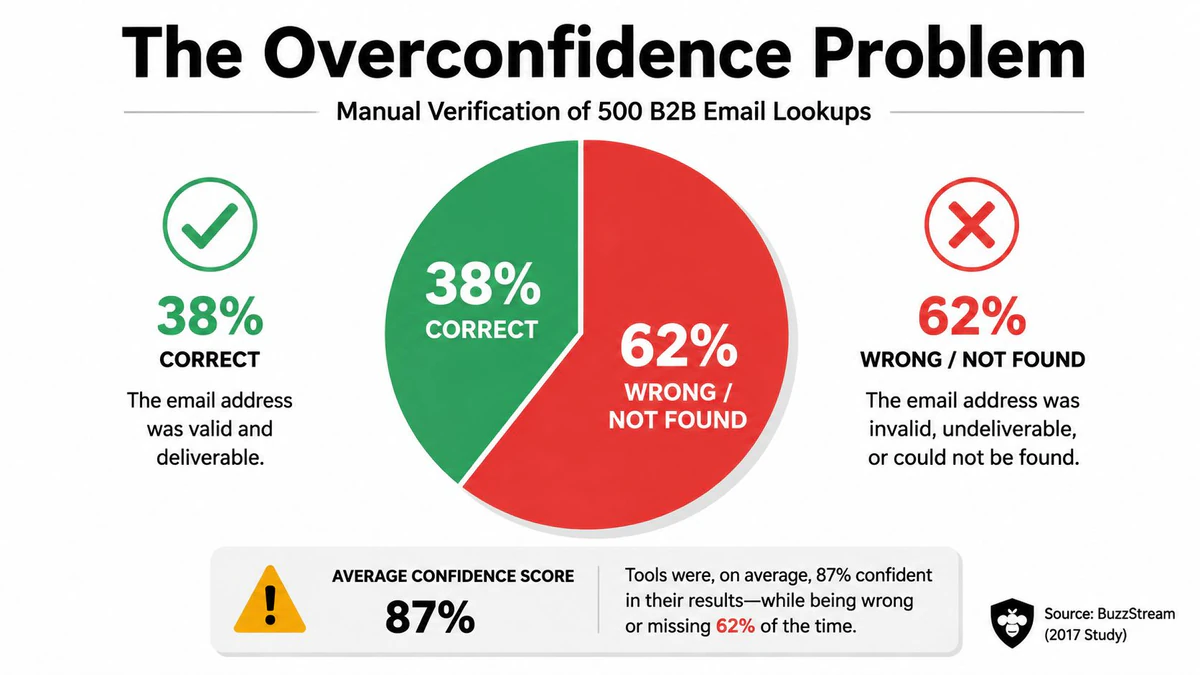
Lookup interfaces encourage certainty. They show a name, attach a confidence score, and make a weak match look like a completed investigation. Independent testing exposes the danger: in a study of 500 B2B emails, only 38% of lookup results were correct after manual cross-checking, while 62% were wrong or not found, according to BuzzStream's email lookup tools study.
The same testing found an average confidence score of 87.5 even though roughly one-third of results were incorrect. That mismatch matters because teams often push lookup results directly into CRM fields, sales sequences, or personalization systems. A confident wrong name can be more damaging than a blank field.
Why the mismatch happens
Scraped profiles go stale. People change employers, abandon addresses, and reuse usernames. Pattern matching can also produce a plausible person because the local part resembles a known naming convention, even though the mailbox belongs to somebody else.
Catch-all domains create another blind spot. A server may accept mail for every recipient without proving that a specific mailbox exists. As SMTP.com explains in its discussion of catch-all verification, even strong SMTP-based checks can't guarantee complete accuracy for those domains, so the result belongs in a risky or unknown category.
Post-send behavior doesn't reliably correct the problem. The BuzzStream testing also noted that 59% of wrong addresses would never generate a bounce notification, which means a quiet campaign isn't evidence that your ownership match was correct. Layer exact-match searches, profile checks, domain clues, and final verification instead of trusting one score.
Privacy Law and the Real Question You Should Be Asking
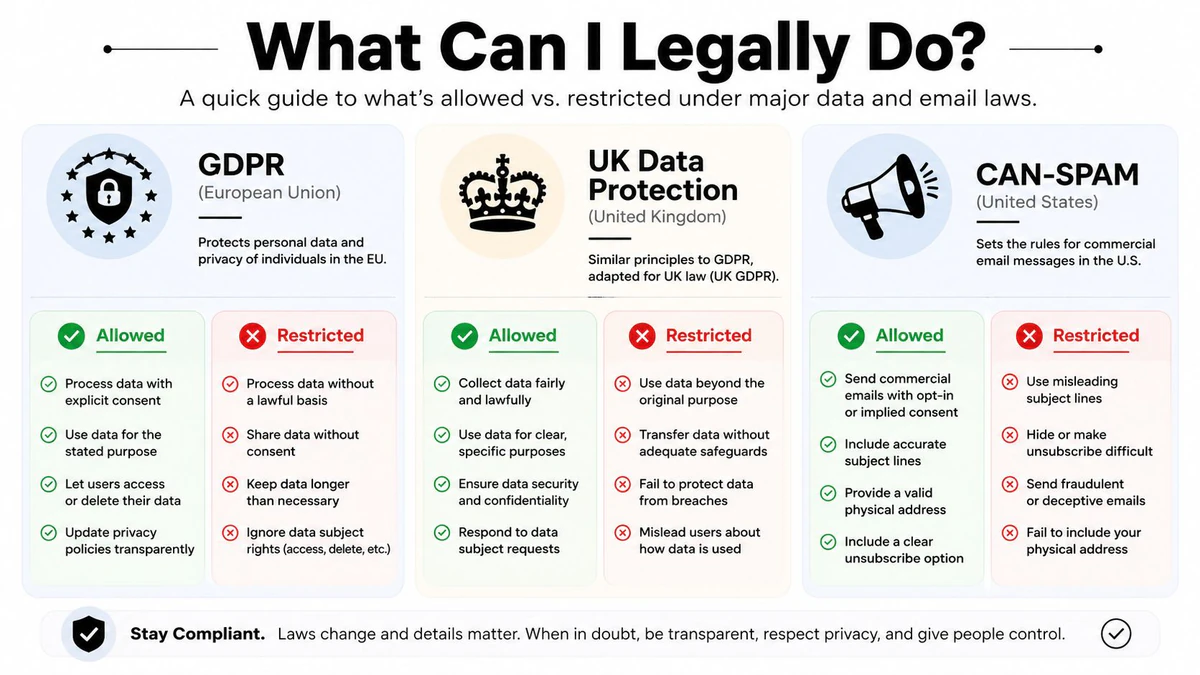
Publicly visible data isn't automatically free to collect, store, and use. A work email connected to an identifiable person can be personal data under GDPR, even when the address belongs to a company domain. Identifying the owner may therefore create obligations around lawful basis, purpose limitation, retention, access, and deletion.
The question isn't only “can I find the owner?” It's also “why am I collecting this information, how long will I keep it, and what will I do with it?” Storing a lookup result in a CRM for a defined business purpose is different from building an unrestricted personal dossier or adding an inferred identity to an outreach list without a defensible basis.
Separate identification from outreach
GDPR and UK data protection requirements can apply when teams retain returned data or use it for marketing. CAN-SPAM also affects commercial email practices, including sender identification and unsubscribe handling. A public profile may help you assess whether an address belongs to a business contact, but it doesn't remove your responsibility to follow the rules that govern collection and communication.
Use a documented workflow:
- Define purpose: Record why you need the ownership signal.
- Minimize data: Store only fields required for that purpose.
- Set retention: Delete weak or unused matches instead of keeping them indefinitely.
- Record decisions: Keep a reason for suppressing, reviewing, or contacting an address.
The email compliance guide is a useful reference for keeping verification and marketing decisions separate.
Privacy features make identity inference even less reliable. Apple Hide My Email can conceal a real address from apps and websites. Plus-addressing, burner accounts, and aliases can separate a mailbox from a public identity. Masked addresses may still be disclosed to law enforcement in certain cases, but that doesn't make them publicly traceable or appropriate for casual enrichment.
When the evidence is weak, don't escalate collection just because a tool offers another search. Mark the record as unknown, limit use, and ask the person to identify themselves through a legitimate interaction when the context allows.
A Confidence-Based Playbook for Marketers and Developers
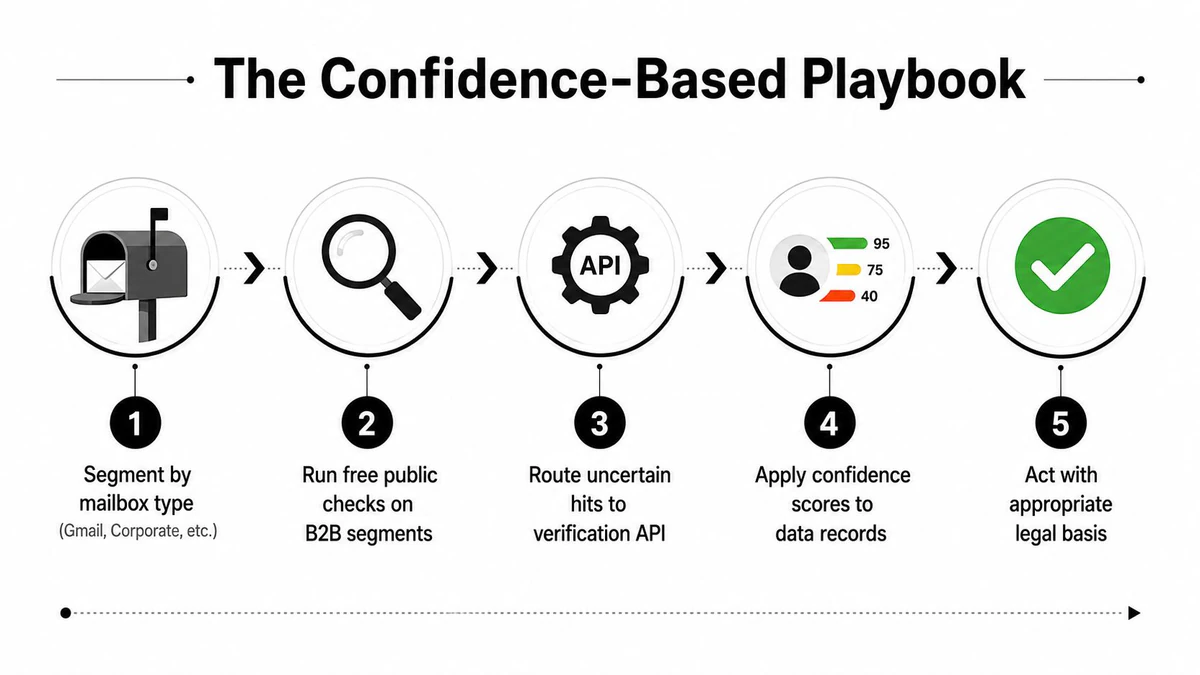
A workable process begins with classification, not enrichment. Segment addresses into corporate domains, free mailboxes, role accounts, disposable-looking addresses, and catch-all domains. Corporate addresses can move through pattern analysis and public checks, while personal and masked addresses usually need a lower-confidence treatment.
Use this sequence:
- Classify the mailbox: Separate Gmail, Outlook, Proton, corporate, role-based, disposable, and catch-all cases.
- Run public checks: Search exact addresses and review professional profiles, forums, repositories, and domain context.
- Form a candidate match: Use reverse lookup only where the domain and public evidence support it.
- Verify technical risk: Check syntax, DNS, MX, SMTP behavior, catch-all status, disposable signals, and role-account flags.
- Apply a decision: Keep, review, suppress, or contact according to confidence, purpose, and legal basis.
Structured API output makes this practical for developers. A JSON response can expose fields such as validity, reason, risk level, deliverability score, mx_found, smtp_check, catch_all, and disposable, allowing a CRM, signup form, or outbound system to automate routing. As documented by Zenvexa's structured verification overview, those fields are designed for machine-readable decisions, not for asserting a person's identity.
Short FAQ
Can disguised addresses be traced? Sometimes, but not reliably through public checks. Hide My Email, aliases, plus-addressing, and burner accounts can leave little or no useful trail.
Does a deliverability score prove ownership? No. It indicates technical or delivery-related conditions. It doesn't prove that the person suggested by a lookup controls the mailbox.
Can lookup APIs enrich contact records? They can return possible identity attributes, but enrichment should remain provisional until public evidence, domain context, and technical verification agree.
For a production workflow, send uncertain records to human review rather than forcing a binary answer. The most defensible output is often not a name, but a confidence state such as supported, plausible, risky, or unknown.
Use BillionVerify to verify address quality, inspect technical deliverability signals, and automate cleaner decisions in signup, CRM, and outbound workflows. Visit BillionVerify with a sample of your unfamiliar records, separate ownership inference from verification, and build your next data-cleaning pass around evidence rather than lookup confidence alone.