



The Posteo login is a bar at the top of posteo.de. You enter your email and the secret behind it, then press Log in. A passkey works too, and a single login opens mail, calendar, contacts and notes.
This guide walks through every step, from the first registration to a lost secret. All facts come from Posteo's homepage, its registration form and its guides, read in November 2026. We did not open an account ourselves, and we are not affiliated with Posteo. BillionVerify is an email verification service.
Key facts (checked November 2026):
- Per Posteo's homepage, a Posteo email plan costs 1 EUR a month, holds 4 GB and needs no personal details at registration.
- According to Posteo's guides, your full Posteo address is the login name, and the secret needs at least twelve characters.
- Per Posteo, a freshly registered plan stays silent until the first payment arrives.
- Posteo's guide to forgotten secrets says a reset by SMS or a spare email only works if you switched the feature on earlier.
- Per Posteo's termination guide, a closed address stays blocked for six years, while senders get an error report.
- BillionVerify's account gives 20 free credits on each day you use it, with no card needed, for checking addresses before a campaign.
Where the Posteo Login Is
Posteo has a single entry for the web. The bar sits on the homepage, and the installed web app shows the same form. It has these parts:
| Element | What it does |
|---|---|
| Takes your full address, such as yourname@posteo.com | |
| Password | Takes your account secret |
| Log in | Opens the webmail |
| Sign up | Starts the three-step registration |
| Forgotten password? | Starts the text message or email route |
| Show login only | Hides the rest of the homepage |
| Log in with passkey | Skips the typed secret |
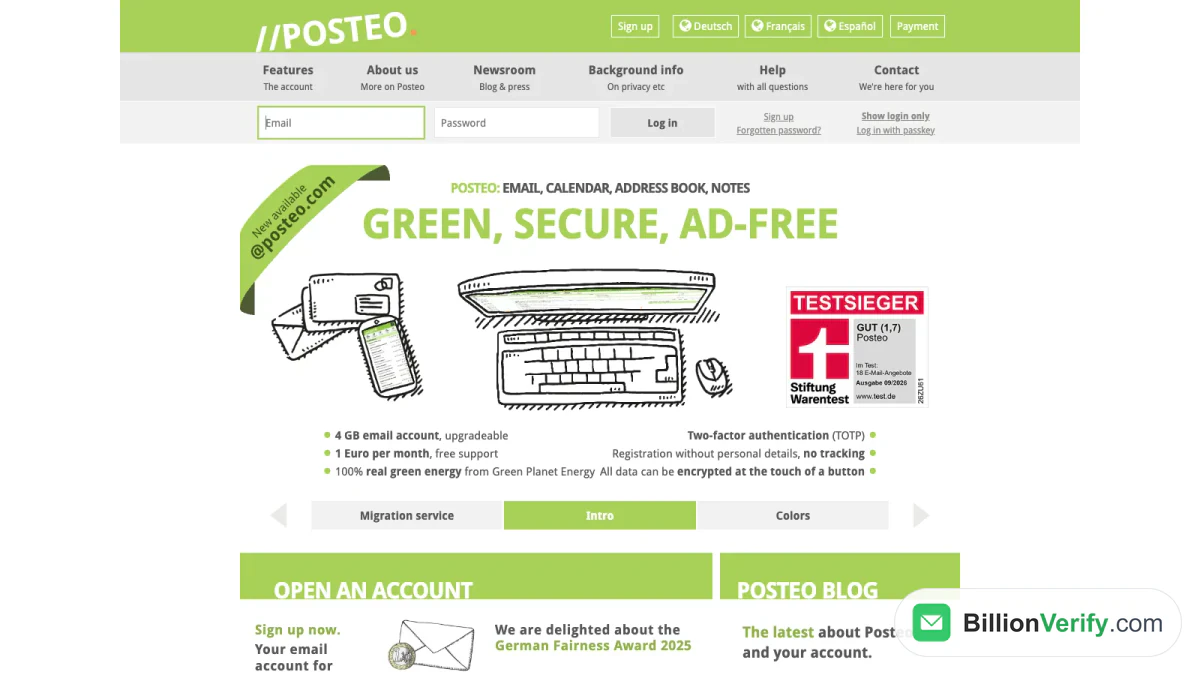
Screenshot: the Posteo login bar on posteo.de/en, taken from the Wayback Machine copy of 1 November 2026.
The site speaks German, French, Spanish and English. The contract language is German, and English questions go to support@posteo.de or the contact form.
Which Name Do You Log In With?
Your address doubles as the login name. Posteo says it usually equals the pick made at registration, for example yourname@posteo.com, yourname@posteo.net or yourname@posteo.uk. You can look it up under My account in the settings.
Endings vary. The registration form offers posteo.com, posteo.net, posteo.us, posteo.uk, posteo.ca and posteo.ie. The guides add posteo.de, posteo.es, posteo.at, posteo.ch, posteo.nl, posteo.be and posteo.lu. A far longer list of country endings exists for aliases.
Log In With a Passkey
Beside the typed route, the Posteo login has a passkey link. We found no guide that explains the passkey steps, so we do not describe them. For a second layer, Posteo documents code-based protection, covered below.
The Posteo App and the Web App
Posteo has no store download. The Posteo app is its web app: it installs from the browser, which puts an icon on the home screen or the taskbar. The provider describes the steps for four systems.
iPhone and iPad
For the Posteo app on iOS, use Safari, since Posteo says other browsers cannot install it. Open the site, tap the share button, pick "Add to Home Screen" and tap Add. Tap the logo afterwards to log in. A device that stores your secret fills the form for you, and it can type the code of the second step as well.
Android, Windows and Mac
Each of these systems has its own guide with screenshots. The idea matches the iPhone: log in once in the browser, then use its install option. The Posteo app on a phone is thus a shortcut to the webmail, with the same colors and a dark mode that follows the device.
A Regular Mail Program Works Too
You can also read mail in Thunderbird, Outlook or Apple Mail. The next section lists the values. For background on this kind of software, read what an email client is in our glossary.
Posteo IMAP and SMTP Settings
Thunderbird finds the values alone. Other programs ask for them, and the guide to setting up a mail client has the list. The Posteo IMAP server name is identical for every ending.
| Item | Incoming (IMAP or POP3) | Outgoing (SMTP) |
|---|---|---|
| Server name | posteo.de | posteo.de |
| Username | Your full address | Your full address |
| Secret | An app password | An app password |
| SSL/TLS port | 993 for IMAP, 995 for POP3 | 465 |
| STARTTLS port | 143 for IMAP, 110 for POP3 | 587 |
The outgoing side always demands a login, even when a program labels the field optional. Posteo accepts only encrypted connections and prefers TLS over STARTTLS where both exist. A program limited to TLS 1.0 or 1.1 cannot sync, and a software update fixes that. The standard folders are Sent, Trash and Drafts. Our glossary explains both protocols: IMAP plus SMTP.
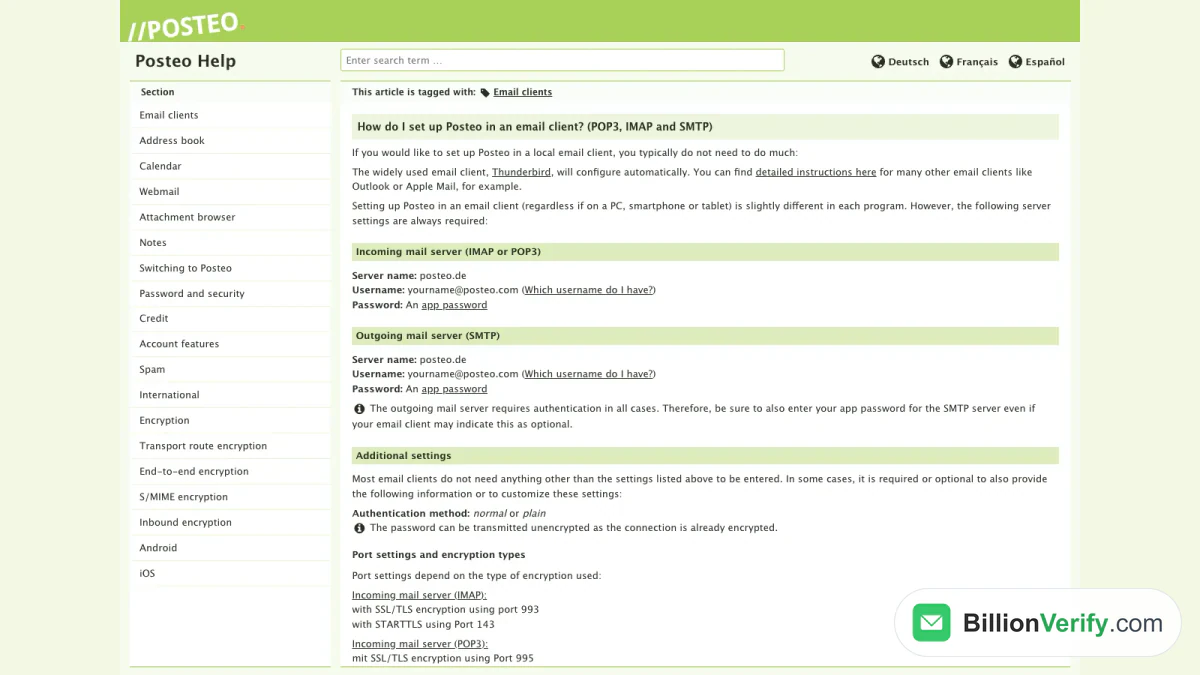
Screenshot: the provider's server table, archived on 20 September 2026.
App Passwords for Programs
Every program can get its own key instead of your main secret. Create it in the settings: choose My account, then Password and security, press Create app password, name it and confirm. You may type your own value instead of the generated value. Posteo keeps only a hash, so it cannot display the key again. Copy it at once.
A separate key for the phone and another for the laptop is the intended use. If a device is stolen, you delete only its key. A program on Posteo IMAP that fails after a security change usually needs a fresh key.
Extra Protection for Webmail Users
Posteo also lets you block programs from your main secret. With the option on, IMAP, POP3 and SMTP accept only app passwords, while the webmail keeps the normal login. The provider recommends it for people who read mail in the browser only.
Register for Posteo
New Posteo email plans start from the Sign up button. Registration has three steps: choose the address and the secret, add credit, and confirm.
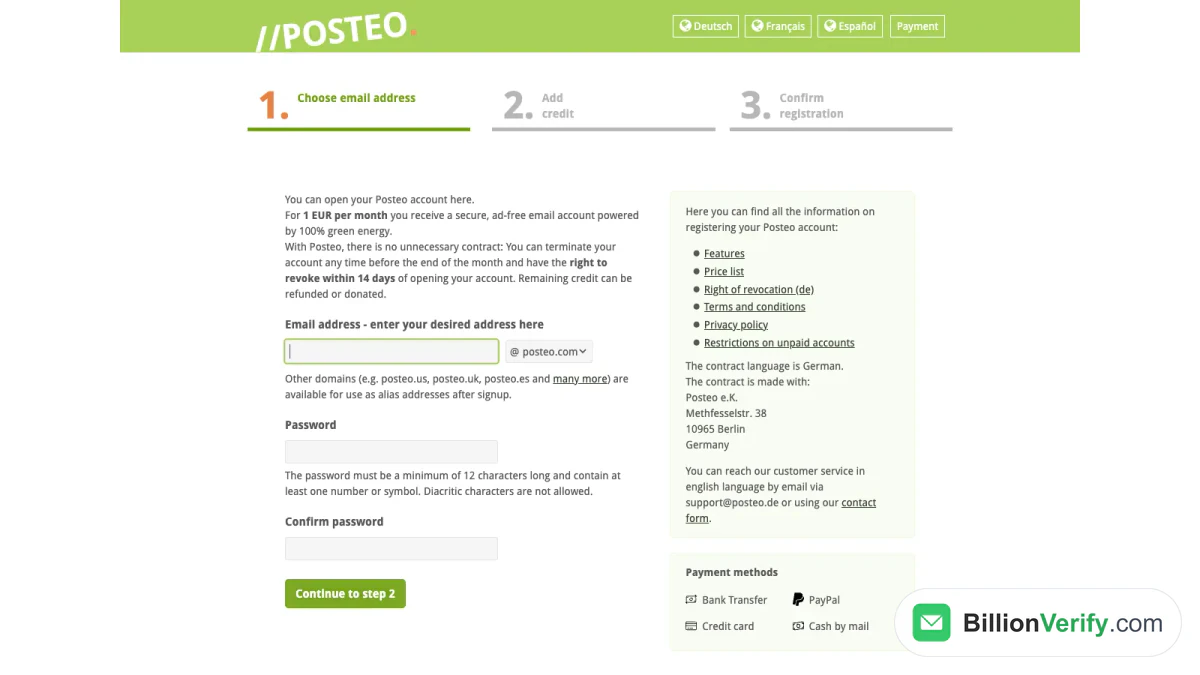
Screenshot: the first registration step, archived on 26 September 2026.
First Step: Name and Secret
Type the part before the @ and choose an ending. The secret needs twelve characters and one number or symbol at least. The guides add a lower case and a capital letter, and they rule out diacritics and exotic symbols. The form never asks for a name or other personal detail.
Step Two and Three: Pay and Confirm
The fee is 1 EUR monthly. You pay by bank transfer, PayPal, credit card or cash sent by mail. Posteo keeps payment data apart from stored mail, and it describes a single-use code scheme for transfers and cash, so a payment never points to an address.
Until the money arrives, you hold a preview. The provider says an unpaid plan can neither send nor receive. You may explore the webmail, set up a program or install the web app, but nothing is delivered. After payment, all features unlock.
What the Monthly Fee Covers
The features page lists the standard package as of November 2026:
- 4 GB of storage, upgradeable up to 75 GB for 0.25 EUR per extra gigabyte and month
- three aliases, or up to 25 for 0.10 EUR per alias and month
- endless filter variants, such as example+amazon@posteo.net
- attachments up to 100 MB in both directions
- IMAP and POP3, plus an address book, a calendar and notes
- second-step login with time-based codes
- a migration service for three outside email accounts
The homepage also says Germany's BSI certifies Posteo under TR-03108 for secure mail transport, and it shows a Stiftung Warentest seal with the grade "GUT (1,7)" from the September 2026 issue. Both claims are quoted as shown and were not tested by us.
Right of Revocation
There is no long contract. Per the registration page, you may revoke within 14 days and end the plan before any month ends, and leftover credit can be refunded or donated.
Forgot Your Posteo Password?
Use the reset link on the homepage. What follows hinges on a feature you had to switch on beforehand. Posteo stores no secrets, so it cannot show you the old value.
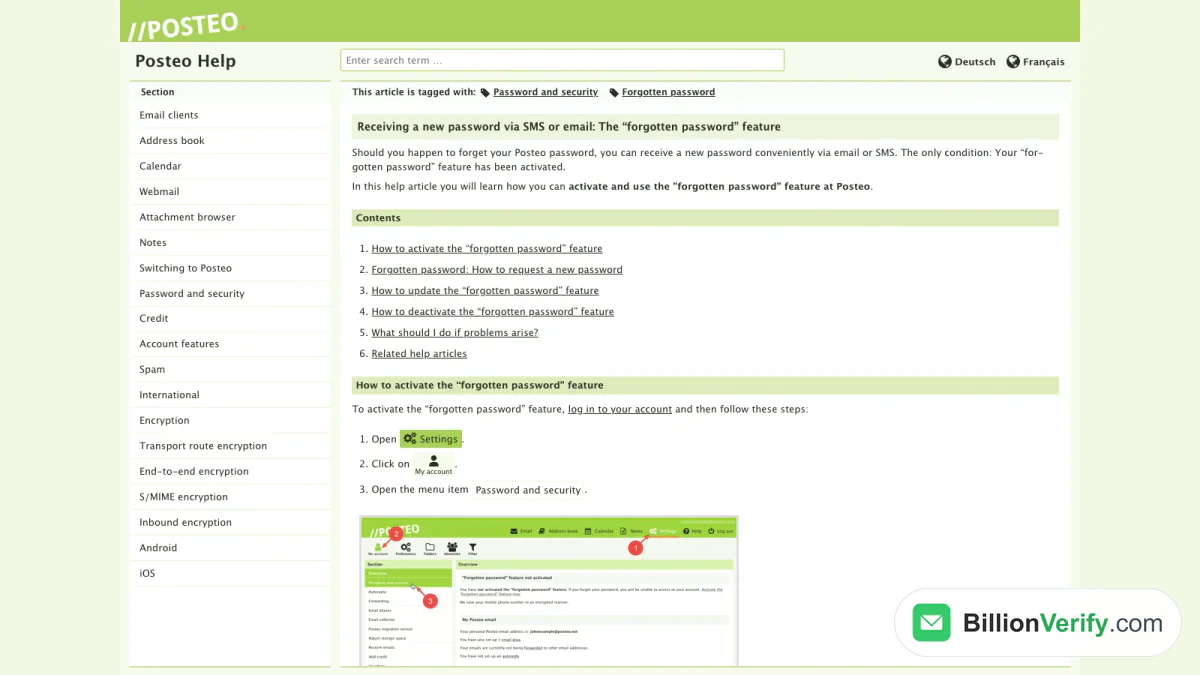
Screenshot: the guide to the reset feature, archived on 24 March 2026.
Ask for a New Secret
If the feature is active, follow these steps:
- Click "Forgotten password?" on the homepage.
- Type the Posteo address you lost the secret for.
- Type the mobile number or spare email you stored.
- Click Reset password.
A fresh value arrives within minutes, by SMS or by email.
Turn the Feature On Early
Log in and open the password area of My account. Enter a mobile number or a spare email. Numbers outside Germany use 00 plus the country code, such as 00447912345678 for the UK, and they must be mobile lines, not landlines. The page converts your entry into a test value, because Posteo does not save the sensitive data itself. Press "Generate a value", enter your current secret and click Activate.
If You Skipped That Step
Look for a saved copy first. Thunderbird, Outlook and Apple Mail can show what they store, and so can a browser that remembered the form. If nothing helps, the support team may find a way. Give another contact route in your message.
Warnings From the Guide
Three cases need care:
- With crypto mail storage turned on, the reset feature does not work, and only customer support can step in.
- With an encrypted address book and calendar, a reset wipes contacts and appointments, unless you still know the old key and restore them.
- Aliases keep working afterwards, though they may look encrypted in the settings.
Replace It When You Know It
If you remember the old value, open the same area and enter it plus the new value twice. Every device is logged out at that point, so type the replacement into each program. Two-factor login need not be turned off first.
Two-Factor Sign-In
Two-factor authentication adds a six-digit code to the Posteo login. It changes every 30 seconds and comes from an app on the open TOTP standard, such as FreeOTP. Posteo's walkthrough for TOTP sign-in shows the steps.
Install the app, open the same security area, confirm your login and tick the box that says the app is ready. Then scan the QR code, or type the key by hand and choose the SHA1 algorithm if the app asks. Enter the current code and press Confirm activation.
Two warnings apply. Lose the phone or delete the app, and you lose access, with only the support team left to help. Copy the key to a second device for that reason. And the second factor guards the webmail and the settings, whereas programs follow the protection option described earlier.
Move Old Mail to Posteo
Posteo runs a free migration service that copies an old inbox, folders, calendar and contacts included, over an encrypted link. It handles three outside inboxes per customer and supports providers like AOL, GMX, Hotmail, iCloud, Office 365, Outlook.com, WEB.DE and Yahoo.
Later arrivals at the old place are the job of the collector. It fetches new mail every ten minutes for three months, with up to three collectors at once, and it works with any provider that offers IMAP. After three months it stops by itself and tells you by email, so you can restart it.
When the Posteo Login Fails
A short list explains most failures. Work through it in this order:
- Nobody paid yet. A plan without credit stays silent.
- The username is wrong. Use the complete address with the ending you chose.
- A program uses the main key. With extra protection on, only app passwords pass.
- The time-based code is refused. Check the clock of your phone.
- The program is too old. Posteo declines TLS 1.0 and 1.1.
- The key is lost. Run the reset if you prepared it, or ask the support team.
Security backups cover the last seven days, so a deleted message can come back under Restore data in the settings.
Close Your Posteo Subscription
Closing happens in the settings: My account, Termination, then the option for immediate effect. Choose whether credit is refunded, given to an NGO or given to Posteo, and confirm with your login.
The data is deleted for good 14 days after the date you picked, so save your data before. Afterwards anyone writing to it gets an error report. Posteo blocks the old name for six years to lower the risk of misdirected mail. You can withdraw the notice until the data is gone.
Emailing Posteo Users? Verify Before You Send
You may collect a Posteo email in a form, or write to Posteo users in a campaign. A few facts above matter for your list. A new plan that nobody paid for receives nothing, so a confirmation message sent there is lost. A closed plan answers with an error report for six years. And a single plan can hold 25 aliases plus countless variants like name+shop@posteo.net, so two list rows may reach a single person.
The BillionVerify email verifier checks that an address can take mail ahead of a campaign.
BillionVerify's email verifier works on single entries, and bulk email verification handles whole lists. What to know:
- valid and invalid results cost 1 credit each, and unknown results are free
- a free re-check is available within 24 hours
- catch-all entries get their own label and are not counted as valid
- the free allowance is 20 credits per day of use, up to 600 a month, and credits never expire
- our servers are in France (EU), and a DPA can be signed
- you can use a REST API, an MCP server or one of 25+ integrations
We make no claim about how Posteo's servers answer checks. If you also collect mobile numbers, our phone number validator shows whether a number fits its country. If a message claims to come from Posteo, our reverse email lookup shows what is known about the sender. For other German providers, see our guides to the mailbox.org login and the mail.de login. Bounces also hurt your own domain, as what a hard bounce is explains.
FAQs
What does a Posteo email look like?
A Posteo email ends in a Posteo domain such as posteo.com, posteo.net or posteo.de. The pick you make at registration is also your login. Aliases can use many more endings.
Does a Posteo email cost money?
There is no free tier; the monthly charge is 1 EUR. More storage or more aliases cost a little extra. A plan with no credit cannot take part in mail traffic.
Is there a Posteo app for Android and iPhone?
The Posteo app is a web app rather than a store download. You add it from the browser menu, using Safari on iOS or Chrome and other browsers on Android. A mail program on IMAP works as well.
Which Posteo IMAP server should I enter?
The Posteo IMAP server is posteo.de, on port 993 with SSL/TLS or port 143 with STARTTLS. Your username is the full address, and the key is an app password.
Which port does Posteo SMTP use?
The SMTP server listens on port 465 with SSL/TLS and on port 587 with STARTTLS. Its name is posteo.de, and a login is always required.
Can I reset the key without a German mobile number?
A mobile number from any country works, as long as it is not a landline and carries the 00 country format. A spare email works instead.
How long is a closed Posteo address blocked?
Nobody else can register it for six years; mail to it triggers a bounce notice.
How do I transfer an old inbox?
Use the migration service in the settings to copy folders, appointments and people, then switch on the collector for new mail. The service accepts up to three foreign accounts.
Watch: Bulk Email Verification: How to Verify an Email List From a File
Watch: How to Validate a Phone Number: Free Phone Number Validator
Read next: HubSpot Login: Sign In, Reset Password and Fix Errors