



You've just sent a campaign to a large list. The content was approved, the subject line was tested, and the first delivery report is coming in. Then the bounce panel fills with permanent failures, and the usual “try again later” instinct suddenly looks dangerous.
So, what is a hard bounce email? It's a permanent email delivery failure, normally signaled by a receiving mail server with an SMTP 5xx response. The receiving system has rejected the message because the address, domain, or delivery policy presents a problem it doesn't expect to resolve through another attempt. Unlike a temporary rejection, resending the same message to the same unchanged destination won't help.
That makes a hard bounce more than a mailbox-status label. It's an operational signal about the quality of your data, your authentication, your sending reputation, or the recipient's security policy. The right response starts with immediate protection, then moves into diagnosis and prevention.
Understanding Hard Bounces in Real Campaigns
A marketing manager launches a newsletter and watches the delivery report refresh. Most messages are accepted, but a cluster returns with permanent failures. The ESP marks those records as undeliverable, and the retry queue doesn't bring them back because the recipient server has already issued a final rejection.
That's the practical meaning of a hard bounce. The destination can't accept the message for an unchanging reason at the current address or under the current rejection condition. A mistyped mailbox, a deleted account, or a domain that no longer receives mail can all produce this outcome. The receiving server is effectively saying that another identical delivery attempt won't change the result.
A soft bounce behaves differently. A full mailbox, temporary throttling, greylisting, or a short-lived server problem may cause a temporary failure, so the sending system can try again. With a hard bounce, the ESP generally stops retrying and suppresses the address because repeated attempts would waste sending resources and may harm the sender's reputation. RFC 5321 defines the modern SMTP framework, while the enhanced status code X.1.1 in RFC 3463 describes a bad destination mailbox address, commonly used when the recipient doesn't exist.
The report is a starting point, not a conclusion
Deleting every hard-bounced row protects the next campaign, but it doesn't explain why those records entered the database. A sudden cluster from one acquisition form may point to poor validation at signup. A cluster across one corporate domain may indicate filtering or a policy rejection rather than invalid people.
Practical rule: Suppress first, diagnose second, and prevent the same failure at its source.
Track the code, domain, acquisition source, and record type connected with each rejection. A free bounce rate checker can help you quantify the pattern, but the useful question is not only how many addresses failed. Ask whether the failures are isolated bad records, a damaged segment, or evidence that a valid sender is being rejected by recipient infrastructure.
How SMTP Signals a Hard Bounce
A campaign can fail before the message body is accepted. SMTP gives the sending and receiving mail systems a shared sequence for making that decision. The sender connects to the receiving mail transfer agent, introduces itself with MAIL FROM, names the destination with RCPT TO, and waits for the server's response. That response determines whether the message should proceed, wait, or stop.
A 4xx response usually marks a temporary condition. The sending system can queue the message and retry. A 5xx response signals rejection under the current conditions, making the 5xx family the protocol signal most closely associated with a hard bounce. Provider wording varies, so an ESP may display “user unknown,” “mailbox unavailable,” or “recipient rejected” instead of the raw SMTP response.
Reading enhanced status codes
Enhanced status codes add context to the basic response. Their structure is class, subclass, detail. The first value identifies the broad result, while the later values narrow it to a category and condition.
A code in the 5.1.x family generally points to an address-status problem. 5.1.0 can indicate a destination-address issue, while RFC 3463's X.1.1 identifies a bad destination mailbox address. Treat these codes as clues, not complete verdicts. Providers add their own wording and policy rules, so the response must be read alongside the receiving domain and delivery evidence.
The rejection stage also changes the diagnosis. At RCPT TO, the receiving server may refuse the destination before accepting the message body. A nonexistent mailbox cannot be repaired by changing the subject line. A valid address rejected because of authentication, content, or sender reputation may work again after the sender corrects the policy problem. That distinction turns a bounce report into an operational signal: suppress an irreversible address failure, but investigate a policy or reputation rejection.
A Kanban-style sales CRM can track ownership, evidence, and follow-up status for bounce investigations. Technical teams can use an email header parsing guide to examine message metadata and delivery evidence instead of relying only on the simplified label in an ESP dashboard.
Hard Bounce vs Soft Bounce at a Glance
The fastest way to classify a delivery failure is to compare its permanence, retry behavior, and likely owner. A hard bounce tells the sender to stop treating the current destination as deliverable. A soft bounce tells the sender to wait, retry, or watch for a later resolution.
| Attribute | Hard Bounce | Soft Bounce |
|---|---|---|
| Delivery state | Permanent failure under the current condition | Temporary or potentially recoverable failure |
| SMTP signal | Usually a 5xx response | Usually a 4xx response |
| Retry behavior | The ESP normally stops retrying and suppresses the address | The ESP may retry over a delivery window |
| Typical causes | Nonexistent mailbox, dead domain, malformed address, policy or security rejection | Full mailbox, greylisting, throttling, transient server outage |
| Operational action | Suppress, classify, and investigate the root cause | Allow controlled retries, then review if it persists |
| List consequence | Usually added to a suppression list | May remain active while retries continue |
| Recovery path | Correct the record or resolve the sender-policy issue | Wait for the recipient or service condition to clear |
The distinction can blur in real ESP workflows. A soft bounce that continues through the provider's retry window may eventually be treated as a permanent failure and placed on suppression. That doesn't mean the original event was a hard bounce. It means the sending platform has decided that continued attempts no longer make operational sense.
Use the reason, not only the label
A “hard bounce” label can describe more than an invalid mailbox. Security filters and policy systems may issue permanent-looking rejections even when the recipient address is real. HubSpot's explanation of hard and soft bounces notes that strict email security filters can cause what is usually considered a permanent failure.
That's why your review should include the SMTP response, enhanced status code, recipient domain, and sending context. Suppress the address while you investigate, but don't assume that every permanent-looking response requires the same repair.
What Actually Causes a Hard Bounce
A hard bounce is an operational signal, not just a mailbox-status label. The failure may belong to the address, the domain, or the recipient's policy system. Separating these layers helps you avoid treating a real mailbox blocked by security controls as a nonexistent contact.
| Failure Layer | Example Causes | Reversible? | Typical Owner |
|---|---|---|---|
| Address level | Typo, deleted mailbox, abandoned role address, expired disposable inbox | Usually no, unless the record can be corrected or the mailbox is restored | Marketing operations, data owner, recipient |
| Domain level | Expired domain, parked DNS, unavailable receiving service, misspelled domain | Sometimes, if the domain or record can be repaired | Domain administrator, data owner |
| Policy level | Security filter, authentication failure, content rejection, deny-list decision | Often, after sender-side or recipient-side policy changes | Deliverability, IT, recipient administrator |
Address and domain failures
An address-level failure is the clearest case. A contact may have mistyped the domain, an administrator may have deleted the mailbox, or an IT team may have retired a role account. Disposable inboxes can also stop accepting mail after their short-term purpose ends.
Domain failures require checking the destination itself. The domain may have expired, stopped publishing usable receiving records, or directed mail to a service that no longer accepts messages. A single missing or added character can send a legitimate lead to the wrong domain. Mailgun's guidance on hard bounces lists nonexistent addresses, invalid domains, and missing recipient mail servers among common permanent-failure conditions.
Verification can catch some of these problems before a campaign runs. Many workflows inspect MX records, which identify the servers responsible for receiving mail for a domain. A domain without usable MX records cannot receive email through that route. Suped's explanation of bounce thresholds and verification describes this pre-send check as part of current verification practice.
Policy and security failures
Policy-level rejections create the most uncertainty. A gateway may refuse a message because its content triggers filtering, DMARC alignment fails, or the sender's infrastructure appears on a deny list. These conditions can produce a permanent-looking response even though the mailbox exists. Its glossary entry on hard bounces explains why that response alone does not prove the address is dead.
Use the SMTP response, enhanced status code, recipient domain, and sending context to identify the layer. Suppress the address while investigating, then choose the repair: correct the record, review domain configuration, or fix authentication and reputation issues. Verification closes the gap for address and domain risks, while policy failures require deliverability or administrator action. A single irreversible database rule cannot resolve all three.
Why Hard Bounces Damage Sender Reputation
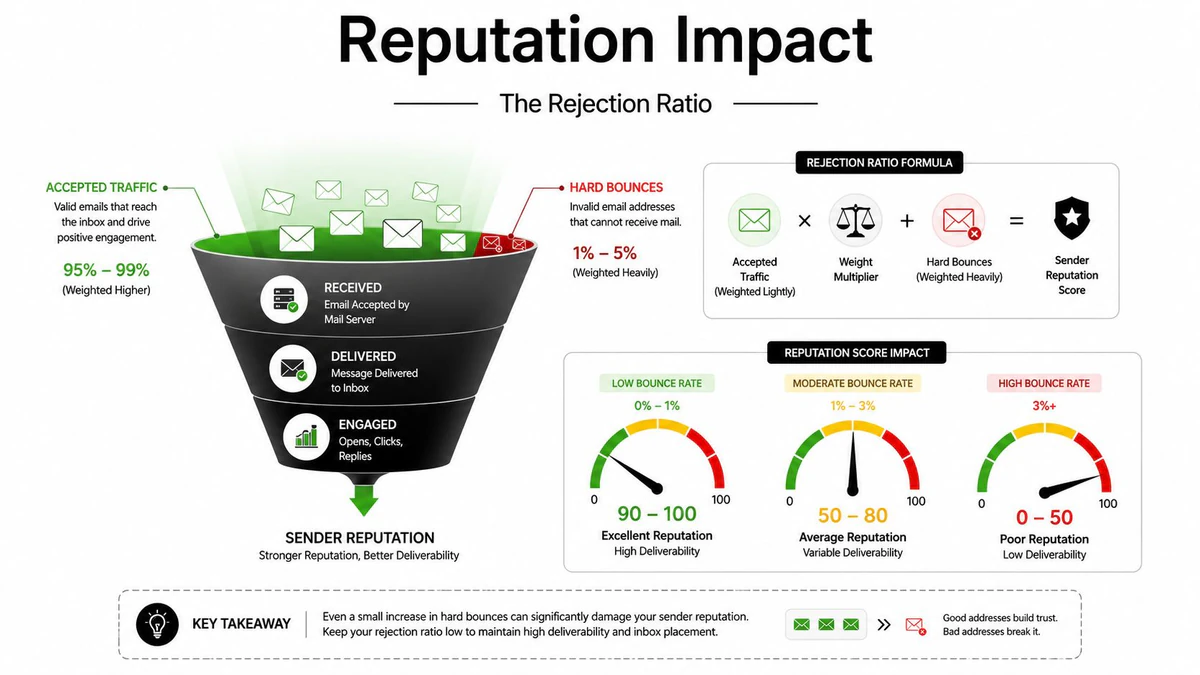
A campaign can look healthy in the dashboard while repeatedly sending to addresses that no longer exist. Mailbox providers read that pattern as an operational signal. Each hard bounce shows that the sender's list, acquisition source, or sending setup is producing destinations the receiving system will not accept.
Hard bounces also need interpretation. An irreversible address failure points to a dead mailbox or invalid domain. A policy or reputation rejection may involve a real mailbox that is refusing the message because of authentication, filtering, or sender history. Treating both cases as the same database problem can hide the action required.
Industry guidance uses bounce rates as decision markers, not universal laws. Trackingplan describes total bounce rates under 2% as healthy, while rates above 5% call for urgent list cleanup, as explained in Trackingplan's hard-bounce explanation. The relevant question is whether failures are rising, concentrated in one campaign or source, or approaching the limit set by your ESP.
The two-layer consequence
Your ESP measures list risk, while recipient providers judge the traffic they receive. Amazon SES states that it doesn't retry hard bounces and that only hard bounces count toward the bounce rate reported in its console and API. A rejected message therefore affects both the immediate campaign and the service-level record used to evaluate sending quality.
The operational cascade is clear:
- Rejected traffic rises: More messages fail before delivery.
- Sender trust weakens: Providers see evidence of poor list hygiene or problematic traffic.
- Inbox placement suffers: Future messages may face stricter filtering or throttling.
- Engagement declines: Fewer delivered messages can reduce opens and clicks.
- Account pressure increases: ESP controls may limit or suspend sending when bounce levels breach policy.
Use a BillionVerify deliverability test to examine sending conditions separately from recipient-list quality. Then classify the failures. Suppress addresses that verification identifies as invalid, while routing policy or reputation rejections to authentication, content, infrastructure, or provider review. That distinction turns a bounce report into a remediation plan.
Preventing Hard Bounces with Email Verification
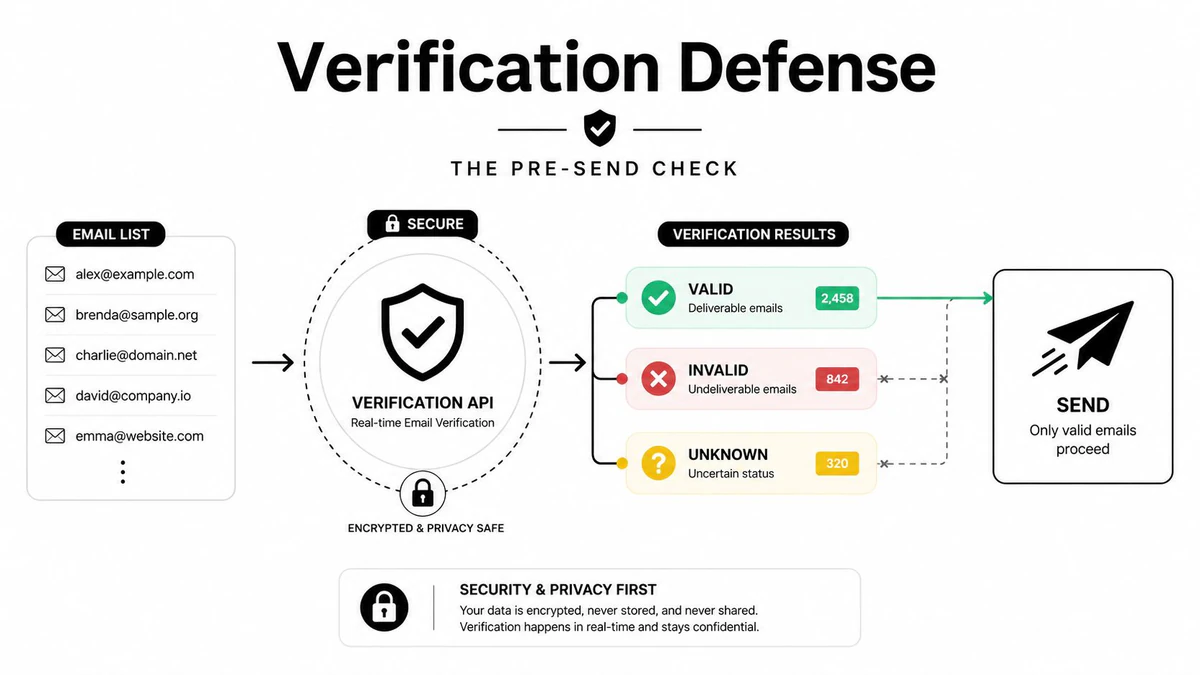
A campaign can fail before its first send. An address may look correct in a form or spreadsheet yet point to a nonexistent mailbox, disposable domain, or domain that cannot receive mail. Post-send reports expose the failure after the fact. Verification moves that check earlier, turning hard bounces into an operational signal about data quality and sending risk.
Start at capture. Add real-time verification to newsletter forms, account registration, lead forms, and sales handoffs. It can identify syntax errors, disposable domains, and other obvious problems before an address enters the active campaign database. A dedicated Email Validation API places that check inside the signup or application flow.
Build verification into the data lifecycle
A form check cannot clean older records. Run a bulk review before activating an acquired, imported, or dormant segment, then recheck contacts before re-engagement. If your team is refining how to grow an email list from scratch, make verification part of acquisition design rather than an emergency cleanup step.
Catch-all domains require caution. They may accept SMTP probes without confirming that a specific mailbox exists. Classify these records as uncertain instead of forcing them into a valid or invalid category. Use cautious segmentation or manual review before sending.
BillionVerify is a professional email verification service for identifying bad email data before it creates delivery problems. Its workflow can check syntax and MX records, perform SMTP handshake verification, classify catch-all domains, detect disposable addresses, and flag role accounts. Those results help separate safer records from uncertain ones.
A practical verification cadence
- At capture: Reject obvious typos and disposable addresses before storage.
- Before a first send: Verify imported or newly acquired lists in bulk.
- Before re-engagement: Recheck dormant segments because address quality can change.
- During ongoing operations: Monitor new records continuously rather than treating hygiene as a quarterly task.
- After a bounce cluster: Compare verification results with the acquisition source and form behavior.
Verification cannot resolve every rejection. A nonexistent mailbox calls for suppression, while policy, authentication, content, or reputation blocks require sender-side investigation. That distinction prevents teams from treating every hard bounce as the same mailbox-status problem and directs each failure to the right remedy.
Suppressing and Remediating Hard Bounces After They Happen
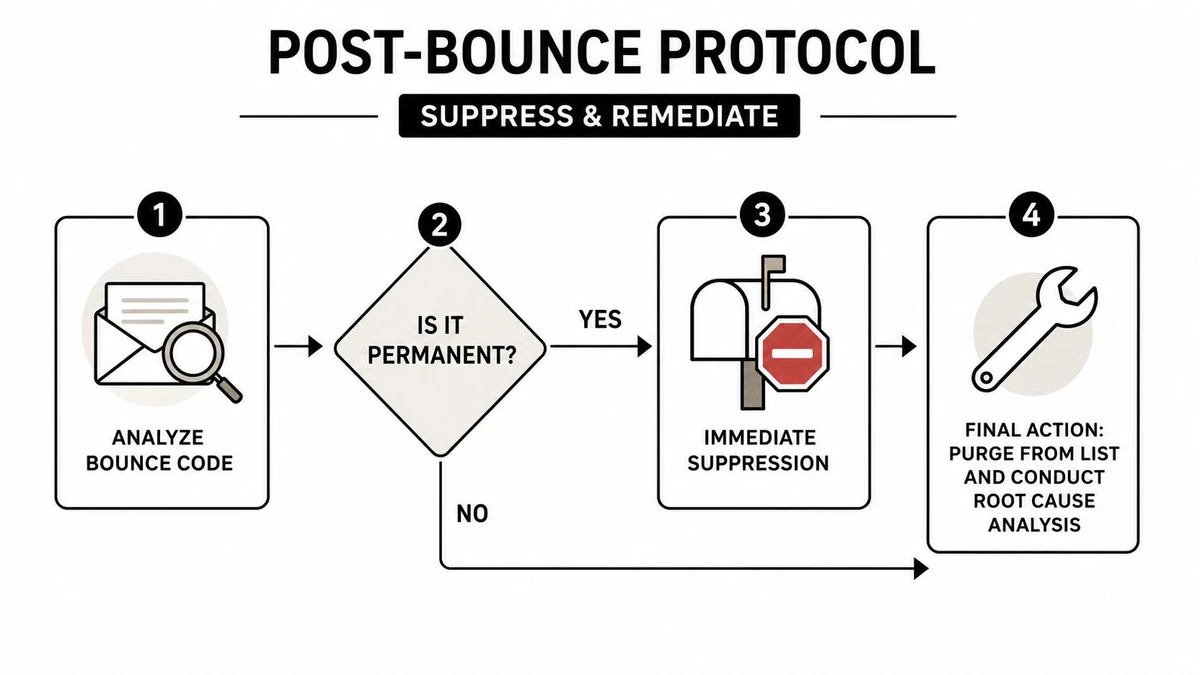
A hard bounce should trigger two actions: suppress the address and investigate the signal. Removing the record protects the current campaign, but it does not fix a broken form, faulty import, CRM sync, authentication setup, or recipient policy that may generate more failures.
Preserve the evidence before changing the record. Capture the SMTP response, enhanced status code, recipient domain, campaign, acquisition source, and prior engagement. Then classify the event as an address failure, a domain failure, or a policy-driven rejection. That classification separates an unreachable destination from a valid address blocked by sender or recipient rules.
Separate suppression from investigation
Invalid mailboxes and dead domains should stay suppressed. Do not move them into a sunset flow or keep retrying, because engagement cannot restore an address that the receiving system says does not exist. A sunset sequence can identify inactive but deliverable subscribers. It cannot revive an unrecoverable destination.
Policy rejections require sender-side investigation. Review authentication alignment, message content, sending reputation, and recipient-domain rules. If the address remains valid and the recipient wants future contact, obtain permission again through a legitimate consent or confirmation process. Repeatedly sending the same rejected message only repeats the trigger.
Find the upstream failure
Use each bounce cluster to inspect the path that produced it:
- Check the source: Compare failures from forms, imports, partner lists, and CRM synchronization.
- Inspect the pattern: Look for recurring domain typos, role accounts, disposable addresses, or one recipient organization.
- Correct the workflow: Add real-time validation, double opt-in, field normalization, or approval controls where bad records entered.
- Protect suppression state: Ensure deleted or suppressed addresses cannot return through an overnight CRM sync.
- Review trends: Share bounce classifications with marketing operations and deliverability owners.
A suppression list is a safety barrier. Root-cause analysis stops the leak.
Feedback loops and ESP event data can reveal repeat problems earlier, particularly when one acquisition source keeps producing permanent failures. The aim is not to rescue every bounced address. It is to distinguish an irreversible address failure from a recoverable policy or reputation rejection, then send each case through the appropriate verification-first remediation path.
Building a Bounce-Resistant Sending Habit
Reliable deliverability is built through repeated controls, not a single cleanup. Treat each campaign as a checkpoint in the path from data capture to inbox delivery, with clear ownership for list quality and sending infrastructure.
Daily and weekly controls
Each day, remove confirmed permanent failures from active queues and watch for unusual clusters. Each week, group bounce codes by domain, acquisition source, and campaign. A sudden shift may point to a broken form, flawed CRM import, or recipient policy change before the problem reaches more contacts.
Before sending, verify the segment, confirm suppression synchronization, check authentication status, and inspect recent seed-test results. Use double opt-in where acquisition creates higher typo risk. For larger databases, schedule bulk list cleaning for marketers before major campaigns and before reactivating dormant records.
A bounce cluster is an operational signal. Its pattern can identify where an address entered the system, whether the failure is irreversible, or whether a valid mailbox is being rejected by policy or reputation controls.
Keep the system verification-first
Aim to keep hard bounces below the 2% warning threshold commonly used in industry guidance, while recognizing that ESP limits and recipient-provider decisions differ. Investigate earlier when the rate rises, rather than waiting for an account warning or sending restriction.
Authentication alignment, careful content practices, and reputation monitoring help address policy-driven rejections. Real-time verification filters bad data during capture, while recurring checks find addresses that deteriorate later. DMARC alignment and BIMI adoption can strengthen identity signals, but neither replaces accurate recipient data.
Connect forms, CRM workflows, verification, ESP suppression, and campaign review. A failed address should be blocked at capture or suppression, not allowed to return through synchronization.
BillionVerify provides real-time and bulk email verification for identifying invalid, disposable, role-based, and uncertain addresses before they generate hard bounces. Visit BillionVerify to review a workflow for signup forms, CRM processes, and campaign preparation.