



You launch a campaign, refresh the dashboard, and watch the opens arrive in a slow trickle. Some recipients received the message immediately. Others are still waiting hours later, while your ESP shows a mixture of queued, deferred, and delivered statuses. The natural reaction is to blame sender reputation, change the content, or resend the campaign.
That reaction often starts too far up the stack. An email delivery delay is frequently a queueing and retry problem before it becomes a reputation problem. A receiving server may temporarily defer a message, your sending system may queue it, or a relay may throttle the connection. The message can look stuck while still moving through a standards-compliant delivery process.
This guide follows three practical questions: what happens during delivery, how can you locate the delay, and how can verification keep bad addresses out of the queue?
What Email Delivery Delay Actually Means
An email delivery delay is the wall-clock gap between the moment a sending platform releases a message and the moment the recipient's mail server accepts it. That definition matters because “accepted by the recipient server” is different from “visible in the inbox.” Inbox placement, spam filtering, promotions tabs, and internal mailbox processing can happen after the SMTP handoff.
A delay also isn't the same as a bounce. A hard bounce means the receiving system has rejected the message permanently. A temporary delay usually involves a 4xx SMTP response, which tells the sending mail transfer agent, or MTA, to keep the message and try again. If a later retry succeeds, the message may arrive minutes or hours after the original send without ever becoming a permanent failure.
Practical rule: Before changing your domain, IP, or email content, find out whether the message was rejected, deferred, or accepted and then filtered.
The distinction is especially important for time-sensitive messages. A password reset, one-time passcode, magic link, or order confirmation loses value when the recipient receives it after the action window has passed. Marketing campaigns also lose momentum when delivery stretches beyond a day, because opens and clicks arrive after the team has already evaluated performance or moved to the next message.
Delivery speed varies by route even when infrastructure is functioning normally. A 2025 regional performance analysis reported delivery under 500 milliseconds on well-peered North American and Western European routes, compared with 1–3 seconds in Asia-Pacific and 2–5+ seconds in parts of Africa and South America (regional email latency analysis). The same analysis described a 2.3× cross-continental penalty in Azure network round-trip latency, with roughly 75 milliseconds between East US and West Europe versus more than 175 milliseconds between East US and Australia East.
That doesn't mean every slow campaign has a geographic explanation. It means “instant” is a routing outcome, not a universal property of SMTP. Start by identifying whether the sender, a relay, or the recipient is holding the message.
The Anatomy of an Email Delivery
An email moves through a chain much like a postal item passing through sorting facilities. The sender hands it to the first facility, intermediary hubs route it across networks, and the destination facility decides whether to accept it. A delay at any checkpoint creates a different symptom.
Sender layer
The sender layer includes your application, ESP, or SMTP server. It receives the message, authenticates the submission, signs or checks the message where configured, and places it into an outbound queue.
Look here when the dashboard shows messages stuck in “processed” or “queued” before any delivery attempt. A sudden campaign spike, a slow downstream connection, or a backlog from earlier deferrals can increase queue depth. IP reputation and sending history also influence how quickly an ESP or MTA releases mail, especially during a new sending program or an unusually large volume change.
Relay layer
The relay layer contains the network of servers between your sending platform and the recipient's mail system. Some senders use a single relay. Others depend on multiple gateways, regional routes, or third-party filtering services.
Relay problems often appear as connection timeouts, TLS handshake failures, DNS lookup latency, or repeated rate-limit responses. The message may have left your application successfully, but the next server can't accept it yet. That distinction explains why an application log can say “sent” while the ESP still reports a queued message.
Recipient layer
The recipient layer begins with the destination MX server. That server evaluates the connection, sender identity, domain authentication, message behavior, and mailbox policy. It may accept the message, temporarily defer it, or reject it.
An Mx record lookup tool can help confirm whether the recipient domain publishes mail-routing records before you investigate deeper SMTP behavior. The lookup won't prove that a specific mailbox exists, but it can expose a domain-level routing problem.
BillionVerify describes its service in simple operational terms, as a professional email verification service built to solve one problem, bad email data costs businesses money.
Match symptoms to the checkpoint
Use the visible symptom as your first clue:
- Slow dashboard reporting usually points toward sender processing or relay activity.
- Growing queued volume suggests the sending MTA or ESP can't clear its backlog.
- Repeated 4xx responses indicate temporary recipient or relay deferrals.
- Late arrival after acceptance may involve post-acceptance filtering rather than SMTP delivery.
The diagnostic question is straightforward: which layer has the timestamp gap? Once you know that, you can stop treating every late message as a reputation incident.
Most Common Causes of Email Delivery Delay
A campaign dashboard may show “sent” while messages wait in an SMTP queue. The response codes and retry pattern explain why. Start with the log, then compare behavior across recipient domains.
Greylisting and temporary deferral
Greylisting temporarily declines an unfamiliar sender and expects a compliant retry. The receiving server commonly returns a 450 or 451 response, often with wording such as “try again later.” That response indicates a temporary delivery condition, not an invalid address.
A first message to a domain can face a 10–60 minute delay under greylisting, according to operational deliverability guidance (greylisting and email delay guidance). Broad greylisting can also delay legitimate MTAs repeatedly and contribute to non-delivery. Your sender must retry correctly, and you should compare the pattern by recipient domain.
Throttling
Recipient providers control how quickly they accept mail from a sender. Throttling appears as repeated 421 responses or enhanced status messages such as 4.7.0. The provider is asking the sender to reduce its delivery rate, rather than necessarily rejecting the campaign permanently.
A healthy campaign can still produce uneven arrival times when some messages remain queued behind provider limits. Check whether the provider eventually accepts those messages. Continued deferrals across later sends point to a persistent rate or policy problem.
Queue congestion
A queue grows when messages enter faster than the MTA or relay can deliver them. Volume spikes, downstream throttling, and a slow recipient server can all produce this imbalance. Local queue warnings and rising message age provide stronger evidence than a general “delivery pending” label.
SMTP retry rules can keep a message in that queue for a long time. After a temporary 4xx response, guidance recommends retry intervals of at least 30 minutes and continued retries for roughly 4–5 days before final failure (SMTP retry guidance). A deferred message may therefore be waiting for another attempt, not lost.
DNS and routing issues
Slow MX lookups, stale routing records, inconsistent DNS responses, and network path problems can delay the SMTP conversation before it starts. These faults often affect particular recipient domains instead of every destination. Compare lookup and connection timing across domains to separate a routing fault from a sender-wide queue problem.
Authentication and reputation
SPF, DKIM, and DMARC problems can trigger extra scrutiny or temporary policy responses. Cold sending infrastructure, poor reverse DNS, and a damaged sender reputation can extend the delay. Start with the queue and transient responses, however. Repeated deferrals can create the sending pattern that later harms reputation, so reputation may be the result of a queue problem before it becomes the cause.
| Cause | SMTP Signal | Typical Delay |
|---|---|---|
| Greylisting | 450 or 451, “try again later” | 10–60 minutes on first contact, potentially longer with poor retries |
| Throttling | 421 or 4.7.0 responses | Minutes to hours, depending on queue pressure |
| Queue congestion | Local queue growth or repeated local deferrals | Minutes to hours |
| DNS or routing | Lookup, connection, or handshake timeout | Variable, often domain-specific |
| Authentication policy | 550 with policy notes, or added scrutiny | Variable, from a brief hold to rejection |
Use a free IP reputation checker when logs show persistent provider-specific deferrals, but inspect queue depth and retry behavior first. Verification APIs can prevent known-bad addresses from entering that queue, which addresses the delivery problem before it turns into a reputation problem.
A Real Example of Email Delivery Delay Over Time
A customer requests a password reset, and the product team expects the message within seconds. The recipient sees it eight hours later. The delay begins as a queueing problem, not a reputation problem: temporary SMTP responses keep moving the message into another retry cycle.
This diagnostic example is not a measured customer case study. It follows one condition, an aggressive IP-warming schedule combined with recipient-side throttling, and shows how several symptoms can appear unrelated.
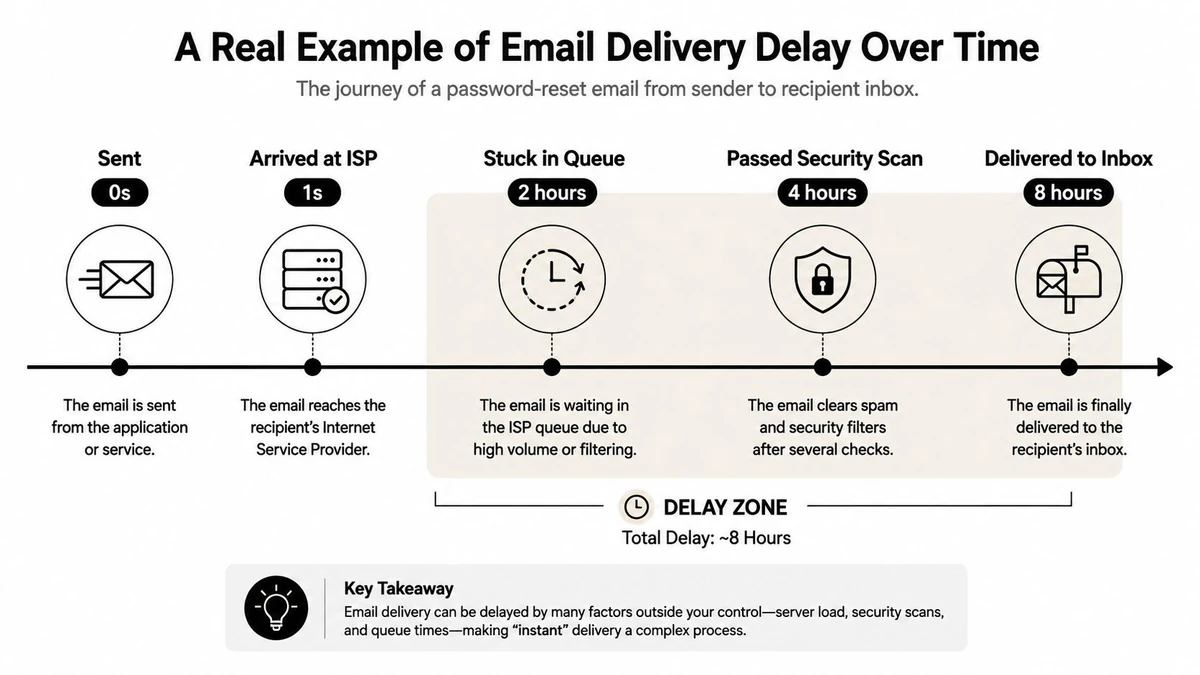
T+0 seconds
The application submits the password-reset message to the ESP. Its log records success, so the developer assumes delivery has started. The ESP has accepted the message, but that acceptance only confirms the first handoff. The recipient's mailbox provider has not accepted it yet.
T+10 seconds
The ESP tries the recipient domain. A relay handling a high-volume burst from the newly warmed IP receives a temporary rate-limit response, so the message enters the retry queue.
Marketing sees a few delayed transactional messages. The developer sees successful submission but has not checked the downstream SMTP response. The message is waiting, much like a package held at a busy sorting station after the sender receives a dispatch confirmation.
T+5 minutes
The next attempt reaches the recipient's infrastructure, which applies greylisting to the unfamiliar sender route. Another temporary response returns the message to the queue. Nothing appears in the recipient's mailbox, while the ESP still considers the message active and retryable.
T+2 hours
The queue now holds messages affected by throttling and greylisting. Retry intervals prevent constant reconnecting, but they also place the password-reset message behind other deferred mail. The dashboard reports queued or deferred status, and support receives a missing-link complaint.
T+8 hours
A later retry succeeds, and the recipient server accepts the message. The user finally receives the reset email, but the original request is no longer useful.
The clues appeared in order: a rate-limit response, a greylisting response, then growing queue age. The fix is to adjust the warming schedule, respect recipient throttling, and confirm predictable retries. Verification APIs can also keep known-bad addresses out of the queue, reducing avoidable retries before they affect delivery behavior or reputation.
How to Diagnose Email Delivery Delay Step by Step
Start with evidence from one affected message, then compare that message with others sent to the same recipient domain. A single delayed email can be incidental. A repeated timestamp pattern is actionable.
1. Read the SMTP logs
Find the first handoff attempt and the final acceptance time. Look specifically for 4xx responses, because they indicate temporary deferral. A 450 or 451 paired with “try again later” points toward greylisting or another temporary policy. A 421 often indicates throttling or a busy receiving service.
Don't manually resend every deferred message. Manual retries can add duplicate traffic while the original message is already waiting in the queue.
2. Identify the holding layer
Ask three questions:
- Did the ESP receive and queue the message promptly?
- Did a relay connect successfully to the destination MX server?
- Did the recipient server accept the message with a success response?
If the ESP has not attempted delivery, inspect sender-side queue depth. If attempts are occurring but receive repeated 4xx responses, inspect relay and recipient behavior. If the recipient accepted the message but the user can't find it, investigate inbox placement rather than SMTP delay.
3. Validate routing and authentication
Check the recipient domain's MX records, then validate your own SPF, DKIM, and DMARC alignment. Authentication errors can create policy-based deferrals, while DNS problems can prevent a clean SMTP connection.
Use an SMTP header inspection tool to compare Received timestamps across hops. The largest gap usually identifies where the message spent its time.
4. Compare controlled sends
Send test messages to seed accounts across major mailbox providers. Compare:
- Provider pattern: Is the delay limited to one provider?
- Domain pattern: Does it affect first contact only?
- Volume pattern: Does the lag grow as sending accelerates?
- Message pattern: Do only certain templates or payloads trigger it?
Cross-reference the results with ESP activity dashboards. A recipient-specific 4xx pattern calls for pacing and provider investigation. A universal queue delay points toward sender infrastructure. A routing failure calls for DNS or relay escalation.
| SMTP Code | Delay Cause | Diagnostic Action | Typical Resolution |
|---|---|---|---|
| 450 | Greylisting or temporary policy | Check whether first contact is affected | Confirm compliant retries and monitor later sends |
| 451 | Temporary recipient or policy deferral | Read the enhanced status and retry history | Correct the underlying policy or wait for retry success |
| 421 | Throttling or busy server | Compare response frequency with send rate | Slow the send rate and review provider limits |
| Local deferral | Sender queue congestion | Inspect queue age and backlog growth | Clear the bottleneck or escalate to the ESP |
| 550 with policy notes | Authentication or permanent policy issue | Validate SPF, DKIM, DMARC, and reputation | Fix policy or authentication before resuming |
A useful triage decision tree is simple. 4xx plus successful later delivery means investigate retry and pacing. DNS or authentication errors mean fix configuration. A growing local queue means involve the ESP or infrastructure owner. Accepted mail missing from the inbox belongs to filtering and placement analysis.
How Email Verification Stops Delay Before It Starts
A campaign can appear ready while invalid addresses wait at the entrance to the sending queue. Each one may trigger a failed connection, a bounce, or a retryable response. Verification moves that decision earlier, before the ESP opens SMTP conversations and schedules work that has little chance of reaching an inbox.
A practical verification stack uses four layers.
Syntax validation
The first layer catches malformed addresses, missing components, invalid characters, and common data-entry mistakes. These records require no SMTP attempt. Removing them before send prevents wasted processing and keeps obvious failures out of the queue.
MX record lookup
The next layer checks whether the domain publishes mail-routing records. A misspelled or inactive domain can be rejected before a message enters the queue. MX validation does not confirm a mailbox, but it separates many unreachable domains from addresses that merit deeper inspection.
SMTP probe
A verification service can connect to the recipient's mail server and issue an SMTP RCPT TO probe without sending a message (layered email verification process). The exchange helps assess whether the server accepts the mailbox address before a campaign begins.
The result still needs context. Some providers conceal mailbox status, accept every recipient, or avoid confirming whether an address exists. Interpret the probe alongside domain behavior rather than treating it as a guarantee.
Catch-all scoring
Catch-all domains accept mail for addresses that may not represent real, monitored inboxes. A catch-all score identifies that uncertainty, allowing your team to suppress, segment, or handle those records cautiously instead of treating them as confirmed recipients.
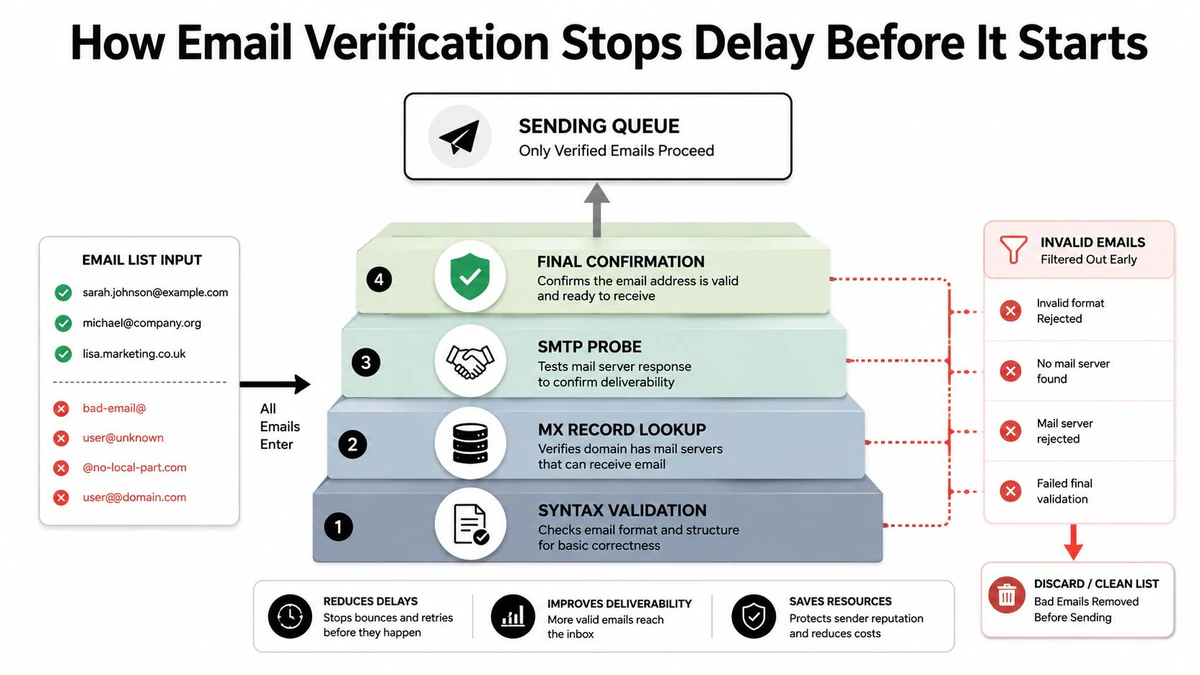
BillionVerify Email Verification applies this layered method to bulk and API workflows. It returns status, SMTP results, MX records, catch-all scoring, and deliverability insights in structured results. Marketing teams can clean lists before campaigns, while product teams can evaluate addresses during signup.
Independent deliverability guidance describes bounce rates under 2% as healthy and sustained rates above about 5% as a serious list-quality and reputation concern (bounce-rate hygiene guidance). Verification therefore does more than reduce permanent failures. Fewer bad addresses create fewer retries, reduce queue pressure, and make genuine provider throttling easier to identify.
Best Practices to Prevent Email Delivery Delay
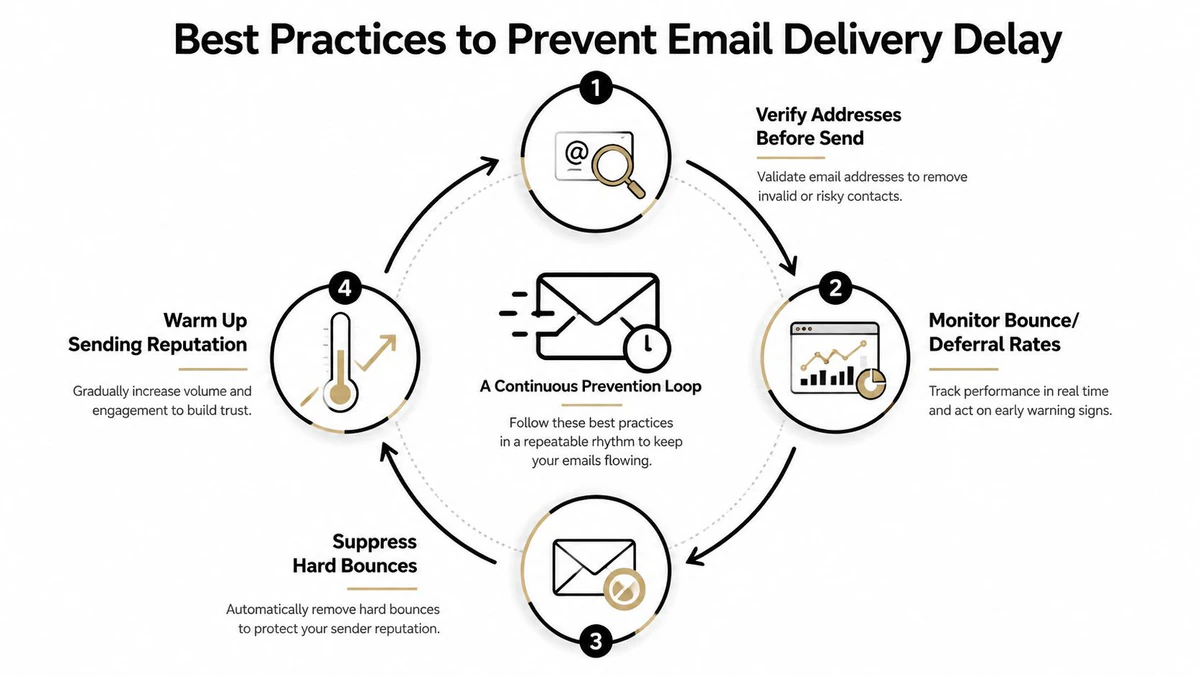
Prevention works as a repeatable operating rhythm, not a one-time cleanup. Build the checks into list collection, campaign preparation, and post-send review.
Verify before send
Run new addresses through syntax, MX, SMTP, and catch-all checks before they reach a campaign queue. For signup forms, verify in real time. For imported lists, clean the file before the ESP accepts the send.
Monitor the queue, bounces, and deferrals
Watch delivery timestamps alongside bounce and deferral responses. A rise in deferred messages can signal recipient throttling or a queue bottleneck before it becomes a broad campaign failure. Don't rely on the final delivered percentage alone, because it can hide messages that are still waiting for retry.
Suppress quickly
Remove hard bounces immediately. Suppress persistent soft bounces within 24 hours as an operational rule for keeping stale recipients from repeatedly re-entering the retry cycle. A healthy program should keep hard bounces below 0.3% and complaint rates below 0.1%, according to the operating thresholds supplied for this prevention framework.
Warm and segment carefully
Warm new IPs gradually rather than combining unfamiliar infrastructure with a sudden volume spike. Segment recipients by engagement and provider, pace large sends, and use separate sending subdomains when different streams need distinct operational controls.
Document every infrastructure change, including authentication updates, relay changes, routing modifications, and warming adjustments. Without a change record, teams often mistake a new configuration effect for random provider behavior.
Use a recurring email marketing deliverability guide to keep authentication, list hygiene, monitoring, and suppression in the same operating process. You can also compare your results with the independent guidance that treats sustained bounce rates above about 5% as a serious warning sign (list hygiene threshold guidance).
The central idea is simple: every invalid address kept out of the queue preserves processing capacity, reduces retry noise, and gives your team a cleaner view of real infrastructure problems.
BillionVerify provides email verification for bulk list cleaning and real-time workflows, helping teams check address validity before bad records create bounces, retries, and queue congestion. Visit BillionVerify to evaluate how pre-send verification can fit into your campaign, CRM, or signup process.