


The most popular advice on email validation vs verification is also the source of many deliverability problems: teams treat the terms as interchangeable and assume a “valid” address is ready for every send. It isn't. Validation filters obvious structural and domain problems, while verification probes whether a specific mailbox accepts mail at the time of the check.
That distinction doesn't make the two methods competitors. They work best as two stages of one hygiene pipeline. Validation is the inexpensive front gate. Verification is the deeper control that tests recipient acceptance. The practical question isn't which label sounds better. It's which stage your workflow needs, and what risk remains when that stage finishes.
Why This Distinction Changes Your Deliverability
A syntax check can reject a malformed address immediately, but it can't establish that the mailbox exists. A DNS or MX lookup can show that a domain has mail infrastructure, but it still doesn't identify whether person@example.com accepts mail. Technical guidance distinguishes those checks from SMTP verification, which opens a session and issues RCPT TO to test mailbox acceptance without sending a message. The technical difference between SMTP, MX, and API-based checks is important because verification normally stops before the DATA stage, so a result confirms acceptance at check time, not guaranteed delivery.
That residual uncertainty is where teams waste money. They validate a list, send it, then discover that abandoned mailboxes, full inboxes, catch-all domains, greylisting, and defensive filters still produce failures. A verification result can also become stale after the check, so neither process proves future delivery or inbox placement.
Practical rule: Use validation to prevent bad data from entering the system. Use verification before a consequential send.
The commonly repeated bounce figures in the planned comparison are not supported by the verified evidence available for this guide, so they shouldn't be presented as benchmarks. What the available technical evidence does support is more useful: on cooperative domains, full SMTP checks are described as materially more precise than DNS-only checks, with sources citing approximately 95% to 99% accuracy for SMTP checks and roughly 80% to 85% for MX-only validation. Those ranges vary with domain behavior and the definition of a successful result. EmailShield's SMTP versus DNS comparison also highlights catch-all domains, greylisting, and aggressive defenses as reasons a verifier may return an uncertain result.
| Metric | Validation Only | Validation + Verification |
|---|---|---|
| Main purpose | Filters malformed, mistyped, or unsupported addresses | Tests whether a specific mailbox accepts mail |
| What it proves | The address and domain appear structurally usable | The recipient server accepted the mailbox probe at check time |
| Remaining risk | Mailbox existence and acceptance remain uncertain | Catch-all, filtering, mailbox changes, and consent remain unresolved |
| Best role | Capture-time screening and low-risk pre-filtering | Pre-send hygiene for important or high-volume mail |
Deliverability is a budget outcome, not a checkbox. Every send to an address that should have been suppressed consumes message volume, creates operational noise, and can weaken the quality signals your sending program depends on. Teams building a reliable process should use this BillionVerify email verification guide as a practical reference, then map validation and verification to separate decision points.
What Validation and Verification Actually Mean
Email validation is the rule-based first pass. It examines whether an address follows expected syntax, whether its domain has usable mail records, and whether it shows recognizable risk patterns such as a disposable or role-based address. It can also normalize obvious typos, such as a mistyped domain resembling gmail.con instead of gmail.com, depending on the service and its correction rules.
Email verification goes further by attempting an SMTP conversation with the recipient domain. After connecting to the mail server, the verifier uses RCPT TO and interprets responses such as 250, which can indicate acceptance, 450, which can represent a temporary or deferred response, and 550, which commonly indicates rejection or a nonexistent recipient. This is a live mailbox probe, not a message delivery test.
Where the terminology becomes confusing
Marketing platforms and CRM vendors sometimes use “validation” and “verification” interchangeably because both support deliverability. That isn't just a vocabulary problem. A buyer may purchase a tool expecting mailbox-level certainty and receive only syntax and domain screening, or reject a useful capture-time validator because the product page uses “verification” as a broad category label.
The safest procurement question is simple: Does the service open an SMTP session and test recipient acceptance, or does it stop after syntax and DNS checks? Ask how it handles greylisting, catch-all domains, timeouts, and unknown responses. A strong workflow should preserve those distinctions instead of collapsing every result into a green “valid” badge.
For implementation guidance, teams can review how to verify emails safely, particularly when checks run against lists collected from several sources. At the product layer, you can verify email addresses before they enter a CRM or trigger a message.
The mental model is short: validation asks whether the address is shaped right, while verification asks whether it will accept your message now.
How a Modern Verification Pipeline Works
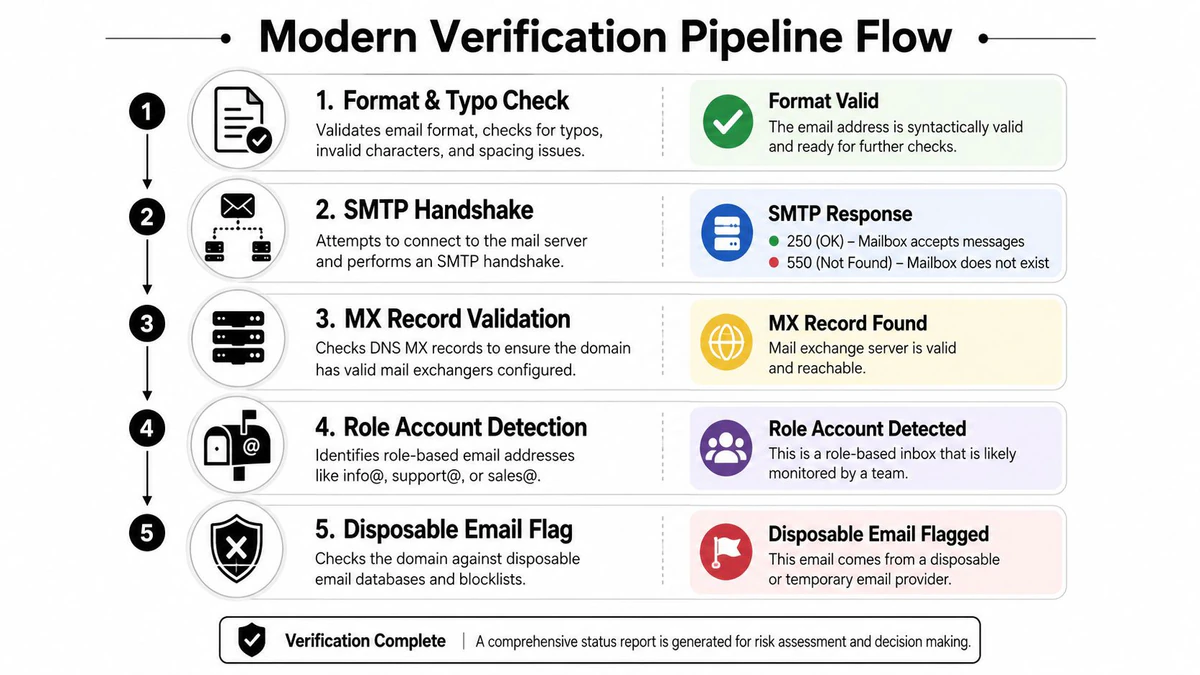
A modern pipeline doesn't begin with SMTP. It starts with cheap filters, then spends latency and compute only where the address survives.
Format and typo normalization catches malformed syntax, missing components, invalid characters, and recognizable domain mistakes. This stage belongs inline on a form because it can give immediate feedback without waiting for a remote mailbox server.
DNS and MX lookup checks whether the domain has mail-handling infrastructure. A failed lookup is a strong reason to reject or correct the address, but a successful lookup only establishes that the domain can participate in email. It doesn't prove that the individual mailbox exists.
Risk classification identifies disposable addresses, role accounts, and other patterns that may be unsuitable for a particular workflow. A role address isn't necessarily invalid, and a disposable address may technically accept mail. The correct response depends on whether the form supports a long-term customer relationship, a one-time download, or an internal alert.
SMTP handshake and RCPT probing test mailbox acceptance. A
250response may support a valid classification, while a550response may support an invalid classification. A450or another deferred response needs retry logic because greylisting and temporary defenses can create false negatives when the verifier gives up too quickly.Catch-all classification and status assignment separate definitive results from uncertain ones. Useful output categories include valid, invalid, risky, and unknown, with catch-all or accept-all behavior retained as a risk signal rather than hidden inside “valid.”
Inline checks versus batch hygiene
A real-time API should keep the fast structural checks on the form path and handle remote checks with timeouts, retries, and a clear fallback. Don't block account creation indefinitely because a recipient server is slow. Store the address, record the uncertain status, and apply a stricter policy before sending marketing mail.
Batch processing serves a different job. It cleans imported lists, checks aging CRM records, and gives the system room to retry temporary responses without damaging form conversion. Webhooks, nightly CRM syncs, and send-time suppression can feed the same status model. Only the trigger changes.
BillionVerify is a professional email verification service built to solve one problem: bad email data costs businesses money. Teams evaluating an implementation can browse BillionVerify email API when they need to compare a real-time integration with bulk list processing.
Validation vs Verification Side by Side
The procurement mistake is treating speed, accuracy, cost, and proof as one decision. They aren't. Validation is usually fast and inexpensive because it relies on local rules and domain-level signals. Verification requires network communication with a recipient server, so it consumes more time and can encounter defenses that a syntax engine never sees.
Accuracy needs careful wording. The verified technical source set describes approximately 95% to 99% accuracy for full SMTP checks on cooperative domains, compared with approximately 80% to 85% for MX-only validation. A separate benchmark-style report claims approximately 99.8% to 99.9% verified accuracy for definitive SMTP labels, while also explaining that catch-all domains, greylisting, and aggressive spam defenses reduce the rate of definitive answers in real-world conditions. These figures shouldn't be treated as a promise for every list or domain.
| Criterion | Validation | Verification |
|---|---|---|
| Primary test | Syntax, domain, MX, typo, and risk screening | SMTP session with RCPT TO mailbox probing |
| What it can prove | The address is structurally plausible and the domain appears configured | The recipient server accepted or rejected the mailbox probe at check time |
| Typical accuracy guidance | Approximately 80% to 85% for MX-only checks, with legacy DNS-only tools described around 91% to 94% | Approximately 95% to 99% on cooperative domains, with definitive benchmark labels reported around 99.8% to 99.9% |
| Processing profile | Fast, suitable for synchronous capture flows | Slower and dependent on remote-server response, retries, and rate limits |
| Relative cost | Lower resource and processing cost | Higher operational cost because it performs live remote checks |
| False results | Can pass nonexistent mailboxes because it doesn't probe them | Can return uncertain or misleading results on catch-all, greylisted, or heavily protected domains |
| Best lifecycle moment | Address capture, import pre-filtering, typo correction | Pre-send cleaning, high-value outreach, and final list decisions |
The distinction matters most when risk is asymmetric. A low-value form submission may need immediate syntax and MX screening, while a large campaign or sensitive transactional stream deserves deeper mailbox checks. Applying SMTP verification to every keystroke wastes resources. Applying only validation before a major send leaves the most consequential uncertainty unresolved.
The right architecture is therefore layered, not binary. Let validation remove obvious failures early, and reserve verification for addresses whose acceptance status can change a sending decision.
The Real Impact on Deliverability and Sender Reputation
Mailbox providers evaluate sending behavior through multiple signals, including bounce patterns, complaints, authentication, message quality, and recipient engagement. AWS guidance on improving sender reputation with email validation explains that bounces are a critical reputation factor and that sustained high bounce rates can lead providers to warn, throttle, or block sending. The operational lesson is straightforward: prevention is safer than waiting for the provider to report the failure.
Validation helps prevent obvious errors, but it doesn't test the mailbox. If a database contains old addresses, bot-generated submissions, or records from a partner import, syntax and MX checks may leave meaningful uncertainty in the sendable segment. Verification reduces that uncertainty by testing recipient acceptance, although it still can't guarantee inbox placement.
Catch-all decisions create the hardest trade-off
Catch-all domains accept mail for addresses that may not exist individually. A probe can therefore receive a positive SMTP response even when the specific recipient is not a real person. Removing every catch-all record protects against some failures but can discard legitimate contacts. Sending to every catch-all record preserves reach but keeps an unresolved risk in the campaign.
The answer is segmentation, not a universal rule. Keep catch-all results separate from definitive valid results, prioritize them for manual review or controlled testing, and don't let an aggregate “valid” count hide the uncertainty. You can verify your sending reputation alongside list-level checks, because address hygiene and sender monitoring answer different questions.
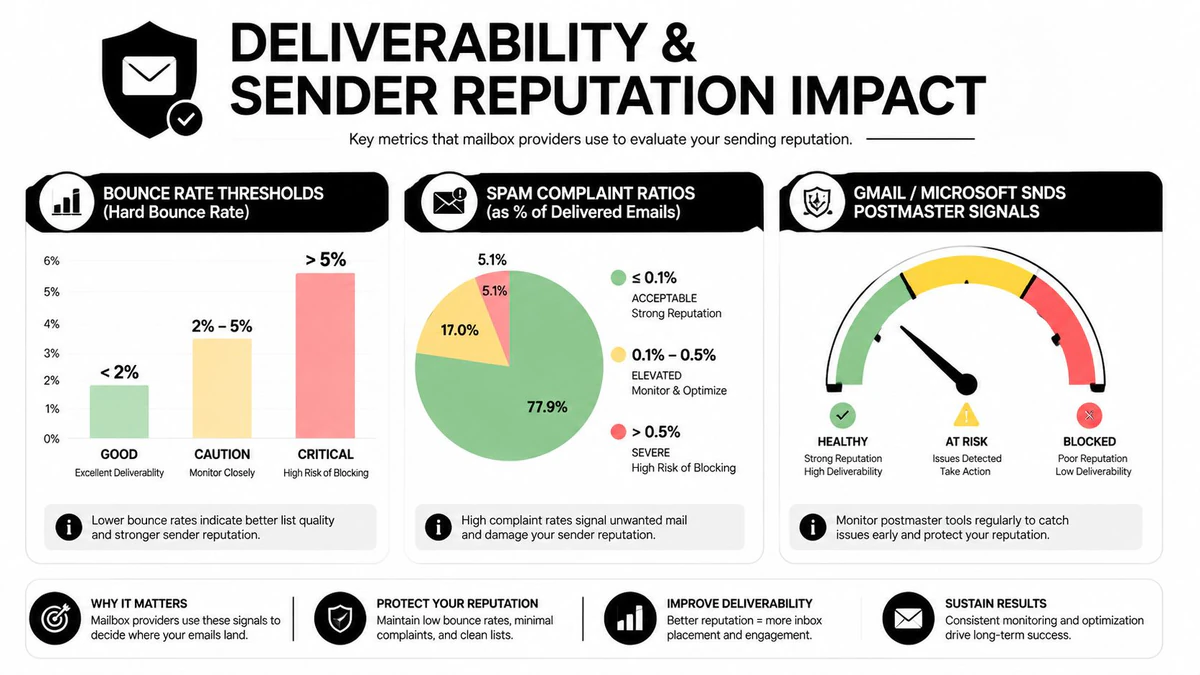
Verification also doesn't repair consent or content problems. A technically accepting mailbox can still ignore, report, or filter a message. The reputational value comes from suppressing addresses that present avoidable delivery risk before they enter the send stream, then combining that practice with authentication, complaint handling, relevance, and engagement controls.
When to Use Each by Team and Use Case
The correct stage depends on what the team is trying to protect. Marketing protects campaign deliverability, sales protects the quality of direct outreach, and product protects the database at the moment an address enters it. The same email address can therefore receive different treatment in different workflows.
Marketing and the large nurture send
A marketing team preparing a 50,000-record nurture campaign shouldn't rely on capture-time validation alone. The list may contain stale records, role accounts, disposable addresses, and domains whose behavior changed after acquisition. Run the full verification pipeline before the send, quarantine invalid and risky results, and keep catch-all records in a separate segment.
The accountable metric is campaign bounce rate and deliverability, not the percentage of records that passed a preliminary filter. Verification moves that metric more directly because it examines mailbox acceptance rather than only address structure.
Sales and the cold prospecting list
A sales team working a 5,000-record cold list faces a different cost and relevance calculation. Full verification may be appropriate for the entire list when the outreach is high stakes, but a focused policy can prioritize catch-all and role-based addresses, especially where a shared inbox is unlikely to produce a useful reply.
The metric is reply quality, not merely the number of messages sent. Syntax validation removes obvious input errors. SMTP checks and role classification help sales decide which records deserve a personalized touch, which should be reviewed, and which should be excluded.
Product and signup capture
Product teams should run real-time syntax and MX validation when a user submits a form. That catches typos before the application sends an account email or stores unusable data. A nightly batch verification pass can then identify newly disposable domains, unresolved statuses, and records that require a stricter pre-send policy.
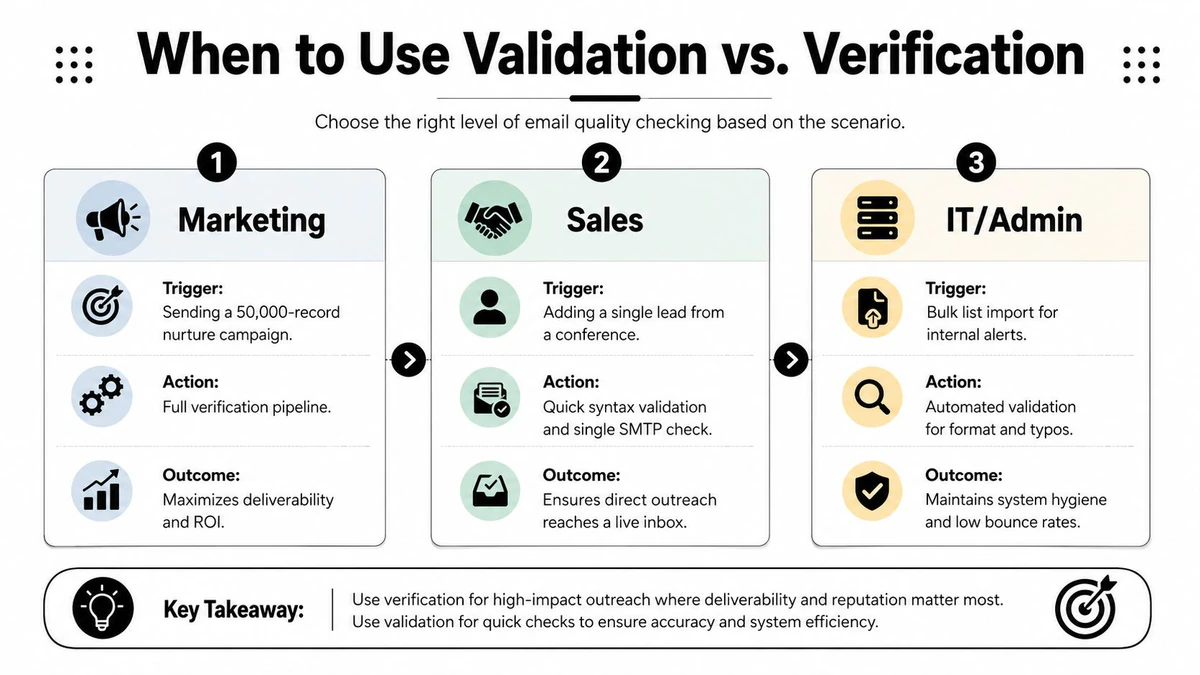
The product metric is successful account activation or usable customer records. Don't force a slow mailbox probe into every form submission if it harms conversion. Capture the result, explain uncertainty clearly, and apply deeper verification before sending recurring communications.
Recommended Workflow and Implementation
A practical workflow uses the least expensive check that can answer the current question, then escalates only when the business risk justifies it.
At capture, validate syntax and obvious typos. Give users a useful correction when the error is clear. Reject malformed input, but don't claim that a structurally correct address is an active mailbox.
At import, run domain and mailbox checks. Use MX screening first, then SMTP verification for records that will enter a campaign, outbound sequence, or important notification stream.
Classify instead of flattening. Store valid, invalid, risky, and unknown as separate statuses. Role accounts, disposable addresses, and catch-all results need policy decisions, not silent conversion into a single pass/fail field.
Suppress known failures permanently. Keep hard-bounce and complaint suppression lists outside ordinary reactivation logic. A later verification result shouldn't automatically override a confirmed complaint or an address your sending system has already suppressed.
Recheck active segments periodically. Mailboxes change, domains expire, and old records lose value. Use a recurring review for active nurture segments, with the exact cadence determined by list age, acquisition source, and observed failure patterns.
For implementation, use debounced real-time calls on forms so the system doesn't send a remote request for every keystroke. Use batch processing during CRM synchronization, then expose the result to marketing automation and sales sequencing tools. Timeouts should produce an unknown or deferred status, not an automatic invalid classification.
A rollout checklist
- Marketing: Verify before major campaigns, isolate catch-all records, and monitor bounce and complaint events.
- Sales: Validate at import, verify records that will receive cold outreach, and review role addresses before sequencing.
- Product: Validate at signup, store the result, and run a background verification process before recurring sends.
- Operations: Retain suppression lists, document status meanings, and audit vendors to confirm whether “verification” includes SMTP probing.
The workflow works because it respects the limits of every stage. Validation protects the database from obvious defects. Verification protects the send from mailbox-level uncertainty. Neither one replaces consent, authentication, content quality, or engagement management.
FAQ on Edge Cases and Limits of Verification
How should catch-all domains be handled?
Treat catch-all or accept-all results as uncertain, not definitively valid. The server may return 250 for a recipient even when the local mailbox isn't provisioned, so a positive probe can't establish that a person will read or respond. Keep these addresses in a separate segment, apply a lower-risk sending policy, or require manual review before a large campaign.
Teams that need a dedicated control can detect catch all email addresses and preserve the result as a field in their CRM. Don't delete every catch-all record automatically. Some legitimate recipients sit behind those configurations, and the right choice depends on the value of the segment and the cost of a failed send.
Are role addresses automatically bad?
No. Addresses such as info@, support@, and sales@ can be monitored by real people, but they often represent shared inboxes rather than individual recipients. Shared ownership can reduce personalization and may increase complaint or disengagement risk in some programs. Quarantine them for review when direct consent or one-to-one outreach matters.
Why can disposable addresses pass validation?
Disposable providers can have working domains and valid MX records. That means syntax and DNS checks may pass even though the address is temporary, difficult to associate with a durable customer, or unlikely to support long-term engagement. Use disposable detection as a policy signal, then decide whether the offer or account type requires a lasting mailbox.
What does verification not prove?
Verification doesn't prove consent, mailbox ownership, message quality, inbox placement, future delivery, or engagement intent. It tests recipient-server acceptance at a particular moment. A mailbox can be valid and still filter the message, ignore it, report it, or become unavailable later.
How do mailbox-full and greylisting responses differ from invalid results?
A mailbox-full response can be temporary, while a greylisting response asks the sender to retry later. A definitive rejection such as 550 can support an invalid classification, but a 450 or timeout should normally enter a retry or unknown path. Treating every temporary response as a hard failure creates false negatives and removes potentially valuable records.
| Edge Case | Verification Output | Recommended Action |
|---|---|---|
| Catch-all domain | Acceptance response with mailbox existence unresolved | Segment as risky or unknown, then review or controlled-test |
| Role account | Mailbox may accept mail, but the address is shared | Quarantine for policy review and limit personalization assumptions |
| Disposable address | Domain and mailbox may respond, but the address is temporary | Suppress for long-term programs or accept only where the use case permits |
| Mailbox full | Temporary failure or deferred response | Retry later and avoid immediate deletion |
| Greylisting | 450 or another temporary response | Retry with backoff, then classify as unknown if unresolved |
| Hard rejection | 550 or comparable permanent failure | Suppress from sending and retain the reason |
| Valid SMTP result | Server accepted the probe at check time | Permit sending only after consent and campaign policy checks |
A verified address is a delivery-risk signal, not a promise that your message belongs in the inbox.
The strongest implementation keeps validation and verification connected but distinct. Run the inexpensive structural gate early, use SMTP checks where sending risk is material, preserve uncertainty instead of hiding it, and maintain suppression rules beyond the verification result.
If bad email data is costing your campaigns, BillionVerify can help you apply mailbox-level verification, bulk list cleaning, and real-time checks as part of a layered hygiene workflow. Visit BillionVerify to evaluate where verification should fit into your signup, CRM, and pre-send processes.