



Most advice on bounce rate is lazy. It treats every bounce like a page problem, then tells you to rewrite copy, add a video, and hope the metric moves. That approach misses the split: website bounce rate and email bounce rate are different problems, and teams that blur them usually fix the wrong one.
On the web side, GA4 bounce rate is the share of unengaged sessions, not the old single-page-session definition many marketers still repeat. On the email side, bounce rate is about delivery failure, and that's where sender reputation gets damaged. If you're serious about how to improve bounce rate, you need to diagnose which bounce you're looking at before you touch a headline, a layout, or a list.
Why Bounce Rate Is Two Problems Hiding Under One Name
A lot of teams waste weeks arguing about one metric that hides two different failures. In GA4, bounce rate is tied to unengaged sessions, so a visit counts as a bounce when it does not last long enough, does not convert, and does not trigger enough interaction to count as engaged. That is a measurement model, not a verdict on the page. Semrush's GA4 explanation makes that distinction clear, and it matters because a page can look weak in reports while still doing its job.
Email bounce rate is a different problem. Here, the issue is not scroll depth or clicks, it is whether the message reached a mailbox at all. Validity's 2025 benchmark report says global bounce rates for permission-based email marketing hover around 1.5%, which implies an average delivery rate of about 98.5%. The same report also notes 84.8% inbox placement, 6.1% spam placement, and 9.1% missing rate. That missing rate is the warning sign. Delivery and inboxing are not the same thing. Validity's report
Practical rule: identify the channel first. Web bounce calls for relevance, UX, and speed work. Email bounce calls for list hygiene and verification.
The mistake I see most often is teams blaming landing pages for a decline that started in the CRM. They redesign the hero, swap the CTA, and celebrate a cleaner layout while bad email data keeps hurting send quality. Senior growth teams start with diagnosis, not aesthetics.
If you need a quick starting point for the email side, use a bounce rate calculator tool before you touch the send list again.
Measuring and Segmenting Before You Fix Anything
Build two dashboards, not one
Start with a GA4 landing-page view and break it down by traffic source, device, and country. Don't average the whole site together, because the average hides the pages that are dragging performance. Then build the matching ESP dashboard for hard bounces, soft bounces, spam complaints, and inbox placement. The point is to see whether bad engagement is a web problem, a traffic-quality problem, or a list-quality problem.
That separation changes the decision tree. A pricing page with high bounce may be performing exactly as intended if visitors get the answer fast. A campaign landing page with high bounce from one channel and normal performance from another usually points to audience mismatch, not broken design. The right fix depends on the segment, not the sitewide average.
Rule of thumb: if one page or one source is far worse than the rest, treat it as structural only after you've ruled out source intent, device friction, and list decay.
| Channel | Healthy Range | Warning Zone | Crisis Threshold |
|---|---|---|---|
| Web | Context dependent, but many teams treat under 40% as strong | Around 60% and above can signal a problem | Extremely high unengaged sessions across key pages |
| Under 2% total bounce is a practical benchmark | 2% to 5% is a warning zone | Above 5% is critical | |
| Email hard bounce | Under 1% is the usual target | Above 1% needs attention | Some guidance tightens the safe zone below 0.5% |
That table comes into focus when you compare it with a different benchmark from the analytics and measurement bible. The key takeaway is simple, if a page or list is outside the healthy range, don't guess. Segment first, then fix the thing that's broken.
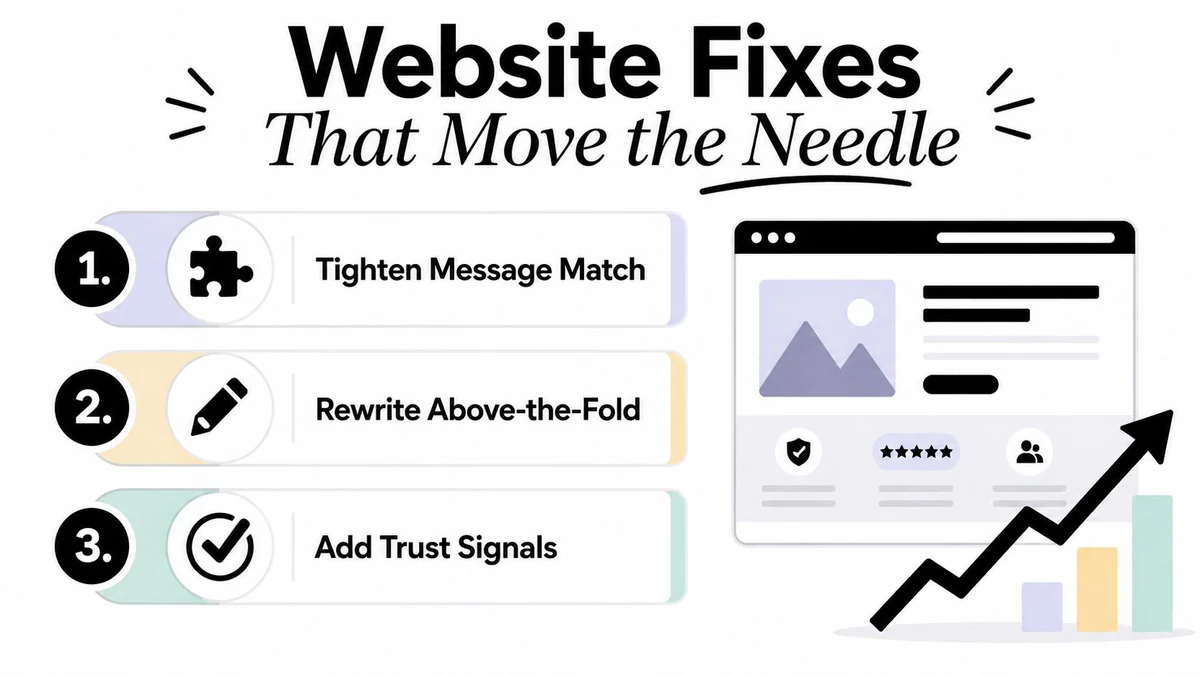
Website Fixes That Actually Move the Needle
Most web bounce work fails because teams optimize noise. They polish paragraphs while visitors are still confused about what the page offers, or they shave 200 words off copy while the page is too slow to load. The fixes that matter come in a strict order, relevance first, clarity second, speed third, technical cleanup last.
Start with message match and the fold
If a visitor clicked an ad, email, or search result, your page has to echo that promise immediately. Tighten the message match between the source and the landing page, then rewrite the top section so the value proposition, primary CTA, and trust signals are visible without scrolling. If those elements sit below the fold, you're making people work too hard.
I've audited pages that buried the CTA under three blocks of marketing language and a carousel nobody touched. The page wasn't “underperforming,” it was hiding the answer. When the headline, subhead, and proof align with the click source, teams usually stop seeing mystery exits and start seeing actual evaluation behavior.
Fix speed and technical drag
If the page feels slow, treat it like a defect, not a brand issue. Cut page weight, remove render-blocking scripts, compress oversized images, and clean up third-party tags that stall the browser. The benchmark to watch is Largest Contentful Paint under 2.5 seconds, because that's the point where many teams start seeing less friction on entry. Semrush's bounce-rate guide calls out that LCP target directly.
Then move to technical hygiene. Broken internal navigation, 404s, and redirect chains waste sessions and make the page feel neglected. Mobile issues matter just as much, check tap targets, viewport layout, and any interstitials that block the actual content. If the page works on desktop but turns clumsy on a phone, your bounce problem is design debt, not copy debt.
If you want the shortest path to improvement, fix the first screen, the load time, and the broken paths in that order.
The same audit discipline applies when you're choosing the right Email Validation API for signup forms. Keep the validation logic close to the point of capture, because bad inputs are cheaper to stop than to repair.
Email Verification and List Hygiene as a Structural Fix
A clean landing page won't save a dirty list. Email bounce rate is governed by the quality of the addresses you send to, not by how clever the creative looks. If your list contains bad domains, dead inboxes, disposable addresses, and stale contacts, your sender reputation will take the hit no matter how good the campaign copy is.
Know hard bounces from soft bounces
Hard bounces are permanent failures. They usually come from invalid domains, nonexistent mailboxes, or addresses that should never have entered the CRM in the first place, including role accounts like info@ or support@ when you don't want them on a marketing list. Soft bounces are temporary, things like full mailboxes, greylisting, throttling, or a brief outage. Both matter, but they don't behave the same way.
The technical reason verification works is straightforward. Email verification starts with syntax checking, then MX lookup, and then, if needed, SMTP-level verification to test whether a mailbox exists without sending a message. This explanation of syntax, MX, and SMTP checks is the right mental model. It also explains why verification reduces hard bounces but can't eliminate every future failure, because mailbox existence changes over time. SMTP-level verification guidance says that directly.
| Bounce Type | Common Cause | Retry Behavior | Reputation Impact |
|---|---|---|---|
| Hard bounce | Invalid address, nonexistent mailbox, bad domain | Don't keep retrying | Strong negative signal if repeated |
| Soft bounce | Full mailbox, throttling, temporary outage | Can be retried briefly | Less severe, but still a warning if it persists |
Make verification part of the system
List hygiene stops being housekeeping and becomes infrastructure. The strongest setup is real-time verification at capture, bulk re-verification for aging lists, and a suppression policy that removes bad records instead of reintroducing them. The published dataset in the brief reports an average bounce reduction of 85%, from 8.4% to 1.2%, after verification, with hard bounces falling 85.7% and total bounce rate dropping from 11.5% to 3.0%. Those are the results you get when teams stop treating bad data as a cosmetic issue. That verification dataset is also the clearest proof that pre-send cleaning works.
BillionVerify fits naturally here as a professional email verification service built to solve one problem, bad email data costs businesses money. Use a tool like that at the point of signup, then run periodic list cleaning through the same discipline before the next major send.
If you want a working policy, use double opt-in for new subscribers, sunset inactive contacts after a reasonable window, and stop mailing people who haven't engaged for months. The exact timing should match your send cadence and audience behavior, but the principle doesn't change, stale addresses belong in suppression, not in your next campaign.
If you need a structured cleanup workflow, the how to clean email lists guide is the right place to formalize it in your process. And if you want to get serious about measuring the change, the email marketing testing guide helps you separate signal from noise before and after verification.
A/B Testing and Ongoing Monitoring
Testing is where many teams lie to themselves. They change five things at once, watch a metric wobble, then claim success because the new version feels cleaner. Real testing starts with a hypothesis, not a redesign.
Test one variable and read the result honestly
For a web page, frame the test like this: if the hero headline changes, bounce rate should drop because intent match improves. Then run a single-variable test, keep traffic split identical, and give the test enough time to collect meaningful behavior before you call a winner. For email, test subject line, preview text, send time, and from-name one at a time so you know what moved the result.
If you need a broader testing mindset, the multi-channel test framework from Sprints & Sneakers is a useful reference because it keeps channels separate without losing the bigger picture. That matters when the same audience sees your offer in search, email, and retargeting, but reacts differently in each place.
Monitor on a schedule, not after a disaster
Weekly, check your GA4 and ESP dashboards. Monthly, compare new vs returning users, because those cohorts often behave very differently. Quarterly, compare the current bounce rate with the baseline you documented before the fixes shipped. The point is to spot drift before it turns into reputation damage or a broken funnel.
Trigger an investigation immediately if web bounce spikes meaningfully or email bounce starts climbing again. Waiting for a second bad send or another redesigned page wastes the window where cleanup is still easy.
A simple monitoring cadence catches decay early, especially on pages and lists that change often. Traffic sources shift, email lists age, and pages drift away from the promise that originally brought people in. If you don't watch the metric after the fix, you're back to guessing.
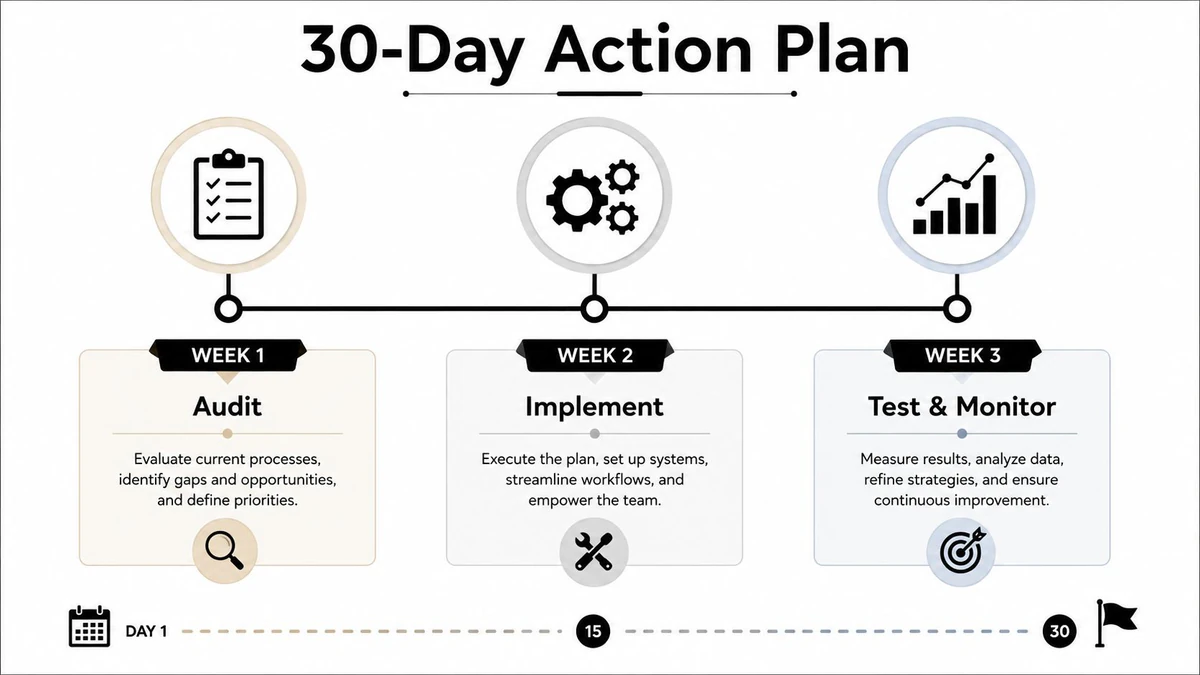
Your 30-Day Bounce Rate Action Plan
Week 1 is the audit. Pull 90 days of GA4 engagement data segmented by landing page, traffic source, device, and country. Export ESP bounce reports split by hard and soft, then calculate the baseline and flag outliers that sit more than 20% above the median. That gives you the priority list instead of a pile of opinions.
Week 2 is the triage. Use a simple impact-effort matrix and ship the fast wins first, message match, above-the-fold clarity, and image compression. If a page is confusing, fix the top section. If it's slow, reduce the weight. If the source and the page don't line up, correct the promise instead of decorating the page around the problem.
Week 3 is the structural cleanup. Run a list-clean through BillionVerify or an equivalent verification workflow, then deploy real-time verification at every form. Document a sunset policy so inactive subscribers don't linger forever, and remove addresses that have gone stale. That's the week many teams finally stop feeding bad data back into the system.
Week 4 is testing and control. Launch your first A/B tests, build the monitoring dashboard, and schedule the first 30-day review. Your checkpoints should be obvious, baseline documented, top three fixes shipped, list cleaned and verified, dashboard live. If any of those are missing, you don't have an optimization program yet, you have a set of disconnected tasks.
If your bounce rate problem lives in the inbox, BillionVerify gives you the verification layer that bad data keeps breaking. If it lives on the page, the same discipline applies, measure it, segment it, and fix the source instead of the symptom. Visit BillionVerify to clean the list, protect deliverability, and make bounce rate work as a signal instead of a mystery.