


A 2025 quality report analyzing nearly one billion email addresses found 11.7% invalid and 7.9% risky, with 19.6% of active databases potentially harmful to deliverability (OpenPR's 2025 email list quality report). That's why “verify email address list” shouldn't mean uploading a CSV once, exporting the green rows, and forgetting the process.
A reliable workflow has several gates. You clean the file before upload, inspect syntax and domain records, interpret catch-all and role-account signals, separate valid from safe to send, and then feed only the right segments into your sending stack. After that, you re-verify as the data ages and validate new addresses at the point of capture.
Why Verifying an Email Address List Matters in 2026
Email databases decay through job changes, closed domains, abandoned mailboxes, and addresses that later become traps or shared accounts. One industry source says about 2% of a verified list can go bad in four weeks, with annual decay still around 23% (Mailgun's State of Email Deliverability report). A list that performed well recently can therefore create hard bounces during the next campaign.
The operational benchmark is clear. Permission-based email programs recorded average combined bounce rates of about 1.5% in 2022, while average inbox placement was just below 85%, meaning roughly one in six legitimate marketing messages missed the inbox (Saleshandy's email deliverability statistics). Marketers commonly treat bounce rates above 2% as a warning and rates above 5% as critical for sender reputation, using those thresholds to decide when cleaning is overdue.
The cost of skipping list hygiene
Three problems usually appear together:
- Hard bounces: Dead addresses create permanent failures and can weaken the reputation of the sending domain or IP.
- Trap exposure: Old addresses may be repurposed or used as honeypots, turning careless outreach into a reputation event.
- Database distortion: Duplicate, dead, and role-based records inflate contact totals and make campaign attribution less trustworthy.
A clean list also improves decision-making. If a sequence underperforms, you can assess the message, offer, audience, and timing without confusing bad data with poor marketing.
| Source | Annual Decay Rate | Primary Cause |
|---|---|---|
| B2B contact databases | Around 23% | Job changes, abandoned mailboxes, and domain shutdowns |
| Aged outbound lists | Qualitatively high | Stale records and weak collection controls |
| Recently captured leads | Variable | Typos, bots, disposable addresses, and invalid submissions |
Practical rule: Treat verification as a recurring hygiene cycle, not a one-time CSV upload. A “valid” result is only one input into a send decision.
Keep a record of every run, including the source list, capture date, result distribution, and suppression decisions. The Email Verification Benchmark can help you compare list-quality signals against operational deliverability thresholds.
Preparing Your CSV and Filtering Out Risk Before You Upload
Verification works better when the input file is orderly. Start by creating one canonical email field, separating it from merged CRM cells such as name, company, title, source, and notes. Preserve those fields in their own columns so you can reconnect verification results to the original contact without losing segmentation data.
Remove duplicates before the file reaches the verifier. Compare addresses case-insensitively, normalize whitespace, and review plus-addressing variants when your data source may have created multiple records for one mailbox. Then run a syntax pass for missing @ characters, trailing dots, malformed domains, and Unicode lookalikes that may appear visually correct but fail standard mail handling.
A practical pre-upload sequence
- Normalize headers: Use a single
emailcolumn and consistent field names for supporting data. - Remove duplicates: Match email values without treating capitalization as meaningful.
- Block role accounts: Separate
info@,sales@,support@,press@, andabuse@before deciding whether they belong in the campaign. - Filter disposable domains: Maintain a refreshed blocklist containing services such as Mailinator, Guerrilla Mail, and 10MinuteMail.
- Review free-mail domains: If the campaign targets business contacts, flag consumer domains for separate handling rather than automatically deleting them.
- Check suppressions: Deduplicate against unsubscribed, complained, and previously hard-bounced records.
For a more detailed pre-flight process, use this guide on how to clean email lists for cold.
Before cleaning:
| contact_name | company | source | |
|---|---|---|---|
| SALES@northstar.example | Jordan Lee | Northstar | Event |
| jordan@northstar.example | Jordan Lee | Northstar | Event |
| bad-addressnorthstar.example | Jordan Lee | Northstar | Import |
After preparation:
| contact_name | company | source | precheck | |
|---|---|---|---|---|
| jordan@northstar.example | Jordan Lee | Northstar | Event | syntax-pass |
| sales@northstar.example | Shared mailbox | Northstar | Event | role-review |
The second row may remain in a separate review file if your sales process can legitimately address a shared inbox. It shouldn't enter the same segment as individual decision-makers.
How SMTP, MX, and Catch-All Checks Work
Email verification follows several technical checks rather than one server question. The verifier first queries the domain's DNS and looks for MX records, which identify the mail servers responsible for receiving messages. A missing or unusable MX setup is a strong invalid signal because the domain has no functioning route for delivery.
The next layer is an SMTP handshake. The verifier connects to the receiving server and sends a recipient probe without delivering the message itself. A clear rejection is useful evidence. An acceptance response requires more caution because some servers accept nearly any recipient.
Why catch-all domains change the answer
A catch-all domain accepts mail for almost any recipient, including addresses that do not exist. Organizations may configure servers this way to prevent outsiders from enumerating valid mailboxes. As a result, an SMTP acceptance response cannot confirm that a specific inbox is real.
Catch-all behavior can leave up to 30% of a list classified as unknown (the catch-all domain analysis on DEV Community). SMTP alone is therefore insufficient. Useful signals include seeded-address tests, historical bounce behavior, domain-level patterns, role detection, syntax, and DNS results. BillionVerify catch all detection can combine SMTP probes with historical bounce data to score these domains.
BillionVerify provides structured verification results that can include status, SMTP results, MX records, catch-all scoring, and deliverability insights. Those fields help turn a one-time check into an ongoing hygiene cycle, especially as addresses and domain behavior change.
SMTP rule: Trust clear SMTP rejects. Treat catch-all accepts as unknown until historical sending data or stronger scoring supports a safer decision.
The distinction matters in B2B data, where catch-all configurations are common and a green SMTP response can create false confidence. A useful result should show certainty and risk, then guide the next action. An address can be technically valid while still being unsafe to send because the mailbox is uncertain, role-based, or associated with prior bounce risk.
Reading Verification Results and Separating Valid From Safe to Send
A verification report usually contains more nuance than a single validity column. Valid generally means the address passed the available technical checks and appears capable of receiving mail. It doesn't guarantee that the recipient wants your message, that the mailbox is monitored, or that the server won't block your sender.
Read each status as a decision signal:
- Valid: Syntax, domain, and mailbox signals support delivery. Keep it in the standard send segment if consent and suppression checks also pass.
- Invalid: The address has a strong failure signal, such as bad syntax, missing mail routing, or a rejected mailbox. Suppress it.
- Catch-all: The domain accepts broadly, so the individual mailbox remains uncertain. Segment it for cautious treatment or further confirmation.
- Role-based: The address points to a shared function such as
info@orsupport@. Decide based on campaign purpose and permission. - Disposable: The address is associated with temporary mail use. Suppress it for most marketing and outbound programs.
- Unknown: The verifier couldn't establish enough evidence. Don't merge it with valid records because it lacks an explicit invalid label.
Sub-statuses add context. A mailbox-full response can indicate a temporary capacity problem, while greylisted responses may require a later check. A disabled status is more serious and should normally be suppressed unless your internal data proves the mailbox was restored.
Turn raw results into operating buckets
| Status | Meaning | Risk Level | Recommended Action |
|---|---|---|---|
| Valid | Technical checks support delivery | Deliverable | Send if consent and suppression rules pass |
| Invalid | Strong evidence the address won't accept mail | Undeliverable | Suppress and retain the reason |
| Catch-all | Domain accepts recipients broadly | Risky | Segment, confirm, or send cautiously |
| Role-based | Shared or functional mailbox | Risky | Use only when the campaign supports it |
| Disposable | Temporary address pattern or domain | Risky | Suppress in most programs |
| Unknown | Evidence is incomplete or inconclusive | Risky | Hold for review or additional verification |
A valid address can still bounce because of filtering, rate controls, mailbox policy, or sender blocking. That's why “safe to send” should combine technical status with consent, engagement history, role policy, suppression history, and campaign context.
Exporting Clean Lists and Syncing Them to Your Sending Stack
Exporting only the valid rows is often too crude. Keep separate outputs for the full report, valid-only records, risky records, and suppressed addresses. The full report preserves audit information, while the segmented files let marketing, sales, and operations apply different policies without rerunning the entire process.
Preserve the fields that make the result useful. Tags, lead source, company, owner, lifecycle stage, and custom CRM fields should travel with the email and verification status. Use a stable contact ID or UUID as the join key whenever possible. Email addresses can change, be normalized differently, or appear in duplicate records, while a stable internal ID keeps the verification result attached to the correct person.
Import controls for common platforms
Mailchimp and HubSpot work well with CSV-based segmentation when fields are mapped deliberately. Import deliverable contacts into an active audience or list, place catch-all and role-based records into review segments, and keep invalid or disposable addresses outside the sending audience. Use tags or properties for verification date, risk category, and source list.
Salesforce needs tighter controls because bulk updates can affect automations. Use Data Loader or a connector according to your governance model, map verification fields before the upload, and test whether updates trigger workflows, tasks, or notifications. Bad rows should be stopped before they enter a process that creates additional records or sales activity.
Run an import audit before activating the segment:
- Row count: Compare exported, accepted, rejected, and suppressed totals.
- Field mapping: Open sample records and confirm names, owners, tags, and verification statuses.
- Suppression match: Confirm unsubscribed and complained contacts remain excluded.
- Segment logic: Check that risky records aren't included in the standard campaign.
- Soft launch: Send to a small, representative segment before deploying the full list.
A clean export is only useful when the destination system preserves the distinctions the verifier found. If every row lands in one undifferentiated audience, the operational value of the report disappears.
Automating Verification With APIs, Webhooks, and AI Agents
Bulk cleaning fixes accumulated risk. Real-time verification prevents new risk from entering the database. The best architecture uses each method at the point where it has the most impact.
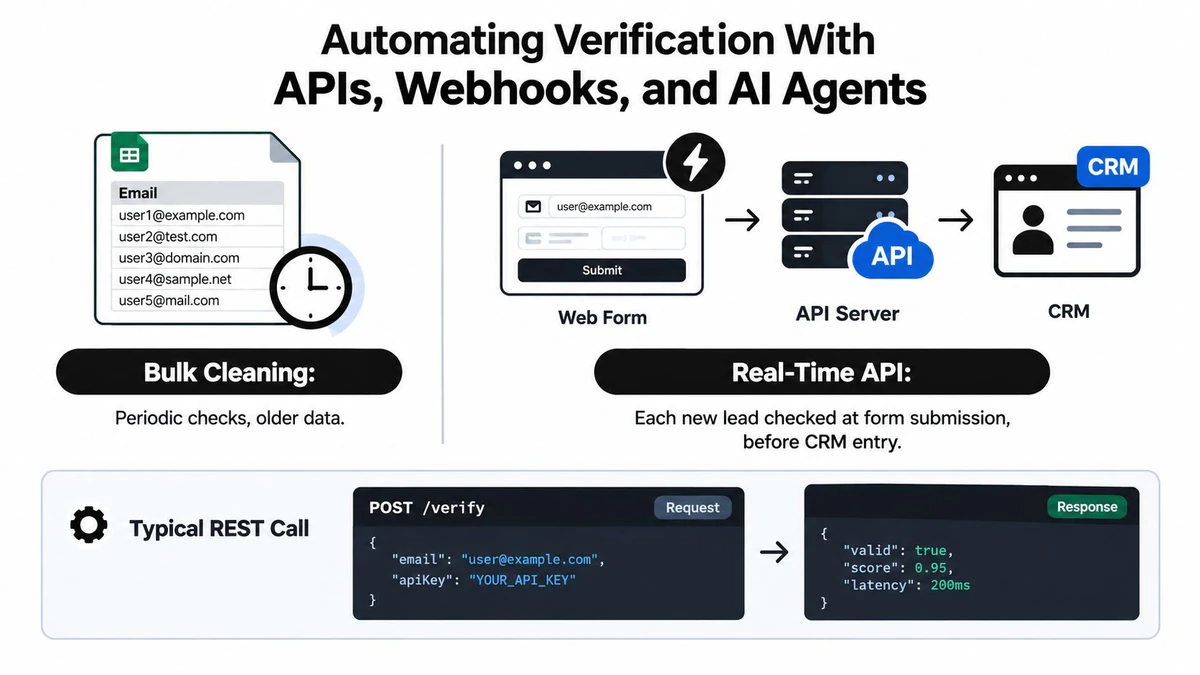
A signup form can send an address to a verification endpoint before creating a CRM record. A typical REST pattern includes the email value and an API credential, followed by a structured response containing status, score, and technical signals. The application can then accept, reject, or flag the submission without waiting for a campaign bounce.
Choosing bulk, API, or hybrid verification
| Approach | Best fit | Main trade-off |
|---|---|---|
| Bulk cleaning | Existing CSVs, acquisitions, and aged databases | It can't protect data captured after the run |
| Real-time API | Forms, registrations, and lead creation | It requires integration, authentication, and error handling |
| Hybrid workflow | Teams with established databases and continuous acquisition | It needs ownership across marketing, product, and operations |
Webhooks can trigger verification when an SDR reactivates a stalled opportunity, an enrichment workflow adds a contact, or an agent discovers a new prospect. Store the response, verification timestamp, source, and decision reason so downstream systems don't repeatedly check the same address without a business need.
AI agents need an ordering rule. Verify before enrichment, not after it. Otherwise, an agent may spend time and enrichment budget developing a dead address, then pass unusable data to a sequence. The agent should also respect authentication requirements, rate limits, retries, and a safe fallback when the verifier is unavailable. A failed API request shouldn't mark an address as valid.
For implementation details, review the Email Validation API documentation and define separate policies for consumer signups, B2B prospecting, transactional mail, and internal notifications.
Use a small allowlist of response states in production. For example, let clearly deliverable records continue, route catch-all and unknown results to a review state, and suppress explicit invalid, disposable, and prohibited role-based addresses. That policy is easier to audit than an AI agent making an unexplained decision from a free-text result.
Before launch, test duplicate submissions, timeouts, malformed responses, provider errors, retries, and CRM write failures. Automation protects the list only when failure paths are as deliberate as the successful path.
Re-Verification Cadence and Sender Reputation Habits That Stick
“Verify once and forget” is a losing policy. One industry FAQ reports that about 2% of a verified list can go bad in four weeks, while another report says 39% of senders rarely or never perform list hygiene and only 23.6% verify before every campaign (Kickbox's email deliverability report). Verification must follow the way each segment changes, not a convenient annual date.
A practical cadence separates active risk from dormant data:
| List segment | Re-verify frequency | Off-cycle trigger | Sender-reputation check |
|---|---|---|---|
| Active outbound segment | Monthly | Bounce rate crosses the warning threshold | Review domain and IP signals weekly |
| Cold prospect pool | Quarterly | New data source or major import | Inspect recent bounce and complaint patterns |
| Dormant nurture track | Semi-annually | Reactivation before sending | Review reputation before reactivation |
Industry guidance commonly treats a total bounce rate above 2% as a warning, while top performers aim to keep hard bounces below 1% (Instantly's 2026 verification benchmark). Those are operating thresholds, not permission to wait for damage. If a campaign crosses its internal limit, pause the segment, investigate the source, and re-verify before resuming.
Make the schedule visible
Log every verification run with:
- Run date and owner
- Source list and acquisition channel
- Records processed
- Distribution across deliverable, risky, and undeliverable
- Suppression changes
- Post-send bounce and complaint observations
Monitor Google Postmaster domain reputation, Microsoft SNDS and JMRP data, and sending IP health on a regular schedule. If sender signals deteriorate, reduce volume while you investigate instead of continuing at full scale.
Keep this short checklist with the campaign owner:
- Confirm the opt-in source for each segment.
- Suppress addresses that hard-bounced twice within 90 days.
- Retire catch-all addresses older than 18 months unless the contact has explicitly reconfirmed.
- Recheck any segment whose bounce rate exceeds the team's threshold.
- Record the result distribution after every verification run.
For broader planning, use this marketing email cadence guide alongside your campaign calendar. The important shift is operational: list quality becomes a monitored process with owners, dates, and escalation rules rather than a checkbox assigned to someone before launch.
BillionVerify provides bulk list cleaning, single-address checks, catch-all scoring, role-account and disposable-email detection, structured deliverability results, and real-time verification for forms and workflows. Visit BillionVerify to evaluate how its verification features can fit into your CSV hygiene cycle, CRM process, and sending stack.