


A healthy email bounce rate is under 2%, with 1% or less considered excellent. Rates from 2% to 5% are a warning zone, while anything above 5% creates serious risk to sender reputation and campaign performance.
Introduction
Those thresholds are practical, not theoretical. Twilio's 2023 email marketing benchmark report found an average bounce rate of 1.06% and a median of 0.21% across senders, reinforcing how low the healthy range has become.
Bounce rate affects nearly every other email metric. A list with invalid addresses wastes send volume, creates avoidable delivery failures, and can make inbox providers question whether your acquisition and consent processes are reliable. The direct cost appears in undelivered campaigns, but the larger risk is reputational. Repeated failures can reduce the number of future messages that reach the inbox.
The headline benchmark still matters, but it isn't enough on its own. A total rate below 2% can hide a concentrated hard-bounce problem in a newly acquired segment, authentication failures affecting one mailbox provider, or poor inbox placement that doesn't appear as a bounce. Gmail and Yahoo enforcement has made that distinction more important because providers evaluate authentication, domain alignment, sender reputation, and complaint signals alongside delivery failures.
This guide covers the practical questions I use when reviewing sender data: what bounce rate measures, how hard and soft bounces differ, where industry benchmarks diverge, and why the same percentage can be safe for one segment but dangerous for another. It also gives you a verification workflow you can run this week, including the checks needed to prevent bad addresses from entering your database in the first place.
What Email Bounce Rate Really Means
A bounced email is the digital equivalent of a letter returned to sender. The postal service couldn't deliver it because the address was invalid, the mailbox was unavailable, or the receiving system refused the message.
Your email bounce rate is the share of sent messages that weren't accepted for delivery. Calculate it by dividing total bounced emails by total emails sent, then expressing the result as a percentage. Keep the denominator consistent when comparing campaigns. A platform that calculates bounces against sent messages won't produce the same figure as one using attempted deliveries.
Hard and soft bounces need different actions
Hard bounce: A permanent delivery failure, usually caused by an invalid, closed, or nonexistent mailbox. Suppress the address immediately.
Soft bounce: A temporary or potentially recoverable failure, such as a full mailbox, server timeout, or transient receiving-system problem. Monitor it before suppressing the contact.
A hard bounce is a data-quality decision. Continuing to send to a permanently invalid address serves no marketing purpose and can expose the rest of your list to unnecessary risk. Suppression should happen as soon as your sending platform confirms the failure.
A soft bounce requires context. One temporary failure doesn't prove that the address is bad. Repeated soft bounces from the same address, however, are a strong reason to pause or suppress it after checking the associated SMTP response and timing.
Don't confuse bounces with spam placement. A receiving provider can accept a message and place it in spam, so the message isn't counted as a bounce even though it missed the inbox. Reject rates can also describe broader refusal behavior at the gateway level. For a calculation that works closer to the delivery event, use this SMTP-level bounce calculator alongside your campaign platform's report.
The Core Email Bounce Rate Benchmark Tiers
A useful email bounce rate benchmark is a ladder, not a single pass-or-fail number. The practical tiers are:
| Bounce rate | Operational interpretation | What to do next |
|---|---|---|
| Under 1% | Excellent health | Maintain acquisition controls and monitor segments |
| 1% to 2% | Acceptable range | Review recent sources and watch hard bounces |
| 2% to 5% | Warning zone | Review the list, acquisition paths, and sending segments |
| Above 5% | Critical danger | Pause questionable sends and investigate before continuing |
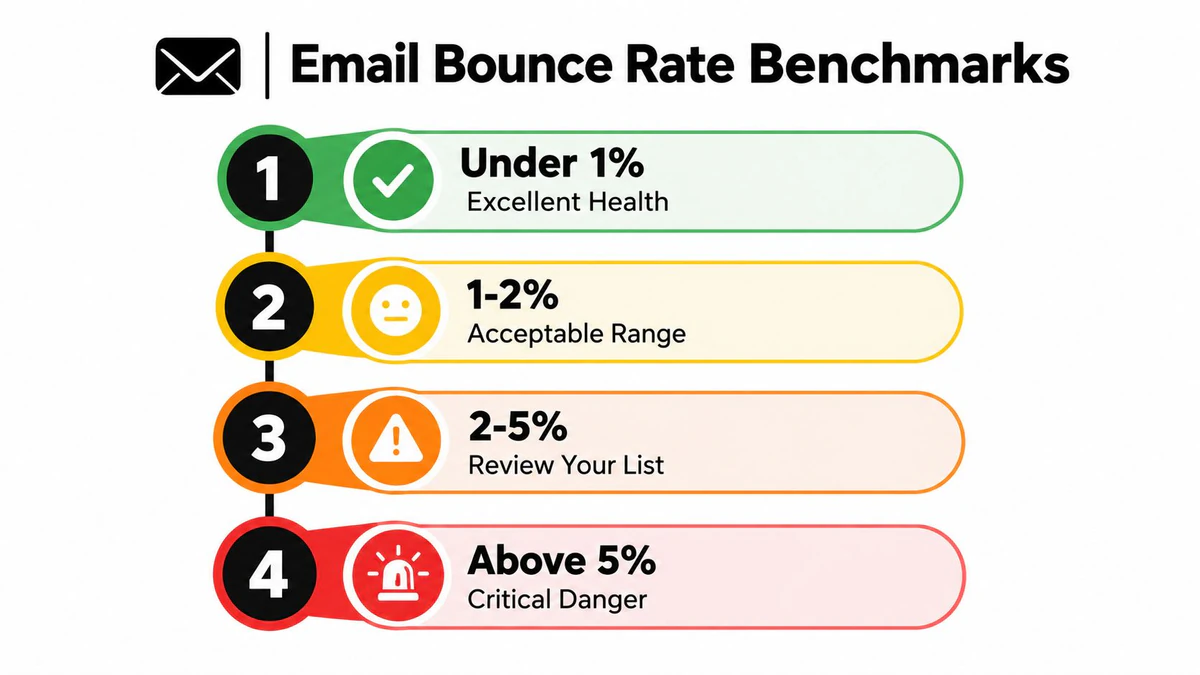
The underlying reference point is low. Twilio recorded an average of 1.06% and a median of 0.21% in its 2023 benchmark report, while Mailchimp guidance treats a campaign above 2% as a trigger for list-review action. Mailgun's benchmark guidance also points toward very low bounce rates among tightly managed programs. These sources differ in methodology, but they converge on the same operational lesson: healthy programs live in the low single digits, usually well below the warning threshold.
Mailtrap's benchmark guidance describes under 2% as healthy, 2% to 5% as a warning zone, and above 5% as critical because list-quality or deliverability problems can compound. That ladder is more useful than chasing a supposedly perfect universal number.
What each tier obligates you to do
At under 1%, don't interpret the result as permission to stop monitoring. Check whether a small, high-risk source is being hidden inside a large healthy list. A strong overall average can conceal poor performance from a recent lead vendor, an old reactivation segment, or a form with weak validation.
Between 1% and 2%, review the latest acquisition sources, hard-bounce share, and campaign-level variation. If the rate is rising, act before the overall program enters the warning zone.
At 2% to 5%, stop treating list hygiene as a general aspiration. Identify the exact addresses and sources responsible, verify the suspect records, and suppress confirmed invalid mailboxes before the next comparable send.
Above 5%, continuing at the same volume is usually the wrong trade-off. Pause the affected segment, inspect SMTP responses, and confirm that your authentication and collection processes are working before resuming.
A useful Email Verification Benchmark can help you compare results, but your own segment history remains the most valuable baseline.
Bounce Rate Benchmarks by Industry
A universal target can mislead because bounce rates partly reflect the volatility of the audience. A database of stable, frequently updated consumer addresses behaves differently from an older business database where employees change roles and domains disappear.
Cross-industry benchmark data places the average around 2.48%, but the sector figures vary substantially:
| Industry | Typical Bounce Rate | What It Signals |
|---|---|---|
| Ecommerce | 0.19% | Frequent customer activity and relatively current consumer data |
| Technology | 0.5% to 1.2% | Generally managed lists, with some business-address churn |
| B2B services | 0.5% to 1.5% | Moderate turnover and changing professional addresses |
| Government | 1.30% | Institutional addresses with some collection and verification variation |
| Construction and manufacturing | Around 2.20% | Higher address churn and less consistently refreshed records |
| Nonprofits | 2% to 5% | Greater variation in list age, acquisition, and reactivation practices |
The table isn't a permission slip. A nonprofit at 3% may be operating within a commonly observed sector range, but that rate still sits in the warning zone for a healthy program. A technology company at 3% is farther from its typical sector range and should investigate more aggressively.
Compare like with like
Segment comparisons are more useful than a global average. Separate new signups from imported CRM contacts, active customers from dormant subscribers, and consumer addresses from business addresses. Otherwise, one high-risk group can distort the result while the overall percentage looks ordinary.
Address churn explains much of the difference. Business contacts move jobs, companies change domains, and role accounts become unattended. Older databases accumulate those failures unless the sender verifies and suppresses records regularly.
Use the email marketing benchmarks appendix as a reference point, then establish an internal baseline for each meaningful source. The operational question isn't just whether your total is below 2%. It's whether one segment is deteriorating faster than the rest of the program.
Why a Low Bounce Rate Does Not Mean You Are Safe
A bounce rate below 2% answers one narrow question: how many messages failed to be accepted for delivery. It doesn't tell you whether accepted messages reached the inbox, whether recipients marked them as spam, or whether a provider is throttling your domain.
That distinction matters in the Gmail and Yahoo enforcement era. Recent 2025 and 2026 deliverability guidance emphasizes keeping hard bounces below 2% because providers may filter messages or pause delivery when failure signals become serious. The same guidance also connects improved bounce performance with broader adoption of SPF, DKIM, and DMARC, suggesting that authentication failures and domain alignment increasingly explain delivery problems. See the 2025-2026 deliverability benchmark discussion for that enforcement context.
The signals to review beside bounce rate
- Authentication alignment: Confirm that SPF, DKIM, and DMARC are configured for the sending identity and aligned with the visible domain.
- Hard-bounce concentration: Look at the rate by acquisition source, mailbox provider, campaign, and signup form, not just the program total.
- Spam complaints: A provider can accept a message before a recipient reports it as unwanted.
- Inbox placement: Delivered doesn't necessarily mean inboxed. Test placement by provider and monitor filtering patterns.
- Throttling: Delayed or deferred delivery can indicate reputation or volume concerns even when the final bounce total stays low.
- Engagement quality: A clean address can still belong to an unengaged recipient who no longer wants your messages.
A 1% bounce rate in a confirmed customer segment may be tolerable, while the same rate in a newly imported cold list could signal immediate trouble. Providers evaluate patterns, and senders should do the same. Benchmark the segment, the source, and the failure type together instead of using one reassuring average as a safety certificate.
Diagnosing Why Your Emails Bounce
Start with the SMTP response, not the percentage. Export the failed addresses, group them by response category, and determine whether each failure is permanent, temporary, domain-related, or caused by a risky address type.
A practical diagnostic sequence
- Classify permanence. Mark confirmed invalid or closed addresses as hard bounces. Suppress them rather than retrying indefinitely.
- Review temporary failures. Check full mailboxes, timeouts, rate limits, and other soft-bounce responses. Watch whether the same address fails repeatedly.
- Inspect the domain. A domain with mail-server or MX problems deserves verification before another send. Don't assume every failure is an individual mailbox problem.
- Identify risky identities. Role-based addresses such as
info@andsupport@, disposable addresses, and catch-all domains need separate treatment. Modern verification systems use these signals alongside mailbox-level checks, as described by Sender's overview of email verification tools. - Trace the source. Compare the failure group with its collection point, upload date, campaign, and consent path. One form or vendor may be responsible for a disproportionate share.
Catch-all domains deserve particular care. They accept mail for any address on the domain, so a server response doesn't prove that the individual mailbox exists. Score or segment those records rather than deleting every catch-all address blindly.
Diagnose one segment at a time. Broad list cleaning without source analysis removes symptoms, but it doesn't fix the form, import, or vendor that keeps creating bad records.
The aim is to land in the inbox not spam, which requires more than deleting obvious failures. Use SMTP-level list verification when the platform report doesn't provide enough detail to distinguish a valid mailbox from a risky or unverifiable one.
Lowering Bounce Rates With Email Verification
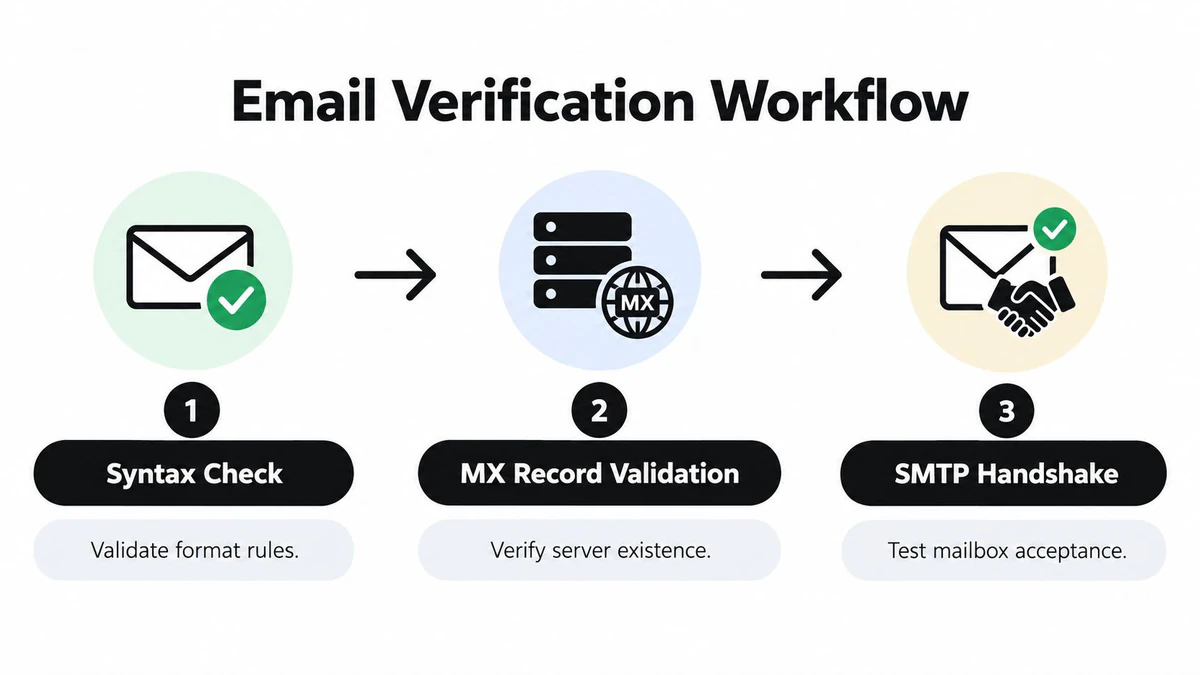
Verification works best as a layered decision process. A syntax check catches malformed addresses, but it can't tell you whether the domain receives mail or whether the mailbox accepts messages. An MX check confirms that the domain has an identified mail server, while an SMTP handshake can test mailbox acceptance without sending an email.
A well-built workflow typically includes:
- Syntax validation: Check format errors, malformed domains, and obvious typos.
- MX validation: Confirm that the domain has mail-exchange records and a reachable receiving configuration.
- SMTP handshake: Simulate the delivery conversation to determine whether the mailbox appears to accept mail, without sending a message.
- Duplicate detection: Remove repeated records so the same questionable address isn't evaluated or contacted unnecessarily.
- Risk categorization: Separate valid, invalid, disposable, role-based, and catch-all results into clear operational groups.
Where BillionVerify fits
BillionVerify is a professional email verification service built to address the cost of bad email data. Its published product information describes 99.9% SMTP-level accuracy across single checks, bulk CSV cleaning with live progress and export-ready filters, and a real-time API for signup validation. Customer stories on its product materials report bounce rates dropping below 1%, though results depend on list source, sending practice, and suppression decisions.
Real-time Email Validation API returns structured JSON fields such as validity status, quality score, typo suggestions, SMTP results, MX validation, and flags for disposable, role-based, or catch-all addresses. That structure lets a product team reject or review a risky signup before it enters the CRM, instead of waiting for the first campaign to expose the problem.
Bulk cleaning and real-time blocking solve different problems. A CSV pass repairs the database you already have. An API check prevents the next bad record from entering it. BillionVerify's published integrations include Mailchimp, SendGrid, HubSpot, Klaviyo, and Zapier, so teams can place verification before campaign syncs, lead routing, or automated sequences.
Prioritize the work
- Verify the next campaign's newest and highest-risk segments first.
- Suppress confirmed invalid and disposable addresses.
- Separate catch-all and role-based results for review rather than treating them as automatically safe.
- Add real-time checks to public signup forms and lead-capture workflows.
- Export the decisions back to the sending platform and preserve the reason for each suppression.
Verification doesn't replace authentication, consent controls, or engagement management. It gives those controls cleaner data to work with.
Conclusion and Your Next Steps
Use this decision framework:
- Under 1%: Excellent health, but continue monitoring source-level changes.
- 1% to 2%: Acceptable, with active review of hard bounces and recent acquisition.
- 2% to 5%: Warning zone, requiring list and source investigation.
- Above 5%: Critical, requiring a pause or major cleanup before normal sending resumes.
Those tiers are a starting point, not a universal pass. Compare your result with the pattern for your industry, then compare each acquisition source with your own historical performance. A cross-industry average can hide a deteriorating segment, while a sector range can make an avoidable problem appear normal.
Bounce rate is also only one part of deliverability. Authentication, domain alignment, complaints, throttling, inbox placement, and engagement all influence whether accepted messages reach people in a useful location. A sender can have a low bounce rate and still lose visibility if recipients reject the content or providers distrust the sending identity.
Your operational checklist
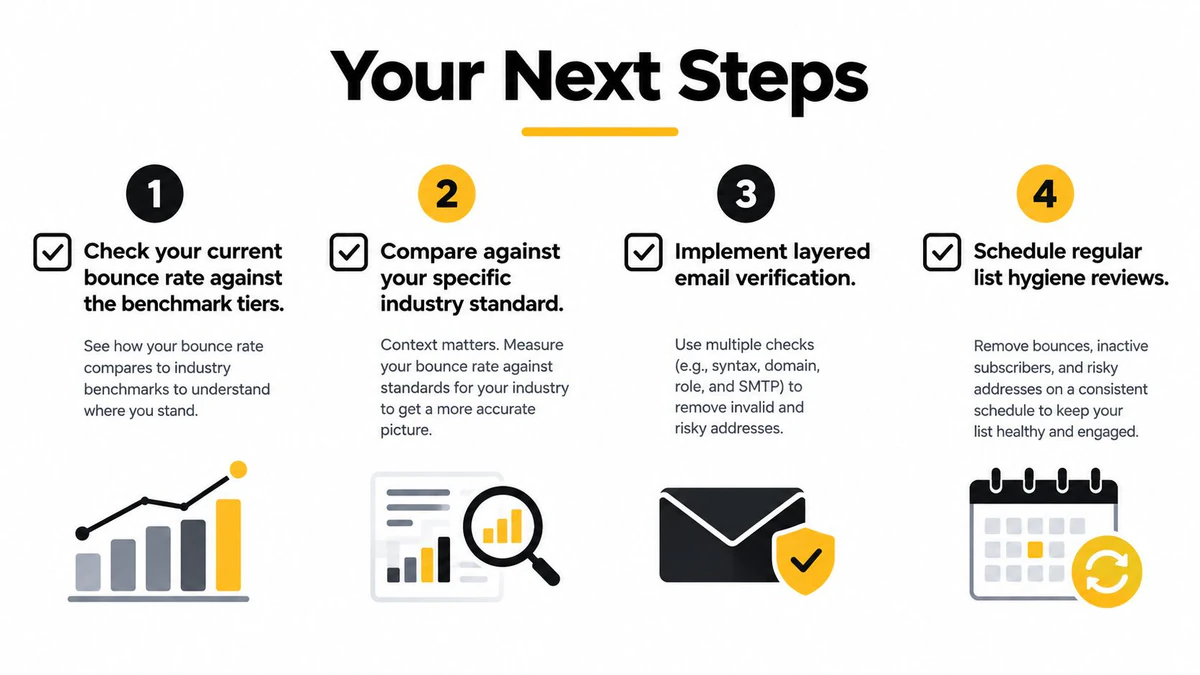
- Measure the current rate: Separate total, hard, and soft bounces by campaign and segment.
- Benchmark the right comparison: Use your industry context, list age, audience type, and acquisition source.
- Diagnose the failures: Read SMTP responses and map each category to suppression, retry, review, or authentication work.
- Verify the existing database: Run layered checks before the next major campaign.
- Protect future signups: Add real-time validation to forms, product registration, and lead imports.
- Schedule recurring hygiene: Review new records and repeated soft bounces continuously instead of relying on one annual cleanup.
Steady hygiene beats a one-time purge. The goal is to keep invalid addresses from entering the database, identify risky records before sending, and give your reputation enough consistency to withstand normal changes in audience and volume.
BillionVerify offers single-address checks, bulk CSV verification, and a real-time API that returns structured deliverability signals for email workflows and signup forms. Visit BillionVerify to evaluate how layered verification can help you control bounce risk before your next campaign.