


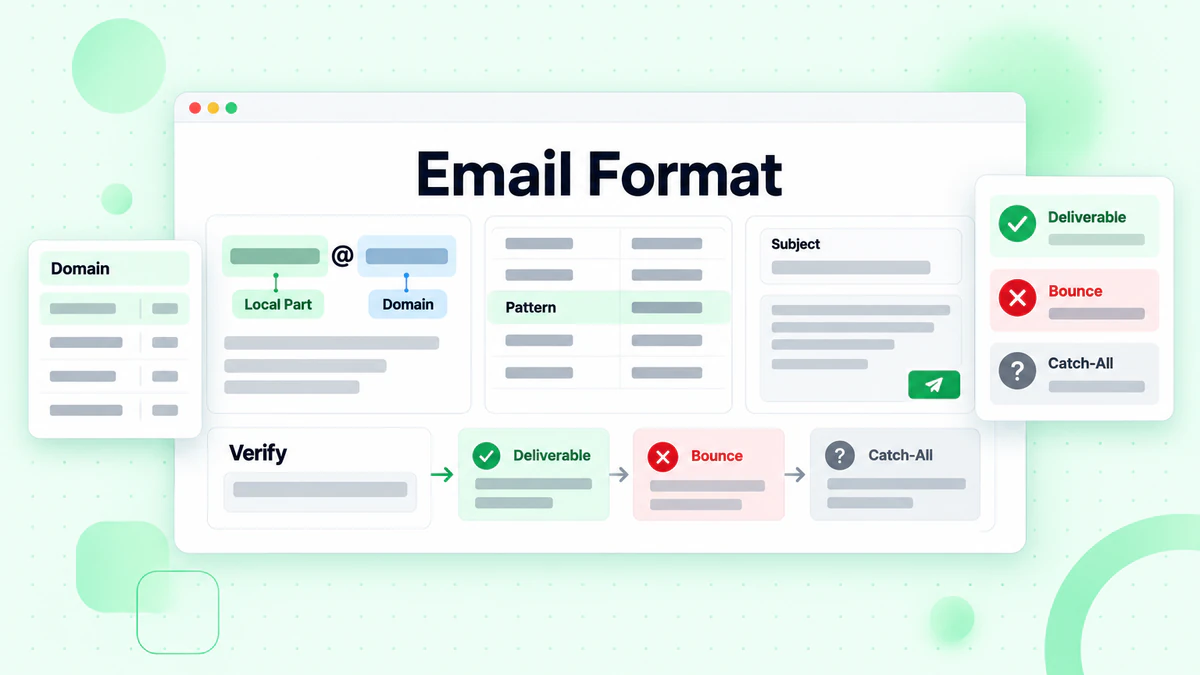
An email format is the way a company builds its addresses. A common example is first.last@example.com. Once you know the company email format, you can guess the address of almost anyone who works there. That is why sales teams, recruiters and journalists look it up every day.
The phrase has a second meaning too. Some people search for "email format" when they want to know how to lay out a message. This guide covers both, with email format examples for each. Most of it is about the email address format, because that is where guesses go wrong. A short section near the end covers the professional email format for writing the message itself.
Here is what you will learn:
- The patterns companies use most, with examples.
- How to look up any company email format in a few minutes.
- How data tools like RocketReach work out email formats.
- Why a guess that looks right can bounce.
- How to check each address first.
Key facts (checked October 2026):
- Away uses first.last for 75.2% of staff addresses, per RocketReach.
- Bloomberg's leading format, the jdoe@bloomberg.net style, covers 83.0% of its mailboxes in RocketReach's data.
- RFC 5322 splits every address into a local part and a domain, joined by @.
- Under RFC 5321 the local part may be case-sensitive, though most mail providers ignore case.
- The RocketReach privacy policy says it may infer a work address from a company's usual pattern.
- BillionVerify reports a catch-all domain as its own result instead of counting it as valid.
What Is an Email Format?
An email address has two parts. The local part sits before the @ sign. The domain sits after it. In jane.doe@example.com, "jane.doe" is the local part and "example.com" is the domain.
The internet standard for message format, RFC 5322, defines this shape: a name part, an @ sign and a domain. The mail transfer standard, RFC 5321, sets the size limits. A local part can be up to 64 octets. A domain can be up to 255 octets.
Inside those rules, each company picks its own email pattern. That email pattern is the company email format. One company uses first.last. Another uses the first initial plus the last name. A small startup may give everyone just their first name.
Email address format vs email message format
The two meanings are easy to mix up:
| Term | What it means | Example |
|---|---|---|
| Email address format | The pattern of the address | first.last@example.com |
| Email message format | How the message is laid out | Subject line, opening, text, closing |
When a sales rep asks "what is their email format?", they mean the address. When a student asks for a "professional email format", they usually mean the message.
Is an email format case-sensitive?
Mostly no, in practice. RFC 5321 allows the part before the @ to be case-sensitive, but most mail providers treat Jane.Doe and jane.doe as the same mailbox. The domain is never case-sensitive. To stay safe, write addresses in lowercase.
The Most Common Company Email Formats
Most companies use one of about ten email patterns. The table uses the name Jane Doe and the example domain example.com.
| Email format | Example | Notes |
|---|---|---|
| first.last | jane.doe@example.com | The most widespread pattern |
| first | jane@example.com | Common at small companies |
| flast | jdoe@example.com | First initial plus last name |
| firstlast | janedoe@example.com | No separator |
| first_last | jane_doe@example.com | Underscore separator |
| f.last | j.doe@example.com | Initial, dot, last name |
| firstl | janed@example.com | First name plus last initial |
| last | doe@example.com | Rare outside very small teams |
| last.first | doe.jane@example.com | Seen at some large employers |
| fl | jd@example.com | Initials only, often for executives |
These are the building blocks. Real companies often mix them. A founder may keep jane@ while later hires get jane.doe@. A second Jane Doe may get jane.doe2@ or jane.m.doe@.
Email format examples from real companies
RocketReach publishes an email format page for many companies. Each page lists the formats found and how often each one appears. Two examples show how different companies can be.
For Away, the travel brand, RocketReach says: "The most common Away email format is [first].[last] (ex. jane.doe@awaytravel.com), which is being used by 75.2% of Away work email addresses." It adds that Away "uses 10 work email formats" in all.
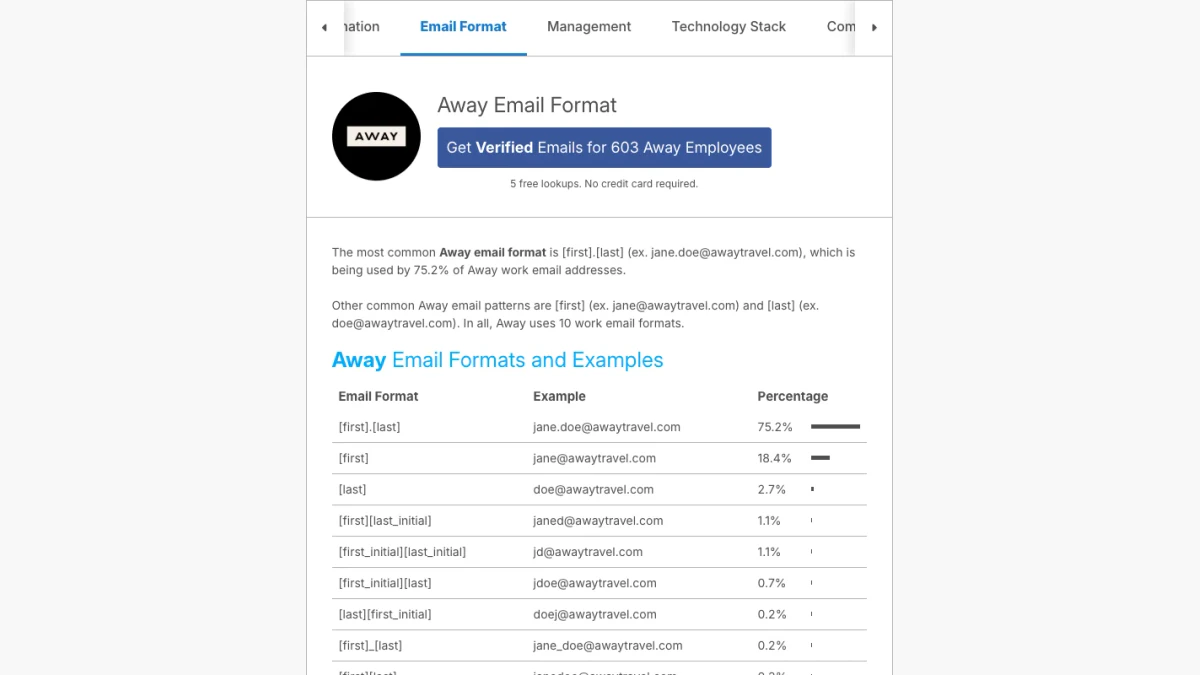
Screenshot: RocketReach's Away page, October 2026. Employee details are cropped out.
Bloomberg looks very different. RocketReach says its most common format "is [first_initial][last] (ex. jdoe@bloomberg.net), which is being used by 83.0% of Bloomberg work email addresses." It counts "11 work email formats" there.
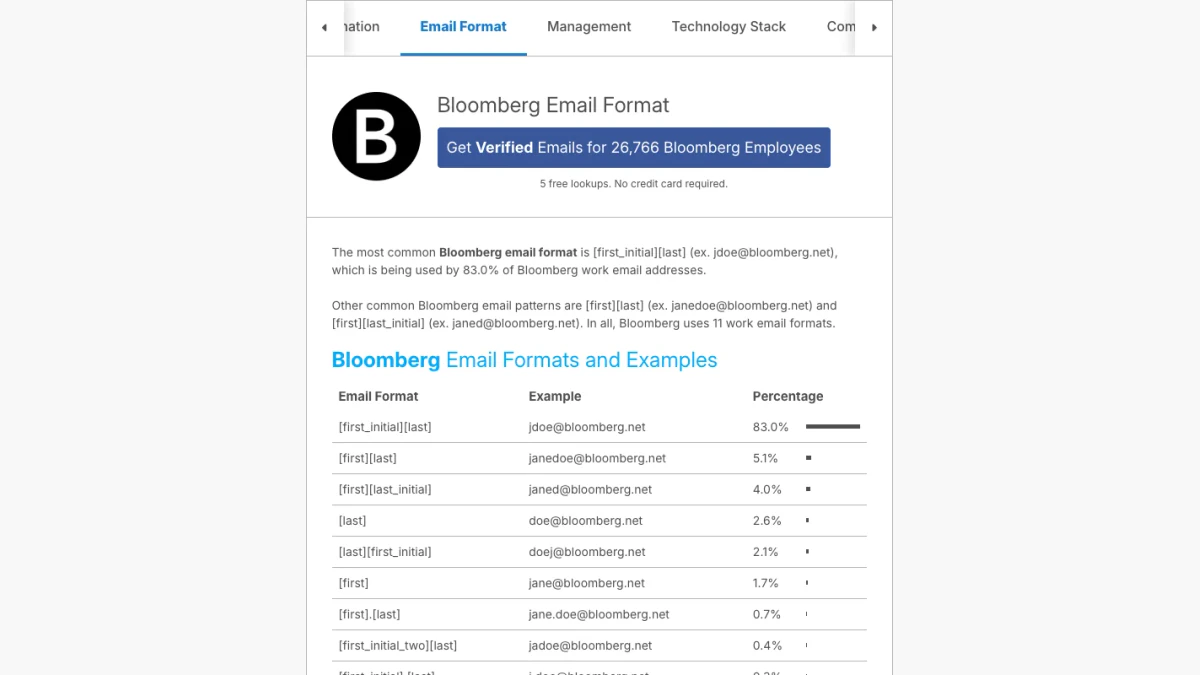
Screenshot: the Bloomberg entry on RocketReach.
Notice two things. First, the leading email pattern does not cover everyone. One in four Away addresses uses a different email pattern. Second, Bloomberg's email domain is bloomberg.net, not the website domain. That detail alone would break a guess like jdoe@bloomberg.com.
Common email formats by company size
Patterns tend to follow company size, though there are many exceptions:
- Small companies often start with first@. There are few name clashes.
- Growing companies often move to first.last@ as the team grows.
- Large enterprises often use flast@ or first.last@, with numbers or middle initials for duplicates.
- Universities and public bodies often use their own schemes, such as a staff ID or a department prefix.
Treat these as hints, not rules. Always confirm the real pattern for the company you need.
Email address format examples for tricky names
Names do not always fit a neat pattern. These email address format examples show how most companies handle the hard cases. Use them as a guide, then confirm with a real address from the same company.
| Name | first.last result | flast result |
|---|---|---|
| Jane Doe | jane.doe@example.com | jdoe@example.com |
| Jane Marie Doe | jane.doe@ or jane.m.doe@example.com | jdoe@ or jmdoe@example.com |
| Ana Lopez-Garcia | ana.lopez-garcia@example.com | alopez-garcia@example.com |
| Sean O'Brien | sean.obrien@example.com | sobrien@example.com |
| José Núñez | jose.nunez@example.com | jnunez@example.com |
| A second Jane Doe | jane.doe2@example.com | jdoe2@example.com |
These email address format examples share one lesson. The rule is simple, but the edge cases vary by company. Some keep hyphens and some drop them. Some add a middle initial for a clash and some add a number. A single real address settles it.
How to Find a Company Email Format
You do not need a paid tool for most lookups. Start with free sources and move to databases only when you need to.
1. Check the company website
Look at the contact page, team page, press page and job listings. Staff addresses often appear there. One real address like jane.doe@example.com reveals the probable email format at once. Generic boxes like info@ or sales@ do not help, because they are not tied to a person.
2. Read press releases and public documents
News announcements often end with a media contact. Annual reports, conference speaker pages, research papers and open-source projects can list staff addresses too. A few examples from different people confirm the pattern.
3. Search the web for the domain
Search engines can surface addresses that sit on public pages. Search for the domain in quotes, such as "@example.com". Combine it with a role, like "@example.com" press, to find staff contacts.
4. Look at your own inbox
You may already have mail from someone at the company. Search your inbox and your CRM for the domain. A past thread is the most reliable proof of the format.
5. Use an email format database
Data tools such as RocketReach collect addresses at scale and break them down by pattern. These pages are useful when the company keeps addresses off its website. A company email format finder saves time, but it shows the past email pattern, not a promise about one person.
6. Ask
If you share a contact with an employee there, ask for the right address. It is quicker than guessing and never bounces.
Choosing a Company Email Format Finder
A company email format finder looks up a domain and shows the patterns it has seen. Several data tools offer one. Before you rely on any of them, check four things:
- Coverage. Does the tool show the share of each email pattern, or only one guess?
- Freshness. When was the data collected? Patterns shift after a merger or rebrand.
- Domain detail. Does it show the real mail domain, or just the website domain?
- Source. Does it say how it collects addresses? Collected and inferred addresses are not the same.
A good company email format finder answers the first question with numbers, as the RocketReach pages above do. Even then, it tells you the likely pattern, not the address of one person. Use it to build a candidate, then verify that candidate.
How RocketReach Works Out Email Formats
RocketReach is a contact data platform. Its email format pages come from the addresses it has collected for each company. It then shows each pattern as a share of the total, as in the Away and Bloomberg examples above.
The company is open about guessing. Its privacy policy says its technology "may also infer Personal Data about you by making assumptions based on publicly available information, such as inferring professional email addresses based on common formats used at a particular company."
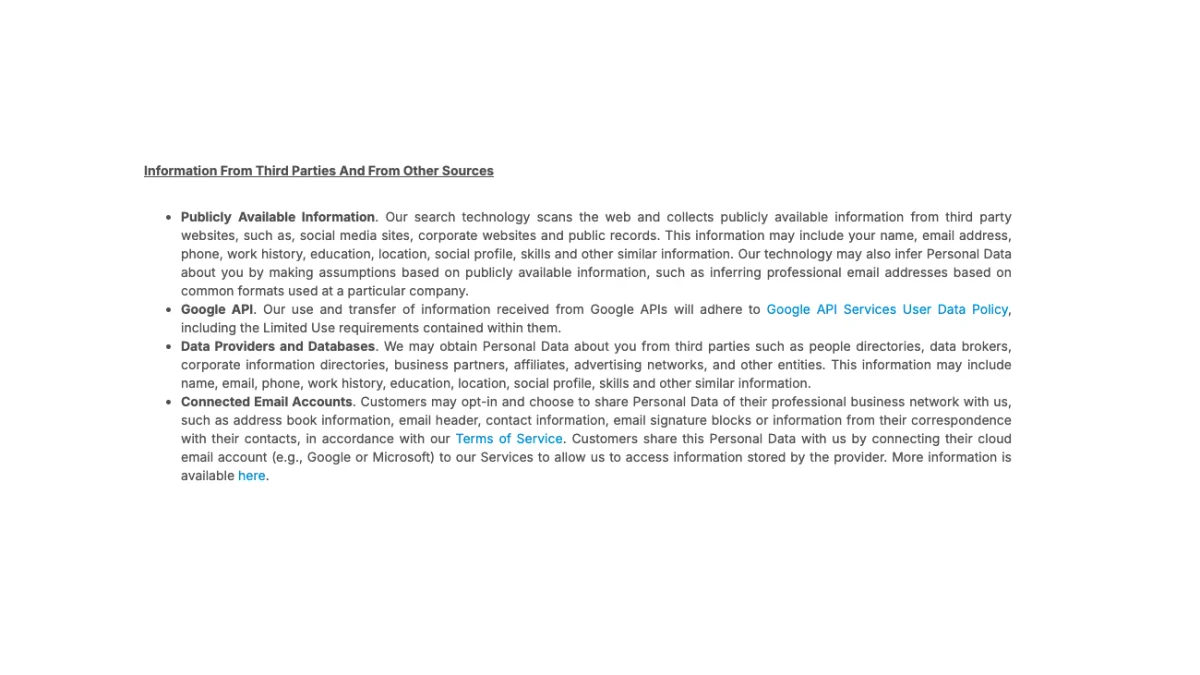
Screenshot: RocketReach's privacy policy, information from third parties, October 2026.
In plain words: some addresses in any contact database are educated guesses. A guess is often right. It can also be wrong for a new hire, a person with a common name or someone who has left. That is why the result needs a check before you send.
Our RocketReach overview covers what else the platform offers. If you export contacts from it, our page on verifying RocketReach emails explains how to clean the list before a campaign.
Email Domain vs Website Domain
Many guesses fail on the domain, not the name part. A company's website and its email domain are not always the same.
- Separate mail domains. Bloomberg's addresses use bloomberg.net, as shown above.
- Country domains. A global firm may use example.de or example.co.uk for local staff.
- Subsidiaries. An acquired company may keep its own domain for years.
- Rebrands. After a name change, old and new domains can both work for a while.
To find the mail domain, look at real addresses, not the web address. You can also check its MX records. MX records name the servers that accept mail. With no MX records and no fallback address record, nothing can be delivered there.
How to Build an Address From an Email Format
With the pattern in hand, build the address step by step.
- Get the person's name right. Use the name they use at work. Check their profile, author page or speaker bio.
- Apply the pattern. For first.last at example.com, Jane Doe becomes jane.doe@example.com.
- Handle special cases. Decide what to do with middle names, hyphens, apostrophes and accents. Most companies drop accents and keep hyphens, but check real examples.
- Watch for nicknames. A "Bob" may be robert.smith@ in the directory.
- Expect duplicates. A second John Smith may be john.smith2@ or john.a.smith@.
- Use the right domain. Confirm the mail domain, as covered above.
- Verify before sending. Treat the result as a guess until a check confirms it.
Email format generator tools
An email format generator takes a name and a domain and lists every likely pattern. That helps, but it multiplies guesses. Sending to ten variations of one name looks like spam and hurts your sender reputation. Generate the candidates, then verify them, then send to the one that passes.
Why a Correct-Looking Guess Still Fails
The right email format does not guarantee the right address. Four things commonly go wrong.
People leave
Staff turnover is constant. A person who left last month may still appear in a database. Their mailbox may be closed, or it may forward to a manager who never replies.
The company has exceptions
Executives, early employees and contractors often break the usual email pattern. Shared names force variations. Some teams use a different domain.
The domain is catch-all
A catch-all domain accepts mail for any address, real or not. On such a domain, a mail server says yes to jane.doe@ and to xyz123@ alike. That makes a guess impossible to confirm from the server's reply alone.

The BillionVerify Catch-All Verifier flags domains that accept any address.
The address has a typo
A missing letter or a wrong separator is enough. jane.doe@ and janedoe@ are different mailboxes. So are .com and .co.
Verify Before You Send
Every guessed or exported address should pass a check before it enters a campaign. High bounce rates hurt your sending domain. Mailbox providers notice when you send to many addresses that do not exist.
BillionVerify offers free tools for each layer of the check:
- Syntax and MX. Our email validator checks the email address format and published MX records. It does not claim to prove a mailbox exists.
- Full mailbox check. Our email verifier runs syntax, MX and SMTP mailbox checks, plus disposable, role and catch-all checks.
- Catch-all domains. Our catch-all verifier detects domains that accept any local part, so you know when an SMTP accept cannot prove a real mailbox.
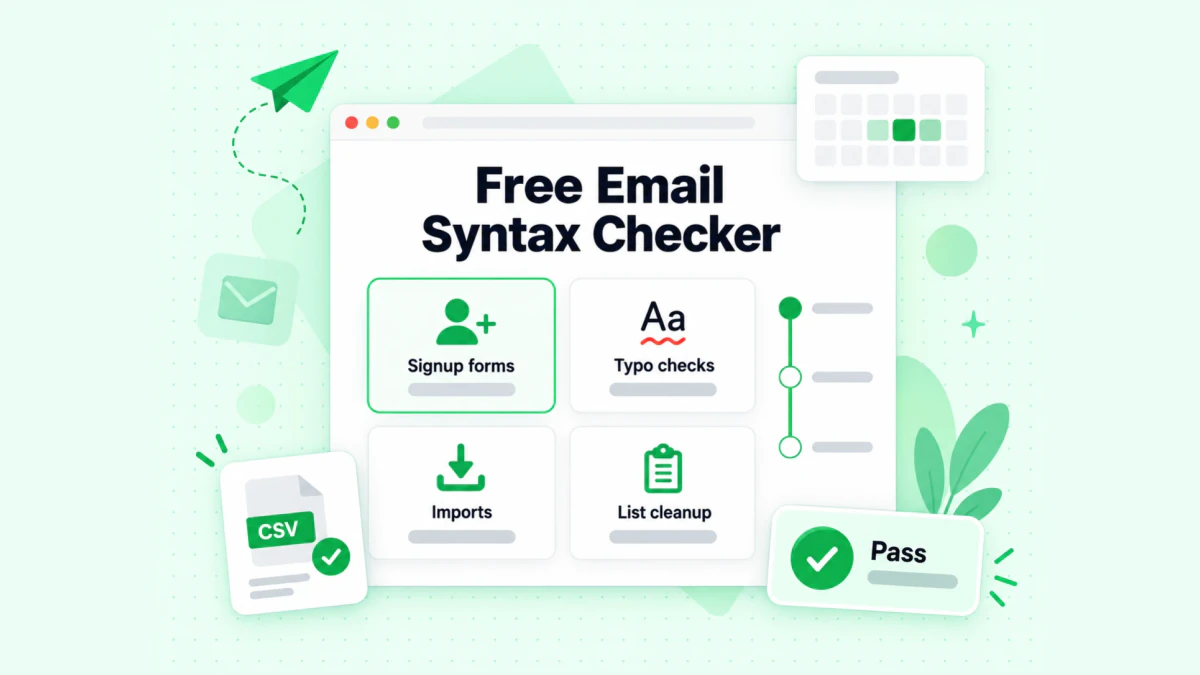
The BillionVerify free email syntax checker catches format errors before a send.
Two more free tools help with single contacts. Our reverse email lookup reads the domain, organisation, mail routing and public profile signals behind an address. Our phone number validator checks whether a number is valid for its country and shows its line type.
For whole lists, you get 20 free credits each day you use your account, up to 600 a month. They never expire, and no credit card is needed. A valid or invalid result uses one credit. Unknown results are free, and so is a re-check within 24 hours. Catch-all addresses are reported as their own result, not counted as valid.
Professional Email Format: Writing the Message
If you searched "email format" to write a message, this part is for you. A professional email format has five parts.
- Subject line. Short and specific. Say what the email is about.
- Greeting. "Hi Jane," for most business mail. "Dear Ms. Doe," for formal or first contact.
- Opening line. Say who you are or why you are writing.
- Body. Keep it short. One idea per paragraph. Put the ask near the end.
- Closing and signature. "Thanks," or "Best regards," then your name, role, company and contact details.
Business email format example
Here is a short sample:
Subject: Meeting request for Q4 pricing
Hi Jane,
I lead partnerships at Example Co. We help finance teams cut vendor costs.
Could we talk for 20 minutes next week about your Q4 plans?
Thanks, Alex Lee Partnerships Lead, Example Co.
The same rules apply to a cold email. Write to one person. Use their real name. Make one clear ask. And use an address you have checked.
Business email format tips
A business email format follows the same five parts, with a few extra habits:
- Keep the subject under about eight words. Phones cut long subject lines.
- Lead with the reason. Put the ask or the key fact in the first two lines.
- Use short paragraphs. Two or three sentences each.
- Add one clear call to action. A date, a question or a link, not all three.
- Use a full signature. Name, role, company, phone and website build trust.
Good email format examples for business mail look plain. They are short, specific and easy to answer on a phone.
Email Format Mistakes to Avoid
- Trusting one example. One address can be an exception. Find two or three email format examples.
- Ignoring the mail domain. The website domain may not be the email domain.
- Sending to every variation. Guessing by volume damages your sender reputation.
- Skipping verification. A guessed address is not a confirmed address.
- Using old data. Formats change after mergers, rebrands and new mail systems.
- Forgetting the law. Cold outreach must follow rules like CAN-SPAM in the US and GDPR in the EU. Give a clear way to opt out.
FAQs
What is an email format?
An email format is how a company structures its addresses, such as first.last@example.com. The term can also mean how a message is laid out.
What is the most common company email format?
first.last@ is the most widespread company email format. Many small companies use first@, and many large firms use flast@. Always check the specific company.
How do I find a company's email format?
You can work out the format from real staff addresses on the company website, news releases and public files. Search your own inbox. Or check a contact database such as RocketReach. Then verify the address you build.
Is an email format finder reliable?
An email format finder shows the most common past patterns, often with percentages. It is a good starting point. But no single pattern covers every employee, so verify each address.
Why does an email bounce when the format is right?
An email can bounce with the right format because the person may have left, the company may use a different mail domain, or the person may be an exception. A catch-all domain can also hide a wrong guess until the message bounces later.
Is the email address format case-sensitive?
The domain of an email address is not case-sensitive. The part before the @ can be case-sensitive under RFC 5321, but most providers ignore case. Writing addresses in lowercase is the safe choice.
What is a professional email format?
A professional email format is a clear subject line, a polite greeting, a short body with one ask, and a closing with your name and contact details.
Where can I find email format examples?
Real staff addresses on a company's own website are the best email format examples. Press pages, conference sites and public reports help too. Contact databases such as RocketReach list the patterns they have collected, with the share of each one.
What is a business email format?
A business email format is the standard layout for work messages: a clear subject, a short greeting, a brief body with one request, and a full signature. It differs from a casual note mainly in tone and in the signature details.
Can I see a company email format on RocketReach for free?
RocketReach shows each company's pattern breakdown publicly. Its pages say new users get "5 free lookups. No credit card required." Contact details beyond that need a plan.
How do I check if a guessed email address is real?
To check a guessed address, run it through an email verifier. BillionVerify checks the syntax, the domain's MX records and the SMTP mailbox, and flags catch-all, disposable and role addresses. Unknown results cost nothing.