



About 74.5% of business email addresses follow just two formats, first.last@ and flast@, according to a 2026 analysis of 336,782 work addresses from Allegrow's business email examples. That makes pattern inference useful, but it doesn't make an unverified guess safe.
The practical answer to how to find someone's work email address is a pipeline, not a single trick. Confirm the person and company, identify the corporate domain, infer the local-part pattern from known examples, validate the candidate at the mail-server level, and then review the result for catch-all, role-account, disposable, and other risks. Discovery creates a plausible address. Verification determines whether it belongs in an outreach queue.
Why Guessing a Work Email Is a Numbers Game
First.last@ represents 47.7% of business emails, while flast@ represents 26.8%. First@ appears in 8.1%, and 8.6% use custom or non-name-based formats, according to the same Allegrow analysis. A guessed address carries a probability, and probability is not proof. A person's name and company domain can narrow the search, yet the mailbox still needs validation.
Company size changes the likelihood of each pattern. The first.last@ format appeared in 74.2% of emails at companies with 10,000 or more employees, compared with 38.0% at companies with 1 to 10 employees. The same Allegrow analysis points to a practical difference: enterprise domains often standardize identity formats, while smaller organizations may retain legacy domains, aliases, shared inboxes, or inconsistent conventions.
That trade-off affects the order of operations. A candidate can pass a format check and still fail at the mailbox level. Catch-all domains add uncertainty because a receiving server may accept an SMTP probe for any address, even without confirming that the specific inbox exists. The Email Verification Benchmark helps compare verification approaches, especially when a “valid” result may reflect server acceptance rather than a confirmed mailbox.
Hit Rate by Domain Configuration
| Domain Type | Avg Hit Rate | Bounce Risk |
|---|---|---|
| Catch-all domain | Uncertain | Higher, because acceptance may not identify a real mailbox |
| Non-catch-all domain | Candidate-dependent | Lower after mailbox-level verification |
| Standardized enterprise domain | More predictable | Still requires verification |
| Small or inconsistent company domain | Less predictable | Higher without confirmed samples |
Pattern frequency should determine which candidates enter the queue, not which addresses receive messages. Generate a short list, then apply syntax, domain, SMTP, and risk checks before outreach. That verification-first sequence is what separates a plausible 49% hit rate from a reliable 85%+ deliverability outcome.
Practical rule: A matching format across two colleagues justifies a verification attempt. It does not justify sending.
The Discovery Workflow That Works
A reliable lookup follows this order: person, company, domain, pattern, verification. Confirm the person's current role and employer through a public professional profile or the company website. A recent job change can invalidate a correctly formatted address, while a similar name can point to the wrong employee.
Confirm the company's working email domain separately. The website domain may differ from the corporate mail domain, especially across parent companies, regional offices, or acquired brands. Check contact, team, press, author, and leadership pages for one or two publicly listed employee addresses. Press releases and company biographies often connect a named employee to the relevant business domain.
A sequential process
- Confirm identity. Match the full name, current company, role, and relevant location or business unit.
- Confirm the domain. Separate the corporate mail domain from a marketing site, parent company, regional domain, or acquired brand.
- Extract known local parts. Record the characters before the @ symbol from confirmed public addresses.
- Infer the pattern. Compare formats such as first.last@, firstlast@, and flast@.
- Generate candidates. Apply the strongest observed pattern to the target's name, keeping alternatives limited to genuine edge cases.
- Verify before sending. Run syntax, domain, SMTP, and risk checks in sequence.
Each stage reduces uncertainty for the next. Manual research succeeds only about 20% to 40% of the time and can take 5 to 15 minutes per contact, according to the workflow guidance at Tomba. Pattern guessing followed by verification performed better in the BillionVerify benchmark, with 55% success for guessed addresses verified by an email verifier, compared with 49% when relying on Gmail-based verification alone. These figures describe discovery outcomes, not guaranteed deliverability, so they should not be treated as confirmed mailbox results.
For adjacent identity research, teams may compare SkipForge skip tracing alternatives. Skip tracing can support broader record discovery, but it does not replace mailbox-level checks for a corporate address.
A lead generation workflow tool can organize the handoff from research to validation. BillionVerify provides professional email verification focused on identifying bad email data before outreach.
Inferring the Right Email Pattern for Any Company
A reliable pattern starts with evidence. Collect two to four confirmed employee addresses from company pages, press materials, public author profiles, or other lawful professional sources. Remove the domain and compare the local parts, keeping punctuation intact. The difference between john.smith, johnsmith, and jsmith is often the signal that identifies the company's format.
Build a short pattern map:
- first.last@: first name, a period, then surname.
- firstlast@: first and last names joined together.
- flast@: first initial followed by the surname.
- firstl@: first name followed by the surname initial, a possible fallback for compact identifiers.
The broader address analysis supports prioritizing first.last@ and flast@, which together represent about 74.5% of the sampled business addresses. It also shows why one template cannot cover every company, since first@ and custom formats remain meaningful alternatives. (Allegrow)
Handle names that break simple templates
Hyphenated surnames, accents, middle names, initials, and duplicate employee names create exceptions. Companies may remove punctuation, transliterate characters, shorten long surnames, or add a middle initial. Classify shared inboxes such as sales@ and partnerships@ separately because they do not identify an individual employee.
One address is a clue, not proof. If three confirmed addresses use the same format, generate that pattern first. If the samples conflict, retain the alternatives and verify each candidate rather than forcing a single guess. SMTP-level checks should decide which result is safe to use, not the pattern alone.
Enterprise standardization also changes how much confidence to place in a pattern. As shown in the size breakdown earlier, samples are more likely to agree at large companies. At small firms, budget extra verification attempts for edge cases because custom formats and exceptions provide weaker pattern evidence.
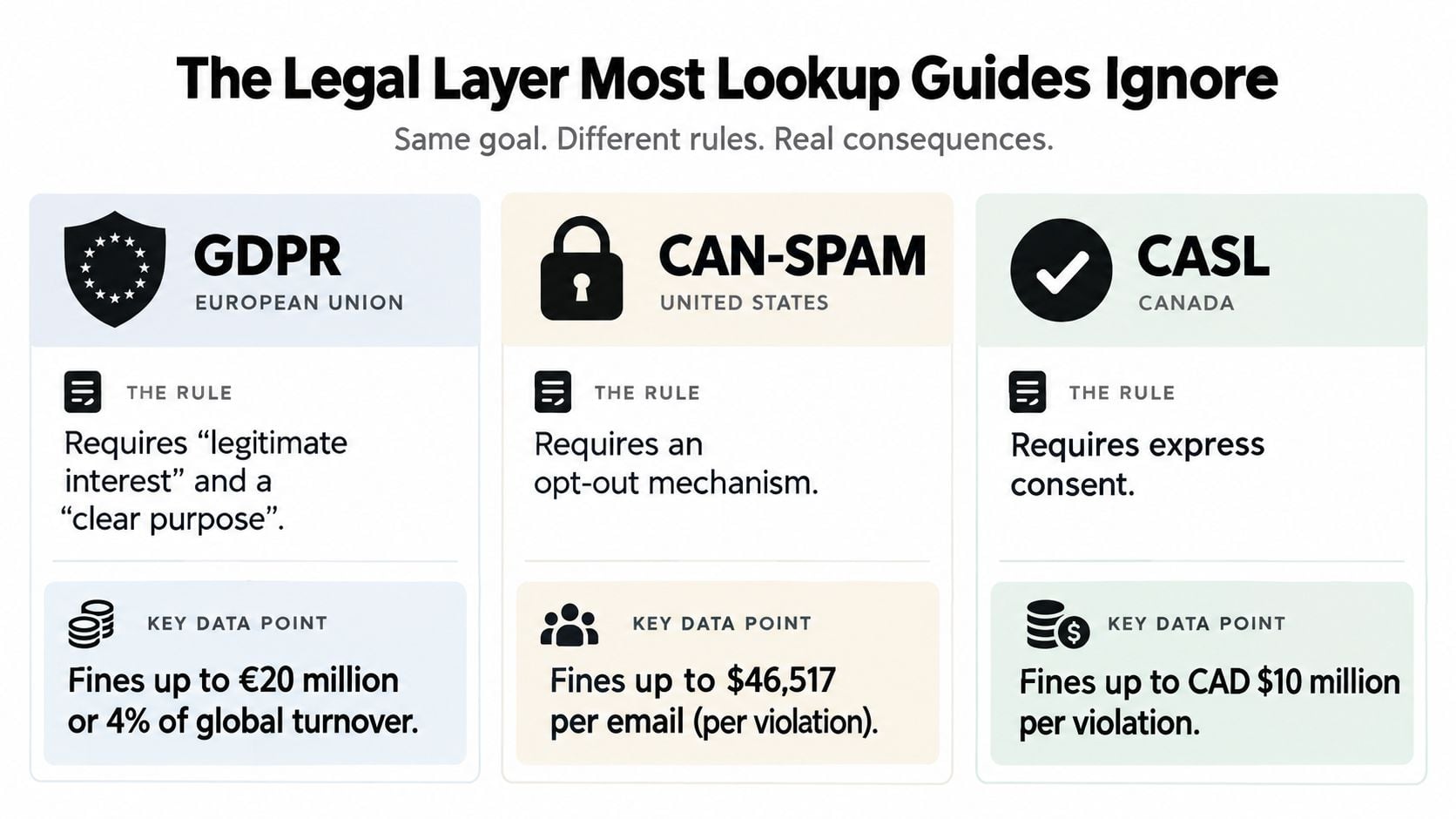
The Legal Layer Most Lookup Guides Ignore
A visible work email does not grant unrestricted permission to contact its owner. Before adding an address to an outreach queue, assess the recipient's location, role, data source, message purpose, and objection process. Treat legal review as a filter in the verification-first pipeline, alongside pattern inference and mailbox checks.
For a GDPR-style review, answer four questions:
- Where is the recipient located? Apply the rules for the recipient's market, rather than relying only on the sender's jurisdiction.
- Why is this person relevant? The message should connect directly to the person's responsibilities or professional setting.
- What is the lawful basis? A one-off lookup in a legitimate professional context is generally described as compatible with GDPR, while continued use still needs a defensible basis, a stated purpose, and data minimization. (Kalent)
- Can the recipient stop contact? Provide a clear, usable opt-out route and process suppression requests promptly.
Build an audit trail
Record the source, timestamp, purpose, role relevance, verification outcome, and suppression state. Retain only the information required for the planned communication, limit access, and delete records when that purpose ends. Avoid using personal email discovery for a legitimate business conversation. Personal addresses carry different privacy expectations and are not a standard replacement for an undisclosed corporate address.
B2B relevance can support a professional approach, but it does not justify irrelevant bulk messaging. CAN-SPAM, CASL, GDPR, ePrivacy requirements, and state privacy laws may impose different duties. Seek legal review for campaigns spanning countries or combining enrichment with automated outreach.
The marketer's guide to email privacy provides a reference for converting these principles into operating rules. Your team should be able to explain why the person was selected, where the address came from, why the message fits the role, and how the recipient can opt out. If those answers are unclear, pause the lookup or outreach step.
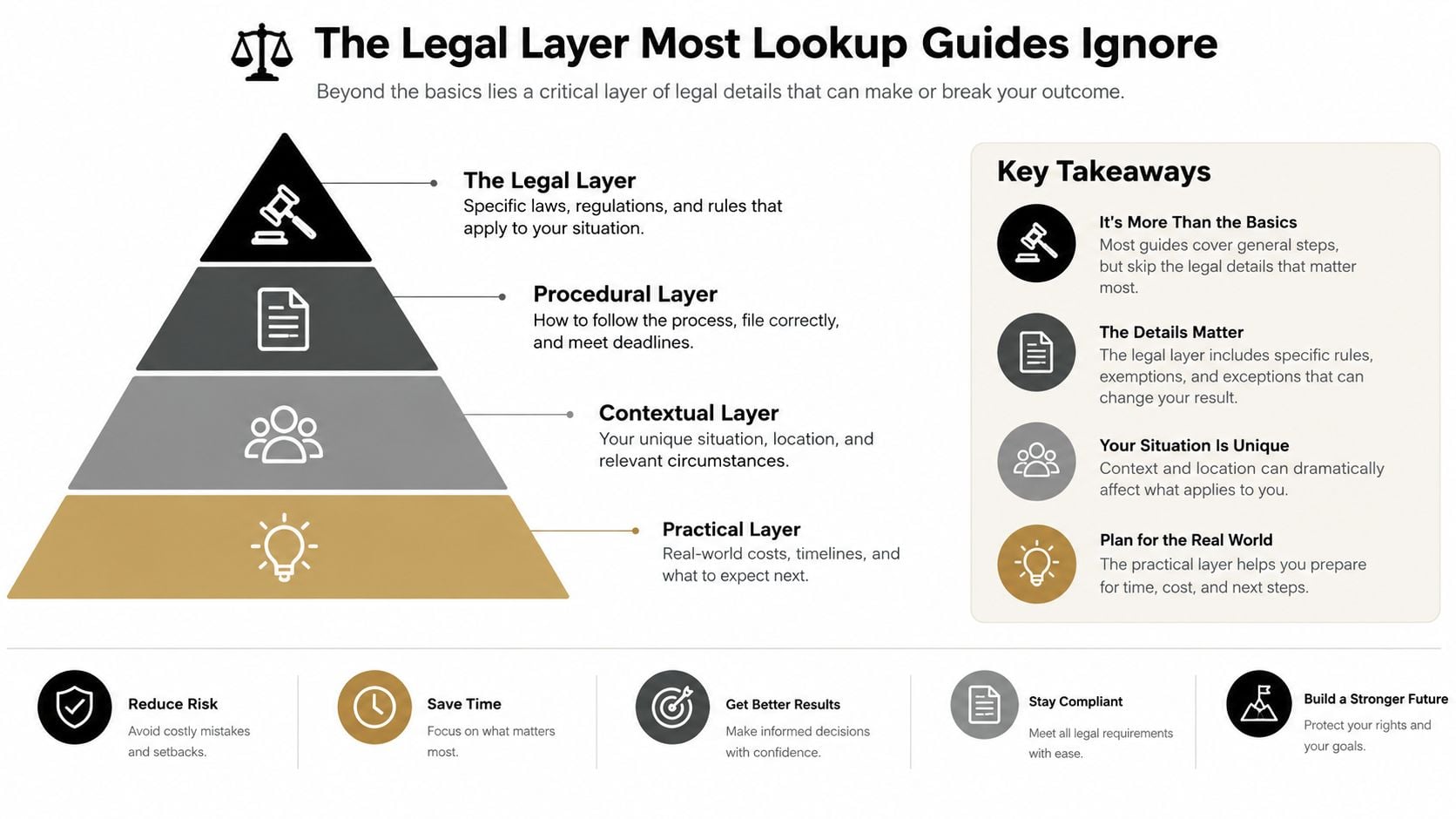
What Verification Looks Like Under the Hood
Verification works best as a layered decision, not a single green check. Each layer answers a different question, and a positive result at one stage can't compensate for a failure at another.
The four checks
Syntax validation checks whether the address has a structurally acceptable format. It can reject malformed characters and identify obvious role-based or disposable addresses, but it can't prove that a mailbox exists.
MX and domain validation checks whether the domain is configured to receive email. A live website can still lack the necessary mail configuration, and a domain with no MX records can't receive mail by definition. (Strategic Digital Tech)
SMTP mailbox probing asks the receiving mail server whether it recognizes the recipient. This addresses the actual deliverability question, but some servers hide recipient information. Catch-all domains are the major complication. They may return a positive response for any tested address, so the result should be treated as uncertain rather than confirmed. (Cleanlist)
Risk scoring evaluates signals such as catch-all behavior, disposable domains, role accounts, and other conditions that make a positive technical response unsafe for outreach. Verification systems often need states such as valid, invalid, risky, or unknown rather than a simplistic yes or no. (Market API)
| Stage | What It Checks | Catches | Limitation |
|---|---|---|---|
| Syntax | Address structure | Malformed candidates | Doesn't confirm a mailbox |
| MX and domain | Mail-receiving configuration | Domains unable to receive mail | A configured domain may still reject the user |
| SMTP | Server response for the recipient | Many nonexistent mailboxes | Catch-all servers reduce certainty |
| Risk scoring | Deliverability and abuse signals | Disposable, role-based, and uncertain results | Requires judgment for borderline outcomes |
For a broader technical overview, the verify email addresses H2 resource is a useful comparison point. At scale, an Email Validation API lets your CRM, prospecting workflow, or signup form apply these checks without making manual decisions for every record.
The practical output should be actionable. Queue confirmed addresses, review risky or unknown results separately, reject invalid domains, and keep role accounts out of person-specific sequences unless the campaign is explicitly designed for a department inbox.
Why Verification Protects Your Sender Reputation
Verification is a sending control, not a cosmetic data-cleaning task. Every hard bounce tells mailbox providers that your list quality may be poor, and repeated failures can affect future delivery across outreach, lifecycle, and marketing mail.
The often-repeated claims about exact bounce thresholds and universal inbox-placement lifts aren't supported by the verified data available for this article, so the safer operating rule is qualitative: don't launch a campaign with an unverified list. A raw prospecting list can contain stale employees, mistyped candidates, disabled accounts, role addresses, and catch-all results that look healthier than they are.
What cleaner data changes
- Cold outreach: Fewer failed deliveries give your sequence a better chance of reaching the intended mailbox instead of generating repeated SMTP failures.
- Lifecycle messaging: Signup, onboarding, and product notifications reach real users rather than accumulating undeliverable events.
- Campaign operations: Cleaner inputs reduce the chance that an email service provider pauses, throttles, or scrutinizes a campaign after poor list performance.
Verification doesn't solve every reputation problem. It can't tell you whether a message is relevant, whether a recipient will complain, whether a dormant mailbox is monitored, or whether a valid address belongs to the correct person. It also can't turn a role inbox into a personal mailbox.
Reverification is part of the process
People change jobs, domains change ownership, and mailboxes are retired. Active outbound lists need recurring review, with the cadence based on sending frequency, data age, and how quickly the target audience changes. New imports should be checked before activation, not after the first bounce report arrives.
Use BillionVerify email verification as a validation step before sending, then separate confirmed, risky, unknown, and invalid outcomes in your CRM. That classification gives operators a reasoned suppression policy instead of forcing every record into a binary decision.
Your Repeatable Lookup and Verification Checklist
A reliable lookup is a verification-first pipeline with four gates: pattern inference, legal review, SMTP-level validation, and risk scoring. Pattern matching may produce candidates, but only technical checks and documented relevance support a defensible send. Skipping a gate can turn a plausible address into a bounce, complaint, or compliance problem.
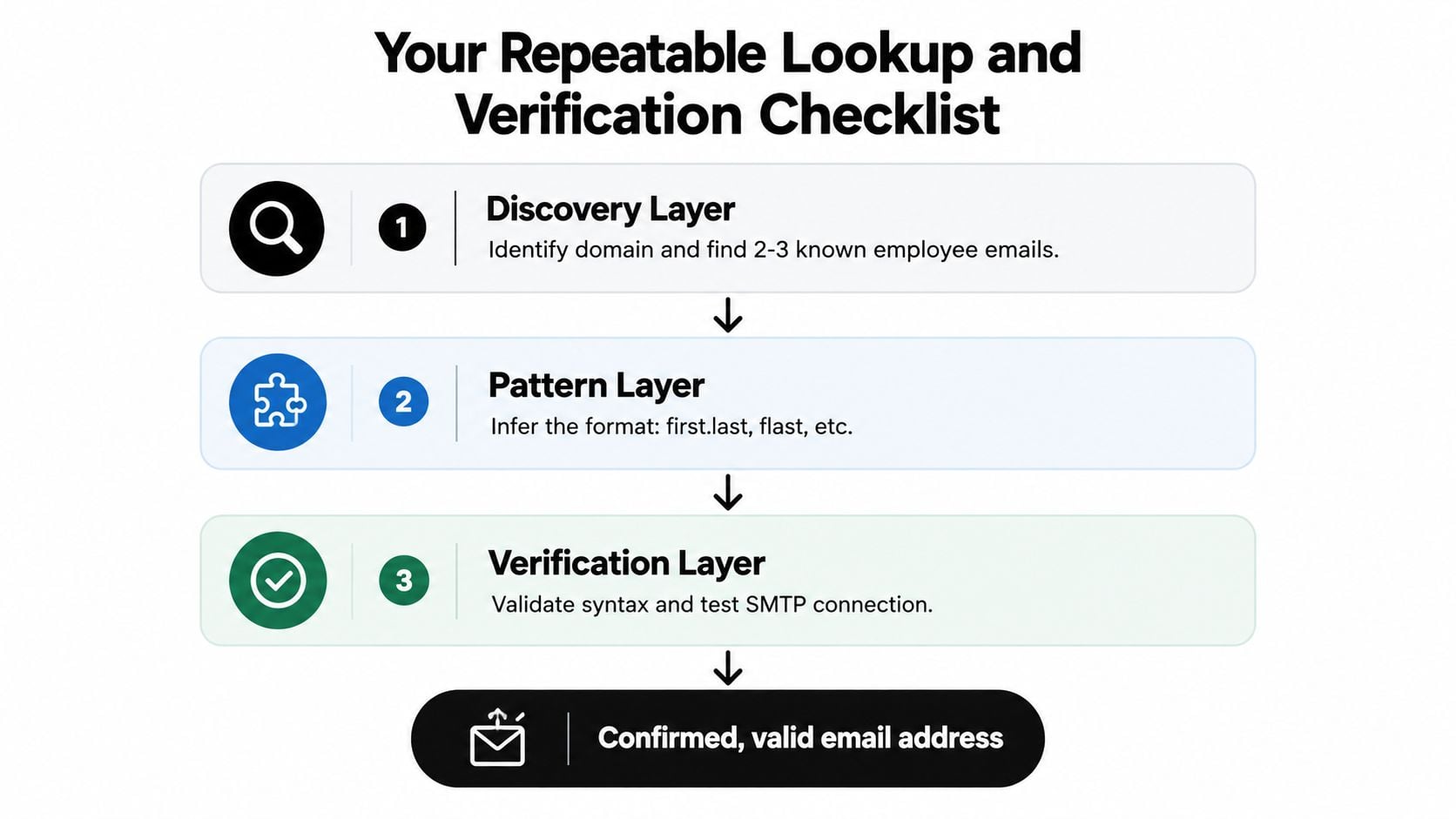
Run the checklist
- Confirm the prospect. Check the full name, current employer, role, and profile freshness on LinkedIn or another public professional source.
- Confirm the domain. Use the company website, team page, press page, or a published employee address.
- Collect evidence. Find two or three employee emails from lawful public sources and compare their local parts.
- Generate candidates. Apply the strongest observed format and keep only a small number of justified alternatives.
- Apply the legal gate. Record the source, outreach purpose, role relevance, lawful basis, and opt-out plan before contact.
- Validate technically. Run syntax and domain checks, then use SMTP-level verification. Treat catch-all responses as uncertain because acceptance does not prove that the target mailbox exists.
- Score and route. Queue confirmed addresses, hold risky or unknown results for review, and suppress invalid or inappropriate contacts.
- Monitor outcomes. Watch bounce and complaint signals, pause when list quality deteriorates, and reverify records as they age.
Frequently asked questions
What should I do with a catch-all domain? Treat the result as uncertain. Use another professional channel or gather stronger evidence before sending.
Should I send a guessed address without verification? No. A pattern narrows the candidates, but it does not confirm mailbox existence or legal suitability.
How often should I reverify? Check newly imported records before activation and refresh active lists periodically. Set the interval according to list age, sending volume, and workforce turnover.
What if a result is valid but role-based? Keep it out of a person-specific sequence. Route it to a department workflow or find an appropriate individual address through a lawful, relevant source.
Stop before sending when the evidence is weak. That restraint protects sender reputation and keeps outreach tied to a defensible professional purpose.
BillionVerify helps teams verify individual addresses, clean uploaded lists, and connect real-time validation to workflows. Before sending a guessed work email, run the candidate through BillionVerify, review the SMTP and risk result, and decide whether the contact belongs in the campaign.