



A user submits a signup form while rushing between meetings. The email looks plausible, the button responds, and the record enters the database before anyone has checked whether the mailbox can receive a message. By the time the welcome email fails, the application has already treated bad data as a real customer record.
That gap is where real time address validation belongs. For email workflows, it acts as a synchronous data-quality gate between the user and the database, checking the address before your CRM, ESP, sales queue, or product logic has to trust it. Postal address validation follows a similar principle, checking formatting and deliverability against authoritative datasets, but this guide focuses on the email verification layer BillionVerify brings into signup, import, and campaign workflows.
The Moment a Bad Address Slips Through
On a Tuesday afternoon, a prospect enters alex@gmal.com instead of a Gmail address. The browser accepts it because the field contains an @ symbol and a domain-like string. The backend stores it, creates a lead, starts the onboarding sequence, and sends the welcome message.
The message hard-bounces immediately. That single failure might look harmless, but the record now exists in several systems. The CRM reports a new lead, the marketing platform carries the address into the next campaign, and an SDR spends time researching a person who can't receive the sequence. Customer success later inherits the same record and assumes the contact details were collected deliberately.
The operational mistake happened before the bounce. The system accepted an address without first deciding whether it was safe to store.
Misspelled domains are only the obvious failure. A role-based alias such as support@ or info@ may route messages into a shared queue rather than a decision-maker's inbox. A disposable address can let someone consume a trial or submit repeated registrations without creating a durable communication channel. A catch-all domain may accept every recipient during the SMTP conversation, then discard or route unknown mail elsewhere.
The result isn't always an immediate hard bounce. Sometimes the address appears to work, remains in the database, and affects later segmentation. Campaign metrics become harder to interpret because the list contains aliases, temporary inboxes, and uncertain recipients. If you need a baseline before cleaning a list, use this tool to calculate email bounce rates for campaigns.
That chain starts at form submission. A validation gate could challenge the typo, flag the disposable address, or route the catch-all result to manual review before any downstream workflow begins.
What Real Time Address Validation Actually Means
Real time address validation is a synchronous check performed at the point where an address is captured. The application sends the submitted value to a verification service, receives a structured verdict, and decides whether to write the record, request correction, or apply a policy such as manual review.
The critical distinction is timing. A batch process examines an existing list after the data has already entered your systems. It can repair legacy records, but it can't prevent a bad signup from triggering onboarding, entering a sales sequence, or consuming a product entitlement. Real-time validation stops that record at the boundary.
A practical flow looks like this:
- Capture the input. The user enters an email address in a signup, checkout, or lead form.
- Run lightweight checks. The interface can catch obvious formatting mistakes before submission.
- Call the verification service. The server sends the address to an API for domain, mailbox, and risk checks.
- Apply business logic. Your application accepts, challenges, soft-blocks, or rejects the record.
- Persist the result. Store the verdict and useful signals so later teams know why the decision was made.
A production API commonly evaluates syntax, domain records, SMTP reachability, catch-all behavior, disposable status, and role-based patterns. The objective isn't perfect certainty. It's controlled risk reduction before the address becomes operational data.
BillionVerify is a professional email verification service built to solve one problem, bad email data costs businesses money. Its Email Validation API fits the synchronous part of this pattern, while batch cleaning remains useful for older records that entered before the gate existed.
Speed determines whether users experience validation as protection or friction. Loqate documentation reports average on-server latency for Address Find at 37 ms for AU/NZ in 2024 and 323 ms for international traffic, followed by a later 2024 update showing 22 ms for AU/NZ and 86 ms for international traffic in its API latency documentation. Email SMTP checks can vary more because the receiving server controls the handshake, so the integration needs timeouts and an explicit unknown state rather than treating every slow response as invalid.
How the Verification Layers Work Under the Hood
A useful real-time verifier doesn't make one magical query. It assembles evidence in layers, then returns a decision your application can interpret.
Syntax and typo detection
The first pass checks whether the address follows an acceptable email structure. It catches missing separators, invalid characters, empty local parts, and other errors that should never reach a network call. This is cheap and fast, so it belongs near the form as well as in the server-side validator.
Typo detection adds a practical correction layer. Dictionary-based domain suggestions can identify gmal.com as a likely misspelling of gmail.com. A suggestion is not the same as an automatic rewrite, however. Show the proposed correction and let the user confirm it, especially when the domain could be a legitimate small provider.
MX lookup
The next layer checks whether the domain publishes mail exchange records. An MX result indicates that the domain has a declared route for receiving email, but it says nothing about the specific mailbox named before the @. A domain can have functioning mail infrastructure while a particular address remains nonexistent, abandoned, or protected from probing.
For implementation details and the limits of this signal, keep an MX lookup guide available to the engineering team.
SMTP and RCPT TO
SMTP verification connects to the recipient's mail server without sending a message. The service identifies itself, begins the envelope conversation, and asks the server to accept the recipient through the RCPT TO stage. This is the core mechanic described in this explanation of SMTP-level email verification.
A positive server response means the server accepted the address during that interaction. It doesn't prove a human owns the mailbox, actively reads it, or intended to submit it. Servers may defer, block, or obscure mailbox-level responses, so a failed or inconclusive handshake needs a distinct interpretation.
Catch-all behavior
A catch-all domain accepts mail for recipients that weren't specifically provisioned. That makes the server appear permissive, even when the individual mailbox is unknown. Verification services test this behavior and return a catch-all flag or confidence signal rather than presenting the address as unambiguously safe.
A catch-all result is therefore a risk classification, not a guaranteed bounce prediction. You might accept it for a low-friction newsletter signup, challenge it for a valuable product account, or send it into a separate nurture segment.
Disposable, role-based, and provider signals
Disposable-domain detection identifies temporary inbox services commonly used for short-lived access. It doesn't prove malicious intent, but it gives product teams a reason to prevent trial abuse or require another verification method.
Role-based detection flags addresses such as info@, support@, and postmaster@. These addresses can receive mail, yet they often represent a team or system rather than an individual buyer. Free-provider indicators add context for segmentation, but they aren't a negative verdict by themselves. Modern APIs combine syntax, domain, MX, SMTP, and risk checks into a deliverability assessment rather than returning only valid or invalid as outlined in this verification API overview.
Client-Side vs Server-Side Validation
Client-side validation and server-side validation solve different problems. The browser is the right place for immediate feedback, but the server is the only dependable enforcement point because it controls the database write and can't be trusted to enforce rules against automated clients.
| Dimension | Client-Side | Server-Side |
|---|---|---|
| Primary role | Immediate user feedback | Authoritative workflow gate |
| Best checks | Basic format, obvious typo prompts, local disposable-domain hints | MX, SMTP, catch-all, disposable, and role-based decisions |
| User experience | Fast and interactive | Depends on provider and receiving-server response |
| Security | Logic is visible and bypassable | API key and policy remain protected |
| Bot resistance | Weak against headless browsers and direct requests | Stronger when tied to authenticated backend logic |
| Database protection | Can't guarantee a blocked write | Can prevent persistence until a verdict exists |
Client-side checks are useful because they catch malformed input before the form submits and reduce unnecessary API calls. They also make correction easy, such as showing a domain suggestion beside the field. They can't safely perform the authoritative network work, and any rule shipped to the browser can be inspected or bypassed by a bot using a direct request.
Server-side validation calls the verification API from your application or API gateway. It can hold the transaction, apply your acceptance policy, and write the result with the record. The trade-off is latency. A browser-side check can feel nearly immediate, while an SMTP handshake may take from 200 milliseconds to several seconds when the receiving server responds slowly. Treat that range as an integration constraint, not as a reason to skip the check.
Practical pattern: Use the browser for guidance and the server for authority.
A hybrid design usually works best. Run regex and obvious typo checks locally, then perform MX, SMTP, and catch-all evaluation on the server before committing the record. Set a timeout and define what happens when the provider returns unknown. Attackers can replay valid-looking addresses from harvested lists, so hiding logic in client code isn't sufficient.
What a Good Real Time API Response Looks Like
A production response should explain the decision, not merely announce it. A flat JSON object is easy for an application to parse, log, and pass into workflow rules. The top-level result might be valid, invalid, risky, or unknown, alongside a boolean deliverability field and the underlying evidence.
Useful fields include:
| Field | Purpose |
|---|---|
status | Gives the overall business-facing verdict |
deliverable | Provides a direct deliverability interpretation |
syntax_valid | Shows whether the address passed format checks |
mx_present | Indicates whether the domain has mail exchange records |
smtp_connected | Records whether the service reached the receiving server |
rcpt_to_result | Stores the recipient-stage server response |
catch_all | Flags whether the domain accepts unspecified recipients |
catch_all_confidence | Expresses uncertainty around catch-all behavior |
disposable | Identifies a temporary inbox domain |
role_based | Flags addresses such as info@ or support@ |
free_provider | Adds provider context for segmentation |
insight or score | Summarizes why the address received its verdict |
response_ms and smtp_ms | Helps tune timeouts and investigate slow responses |
Timing data matters during production troubleshooting. If total response time is high but SMTP time is low, your application or upstream network may be the bottleneck. If SMTP time dominates, the receiving server is likely delaying the interaction. Those fields let engineers distinguish a bad address from a slow dependency.
A minimal true or false response creates avoidable problems. When a user is blocked, the product team can't tell whether the input was malformed, the domain lacked mail routing, the server rejected the recipient, or the address sits behind a catch-all. Rich signals support a more humane interface, such as an inline correction for syntax errors, a warning for a role account, and a manual approval path for uncertain results.
For transient feedback, the interface can use a small status message beside the field. Teams unfamiliar with this pattern may find what is a toast notification useful when deciding whether a temporary verification update belongs in a toast or directly in the form.
Why Real Time Validation Protects Deliverability
Every rejected address is one fewer message sent to an unknown recipient. That connection makes validation a sender-reputation control, not just a data-cleaning convenience.
Mailbox providers evaluate signals that include bounces, complaints, and suspicious recipient activity. Amazon SES guidance warns that mailbox providers may issue warnings when bounce rates rise above 5% and may throttle or block sending above 10% in its sender reputation guidance. Those thresholds make pre-send screening concrete: prevent bad addresses before they become campaign events.
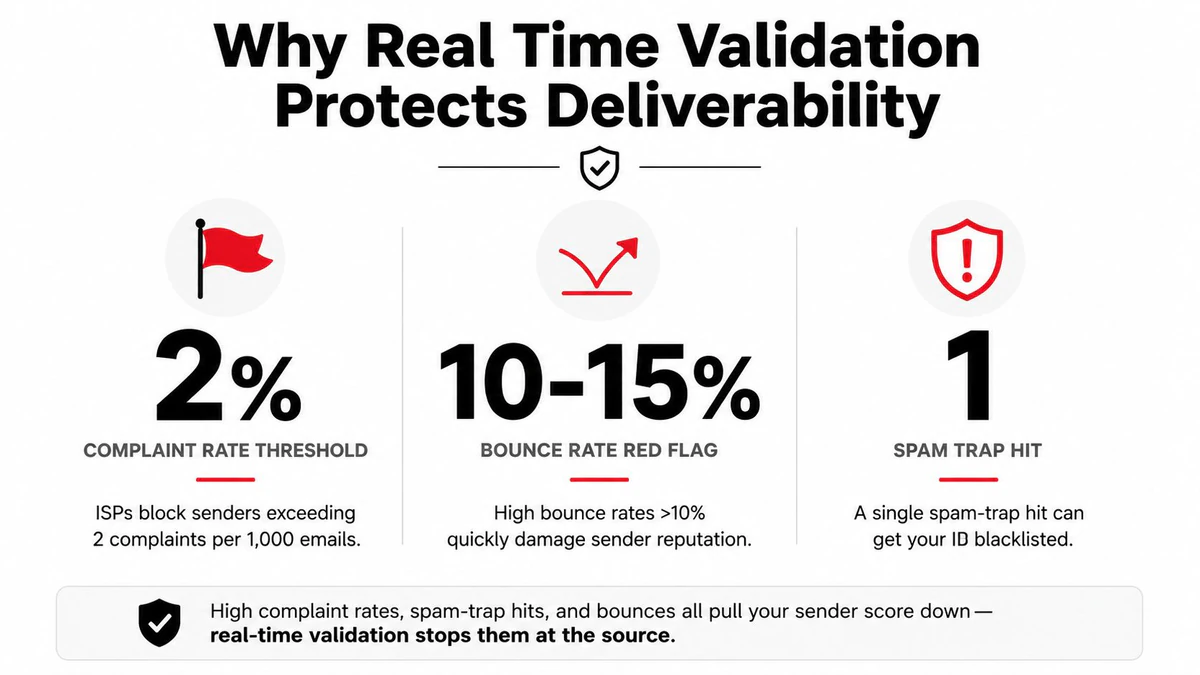
At signup, the gate can stop misspelled domains and disposable inboxes before onboarding sends. During imports, the same logic separates uncertain contacts from addresses ready for outreach. Over time, that reduces wasted sends and gives deliverability teams cleaner segments to suppress, test, and monitor.
The limits matter just as much. Address validation can establish that an address is real, standardized, and potentially deliverable, but it can't prove occupancy or identity as the Google Maps Address Validation documentation explains. It also can't identify every spam trap hidden behind a legitimate-looking domain. Pair the synchronous check with engagement-based suppression, ongoing list hygiene, and careful campaign monitoring.
Use a dedicated check email deliverability workflow when you need to inspect broader sending conditions rather than relying on an address verdict alone.
Where Real Time Validation Fits in Real Workflows
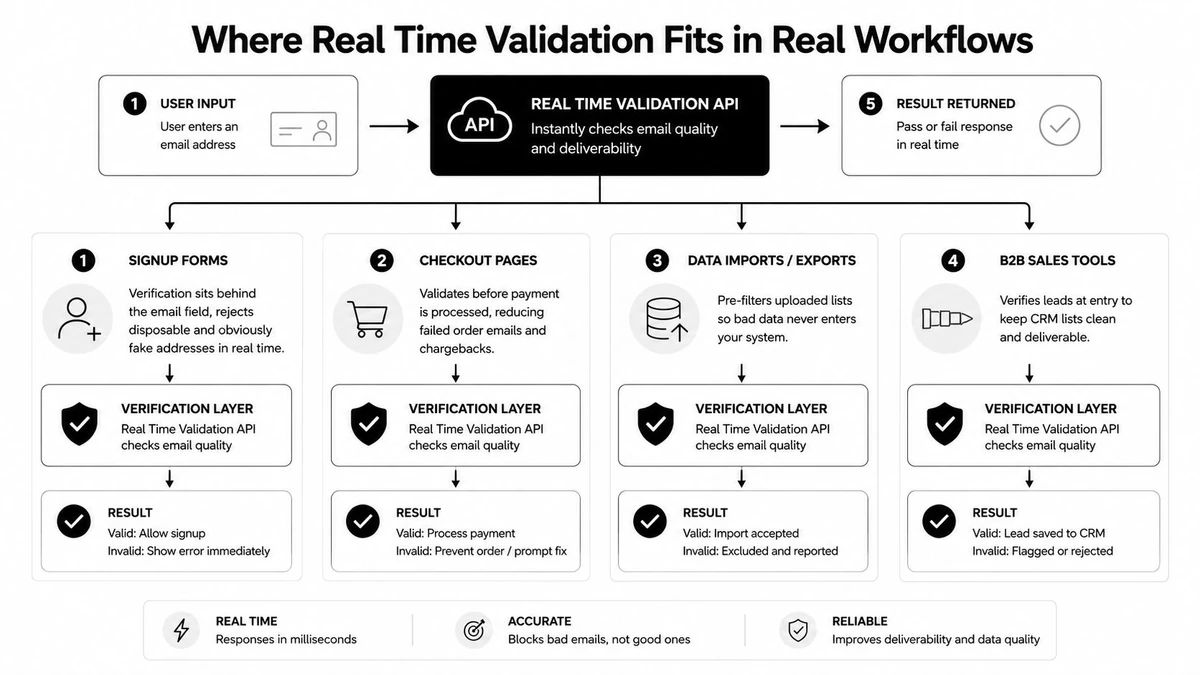
The API call stays consistent, but the policy changes with the workflow. A signup form may reject disposable addresses to protect trial access, while a newsletter might accept a catch-all address and classify it separately.
Signup forms
Put the check behind the email field, but enforce the result on the server. Syntax and typo suggestions improve the interaction, while disposable and obviously invalid results can stop the account before it reaches the user table. Catch-all addresses may deserve a warning or an email-confirmation step instead of an automatic rejection.
SDR outbound
For prospect uploads, mailbox and SMTP outcomes matter more than interface speed. Filter invalid records before reps build sequences around them, then separate role accounts because support@ and info@ may be poor targets for personal outreach. A catch-all result should remain visible so sales operations can decide whether the account is worth manual research.
Ecommerce checkout
Checkout teams need to protect order confirmations, receipts, and delivery updates from typographical errors. A typo in the email field may not stop payment or shipping, but it can leave the customer without essential notifications. Keep the correction experience clear, and avoid forcing a hard block when the address is merely uncertain.
CRM hygiene
Run validation on web-form submissions and meaningful record updates, then use an asynchronous sweep for dormant contacts that predate the gate. CRM teams should retain the granular status so nurture journeys can exclude invalid addresses, segment role accounts, and route uncertain records for review. For outbound imports, BillionVerify list cleaning for outbound is the relevant batch companion to point-of-capture checks.
The same response fields support all four workflows. Signup emphasizes abuse prevention, outbound emphasizes mailbox confidence, checkout emphasizes notification reliability, and CRM hygiene emphasizes segmentation and historical cleanup.
Best Practices and a Quick Implementation Checklist
A real-time verifier works only when the surrounding application handles uncertainty safely. Start with the server, keep the API credential out of browser code, and make the database write conditional on the server's decision.
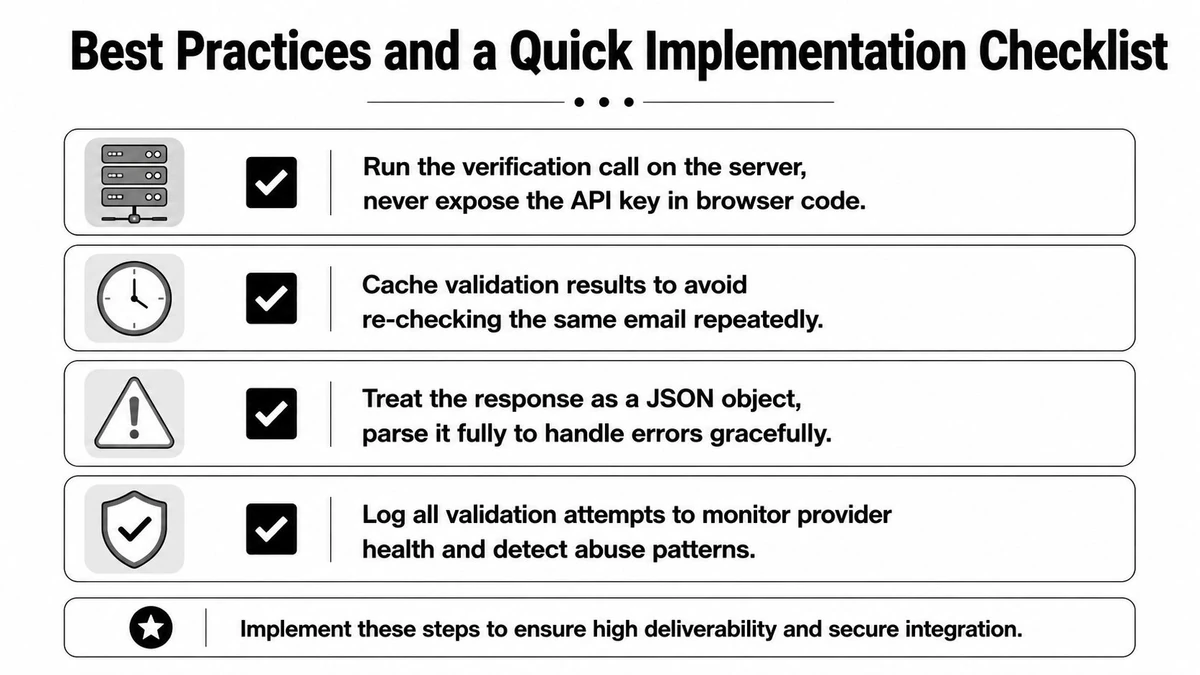
Use this implementation checklist:
- Protect the credential: Call the verification endpoint from your backend or API gateway. Never place the API key in client-side JavaScript.
- Cache repeated checks: Store recent results briefly so refreshes, retries, and repeated submissions don't multiply latency or unnecessary verification calls.
- Parse the full response: Don't reduce structured JSON to a single boolean. Read status, MX presence, SMTP outcome, catch-all behavior, disposable status, and role-based flags.
- Define policy tiers: Hard-block clear invalid and disposable results where abuse risk is high. Soft-block uncertain or catch-all results when the workflow can tolerate review.
- Explain the rejection: Return an inline message that tells the user to correct the address, rather than exposing an opaque provider error.
- Log decisions: Record the status, MX result, SMTP outcome, latency, and policy action so deliverability teams can investigate false positives and provider changes.
- Keep batch hygiene: Run periodic checks on dormant and imported segments because older records never passed through the synchronous gate.
SMTP probes can be blocked, deferred, or rate-limited, so treat the response as informed evidence rather than absolute identity proof. Give unknown its own path, set an application timeout, and avoid converting every timeout into a permanent rejection.
BillionVerify's real-time endpoint, structured JSON status fields, and webhook-friendly response shape fit this server-side pattern without requiring a custom SMTP probing system. The important design choice remains yours: decide which signals should accept, challenge, or reject an address in each workflow.
BillionVerify provides real-time email verification for syntax, MX, SMTP, catch-all, disposable, and role-based signals, helping you place a data-quality gate before signup or campaign data enters your systems. Visit BillionVerify to connect that verification layer to the workflows where bad addresses create the most operational and deliverability risk.