



A distribution list is a server-side alias that expands to multiple recipients, so one message reaches a group at once. But if you use that same setup for campaigns, you can trigger 40–60% higher spam complaint rates and 3–5x higher blacklisting risks than a CRM-managed marketing list.
That gap gets lost in most advice about what is distribution list. People hear “one address for many recipients” and assume it's a general-purpose email solution for announcements, customer communication, and even newsletter sends. In practice, those are very different jobs.
I've seen teams treat a distribution list like a shortcut around proper list management. It feels convenient because the alias hides the underlying complexity. The server handles expansion, the sender types one address, and the message goes out. For internal updates, that's fine. For marketing or customer-facing workflows, it usually creates blind spots around replies, consent, bounce handling, and list hygiene.
That's where modern verification matters. A clean list isn't just nicer to manage. It protects sender reputation, reduces wasted sends, and makes sure your data can support segmentation and automation without dragging performance down.
What Is a Distribution List Really
A distribution list is a collection of email addresses grouped under a single alias, which lets one sender deliver a message to multiple recipients without typing each address individually. In practical terms, it acts like a virtual recipient. The sender sees one address, while the mail system handles delivery to everyone behind it, as described in Fidelis Network's definition of distribution lists.
The simplest way to think about it is a forwarding address for a team. You send to sales@company.com, but the system forwards the message to the people assigned to that group. That's why distribution lists are common for departments, office locations, project teams, and report distribution.
Why companies use them
Distribution lists work well when the goal is broad internal reach with low friction. Common examples include:
- Department updates: HR sends a policy update to one alias instead of managing dozens of recipients.
- Operational alerts: IT notifies a support team or site staff about an outage.
- Recurring reports: Finance routes a scheduled report to a predefined stakeholder group.
- Project coordination: A temporary alias keeps a working group aligned during an initiative.
That design is about efficiency, not audience development. A distribution list stores and organizes contacts centrally, which is useful, but it doesn't turn the list into a proper marketing asset.
Practical rule: If the main need is “send one internal message to a known group,” a distribution list fits. If the need is segmentation, consent tracking, or campaign automation, it doesn't.
The same logic shows up in other channels. If you want a parallel example outside email, this WhatsApp one-to-many messaging guide is useful because it shows how group-style communication tools are built for distribution convenience, not full campaign governance.
For teams that are starting to move from simple group communication into real audience building, a more durable path is to separate internal aliases from subscriber databases and follow a structured email list building guide. That keeps operations clean and marketing data usable.
Distribution List vs Shared Mailbox vs Marketing List
Teams confuse these three constantly because all of them involve multiple people and email. The overlap stops there. The right choice depends on whether you're broadcasting information, handling conversations, or running permission-based campaigns.
Three tools, three different jobs
A distribution list is for one-to-many sending. A shared mailbox is for many teammates working from the same inbox. A marketing list inside a CRM or email platform is for subscriber management, segmentation, automation, and compliant outreach.
The biggest operational mistake is using a distribution list for customer-facing communication. According to Missive's analysis of distribution lists versus shared mailboxes, 90% of users assume distribution lists enable team collaboration, but they block replies from being tracked, causing 70% of customer inquiries to go unanswered or delayed, while shared mailboxes allow real-time response tracking and 2x faster resolution times.
That one finding explains a lot of avoidable inbox chaos. If replies matter, a distribution list is the wrong tool.
Comparison of Communication Tools
| Feature | Distribution List | Shared Mailbox | Marketing List (CRM) |
|---|---|---|---|
| Primary purpose | Broadcast one message to a predefined group | Manage incoming and outgoing team conversations | Run subscriber-based campaigns and automations |
| Best use case | Internal alerts, team notices, report routing | Support, sales handoff, account management | Newsletters, promotions, lifecycle email |
| Reply handling | Poor fit for tracked collaboration | Designed for shared reply visibility | Managed through campaign and response systems |
| Team ownership | Usually admin-managed or owner-managed | Shared by a working team | Managed by marketing, ops, or CRM owners |
| Segmentation | Basic group membership | Not built for segmentation | Built for segments and dynamic audience logic |
| Consent management | Not designed for opt-in workflows | Not designed for opt-in workflows | Built for subscriber permissions and list governance |
| Bounce handling | Limited in campaign terms | Not a campaign tool | Expected as part of proper email operations |
| Automation | Minimal | Workflow support around inbox work | Core feature for journeys and triggered sends |
Use a shared mailbox when the team needs accountability. Use a marketing list when the business needs compliant sending. Keep distribution lists for internal distribution.
Many email problems that look like copy or targeting problems are data structure problems. If a team doesn't know the difference between these tools, the list quality degrades fast. Understanding what email list quality means in practice helps, because quality starts with choosing the right container for the job.
Common Use Cases and Technical Workflows
Distribution lists are still useful. The trouble starts when people expect them to do work they were never designed to handle.
Where distribution lists actually fit
In most organizations, the strongest use cases are operational. A facilities team might send a building notice to all employees in one location. A finance team might route periodic reports to a fixed stakeholder group. A project manager might use a list alias to keep a cross-functional team in sync without rebuilding the recipient list every week.
Some enterprise systems structure distribution lists more formally. Oracle's JD Edwards overview of distribution lists describes list structures that support group processing and hierarchical processing, where routing can follow an organizational tree instead of just a flat member list. That's a reminder that distribution lists are rooted in workflow routing, not campaign logic.
If your outbound work starts looking more like prospecting or audience development than internal communication, you need a different playbook. Teams doing agency-style outbound often use channel-specific systems and controlled workflows, similar to the processes described in this LinkedIn outreach for agencies resource, because distribution lists aren't built for that level of targeting or response management.
How list expansion works
Under the hood, the key process is list expansion. In computer science terms, a distribution list is an abstract identifier that the message server must resolve into real recipient addresses before the email is dispatched, as explained in ScienceDirect's distribution list reference.
That sounds technical, but the operational meaning is simple:
- The sender uses one alias.
- The server expands that alias into individual member addresses.
- The system sends the message to each resolved recipient.
This is why distribution lists save time. The sender doesn't have to maintain a manual recipient string every time. The administrator or owner maintains the group centrally instead.
The alias is just the front door. The server still has to open it and decide who actually receives the message.
That convenience is real, but it also hides stale membership and role-based addresses if nobody maintains the list. When teams later export those contacts into campaign systems, it helps to treat the handoff like a data cleanup project, not a copy-paste task. A disciplined bulk email verification workflow guide is the safer approach.
Why Using Distribution Lists for Marketing Is Risky
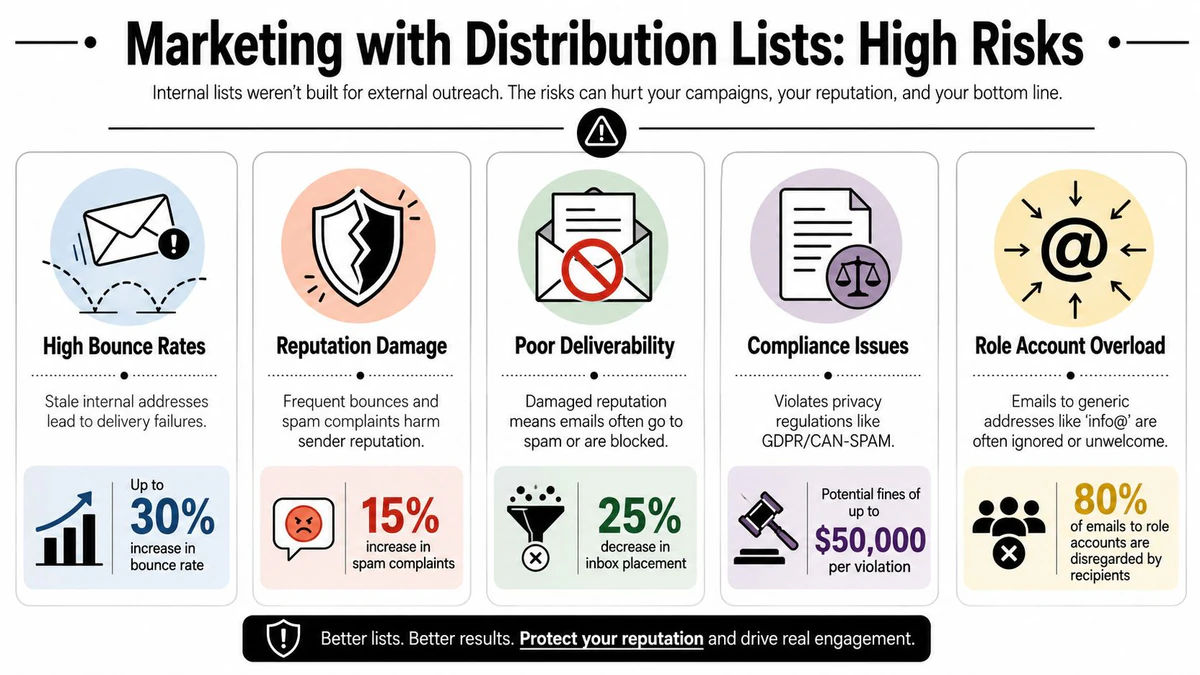
Using a distribution list for external campaigns looks efficient on paper. It's usually a shortcut that creates compliance issues and sender reputation problems at the same time.
The compliance problem
A distribution list doesn't function like a real subscriber database. It isn't built to track who opted in, who wants out, which addresses have gone bad, or how consent should be documented. That matters because campaign infrastructure depends on those controls.
TechTarget's overview of distribution lists notes that using them for campaigns leads to 40–60% higher spam complaint rates and 3–5x higher blacklisting risks compared with CRM-integrated subscriber lists that manage opt-ins and bounce handling, according to TechTarget's distribution list definition.
That's the practical difference between internal communication plumbing and marketing operations. One sends mail. The other governs permission, suppression, and response data.
The deliverability problem
Marketing performance depends on list health. When bad addresses, inactive contacts, generic role accounts, or poorly sourced recipients make it into sends, mailbox providers start treating your mail differently. Even strong creative can't overcome weak input data.
A proper marketing list gives you room to segment by behavior, geography, and engagement, and that structure makes messages more relevant. Link Mobility's explanation of distribution lists in marketing systems emphasizes that the list acts as the central repository for subscriber data and that list quality directly affects flexibility, relevance, and sender reputation through fresher profiles and removal of inactive contacts, as outlined in Link Mobility's guide to distribution lists and use cases.
That's why a verification layer matters before any migration or campaign use. BillionVerify is a professional email verification service built to solve one problem: bad email data costs businesses money.
A distribution list can help an internal team share information. It can't substitute for a consent-driven marketing system with hygiene controls.
Proactive Management and Data Hygiene Strategies
Most list problems don't start with one bad send. They build slowly through neglect. Members change roles, aliases stay active long after the purpose disappears, and stale groups remain in the environment because nobody owns periodic cleanup.
Audit the list, not just the members
One of the better operational habits is checking whether the list itself is still used. Office 365 administrators can analyze message trace data over a 90-day period to identify distribution lists that received zero messages, which makes it easier to isolate dormant lists for cleanup, as shown in Office 365 IT Pros' guidance on checking unused distribution lists.
That matters because dead lists create noise. They clutter admin views, confuse senders, and make it harder to distinguish active communication paths from abandoned ones.
A sensible audit cycle looks like this:
- Check activity first: Review whether the alias is still used in the business.
- Confirm ownership: Every list should have a clear owner who can approve membership changes.
- Review membership quality: Remove former employees, obsolete role accounts, and no-longer-relevant recipients.
- Reclassify the list: Decide whether it belongs in internal operations, a shared mailbox workflow, or a marketing platform.
Old aliases rarely announce that they're obsolete. Admins have to prove current use, or remove them.
Build a repeatable hygiene routine
The strongest list hygiene programs don't rely on occasional cleanup. They create repeatable process. Internal aliases should have owners, review dates, and clear purpose statements. Marketing databases should have suppression logic, segmentation discipline, and verification before import or send.
If you're formalizing that process, this email list hygiene framework for 2026 is a useful reference point because it pushes teams toward continuous maintenance instead of reactive cleanup after performance slips.
The principle is simple. Every list degrades unless someone actively maintains it.
Securing Your Lists with Automated Verification
At some point, manual cleanup stops being enough. That's when automated verification becomes the practical control layer between raw contact data and real sending.

What automated verification actually checks
When teams export addresses from old systems, intake forms, sales spreadsheets, or internal aliases, they need to know what's valid before those contacts reach a CRM or campaign platform. Verification helps answer that at the record level.
According to DokeyAI's BillionVerify product snapshot, BillionVerify delivers 99.9% SMTP-level accuracy across single checks, bulk list cleaning, and real-time API usage, with structured JSON returns that include status, SMTP results, MX records, catch-all scoring, and deliverability insights.
That combination matters because different workflows need different controls:
- Single checks fit manual review or ad hoc validation.
- Bulk list cleaning fits migration projects, recurring database cleanup, or pre-campaign scrubbing.
- Real-time API validation fits signup forms and product workflows where bad data should be blocked at the source.
For teams evaluating verification as part of modern email operations, a grounded explainer on what email verification does helps connect the technical checks to the business outcomes.
Where verification belongs in the workflow
Verification does the most good when it sits upstream. Don't wait until bounce reports or complaint spikes tell you there's a problem. Clean before import. Validate at signup. Recheck older records before major sends.
A straightforward workflow looks like this:
- Export the addresses from the distribution list, legacy system, or form source.
- Run verification before those contacts enter your CRM or campaign tool.
- Filter the results using the returned status and deliverability signals.
- Import only usable records into the system that will handle compliant outreach.
- Repeat on a schedule so the database doesn't drift back into poor condition.
This is also where structured output helps operations teams. JSON-based results are easier to route into CRMs, automation tools, and review queues than vague pass-fail labels. Product teams can use API responses to block obvious junk. Sales and marketing teams can clean lists before launch instead of sorting through damage afterward.
Here's a walkthrough that shows the broader verification model in action:
The bigger point is this: asking “what is distribution list” is only the starting question. The better question is whether the data behind that list is safe to use for the purpose you have in mind. Internal broadcast, team routing, and report distribution are one thing. Marketing, prospecting, and subscriber management are another.
A distribution list is a convenient alias. Verification turns a raw set of addresses into data you can trust.
If you need to clean existing contacts, validate new signups, or check a list before moving it into a CRM, BillionVerify is a practical option for email verification. It supports single checks, bulk list cleaning, and real-time API validation, which makes it useful when bad email data is starting to affect deliverability, segmentation, or sender reputation.