

LinkedIn Sales Navigator pricing starts at US$119.99 a month for the Core plan, billed per license. The Advanced plan starts at US$159.99 a month. LinkedIn Sales Navigator Advanced Plus has no public price, because LinkedIn quotes it for each sales team. Paying yearly lowers the monthly figure on Core and Advanced, and the saving is much bigger on Core.
This guide covers LinkedIn Sales Navigator pricing plan by plan, in US dollars and four more currencies. It also explains team licenses, the features each plan includes and the things that move the number on your own checkout screen. Every figure comes from LinkedIn's own plans page as shown in October 2026, and we quote LinkedIn's own wording wherever the wording matters.
Key facts (checked October 2026):
- Per LinkedIn's compare plans page, Sales Navigator Core is US$119.99 a month, or US$1,079.88 for a full year.
- On the same page, Sales Navigator Advanced is US$159.99 a month, against US$1,799.88 for a full year.
- LinkedIn Sales Navigator pricing for Advanced Plus is a quote, based on team size, CRM integration and onboarding needs, per LinkedIn's pricing FAQ.
- LinkedIn lets a buyer purchase up to five Advanced licenses online from a desktop, per its license FAQ.
- LinkedIn notes that listed prices may exclude VAT, GST and promotions, and that they can change.
- BillionVerify gives every active account free daily credits to check the email addresses people collect while prospecting on LinkedIn.
We are not affiliated with LinkedIn. BillionVerify is an email verification service, and many of our users prospect with Sales Navigator, so we keep the pricing facts in one place. Weighing your options? Read the BillionVerify vs QuickEmailVerification comparison.
LinkedIn Sales Navigator Pricing at a Glance
LinkedIn sells Sales Navigator in three plans. The entry plan is Core, Advanced comes next and Advanced Plus is the top plan. The table shows the starting price of each plan next to the person LinkedIn built it for.
| Plan | Best for, per LinkedIn | Monthly price | Annual price | Annual saving |
|---|---|---|---|---|
| Core | Individual sellers | US$119.99 | US$1,079.88 | 25% |
| Advanced | Sales teams | US$159.99 | US$1,799.88 | 6% |
| Advanced Plus | Sales teams using an integrated CRM | Quote only | Quote only | Not listed |
All prices are per license. LinkedIn words them as "starts at," so the number on your own screen can differ from the table.
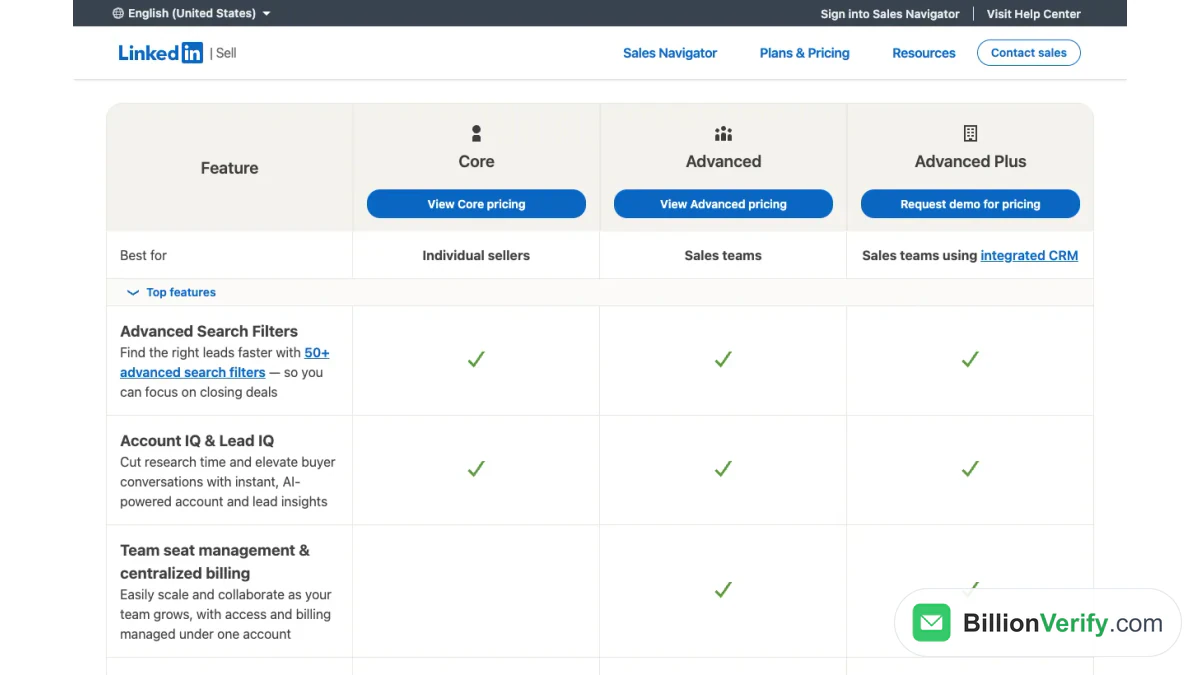
Screenshot: the top of LinkedIn's Sales Navigator plans and pricing page, with the three plan columns and the "Best for" row.
What the three plan names mean
Core is the entry plan for one seller who wants to find good leads and keep client relationships warm. Advanced is the team plan, and it adds team controls and shared selling tools. Advanced Plus is the quote-only plan for teams that want deeper links to a supported CRM.
The sections below take each plan in turn. First, though, the question most readers ask is how much the cheapest option costs each month.
How Much Does LinkedIn Sales Navigator Cost per Month?
The lowest first payment is Core on monthly billing, at US$119.99 a month. Advanced on monthly billing is US$159.99, which is US$40 more every month. That monthly figure is the one you pay if you renew each month and want the freedom to stop after any single month.
Monthly billing is the highest rate LinkedIn offers on each plan. Twelve payments of US$119.99 add up to US$1,439.88 on Core, and twelve payments of US$159.99 total US$1,919.88 on Advanced.
How much is Sales Navigator per year?
Core is US$1,079.88 when you pay once for the year. Advanced is US$1,799.88 for the year. A yearly payment covers twelve months in one charge, so the cash you hand over on day one is much larger than a monthly bill.
Annual billing against twelve monthly payments
The table compares the two billing cycles using LinkedIn's own figures. The last two columns are our arithmetic.
| Plan | Twelve monthly payments | One annual payment | Annual price per month | Saving per year |
|---|---|---|---|---|
| Core | US$1,439.88 | US$1,079.88 | US$89.99 | US$360.00 |
| Advanced | US$1,919.88 | US$1,799.88 | US$149.99 | US$120.00 |
LinkedIn states the savings as 25% for Core and 6% for Advanced. The Advanced saving is small, so the monthly and annual routes sit close together on that plan.
Annual and monthly cancellation rules
LinkedIn's cancellation policy ties the end of access to the billing cycle. For annual plans, cancellation applies at the end of the paid year. For monthly plans, it applies when the current month closes. A yearly buyer therefore commits the whole payment up front, and a monthly buyer can leave sooner.
LinkedIn Sales Navigator Pricing in Other Currencies
LinkedIn prints the Core and Advanced prices in five currencies: US dollars, Australian dollars, Canadian dollars, euros and pounds. These are the numbers from its pricing FAQ.
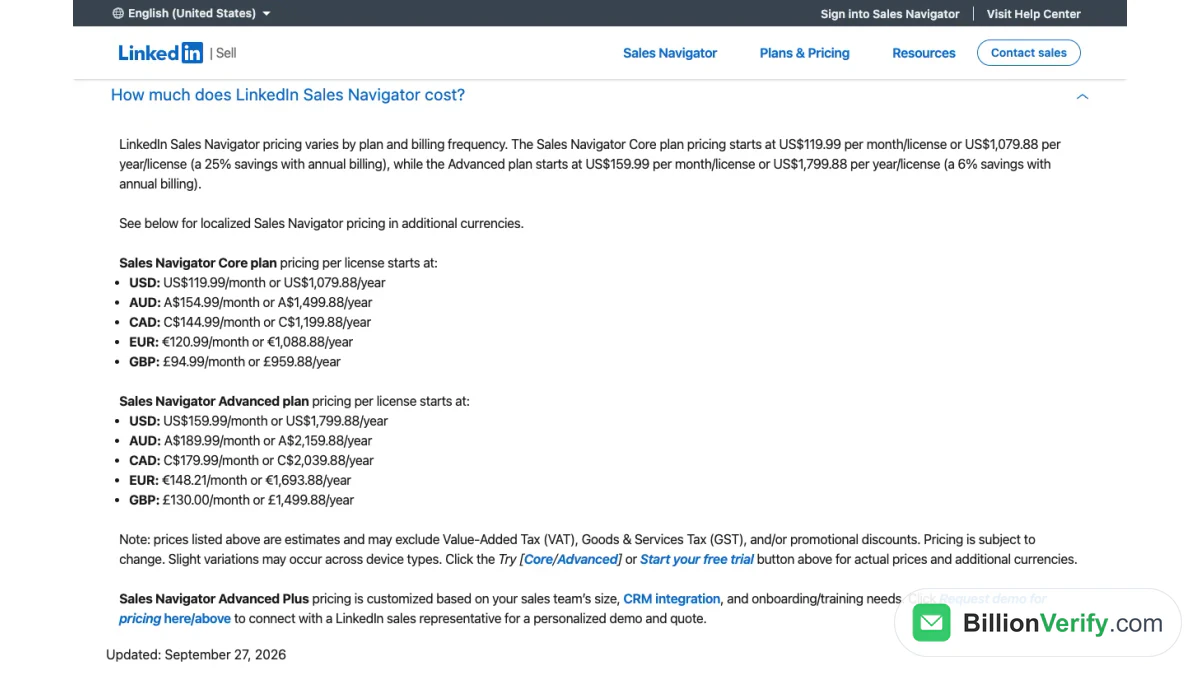
Screenshot: LinkedIn's answer to "How much does LinkedIn Sales Navigator cost?", with the five-currency lists and its update note.
Sales Navigator Core price by currency
| Currency | Core monthly | Core yearly | Yearly price per month |
|---|---|---|---|
| USD | US$119.99 | US$1,079.88 | US$89.99 |
| AUD | A$154.99 | A$1,499.88 | A$124.99 |
| CAD | C$144.99 | C$1,199.88 | C$99.99 |
| EUR | €120.99 | €1,088.88 | €90.74 |
| GBP | £94.99 | £959.88 | £79.99 |
Sales Navigator Advanced price by currency
| Currency | Advanced monthly | Advanced yearly | Per month, paid yearly |
|---|---|---|---|
| USD | US$159.99 | US$1,799.88 | US$149.99 |
| AUD | A$189.99 | A$2,159.88 | A$179.99 |
| CAD | C$179.99 | C$2,039.88 | C$169.99 |
| EUR | €148.21 | €1,693.88 | €141.16 |
| GBP | £130.00 | £1,499.88 | £124.99 |
Why the currencies do not match an exchange rate
LinkedIn sets each currency separately. Core is £94.99 on monthly billing in pounds but €120.99 in euros, and the euro figure is almost the same as the dollar figure. A converter will not reproduce the number at checkout. Members in other countries see a local price at checkout, and LinkedIn tells readers to click the free-trial button for actual prices and additional currencies.
LinkedIn Sales Navigator Core Pricing and Features
Sales Navigator Core is built for a single seller. LinkedIn describes it as best for "individual sellers who want to find high-quality leads and build client relationships." It is also the plan most people mean when they search for the plain LinkedIn Sales Navigator price, because it is the lowest one.
Core includes these items in LinkedIn's comparison grid:
- Advanced search filters. LinkedIn advertises "50+ advanced search filters" to find the right leads faster.
- AI insights. Account IQ plus Lead IQ give instant, AI-powered research on accounts and leads.
- InMail. Core includes 50 InMail messages a month, the same allowance as the other two plans.
- Relationship Explorer and Relationship Map. The first shows insights such as buyer interest and mutual connections. The second supports org charts with alerts on key leads.
- Alerts. Real-time signals such as job changes and new content.
- Message Assist. AI help with personalized outreach.
LinkedIn's grid shows no tick for Core on team controls, buyer intent, TeamLink, Smart Links, team reporting, list upload or any CRM feature. Our guide to LinkedIn Sales Navigator shows how these tools work in daily use.
Sales Navigator Advanced Pricing and Features
Sales Navigator Advanced is the first team plan. LinkedIn's wording is that it suits "sales teams that need AI-powered lead and account research, actionable insights, and collaboration tools." Priced from US$159.99 a month, it costs US$40 more than Core each month and US$720 more each year at LinkedIn's starting prices.
Advanced adds six things to Core in the grid:
- Seat management and one bill, so access and billing sit under one account.
- Buyer Intent, which shows when buyers show interest in your company.
- TeamLink, which opens warm introductions through your team's trusted connections.
- Smart Links, which are trackable links for shared content.
- Team reporting, which tracks team activity in easy-to-read reports.
- Book of business upload, limited to a CSV upload on this plan.
LinkedIn also lists specialist onboarding and training for Advanced, with a footnote: "If purchased through a sales representative." The tick therefore depends on how you buy.
LinkedIn Sales Navigator Advanced Plus Pricing
LinkedIn publishes no Advanced Plus figure. Its pricing FAQ says the quote depends on how big the sales team is, which CRM it runs and what training it needs. You click "Request demo for pricing" and a LinkedIn sales representative gives a personalized demo and quote.
That makes Advanced Plus the answer to a common question. People searching for LinkedIn Sales Navigator enterprise cost or enterprise pricing are looking for a tier that LinkedIn's plan list does not call Enterprise. The list has three plans, and the quote-based one is Advanced Plus.
What Advanced Plus adds
LinkedIn's grid shows these extras for Advanced Plus, on top of everything in Advanced:
- Deeper CRM sync. Salesforce, HubSpot, Microsoft Dynamics, Oracle and more, with real-time updates.
- Records made from Sales Navigator. Add leads and accounts straight to your CRM with no manual entry.
- LinkedIn insights inside the CRM, plus 15+ sales integration tools.
- Alerts in Microsoft Teams, which LinkedIn labels NEW in its grid.
- Custom ROI reporting inside team reporting.
- CRM import for the book of business, on top of the CSV upload.
Who Advanced Plus is for
In LinkedIn's words, Advanced Plus fits teams "using one of these CRMs who need advanced sales-tool and CRM integrations." If your team does not use a supported CRM, the integration rows add nothing, and the quote has little to price.
Sales Navigator Plans Compared Feature by Feature
The full comparison grid is long, so the table below puts every row in one place. A tick means LinkedIn shows a check mark for that plan.
| Feature | Core | Advanced | Advanced Plus |
|---|---|---|---|
| Advanced search filters | Yes | Yes | Yes |
| Account IQ and Lead IQ | Yes | Yes | Yes |
| InMail per month | 50 | 50 | 50 |
| Relationship Explorer | Yes | Yes | Yes |
| Relationship Map | Yes | Yes | Yes |
| Alerts | Yes | Yes | Yes |
| Message Assist | Yes | Yes | Yes |
| Team seat management and centralized billing | No | Yes | Yes |
| Buyer Intent | No | Yes | Yes |
| TeamLink | No | Yes | Yes |
| Smart Links | No | Yes | Yes |
| Team reporting | No | Yes | Yes, with custom ROI reporting |
| Book of business | No | CSV upload | CSV upload and CRM import |
| Dedicated account team and tailored training | No | Yes, if bought via a sales rep | Yes |
| Advanced CRM integrations | No | No | Yes |
| Lead and contact creation in the CRM | No | No | Yes |
| Sales Navigator for Microsoft Teams | No | No | Yes |
| CRM embedded experiences and profiles | No | No | Yes |
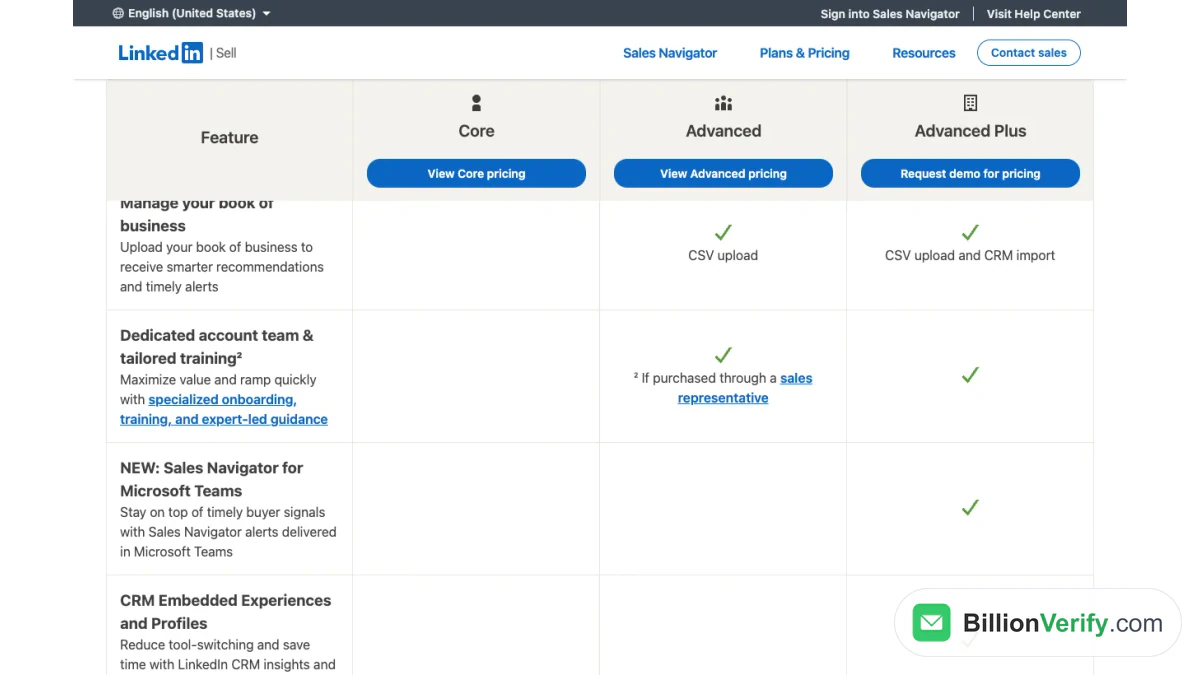
Screenshot: the middle of LinkedIn's feature grid, where TeamLink is the first row that Core does not tick.
The table shows why the three plans sit close together on the sales side. The prospecting tools are the same on every plan. The price steps pay for team features, and the biggest gap is between Advanced and the quote-only top plan, on CRM work.
LinkedIn Sales Navigator Team Pricing: Licenses and Seats
Team pricing follows LinkedIn's per-license model. Each seller needs a license, and each license carries the monthly or yearly price of its plan. LinkedIn's FAQ explains how a team buys several Advanced licenses.
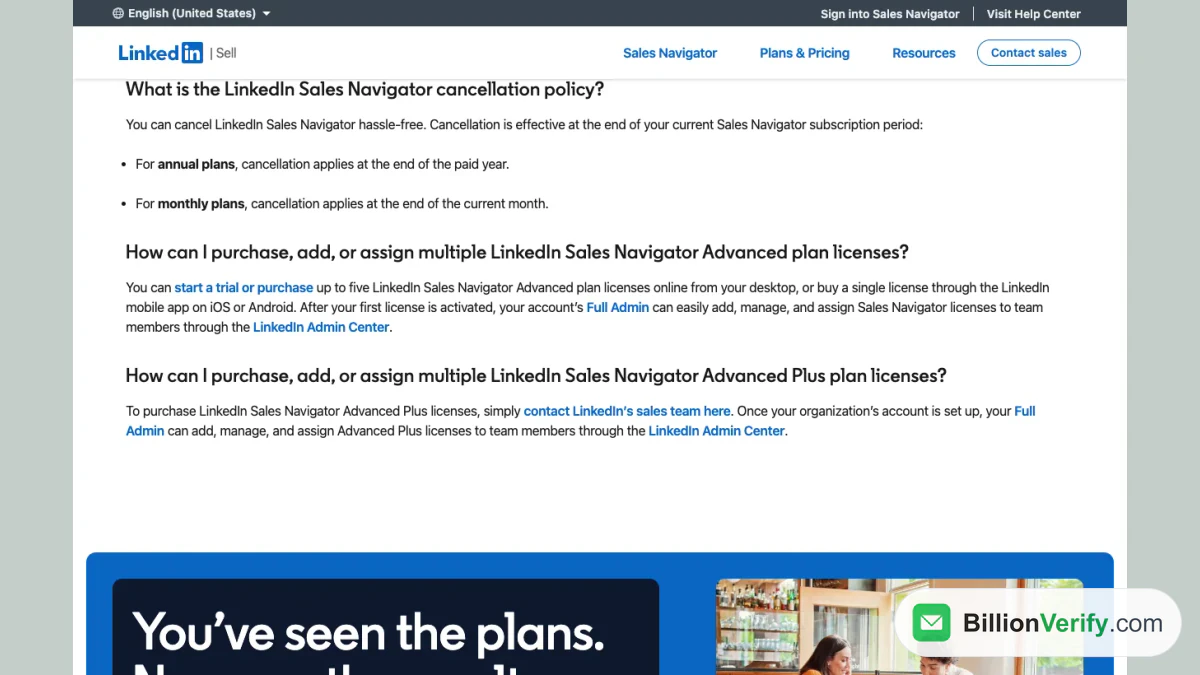
Screenshot: LinkedIn's answers on cancellation and on buying several licenses for the two team plans.
How to buy more than one Advanced license
Per LinkedIn, a single desktop order covers up to five Advanced seats, and a single seat can also be bought in the iOS or Android app. After the first license is active, the account's Full Admin can add, manage and assign licenses to team members through the LinkedIn Admin Center.
How to buy Advanced Plus licenses
LinkedIn's sales team sells the Advanced Plus licenses. Once the organization's account is set up, the Full Admin adds and assigns Advanced Plus licenses in the same Admin Center.
What the admin roles can do
LinkedIn's help center describes three permission levels. A Full admin can manage billing, users, licenses and permissions, and can create groups and configure IT settings. A Sub admin can view usage reports. A User gets access to Sales Navigator. LinkedIn also notes that an admin with billing permissions can add licenses to the contract through the Admin Center.
Sales Navigator team cost for one to five Advanced seats
The table works out LinkedIn Sales Navigator team pricing for Advanced seats, using LinkedIn's starting prices. It is our arithmetic, and a quote from LinkedIn can differ, so treat it as a planning aid.
| Advanced seats | Monthly billing, 12 months | Annual billing |
|---|---|---|
| 1 | US$1,919.88 | US$1,799.88 |
| 2 | US$3,839.76 | US$3,599.76 |
| 3 | US$5,759.64 | US$5,399.64 |
| 4 | US$7,679.52 | US$7,199.52 |
| 5 | US$9,599.40 | US$8,999.40 |
People who look for a group plan find it under the two team plan names, and TeamLink is one feature inside them. Sign-in rules for company licenses are in our Sales Navigator login guide.
What Can Change Your Sales Navigator Price
LinkedIn adds a note under its price lists: "prices listed above are estimates and may exclude Value-Added Tax (VAT), Goods & Services Tax (GST), and/or promotional discounts. Pricing is subject to change. Slight variations may occur across device types."
Tax
VAT and GST can raise the total above the listed figure, depending on where you live and whether you buy for a business. The checkout screen shows the amount that counts.
Device and purchase route
LinkedIn says prices can vary by device. Its license FAQ also separates the routes: a desktop order for several Advanced seats, or one seat bought on a phone. Read the total on the final checkout screen before you confirm.
Promotions and trials
A free trial delays the first charge, and a promotion can lower it. Trial rules are covered in two sentences below and in full in our guide to the LinkedIn Sales Navigator free trial.
Updates over time
LinkedIn's pricing FAQ carries the note "Updated: September 27, 2026." A price is only as current as its date, so check the date before you put a figure into a budget. Pages that show LinkedIn Sales Navigator pricing 2026 should carry that date, and older pages for 2024 or 2025 may show figures LinkedIn has since changed.
Free Trial, Credit Card and Billing
LinkedIn offers a free trial of Core or Advanced. Members qualify when they are not on any paid LinkedIn subscription, including Premium or Sales Navigator, and have not used a LinkedIn free trial in the past 365 days. LinkedIn adds that trial availability and features may vary by plan and region.
LinkedIn asks for payment information so the subscription can start without a gap. You can cancel for any reason before the trial ends to avoid a charge, and LinkedIn sends an email reminder seven days before the trial expires.
LinkedIn Premium Prices Next to Sales Navigator
Premium is a separate family of plans. LinkedIn lists Premium Career from US$39.99 a month and Premium Business from US$69.99 a month, so Core is US$50 a month above Business at starting prices. The full Premium list is in our guide to LinkedIn Premium cost, and the feature differences between the two products are in LinkedIn Premium vs Sales Navigator.
For a broader look at what a paid LinkedIn plan can and cannot do, read whether LinkedIn Premium is worth it. If you are weighing other prospecting tools by price, our Sales Navigator alternatives guide lists them.
How to Judge the Sales Navigator Price for Your Team
Nobody can tell you whether a price fits without your own numbers, so use a short method instead of a verdict. LinkedIn itself claims that "Forrester found Sales Navigator pays for itself in six months," and that is LinkedIn's statement on its own page, not our finding.
Work through these questions with your own figures:
- Count the seats. Each seller who will log in needs a license. Multiply the plan price by that number, using the seat table above.
- Pick the billing cycle. Annual billing lowers the price per month, most on Core. It also locks in twelve months.
- Match the plan to the missing feature. Ask which row in the grid you cannot work without. If it is TeamLink or buyer intent, Core is out. If it is a CRM sync, only Advanced Plus has it.
- Estimate how many leads you work each month. Divide the yearly price by the number of contacts you reach, and compare it with your current tools.
- Add the cost of bad data. A list that bounces costs more than the license, because it harms your sender reputation.
The same questions apply to the keyword searches about whether Sales Navigator is worth it. The answer depends on your seats, your CRM and the number of people you contact, and we leave that call to you.
After You Pay: Check the Emails You Collect
The Sales Navigator price buys search, alerts and InMail. It does not hand you verified work email addresses. LinkedIn shows a member's email only when the member chooses to share it, so most teams add addresses from other sources and then send cold email. Our guide to exporting leads from LinkedIn Sales Navigator covers the usual routes.
Addresses collected this way age quickly, because people change jobs. A bounced batch hurts your sender reputation, and the damage can outlast the subscription. Check each address before the first send. BillionVerify will check a single address for free, with no account.
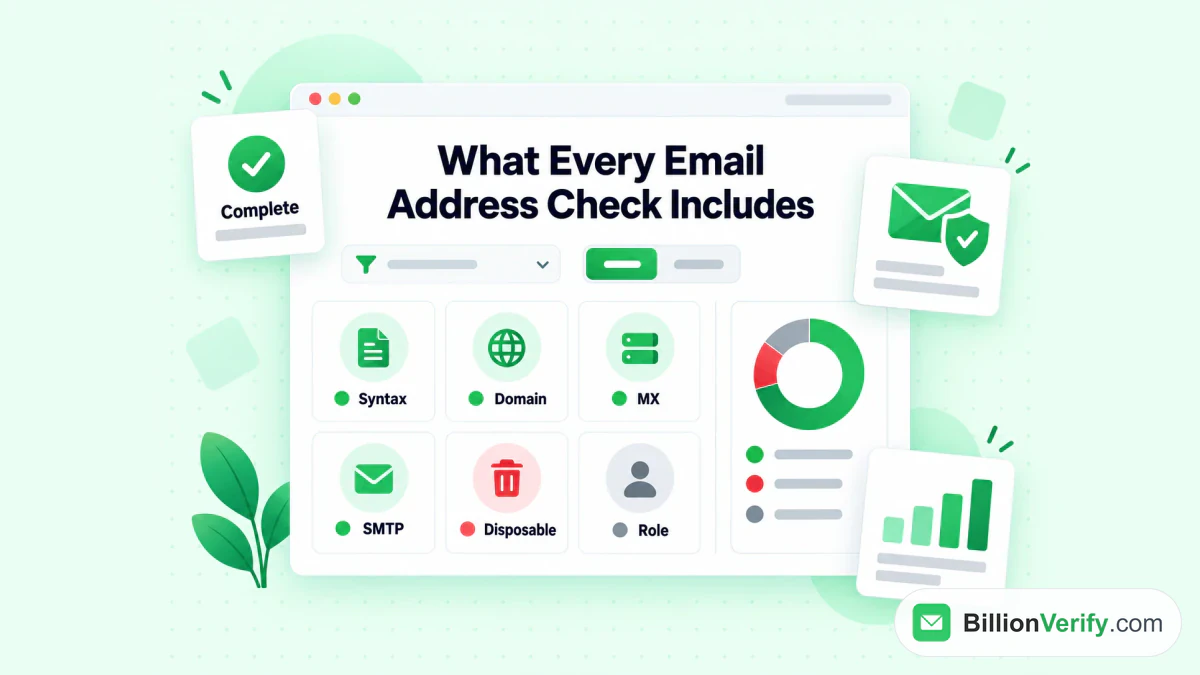
BillionVerify's address check runs syntax, domain, MX, SMTP, disposable and role-account checks on each address.
A few free tools help once you have a list:
- Our reverse email lookup reads the domain, organization and public profile signals behind an address.
- Our phone number validator checks whether a number is valid for its country and shows its line type.
If your leads come from the sales tool, read about verifying LinkedIn Sales Navigator emails. BillionVerify checks syntax, domain, mail server and mailbox, reports catch-all addresses as their own group and does not charge for unknown results. You get 20 free credits each day you use your account, up to 600 a month.
Content is the other half of social selling. To study a video post that worked in your niche, save it with our free LinkedIn video downloader.
FAQs
How much does LinkedIn Sales Navigator cost?
Core costs US$119.99 monthly and US$1,079.88 annually, and Advanced costs US$159.99 paid monthly or US$1,799.88 paid yearly, for one license each. LinkedIn quotes Advanced Plus to each team.
How much is Sales Navigator per month?
Paid month by month, Core runs US$119.99 and Advanced runs US$159.99. Paid for the year, the monthly equivalent falls to US$89.99 for Core and US$149.99 for Advanced.
What is the price of LinkedIn Sales Navigator Core?
The Core price on LinkedIn's page begins at US$119.99 for a single license paid monthly. Core is aimed at individual sellers, and paying yearly saves 25%, per LinkedIn.
What is LinkedIn Sales Navigator Core?
LinkedIn Sales Navigator Core is the lowest-priced option, meant for one seller. It includes filtered lead search, AI insights, alerts, Message Assist and 50 InMails a month.
What does LinkedIn Sales Navigator Advanced Plus cost?
LinkedIn lists no Advanced Plus price. The quote depends on team size, the CRM in use and training needs, and you ask for it through LinkedIn's demo button.
How much is LinkedIn Sales Navigator for a team?
A team pays the plan's per-license price for every seller. Five Advanced seats come to US$8,999.40 for the year or US$799.95 a month, at LinkedIn's starting prices, and Advanced Plus gets its own quote.
How many Advanced licenses can I buy online?
Up to five Advanced licenses can be bought in one online order from a desktop browser. Larger orders are handled by LinkedIn's sales reps, and a Full Admin then assigns the seats in the Admin Center.
Is there a LinkedIn Sales Navigator enterprise plan?
LinkedIn's plan list names three plans, and none is called Enterprise. The quote-based plan is Advanced Plus, which LinkedIn aims at teams with an integrated CRM.
Is the LinkedIn Sales Navigator price per month or per year?
LinkedIn lists both. The monthly price is the higher rate for each month, and the yearly price is one payment for twelve months at a lower monthly equivalent.
Does the Sales Navigator price include tax?
The listed prices may leave out sales taxes and offers, according to LinkedIn's disclaimer. The checkout screen shows the total that applies to your account.
Why is my Sales Navigator price different from this guide?
Your price can differ because of currency, tax, device type or an offer. LinkedIn also says prices can change, and its FAQ carries an update date.
Can I try Sales Navigator before paying?
Members with no paid LinkedIn subscription and no earlier trial this year can start a Core or Advanced trial. Our free trial guide covers the rules in more detail.
Does LinkedIn Sales Navigator give me email addresses?
LinkedIn Sales Navigator does not hand out work email addresses for every lead. A member's email shows only when the member shares it, so teams verify any address they add from another source.
How do I check emails before I message prospects from Sales Navigator?
Run the list through an email verifier before you send. BillionVerify checks each mailbox and keeps unknown results free.
Watch: How to Download LinkedIn Videos: LinkedIn Video Downloader
Watch: How to Validate a Phone Number: Free Phone Number Validator
