



LinkedIn Premium vs Sales Navigator comes down to one question. Do you sell for a living, or do you use LinkedIn for your career and your own small business? LinkedIn Sales Navigator is the dedicated sales tool. LinkedIn Premium is a family of plans for job seekers, consultants and owners. Every Sales Navigator plan already includes the Premium Business toolset, so nobody needs to buy both. Small businesses often list only an info@ address, so read how info@ email filtering keeps those contacts without the noise.
This guide settles the LinkedIn Premium vs Sales Navigator choice plan by plan. It compares features, InMail, LinkedIn Premium cost, free trials and switching. Each fact comes from LinkedIn's own pages, read in October 2026, and we link every source. LinkedIn updates its plans often, so check the live page before you pay.
We are not affiliated with LinkedIn. BillionVerify is an email verification service. Near the end, we explain why neither plan hands you email addresses, and what to do about that.
Key facts (checked October 2026):
- LinkedIn Sales Navigator includes the Premium Business features, per LinkedIn's official comparison page.
- LinkedIn lists monthly InMail credits of 15 for Premium Business, 30 for All-in-One and 50 for Sales Navigator.
- LinkedIn priced Premium Business from $69.99 a month and Sales Navigator Core from $119.99 a month in October 2026.
- LinkedIn refuses a new Premium trial if your profile redeemed one in the previous 12 months.
- Neither LinkedIn Premium nor Sales Navigator hands out work email addresses, so outreach lists need their own check.
LinkedIn Premium vs Sales Navigator: The Short Answer
LinkedIn answers this on its own Premium vs Sales Navigator page. It calls Sales Navigator "a specialized sales tool that helps sellers find the right buyers." It describes Premium Business as "generalist features that help you showcase your credibility and grow your career or business."
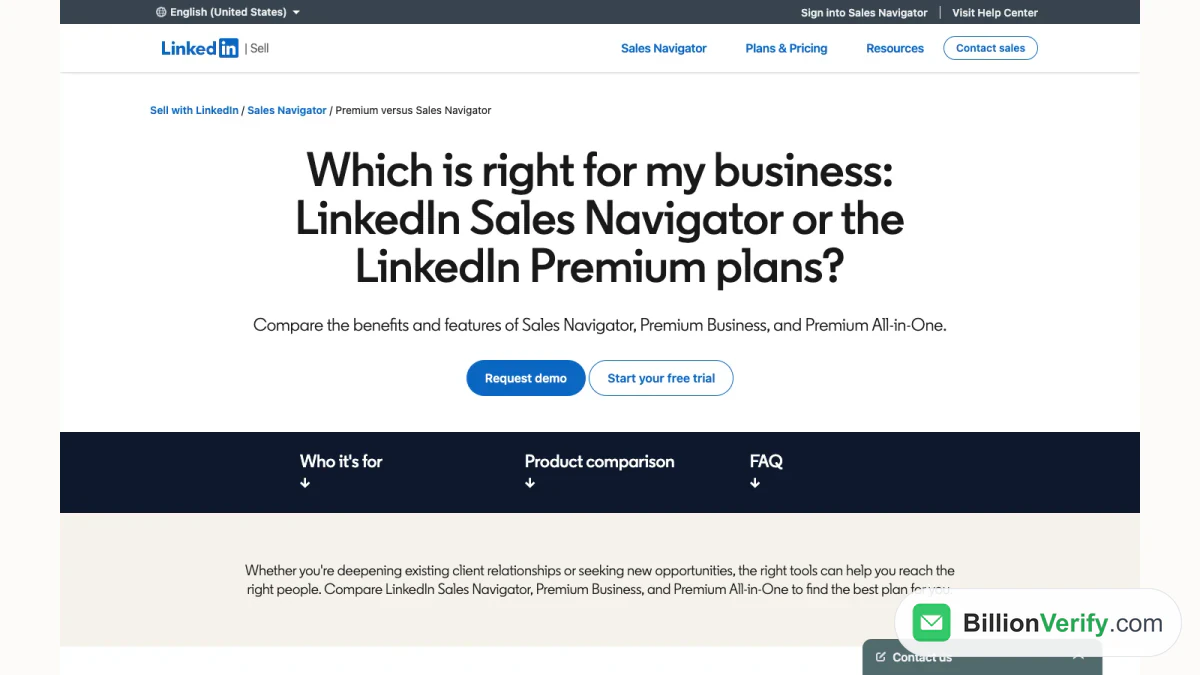
Screenshot: LinkedIn's own page comparing its plans, October 2026.
The short version:
- Choose LinkedIn Sales Navigator if prospecting is your job. You get sales search filters, saved leads, alerts and the largest InMail allowance.
- Choose LinkedIn Premium Business for a stronger profile and some InMail. It suits consultants and business leaders.
- Choose the All-in-One plan if you run a small business that also hires and promotes posts.
- Choose the Career plan if you are hunting for a job.
The sections below explain each choice.
What Is LinkedIn Premium?
LinkedIn Premium is a set of paid plans layered on a free account. The LinkedIn Premium homepage lists four of them: All-in-One, Business, Career and Company Page. LinkedIn says these LinkedIn Premium plans help "job seekers and small businesses" to "showcase credibility, find and message the right people, and gain an advantage with exclusive insights."
LinkedIn's help article on free and paid accounts also lists Sales Navigator and Recruiter Lite in the same family. So in LinkedIn's own words, Sales Navigator is one of the paid subscriptions. It is the one for generating leads.
The Career plan
The Career plan is for job seekers. LinkedIn's Career page lists top applicant jobs, top choice jobs, AI insights on job posts and profile writing help. It adds LinkedIn Learning, with 25,000+ courses. It comes with 5 InMail messages each month.
LinkedIn Premium Business
LinkedIn Premium Business is for business leaders and owners. LinkedIn says it "focuses on professional networking and personal branding without the marketing and hiring components." Its tools include a custom button, featured credibility highlights, business insights and 15 InMail messages per month.
The All-in-One plan
All-in-One is for owners who "manage sales, marketing, and hiring without specialized teams." It adds daily prospect suggestions, 30 InMail messages per month, a $50 monthly post boosting credit and a monthly hiring credit. LinkedIn notes it is "currently available to a limited group."
The Company Page plan
The Company Page plan upgrades a company's Page, not a person. It adds custom testimonials and a view of who visited the Page. LinkedIn also lists credibility highlights and auto-invites for people who engage with your posts. It is not a prospecting product, so the comparisons below leave it out. A company can pair it with a personal plan for its founder or sellers.
What Is LinkedIn Sales Navigator?
LinkedIn Sales Navigator is LinkedIn's prospecting tool for sellers. It runs in its own interface, apart from the usual feed. LinkedIn sells it in three tiers: Core, Advanced and Advanced Plus.
On its comparison page, LinkedIn lists what the sales tool adds:
- Advanced lead and company search with "50+ sales-specialized filters."
- Message Assist for AI message suggestions.
- Account IQ and Lead IQ for research on buyers and accounts.
- Buyer Intent signals and alerts for timing outreach.
- TeamLink, seat management and team reporting for groups.
- CRM integrations with Salesforce, HubSpot, Microsoft Dynamics, Oracle and others.
Our full guide to LinkedIn Sales Navigator covers every feature and tier in depth.
Does LinkedIn Sales Navigator Include Premium?
Yes. LinkedIn states it plainly: "A Sales Navigator subscription includes access to Premium Business features." That holds for every tier.
So a LinkedIn Sales Navigator subscriber also gets those profile extras. They cover who viewed your profile over the past 365 days, the custom button and business insights. Adding LinkedIn Premium on top would duplicate what you already pay for.
The reverse does not hold. None of the LinkedIn Premium plans includes Sales Navigator. Business, Career and All-in-One run inside the normal LinkedIn interface. None offers the sales interface, lead lists or real-time sales alerts.
Is Sales Navigator the same as LinkedIn Premium?
No. They are separate subscriptions. LinkedIn groups them in one family, yet LinkedIn Sales Navigator is the sales product. It bundles those profile features with a full sales toolset that LinkedIn Premium plans lack.
LinkedIn Sales Navigator vs Premium: Side-by-Side
LinkedIn publishes a side-by-side table on that same page. Here are the rows that matter most for prospecting in the LinkedIn Sales Navigator vs Premium decision.
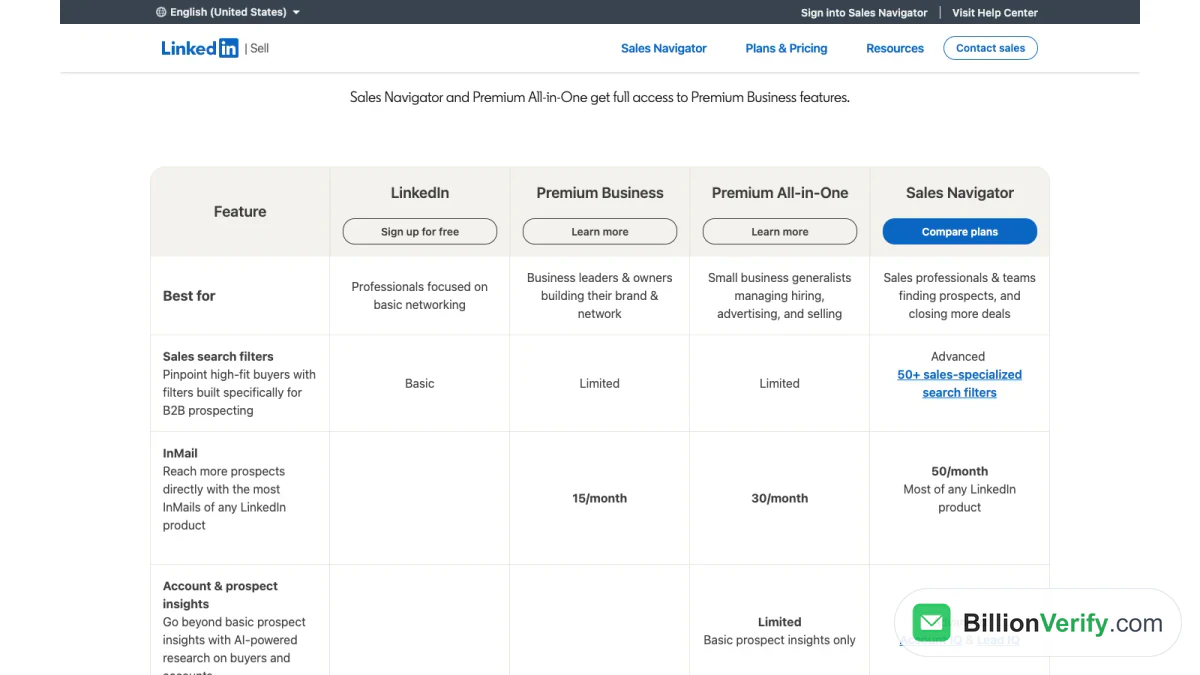
Screenshot: LinkedIn's table comparing free LinkedIn, Business, All-in-One and Sales Navigator.
| Feature | Business | All-in-One | Sales Navigator |
|---|---|---|---|
| Best for | Business leaders and owners | Small business generalists | Sellers and sales teams |
| Sales search filters | Limited | Limited | 50+ filters |
| Monthly InMail | 15 | 30 | 50 |
| Prospect insights | Not listed | Basic | Account IQ, Lead IQ |
| Sales alerts | Not listed | Basic tips | Buyer Intent and alerts |
| CRM integrations | No | No | Yes |
| Seat management | No | No | Yes |
| Starting price | $69.99 per month | $89.99 per month | $119.99 per month |
The help center adds a wider grid that includes Career, Core and Recruiter Lite. Core is the only one listed with the Sales Navigator interface, custom lead and account lists, and real-time updates.
Where the plans overlap
The overlap is bigger than most people expect. LinkedIn's help grid gives every one of these plans private browsing, direct messaging and profile writing help. Each shows who viewed your profile across the past 365 days. If that list is all you want, a cheaper LinkedIn Premium plan covers it.
Where they differ
The real gap is prospecting. LinkedIn Sales Navigator has the sales filters, lists, alerts and CRM links. LinkedIn Premium plans offer only limited search for sales work. If you prospect every day, that gap decides the LinkedIn Premium vs Sales Navigator question for you.
LinkedIn Premium Cost vs Sales Navigator Cost
LinkedIn prints starting prices in its comparison table, in US dollars. In October 2026, the LinkedIn Premium cost row read:
- Free LinkedIn: free.
- Business: "From $69.99/month."
- All-in-One: "From $89.99/month."
- Sales Navigator: "From $119.99/month."
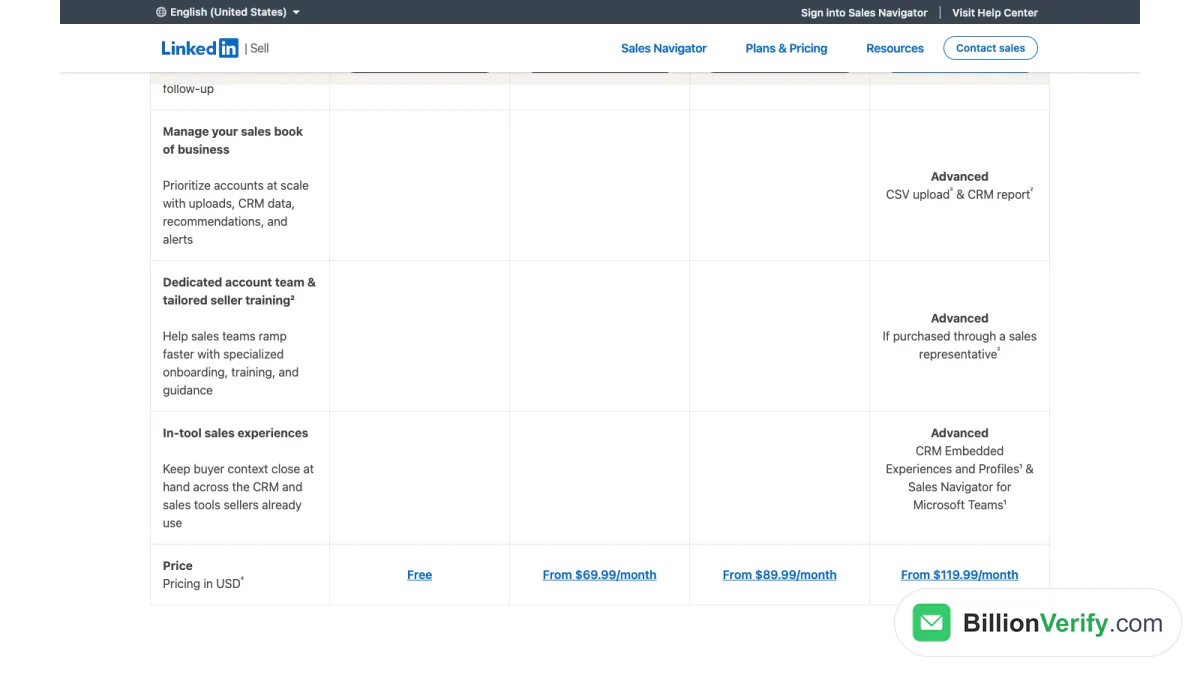
Screenshot: the price row of LinkedIn's comparison table, showing LinkedIn Premium cost next to Sales Navigator.
LinkedIn adds that the sales tool's pricing "is generally higher than Premium Business and Premium All-in-One due to its advanced features." It also notes "the exact cost can vary based on the plan."
Sales Navigator tier prices
LinkedIn's plans page, updated September 27, 2026, listed these prices:
| Tier | Monthly billing | Annual billing |
|---|---|---|
| Core | US$119.99 per month | US$1,079.88 per year |
| Advanced | US$159.99 per month | US$1,799.88 per year |
| Advanced Plus | Custom quote | Custom quote |
Career plan pricing
LinkedIn's Career page lists US$39.99 per month or US$239.88 per year, last updated April 20, 2026. That makes Career the lowest LinkedIn Premium cost in the lineup.
How much more does Sales Navigator cost?
At LinkedIn's starting prices, Core costs $50 more per month than Business. It costs $30 more than All-in-One. For that extra money you get sales search, lead lists, buyer alerts and 35 more InMail messages than Business.
Is the LinkedIn Premium cost worth it for sellers?
For a full-time seller, Core usually gives more value per dollar. Core already comes with the Business profile extras. Paying the LinkedIn Premium cost now and upgrading later means paying for those features twice.
InMail Compared Across Plans
InMail lets you message people outside your network. The monthly allowance is one of the clearest gaps between the plans. LinkedIn's help grid and its business site list:
| Plan | Monthly InMail |
|---|---|
| Career | 5 |
| Business | 15 |
| All-in-One | 30 |
| Recruiter Lite | 30 |
| Sales Navigator, every tier | 50 |
LinkedIn says its three sales tiers "provide 50 InMail credits per month — the most of any LinkedIn subscription plan."
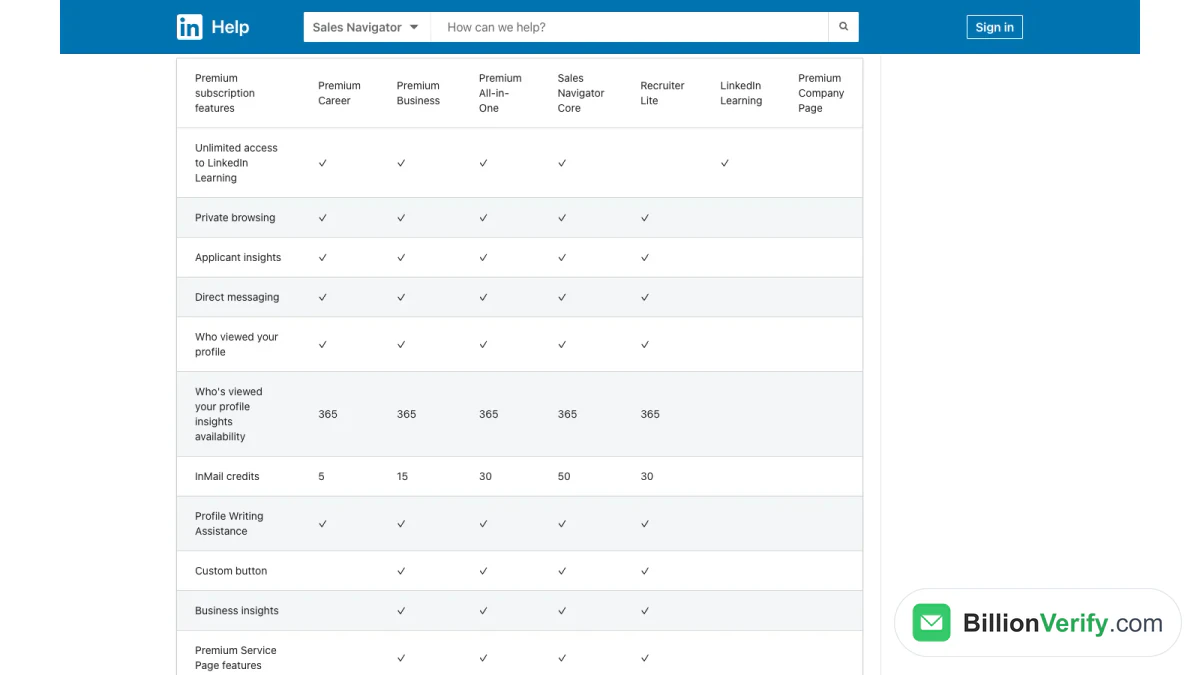
Screenshot: LinkedIn's help center grid comparing LinkedIn Premium plans and Sales Navigator Core.
Rollover rules
The rollover rules also differ. LinkedIn's small business plans page says messages on those two small business plans roll over "for 3 months." On the sales tool, unused InMail rolls over up to 150 and must be used within 90 days, per LinkedIn's InMail guidance. LinkedIn also returns a credit for each InMail that gets a reply within 90 days.
Search and Prospecting
Search is where daily sellers feel the gap most. A seller may run dozens of searches a week. Small limits add up fast at that pace.
Search on free LinkedIn and LinkedIn Premium
A free account lets you "Save up to three searches and get weekly alerts on those searches," per the help center. LinkedIn Premium plans widen search, yet LinkedIn rates Business and All-in-One search as "Limited" for sales prospecting.
Search in LinkedIn Sales Navigator
LinkedIn Sales Navigator gives you "50+ sales-specialized search filters." You can narrow leads by role, seniority, company and more. You save leads and accounts to lists. Alerts then flag job changes and account activity. Our guide on exporting leads from LinkedIn Sales Navigator explains what you can and cannot take out of those lists.
Daily prospect suggestions
All-in-One has one prospecting feature of its own. It offers "up to 15 personalized prospect recommendations each day." That suits a founder who will not build searches by hand.
Which Plan Fits Which Job?
Start from your main goal.
You are looking for a job
Choose the Career plan. It is the only one built around job search, with top applicant jobs and LinkedIn Learning. LinkedIn Sales Navigator adds nothing useful for a job seeker.
You are a consultant or solo professional
Choose LinkedIn Premium Business. You get a sharper profile, a custom button, the profile viewer list and 15 InMail messages. That is often enough to win clients from your own network.
You run a small business
Choose All-in-One if LinkedIn offers it to you. It pairs daily prospect ideas with InMail, post boosting and hiring credits. LinkedIn built it for owners who "do it all."
You sell for a living
Choose LinkedIn Sales Navigator. Take Core for one seller, Advanced for a team and Advanced Plus for deep CRM sync. Every tier ships with those Business extras, so you lose nothing by skipping LinkedIn Premium.
You recruit
Neither fits well. LinkedIn sells Recruiter Lite for hiring, with a recruiting design and candidate tracking.
A Quick Decision Checklist
Still unsure? Run through these points in order. Stop at the first one that fits.
- You are changing jobs this year. Take the Career plan.
- You sell services and want inbound leads from your profile. Take LinkedIn Premium Business.
- You own a small company and also post jobs. Look at All-in-One, if your account shows it.
- You chase a quota. Take Sales Navigator Core. Its filters and alerts save hours of manual searching each week.
- You lead a team of sellers. Take Advanced, so seats and reporting sit in one place.
- Your team lives in Salesforce or HubSpot. Ask LinkedIn about Advanced Plus and CRM sync.
- You only want to see profile viewers. Any paid personal plan shows them for 365 days.
Then think about the next six months, not just today. A founder who starts hiring may outgrow Business. A seller who joins a team may need seat management. Write down the one feature you would miss most. Then check that your chosen plan includes it on LinkedIn's current page. Features move between tiers, so the live page is the final word.
Is LinkedIn Premium Worth It?
It depends on how you use LinkedIn. Ask three questions.
- Do you message strangers every week? If yes, InMail matters, and the sales tool gives the most.
- Do you build lead lists? If yes, you need LinkedIn Sales Navigator. LinkedIn Premium plans have no lead lists.
- Do you mostly want visibility? Then LinkedIn Premium Business or the Career plan is the cheaper fit.
For a seller, LinkedIn Premium alone is rarely the best buy. For a job seeker or a consultant, it often is. The LinkedIn Premium cost is lower, and it covers what they need.
LinkedIn Premium Free Trial vs Sales Navigator Free Trial
Both can be tried for free, with conditions.
The LinkedIn Premium free trial
LinkedIn says "Eligible LinkedIn members can try LinkedIn Premium for free." It adds: "If you've already redeemed a trial for your profile within the last 12 months, you won't be eligible for another free trial just yet." LinkedIn's help article also says these subscriptions "may be available to try free for one month." So the LinkedIn Premium free trial usually runs a month, once a year at most.
The Sales Navigator free trial
LinkedIn Sales Navigator has its own trial rules, renewal timing and cancellation steps. Our guide to the LinkedIn Sales Navigator free trial covers them in LinkedIn's own words.
Try one, then decide
A trial is the cheapest way to settle the choice. Start with the plan that matches your main goal. Use it for real work during the trial. Then keep it, switch or cancel before renewal.
Switching Between LinkedIn Premium and Sales Navigator
LinkedIn treats both as personal plans. Its FAQ says: "LinkedIn Premium and Sales Navigator are individual subscription plans tied to your LinkedIn profile."
You can move between them. LinkedIn says "eligible subscribers can switch plans through LinkedIn Admin Center." Depending on how you bought your plan, "you may need to cancel your existing subscription before switching."
Know what you give up. LinkedIn warns that moving from the sales tool to a personal Premium plan means losing "sales-specialized search, real-time buyer alerts, TeamLink, and CRM integrations." Save anything you need first.
Can you have LinkedIn Premium and Sales Navigator at once?
You do not need both. The sales subscription already includes the Business features. A second subscription would mostly repeat them.
Content Helps Both Plans Work
Whichever plan you pick, buyers answer sellers they recognize. Posting useful videos builds that recognition before your first InMail.
Study what already works in your market. Our free LinkedIn video downloader downloads the video from any public LinkedIn post, so you can review a strong example offline. Then record your own take.
Neither Plan Gives You Email Addresses
LinkedIn Premium and LinkedIn Sales Navigator both help you find people. Neither hands you a work email. A member's email shows only when they choose to share it, and usually only with first-degree connections.
So most teams find emails elsewhere. They guess from a company's email format, or they buy contact data. Those addresses can be wrong or stale. People change jobs often, and old inboxes stop working.
BillionVerify flags generic role inboxes like info@ and sales@ before you send.
Check each address before your first cold email:
- See who is behind an inbox. Our free reverse email lookup reads the domain, organisation, mail routing and any public profile, using public signals only.
- Check a number before you call. Our free phone number validator shows if a number is valid for its country, its line type and its E.164 format.
- Verify the whole list. Our page on verifying emails from LinkedIn Sales Navigator shows how to check a lead list before outreach.
BillionVerify gives you 20 free credits each day you use your account, up to 600 a month. They never expire. A valid or invalid result uses one credit. An unknown result is free.
FAQs
What is the difference between LinkedIn Premium and Sales Navigator?
LinkedIn Premium covers plans for job seekers, professionals and small businesses. LinkedIn Sales Navigator adds the prospecting layer: sales filters, lead lists, buyer alerts, CRM links and the most InMail.
Does LinkedIn Sales Navigator include Premium?
Yes, each Sales Navigator tier comes with Premium Business features, so no extra Premium subscription is needed.
Does LinkedIn Premium include Sales Navigator?
No, LinkedIn Premium does not include Sales Navigator, because none of the three LinkedIn Premium plans includes the Sales Navigator interface, lead lists or buyer alerts.
How much is the LinkedIn Premium cost in 2026?
In October 2026, LinkedIn's table listed Business from $69.99 per month and All-in-One from $89.99 per month. Career was listed at $39.99 per month. Sales Navigator started at $119.99 per month.
Which LinkedIn plan has the most InMail?
LinkedIn Sales Navigator has the most InMail of any LinkedIn plan. Every sales tier includes 50 InMail messages per month. All-in-One includes 30, Business 15 and Career 5.
Can I switch from Sales Navigator to LinkedIn Premium?
Yes, eligible Sales Navigator users can switch to LinkedIn Premium through LinkedIn Admin Center. You may need to cancel first. You lose the sales search, alerts, TeamLink and CRM links.
Is LinkedIn Premium worth it for sales?
For a full-time seller, LinkedIn Sales Navigator is usually the better fit. It bundles the Business features and adds the sales tools. LinkedIn Premium Business suits lighter outreach.
Can I get a LinkedIn Premium free trial?
LinkedIn offers eligible members a Premium trial at no cost. LinkedIn says you cannot redeem another trial if you used one on your profile in the last 12 months.
Do I get email addresses with either plan?
No, neither of the two LinkedIn plans provides work email addresses. Verify any address you find elsewhere before you send.
Watch: How to Download LinkedIn Videos: LinkedIn Video Downloader
Watch: How to Validate a Phone Number: Free Phone Number Validator