


Nearly 1 in 5 email addresses can be problematic at the moment of collection. A 2025 industry report analyzing nearly 1 billion addresses across 23 sectors found that only 80.94% were valid when collected, leaving roughly 19% with an immediate data-quality problem (BillionVerify). That changes the question from “Do we need to verify this list?” to “How much damage are we willing to accept from data we already know can be wrong?”
Email verification protects more than campaign delivery. It keeps invalid records from contaminating lead scores, triggering broken lifecycle journeys, distorting reporting, and spreading unreliable data through your CRM and marketing stack. After managing high-volume email programs, the pattern is consistent: teams usually notice verification only after a bounce spike, a throttled campaign, or a workflow that stops behaving as designed.
The Hidden Cost of Unverified Email Lists
A spreadsheet can show a clean audience while hiding serious operational risk. Only 80.94% of collected addresses are valid, leaving roughly 19% problematic immediately, according to the industry analysis cited by BillionVerify's email verification guide. Those records do more than bounce. They can weaken sending signals, inflate acquisition costs, and enter the CRM as if they were genuine prospects.
List quality also declines after collection. According to the 2025 industry report cited earlier, 43% of subscriber lists contain invalid addresses within 6 months, while only 15% of marketers perform regular re-verification cycles. People change jobs, abandon inboxes, mistype addresses, and submit disposable accounts. Treating the list as a fixed asset guarantees that old errors spread into new campaigns.
Small data errors create disproportionate damage
Unverified addresses can corrupt lead scoring before a sales rep ever sees the record. They can also trigger lifecycle emails for unreachable contacts, distort conversion reporting, and create conflicting customer records when the same data flows between an ad platform, CRM, marketing automation system, and sales database.
Validity's deliverability benchmark reports that permission-based email programs experience global bounce rates around 1.5%, equivalent to approximately 98.5% deliverability under normal conditions (Validity's 2025 Benchmark Report). Loqate cites evidence that a 1% increase in unverified addresses can reduce deliverability by 10%, while verification can reduce bounce rates by 90% (Loqate's email verification guidance).
For high-volume senders, the cost includes wasted capacity, unreliable campaign results, polluted retargeting audiences, and poor sales prioritization. Teams should also clean your CRM with data hygiene, since deleting bad records has limited value if forms, imports, or integrations add them back.
Before a major send, check your email bounce rate. Use the result as an operational warning, then review the data paths that produced it. Verification belongs alongside segmentation, consent management, and performance tracking because every one of those processes depends on accurate contact data.
How Email Verification Actually Works
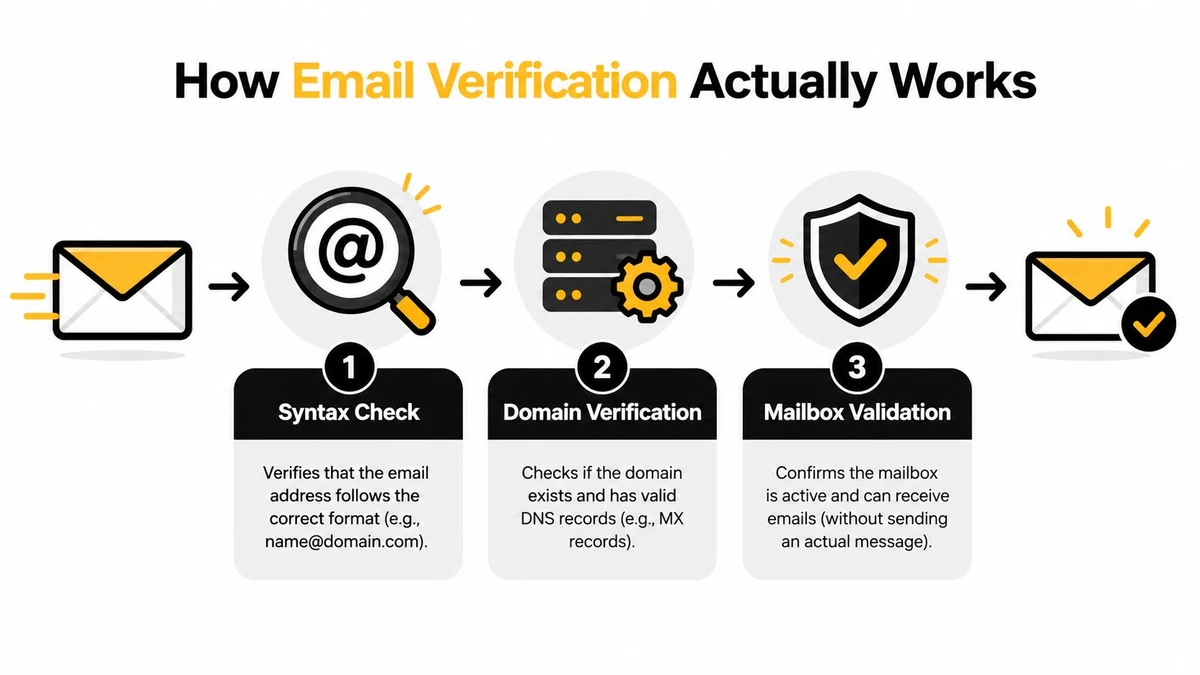
Email verification works like a security checkpoint. A reliable process doesn't make one superficial check and declare an address safe. It moves the address through several layers, each designed to answer a different question.
First checkpoint, syntax
The system checks whether the address is formatted correctly. It looks for a usable local part, an @ separator, and a domain structure that can be interpreted as an email address. This catches obvious mistakes such as missing characters, misplaced punctuation, or accidental spaces.
Syntax validation is necessary, but it isn't enough. An address can be perfectly formatted and still point to a nonexistent domain or abandoned mailbox. Stopping at this layer creates false confidence.
Second checkpoint, domain verification
The service checks whether the domain exists and can receive email by reviewing its mail-exchange information. This separates an address attached to a functioning email domain from one connected to a nonexistent or misconfigured destination.
A valid domain still doesn't prove that a specific mailbox exists. Large organizations may also use catch-all behavior, where the server accepts mail for many addresses even when individual inboxes aren't confirmed. That result needs careful classification rather than a simple “valid” label.
Third checkpoint, mailbox validation
At the mailbox layer, the verifier communicates with the receiving server through an SMTP handshake. It checks whether the server appears able to accept mail for the address without sending the campaign message itself. This is the practical distinction between checking an address's shape and testing whether the destination can respond.
A thorough result can also identify disposable addresses, role accounts, inactive contacts, risky mailboxes, and catch-all domains. Those categories matter differently. A role address such as a departmental inbox may receive mail, but it can behave differently from an individual subscriber. A disposable address may work briefly and then disappear. Treating every positive technical response as an equally valuable prospect is a data-modeling mistake.
For teams that need verification inside registration or lead-capture flows, an Email Validation API can return a structured decision before the address enters the database. BillionVerify is a professional email verification service built to address the cost of bad email data. The important principle is to combine syntax, domain, mailbox, and risk signals rather than relying on one test.
Protecting Sender Reputation and Inbox Placement
Your sender reputation determines whether a legitimate message reaches an inbox, a spam folder, or nowhere useful. Mailbox providers don't see your marketing strategy. They see patterns, including repeated delivery failures from addresses your systems chose to contact.
Bounce thresholds are operating signals
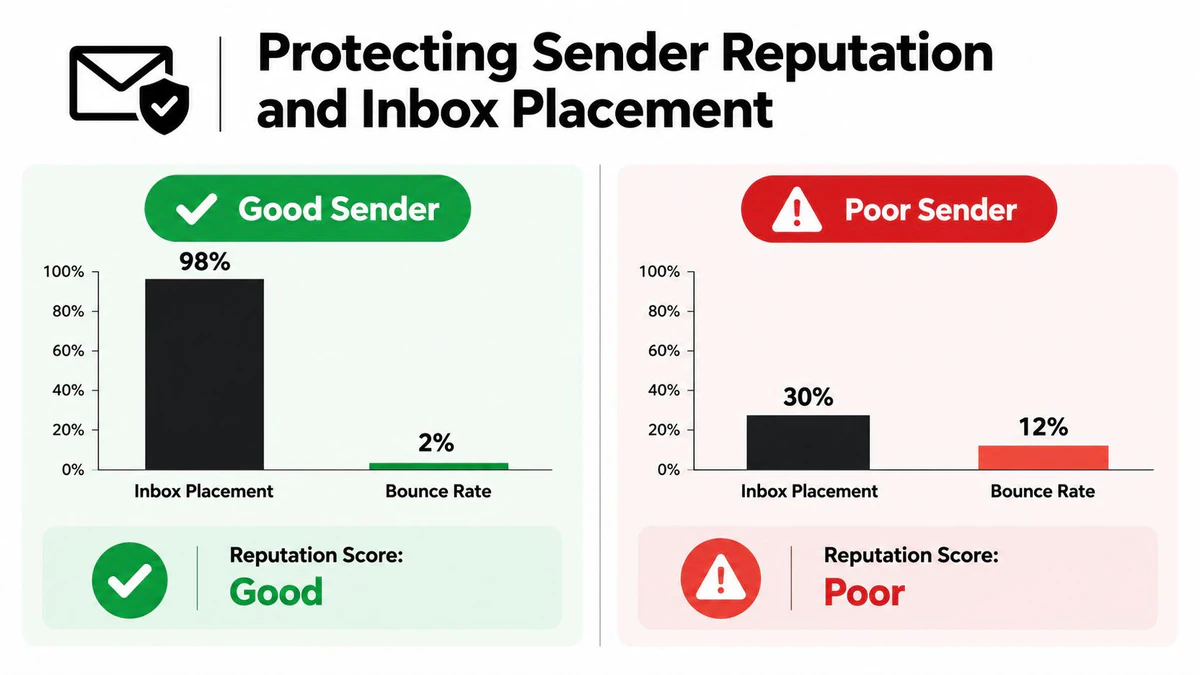
Industry deliverability guidance describes a healthy total bounce rate as under 2%, with hard bounces ideally below 1%, and sometimes below 0.5% for well-managed outbound programs (Validity's deliverability benchmark). Once bounce rates rise above 2% to 5%, benchmark guidance warns that deliverability begins to degrade and campaigns enter warning or danger territory.
ZeroBounce similarly describes rates under 1% as excellent, rates above 2% as a warning, and rates above 5% as a serious danger zone (ZeroBounce's bounce-rate guidance). These aren't universal laws, because mailbox providers evaluate many signals, but they give teams a practical operating boundary.
Practical rule: Don't wait for an ESP warning before investigating list quality. A rising bounce rate is an early indication that acquisition, aging, or suppression controls need attention.
Verification prevents many permanent hard bounces before send time. That protects the campaign being prepared, but the larger benefit is continuity. A domain-wide reputation problem can affect future messages sent to legitimate, engaged recipients as well. Guidance on how sender reputation affects spam helps clarify why a bad segment can create consequences beyond its own recipients.
Reputation protection beats recovery
Recovery usually requires slower sending, tighter segmentation, suppression of risky records, and careful monitoring. Meanwhile, sales sequences may pause and marketing campaigns may lose their normal reach. Prevention is less disruptive because it removes known risks before they create a provider-side signal.
Use verification alongside consent controls, engagement policies, and suppression management. It won't make an unsolicited list legitimate, and it can't guarantee inbox placement. It does remove a controllable source of delivery failure. Teams can also check email deliverability rates before and after list-quality changes to determine whether the intervention is improving the sending environment.
The Business Impact Beyond Bounce Rates
Bounce reduction is the visible outcome. The hidden cost appears when an invalid address behaves like a real customer record across the rest of the stack.
A lead-scoring model may assign points for a form completion, company fit, or content download without knowing that the email field is undeliverable. Sales then receives a “qualified” lead that can't be reached. Marketing automation may enroll the same contact in a nurture sequence, wait for an engagement event that never arrives, and interpret the silence as low intent rather than bad data.
Bad records distort the systems around them
Unverified addresses can create several operational failures:
- Lead routing errors: A sales queue receives contacts that aren't reachable, increasing manual review and reducing confidence in assignment rules.
- Lifecycle automation gaps: A welcome, activation, or renewal journey may depend on email delivery, but the workflow doesn't always distinguish non-delivery from customer disengagement.
- Reporting noise: Delivery, engagement, and conversion dashboards combine real contacts with records that could never respond, making campaign comparisons less reliable.
- CRM contamination: Invalid addresses spread through synchronization between the CRM, ESP, customer-data platform, and advertising audiences.
This is why email verification is a data-integrity control. It protects the meaning of fields used by routing, scoring, segmentation, and attribution. Icypeas' guidance on email verification services makes the broader operational point: once bad addresses enter routing logic, cleanup becomes an operations problem rather than a simple list task.
Verification also supports account security
Product teams face a different version of the same risk. Email is used for onboarding, account recovery, credential changes, and security notices. Verifying ownership can reduce sign-up abuse, borrowed identities, and multi-accounting, but an OTP alone doesn't prove that an address is durable or trustworthy. Disposable and hyper-disposable addresses can pass an ownership check temporarily.
That distinction is important. Combine ownership verification with address validation and reputation signals, as recommended in guidance on email verification for fraud prevention. The result is a stronger decision about whether an address should enter the customer database, not just whether someone can access its inbox.
The commercial impact is measurable at the program level. The BillionVerify-cited industry report says poorly maintained lists produce a 17% year-over-year drop in campaign ROI, alongside a 22% average increase in bounce rates (BillionVerify). Verification helps protect the economics behind acquisition, automation, and sales activity.
Real-Time API Verification Versus Bulk List Cleaning
Real-time and bulk verification solve different timing problems. Treating them as substitutes usually leaves one part of the customer journey exposed.
Real-time checks belong at the point of entry
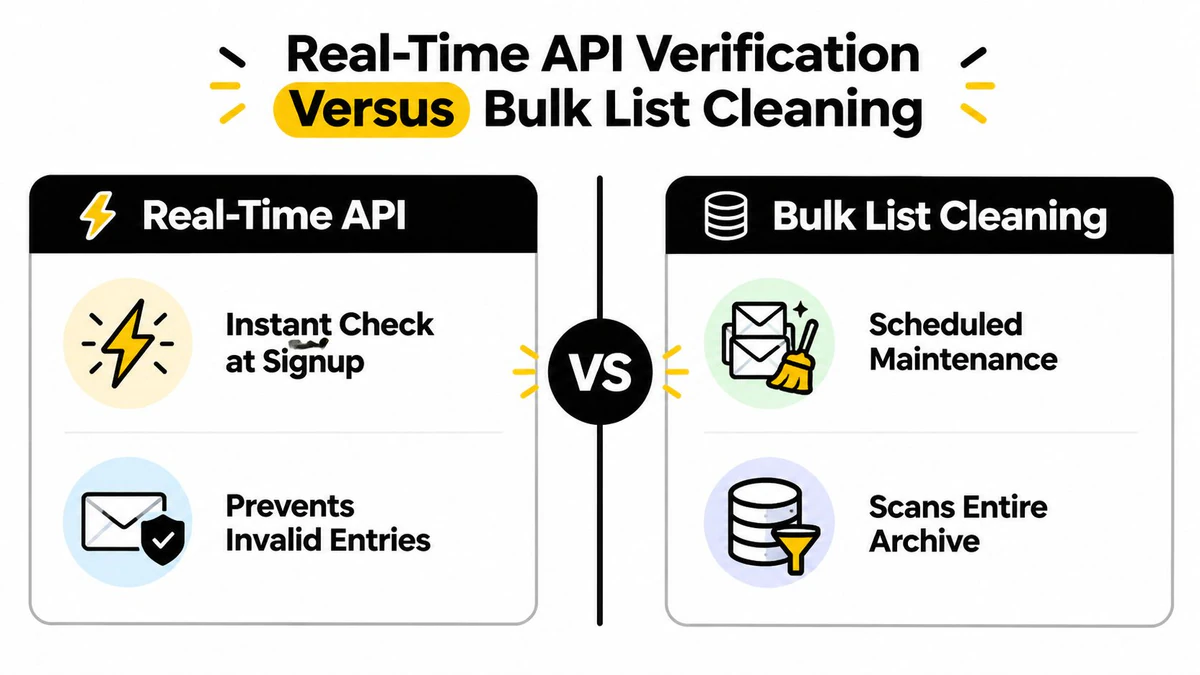
An API check fits a signup form, account-registration flow, demo request, or lead-enrichment process. The application sends the submitted address, receives a structured response, and decides whether to accept it, flag it, or request a correction before the record enters the CRM.
This approach works best when the decision must happen immediately. It prevents a typo or disposable address from becoming a contact, triggering automation, or entering a sales queue. Developers should define the response handling before integration, including what happens for valid, invalid, risky, role-based, and uncertain results. Blocking every ambiguous result can frustrate legitimate users, while accepting every uncertain result weakens the control.
Bulk cleaning fits existing databases
Bulk cleaning is better for an established archive. It can process CSV exports from platforms such as Mailchimp, HubSpot, or Salesforce, classify records, and return filters for suppression, review, or segmented sending. A scheduled job can also support periodic hygiene without adding latency to a customer-facing form.
The trade-off is timing. Bulk cleaning won't stop a bad address at collection, and real-time verification won't automatically repair years of accumulated records. Teams with high-volume programs usually need both:
| Use case | Best fit | Operational decision |
|---|---|---|
| New signup or registration | Real-time API | Validate before database entry |
| Legacy campaign audience | Bulk verification | Clean before deployment |
| CRM migration | Bulk verification | Review classifications before import |
| Ongoing form capture | Real-time API | Prevent recurring contamination |
| Aging subscriber base | Scheduled bulk job | Recheck and suppress risky records |
Use a bulk email verification tool when the problem is an existing list, and an API when the problem is continuous data entry. Webhooks can notify systems when bulk processing finishes, while JSON responses can feed routing and suppression logic. The architecture matters less than the control point: verify before the address can create a cost.
When to Prioritize Email Verification
Resource-constrained teams shouldn't treat every list as equally urgent. Prioritize the audiences where bad data can affect the most sends, the most automation, or the most important customer interactions.
Start with four questions:
- How old is the data? A dormant segment deserves more scrutiny than a recently collected first-party list, because addresses can become stale after collection.
- How often will you send? A list used repeatedly can generate recurring delivery signals and repeated operational waste.
- Where did the addresses come from? Purchased, transferred, scraped, or poorly controlled sources require immediate review. Double opt-in data generally starts with stronger acquisition controls, but it still needs lifecycle maintenance.
- What happens if delivery fails? A newsletter contact and a password-recovery address don't carry the same customer-experience risk.
A practical priority matrix
| Priority | Typical condition | Recommended action |
|---|---|---|
| Urgent | Purchased or inherited list | Verify before import or deployment |
| Urgent | Dormant segment with unclear history | Clean, suppress risky results, then test cautiously |
| High | High-volume sender approaching bounce thresholds | Verify the next campaign audience and investigate acquisition sources |
| High | Signup flow attracting abuse | Add real-time validation and risk checks |
| Moderate | Recently collected first-party data | Add point-of-entry controls and monitor quality |
| Ongoing | Core CRM and lifecycle database | Schedule recurring review and suppression |
Calculate the cost of inaction with your own send volume, ESP pricing, conversion rate, and the value of sales time spent reviewing unreachable leads. You don't need a universal benchmark. The useful comparison is between the cost of verification and the cost of repeatedly sending, scoring, routing, and reporting on records that can't perform their intended function.
The same prioritization logic applies to adjacent support workflows. Teams assessing how Halo AI handles email tickets should also ask whether the addresses entering those workflows are valid, durable, and correctly classified. Verification belongs in the operating process, not as a one-time emergency cleanup.
Implementing Verification in Your Marketing Stack
A practical rollout starts at the point where data enters your systems. Add validation to signup and registration flows first, then clean the existing database before the next major campaign. This combination prevents new contamination while addressing the backlog.
Build the workflow in layers
- Entry control: Send every new address through an API before writing it to the CRM or triggering lifecycle automation. Store the result and the verification timestamp so downstream teams can understand how the record was accepted.
- Campaign control: Export the intended audience, run a bulk verification job, and apply suppression or review filters before the file reaches your ESP. Don't overwrite the original data until the team has reviewed how classifications map to business rules.
- Aging control: Re-verify older segments on a recurring schedule based on their use and risk. Keep the process automated so list hygiene doesn't depend on someone remembering a manual upload.
- System control: Use webhooks or job notifications to update campaign workflows, and preserve structured results for reporting. A clean address without a recorded decision can still become difficult to audit later.
Track performance before and after implementation using the metrics your team already trusts, including bounce rate, inbox placement, delivery outcomes, engagement, qualified-lead routing, and campaign ROI. The aim isn't to celebrate a cleaner file. It's to confirm that fewer invalid records enter the systems responsible for revenue and customer communication.
Provider selection should follow your architecture. Evaluate verification accuracy, response speed, API and bulk support, integration options, result detail, and pricing that remains workable as sending volume changes. Teams comparing the best email verification API should also test uncertain outcomes, catch-all handling, disposable detection, export formats, and failure behavior before committing.
BillionVerify's stated scope is straightforward: it verifies email addresses across single checks, bulk list cleaning, and real-time API workflows, with results that can support filtering and downstream decisions. That makes it suitable for teams treating verification as a control across the marketing stack rather than as a last-minute bounce fix.
BillionVerify helps teams verify addresses before campaigns, during signup, and across existing databases, so bad email data doesn't corrupt deliverability or operations. Visit BillionVerify to evaluate a verification workflow that fits your CRM, marketing automation, sales, or product stack.