



A 2026 analysis of 14 million form submissions found that 12% of signups used disposable email addresses, while only 62% of submitted emails were valid after checks for typos, defunct domains, role accounts, and full inboxes were included. With more than 55,000 known disposable domains in circulation, an email check performed after a campaign can be too late. A verify email address API puts that decision at the point where the address enters your product, CRM, or marketing list.
This guide follows the integration lifecycle with BillionVerify, from your first request and response through field interpretation, workflow design, webhooks, security, privacy, business-stack connections, and provider migration. The practical objective is simple: accept useful addresses, route uncertain ones safely, and keep bad data out of downstream systems.
Why Integrate an Email Verification API
Bad email data creates several problems at once. A mistyped address can produce a bounce, a disposable address can create a misleading signup, and a role account can connect a campaign to a shared inbox instead of an individual buyer. Each record may look like growth in a dashboard while weakening the quality of your CRM and audience data.
The scale makes manual review unrealistic. The same 2026 analysis of form submissions found that only 62% of submitted emails were valid, while 12% used disposable addresses. It also identified more than 55,000 known disposable domains, with new disposable domains appearing regularly. A static blocklist can help, but it can't keep pace with an address pattern that changes continuously.
Reactive cleaning versus point-of-capture checks
Traditional list cleaning is reactive. Your application accepts every address, your CRM synchronizes the record, and your marketing platform may attempt delivery before anyone discovers the problem. By then, the record has already affected acquisition reporting, segmentation, onboarding metrics, and support workload.
A real-time Email Validation API changes the sequence. Your application can normalize the input, check its structure and domain, and receive a structured result before creating an account or adding a subscriber. That doesn't guarantee future inbox placement, but it gives your team a defensible decision point before bad data spreads.
Practical rule: Treat verification as an input control, not a cleanup task.
The business case isn't limited to bounce reduction. Cleaner records help teams distinguish genuine demand from throwaway registrations, protect sender reputation by avoiding unnecessary delivery attempts, and keep campaign analytics tied to reachable audiences. Product teams can also use the result to apply different onboarding rules without blocking every ambiguous address.
A verification service is therefore most useful when it becomes part of your application logic. Store the result, preserve the provider response for debugging, and decide explicitly what your product should do with valid, risky, unknown, and undeliverable outcomes.
Making Your First API Call with BillionVerify
Start with a narrow test before wiring verification into registration. Create or retrieve your API key from the BillionVerify dashboard, keep it on your server, and make one request with a controlled test address. The browser should submit the email to your backend, never expose the private key in client-side JavaScript.

The exact endpoint, authentication header, and parameter names should come from your current BillionVerify account documentation. Keep those values in environment variables so a change of environment doesn't require editing application code. BillionVerify Email Validation is a professional email verification service built to solve one problem, bad email data costs businesses money.
A generic server-side request can look like this:
Python request
import os
import requests

api_key = os.environ["BILLIONVERIFY_API_KEY"]
email = "person@example.com"

response = requests.get(
    "YOUR_BILLIONVERIFY_ENDPOINT",
    headers={"Authorization": f"Bearer {api_key}"},
    params={"email": email},
    timeout=10,
)

response.raise_for_status()
result = response.json()
print(result)
Node.js request
const apiKey = process.env.BILLIONVERIFY_API_KEY;
const email = "person@example.com";

const response = await fetch(
  `YOUR_BILLIONVERIFY_ENDPOINT?email=${encodeURIComponent(email)}`,
  {
    headers: {
      Authorization: `Bearer ${apiKey}`,
      Accept: "application/json"
    }
  }
);

if (!response.ok) {
  throw new Error(`Verification failed with HTTP ${response.status}`);
}

const result = await response.json();
console.log(result);
For a quick terminal check, use cURL with the same server-side credentials:
curl -G "YOUR_BILLIONVERIFY_ENDPOINT" \
  -H "Authorization: Bearer YOUR_API_KEY" \
  --data-urlencode "email=person@example.com"
The placeholder endpoint is intentional. Don't guess production URLs from an old snippet. Copy the current endpoint and authentication format from your BillionVerify dashboard or API documentation, then replace the placeholder before running the request.
What to inspect first
A successful response should be treated as structured data, not as a single Boolean. A representative response may contain the submitted address, an overall status, SMTP findings, MX information, catch-all information, disposable detection, and role-account indicators. Your first implementation should log the response safely, excluding the API key and applying whatever email-data retention policy your organization requires.
Use the response to create an internal decision object. For example, your application might allow a clearly valid personal address, place a risky or catch-all result into a review path, and ask the user to correct an undeliverable address. The correct policy depends on the workflow. A newsletter signup may tolerate more uncertainty than a paid account registration.
Don't make the signup page depend on an unbounded network request. Set a timeout, return a friendly retry message when the provider is unavailable, and decide whether your product should fail open or fail closed. That decision belongs in product requirements, not in an accidental exception handler.
Decoding the API Response Fields
A verification response is useful only when your application understands what each signal means. Email verification APIs commonly combine syntax validation, DNS/MX lookup, a live SMTP mailbox probe without sending a message, and detection of catch-all and disposable addresses in one request. The resulting verdict can be valid, invalid, risky, or unknown, as described in this overview of email verification API checks.
The four layers behind the verdict
Syntax validation catches malformed input, but it can't prove that the mailbox exists. MX lookup checks whether the domain advertises a mail destination. If a domain has no MX record and no fallback A record, the address is undeliverable regardless of how convincing its syntax looks, as explained in this guide to finding your domain's MX record.
SMTP probing adds another signal by communicating with the receiving mail server without sending a message. That result can still be ambiguous because catch-all domains, greylisting, temporary failures, and protective mail-server policies can prevent a clean answer. Disposable and role flags add business context, since a technically reachable address may still be unsuitable for a campaign.
| Field | Meaning | Developer Action |
|---|---|---|
status | Overall classification, such as valid, invalid, risky, or unknown | Route the record according to an explicit product policy |
email | Address evaluated by the service | Match it to the normalized address submitted by the user |
smtp_valid | Result of the SMTP mailbox probe | Use it as a deliverability signal, not as an absolute promise |
mx_found | Whether the domain has a usable mail-exchange path | Reject addresses whose domain can't receive mail |
catch_all | Whether the domain may accept mail for many or all local parts | Treat positive or uncertain results as higher risk |
disposable | Whether the address belongs to a temporary-mail service | Block or isolate it when durable identity matters |
role | Whether the local part represents a shared function, such as contact or admin | Decide whether role accounts fit the workflow |
reason | Provider explanation for the classification | Store it for support, audit, and rule tuning |
risk | Additional risk interpretation | Use it for segmentation instead of forcing every record into pass or fail |
Build rules around combinations
A role account isn't automatically invalid. admin@ or contact@ may be a legitimate business destination, but it can be a poor fit for personal onboarding or lead assignment. Likewise, a catch-all domain can accept messages while hiding whether the specific mailbox exists. Your code should combine fields rather than treating one flag as the complete answer.
A useful internal model preserves the raw response and adds a business decision such as accept, review, reject, or retry. That separation matters because provider signals describe the address, while your application decides what the address means for registration, billing, support, or marketing.
Don't collapse
unknownintoinvalid. Temporary SMTP behavior and defensive mail servers can produce uncertainty without proving that delivery will fail.
Keep the raw provider response available for troubleshooting, but restrict access because email addresses are personal data in many contexts. If you later change your acceptance policy, historical signals can help explain why a record was routed differently without requiring a second verification call.
Designing Real-World Verification Workflows
One request is easy. A reliable workflow needs clear timing, failure behavior, and data ownership.
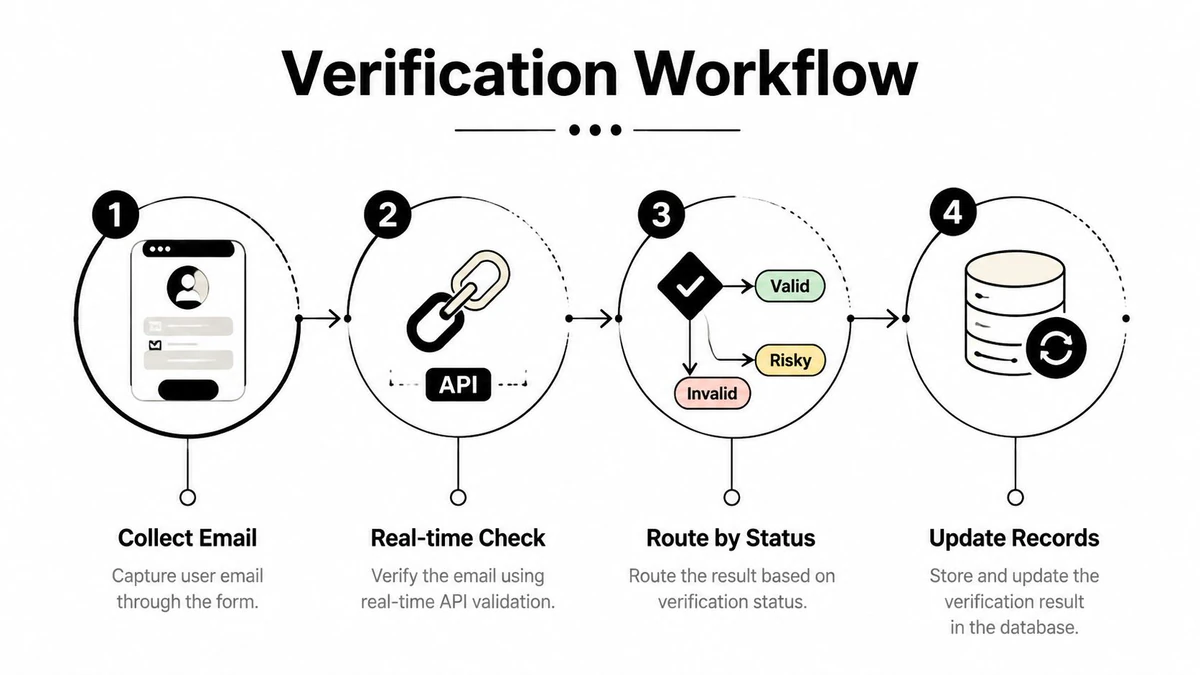
Real-time verification belongs at a friction point where the user has just entered an address. Normalize the input, send it from your backend, and return concise feedback such as “Please check the address” or “This email needs review.” Don't expose SMTP details to the user unless they help correct an obvious mistake. The interface should guide the user without revealing whether a particular account exists.
Bulk cleaning serves a different purpose. Existing CRM records, imports, and campaign lists should run asynchronously so a large job doesn't hold open a web request. Create a job record, enqueue the addresses, persist each result, and expose progress to an operator or internal dashboard. BillionVerify's bulk email verification can fit this model when a team needs a 99.9% accurate email checker, but your implementation should still preserve nuanced outcomes rather than assuming every result is binary.
Real-time and asynchronous paths
Use real-time checks when the user is waiting and the result affects the next screen. Use asynchronous processing when the source is a file, an existing database, or an event stream. Mixing these paths often creates poor experiences, such as making a signup wait for a batch queue or attempting to process an entire imported list inside one request.
Launch traffic deserves special handling. A 2026 report on SaaS signup traffic found that disposable-email registrations typically account for 2% to 5% of day-to-day SaaS signups but can rise to 15% to 30% during high-visibility launches. That makes real-time validation a useful control layer when acquisition suddenly attracts low-quality traffic.
Webhooks need idempotency
For a bulk job, a webhook can notify your application when processing completes. The receiving endpoint should verify the webhook signature if the provider supplies one, reject malformed payloads, record the event identifier, and return success only after the event is safely persisted. Queue the actual database updates separately if the callback could contain substantial work.
Design for duplicate delivery. Store a unique event key, make updates idempotent, and allow a replay to produce the same final state. Also define what happens when the webhook is delayed or never arrives. A scheduled reconciliation task can compare open jobs with provider status and recover the workflow without manual intervention.
A webhook is a notification, not your source of truth. Persist the job state and make replay safe before you connect it to customer-facing automation.
For status routing, keep policy separate from transport code. The API client should fetch and validate responses. A policy layer should decide whether valid creates a contact, whether risky enters review, and whether unknown triggers a retry or a softer onboarding path.
Advanced Integration and Best Practices
Production failures usually come from the edges, not the happy-path request. Protect the API key with server-side secret storage, never commit it to source control, and don't place it in browser bundles or mobile applications. Rotate credentials through your normal secret-management process and restrict operational access to the people and services that need it.
Rate limits require the same discipline as any external dependency. Use a queue for bulk work, cap concurrency conservatively, and apply exponential backoff to temporary failures. An idempotent job design prevents retries from creating duplicate records or charging your internal usage ledger twice. Where the provider's guidance supports it, controlled IP rotation can help distribute operational load, but it isn't a substitute for respectful concurrency and correct retry behavior.
SMTP results are not always definitive
A practical verification sequence normalizes and rejects obviously invalid syntax, checks MX records, then connects to the MX host with a timeout and issues the SMTP conversation needed to classify the result. Guidance for this workflow recommends conservative concurrency, idempotent queues, and treating 4xx SMTP replies as unknown rather than invalid, as described in this email verification API benchmark guidance.
Testing methodology matters too. A meaningful evaluation sample should include at least 500 addresses spanning corporate, catch-all, freemail, and expired domains, while a 100-email sample is too small to be statistically meaningful. Same-day testing reduces timing noise because mail-server configurations can change.
Prevent enumeration and probing
A public verification endpoint can become an account-discovery tool if it returns different responses for addresses that exist and those that don't. Put the call behind your authenticated application flow, apply per-user and per-IP throttling, monitor unusual query patterns, and avoid exposing provider-level explanations to anonymous clients.
Privacy and abuse prevention are now product concerns. The strongest designs use unknown states, rate limiting, and risk scoring rather than a simple valid or invalid gate, because aggressive checks can trigger false negatives, throttling, or IP reputation problems. This guidance on real-time verification privacy also highlights the risk of allowing endpoints to probe whether a person or role account exists.
Store less data when you can. Hash or redact addresses in application logs, define retention for raw responses, encrypt data in transit and at rest, and document the reason for verification. If your API exposes webhooks, authenticate them independently from user-facing requests and reject callbacks that fail signature or freshness checks.
Before choosing thresholds, run your own evaluation against representative addresses and review the provider's Email Verification Benchmark. Measure not only accepted and rejected records, but also unknown rates, retry behavior, support complaints, and the quality of downstream campaign data.
Connecting the API to Your Business Stack
The integration becomes valuable when the result follows the contact through the systems your team already uses. A signup form can send an address to your backend, receive a verification verdict, and create a HubSpot or Salesforce contact only after your routing policy permits it. A Zapier or Make scenario can perform a similar handoff for lower-code workflows, provided the automation handles timeouts and doesn't treat every non-success response as a permanent rejection.
For marketing operations, the same pattern can sit before Mailchimp or SendGrid list insertion. A verified result can proceed to the audience, while disposable, undeliverable, or unsuitable role addresses can be excluded or placed in a separate segment. Keep the original acquisition source and verification timestamp with the contact so campaign operators understand why a record was filtered.
Migration requires a controlled comparison
Moving from another provider isn't just a matter of replacing one URL. First, map the old provider's fields to the new schema, especially where one service calls an address “deliverable” and another uses “risky” or “unknown.” Then run both providers against a representative list, compare disagreements by category, and review ambiguous records manually before changing production routing.
Real-world benchmark results show why this step matters. One 2026 benchmark using 100 curated test emails reported provider accuracy between 97.8% and 99.3%, while another benchmark using 3,000 real business emails found the top three tools reached only 67% to 70% in real-world conditions, according to this comparison of email verification API benchmarks. Catch-all domains, greylisting, and aggressive spam filters explain why a curated test can look much better than production traffic.
Compare decisions, not marketing labels. A provider that returns structured risk and unknown states gives your team more control than one that forces every address into pass or fail.
Calculate total cost of ownership beyond the API bill. Include engineering time, retry volume, webhook maintenance, false-positive support cases, list pollution, and the effort required to migrate historical data. A cheaper request can cost more if it creates opaque results that force your team to rebuild the missing decision logic.
For a new integration, start with one business path, such as signup or CRM import. Track how many records reach each status, review exceptions with marketing and support, and only then extend the same client to other systems. That staged rollout keeps migration reversible and gives your team evidence for adjusting policy.
BillionVerify provides a professional email verification service for checking addresses in real time and cleaning lists before they enter your CRM or campaigns. Use the structured results to build safer routing for valid, risky, unknown, disposable, role, and undeliverable addresses, then visit BillionVerify to evaluate it for your integration.