


48,185 CVEs were published in 2025, and attackers were able to weaponize new vulnerabilities within hours of disclosure, which is why vulnerability assessment can't be treated like a quarterly paperwork exercise. The gap is no longer just between discovery and patching, it's between discovery and exploitation, and that gap keeps shrinking. For marketing, ops, and security teams alike, the core job is to find what's exposed, rank it fast, and close it before it becomes live risk.
Why Vulnerability Assessment Matters More Than Ever
The scale of modern exposure is the reason vulnerability assessment matters now more than ever. Edgescan's 2025 report shows 48,185 CVEs published in a single year, with attackers weaponizing new flaws within hours of disclosure, and the average time to close high and critical application vulnerabilities was 54.81 days. That's not a tooling problem. It's a prioritization problem, and it's exactly why assessment has to run continuously rather than on a fixed audit calendar. types of vulnerability assessments explained
A race measured in hours and days
The useful frame is simple, find exposure fast enough to beat the attacker who's already reading the same advisories. Edgescan's data also shows the CISA Known Exploited Vulnerabilities catalog reached 1,275 vulnerabilities, with 320 additions in 2024, which makes a strong case for triage that starts with what's actively being used in the wild, not just what scored high on paper. email compliance and privacy guide
Practical rule: if your assessment output doesn't tell you what to fix first, it's just an inventory with anxiety attached.
That logic applies outside infrastructure too. Bad email data creates its own exposure surface, stale contacts, role accounts, disposable addresses, and risky lists all drag down deliverability and sender reputation in the same way exposed services drag down system security. The section on assessment types below includes a useful external overview of the categories teams usually start with, but the win comes when the scan is paired with a workflow that closes the loop.
What Vulnerability Assessment Actually Means
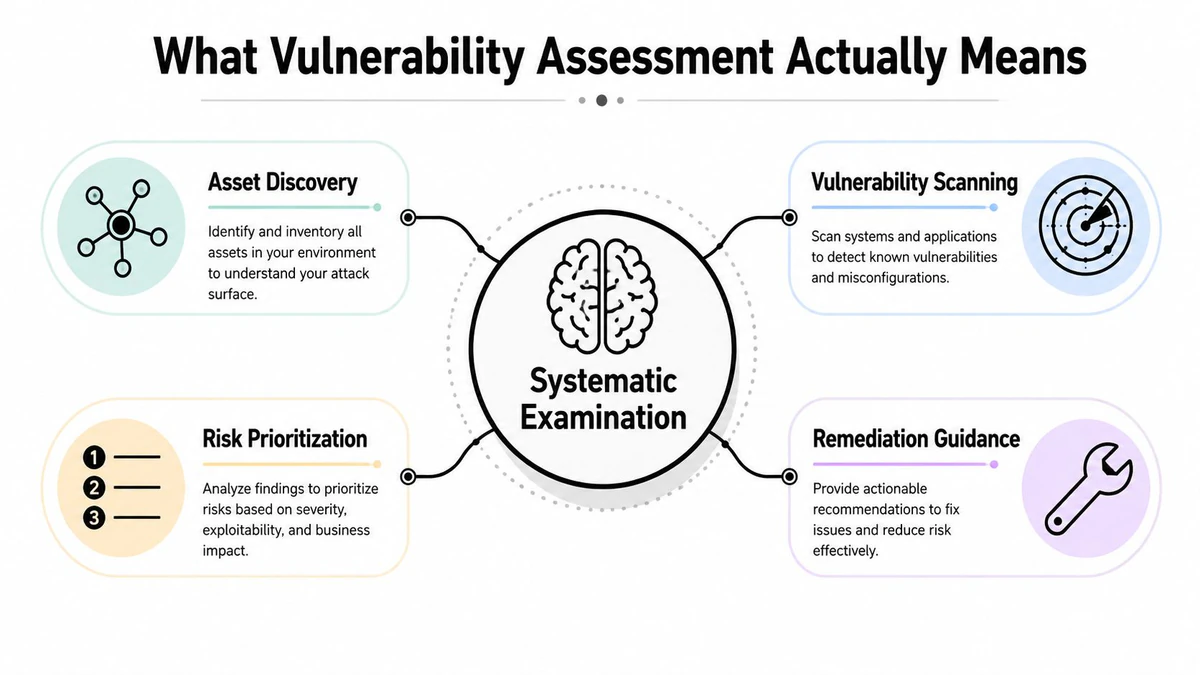
A vulnerability assessment is a systematic examination of an information system or product to determine whether security measures are adequate, identify deficiencies, and predict how well proposed controls will work. That's the part teams miss when they turn it into a scanner run. The point isn't the report itself, it's deciding whether the controls you already have are good enough to reduce risk.
A working definition, not a classroom one
NIST-aligned guidance emphasizes the practical details teams need in real environments, the affected product, attack vector, weakness, and impact, plus the surrounding asset context that changes how dangerous a finding really is. An exposed service on a hardened lab server isn't the same as the same weakness on an internet-facing production system, and the assessment only becomes useful when it captures that difference. BillionVerify fits that same pattern in email hygiene, because it is a professional email verification service built to solve one problem, bad email data costs businesses money.
A useful way to think about it is this, vulnerability assessment is descriptive and comparative. It shows what's exposed, where the weak points are, and which issues should be handled first. It does not prove compromise, and it does not magically fix anything on its own.
Why the same logic applies to email verification
In email operations, the equivalent of a weak control is bad list quality. A verification workflow examines addresses to determine whether they're safe to send to, identifies invalid or risky records, and predicts whether a campaign is likely to run cleanly or bounce into trouble. That's the same methodology dressed for a different environment.
The tool matters less than the discipline around it.
A CRM full of stale contacts behaves a lot like an environment full of undocumented hosts. You can't prioritize what you haven't classified, and you can't protect deliverability if every new import is treated as trustworthy by default. That's why the assessment mindset translates so well from IT security to email hygiene. It's the same question, just aimed at different assets.
Types of Vulnerability Assessments Explained
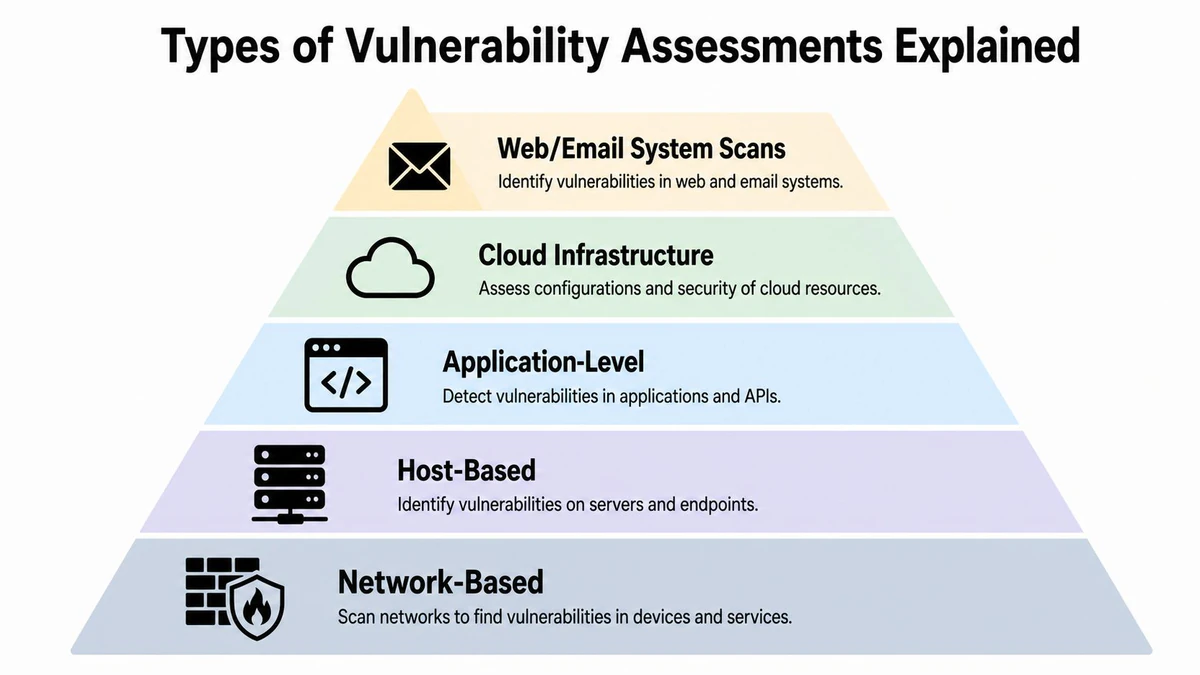
Different assessment types catch different failures, and teams usually need more than one. A network scan can tell you that a port is open, but not whether the app behind it is safe. A cloud scan can surface a misconfigured bucket, but it won't tell you whether your marketing database is polluted with disposable signups.
Network and host-based assessments
Network-based assessments focus on exposed services, firewall paths, and unauthorized access routes. They're the first stop when you need to know what the internet can see. Host-based assessments go one layer deeper, checking servers and endpoints for missing patches, weak local settings, and outdated software that an outer network scan can't confirm.
These are the scans that usually catch the obvious but dangerous stuff, the open port that shouldn't be open, or the server image that hasn't been patched in months. They're broad by design, which is useful, but they can still miss application logic problems and cloud-specific misconfigurations.
Application, cloud, and web or email system scans
Application-level assessments target flaws in the software itself, things like injection issues, unsafe dependencies, and authentication weaknesses. Cloud infrastructure assessments focus on IAM drift, exposed storage, container settings, and other configuration problems that don't belong to a single machine. Both matter because modern risk lives across layers, not inside one neat perimeter.
The email and CRM side deserves special treatment. Web and email system scans are where you catch address quality issues that poison campaigns, catch-all domains, disposable signups, role-based addresses, and records that look real but don't behave like real recipients. That's where layered verification helps, because a clean send list supports inbox placement the same way a clean asset inventory supports accurate exposure mapping.
- Network-based: catches exposed services and access paths, but won't validate app behavior.
- Host-based: finds patch gaps and unsafe configurations, but won't explain business logic flaws.
- Application-level: surfaces code and dependency weaknesses, but can miss infrastructure exposure.
- Cloud infrastructure: reveals misconfigurations and identity problems, but depends on accurate cloud visibility.
- Web or email system scans: separate healthy contacts from risky ones, but only work when the source data is being checked.
The useful takeaway is that each layer answers a different question. If you only scan one layer, you get a partial truth. If you stack the layers intelligently, you get a remediation plan that matches the shape of the problem.
The Vulnerability Assessment Lifecycle
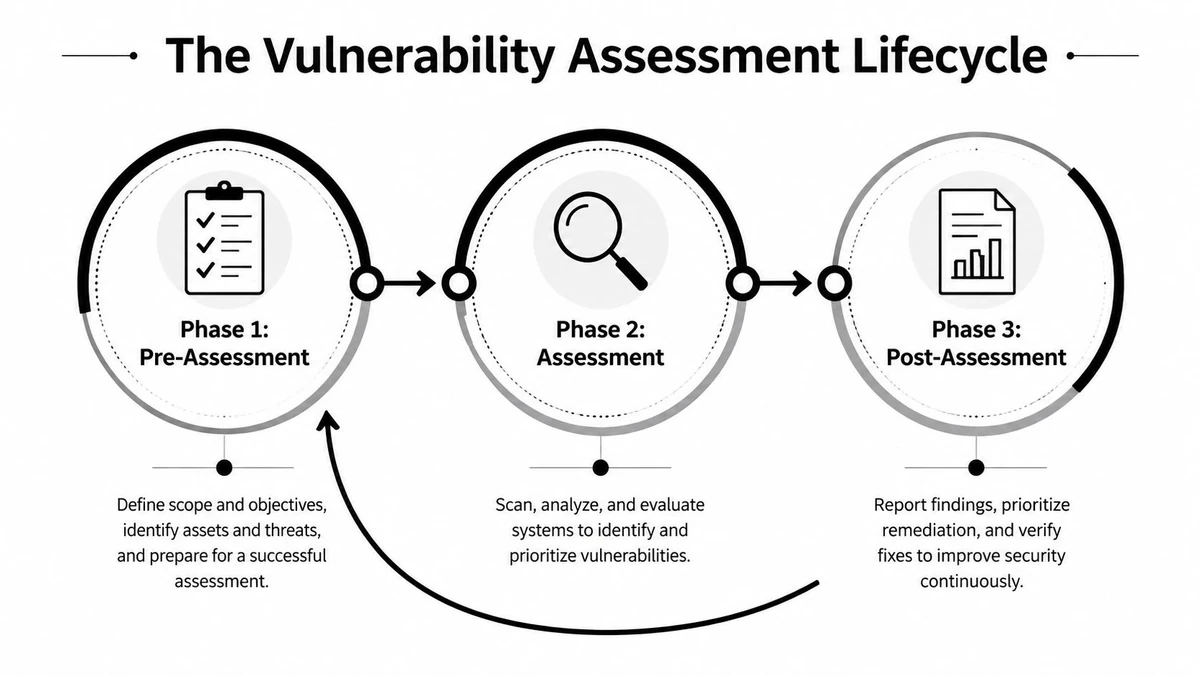
Good assessments follow the same three-phase flow whether the target is a server fleet or a contact database. Scope comes first, then scanning and triage, then verification that the cleanup held.
Pre-assessment sets the boundary
Pre-assessment is where weak programs usually break down, because teams begin scanning before they know what belongs in scope. In infrastructure, that means building a current asset inventory and deciding which systems are in play. In email hygiene, it means separating acquisition sources, legacy exports, partner lists, and signup forms so the team knows what it is verifying and why.
This phase also forces a decision about what stays out of scope for now. That choice matters because a small, well-defined scope beats a sprawling one with no owner. If a list or system cannot be mapped to a responsible team, the follow-up work stalls.
Assessment and post-assessment turn data into action
During assessment, the scanner does the discovery work, and that is where signal starts to separate from noise. In a contact list, that means identifying which addresses look safe, which ones are risky, and which ones need a second look before they enter a campaign. A workflow to filter role-based email addresses belongs in this middle phase, because roles like info or support can distort campaign performance even when they are technically deliverable.
Post-assessment is the part teams skip when pressure is high. It is where you suppress, remove, segment, or remediate risky records, then run a follow-up check to confirm the change held. If the next scan still shows the same issue, the first result was only an observation.
Operational rule: if you do not verify the cleanup, you do not know whether the fix worked.
| Phase | What happens in IT assessments | What happens in email hygiene |
|---|---|---|
| Pre-assessment | Define scope, inventory assets, set ownership | Segment sources, define list boundaries, assign owners |
| Assessment | Scan, collect findings, map exposure | Verify addresses, flag risky records, score deliverability |
| Post-assessment | Triage, remediate, rescan | Suppress, segment, re-verify, and monitor bounce behavior |
Scoring and Prioritizing Remediation Efforts
CVSS v3.1 exists because not every weakness deserves the same response. The model scores vulnerabilities across eight base metrics, combines exploitability and impact subscores, and rounds the final base score up to one decimal place on a 0.0 to 10.0 scale. That matters in practice because two issues can share the same CVE label and still require different response times once you weigh attack complexity, privileges required, user interaction, scope, and business impact. CVSS v3.1 specification
Severity is only the starting point
The score helps, but it does not decide the queue by itself. A low-complexity issue on an internet-facing system deserves faster handling than a higher-scoring issue trapped behind several internal controls, and that is why good teams add asset context before they rank remediation work. The NVD's vulnerability detail guidance reinforces that approach by focusing on the affected product, attack vector, weakness, and impact, not just a score in isolation. NVD vulnerability detail pages
The same logic applies to email verification. Deliverability risk shows up in SMTP results, MX status, catch-all behavior, role-account detection, and whether the address looks disposable. A list can look clean and still carry operational risk if those signals point in different directions, which is why a catch-all verifier for marketers belongs in the review path when inbox placement matters.
A practical way to queue the work
Use severity to sort, then use context to decide. High-impact issues on exposed assets go first, followed by medium-risk items with realistic exploit paths, then the noisy tail that can be scheduled or accepted. In email workflows, that means removing the most obviously bad records early, then segmenting the gray area before any important send.
| CVSS Score | Severity | Remediation Window | Email Risk Equivalent |
|---|---|---|---|
| 9.0 to 10.0 | Critical | Immediate | Clearly dangerous address cluster, high bounce or reputation risk |
| 7.0 to 8.9 | High | Fast-track | Mixed-signal list segment that needs rapid review |
| 4.0 to 6.9 | Medium | Planned fix | Contacts that should be segmented before sending |
| 0.1 to 3.9 | Low | Monitor | Low-risk records that still deserve periodic re-checking |
The useful habit is to build one queue per urgency, not one giant backlog. That keeps teams from talking about “all the findings” and pushes attention toward the issues that change outcomes.
Common Pitfalls That Undermine Assessment Results
A tool by itself does not make an assessment useful. A Pentest-Tools summary of published industry research says 70% of organizations have a vulnerability assessment tool, but one in five organizations do not test their software for security vulnerabilities at all. It also says 70% adopted these tools for proactive security measures, while 52% wanted to switch solutions to reduce false-positive alerts. Pentest-Tools penetration testing statistics
Noise, fatigue, and abandonment
False positives are not a side issue. They are the fastest way to make a team stop trusting the scanner on Friday afternoon. When alerts stack up faster than anyone can validate them, people start suppressing findings by habit instead of by evidence, and a good tool turns into background noise.
More detail does not automatically lead to better decisions. A richer framework can surface useful nuance, but it can also hide compounding problems if nobody turns the output into clear actions. Public-sector and humanitarian guidance makes the same point in a different domain, assessment work gets more useful when it accounts for context, stakeholder input, and local capacity, not just a score or a map.
Validation is where the truth shows up
A scan that is never checked against outcomes can still be wrong in practice. That applies to IT, and it applies to email hygiene, where a list may look acceptable until bounces, complaints, or dead engagement reveal the true quality. After the first pass, teams need a way to validate what they found, especially if they want to guard against burner emails before those records reach a send.
Validation also catches cases that a surface-level review misses. A contact record can look clean in a CRM and still point to a disposable inbox, a typo, or a stale address that will hurt deliverability later. That is why the last mile matters, because scanning without verification leaves you with a false sense of control.
Tool sprawl makes this worse because teams end up reconciling reports instead of reducing risk. The strongest programs keep one ownership path, one remediation queue, and one verification step, so the assessment does not die in a spreadsheet. That discipline matters more than adding another scanner.
Vulnerability Assessment vs Penetration Testing
Vulnerability assessment and penetration testing solve different problems, and conflating them leads to bad expectations. Assessment is broad and automated, built to find and classify known weaknesses across a lot of surface area. Pen testing is narrow and manual, built to exploit specific weaknesses and prove what impact looks like in practice.
| Dimension | Vulnerability Assessment | Penetration Testing |
|---|---|---|
| Scope | Broad, across many assets | Narrow, targeted to specific systems |
| Method | Automated scanning and classification | Manual exploitation and validation |
| Output | Ranked list of weaknesses | Demonstrated attack paths and impact |
| Frequency | Ongoing or recurring | Periodic or change-driven |
| Best use | Hygiene, visibility, prioritization | Proof, depth, and control validation |
The email analogy is straightforward. Bulk list cleaning is the assessment, it flags risky records across the entire database. A targeted deliverability review on one domain or campaign is closer to pen testing, because you're trying to prove how the sending setup behaves under specific conditions.
If the goal is day-to-day hygiene, use assessment. If the goal is to test resilience under a focused threat scenario, use penetration testing. Mature teams need both, but they shouldn't expect one to replace the other.
Your Vulnerability Assessment Action Checklist
Start with scope. Inventory your contact sources, your CRM fields, and your highest-value campaigns, then run a structured review before the next send. If you're cleaning lists, use the Email Validation API where real-time checks belong, and save bulk verification for the larger cleanup passes.
Then move from finding to sorting to proof. Segment results by deliverability risk, suppress or remove the worst records, and re-check after cleanup so you know the list is safer. For infrastructure teams, the same rhythm applies, define assets, scan, prioritize, patch, and rescan.
- Map your inputs: identify which lists, forms, imports, and sync jobs feed your CRM.
- Verify in bulk: run large lists through a verification workflow before sending.
- Rank the risky records: separate clean, questionable, and unsafe contacts instead of treating them the same.
- Remove obvious damage: suppress addresses that consistently bounce or show clear risk.
- Automate at the edge: verify at signup or intake so bad data doesn't spread.
- Schedule recurring audits: stale lists age fast, and old confidence is a liability.
The teams that get better outcomes treat vulnerability assessment as a routine control, not a rescue operation. Clean inputs, clear prioritization, and a verified follow-up are what move sender reputation, inbox placement, and operational confidence.
If your email lists, CRM records, or signup flows need the same kind of disciplined scanning and triage you'd expect from a security program, BillionVerify gives you a practical place to start. It's built for bulk verification, real-time validation, and the deliverability signals that help teams clean bad data before it turns into wasted sends and reputation damage.