



You've sent the campaign, opened the reporting dashboard, and found a bounce rate that makes every other metric look irrelevant. Maybe the number jumped after a list import, or a sender reputation alert appeared at the same time. The immediate temptation is to rewrite the email, change the subject line, or blame the campaign.
That's usually the wrong starting point. A high bounce rate is often a list-quality and deliverability problem, not just a content problem. Email operations commonly treat under 2% as healthy, 2% to 5% as warning territory, and above 5% as critical, while well-maintained marketing lists generally remain below 2% bouncing according to independent email bounce-rate benchmarks.
The right question isn't only, “Why is my bounce rate so high?” It's, “Which kind of bounce am I looking at, and what changed before it appeared?” This guide separates email bounces from analytics bounces, then works backward through infrastructure, traffic, list hygiene, and verification so you can fix the actual failure.
The Moment You Notice the Number
A typical deliverability morning starts with an alarming dashboard. The campaign report shows an 18% bounce rate, a sender reputation indicator has fallen, and a Slack thread is filling with questions about the list, the creative, and the sending platform. Everyone wants an answer before the next campaign goes out.
The number is a symptom, not a diagnosis. A 15% bounce rate on a send to 50,000 contacts represents a very different operational event from the same rate on a 2,000-contact send. The percentage tells you the scale of the failure relative to delivery attempts, but it doesn't identify whether stale records, invalid domains, temporary throttling, or a reporting issue created it.
Start with three questions before changing the campaign:
- What definition is the platform using? Confirm whether the dashboard reports rejected email messages, undelivered messages after retries, or website sessions without additional interaction.
- When did the rate change? Compare the current send with earlier campaigns, list imports, form changes, domain changes, and shifts in sending infrastructure.
- Which segment spiked? Break the result down by acquisition source, upload batch, domain, country, campaign, and recipient type. A problem isolated to one imported file demands a different response from a problem affecting every segment.
Practical rule: Don't optimize the message until you know whether recipient servers rejected the message or your analytics platform simply recorded a single-page session.
This distinction matters because teams often react to a frightening number with broad changes that erase useful evidence. Pausing the wrong campaign, deleting an entire audience, or changing authentication without first identifying the failure mode can make diagnosis harder.
Use a consistent naming and reporting process so each send can be compared against its source data. A useful measurement guide for email teams can help standardize the definitions, segments, and reporting fields you use across campaigns.
What Bounce Rate Actually Measures
For email, bounce rate is the percentage of sent messages rejected by recipient servers. The receiving server returns a non-delivery response, and the sending platform records the result. That is different from the website metric called bounce rate, where an analytics platform evaluates whether a visitor had another interaction during a session.
Email bounces fall into two operational categories. A hard bounce indicates a permanent delivery failure, such as an invalid or nonexistent address, a disabled mailbox, or an undeliverable domain. A soft bounce indicates a temporary problem, such as a full inbox, a server timeout, greylisting, throttling, or short-term blocking.
Soft failures need a second layer of interpretation. A transient soft bounce may clear when the receiving server becomes available or accepts another attempt. A persistent soft bounce continues across retries and can eventually be treated as undeliverable by the email service provider. Most ESPs retry soft failures automatically, so the first event and the final campaign result may not be identical.
| Bounce Types at a Glance | Trigger | Resolution Path |
|---|---|---|
| Hard bounce | Invalid address, nonexistent domain, disabled mailbox, or permanent recipient rejection | Suppress the address, investigate the acquisition source, and prevent another send |
| Transient soft bounce | Full mailbox, temporary server error, timeout, greylisting, or short-term throttling | Allow controlled retries and review the receiving server response |
| Persistent soft bounce | Repeated temporary failures or continuing blocks | Examine sender reputation, volume, authentication, and recipient history before suppressing |
A practical email operations benchmark treats anything above about 2% total bounce rate as unhealthy, while under 1% is a stronger steady-state target for protecting sender reputation, as described in Salesforce's email benchmark guidance. Those thresholds are useful triage signals, not proof that a particular campaign failed for one reason.
The word “bounce” creates confusion because Google Analytics uses it differently. Universal Analytics treated a bounce as a session with no further recorded interaction. GA4 centers reporting on engagement rate, and events can affect whether a session is considered engaged. If you need to find email marketing fundamentals, start by separating the email-delivery definition from the website-analytics definition.
BillionVerify is a professional email verification service built to solve one problem, bad email data costs businesses money. Its role belongs on the email-data side of this diagnosis, not in the interpretation of website sessions.
Technical and Analytics-Side Causes
The platform and tracking layer deserve attention before you assume the audience or creative caused the result. A technical defect can create genuine delivery failures, misclassify server responses, or inflate a reported metric without changing recipient behavior.
Authentication and sending infrastructure
Start with the sending domain. A missing or misaligned SPF record can fail SPF alignment under DMARC. An absent DKIM signature removes another authentication signal, while a domain still using a DMARC policy of p=none may be collecting reports without enforcing a protective policy. These conditions don't automatically explain every bounce, but they can affect trust, filtering, and the way receiving systems handle your mail.
Older ESP reporting can also misrepresent an SPF softfail as a hard failure. Compare the platform's label with the underlying SMTP response and authentication results. If the dashboard says “hard bounce” but the receiving response indicates a temporary policy or authentication issue, suppressing addresses won't solve the root cause.
Sending infrastructure creates another group of failure modes:
- New IP warm-up: A new sending IP that receives a large volume immediately can face throttling or temporary blocks.
- Volume control: Sudden spikes, compressed send windows, and repeated retries can make a temporary problem worse.
- Shared reputation: On a shared IP, another sender's poor practices can affect how receiving systems evaluate your traffic.
Run the BillionVerify DKIM checker as one part of an authentication review, then compare the result with your ESP's domain-alignment and delivery logs.
Payload and measurement defects
Filters may react to broken HTML, a missing plain-text alternative, oversized images, or links that point to recently blacklisted domains. Test the rendered message in major clients, inspect redirects, and review every linked domain. A message that works in one inbox can still produce failures elsewhere because receiving systems apply different policies.
Analytics creates a separate class of false positive. Duplicate tags can fire twice, view-through wrappers can rewrite redirects, and consent banners may load scripts after the first paint. Those events can distort session engagement and make a website bounce rate look worse or better than the underlying experience.
Check the raw campaign logs for email diagnosis. Check tag firing, consent behavior, redirect chains, and event timing for website diagnosis. Don't use a web analytics report to decide which email addresses should be suppressed.
Content, UX, and Traffic Quality Causes
A correctly authenticated sender can still see a high website bounce rate when visitors don't get what the acquisition source promised. The email may have delivered successfully, but the landing page can lose the visitor through relevance, speed, layout, or unclear next steps.
Match the segment to the failure
Start with a simple diagnostic matrix. Segment the report by channel, device, and landing page, then compare the bounce-rate bands rather than relying on one sitewide average.
- Search intent: If non-branded organic visitors leave on one group of landing pages, compare the query language with the page promise. A mismatch points to content or targeting.
- Page performance: If mobile visitors leave disproportionately across several pages, inspect load speed, layout shifts, readability, and tap targets. That pattern points to UX or performance work.
- Interstitials and banners: If exits cluster immediately after a pop-up, cookie banner, or full-screen prompt appears, test the experience without the interruption.
- Content depth: If visitors from qualified sources stop on thin pages, add the missing explanation, proof, navigation, or next step instead of adding unrelated copy.
- Traffic source: If paid search, display, or social traffic behaves differently from branded traffic, review keyword intent, ad creative, audience targeting, and referral expectations.
A single-screen page isn't automatically broken. A visitor may have found the answer or completed the intended action, especially when event tracking is incomplete. Compare bounce with conversions, scroll behavior, time on page, and session duration before declaring the page unsuccessful.
Mobile and acquisition checks
Mobile behavior often exposes problems desktop reports hide. Test the actual landing page on common phone sizes, including the first interaction, form fields, navigation, and dismiss controls. A layout that looks acceptable on a large monitor can become unusable when text wraps, images shift, or a banner covers the call to action.
Traffic quality also depends on the promise made before the click. Branded traffic usually carries stronger familiarity than broad, non-branded traffic, while misaligned paid keywords can attract visitors who were never suitable for the page. Social and display placements can create the same mismatch when the ad sets an expectation the destination doesn't meet.
For teams using social acquisition, the X for business guide 2026 offers useful context for aligning platform activity with business objectives. Pair that planning with conversion-focused email copy, so the message and destination make the same promise.
When the Word Bounce Means Something Else
Start with the report type, not the percentage. An email service provider shows sent messages, rejected messages, delivery responses, hard bounces, soft bounces, and suppression events. An analytics platform shows sessions, page views, events, engagement, and conversions. Those reports use the word bounce for different failures.
An email hard bounce is permanent. The address may be invalid, the domain may not exist, or the recipient may be blocked. An email soft bounce is temporary. A full mailbox, receiving-server throttling, or a short-lived server error may interrupt delivery without proving that the address is permanently unusable.
Email bounce rate comes from messages rejected during sending. A rate approaching the roughly 2% threshold is commonly treated as a sender-reputation risk, as noted in email deliverability benchmark guidance. Treat that threshold as an investigation trigger, not an automatic deletion rule. Check the SMTP response, separate hard from soft failures, and review the source and age of the affected records before sending more volume.
Analytics uses a separate definition. In Universal Analytics, a bounced session generally meant one page view with no further recorded interaction. GA4 uses engagement-based reporting, so its result depends on configured events and session conditions. A completed single-page visit can therefore appear alongside an untracked interaction, even though neither represents an email rejection.
| Two Meanings of Bounce, Side by Side | Analytics Bounce | Email Bounce |
|---|---|---|
| Object measured | Website session | Sent email message |
| Primary signal | No further recorded interaction or engagement | Recipient server rejection |
| Typical causes | Intent mismatch, poor UX, slow page, tracking defect, or completed single-page intent | Invalid address, temporary server problem, policy block, or stale data |
| Useful next check | Channel, device, landing page, events, and session behavior | SMTP response, hard or soft classification, domain, list source, and authentication |
| Likely remediation | Improve relevance, UX, content, or measurement | Suppress bad addresses, verify the list, and repair sending conditions |
If the report contains recipient addresses and delivery codes, investigate list hygiene and sending conditions. If it contains sessions and page paths, inspect analytics definitions, tracking, and visitor behavior. Confirming that distinction prevents a website measurement issue from being treated as an email-list failure, or a stale list from being dismissed as an analytics problem.
Using Email Verification to Fix Email Bounces
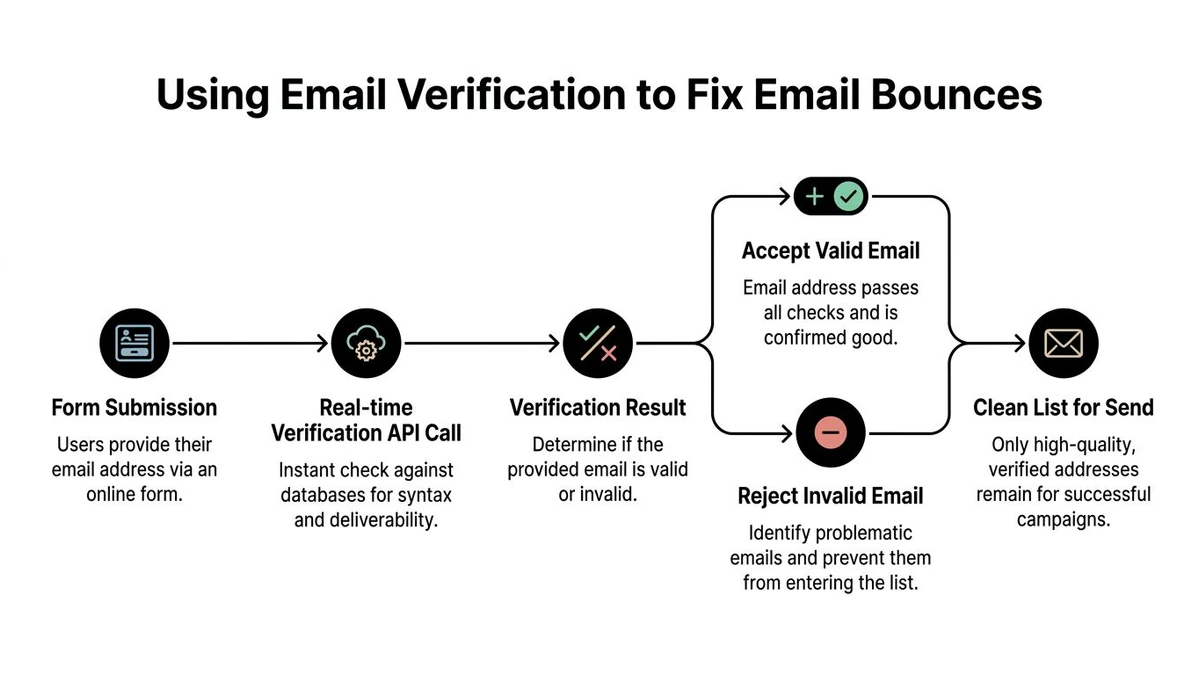
Verification has the greatest effect before an address reaches the campaign queue. It gives the sending team a way to assess the record, assign a disposition, and choose whether to accept, suppress, or review it before a recipient server rejects the message.
Put verification at collection and campaign stages
At form submission, send a real-time verification request to catch typos, disposable inboxes, and addresses that cannot accept mail. Ask the visitor to correct a clear error, or stop the record from entering the CRM. Uncertain results should go to review rather than trigger an automatic block, since aggressive filtering can reject legitimate prospects.
Before a campaign, run bulk verification on the existing list. Prioritize old CRM exports, event imports, purchased data, and records with little recent engagement. B2B addresses can become stale between collection and sending. The Postmastery benchmark report uses healthy permission-based delivery around 98.5%, showing why a list that was clean at collection still needs checking before use.
An Email Validation API can connect the form or CRM to the sending platform and return structured results for automated routing. Store the result, check time, source, and disposition on the contact record so later imports do not erase the audit trail.
Act on the result, not just the score
Verification can assess more than address syntax and domain configuration:
- Valid: Keep the address eligible, subject to consent and engagement rules.
- Invalid: Remove or suppress it. A domain without MX records or a fallback A record cannot accept email, even when the format looks correct, as explained in how email verification works.
- Role-based: Review shared addresses such as
info@,support@, andadmin@. Keep them only when a shared inbox fits the use case. - Catch-all: Treat the result as unconfirmed. A catch-all server can accept mail for any address at the SMTP layer, so a positive response does not establish that the individual mailbox exists, according to SMTP verification guidance. Keep these records in a separate segment, send only when the relationship justifies the risk, and watch subsequent delivery and complaint signals.
- Disposable: Block or suppress temporary inboxes, which often expire before an ongoing communication program can reach the recipient.
- Spam-trap: Remove the record and investigate the acquisition source.
- Abuse: Suppress or isolate it because complaint risk can outweigh apparent validity.
- Unknown: Hold for review, recheck later, or suppress until another trusted signal supports delivery.
Apply the same rules to recurring imports, forms, and pre-send checks. Keep verification results separate from engagement data, then compare them with delivery outcomes, complaints, and inbox placement. Cleaning the list removes one source of bounces. Permission controls, authentication, and source-level review determine whether the improvement lasts.
Your Prioritized Fix Plan
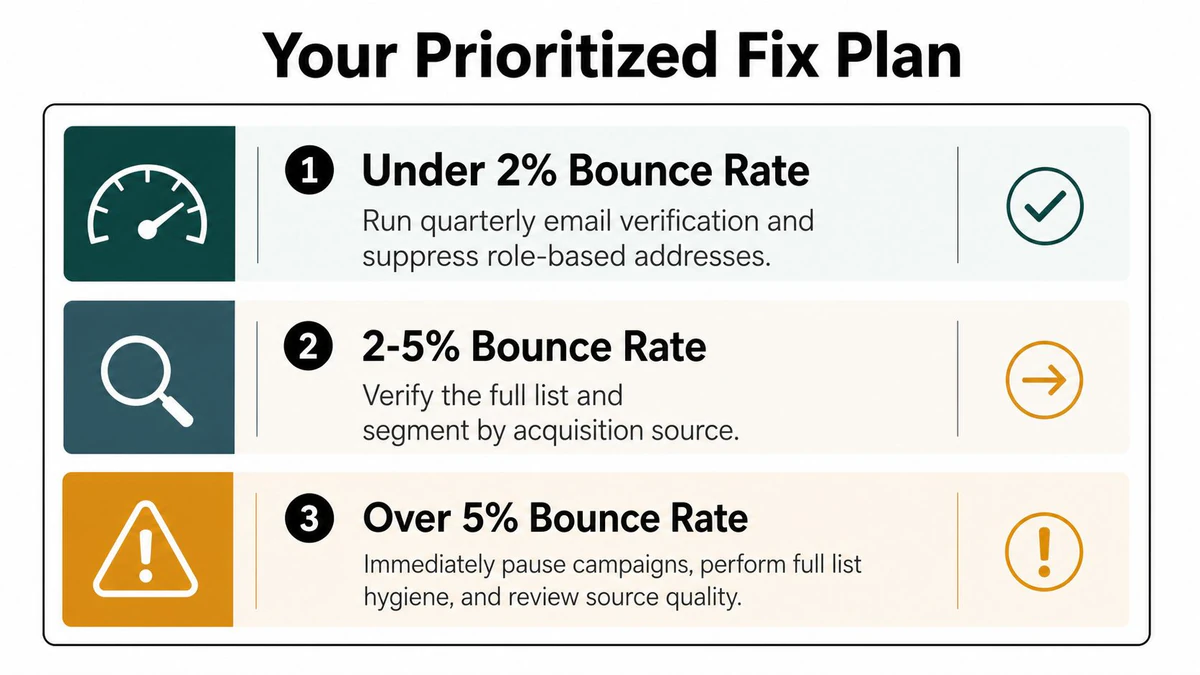
Severity should determine your next action. Treating every bounce rate as the same problem wastes time at the low end and creates unnecessary exposure at the high end.
Under 2%
This is the maintenance band for a well-managed permission-based list. Run quarterly verification, suppress role-based addresses when they don't match the audience, and continue monitoring acquisition sources. Track inbox placement rate as the primary progress signal, because a low bounce rate doesn't guarantee that messages reach the inbox.
Technical corrections can show movement within days. Keep the sending program stable while you verify that the change persists across normal campaigns.
2% to 5%
Treat this as a warning that needs investigation, not a cosmetic reporting issue. Verify the full list, segment results by acquisition source, inspect hard and soft bounce classifications, and audit analytics for duplicate tags or tracking errors if the metric comes from a website dashboard.
A clean technical fix can take days to reflect in reporting. If reputation has suffered, recovery may take weeks. Use inbox placement rate for email, and don't judge success from bounce rate alone.
Above 5%
Pause additional sends to the affected audience. Investigate IP and domain reputation, review the postmaster response, identify the list source that contributed the addresses, and verify in real time through an API before the next campaign.
The benchmark evidence treats rates above 5% as critical, while poor list hygiene can push bounce rates into the 5% to 10% or higher range, as documented in email bounce-rate benchmark analysis. Technical repairs may take days, but reputation repair can take weeks, so avoid trying to force recovery with more volume.
Use a quarterly checklist:
- List health: Verify new imports and aging records.
- Acquisition quality: Compare bounce and complaint signals by source.
- Authentication: Review SPF alignment, DKIM signing, and DMARC reporting.
- Infrastructure: Check volume changes, throttling, and shared-IP conditions.
- Measurement: Confirm that email rejection data and website session data remain separate.
A bounce rate becomes manageable when every change has an owner, a defined segment, and a metric that can confirm recovery.
BillionVerify offers email verification for identifying bad addresses before they damage campaign deliverability, including list cleaning and real-time validation workflows. Visit BillionVerify to review how its verification service can fit into your forms, CRM hygiene process, and pre-send checks.