


A 2022 CRM data management report found that 44% of respondents estimated their company loses more than 10% of annual revenue because of poor-quality CRM data. The same report found that 95% of participants had some CRM data quality issues, even though 85% rated their data as good or very good (CRM statistics and data quality findings). That gap captures the core problem: many teams trust their CRM long enough for bad records to affect targeting, routing, forecasting, and customer conversations.
CRM data quality isn't a spreadsheet-cleaning exercise. It's a revenue operations discipline that depends on ownership, measurement, verification, and processes that prevent decay from returning. Email verification plays an important role, but it works best as part of a broader system that connects record accuracy to business outcomes and prepares the database for automation and AI.
The Hidden Revenue Cost of Poor CRM Data
Poor CRM data creates costs long before anyone labels a record “bad.” A sales representative calls a former employee, marketing sends a campaign to the wrong segment, or a duplicate account splits activity across two records. Each incident looks small in isolation. Together, they distort the operating picture that revenue teams use to decide where to spend time and money.
The 2022 report's revenue finding is difficult to dismiss because it connects data quality to financial performance rather than administrative inconvenience. The same source records a long-standing contradiction: 95% of participants acknowledged CRM data quality issues, while 85% still described their data as good or very good (CRM statistics and data quality findings). Teams often judge their databases by whether users can work in them, not whether the records consistently represent reality.
What quality means operationally
I assess CRM data quality across five dimensions:
- Accuracy: The record matches the actual person, company, role, and contact details.
- Completeness: Revenue-critical fields contain usable information, not merely populated placeholders.
- Consistency: Teams use the same values, formats, naming conventions, and lifecycle definitions.
- Timeliness: The record is current enough for the decision or workflow that depends on it.
- Validity: The information passes the rules required for its intended use, such as a deliverable email address or a correctly structured date.
A complete record can still be inaccurate. A consistent record can still be stale. Treating one dimension as proof of overall health is how organizations end up with dashboards that look orderly but produce unreliable decisions.
Practical rule: Measure whether a record supports the action you want to take, not just whether the CRM accepts it.
How errors spread through revenue operations
An inaccurate job title can send an outbound sequence to someone without buying influence. An incomplete industry field can exclude a qualified account from a campaign. A duplicate contact can receive overlapping outreach while the pipeline report counts the same commercial relationship more than once.
These errors also compound across systems. A CRM syncs with marketing automation, sales engagement, customer support, enrichment tools, and reporting layers. Once a bad value enters the source record, each connected workflow may copy, transform, or act on it. The result is often a chain of small operational failures that no single team can diagnose from its own dashboard.
Early warning signs include rising duplicate creation, more bounced messages, inconsistent segmentation values, and salespeople maintaining private spreadsheets because they no longer trust the CRM. Those symptoms point to a process problem, not just a backlog of records awaiting cleanup.
Measuring CRM Data Quality with Clear Benchmarks
A CRM score is useful only when it connects to a revenue decision. Start with the records and fields that affect routing, segmentation, outreach, forecasting, and AI inputs. Report results by object, source, segment, owner, and critical field. One database-wide average can conceal a failing acquisition channel or a team that creates unreliable records.
Independent CRM data-quality benchmarks commonly use a duplicate rate below 5%, email validity above 93%, field completion above 80% for revenue-driving fields, and bounce rates under 2%. Treat these as operating starting points, not universal laws. Regulated workflows, high-volume outbound programs, and account-based sales motions may require tighter controls.
The core measurement set
| Metric | Healthy Threshold | At-Risk Threshold | Business Impact |
|---|---|---|---|
| Duplicate rate | Below 5% | 5% or higher | Splits activity, inflates pipeline, and confuses ownership |
| Email validity | Above 93% | 93% or lower | Increases bounce exposure and weakens campaign reach |
| Critical field completion | Above 80% | 80% or lower | Limits routing, segmentation, scoring, and personalization |
| Bounce rate | Under 2% | 2% or higher | Signals invalid or stale addresses and creates deliverability risk |
| Data freshness | Defined by workflow | No verification standard | Leaves teams acting on outdated contacts and accounts |
Calculate duplicate rate by dividing suspected duplicates by the total records assessed. For email validity, divide addresses that pass your verification policy by the addresses tested. Measure completion against fields that change an action, such as account owner, lifecycle stage, industry, role, email, or opportunity amount. Filling irrelevant fields can raise a score without improving execution.
An address may be syntactically correct yet unreachable. Use the Email Verification Benchmark to frame email-specific measurement, then adjust the standard to your sending model and risk tolerance. BillionVerify provides email verification focused on identifying bad email data before it creates delivery and revenue problems.
Establish a baseline before cleaning
Export a controlled sample or use native CRM reports, and preserve the initial results. Record the measurement date, population, source, and calculation method. Without that snapshot, teams can mistake the number of processed records for genuine quality improvement.
Track results by acquisition source. A clean historical database can deteriorate quickly when one form, integration, import, or sales process continues creating malformed or duplicate records. Source-level reporting shows where validation, ownership, or workflow changes will prevent more future errors than another manual cleanup. That is the governance signal: assign someone authority to fix the source, not only the symptoms.
Why Data Quality Is a Governance Problem Not a Technical One
CRM data quality failures rarely result from a missing deduplication feature. They usually reflect unresolved decisions about record ownership, required fields, acceptable completeness, and the response when users or integrations break the standard. Software can surface defects, but people must decide which defects affect revenue and who fixes the process creating them.
A 2025 survey reported that 76% of organizations said less than half of their CRM data is accurate and complete, while only 32% said their company has a data quality problem. It also found that 46% don't have a full-time employee responsible for CRM data quality (2025 CRM data management findings). The gap points to an accountability failure. Leaders may see revenue leakage, unreliable reporting, or wasted campaign spend without giving anyone authority to correct the underlying causes.
Ownership has to be explicit
“Everyone owns data quality” sounds collaborative, but it often leaves decisions unattended. Assign a data steward to each major CRM object or domain. Sales operations can own account and opportunity standards, marketing operations can own campaign and consent fields, and customer operations can own service attributes.
The steward does not need to correct every record. The role is to define the standard, review the scorecard, approve changes, and escalate recurring defects to the team controlling the source process.
A small data-quality council can settle conflicts between departments. Include representatives from revenue operations, sales, marketing, service, IT, and security when appropriate. Its charter should define decision rights, review cadence, escalation paths, and the business KPI affected by each standard.
Connect governance to revenue
The same report also found that 37% of firms lose revenue from poor data quality, while 25% said the loss reaches at least 10% of annual revenue. Those findings create a clearer business case than a general request for a cleaner database.
Tie governance decisions to operating consequences. Duplicate accounts create ownership disputes. Missing fields weaken lead routing. Invalid email addresses increase bounce risk and waste campaign capacity. Technology can identify and correct many symptoms. Governance determines whether those defects return through the next import, form, integration, or sales workflow.
For demand generation teams, B2B data quality for marketers can support that operating model. It should complement, not replace, clear ownership, documented standards, and recurring review.
Step-by-Step CRM Data Audit and Remediation Workflow
A useful audit doesn't attempt to perfect every record at once. It identifies the records most likely to affect active revenue, establishes evidence for the problem, and sequences fixes so the team can learn before expanding the effort.
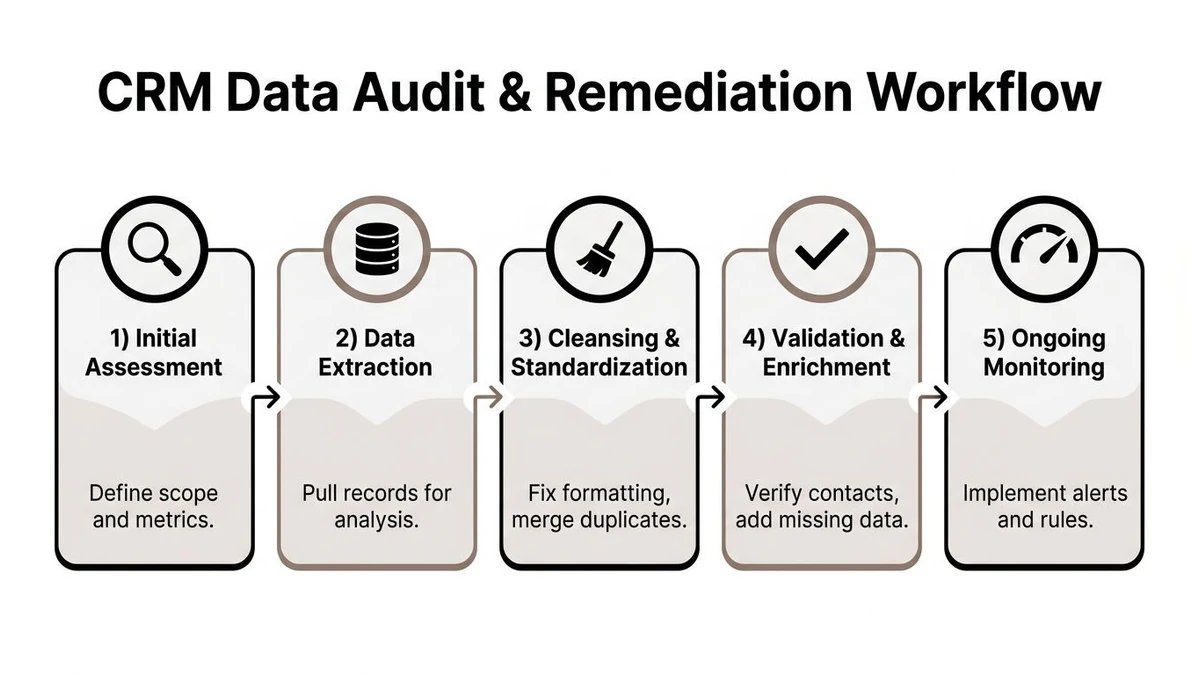
Start with scope and extraction
- Define the population. Choose the objects, regions, lifecycle stages, and source systems to assess. Prioritize active opportunities, strategic accounts, recent leads, and records used in current campaigns.
- Set the measures. Select duplicate rate, email validity, critical-field completion, bounce rate, and freshness. Write down how each metric will be calculated before anyone changes the data.
- Extract a working copy. Pull the relevant records and preserve identifiers, ownership, source, timestamps, and integration history. Never clean a production database without a rollback path or an audit trail.
Watch the video for a visual walkthrough of the audit and remediation sequence.
Clean by business impact
Use matching logic to identify exact and likely duplicates, then route ambiguous matches to manual review. Automatic merges work well when identifiers agree and the surviving record is obvious. They're risky when two records have conflicting owners, consent history, opportunity activity, or account relationships.
Standardize controlled fields before enrichment. A canonical industry taxonomy or account naming policy makes later routing and reporting more reliable. Enrichment can fill missing attributes, but it shouldn't overwrite trusted values without a documented precedence rule.
For teams working in regulated or specialized environments, these banking CRM data quality steps offer useful context for structuring cleansing work around controlled records and review requirements. For email records, remove invalid addresses after verification rather than deleting addresses solely because they look unusual.
Close the loop
After remediation, compare the results with the baseline and document the remaining exceptions. Then fix the entry form, integration mapping, validation rule, or user behavior that created the defect. A cleanup without prevention is only a temporary reduction in symptoms.
Integrating Email Verification into Your CRM Hygiene Strategy
Email verification belongs at two control points: before a record enters the CRM and before an existing audience is used for outreach. Real-time checks protect new records from invalid addresses. Bulk verification evaluates older data that may have decayed, moved between systems, or arrived through imports. Treat these as separate workflows because they require different controls and follow-up actions.
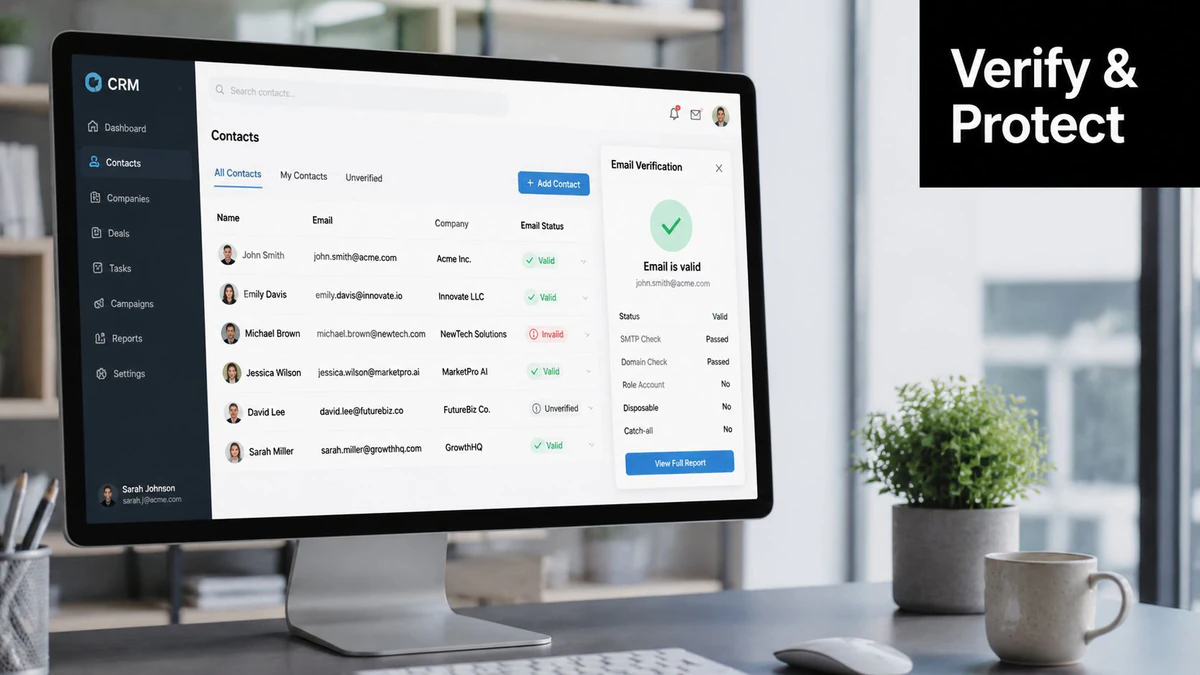
Verification goes beyond syntax. It commonly combines DNS/MX validation with SMTP probing. MX records identify the servers responsible for receiving mail for a domain. SMTP verification communicates with that server to assess whether a mailbox appears to exist without sending message content (how email verification works).
Use verification according to the workflow
At form submission, check the address before creating or updating a contact. Route uncertain results for review or hold them out of automated outreach. For imports, verify the file before loading it, retain the original value, and write the result, check time, and disposition to dedicated CRM fields. That history gives operations teams an audit trail instead of an unexplained suppression.
For existing records, run a controlled bulk pass and separate results into deliverable, invalid, risky, and unknown states. Use the provider's response model together with your campaign policy. An uncertain result is not a confirmed failure, particularly for catch-all domains or mail servers that defer verification.
The SMTP response determines the next action. 250 indicates acceptance, 5xx indicates an invalid mailbox, and 4xx indicates an unknown or retry-later state after the verification sequence (SMTP verification mechanics). A confirmed invalid address can be suppressed. An unknown result may need a retry, review, or a lower-risk sending policy.
Build the control into the CRM
An Email Validation API can support checks in forms, product registration, lead capture, and integration pipelines. Store the verification status and last-checked timestamp without replacing the original address. Sales and operations teams can then see why a record was accepted, withheld, or sent for review.
Recent 2026 benchmarking data suggests invalid-address rates can reach 12–23%, with one dataset reporting approximately 48% verified addresses across millions of records (email deliverability benchmarks). These figures indicate why verification should occur before sending, especially when lists combine multiple sources. They are directional benchmarks, not a universal forecast for every CRM.
Verification does not resolve consent, suppression, engagement, or sender-reputation decisions. It supplies a defensible signal for suppressing confirmed invalid records and assigning ownership for uncertain ones. Define that ownership in the CRM, or the control will become another unresolved queue.
Preparing Your CRM Data for AI and Automation
In 2025, 45% of CRM users said their CRM data wasn't ready for AI (2025 CRM data management research). That gap reflects a governance failure as much as a technical one. Adding a copilot to inconsistent records can produce incomplete summaries, incorrect next-action recommendations, or lead routing based on fields whose definitions differ across teams.
Traditional hygiene asks whether a person can use a record. AI and automation require a stricter standard: the system must know what each value means, where it came from, how current it is, and whether it is safe to act on.
Define AI readiness operationally
AI-ready CRM data should meet five operational conditions:
- Standardized schemas: The same field represents the same concept across sales, marketing, and service systems.
- Provenance: Users and systems can identify the source and confirmation time of each value. An AI model can then distinguish a manually entered budget from an auto-enriched estimate instead of treating both as equally reliable.
- Freshness rules: Each workflow defines how current a record must be before automation acts.
- Confidence signals: Verified, inferred, imported, and uncertain values remain distinguishable, so a model can weight them appropriately.
- Useful context: Structured fields connect to approved interaction history, account relationships, and other information relevant to the decision.
Legacy customizations create hidden risk. Historical data may not support a current recommendation, unstructured notes may lack consistent context, and system silos can hide part of the customer relationship. Deleting old data or forcing every field into one template creates its own problems. Segment records by use case, then document which signals an automated decision may trust and which require human review.
Test the workflow before scaling it
Start with one narrow use case, such as lead routing or opportunity summarization. Trace every input field, record its source and freshness, and review outputs with the process owner. Test incomplete, conflicting, and recently updated records, not only clean examples.
A recommendation that cannot be explained, corrected, or tied to approved data is not ready for broad deployment. Define the correction path before launch, including who reviews exceptions and where the decision is recorded.
The email marketing bible AI insights offers practical context for AI-supported email operations. The same rule applies across revenue workflows: automation magnifies useful signals and bad ones. Establish the data contract first, then expand the workflow.
Building a Sustainable CRM Data Governance Playbook
A sustainable program turns data quality from a periodic project into a management routine. The playbook I use starts with a one-page charter, a scorecard that leaders can read, and clear escalation rules for defects that affect revenue.
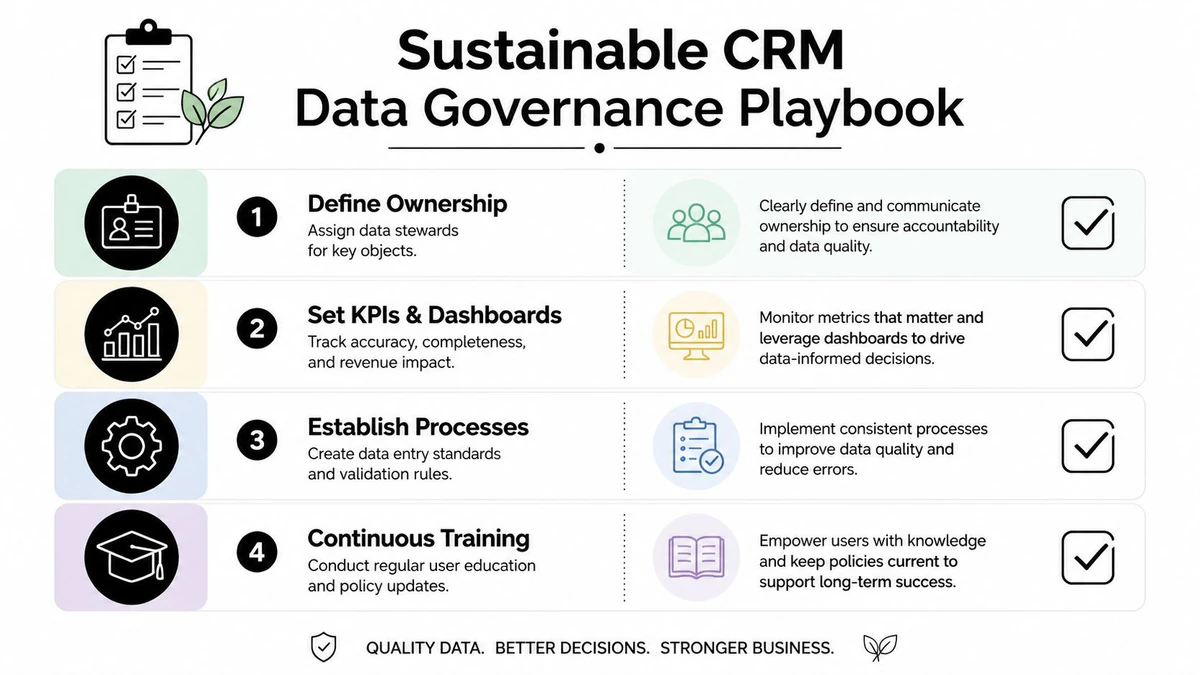
Write the charter
The charter should name the executive sponsor, data stewards, system owners, and decision rights. For each critical field, define the owner, accepted values, source of truth, validation rule, freshness expectation, and escalation path. Keep the document short enough that sales, marketing, service, and operations teams will use it.
A practical scorecard combines record metrics with commercial outcomes:
- Quality measures: Duplicate rate, email validity, critical-field completion, bounce rate, and freshness.
- Process measures: New duplicate creation, unresolved exceptions, correction time, and adherence to entry standards.
- Revenue measures: Forecast confidence, routing accuracy, campaign audience integrity, and pipeline attribution quality.
Make monitoring visible
Dashboards should show trends by source and owner, not only a single company-wide average. Set alerts for sudden deterioration, recurring integration failures, and records entering high-value workflows without required verification. Review exceptions with the team that controls the originating process.
Training also matters. A required field won't create useful data if users don't understand its purpose, and a validation rule won't fix an integration that bypasses the form. Teach representatives what the field enables, show managers how quality affects their reports, and revise the policy when the sales process changes.
Operating principle: The person who creates a record should know the standard, the person who owns the process should monitor it, and the person accountable for revenue should see its business impact.
The most durable improvement usually comes from combining prevention with review. Validate new entries, monitor the database continuously, audit important segments, and escalate recurring defects instead of repeatedly repairing their consequences. That approach gives the CRM a chance to remain trustworthy as the business, systems, and automation layer evolve.
BillionVerify provides email verification for checking addresses before they enter your CRM and for cleaning existing lists before outreach. Visit BillionVerify to evaluate how its verification workflow can support stronger CRM hygiene, fewer invalid records, and more dependable revenue operations.