



More than half of respondents in a widely cited 2023 data-quality survey experienced five or more data issues within the previous three months, while 20% reported at least two severe incidents during the prior six months that affected the business bottom line. The 2023 Data Quality Survey makes the operational lesson clear: bad data isn't a one-time cleanup problem. It requires ownership, monitoring, incident detection, root-cause analysis, and controls that run throughout the data lifecycle.
Email data makes that risk visible quickly. Invalid addresses create bounces, disposable addresses can signal abuse, role accounts distort prospect targeting, catch-all domains create uncertainty, and misconfigured domains weaken the reliability of CRM records. A single syntax check won't tell you whether a domain can receive mail or whether a specific mailbox exists. Professional verification commonly combines RFC 5322 syntax validation, MX record lookup, SMTP-level mailbox checks, and risk classification for catch-all, disposable, and role-based addresses. This email verification overview explains why those layers matter.
The practical answer is to treat email and CRM quality as a continuous operating system. Block bad data during signup, clean existing records before sends, connect verification to CRM and automation workflows, score sources, and measure whether the process improves deliverability, campaign execution, and record reliability.
The roadmap below follows that lifecycle, from real-time capture and bulk cleaning through disposable detection, role-account handling, domain and catch-all assessment, integrations, sender reputation, audit trails, and source scoring.
1. Real-Time SMTP Validation at Point of Entry
The cheapest bad email to fix is the one you never store. A signup form, checkout page, event registration flow, or partner import can create a downstream problem before marketing or sales ever sees the record. If the address is mistyped, belongs to a nonexistent domain, or points to a mailbox that won't accept mail, every later system inherits the defect.
A real-time API lets a product team check an address as the user submits it. The verification sequence can examine syntax, query the domain's mail infrastructure, and use an SMTP conversation to assess mailbox acceptance. That layered approach is stronger than checking whether an address merely contains an at-sign and a domain-like string.
BillionVerify is a professional email verification service built to solve one problem, bad email data costs businesses money. Teams can connect the Email Validation API to capture points where quality matters most.
Design the decision, not just the check
A SaaS company might block a fake registration immediately, while an event platform may accept a borderline address but request an alternative contact method. An e-commerce team may validate before order confirmation, and a marketplace may combine email verification with other anti-abuse controls.
Use a response policy that distinguishes clear failures from uncertain results:
- Reject confirmed invalid records: Don't write addresses with failed syntax, unreachable domains, or rejected mailbox checks into the primary CRM.
- Quarantine uncertain records: Route catch-all or ambiguous responses to a review state instead of treating them as deliverable.
- Protect the user experience: Set sensible timeout behavior and use progressive profiling so verification doesn't turn a short form into a frustrating gate.
- Capture diagnostic fields: Store status, SMTP result, and verification time so support and data teams can explain why a record was blocked.
Practical rule: Validate at every meaningful entry point, but don't force every uncertain address into the same reject bucket.
2. Bulk List Cleaning and Segmentation Pre-Campaign
Real-time prevention won't repair the records already sitting in a CRM. Historical imports, old event lists, manual exports, and acquired contacts can contain addresses that have changed status since they were collected. Run a bulk verification pass before a major send, then preserve the result as usable segmentation rather than flattening everything into “good” or “bad.”
A typical workflow begins with a CSV export from a CRM or email platform. Teams remove duplicates, apply syntax filtering, submit records in manageable batches, and import the results into suppression or campaign segments. A developer playbook for bulk cleaning describes chunking large jobs into 1,000 to 10,000 records per batch, which helps teams manage retries and errors.

Keep the segments useful
Exporting one cleaned file is convenient, but it hides important decisions. Separate deliverable addresses from catch-all, disposable, role-based, and invalid results. Marketing may send to confirmed deliverable records, route catch-all addresses into a controlled test segment, and suppress disposable or failed addresses. Sales may use role accounts for account research while excluding them from individual prospect sequences.
A practical bulk routine includes:
- Before major sends: Clean early enough to review borderline results and update the sending platform.
- After imports: Run verification whenever a new vendor, form, or partner feed adds records.
- For dormant data: Reverify old lists before re-engagement rather than assuming historical validity.
- For bounce recovery: Add hard-bounced addresses to suppression and recheck records only when there's a defensible reason.
Use how to clean email lists as the operational model for repeatable list hygiene, and compare campaign and CRM outcomes before and after each run. Teams validating B2B prospect data can also use this data validation guide to connect email checks with broader record controls.
3. Disposable and Temporary Email Detection
A formally valid address can still be a poor business record. Disposable and temporary services give users short-lived inboxes that may work for an initial confirmation but rarely support a durable customer or prospect relationship. They can also appear in free-trial abuse, incentive fraud, bot registrations, and repeated account creation.
Disposable detection adds a risk signal before the address enters a premium workflow. A SaaS company might block a throwaway address from a paid trial, while a community could allow registration but place the account in a lower-trust state. An online retailer may use the signal for fraud review rather than rejecting a legitimate buyer automatically.
The important distinction is between deliverability and suitability. A disposable mailbox may accept a message today. That doesn't mean it belongs in a long-term CRM, a customer lifecycle segment, or an account-based sales sequence.
Apply different policies by context
Use check for invalid emails alongside syntax, domain, and SMTP results. Then make the action depend on the business risk:
- High-value signup: Request stronger ownership confirmation or an alternative business contact.
- Free access flow: Block disposable addresses if repeated abuse is a known problem.
- Consumer purchase: Flag the address for review instead of creating unnecessary checkout friction.
- Campaign list: Suppress disposable records unless there's a documented reason to retain them.
- Fraud analysis: Keep a controlled record of blocked domains and addresses outside the active marketing audience.
Review detection patterns regularly because temporary-email services change. A monthly review can show whether a particular acquisition source, form, promotion, or geography is contributing unusual risk. Pair disposable detection with role-account identification, duplicate checks, source tags, and engagement history. No single flag should decide every customer interaction.
4. Role Account Identification and Removal
An address such as info@, support@, sales@, admin@, or noreply@ can be technically valid and still fail the purpose of an individual-prospect campaign. These addresses usually represent a department, function, or automated process. Treating them as named decision-makers pollutes segmentation and makes sales activity harder to interpret.
An SDR team preparing cold outreach should separate role accounts before assigning contacts. A sales operations team may exclude them from individual-contact sequences while retaining them for account research. A B2B agency might deliver one list for named prospects and another for company-level discovery. The right decision depends on the use case, not on whether the mailbox can receive mail.
Segment instead of deleting blindly
Role accounts can be valuable. A sales@ address may reveal the correct company domain, support account research, or provide a route to a real contact. Deleting it permanently removes context that another team may need.
Use identify role-based accounts to classify these records, then apply a clear field and workflow policy:
- Individual outreach: Exclude role accounts from prospect sequences and route them to research.
- General broadcasting: Retain appropriate shared mailboxes when the communication is account-level.
- CRM reporting: Preserve the original address and record the exclusion reason.
- Data sourcing: Track the share of role accounts by provider or acquisition channel.
- Contact enrichment: Cross-reference the company with public information to find an individual owner.
A high concentration of role accounts often indicates that the source describes organizations better than people. That isn't necessarily a worthless source, but it should be priced, scored, and used as account data rather than individual-contact data.
5. MX Record and Domain Validation Assessment
Mailbox verification starts with the domain. An MX record identifies the mail server responsible for accepting email for a domain, so a verifier typically queries DNS before attempting a mailbox test. If the domain has no reachable mail infrastructure, the address can't be treated as a confirmed receiving mailbox.
MX behavior also includes priority. The verifier tries the highest-priority MX host first, then can fall back to another listed host if the first fails. Lower preference numbers indicate higher priority, which affects the order of the verification attempt. This MX lookup tutorial explains that infrastructure layer in practical terms.
Read domain results as operational evidence
A failed domain check may indicate a typo, an expired domain, an unfinished company setup, or a routing problem. A B2B data team can use those results to flag records for enrichment instead of sending immediately. A customer-success team can use a sudden change in domain status as an account-health signal, then confirm the situation through an approved business process.
Structured results are more useful than a simple valid or invalid label. Review:
- Domain status: Is the domain present and configured to receive email?
- MX records: Which hosts are listed, and does the priority order make sense?
- SMTP response: Did the receiving server accept, reject, defer, or obscure the mailbox result?
- Record history: Was the address recently added, imported from a vendor, or previously active?
Don't use a domain failure as automatic competitive intelligence or as proof that a company has closed. Treat it as a technical signal that needs context. Store the result for support escalations, source scoring, and remediation workflows, while keeping sensitive domain research within your governance rules.
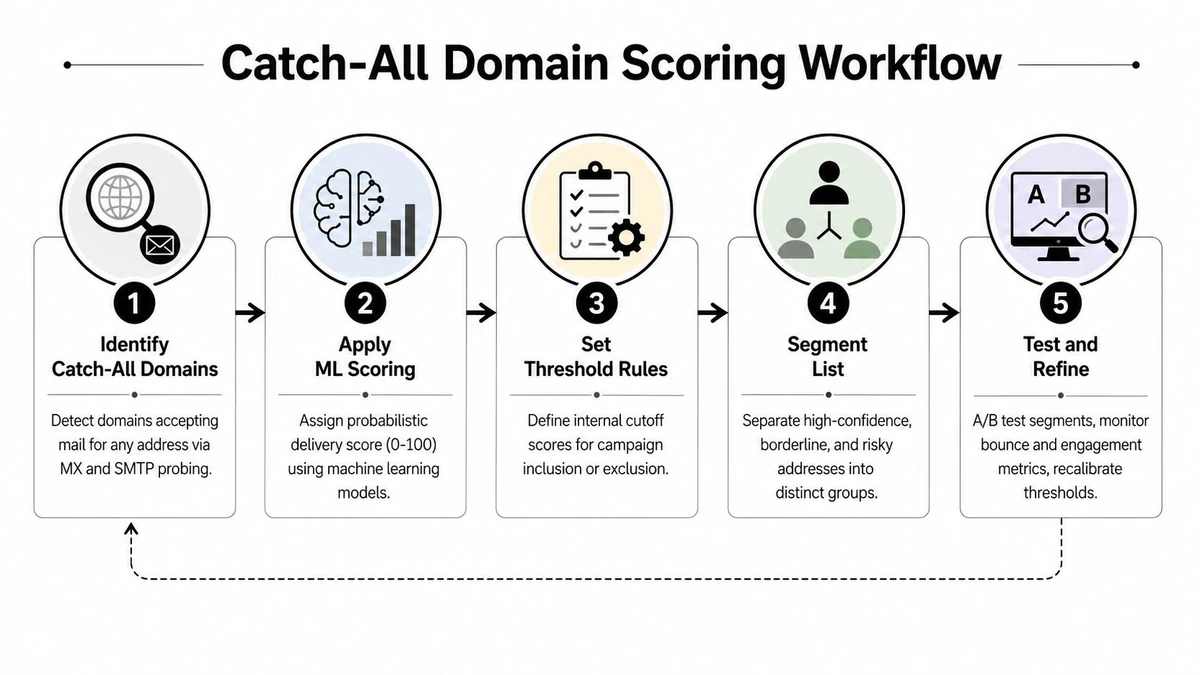
6. Catch-All Domain Scoring and Probabilistic Delivery Assessment
Catch-all domains create a verification blind spot. The server accepts mail for addresses that may not correspond to real individual mailboxes, so an SMTP handshake can't reliably prove that a specific recipient exists. A binary “valid” label hides that uncertainty and encourages teams to send with more confidence than the evidence supports.
Use a catch-all score as a decision input, not a guarantee. A large organization may intentionally route unknown addresses through a shared mail system. A small business may use a broad configuration while still maintaining active individual inboxes. International domains and shared-mailbox environments can produce similar uncertainty for different technical reasons.
Create a separate treatment for uncertainty
Set internal inclusion rules based on campaign purpose and recipient value. A low-risk newsletter can use a different catch-all policy from a high-volume outbound sequence. A high-value account may justify manual research, a second verification path, or a carefully monitored first touch.
Useful controls include:
- Separate catch-all segments: Don't mix uncertain records with confirmed deliverable addresses.
- Use engagement history: A recent reply or click is stronger context than a score alone.
- Test cautiously: Keep catch-all sends controlled and review bounce and complaint signals separately.
- Record the method: Document how your team interprets scores so different operators don't make conflicting decisions.
- Reassess over time: A domain's configuration and a contact's business status can change.
This approach accepts a real trade-off. Excluding every catch-all address may reduce reach, while including all of them may increase uncertainty. The disciplined answer is segmentation, explicit thresholds, and feedback from actual campaign outcomes.
7. CRM, Automation Platform and AI Agent Integration for Continuous Data Hygiene
A verification tool delivers limited value if staff must remember to open it manually. Continuous quality comes from connecting checks to the systems where records enter, change, and get activated. Map verification status to CRM fields, trigger actions from those fields, and make exceptions visible to the people who own them.
A HubSpot team might verify imported leads before assignment. A Salesforce workflow can write verification status and domain results to contact fields. Mailchimp, Klaviyo, or ActiveCampaign users can clean a list before an automated send. Zapier and Make can connect web forms, CRM updates, and suppression actions without requiring every marketer to build custom code.
Build safe automation boundaries
AI agents and native MCP Server integrations can extend verification into lead routing, onboarding, list segmentation, and CRM assistance. They also introduce a governance concern: an agent that can write records may amplify a mistaken decision quickly. Start with read-only verification, log every decision, and require explicit rules before enabling autonomous updates.
A resilient integration design includes:
- Visible status fields: Store verification outcome, timestamp, source, and review state.
- Quarantine paths: Prevent uncertain addresses from entering active campaigns until an owner resolves them.
- Failure handling: Define what happens when an API times out, an integration breaks, or an agent can't interpret a response.
- Test environments: Use sample records before connecting a production CRM or sending platform.
- Audit logs: Preserve agent decisions, workflow runs, and human overrides for debugging.
- Maintenance ownership: Assign someone to review integration errors and update SDK or MCP configurations.
The workflow should stop bad data from traveling undetected. Automation isn't a substitute for policy. It makes the policy repeatable.
A short product walkthrough can help teams visualize the verification flow before they design integrations.
8. Sender Reputation Protection Through Bounce Rate Reduction
Email verification protects more than list cleanliness. It protects the sending infrastructure that carries transactional and marketing messages. Invalid addresses generate hard bounces, and repeated poor-quality sends can make inbox placement less predictable. That affects password resets, receipts, newsletters, prospecting sequences, and every other message sent from the same reputation environment.
Start with the operational causes of bounces. Validate new addresses at capture, clean imported lists before activation, suppress hard bounces automatically, and investigate spikes after a form change or vendor import. Monitor bounce categories, complaint activity, unsubscribes, and engagement in the email platform rather than treating verification as a standalone technical score.
Connect metrics to ownership
Marketing should own pre-send readiness and campaign monitoring. Product should own capture validation. Sales operations should control outbound eligibility. Deliverability specialists or data operations should investigate recurring defects and coordinate suppression rules.
Useful monitoring questions include:
- Coverage: Which forms, imports, and integrations run verification?
- Failure reasons: Are problems concentrated in syntax, domains, SMTP responses, disposable addresses, or catch-all records?
- Campaign effect: Did the cleaned segment behave differently from the unreviewed segment?
- Recurrence: Is the same vendor, form, or workflow creating new bad records?
- Infrastructure risk: Are transactional and promotional streams sharing exposure to the same data defect?
Don't promise that verification alone guarantees inbox placement. Sender reputation also reflects complaints, authentication, content, engagement, infrastructure, and sending behavior. Verification removes a major source of avoidable risk, but it belongs inside a broader deliverability program.
9. Compliance-Ready Audit Trails and Data Quality Documentation
A clean list without an explanation can still create governance problems. Teams need to know what was checked, when it was checked, what result came back, and why an address was retained, quarantined, or suppressed. That record supports internal reviews, client reporting, incident investigation, and responsible handling of marketing data.
Store the verification response alongside the record or in a controlled audit system. Structured JSON can preserve status, SMTP results, MX information, catch-all assessment, and other deliverability signals. Export filters can produce the actual segments used for a campaign, while operation metadata connects those exports to a specific workflow.
Document decisions people can repeat
An EU marketing team may need to explain how it handled an imported audience. An agency may need to show a client which addresses were excluded and under what policy. A SaaS security review may ask how the company prevents obviously risky addresses from entering customer systems.
Create a standard operating procedure that defines:
- Verification events: Record the workflow, operator or service, timestamp, and source batch.
- Decision rules: Explain why invalid, disposable, role-based, or uncertain records were suppressed or retained.
- Retention: Keep audit information according to applicable legal, contractual, and internal requirements.
- Access: Limit raw email data and verification details to people who need them.
- Review cadence: Examine recurring defects and overrides so documentation improves the process.
Documentation shouldn't become a second spreadsheet that nobody trusts. Automate capture from the API, CRM, bulk workflow, and sending platform where possible. Then assign an owner who can resolve contradictions between systems.
10. Multi-Vendor Data Source Validation and Source Quality Scoring
The source of an email address predicts how much work it may require. Organic signups, event registrations, affiliate leads, purchased prospect files, and partner imports often follow different collection practices. Applying one global quality assumption hides the channels that create most defects.
Tag each record with its acquisition source before verification. Run separate batches by vendor or channel, then compare invalid, risky, duplicate, role-account, engagement, bounce, and complaint outcomes. A B2B team can compare several prospect providers. An e-commerce brand can distinguish checkout capture from affiliate acquisition. An event company can compare registration channels without blending their results.
Turn source data into procurement decisions
A source score should combine technical quality with business usefulness. A vendor may deliver few invalid addresses but many role accounts. Another may provide individual contacts but produce weak engagement. A third may create clean records that don't convert. The right source depends on the intended use, so score it against the campaign or CRM purpose.
Use this operating pattern:
- Tag at ingestion: Preserve source, campaign, vendor, date, and acquisition path.
- Verify separately: Keep batches distinct so poor performance isn't hidden by stronger channels.
- Compare downstream outcomes: Review bounces, complaints, engagement, conversions, and suppression volume.
- Review vendors: Share findings with procurement and require documented quality expectations.
- Reassess periodically: Sources change, and a previously reliable channel may degrade after a process change.
Don't optimize only for list size. A smaller source with clearer consent, better individual-contact coverage, and fewer remediation steps may create more useful pipeline than a larger, noisier file. Source scoring turns data quality from a cleanup expense into a feedback loop for acquisition strategy.
10-Point Data Quality Best Practices Comparison
| Item | Complexity 🔄 | Resources ⚡ | Expected outcomes ⭐ | Ideal use cases 📊 | Key advantages & tips 💡 |
|---|---|---|---|---|---|
| Real-Time SMTP Validation at Point of Entry | Medium 🔄, API integration, timeout tuning | Moderate ⚡, developer time, low-latency API calls | High ⭐, immediate reduction in invalid addresses and bounces | Signups, form capture, checkout flows (SaaS, e‑commerce) | Prevents bad data entering CRM; set sensible timeouts and use progressive profiling |
| Bulk List Cleaning and Segmentation Pre-Campaign | Low–Medium 🔄, upload/workflow setup | Moderate ⚡, batch processing, CSV handling, some processing time | High ⭐, cleaner lists, improved open/CTR and deliverability | Pre-send campaign hygiene for marketing and agencies | Schedule cleaning 1–2 weeks prior; export segmented lists (valid, catch-all, disposable) |
| Disposable and Temporary Email Detection | Low 🔄, pattern/db checks, ML updates | Low ⚡, DB maintenance and periodic ML updates | Medium–High ⭐, fewer throwaway signups and fraud; budget savings | Free tiers, fraud-prone signups, high-risk registrations | Block or quarantine at signup; review detection lists monthly to catch new providers |
| Role Account Identification and Removal | Low 🔄, pattern recognition and segmentation | Low ⚡, rules engine and export filters | Medium ⭐, improved response/open rates for B2B outreach | B2B outbound, SDR lists, CRM cleanups | Segment rather than delete; cross-reference to find individual contacts |
| MX Record and Domain Validation Assessment | Medium 🔄, DNS/MX lookup handling | Low–Moderate ⚡, DNS queries, periodic rechecks | High ⭐, identifies unreachable domains and prevents hard bounces | Deliverability troubleshooting, B2B domain legitimacy checks | Use MX data with WHOIS trends; re-validate periodically for changed MX records |
| Catch-All Domain Scoring and Probabilistic Delivery Assessment | Medium–High 🔄, ML scoring + decision rules | Moderate ⚡, model compute and policy thresholds | Medium ⭐, preserves potential valid addresses while managing risk | Large lists, ambiguous domains, international sending | Define internal thresholds; A/B test segments and monitor bounce rates |
| CRM, Automation Platform & AI Agent Integration | High 🔄, connectors, workflows, AI logic | High ⚡, integration effort, monitoring, API quotas | Very High ⭐, continuous hygiene and automated routing/quality | Enterprise CRM, automation pipelines, AI-driven workflows | Map statuses to CRM fields, start read-only, log decisions for audit and fallback |
| Sender Reputation Protection Through Bounce Rate Reduction | Low–Medium 🔄, policy and pre-send checks | Moderate ⚡, integration with verification and reporting tools | Very High ⭐, improved sender score and inbox placement | Any high-volume sending program (newsletters, transactional mail) | Target <1% bounce; monitor ISP reputation tools and auto-suppress hard bounces |
| Compliance-Ready Audit Trails & Data Quality Documentation | Medium 🔄, logging, retention policies | Moderate ⚡, storage, export capabilities, SOPs | High ⭐, auditability and regulatory defensibility | Regulated industries (GDPR, CAN‑SPAM, finance, healthcare) | Log timestamps and decisions; implement retention and SOPs aligned with legal needs |
| Multi-Vendor Data Source Validation & Quality Scoring | Medium 🔄, source attribution and reporting | Moderate ⚡, tagging, per-source batches, analytics | High ⭐, identify best vendors and optimize acquisition ROI | Organizations buying lists, multi-channel acquisition strategies | Tag by source, run source-specific verification batches, review quarterly and renegotiate vendors |
Turn Verification Signals Into Shared Team Checklists
Email and CRM quality improves when each team owns the decision closest to its work. Marketing owns list readiness, segmentation, suppression, and deliverability monitoring. Sales separates individual prospects from role accounts and decides how catch-all records fit outbound workflows. Product validates capture flows and controls disposable signups. Data and operations teams own schemas, integrations, source attribution, audit logs, and KPI definitions.
The International Monetary Fund's Data Quality Assessment Framework offers a durable way to organize those responsibilities. It frames quality through prerequisites plus integrity, methodological soundness, accuracy and reliability, serviceability, and accessibility. The statistical journal discussion of the IMF framework shows why structured dimensions remain useful: teams can turn broad expectations into validation rules, documentation, lineage controls, and review routines. Quality means fitness for the intended use, not an abstract claim that every record is perfect.
A phased rollout keeps the work practical. Start by validating addresses at signup, checkout, forms, and imports. Next, clean existing lists and create separate segments for deliverable, invalid, disposable, role-based, and catch-all results. Then connect those decisions to CRM and automation workflows so the controls run without manual reminders. Once the operational path works, formalize governance, source scoring, audit retention, and recurring reviews.
The newer benchmark perspective is scale-oriented. A 2026 global research-operations benchmark, based on data from 13 countries and nearly 1.8 million survey records, presents quality as an operational discipline that can be compared across agencies, suppliers, countries, and study types. The Insights Association benchmark announcement reinforces the value of finding where defects concentrate instead of spreading remediation effort evenly across every record.
Use this checklist to make the operating system concrete:
- Verification coverage: Inventory every email capture, import, CRM creation, and campaign activation path.
- Quarantine rules: Define which results are blocked, suppressed, reviewed, or allowed with restrictions.
- Catch-all handling: Set documented thresholds and keep uncertain addresses separate from confirmed records.
- Bounce monitoring: Review bounce categories and investigate recurring failures at their source.
- Source scoring: Tag acquisition channels and compare technical quality with downstream engagement.
- CRM reliability: Store verification status, timestamps, and decision reasons in fields teams can see.
- Audit documentation: Retain operation records, exported segments, policy versions, and human overrides.
- Revalidation: Recheck dormant or historically collected records before they become active again.
- Ownership: Name responsible people for product capture, marketing sends, sales targeting, integrations, and governance.
- AI controls: Begin with read-only verification, log decisions, and add autonomous writes only after fallback and review processes work.
The practical standard is simple. Prevent defects where they enter, detect uncertainty before it reaches a send, preserve the evidence behind each decision, and use outcomes to improve the next source or workflow. BillionVerify fits that model through real-time API checks, bulk list cleaning, structured verification responses, segmentation, and integrations that connect email quality to the systems teams already use.
BillionVerify provides real-time, bulk, and API-based email verification for checking syntax, SMTP responses, MX records, catch-all status, disposable addresses, and role accounts. Visit BillionVerify to connect those signals to your signup flows, CRM hygiene, campaign preparation, and ongoing data quality process.