



The most popular advice about an email deliverability score is also the least useful: find a number, compare it with a generic benchmark, and try to push it higher. That approach treats deliverability as a universal grade, even though mailbox providers, email service providers, and inbox-placement tools measure different stages of the email lifecycle.
A more accurate interpretation is a diagnostic risk index. It combines authentication, reputation, complaints, delivery errors, engagement, and placement signals to estimate how likely a specific sending stream is to reach a recipient's inbox. The number matters, but the inputs behind it matter more. A clean address list can reduce hard bounces, yet it can't repair a damaged domain reputation or guarantee primary-inbox placement.
What a Deliverability Score Actually Represents
A deliverability score isn't a universal number handed down by a single authority. Gmail, Microsoft, ESP dashboards, and third-party testing platforms observe different signals, apply different weightings, and update their assessments on different schedules. Even when two tools display a score on a similar scale, they may be answering different questions.
The most useful definition is this: an email deliverability score is a composite snapshot of mailbox-provider trust for a particular domain, IP, sending stream, campaign, or audience segment. It can indicate risk, expose deterioration, and help prioritize corrective action. It can't guarantee that every message will reach the primary inbox.
Three measurements that look alike
Mailbox-provider scores are closest to production filtering decisions because providers observe real sending behavior and recipient reactions. Gmail describes reputation as a quality rating for sending domains and IP addresses, and explains that higher-reputation senders are more likely to reach the Inbox. Its Postmaster Tools separate spam rate, authentication, and delivery errors instead of reducing every signal to one list-quality percentage. (Gmail's reputation and authentication guidance)
Inbox-placement tools estimate where messages land by sending them to seed mailboxes across providers. They help identify whether a message reaches the inbox, Promotions, spam, or quarantine, but seed results aren't identical to the experience of a real recipient with an established engagement history.
ESP reporting usually focuses on accepted messages, bounces, complaints, and engagement events. It's operationally valuable, but acceptance by a mailbox provider doesn't prove that the message reached a visible inbox.
That distinction explains why a transactional stream can appear healthy while a cold-outbound stream performs poorly under the same domain. The audiences have different consent histories, engagement patterns, complaint risks, and expectations. Track the score by stream and investigate its direction over time instead of asking whether the number is merely “good.”
Teams assessing the underlying causes can also use resources that explain how to improve your sender reputation and review the BillionVerify email deliverability tips for practical list and sending controls.
How the Score Is Calculated and Weighted
A useful scoring model separates four signal families rather than hiding them behind one opaque grade:
- Inbox placement and engagement, including opens, clicks, replies, reads, forwards, and other signs that recipients value the message.
- Authentication and technical compliance, including SPF, DKIM, DMARC, valid reverse DNS, TLS, and standards-compliant message construction.
- Reputation and delivery risk, including domain and IP reputation, unstable volume, blocklist signals, and suspicious behavior.
- Complaints and delivery errors, including spam reports, hard bounces, soft bounces, throttling, and other provider responses.
These families don't deserve equal weight in every context. A recent scoring framework assigns 60% to inbox placement, 25% to authentication, 10% to reputation, and 5% to technical compliance, illustrating why a technically clean setup can still receive a weak overall assessment when messages are routed away from the inbox. (Example deliverability scoring framework)
| Signal Family | Third-Party Tool Weight | Mailbox Provider Internal Weight | Key Inputs |
|---|---|---|---|
| Inbox placement and engagement | Often the dominant component, but weighting varies | Typically highly influential because providers observe recipient behavior directly | Placement, reads, clicks, replies, forwards, disengagement |
| Authentication | Commonly scored as a separate technical trust layer | Evaluated through SPF, DKIM, DMARC pass rates and alignment | Authenticated identity, aligned domains, forwarding-related failures |
| Reputation | Usually combined from historical and infrastructure signals | Built from domain and IP sending behavior | Volume stability, complaints, suspicious activity, blocklist indicators |
| Complaints and delivery errors | May be combined with list-quality metrics | Can trigger sharp filtering responses | Spam reports, hard bounces, soft bounces, throttling, rejection |
Why complaints can outweigh clean delivery
Complaint rate deserves special treatment because a spam report is a direct signal from a recipient. Google recommends keeping spam rate below 0.1% and preventing it from reaching 0.3% or higher. Google defines the metric as spam reports divided by messages delivered to an engaged recipient's Inbox, so a low bounce rate alone doesn't establish that a campaign is healthy. (Google's spam-rate guidance)
Hard bounces usually deserve a stronger penalty than soft bounces. A hard bounce indicates a persistent delivery failure, while a soft bounce can result from temporary throttling, greylisting, or temporary mailbox unavailability. The distinction matters because the first points to list quality or an invalid destination, while the second may require retry logic rather than immediate suppression.
Authentication failures pull down the score for a different reason. They weaken confidence in the sender identity, even when recipients who receive the messages engage with them. Google requires all senders to configure at least SPF or DKIM, while bulk senders must use SPF, DKIM, and DMARC. Correctly configured authentication typically produces 95% or higher SPF, DKIM, and DMARC success rates, according to Gmail's guidance. (Gmail sender requirements)
A score becomes actionable only when each movement maps to an owner and an intervention. A complaint spike belongs with targeting and consent. A hard-bounce increase belongs with acquisition and verification. An authentication decline belongs with the team managing sending infrastructure.
Inbox Placement vs Delivery Rate
Delivery rate answers a narrow infrastructure question: did the receiving mailbox provider accept the message during the SMTP exchange? Inbox placement answers the question marketers care about: where did the accepted message go afterward?
An accepted message can enter the Primary inbox, Promotions, spam, or quarantine. Delivery reporting generally can't distinguish those destinations, while placement testing is designed to expose them. That makes delivery rate a useful transport metric, but not a reliable proxy for human attention.
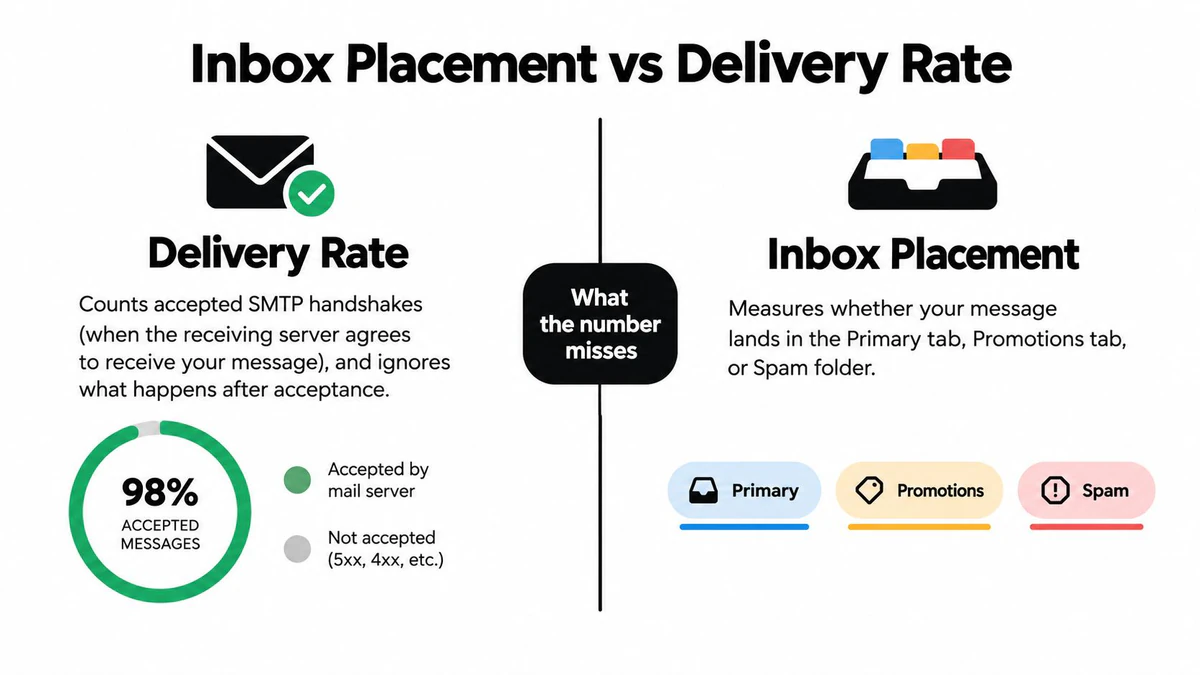
Read each measurement at the right stage
ESP delivery data shows acceptance and delivery errors. Use it to identify hard bounces, temporary failures, throttling, and provider-level rejection patterns.
Seed-mailbox tests show placement across controlled inboxes. Use them before important campaigns or after making changes to authentication, content, links, or sending volume. Seed tests don't perfectly reproduce real-user behavior because they lack the complete engagement history of a normal recipient.
Postmaster metrics reveal provider-specific reputation, authentication, spam, and delivery-error conditions where the provider makes those measurements available. They're closer to the filtering system than a generic third-party grade, but they still represent only that provider's environment.
The strongest diagnosis compares all three. If acceptance remains stable while placement falls, investigate content classification, reputation, or complaints. If placement is stable but engagement declines, examine audience relevance and message value. If both acceptance and placement deteriorate, start with authentication, sending behavior, delivery errors, and list quality.
Open tracking adds noise because a recorded open doesn't necessarily represent deliberate reading, and privacy protections can generate misleading activity. Placement, clicks, replies, and read signals should therefore be interpreted together rather than using an open rate as a standalone verdict.
Practical rule: Delivery confirms that a provider accepted the message. Placement shows whether the message became visible. A deliverability score should help you explain the gap between those events.
Score Variations by Sending Context
A single score rarely means the same thing across sending contexts. Mailbox providers evaluate a password reset differently from a cold prospecting message because recipients expect the first and may not recognize the second. The sender should also set different internal thresholds, suppression rules, and escalation triggers for each stream.
| Context | Spam Complaint Tolerance | Engagement Window | Top Reputation Driver |
|---|---|---|---|
| Cold outbound | Very low, because recipients may not have opted in | Immediate reactions, replies, and negative feedback | Relevance, permission, targeting, and low-risk list quality |
| Transactional mail | Very low, because recipients expect the message to be useful and timely | Immediate delivery and interaction with the requested event | Authentication, infrastructure reliability, and message purpose |
| Newsletters | Low, with sustained attention and list churn as important signals | Repeated interaction across campaigns | Audience relevance, read behavior, and suppression discipline |
| High-volume marketing | Low, with additional scrutiny around fatigue and volume patterns | Campaign-to-campaign engagement trends | Stable cadence, segmentation, complaints, and domain reputation |
Cold outbound deserves separate reporting from opted-in marketing. A weak response may reflect poor targeting rather than a technical failure, while a complaint can still affect the sending identity. Keep prospecting domains, campaigns, and engagement analysis distinct enough to identify that difference.
Transactional mail requires an equally careful separation. A delivery problem can affect a password reset or receipt even when the marketing program is performing well. Keep its authentication, rejection, and latency signals visible rather than blending them into a marketing average.
Newsletters sit between those extremes. Repeated non-engagement, unsubscribes, and complaints should lead to segmentation or suppression before the sender increases volume. High-volume marketing requires the same discipline at greater operational scale, because fatigue and sudden changes can affect reputation across future campaigns.
The right question isn't “What score is good?” It's “Does this score predict risk for this stream, and which signal explains the risk?” A channel-specific scorecard is more informative than a universal pass/fail threshold.
Strategies That Move the Score Up
Every major component of an email deliverability score has an operational lever. Teams can improve the underlying risk profile by fixing the data, identity, content, cadence, and complaint feedback loop in a deliberate order.
Start with the recipient data
List hygiene removes avoidable delivery failures before they become reputation signals. Suppress addresses that have already produced hard bounces, review role accounts such as info@ and support@, and isolate disposable or otherwise risky destinations. Stale contacts shouldn't remain active just because they once engaged.
Verification at the point of submission is more effective than waiting for a campaign failure. A signup form, lead import, or CRM synchronization can reject malformed addresses and questionable domains before those records enter an active sending segment.
If the current database contains accumulated risk, clean your email list before changing message content. Otherwise, a better subject line may still be sent to recipients who should never have been contacted.
Make sender identity consistent
Authentication is a foundation, not a substitute for relevance. Configure SPF, DKIM, and DMARC for the sending identity, and investigate failures by sending stream. Misalignment, forwarding, broken records, or unauthorized third-party senders can create failures that a list-cleaning process can't resolve.
Gmail's bulk-sender rules require authentication, avoidance of unsolicited messages, and an easy unsubscribe mechanism. For promotional messages, Google requires one-click unsubscribe and processing of unsubscribe requests within two days. (Gmail bulk-sender requirements)
Protect engagement and complaints
Content should make the intended action clear without relying on suspicious link practices, image-only creative, or excessive styling. Use recognizable domains, provide enough text for context, and make the message relevant to the segment. Engagement signals become more useful when the audience has a legitimate reason to read and respond.
Complaint handling needs speed. Process feedback-loop events, honor unsubscribes, suppress disengaged recipients, and investigate campaigns that approach the 0.1% complaint threshold identified in Google's guidance. Don't wait for a blended monthly average to reveal a problem.
Keep volume predictable
Sudden volume changes after a dormant period can create delivery friction. Use a stable cadence, segment large audiences, and ramp new sending streams gradually. Consistency gives providers a clearer behavioral pattern than bursts followed by inactivity.
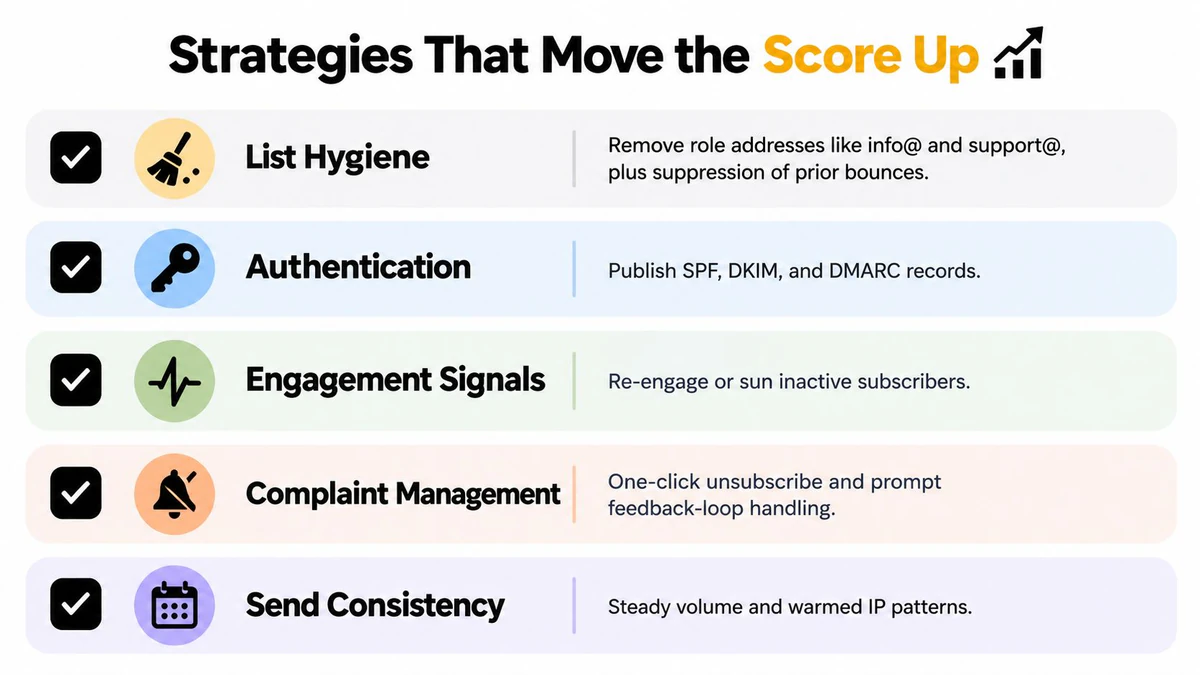
The improvement process should be measured at the same level at which changes are made. Review complaints by campaign, bounces by acquisition source, authentication by sending stream, and placement by provider. That prevents a strong newsletter from hiding a failing outbound sequence.
Using Verification to Strengthen the Score
Address verification is a pre-send control, not a complete deliverability program. Its job is to remove avoidable address-level risk before mailbox providers record hard bounces, invalid-recipient errors, or suspicious list behavior.
A layered workflow creates a feedback loop:
- At capture, check syntax and the recipient domain so obvious typos and nonexistent domains don't enter the CRM.
- Before activation, perform an SMTP-level mailbox check. The verifier connects to the recipient domain's MX host and uses the SMTP conversation, including EHLO, MAIL FROM, and RCPT TO, without delivering a message. A positive
250response indicates acceptance, a5xxresponse generally indicates a hard failure, and a4xxresponse signals a temporary condition that normally warrants a retry. (SMTP mailbox verification mechanics) - Before a campaign, re-verify the active segment and divide results into valid, invalid, and unknown or risky groups. Suppress the bottom tier rather than forcing uncertain addresses into the send.
- After sending, compare provider bounce classifications with verification outcomes. If invalid addresses continue to appear, adjust capture rules, retry handling, or verification policy.
That final step is what turns verification into a diagnostic system. A one-time list scrub can remove current problems, but it can't stop future imports, stale records, or changing mailbox conditions from recreating them.
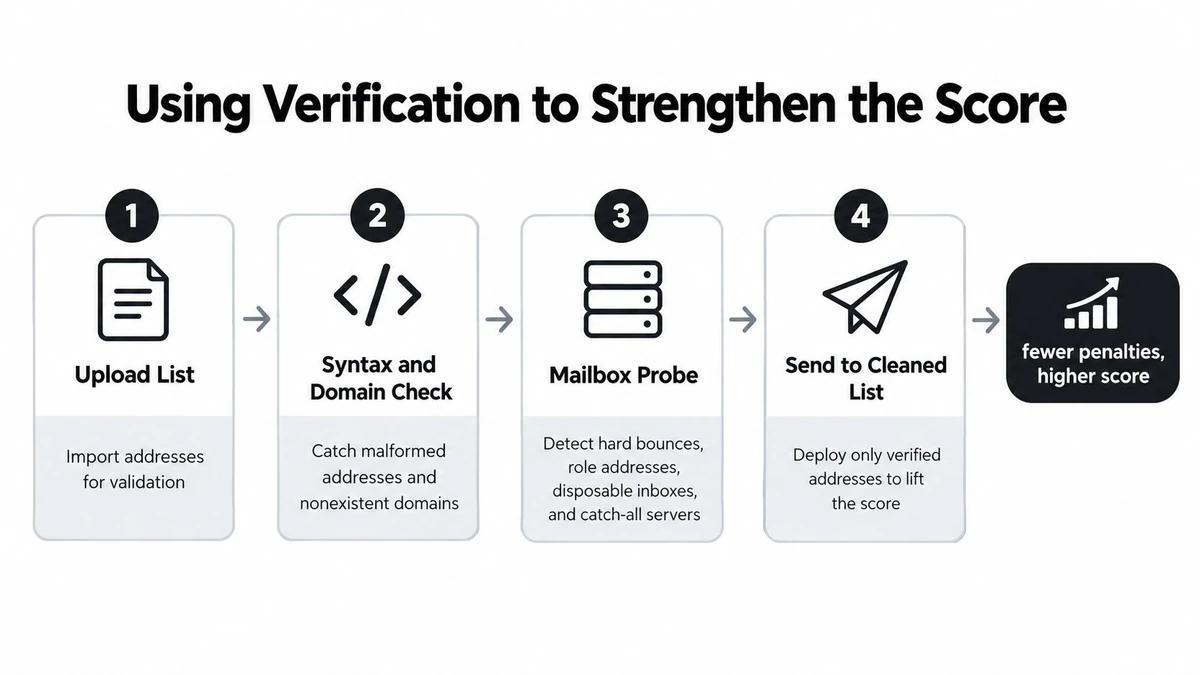
Email Validation API can place the capture and pre-send checks inside signup, CRM, and campaign workflows. BillionVerify is a professional email verification service built to solve one problem: bad email data costs businesses money.
Verification can't determine whether a recipient will complain, whether content will be classified as spam, or whether a domain has a reputation problem. It can reduce one important source of avoidable harm, then provide cleaner evidence for the remaining diagnosis.
Benchmarks and a Practical Improvement Checklist
A numeric score band isn't portable across tools because providers and testers don't use the same inputs or weightings. A score should be considered useful only when the team knows what it measures, which sending stream it covers, and whether the result agrees with placement and complaint data.
| Score Band | Inbox Placement | Spam Placement | Hard-Bounce Rate | Spam Complaint Rate |
|---|---|---|---|---|
| Lower-risk result | Confirm with provider-level placement tests | Should be monitored for deterioration | Should remain controlled through verification and suppression | Must remain below the provider's warning threshold |
| Developing program | Compare campaign and segment results before scaling | Investigate provider and content differences | Review acquisition sources and stale records | Review complaints by campaign, domain, and audience |
| Strong operational result | Validate across providers and sending streams | Confirm that placement remains stable | Maintain continuous list controls | Keep complaints comfortably below warning levels |
Use the score as a prioritization tool, not as permission to send more aggressively. A low-risk result with worsening complaints still requires intervention, and a high score with falling placement still requires investigation.
A practical audit sequence
- Verify the active list: Run a pre-send verification pass and separate valid, invalid, and uncertain results.
- Suppress known failures: Remove hard bounces and investigate the source of those records.
- Authenticate every stream: Check SPF, DKIM, DMARC, alignment, and reverse-DNS requirements.
- Stabilize cadence: Avoid abrupt changes after dormancy and monitor new streams closely.
- Review complaints: Process feedback-loop events and segment complaint data by campaign and provider.
- Test placement: Use seed mailboxes to check the destination of messages, not only provider acceptance.
- Track the trend: Compare the score with placement, delivery errors, bounces, complaints, and engagement over time.
Teams can use an Email Verification Benchmark to inform their list-quality review, but the most reliable benchmark is the sender's own history by provider and sending context. The objective isn't to win a scoring display. It's to reduce avoidable failures while preserving the recipient trust that mailbox providers use to decide where messages belong.
BillionVerify helps teams verify email addresses before campaigns and signup events, so they can identify invalid, disposable, role, and uncertain records before those addresses create avoidable delivery risk. Visit BillionVerify to evaluate how pre-send verification can fit into your email deliverability score monitoring and list-management workflow.