



A bigger email list doesn't automatically produce more revenue. It can produce more bounces, more complaints, weaker inbox placement, and a higher cost per qualified lead if the database contains invalid, stale, disposable, role-based, or catch-all addresses.
That's why choosing an email list cleaning tool requires more than comparing headline accuracy claims. A basic scrubber can remove duplicates and obvious formatting errors. A genuine verifier goes further, using SMTP-level checks and catch-all analysis to estimate whether a specific mailbox can receive mail. That distinction should determine your vendor decision.
This guide takes a practical view of the technology and the workflows around it. You'll see which verification layers affect bounce risk, how to separate clean from risky results, how marketing, sales, and development teams should implement verification, how to evaluate pricing without relying on unsupported assumptions, and where cleaning stops being enough.
Why Your Email List Is Quietly Costing You Money
The popular advice is to grow your list as aggressively as possible and worry about quality later. That approach treats every stored address as an asset. In reality, an email database is a moving system. Contacts change jobs, abandon inboxes, switch providers, submit typos, and become unreachable. A large database can therefore hide a serious deliverability liability.
A major deliverability study found that 38.7% of senders rarely or never practice email list hygiene, while only 27.4% clean their lists monthly or more and nearly 17% do so quarterly. The same research identified 26.2% of senders who rarely conduct hygiene and 12.5% who never do it, showing how many programs continue sending against stale records (State of Deliverability Report).
The database is an operating cost
Independent 2026 deliverability research reports at least 23% annual list degradation, which makes list hygiene a recurring control rather than a one-time audit (email list decay research). Every campaign sent to an invalid address adds avoidable risk. The cost doesn't appear only in the email platform invoice. It can surface as weaker inbox placement, throttling, lost sales capacity, and unreliable campaign reporting.
Sector benchmarks make the problem more concrete. A 2025 report recorded bounce rates ranging from 0.21% in entertainment and 0.27% in marketing to 0.84% in manufacturing. The same benchmark notes that most leading industries remain well below 0.5%, while a rate above 2% signals that a list needs attention (email list hygiene benchmarks).
Practical rule: Treat list hygiene as sender-reputation maintenance, not database housekeeping.
Role-based addresses such as info@, sales@, and support@ also need a deliberate policy. They may be technically deliverable, but they often represent teams rather than a person with clear buying intent. Removing every role account blindly can discard useful operational contacts. Keeping every one can pollute segmentation and create complaint risk. Your tool should identify them so your team can decide based on campaign purpose.
Before a major send, calculate email bounce rate before sending and establish a suppression rule for invalid and unacceptable risk categories. Teams that need a separate scrubbing reference can also review the EmailScout email scrubbing service to compare how a hygiene-focused workflow handles list cleanup.
What an Email List Cleaning Tool Actually Does
The first question to ask a vendor is simple: does the product clean records, verify mailboxes, or do both?
A hygiene scrubber usually handles duplicates, malformed addresses, obvious typos, disposable domains, and role accounts. That work improves database quality, but it doesn't prove that a mailbox exists. A true verifier adds technical checks designed to estimate whether the receiving server will accept mail for the specific address.
Think of the process like postal delivery.
The verification layers
Syntax validation checks whether the address is written in a structurally possible format. It's the equivalent of checking that a postal address contains the expected letters and house-number pattern. An address with a malformed local part or missing domain can be rejected before any server connection occurs.
Domain and MX checks ask whether the destination domain exists and has a mail route. In the postal analogy, this confirms that the town has a functioning post office. It doesn't confirm that the recipient lives at a particular street address. DNS-only verification is therefore limited. One benchmark found that only 0.3% of checks failed at the DNS level, while 12.3% of verified addresses were flat-out invalid, and 33.1% reached catch-all domains (SMTP and deliverability benchmark).
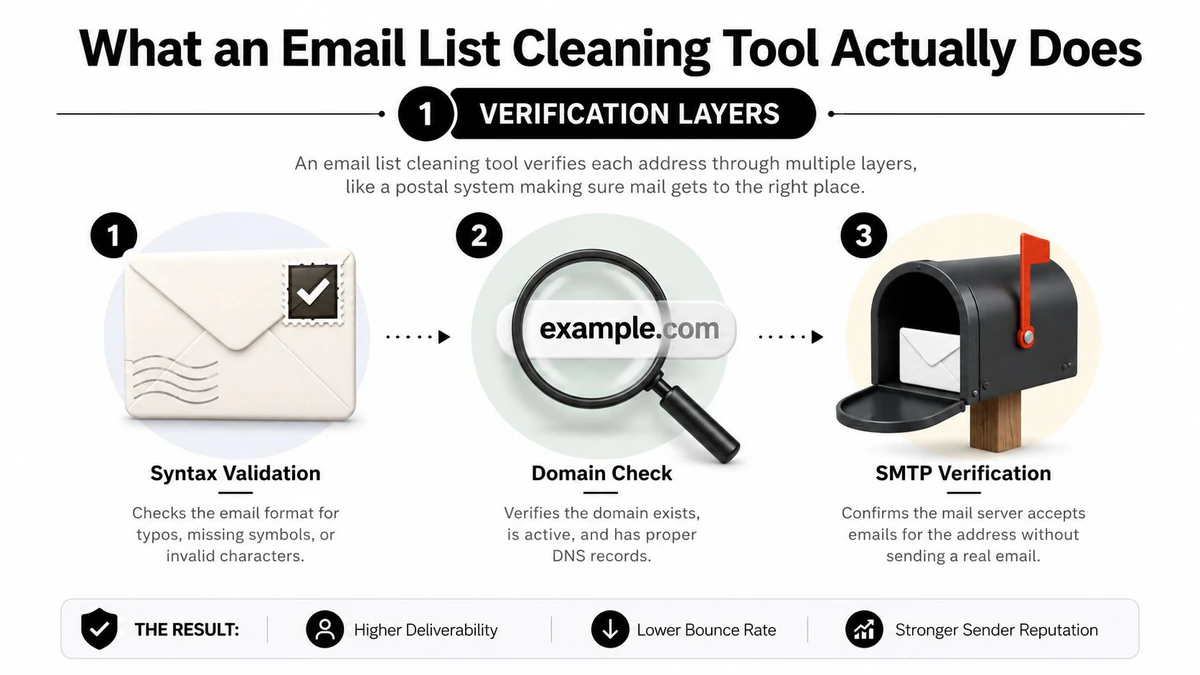
SMTP verification goes deeper by contacting the receiving mail server and interpreting its response without sending a message. It's like ringing the doorbell to check whether someone appears to live at the address. SMTP-based verification is reported to reach 95% to 99% accuracy on non-catch-all domains, while DNS-only verification is limited to 91% to 94% because it confirms domain mail acceptance, not mailbox existence (SMTP versus DNS verification).
Why catch-all results need judgment
A catch-all domain accepts mail for addresses that may not exist. The doorman says, “We accept everything,” so the verifier can't confirm the individual mailbox. A responsible tool shouldn't force this result into a simplistic valid or invalid category. It should assign a risk or confidence classification that lets your team decide whether to send, suppress, or test cautiously.
Disposable-domain detection identifies temporary inbox providers. Role-account detection flags shared addresses such as info@ and sales@. Both categories can be useful for specific purposes, but neither should automatically receive the same treatment as a confirmed individual business mailbox.
Different vendors also vary in SMTP probe depth, greylisting handling, timeout interpretation, and catch-all scoring. Those mechanics matter more than polished dashboard language. A service such as BillionVerify is positioned around professional email verification, with the stated purpose of addressing the cost of bad email data.
For teams that need to verify email addresses in bulk, the right output isn't merely a cleaned file. It's a result set that explains why an address was classified and how much uncertainty remains. Teams should also pair verification with how to warm and monitor your sender, because a technically valid address can't compensate for poor sending practices.
Features That Separate Real Verifiers From Basic Scrubbers
Not every feature deserves equal weight. If bounce reduction is the priority, rank vendors by the quality of their mailbox-level verification first. Integrations and dashboards matter, but they can't rescue shallow checking.
Rank the technical controls first
SMTP handshake depth and MX routing quality come first. The verifier must distinguish a real mailbox response from a domain that merely accepts mail. It should handle temporary deferrals, timeouts, and greylisting without converting every uncertain result into a hard failure. The benchmark evidence is clear on the limitation of DNS-only checks. Domain acceptance is not mailbox confirmation.
Catch-all scoring comes next. A binary catch-all flag is better than ignoring the category, but a confidence score is more useful operationally. Marketing may suppress high-risk catch-all records before a large campaign. Sales may route them into a lower-risk sequence with tighter monitoring. Developers may accept them temporarily while requiring additional confirmation.
Role-account and disposable detection protect different parts of the program. Role accounts can create ambiguous ownership and weaker personalization. Disposable addresses can distort acquisition quality and often have little long-term value. Use stop disposable signup emails at the point of capture when fake or temporary registrations create downstream work.
Spam-trap and abuse-address flagging should produce an explicit status, not disappear into a vague “unknown” bucket. Domain age and disposable-mailbox intelligence can add context, but treat them as risk signals rather than proof of non-delivery.
Operational features determine adoption
Bulk upload is essential for marketing teams, while real-time API verification belongs at signup, lead capture, and CRM enrichment points. A structured JSON response should expose status, confidence, SMTP findings, domain results, catch-all information, and substatus reasons. That lets an application make a policy decision instead of accepting a vendor's opaque keep-or-remove label.
Native or reliable integrations with HubSpot, Salesforce, Mailchimp, Klaviyo, and Pipedrive reduce manual exports. Webhooks help systems react when a status changes. Agencies may need whitelabel options, while regulated teams should examine GDPR handling, SOC 2 evidence, retention controls, and uptime SLAs.
| Feature | What It Does | Impact on Bounce Rate | Impact on Inbox Placement |
|---|---|---|---|
| SMTP verification | Tests mailbox-level server responses | Directly identifies more invalid recipients than syntax or DNS checks alone | Reduces invalid-recipient signals that can weaken sender reputation |
| MX and domain checks | Confirms that a mail route exists | Removes malformed or unreachable domains | Supports cleaner sending infrastructure |
| Catch-all scoring | Separates confirmed results from uncertain acceptance | Prevents teams from treating uncertain addresses as fully safe | Helps teams control risk by segment |
| Disposable detection | Identifies temporary mailbox providers | Reduces dead-end and low-value addresses | Limits poor acquisition signals |
| Role-account detection | Flags shared inboxes | Supports suppression or separate routing policies | Helps protect engagement quality and complaint control |
| Structured results and webhooks | Moves decisions into existing systems | Stops risky addresses before they enter campaigns | Enables continuous monitoring instead of occasional cleanup |
Measure the vendor against the outcomes a deliverability consultant watches: hard bounces, complaints, inbox placement, unknown rates, catch-all rates, and post-send correlation. A feature belongs on your shortlist only if it changes one of those operating metrics or makes the control easier to enforce.
Implementation Workflows for Marketing, Sales, and Dev Teams
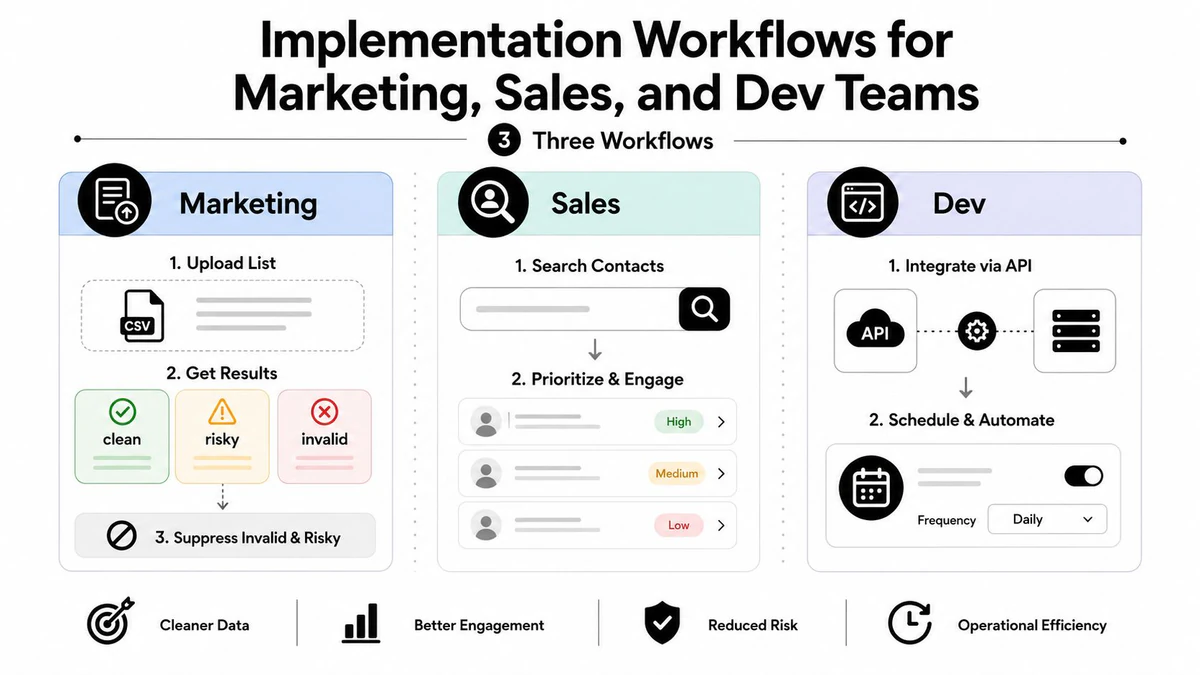
The same verifier should not be implemented identically across departments. Marketing owns campaign safety, sales owns sequence risk, and development owns prevention at the point where data enters the system.
Marketing workflow
Start with the campaign audience, not the entire CRM. Upload the permissioned segment, preserve the original file, and map every returned address to a clear action.
- Upload and classify. Separate results into clean, risky, and invalid buckets. Keep catch-all, unknown, role, and disposable statuses visible rather than merging them into valid.
- Apply campaign rules. Suppress invalid and unacceptable risk categories. Send role accounts only when the campaign targets a shared business function.
- Sync suppression back. Push the decision into the ESP and CRM so the same addresses don't reappear in the next export.
- Review the send. Compare hard bounces and complaints against the pre-send classifications. An address that looked uncertain should remain a monitored segment, not return to the main audience.
This workflow fits stacks built around HubSpot, Mailchimp, Klaviyo, or Salesforce. The handoff trigger is a completed verification report. The second trigger is a post-send result that contradicts the tool's classification.
Marketing rule: Never let a cleaned export become a second, unmanaged database.
Sales and SDR workflow
Sales teams need verification before an address enters an automated cadence. Run a real-time check when a prospect submits a form, then verify again during CRM enrichment if the record came from a third-party source or has aged.
A clean status can enter the normal sequence. A risky or catch-all status should move to a lower-volume cadence, require manual review, or wait for another signal. If an address shifts to risky, pause the sequence rather than allowing the next automated step to send. Invalid records should return to the enrichment queue or suppression list.
For teams using Outreach alongside Salesforce, the handoff should be explicit. The CRM stores the verification status and timestamp, while the sequencing platform reads the approved sending state. That prevents sales activity from bypassing the deliverability policy.
Developer workflow
Developers should place verification at lead-capture and signup endpoints, then run scheduled batch jobs for existing records. A real-time Email Validation API can return structured JSON that an application uses to accept, challenge, or reject an address.
Nightly hygiene jobs should recheck records according to risk and age, while webhook callbacks update status changes without waiting for a manual export. AI agents can route verification jobs, parse JSON fields, group uncertain results, and open review tasks. The agent should never invent a deliverability decision. Give it explicit rules for clean, risky, invalid, and unknown outcomes.
Pricing Models and How to Match Them to Your List Size
Pricing is easy to compare badly. A low headline cost can become expensive when the vendor charges for overages, restricts API throughput, bills separately for integrations, or requires a minimum commitment. Compare the complete operating model, not just the credit price.
The market generally uses four structures.
| Pricing Model | Best Fit (List Size) | Typical Cost | Key Trade-off |
|---|---|---|---|
| Pay-as-you-go credits | Occasional list scrubs and irregular campaigns | Variable cost per verification | Flexible usage, but fewer subscription conveniences may be included |
| Monthly subscription with rollover | Recurring campaign and CRM hygiene programs | Recurring fee tied to an allowance | Predictable capacity, but unused credits and rollover rules need review |
| Enterprise tier | High-volume sending and multiple production systems | Custom pricing and negotiated terms | Dedicated infrastructure and support, with greater commitment |
| Limited free tier | One-off tests and representative samples | Free within a restricted allowance | Useful for evaluation, but inadequate for sustained operations |
The practical matching rule is straightforward: under 10,000 emails per month, pay-as-you-go is usually the cleanest fit. From 10,000 to 250,000 monthly emails, a subscription often makes more operational sense. Above 250,000, ask for an enterprise conversation, especially if you need high API throughput, dedicated support, or multiple business units.
Read the fine print
Ask whether catch-all scoring, SMTP verification, real-time endpoints, webhooks, and detailed substatus reasons are included in the base allowance. Confirm how the vendor treats retries, unknown results, and rechecks. A service that counts every retry as a new credit can produce a very different effective cost from one that handles temporary server responses within the original request.
Also check for:
- Overage fees: Find out what happens when a campaign exceeds the allowance.
- API rate limits: A cheap API is useless if signup traffic gets throttled.
- Integration charges: Confirm whether CRM and ESP connectors cost extra.
- Minimum commitments: Avoid paying for capacity your sending pattern won't use.
- Data retention: Ensure exported results and contact data follow your privacy requirements.
Choose the model that matches your actual sending rhythm. Occasional cleaning shouldn't force a subscription, while a continuously fed CRM shouldn't depend on manual credit purchases.
The ROI Case and What the Numbers Look Like in Practice
Verification ROI is easiest to understand through deliverability outcomes, but unsupported forecasts weaken the business case. Use measured campaign data and a conservative model rather than promising a fixed revenue lift.
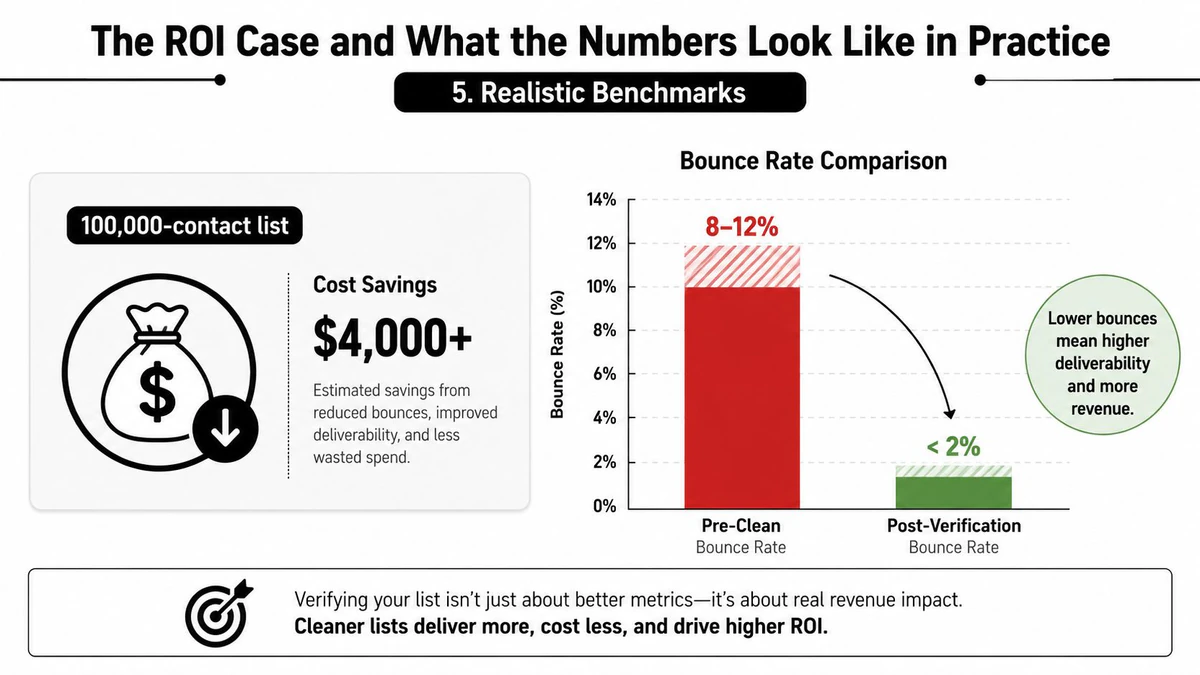
A 2026 benchmark reports that teams using daily real-time verification average a 0.3% bounce rate and 95% inbox placement, while teams that never clean their lists average 6.5% or higher bounces and 68% inbox placement (2026 deliverability benchmarks). Treat those figures as benchmark observations, not a guaranteed outcome for your program.
A separate benchmark says bounce rates above 2% are a sender-quality warning signal for major mailbox providers (reasonable bounce-rate benchmark). The operational implication is more useful than a theoretical revenue promise: if cleaning moves your measured bounce rate below your internal threshold, you protect more than one campaign.
Build the business case from your own send
Take a recent campaign and record the audience size, hard bounces, complaints, inbox placement, opens, clicks, and attributed pipeline. Run a representative sample through the candidate tool. Then compare the tool's classifications with the next controlled send, not with a vendor's accuracy badge.
For a campaign with 100,000 contacts, the value calculation should include:
- Recovered reach: Count messages that would otherwise have failed.
- Recovered engagement: Measure additional opens and clicks from inboxed messages.
- Avoided remediation: Estimate the internal cost of throttling, list rebuilding, and reputation recovery.
- Protected future sends: Track whether later campaigns maintain healthier bounce and placement results.
The verification bill is only one side of the equation. The other side is the value of contacts that receive the message, the sales activity that remains deliverable, and the reputation risk you avoid. Research on verification testing recommends comparing claims with real send outcomes, which is why post-send validation should remain part of the measurement plan.
A verifier earns its place when your own send data shows fewer hard bounces and more reliable inbox access, not when its dashboard displays a reassuring score.
Choosing the Right Tool and Avoiding Common Pitfalls
Don't choose a vendor from a landing-page accuracy claim. Test a representative, permissioned sample that includes known-good, known-bad, catch-all, disposable, and role-based addresses. Your procurement decision should depend on useful classification, transparent uncertainty, and observed send outcomes.
Start with the workflow:
- Marketing needs: Bulk upload, segmentation, suppression sync, export filters, and post-send reporting.
- Sales needs: Real-time checks, CRM enrichment, sequence controls, and clear risky-status handling.
- Developer needs: A documented JSON API, webhooks, predictable rate limits, and stable status codes.
- Agencies need: Multiple workspaces, client separation, and whitelabel controls.
- Data leaders need: Retention policies, deletion controls, auditability, and compliance documentation.
Questions to ask before signing
Ask whether SMTP checks interpret mailbox-level responses, how catch-all addresses are scored, and whether greylisting and timeouts receive distinct recommendations. Request every result code and substatus reason. Confirm that you can export both the final classification and the explanation behind it.
Accuracy claims need careful interpretation. A “valid” result may reflect acceptable syntax and a responsive domain while leaving mailbox existence uncertain. Agree in advance on the acceptable rate of unknown and catch-all results, then compare those categories with actual campaign performance.
Cleaning isn't the whole deliverability program
Catch-all servers may accept probes and still reject messages later. Temporary greylisting can also resemble failure. A verifier can't repair low engagement, excessive complaints, poor content, authentication failures, shared-IP problems, or an abrupt volume surge.
Use verification alongside a durable suppression list, gradual re-engagement, seed testing, bounce monitoring, and sunset policies. If results remain volatile, investigate acquisition quality, authentication, mailbox-provider feedback, and sending behavior before buying another tool. A focused comparison of the best email verification tools should come after you've defined those requirements.
BillionVerify offers professional email verification for bulk list cleaning, single checks, and real-time workflows, with results designed to support decisions around SMTP status, MX findings, catch-all risk, and deliverability. Visit BillionVerify to evaluate whether its verification workflow fits your marketing, sales, or product data pipeline before your next campaign.