


Friday night is busy. The dining room is full, walk-ins keep arriving, and the host stand is moving quickly. Yet when you review the guest list later, you notice a familiar pattern: many of the people who dined with you recently haven't returned, while your social post reached an audience you can't reliably identify or contact again.
Email marketing for restaurants gives you a direct way to close that gap. A well-built program can remind guests about your brand between visits, support reservations and online orders, promote private events, and encourage loyalty sign-ups. It also gives you a practical place to connect campaign creative with the quality of the email addresses behind it.
Industry benchmarks show why the channel deserves attention. One restaurant and venue benchmark reported a 43.69% average open rate and 1.13% click-through rate, while another dining and food services benchmark reported a 32.54% open rate and 0.81% click-through rate. The figures come from a restaurant email marketing benchmark summary, and they point to a channel where timely, relevant messages can reach diners when they're deciding where to eat.
Building a Restaurant Email Program
A social post can introduce your restaurant, but it doesn't give you dependable control over who sees it or when they see it. An email program lets you communicate with permissioned guests through a channel you can organize around reservations, orders, loyalty activity, and past visits.
Give email three jobs
A restaurant email program should do three things consistently:
- Stay memorable: Remind guests about your food, atmosphere, chef, events, or neighborhood presence between visits.
- Create a next step: Give a guest a clear reason to reserve, order, attend an event, or join your loyalty program.
- Protect the list: Keep invalid, abandoned, disposable, and otherwise risky addresses from weakening future sends.
That third job often gets overlooked. A beautiful email sent to a poor-quality list can produce failed deliveries and weak engagement. The result is wasted effort, fewer opportunities to reach active guests, and a sender reputation that becomes harder to protect.
Think of the channel as connective tissue between discovery and retention. A new guest might find you through search or social media, reserve a table, and receive a confirmation that makes the upcoming experience feel easy. After the visit, a thank-you email can invite feedback. Later, a seasonal menu message or a carefully chosen win-back offer can create another occasion to return.
Build around the guest relationship
Suppose a guest orders takeout for the first time. A generic weekly promotion treats that person the same as a loyal regular, a birthday celebrant, and someone who hasn't visited in months. A coordinated program assigns each guest a more useful message based on what happened and what you want to happen next.
Restaurant email engagement has remained strong across historical benchmarks. Mailchimp recorded a 20.39% average open rate for restaurants and venues in 2019, while Constant Contact later reported 28% for dining and food services in 2021, according to the same industry benchmark source. The lesson isn't to promise a particular result. It's to treat email as a measurable retention system, not an occasional blast.
Operating principle: Creative, automation, and verification should be planned together. The right offer can't compensate for poor timing, and perfect timing can't compensate for unreliable addresses.
Understanding the Restaurant Email Ecosystem
The restaurant email ecosystem makes more sense when you treat it like a guest journey. Each stage has a different question, a different message, and a different action.
Awareness and the first visit
At the awareness stage, a guest may encounter your restaurant through a social post, search result, recommendation, or local event. Your email objective is to turn that interest into a permissioned relationship. A reservation widget, loyalty form, Wi-Fi page, table QR code, or online ordering checkout can collect the address when the guest chooses to share it.
The first visit creates richer context. You may learn whether the guest reserved or walked in, dined in or ordered delivery, visited a particular location, or selected a certain menu category. A confirmation email should reduce friction by making the reservation details easy to find and directing the guest to practical information such as the menu or location.
The email address becomes a useful identifier across reservation, POS, ordering, and loyalty tools. That doesn't mean every system will automatically share data. It means your integrations and consent practices should be designed so the same guest record can support relevant communication without creating duplicate profiles.
Repeat visits and advocacy
After a meal, a thank-you message can acknowledge the visit while the experience is still fresh. A review request may suit a satisfied guest, while a service recovery path may be more appropriate when feedback indicates a problem. Birthday messages, loyalty updates, seasonal announcements, and win-back campaigns then give the relationship a reason to continue.
A simple planning grid helps operators assign responsibility:
- Data: Email address, visit history, order channel, location, preferences, and loyalty status.
- Message: Confirmation, welcome, thank-you, reward reminder, event invitation, or re-engagement email.
- Timing: Immediately after a signup or reservation, shortly after a visit, near a relevant occasion, or after a period of inactivity.
- Action: Reserve, order, review, redeem, attend, or update preferences.
Your email service provider handles sending and automation. POS and reservation integrations supply behavioral signals. Verification APIs help assess whether new or existing addresses are usable. BillionVerify is a professional email verification service built to solve one problem: bad email data costs businesses money.
Growing and Segmenting a Permission-Based List
List growth starts with a fair exchange. Guests should understand why you're asking for an email address and what they'll receive in return. A clear permission process protects trust and gives your campaigns a more engaged audience.
Capture addresses where intent already exists
Start with the moments when guests are already interacting with your business:
- Reservation widgets: Offer an optional marketing signup separate from essential booking communications.
- Online ordering: Present the permission choice during checkout without making promotional consent confusing.
- Wi-Fi splash pages: Invite guests to join for menu news, events, or loyalty updates.
- Loyalty enrollment: Explain the messages connected to rewards and account activity.
- Receipt and table QR codes: Use a simple form for menu updates, event invitations, or a welcome benefit.
- Takeout packaging: Place the signup invitation where a guest can scan it after receiving the order.
Double opt-in can add friction, but it also confirms that the person controls the address and wants to hear from you. For restaurants dealing with shared household inboxes, mistyped entries, or guests who sign up casually, that extra confirmation can improve list confidence.
A permission-based list also needs a clear separation between transactional and marketing communication. A reservation confirmation serves the booking. A seasonal promotion serves marketing. Labeling those purposes clearly helps guests understand the relationship and makes your sending practices easier to manage.
Segment according to restaurant behavior
Demographics alone rarely tell you what a guest wants tonight. Restaurant segments become more useful when they reflect actual behavior and preferences:
- Visit frequency: New, occasional, regular, and inactive guests.
- Average spend: Useful for designing offers that protect margin while recognizing value.
- Location: Important for multi-location restaurants and neighborhood-specific events.
- Dietary preferences: Helpful for communicating vegetarian, vegan, allergen-aware, or other relevant menu updates.
- Order channel: Separate dine-in, pickup, delivery, catering, and private-event prospects.
- Loyalty tier: Use status to distinguish recognition messages from acquisition offers.
A small restaurant doesn't need a complex data model on day one. Start with three segments: new guests, active repeat guests, and lapsed guests. A weekday lunch regular might receive a lunch-focused message, while an event prospect receives information about private dining or a wine dinner. As your data becomes more reliable, add location, dietary preference, or loyalty distinctions.
For practical permission and acquisition guidance, use a marketer's guide to list growth as a reference point. The central discipline is simple: collect consent deliberately, record useful context, and avoid treating every address as interchangeable.
Designing Campaigns Offers and a Calendar
A campaign calendar should answer three questions before anyone writes subject lines: who is receiving the message, why does it matter now, and what action should follow? That turns a list of planned sends into an operating system for demand and retention.
A welcome email belongs to a new subscriber or first-time guest. Its job is to establish the relationship and make the next visit easy. A seasonal menu launch belongs to guests likely to care about new dishes, while a re-engagement message belongs to people whose visit pattern has gone quiet.
Match the offer to intent
The offer should fit the guest's situation, not just reduce the price for everyone.
- Hesitant guests: A clear percentage discount can reduce the risk of trying again.
- Loyal guests: Early access, a chef experience, or a reservation window can feel more valuable than a broad discount.
- Office and group prospects: A catering bundle or group-order incentive can solve a practical need.
- Price-sensitive diners: Value-forward bundles and transparent pricing can make the decision easier.
- Event-minded guests: A wine dinner, tasting, or holiday reservation should emphasize the experience and limited availability.
Here's how the main campaign types can work together:
| Campaign Type | Target Segment | Offer Example | Primary Goal |
|---|---|---|---|
| Welcome | New subscribers and first-time guests | Welcome benefit or menu introduction | Encourage a second visit |
| Seasonal menu launch | Guests interested in relevant menu categories | Early preview or limited-time dish | Drive trial and reservations |
| Weekly special | Local active guests and slower-period diners | Weekday meal value | Fill selected service periods |
| Event-driven promotion | Event prospects and loyal guests | Wine dinner invitation or private-event package | Generate event bookings |
| Re-engagement | Lapsed guests | Return incentive or personal invitation | Reactivate the relationship |
Use the calendar as a decision tool
A workable month might include a welcome flow running continuously, a seasonal announcement around a menu change, one weekday-focused promotion, an event invitation, and a re-engagement send. Leave room for reservation confirmations, post-visit messages, and other transactional communication. Avoid stacking several promotional emails around the same service period.
Local events, holidays, weather-sensitive occasions, and slow shifts can shape the calendar, but the audience still determines the message. Operators who need a broader framework for restaurant positioning can craft a powerful marketing plan before translating the strategy into email.
Keep the calendar visible to the team. Planning emails with this calendar helps connect campaign ownership, creative deadlines, audience rules, and post-send review instead of treating each email as an isolated task.
Setting Up Templates Automations and Integrations
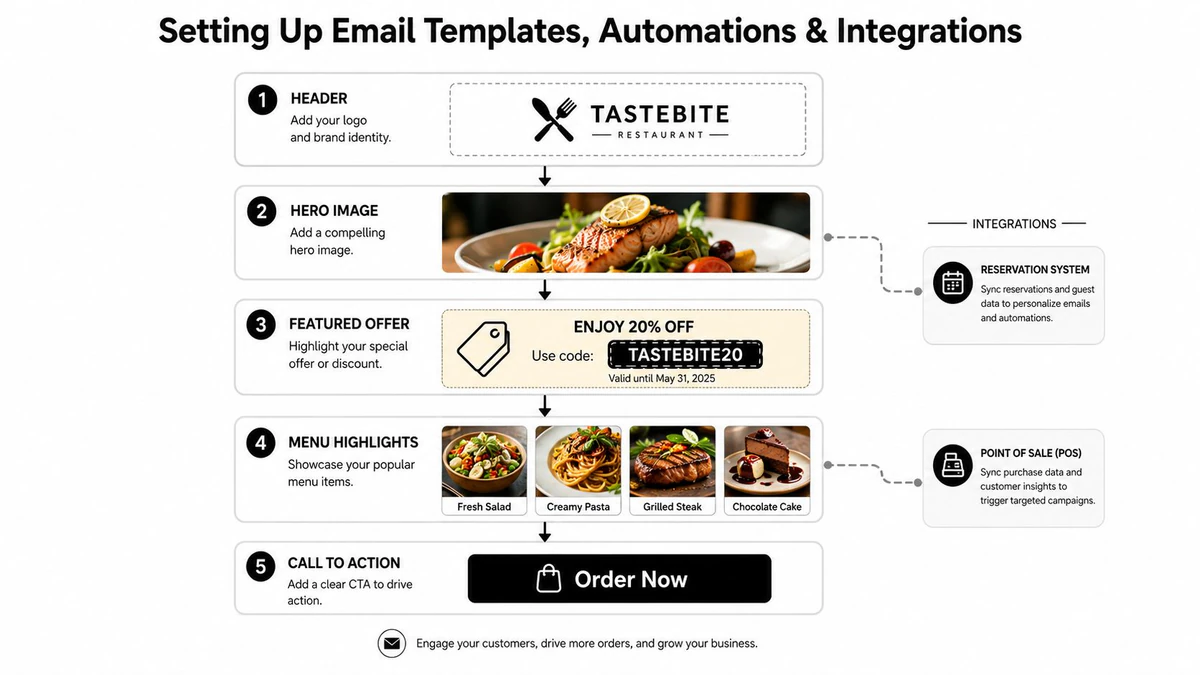
A restaurant email template should make the next action obvious. Start with a recognizable header, a strong hero image, a featured offer or announcement, a concise menu block, one primary call to action, and a footer with location, contact, and preference details.
The design should support the meal decision rather than compete with it. A guest opening a menu-launch email should quickly see what changed, why it matters, and where to reserve or order. For menu presentation ideas, browse examples of themes for digital restaurant menus, then adapt the visual direction to your email template and brand standards.
Build the foundation first
Before creating complex flows, configure the sender identity, reply-to address, authentication requirements in your email platform, and branded visuals. Then connect the systems that hold guest behavior:
- Reservation platform: Supplies booking details, location, party context, and visit status.
- POS: Connects purchases, spend patterns, and menu behavior where available.
- Ordering system: Distinguishes pickup, delivery, and online ordering activity.
- Loyalty application: Supplies points, status, and reward events.
- Email platform: Applies segments, schedules messages, and records engagement.
A welcome flow might say, “Thanks for joining us. Start with our most-loved dishes, then reserve your next table.” A reservation confirmation can include, “Your table is booked. Browse the menu before you arrive.” After the visit, send, “Thanks for dining with us. Tell us how your meal went.” A birthday flow can offer, “Celebrate with us this month,” while a win-back email might say, “We've added something new to the menu. Come see what's waiting.”
Place the essential process visual near the operational setup:
Add automations one at a time
Start with the flow closest to your business goal. If first-time guests rarely return, build welcome and post-visit messaging. If your restaurant has a strong historical customer base but weak recent activity, build win-back. If loyalty is central to the model, create milestone and reward reminders.
Test every trigger with an internal record before launch. Check that a reservation confirmation doesn't enter a promotional flow, that a canceled booking doesn't receive a pre-visit reminder, and that a recent order removes a guest from win-back.
A short demonstration can help your team understand how automation concepts translate into a working campaign:
For teams that need to validate addresses inside a signup or ordering workflow, the Email Validation API can be evaluated as part of the integration layer.
Improving Deliverability With Email Verification
A restaurant email program can have appealing offers and accurate timing yet still miss inboxes when its database contains invalid or risky addresses. Sender reputation, content quality, and list hygiene work together. List quality is the filter that protects the other two.
Addresses arrive through reservation forms, online ordering, event RSVPs, loyalty enrollment, and manual imports. A single typing error can create a bounce. Other records may be abandoned, disposable, or attached to domains that cannot receive mail. Verification starts by examining the domain in the address. MX records show whether that domain is configured to receive mail. Learn how BillionVerify verifies emails by checking domain configuration and SMTP status before a send. An address on a domain without usable MX records cannot receive a normal message, even if its format looks correct, as explained in this overview of email verification.
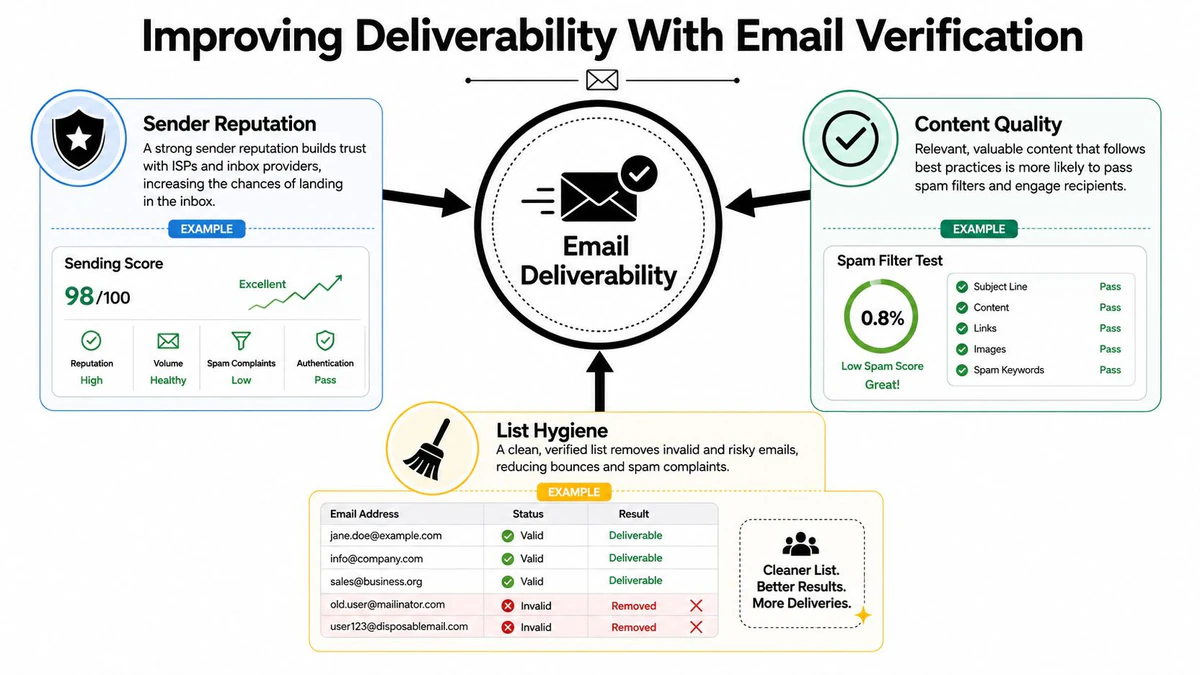
Place checks at the right points
Apply verification throughout the guest lifecycle:
- At signup: Run a real-time API check before a new address enters a welcome or offer automation.
- During list cleaning: Review older records before a seasonal promotion or event campaign.
- During imports: Check reservation, POS, event, and loyalty exports before merging them.
- During suppression: Separate disposable, role-based, invalid, or otherwise unsuitable addresses according to your sending policy.
This timing connects verification with campaign strategy. A new guest can receive a welcome series, while an unreachable address never enters it. Before a limited-menu announcement or event promotion, cleaning the list helps your offer reach guests who can receive it.
Verification APIs can return structured JSON fields for validity, disposable status, domain existence, MX presence, SMTP results, catch-all status, and deliverability scoring. The developer-facing verification examples show why these details give operators and developers more context than a simple yes-or-no result.
Permission, relevant content, and sensible frequency still matter. Verification reduces preventable delivery failures, so segmentation, lifecycle timing, offers, and list operations support the same retention system.
Practical rule: Validate an address before it enters an automated journey, then clean older records before important sends.
Measuring Results and Optimizing Performance
Open rates and clicks are useful signals, but restaurant operators need to connect them to covers, orders, event attendance, and repeat behavior. A campaign that attracts attention without producing a meaningful next action may need a different offer, audience, landing page, or timing.
Track the indicators that explain where the journey succeeds or breaks:
| KPI | What It Measures | Restaurant Action Signal |
|---|---|---|
| Delivery rate | Whether messages reached accepted mailboxes | Investigate list quality and sending practices when delivery weakens |
| Open rate | Initial subject-line and audience interest | Test relevance, timing, and sender recognition |
| Click-to-open rate | Engagement among people who opened | Improve content hierarchy, offer clarity, or call to action |
| Reservation or order conversion | Business action after the message | Check audience fit, booking flow, and offer friction |
| Revenue per email | Commercial value generated by the send | Compare campaign economics, not just engagement |
| Unsubscribe rate | Audience tolerance and message relevance | Review frequency, expectations, and segmentation |
Test decisions, not decoration
An A/B test should isolate a practical choice. Compare a Tuesday family-meal message with a Thursday date-night message for the relevant audiences, or test a direct subject line against one that emphasizes a new dish. You can also compare an offer-led layout with a menu-story layout, provided the audience and timing remain controlled.
Review automated flows separately from one-off campaigns. Look for places where guests stop clicking, fail to reserve, ignore a reward, or unsubscribe. Then adjust the timing, cadence, copy, or segment rule. A welcome flow may need a clearer second-visit path, while a win-back series may need a more relevant reason to return.
For a structured approach to measure email campaign performance, connect every report to an operating question: Did this message fill a slow period, increase repeat visits, move an event, or strengthen loyalty?
Creating a Sustainable Restaurant Email Strategy
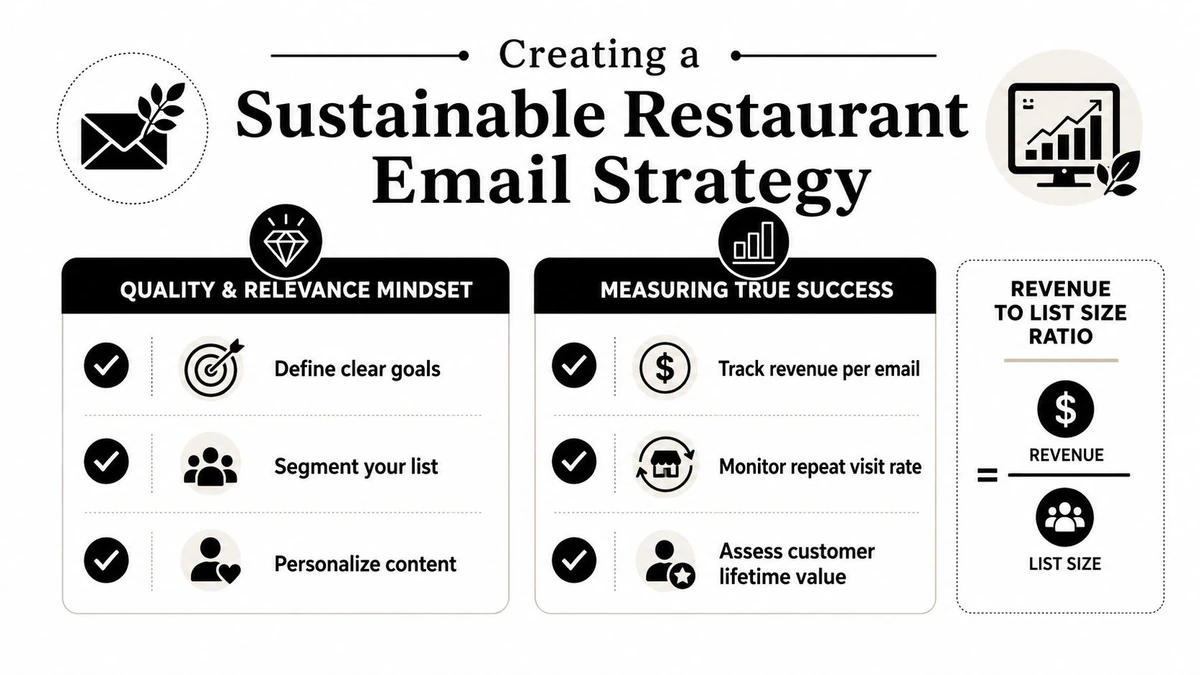
A large list isn't automatically a healthy list. If many addresses are invalid, unengaged, or collected without clear permission, the total can create a misleading sense of progress. Quality and relevance matter more than raw subscriber count because the business depends on people who can receive, understand, and act on the message.
Restaurant email marketing becomes sustainable when each part reinforces the others. Useful segmentation makes automation more relevant. Relevant automation creates better engagement signals. List hygiene helps those messages reach the people who want them.
A practical first 90 days
- Stabilize delivery: Verify new addresses, clean legacy records, and define suppression rules.
- Launch one high-impact automation: Choose a birthday, welcome, post-visit, or win-back flow based on your clearest business problem.
- Segment by behavior: Separate new, active repeat, and lapsed guests before expanding into more detailed groups.
- Test monthly: Change one meaningful variable at a time, record the result, and apply what you learn to the next campaign.
Judge progress by revenue and repeat visits generated per engaged subscriber, not by list size alone. When your team treats creative, automation, measurement, and verification as one operating system, email stops being a sporadic promotion and becomes a dependable guest-retention channel.
BillionVerify offers email verification for checking address quality before restaurant campaigns and automated guest journeys, helping teams identify bad email data before it costs them through failed delivery. Visit BillionVerify to evaluate how verification can fit into your signup, list-cleaning, and campaign workflow.