



You get the PDF on a Tuesday morning. It's 60 pages long, the findings are packed with severity scores, and the first question from marketing is whether this affects campaign sends, while sales wants to know if the CRM is safe and ops wants a fix list by Friday. That's a normal reaction, because penetration testing results are usually written for specialists, then handed to teams that have to turn them into action.
The right way to read the report is not to start at page one and hope the meaning emerges. Start by asking what was tested, what was excluded, and what evidence supports each finding. That orientation matters because a useful report ties every issue to a reproducible path, not just a label, and it should also make scope gaps visible, especially where human paths and email workflows were left out of the engagement bCyber's guidance on interpreting findings and prioritizing risk and Cliffside's penetration testing guide.
In practice, that means the report is a decision tool, not a trophy. The teams that get value from it are the ones that translate each finding into ownership, remediation, and retest steps, then keep the document alive instead of filing it away.
When the Report Lands and Nobody Knows What to Do
A marketing lead opens a thick report and sees a wall of jargon, a few red findings, and a long list of medium issues. Sales wants to know whether any customer data was exposed. Ops wants to know which tickets need to be created first. That moment feels chaotic because the report is compressing technical detail, business risk, and remediation work into one document, and those layers rarely land in the same place in an organization.
Start with the test boundary, not the findings
The first read should focus on the boundary of the engagement. If the test covered only a web app, do not read the report as if it validated the whole environment. If social engineering was excluded, do not assume the human path was safe just because the PDF stayed quiet about it. That blind spot matters because social engineering is often the most common attack vector and also one of the most commonly excluded pentest scope items.
Practical rule: if you cannot answer what was in scope, what was out of scope, and what evidence exists for each issue, you are not reading the report yet, you are guessing.
A useful first-pass checklist looks simple:
- Scope clarity: confirm which systems, applications, and communication paths were tested.
- Exclusions: note any deliberate omissions, especially human testing and third-party dependencies.
- Evidence quality: look for proof of concept, reproduction notes, and impacted assets, not just labels.
Read the report like a work order
The most common mistake is treating the report as a verdict. It is a work order that should lead to fixes, ownership, and retesting. The best reports carry evidence that another tester can replay and validate, and leadership should care less about the PDF length than about whether each finding can be actioned.
That same reading discipline matters for email infrastructure. A report that flags weak SPF, loose MX configuration, or spoofing exposure is not an abstract mail problem, it can affect campaign delivery, sender trust, and the credibility of outbound messages that marketing, sales, and support teams rely on every day. If you see a finding tied to domain verification, mailbox setup, or impersonation risk, treat it as part of the security work, not a side note. BillionVerify fits into that operational layer because it focuses on email verification, which helps teams clean lists and reduce the bad data that often sits next to these issues.
Anatomy of a Useful Penetration Testing Result
A finding only matters when another person can verify it. A useful report shows the affected asset, the proof of concept, the reproduction steps, the business impact, and the fix path, so engineering, ops, and leadership can read the same evidence and reach the same conclusion.
What each part does for the people who need it
Affected asset tells ops where to look. If the report cannot name the system, host, application, or email component involved, ownership gets muddy fast, and the ticket starts drifting between teams.
Proof of concept is for engineers. A label like “improper authentication” is not enough if no one can see how the tester reached the issue. Reproducibility is the property that separates a confirmed weakness from a debate.
Business impact belongs with leadership. The report should explain what could happen if the weakness were exploited, in plain language. That is the difference between “a vulnerability exists” and “this could affect campaigns, customer trust, or internal access.”
Remediation guidance matters to everyone, especially the team doing the fix. Good guidance points to the next action, not just the category of the issue.
A report that cannot be reproduced becomes a discussion about opinion. A report that can be reproduced becomes a ticket.
Why the evidence trail matters more than the score
CVSS is useful, but it is not the whole story. A high score without a reproducible path can be hard to operationalize, while a lower-scored issue with a clean exploit path can be more urgent in a live environment. That is why strong reports tie every claim back to evidence, then give enough detail for another tester or an internal engineer to verify it without guessing.
The same logic applies to the systems around email. If a report touches SMTP, MX, sender identity, or spoofing exposure, the issue is not just technical. It becomes a workflow risk for marketing and sales, because delivery and trust ride on those systems too. Teams that need cleaner recipient data should pair remediation with BillionVerify's cleaning process, since bad list hygiene often sits next to verification gaps and makes them harder to manage. For teams trying to reclaim delivery velocity with OKRs, these findings should be tracked like any other operational blocker, because they affect what the business can safely send and who receives it.
Turning Severity and Exploitability Into a Real Priority
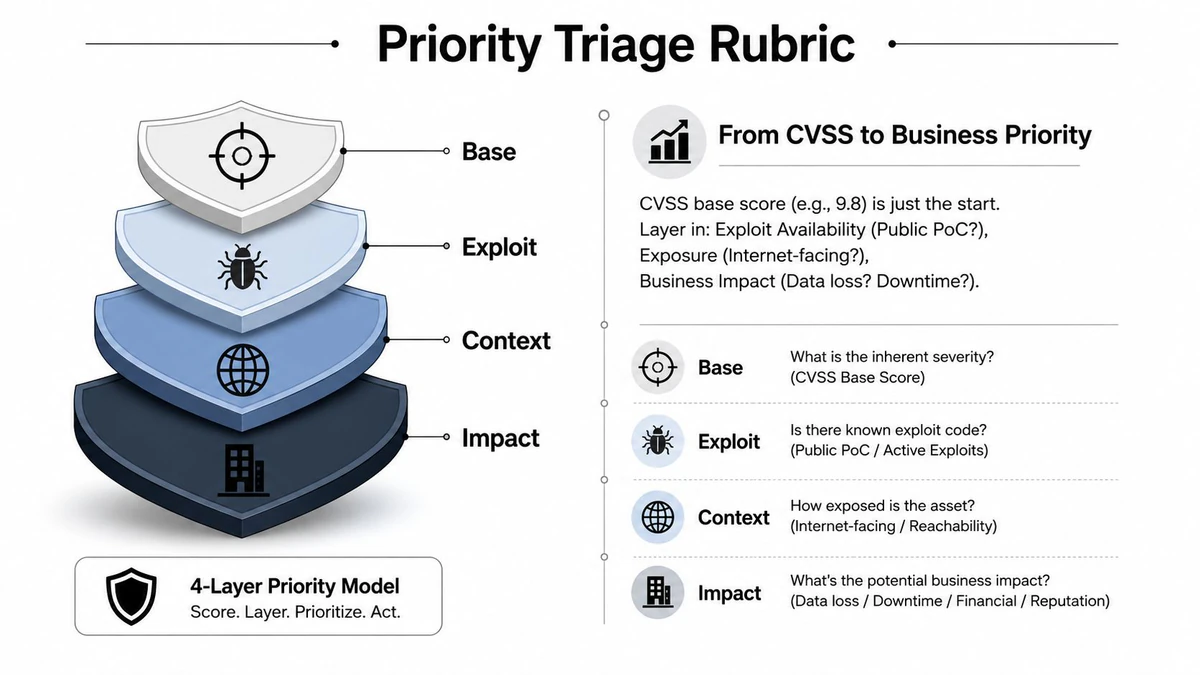
A finding only becomes priority when you can explain why it matters in your environment. A critical issue with a narrow blast radius, weak access, or no practical path to abuse may sit behind a medium issue that touches a public admin panel, a signup flow, or mail infrastructure that business teams depend on every day. Score matters, but score alone does not tell you what should move first.
A better triage starts with the path, not the label.
Use three lenses at the same time
Read each finding through severity, exploitability, and business context.
Severity gives you the starting point, usually the tester's first judgment.
Exploitability shows whether the route is realistic, especially when the report includes public code, simple chaining, or weak authentication.
Business context shows what the weakness touches, such as customer data, campaign delivery, registration flows, sender identity, or admin access.
That mix turns a flat list into a queue that people can work. A public-facing issue with user impact moves sooner. A lower-scored issue buried behind controls can stay tracked without taking the front of the line.
If two findings share the same score, put the one with easier exploitation and wider exposure first. A finding that runs through a human workflow, such as login, signup, or email identity, usually deserves more attention than its score suggests.
| Signal | What to ask | What it means |
|---|---|---|
| Score | How severe is the weakness on paper? | Good baseline, not final priority |
| Exploit path | Is there a repeatable route in the report? | Shows whether the issue is real in your environment |
| Exposure | Is the asset public, internal, or gated? | Defines how quickly it can be abused |
| Impact | Does it touch data, money, reputation, or sendability? | Sets business urgency |
Practical rule: treat CVSS as the floor, then adjust priority based on exploitability and business exposure.
Teams that lose this discipline usually stall on execution because fixes are not sequenced cleanly. If you need to reclaim delivery velocity with OKRs, tie remediation to outcome ownership instead of ticket closure.
Email systems deserve the same treatment. An SMTP or MX weakness may look routine on paper, but if it affects identity, relay behavior, or spoofing resistance, it can hit security and deliverability together. Marketing, sales, and operations teams often feel that impact first, because inbox placement and sender trust ride on the same infrastructure. If list hygiene is part of the problem, fold in BillionVerify's cleaning process so verification gaps and bad data are handled in the same pass.
From Findings List to Remediation Plan That Actually Ships
A prioritized list is not a plan. Teams often stop at “critical first, medium later,” then wonder why the report doesn't change anything. Real remediation needs owners, deadlines, verification steps, and a way to separate infrastructure work from application work, because one queue for everything usually turns into nobody owning anything.
Split the work by domain
The cleanest handoff is by team boundary, not by individual finding. Infrastructure owns patching, network controls, and mail server posture. Application teams own code fixes, auth logic, and abuse cases. Operations and platform teams own configuration drift, monitoring, and rollout timing. Email stack issues need their own lane because they sit between security, deliverability, and CRM behavior.
A simple tracking sheet works well if it captures:
- Owner: who is responsible for the fix.
- Deadline: when the fix must land.
- Status: open, in progress, blocked, or verified.
- Evidence: what shows the fix worked.
- Retest note: whether the tester confirmed closure.
The business brief for Email Validation API is relevant here because a remediation plan often needs both a code fix and an ongoing control to keep bad inputs out of the pipeline. That's especially true when the weakness is tied to signup abuse or list hygiene.
Don't close the loop before verification
A common failure mode is that engineers deploy a fix, but nobody retests it. That leaves the report in a gray zone, and gray zones grow. Verification should be a required step, not an optional sign-off, because the report only becomes trustworthy again when someone proves the issue is gone.
The right cadence is simple. Assign the fix, ship the change, verify the result, then archive the evidence. If a team can't meet that loop consistently, the report is exposing a process problem as much as a technical one.
Retesting, Scope Gaps, and the Human Path Most Reports Miss
A pentest report is a milestone, not a finish line. Risk reduction starts after the findings land, when teams prove the fix and ask what the next test should cover. That matters because remediation without verification is just hope with a ticket number on it.
Retesting should be planned before the first fix ships
The safest practice is to schedule retesting as part of the response, not as an afterthought. Rapid7's research shows credentials were compromised in 46.0% of engagements and some form of compromise occurred in 86% of engagements, which is a good reminder that attackers often chain small weaknesses into larger outcomes Rapid7's research report. That's exactly why a fix should be verified in the same workflow that created it.
If the fix isn't retested, the report still contains an open risk, even if the ticket says done.
A practical retest checklist for the next engagement looks like this:
- Scope the human path: ask for phishing, impersonation, or social engineering coverage if those routes matter to your business.
- Clarify exclusions: get every omitted asset and workflow named explicitly.
- Request evidence format: confirm that proof of concept, reproduction steps, and asset ownership will be included.
- Add verification windows: make room for retest before final closure.
Ask for the path that wasn't tested
The biggest blind spot is often the human route into systems. Reports focus on vulnerable services, but business risk often starts with someone clicking, approving, forwarding, or trusting a sender identity they shouldn't. That's why scope has to be discussed in terms of workflows, not just servers.
A useful companion read is the ViralRef security guide, because teams managing allowlists and trust rules often miss how quickly human exceptions become attack surface. If your environment depends on manual approvals, whitelisting, or access exceptions, those should be named in the next scope conversation.
One more operational point. role account detection matters because generic inboxes and shared mailbox patterns can hide misuse, weaken ownership, and complicate verification after the test. If the report doesn't touch those paths, ask for them next time.
Email Infrastructure Findings for Marketing and Deliverability Teams
Email findings land differently because they don't stay in the security lane. A weak MX posture, an open relay, sloppy SMTP handling, or spoofable display names can show up in a penetration report as a technical defect, then show up in the marketing calendar as a blocked send, a damaged domain, or a support fire drill.
Read mail-layer findings as operational risk
If a tester can demonstrate unauthenticated relay behavior or forged sender headers, that's not just a mail issue. It's a sender reputation issue, a brand trust issue, and a campaign delivery issue. Marketing teams own the outcomes, even when the root cause lives in infrastructure or identity controls.
The useful way to interpret these findings is to ask four questions. Does the issue let someone send mail they shouldn't. Does it expose identity confusion. Does it weaken domain trust. Does it create a path for phishing that looks like your company. If the answer is yes, the finding belongs in the same priority discussion as the rest of the report.
The BillionVerify email test guide fits naturally into that workflow because deliverability checks and security checks often point at the same weak edge, especially when a report raises questions about sender identity or list quality.
What a deliverability team should check first
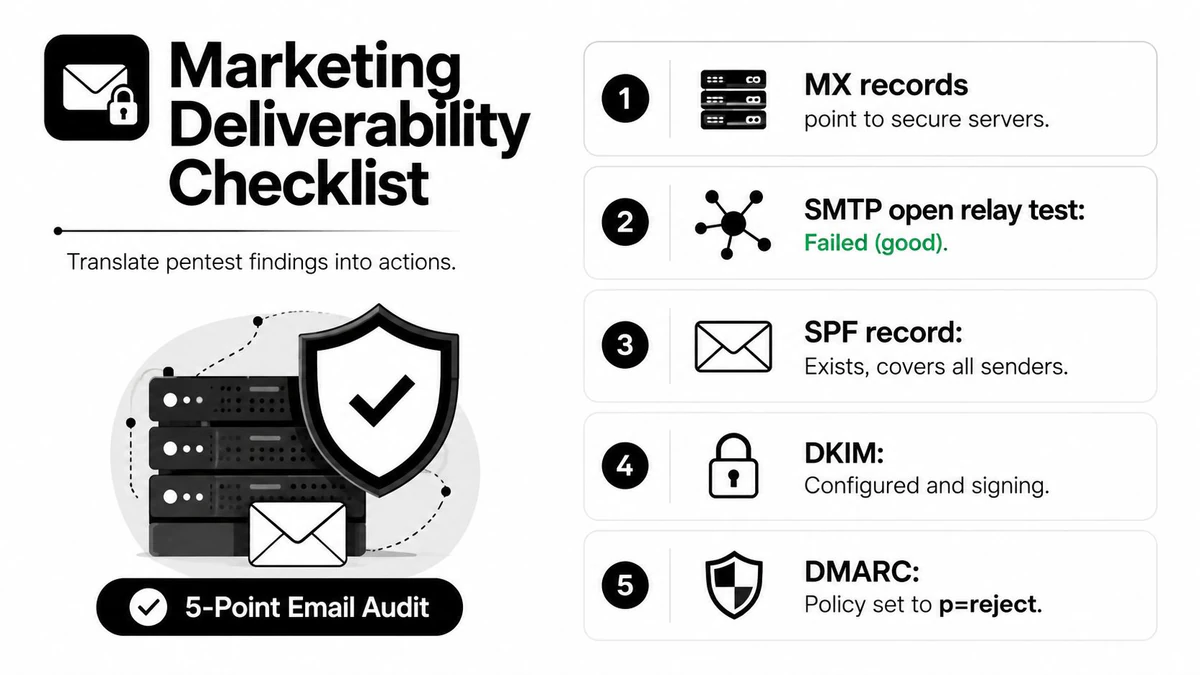
A practical triage list for marketing and ops is short:
- MX alignment: confirm the mail path points where it should.
- SMTP behavior: verify there's no open relay exposure.
- Authentication posture: check SPF, DKIM, and DMARC together, not in isolation.
- Display name abuse: look for spoofable sender identity that could confuse recipients.
- Proof output: keep the tester's evidence showing how the issue was demonstrated.
An email finding is serious when it can change what recipients believe, not just what the server accepts.
For teams that run outbound at scale, cold email infrastructure is a useful lens because the line between growth plumbing and trust plumbing is thinner than many realize. When an issue touches SMTP or sender identity, it affects both.
Tailoring the Report for Each Audience Without Losing Fidelity
One report should become three views. Executives need business risk and posture change. Engineers need reproducible steps and a backlog. Marketing and ops need the impact on sending, signup flow, and CRM hygiene. If you give each group the same full PDF, most of them will miss the part they need.
Keep the same facts, change the framing
The executive version should be one page and stay high level. Lift the scope summary, the top risks, and the business impact. Leave out tool chatter and reproduction detail unless leadership needs to understand a specific exposure.
The engineering version should be the opposite. Preserve the proof, the steps to reproduce, the affected assets, and the remediation notes. Don't bury the fix path under summary language. If there's a code or configuration ticket to open, the ticket should be able to stand on the report without additional translation.
The marketing and ops brief should focus on sender reputation, list hygiene, integration risk, and delivery behavior. That version should explain whether the issue could affect campaign sends, onboarding emails, or CRM quality.
The BillionVerify email checker is useful to mention in that operational layer because it gives teams a concrete verification point before bad data gets into the system again.
Publish, review, and keep it alive
A report loses value when it sits still. Set a review cadence, update status as fixes land, and keep the ownership trail visible. If a finding changes from open to verified fixed, record who confirmed it and when. If it stays blocked, say why.
The best report is the one people keep using after the meeting ends.
That habit turns a one-time assessment into a running record of security posture, which is exactly what mixed teams need when technical findings touch business workflows.
Closing the Loop With Continuous Verification
Annual testing is useful, but it's still a snapshot. Between engagements, teams keep sending mail, accepting signups, syncing CRM records, and changing configuration. That's where continuous verification matters, because it reduces the blast radius of the same kinds of weaknesses a pentest might find later.
BillionVerify supports single checks, bulk list cleaning, and a real-time API with 99.9% SMTP-level accuracy, and it returns structured JSON with status, SMTP results, MX records, catch-all scoring, and deliverability insights. It's designed to help teams verify billions of addresses at a fraction of traditional costs, which makes it a practical control for teams that need to clean data, block fake signups, and protect sender reputation before bad inputs spread.
The strongest connection to penetration testing is simple. If a report exposes weak SMTP posture, spoofable identity, or dirty email data, continuous verification becomes part of the fix, not just a separate marketing tool. Marketing, sales, product, and ops all benefit when the checks happen at the point of send and signup instead of after a problem has already spread.
If your team is trying to turn penetration testing results into cleaner sending, safer signup flows, and better-owned remediation, BillionVerify gives you the verification layer to support that work. Visit BillionVerify to see how single checks, bulk cleaning, and real-time API verification can fit into your email stack and help keep the next report smaller, clearer, and easier to act on.