



A single independent campaign analysis reported that email verification reduced hard bounces from 8.4% to 1.2% and total bounces from 11.5% to 3.0%, representing improvements of 85.7% and 73.9% respectively. (Campaign analysis on bounce-rate reduction) That result changes how I evaluate real time check verification. It isn't merely a list-cleaning task after a campaign fails. It's a control point that can protect sender reputation before bad data reaches your database, automation platform, or outbound sequence.
The difficult part is deciding what to do when the answer isn't clean. A receiving server may accept, reject, delay, or obscure an SMTP probe. Blocking every ambiguous address can hurt signup conversion, while accepting every unknown result can let risky data into the system. The right implementation treats fail-open versus fail-closed as a product and operations decision, not as a default hidden inside an API client.
Why Real Time Check Verification Matters Now
Email teams often judge verification by the invalid addresses removed. The more useful measure is operational: whether the check changes data quality before a mailbox provider sees the next send. Hard bounces affect sender reputation, campaign economics, and future inbox placement, so the decision belongs near the point of capture.
The campaign analysis cited earlier reported hard bounces falling from 8.4% to 1.2%, while total bounces fell from 11.5% to 3.0% after verification. Those figures are not a forecast for every sender, but they show the cost difference between stopping a bad address during signup and storing it in the CRM, syncing it to other tools, and mailing it repeatedly.
A T0 answer, not a permanent guarantee
Real time check verification is a T0 check. It evaluates whether a mailbox appears able to accept mail at the moment of the request. Services commonly combine syntax analysis, domain and MX checks, and SMTP probing to produce that result. (How real-time verification works)
The result can change after the request. Reputation controls, filtering policies, mailbox limits, and other delivery conditions may alter what the receiving server accepts later. A successful response is therefore a current risk signal, not a guarantee that a future campaign reaches the inbox.
Practical rule: Treat verification as admission control, not as a lifetime certificate of deliverability.
Where Verification Creates the Most Value
Signup, checkout, CRM ingestion, and prospecting flows tolerate different levels of friction. Each still faces the same operational problem: once invalid data enters a system, it can be copied, scored, segmented, and activated without another check.
The most important implementation choice appears when the SMTP response is slow or ambiguous. A fail-closed policy blocks or holds the address until the service returns a definite result. That protects list quality, but a temporary timeout can also reject a legitimate signup. A fail-open policy accepts the address when verification cannot decide, preserving conversion while allowing uncertain records into later workflows. Many teams quarantine those results instead of treating them as clean.
That trade-off makes the verification call part of product design, not just an API setting. Define separate handling for clear failures, clear passes, and unknown responses, then monitor conversion and bounce outcomes by result.
A check can prevent several downstream problems:
- Sending waste: The platform avoids spending volume on addresses that fail basic acceptance tests.
- Reputation pressure: Fewer hard bounces support a healthier sending pattern.
- Data contamination: Marketing and sales teams avoid building segments around unusable records.
- Operational rework: Support and revenue teams spend less time correcting mistyped or disposable addresses.
For a marketing lead, the decision is practical. Real time verification puts quality control where the organization can still block, accept, or quarantine the address. BillionVerify Email Verification is one service designed for that workflow.
How the Verification Pipeline Works
A real-time check is a sequence of increasingly specific tests, not a single yes-or-no lookup. For alex@example.com, the system first evaluates the text, then the domain, and finally asks the recipient server whether it will accept that mailbox. Each stage adds evidence, latency, or both.
Six checks that build the result
Syntax validation checks whether
alex@example.comfollows an acceptable email structure. A missing@, malformed domain, or invalid character can be rejected without contacting a mail system.Domain validation confirms that
example.comis formatted as a usable domain. This catches addresses that look plausible but point to an invalid destination.MX lookup checks whether the domain publishes mail-exchange records. An MX record shows that the domain has a mail route, but it does not prove that
alex@example.comexists. You can browse MX lookup by BillionVerify when diagnosing the domain side of a result.SMTP probing opens a mail-transfer conversation and issues an
RCPT TOprobe for the recipient. The receiving server's response helps the verifier judge whether the mailbox appears acceptable at that moment. The sequence of syntax validation, MX lookup, SMTP probing, and catch-all testing is covered in technical benchmark coverage of verification accuracy.Catch-all detection tests the same domain with a guaranteed nonexistent address. If the server accepts both a plausible address and a nonexistent one, the SMTP response alone cannot confirm mailbox existence.
Risk classification combines signals such as disposable-provider detection, role-account identification, and the final status. A result may be valid, invalid, unknown, or risky instead of just passing or failing. The email verification process guide describes these common checks.
Why MX alone isn't enough
Suppose example.com has working mail infrastructure but alex@example.com contains a typo. An MX-only system sees a functioning domain and may pass the address. The SMTP stage asks the more useful question, whether the recipient server will accept that mailbox.
Catch-all behavior creates the opposite problem. A server may return an acceptance response for nearly any local part, so the verifier needs the nonexistent-address comparison before assigning confidence. Preserve those underlying signals instead of exposing only a final label.
Every deeper check adds network work, server negotiation, and possible delay. The implementation therefore needs a policy for slow or ambiguous responses. A fail-closed choice protects list quality but can interrupt a legitimate signup, while fail-open preserves conversion and sends uncertain records to later review. That decision belongs in the workflow design, not only in a valid field.
Choosing Between Client-Side and Server-Side Integration
The integration boundary decides who absorbs latency, where credentials are stored, and whether every funnel applies the same verification policy. A browser-side request can show feedback quickly, but placing a private API key in JavaScript exposes it. A server-side request protects the credential and centralizes the decision, while adding verification time to the submission path.
For production signup and checkout flows, keep the acceptance decision on the server. The browser can provide basic syntax feedback, such as identifying an incomplete alex@, while the backend submits the address, interprets the response, records the outcome, and returns a controlled status to the interface. This also gives one place to configure what happens when SMTP responses are slow or ambiguous.
Three integration patterns
Client-side JavaScript works well for immediate format guidance. It should not contain a secret credential or serve as the only enforcement layer. Users can modify or bypass browser code, and separate pages may apply different rules. Use it to reduce avoidable form errors, not to establish mailbox validity.
Server-side synchronous verification fits flows that must decide before creating an account, accepting an order, or saving a lead. The backend calls the JSON endpoint, keeps credentials private, applies the selected fail-open or fail-closed policy, and stores response fields for review. The trade-off is visible latency: a slow receiving server can delay the user unless the application has a defined timeout and fallback.
Webhook or queued verification suits CRM imports and workflows where the user is not waiting. The record enters a holding state, receives an asynchronous result, and moves to an approved, rejected, or review queue. This keeps SMTP delay out of form submission, but every downstream system must handle the temporary state correctly.
A real-time API can return domain and mailbox signals in one structured response, including live MX records, A records, syntax status, catch-all flags, disposable-provider flags, role-account detection, and a final verdict such as valid, invalid, unknown, or risky. (Structured email validation response fields)
| Pattern | Latency | Security | UX Impact | Best For |
|---|---|---|---|---|
| Client-side check | Exposed to the browser | Weak if private credentials are included | Fast feedback, inconsistent enforcement risk | Format hints |
| Server-side synchronous call | Added to the request path | Centralized and protected | Direct decision during signup or checkout | High-value conversions |
| Webhook or queued check | Removed from the immediate path | Centralized with asynchronous controls | User continues, record remains pending | CRM ingestion and bulk workflows |
For cold outreach, the choice also affects data ownership, list movement, and control over verification results. Teams comparing built-in and external approaches can review why wins for cold email, then test the design against their sending workflow. The practical question is whether uncertain addresses should pause a user action or enter a later review queue.
Handling Slow and Ambiguous SMTP Responses
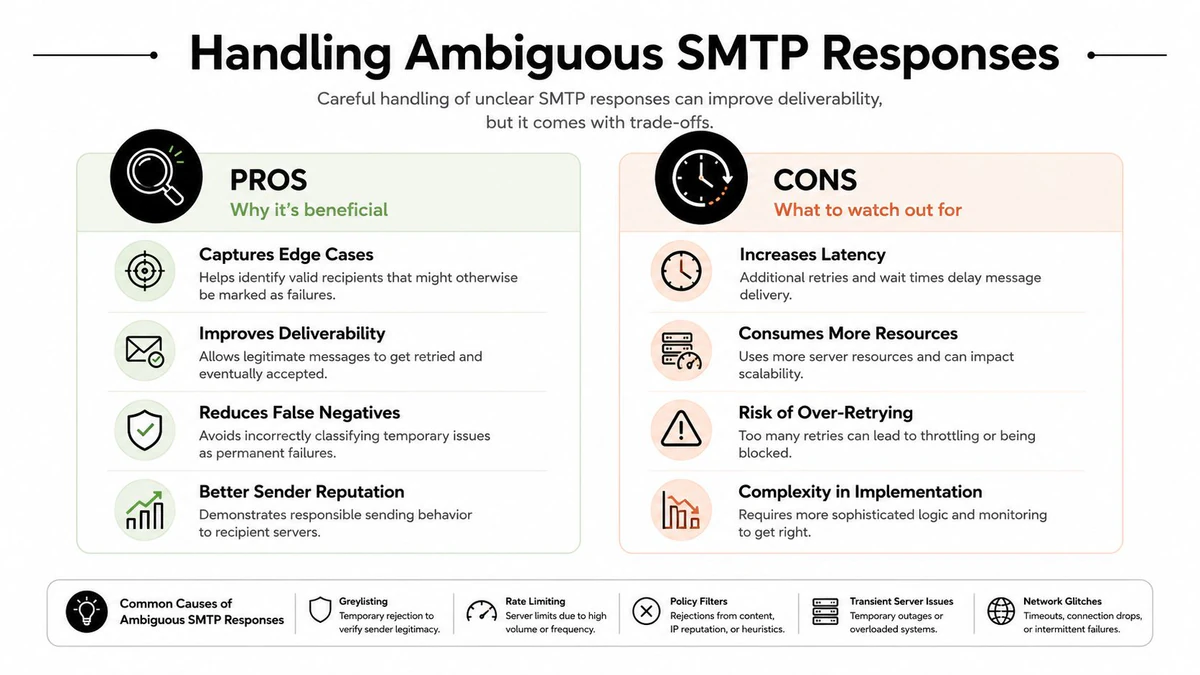
A verification call does not always produce a definitive answer quickly. Receiving servers may greylist, delay SMTP probes, or limit connection rates. Most requests can finish promptly while a small group remains slow enough to affect form completion and signup conversion.
Set a client timeout and define what happens when it expires. A practical implementation can use a 5–8 second client timeout that fails open for slow lookups, as described in Developer guidance on timeout handling. The application must separate a transport timeout from a confirmed invalid result. A timeout is unresolved evidence, not proof that the mailbox is bad.
Fail-open and fail-closed are product policies
Fail-open lets the user continue after a timeout or unresolved response. The system can create the account, mark the address unconfirmed, send a confirmation message, and run a later asynchronous check. This protects conversion in low-friction registration flows where a delayed verifier should not block a legitimate user.
Fail-closed blocks or holds the action until the verifier returns an acceptable result. That policy fits workflows where the address controls access, triggers costly fulfillment, or feeds a tightly controlled outbound list. It also creates a clear operational risk: a valid user may be rejected because the receiving server was slow.
The key distinction is between uncertainty and invalidity. unknown can result from a catch-all domain, defensive mail-server behavior, greylisting, or an incomplete probe. risky may indicate a disposable or role-based address, which calls for a different action than a malformed address.
A routing policy that survives real traffic
Create separate handling for confirmed invalid, acceptable, and unresolved outcomes:
- Confirmed invalid: Ask the user to correct the address, and keep it out of marketable data.
- Valid and acceptable: Continue the flow and store the verification timestamp and response.
- Catch-all or unknown: Let the user continue where conversion matters, then require confirmation or place the record in review.
- Disposable or role-based: Apply the funnel's business rule. A newsletter may accept a role inbox even when a sales sequence should not.
- Timeout: Apply the endpoint policy, log the event, and retry asynchronously instead of keeping the user waiting.
Decision rule: Fail closed on confirmed invalid data. Fail open on uncertainty when blocking a legitimate user costs more than a follow-up verification step.
Document that rule beside the integration code. Product, marketing, and engineering should agree on each verdict before launch, especially when one API serves signup, checkout, and CRM ingestion. That agreement determines whether a slow SMTP response becomes a conversion loss, a pending record, or a later deliverability check.
Reading a BillionVerify API Response in Practice
An API response is useful only when it gives the application enough context to make one routing decision. In a signup flow, the backend can submit alex@company.example and receive structured fields for the final status, SMTP result, MX presence, catch-all signal, disposable flag, and role-account flag. Those fields also support a deliberate fail-open or fail-closed policy when the mailbox check is uncertain.

Read the fields as a group
Start with status. A valid result can support account creation, while an invalid result should normally keep the address out of the marketable database. Unknown and risky require a policy decision, not an automatic rejection.
Check the SMTP result alongside the domain signals. It records what happened during the mailbox-level exchange, but an accepted response from a catch-all domain does not confirm that the specific mailbox exists. Slow, incomplete, or ambiguous SMTP behavior should be recorded as uncertainty rather than converted into a false invalid result.
MX record presence confirms that the domain has mail-routing infrastructure. It does not establish that the local mailbox exists. The catch-all flag or score identifies a domain that accepts addresses which may not exist, so the application should treat that result differently from a confirmed rejection.
Review the disposable and role-account flags next. A disposable provider can reduce long-term contactability. A shared inbox may be unsuitable for personalized sales outreach but appropriate for a support request. The form's purpose determines the action.
A practical routing table might look like this:
| Response combination | Signup action | Marketing data action |
|---|---|---|
| Valid, SMTP accepted, not catch-all | Create account | Permit normal nurture |
| Invalid, no usable mailbox signal | Ask for correction | Do not activate |
| Unknown, catch-all detected | Continue with confirmation | Hold from outreach |
| Risky, disposable flagged | Apply funnel-specific rule | Exclude or quarantine |
| Valid, role account detected | Create account if appropriate | Segment before personalization |
BillionVerify's Email Validation API can serve as the server-side endpoint for this pattern. Preserve the raw decision context, not just the final label, so support can determine why the system accepted, blocked, or held an address.
Keep the payload intact
Store the verification result with the address, request time, policy version, and decision outcome. Saving only true or false removes the distinction between an invalid mailbox, catch-all domain, disposable provider, role account, and timeout.
That distinction matters when marketing changes its tolerance for role accounts or product changes confirmation behavior. Keep the response available for audit and reprocessing, while limiting which fields enter downstream tools. Document whether ambiguous results fail open or fail closed beside the integration code, because that choice directly affects signup conversion and the quality of later email sends.
Balancing Performance Cost and Deliverability Gains
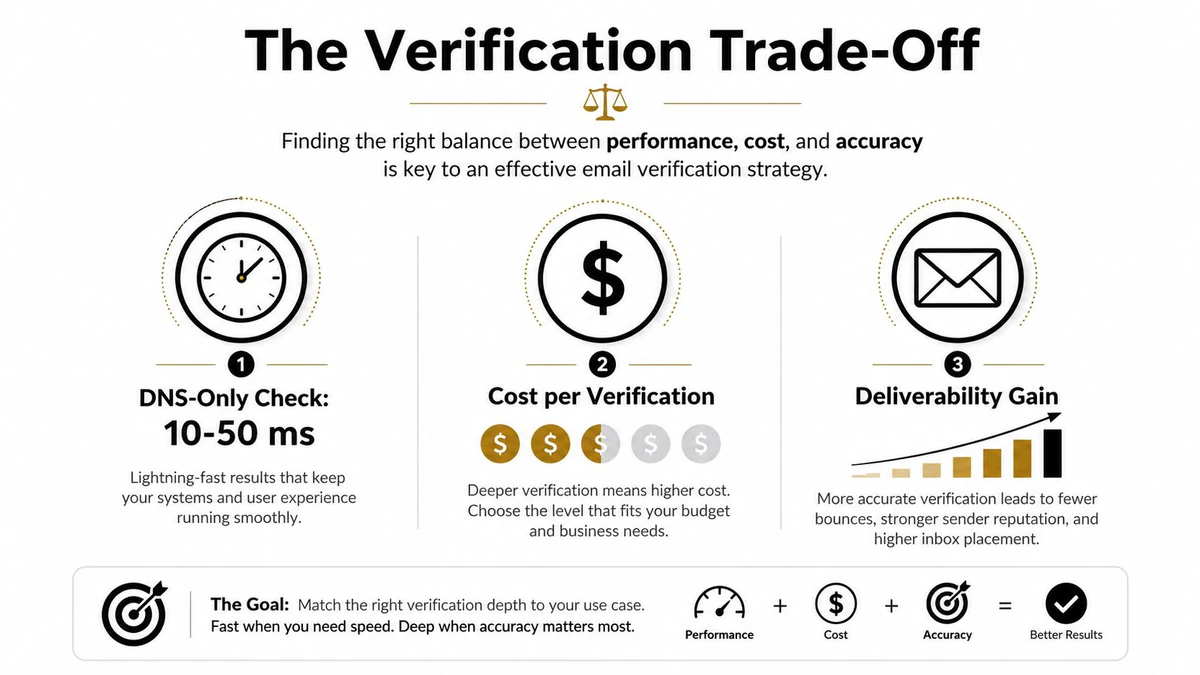
Verification depth is a routing decision, not a universal setting. DNS-only checks stop at the domain layer and usually return quickly. Full SMTP verification contacts the receiving server, which can provide mailbox-level evidence but introduces network delay, throttling, and ambiguous responses.
Published API latency benchmark measurements put DNS-only checks at roughly 10–50 milliseconds. Full SMTP verification commonly takes 200 milliseconds to 2 seconds for catch-all classification and 500 milliseconds to 5 seconds for mailbox confirmation. Slow or rate-limiting servers can push p99 latency beyond normal form expectations.
Match verification depth to business risk
A low-risk form can use a lightweight synchronous pass, then verify deeper after the user submits. Reject obvious syntax and domain failures immediately, while sending uncertain addresses through asynchronous SMTP checks.
Checkout needs a different threshold. A mistyped address can affect receipts, delivery notices, account recovery, and support. Synchronous SMTP verification may justify its latency before payment or fulfillment, but the interface must handle a delayed result without appearing broken.
The fail-open versus fail-closed choice matters most when SMTP is slow or returns an unknown result. Fail-closed protects list quality by blocking uncertain signups, but it can reject legitimate users when a receiving server is temporarily unavailable. Fail-open preserves conversion, yet allows an address with unresolved mailbox status into the next stage. A practical policy can fail open for account creation while holding the address from marketing activation until confirmation or a later check.
CRM ingestion usually fits queued processing. Verify records before campaign activation while the importer continues with other data. This separates user-facing latency from list hygiene and gives operations a review path for unknown and risky results.
Engineering trade-off: Spend synchronous latency where an invalid address creates downstream cost, and use asynchronous processing where the user does not need an immediate decision.
Cost per call should follow the same risk model. Use a cheaper preliminary control to route obvious failures instead of applying the deepest check to every low-value event. Reducing every check to DNS creates a fast system that may still admit nonexistent mailboxes.
Track latency alongside outcome distribution. Monitor valid, invalid, unknown, risky, catch-all, disposable, and role-based results, plus timeout frequency and later suppressions after sending. These measures show whether verification improves data quality or merely shifts cleanup into campaigns.
Best Practices for Signup and Form Flows
A signup flow should make verification feel protective rather than punitive. Show immediate format feedback, call the verification service from the backend, and tell users what to fix when an address is clearly invalid. Keep SMTP details out of the interface.
Route outcomes by risk. Block confirmed invalid addresses and ask for correction. Send catch-all or unknown results through confirmation or review. Evaluate disposable and role-based addresses against the form's purpose. Marketing lists generally need stricter rules than account access flows. Use this disposable email detection guide when defining suppression criteria.
Industry hygiene guidance supports removing disposable and role-based addresses from outreach lists, treating catch-all domains carefully, and checking addresses during signup so invalid records do not enter the list. (Email list hygiene guidance)
A practical launch checklist
- Validate early: Check the address before adding a new contact to the active marketing database.
- Protect the key: Keep API credentials on the server, never in browser code.
- Separate outcomes: Store valid, invalid, unknown, risky, catch-all, disposable, and role-account signals independently.
- Choose fail-open deliberately: A slow or ambiguous response should not receive the same treatment in every flow. For account creation, allow signup when conversion matters, then require confirmation or hold the address from marketing activation. For high-risk acquisition sources, fail closed or quarantine the record.
- Set a timeout: Use the documented 5–8 second fail-open approach for slow lookups, then complete unresolved checks asynchronously. (Timeout recommendation)
- Confirm ownership: Send a confirmation message when the business can tolerate a second step.
- Quarantine uncertainty: Keep unknown and catch-all records out of automated outreach until policy requirements are met.
- Recheck at ingestion: Verify addresses when they enter the CRM, not only during registration.
- Review outcomes: Compare bounce behavior, later suppressions, and conversion impact before changing routing rules.
Real time check verification works as a control across capture, storage, and activation. The operating decision is not only whether an address passes. It is where uncertainty is allowed, how long it remains unresolved, and which downstream systems can use it.
BillionVerify provides real-time email verification with structured results for status, SMTP response, MX records, catch-all scoring, disposable providers, and role accounts. Visit BillionVerify to review its API and list-verification workflows for signup decisions and outbound data.