


The most popular advice about wedding save the date emails is incomplete. Couples are told to choose a beautiful template, write a warm announcement, and send it at the right time. None of that helps if an outdated address bounces, a household receives duplicates, or the message disappears into spam.
Treat the save-the-date as the first operational email in your wedding communication sequence. It establishes the quality of your guest data, tests your sending setup, and creates the audience you'll later use for formal invitations, RSVP reminders, and day-of updates. The creative matters, but deliverability comes first.
Why Wedding Save the Date Emails Need a Deliverability Strategy
A save-the-date email isn't only a piece of etiquette. It's an early notification sent to a group of people who may not regularly communicate with the sender's email account. That makes the campaign behave more like a small event-marketing send than a personal message.
Personal Gmail and Outlook accounts are designed for individual correspondence, not sudden bulk delivery to an unfamiliar list. Sending a large group of messages from a personal inbox, especially with many stale or duplicated addresses, can create filtering and delivery problems. If guests don't see the message, the practical result is predictable: someone has to chase them by text, phone, or family group chat.
Email deliverability describes whether a message reaches the intended inbox rather than merely leaving the sender's system. Mailadept's email deliverability explained is useful background because it separates successful sending from actual inbox placement. That distinction matters for weddings. A platform may report that messages were accepted for delivery while guests still fail to notice them.
Practical rule: A polished email that doesn't reach the inbox is an unsuccessful save-the-date.
The first send affects the next send
The save-the-date is normally the first step after the date and venue are confirmed, before formal invitations go out. Its job is intentionally narrow: give guests the couple's names, wedding date, location or city, and wedding website, then let a later invitation handle fuller details. Guidance on wedding save-the-date timing and content places the usual window at 6 to 8 months before the wedding, or 9 to 12 months for destination weddings.
That early position gives the campaign unusual importance. If your first send produces many bounces or spam complaints, you'll have less confidence in the same list when the invitation sequence begins. You may also lose track of which households received the announcement.
Before designing anything, run the addresses through the BillionVerify deliverability test tool. Use the results to separate usable addresses from records that need confirmation, correction, or removal. The workflow is simple: clean the list, test a small group, inspect delivery, then send the full campaign through an appropriate platform.
Wedding-related messages often attract strong attention because recipients are motivated and the subject is time-sensitive. The Omnisend email marketing benchmarks report a 52.43% open rate for the wedding category in 2026 benchmarks, the highest among the measured industries, alongside a 0.04% conversion rate. That contrast is useful. Guests may open a wedding message readily, but opening doesn't guarantee a website visit, RSVP, or any other direct action.
Timing Rules and Guest List Segmentation
Timing should reflect the work guests must do after receiving the announcement. For a local or regional wedding, the established planning window is 6 to 8 months before the event. Destination weddings generally need 9 to 12 months, particularly when guests must coordinate flights, lodging, passports, or extended time away.
Use the date and location as your first decision points, then segment by logistics rather than by how close you feel to each person. A household traveling internationally needs more practical notice than a local guest, even if both receive the same core announcement.
| Wedding Type | Send Window | Priority Segments | Key Considerations |
|---|---|---|---|
| Local or regional | 6 to 8 months before | Immediate family, wedding party, local guests | Confirm the city and website before sending |
| Destination | 9 to 12 months before | International and out-of-state households first | Give guests more time for travel and lodging |
| Holiday-adjacent | Earlier within the relevant window | Travelers and guests with fixed schedules | Competing plans can fill calendars quickly |
| Multi-day celebration | Within the destination window when travel is involved | Guests attending more than one event | Explain the main date clearly and place evolving details on the website |
Build segments around households
A practical order is immediate family and the wedding party, followed by local guests, out-of-state travelers, and international attendees. The first group can function as a soft test batch, but only if the addresses are verified and the recipients understand that the message is an early announcement, not a request for an RSVP.
Send one save-the-date per household when that matches your invitation plan. A couple sharing an inbox shouldn't receive two identical messages, and a family account shouldn't create multiple competing records. Keep the spreadsheet organized around the unit that will later receive the invitation, while recording plus-ones and family groups separately for planning.
Send only to people you fully intend to invite. A save-the-date creates a clear expectation, so it shouldn't go to a speculative B-list.
Decide whether to stagger
Stagger the campaign when the list contains many unfamiliar or recently collected addresses, when the sending domain is new, or when different groups need materially different information. A smaller initial send lets you inspect bounces, rendering, and link behavior before the next segment goes out. Don't split sends merely to create artificial complexity. If the list is clean and the platform is configured properly, a single coordinated campaign may be easier for guests and planners.
For the broader planning picture, a wedding seating chart resource can help you think through household relationships, plus-ones, and family groupings before those decisions reach the email database. For more operational guidance, review segmentation strategies for sales teams, then adapt the principle to wedding households rather than sales contacts.
Cleaning and Verifying Your Guest Email List
Most delivery failures begin in the spreadsheet, not the email template. Guest information often arrives from family lists, address books, wedding website forms, and messages sent to either partner. Consolidate those sources before you write the campaign so the same household doesn't appear under several spellings or addresses.
Create one controlled master list
Start with one row per sending unit, usually a household. Keep separate fields for the primary name, partner or plus-one details, email address, invitation status, geography, and notes about how the address was collected. Don't let each family member maintain a separate “final” file. Merge them into one controlled record and assign one person responsibility for changes.
Then perform a basic data review:
- Normalize addresses: Remove accidental spaces, inconsistent capitalization, and duplicate records.
- Check syntax: Look for obvious typing errors such as
gmial.comorhotmial.com, then confirm the correction with the guest. - Filter role addresses: Addresses such as
info@,office@, oradmin@usually describe an organization or shared function, not a guest's personal inbox. - Remove disposable domains: Temporary addresses may expire or be unsuitable for an ongoing wedding communication sequence.
- Resolve household duplicates: If two records point to the same household inbox, retain one sending record and preserve the other person's details in the household fields.
Verification tools commonly combine syntax checks, MX record lookup, SMTP deliverability probing, disposable-domain detection, and role-account detection. That feature set is described in independent bulk email verification documentation, and it matches the checks a wedding planner needs before a large guest send.
Handle uncertain addresses carefully
An address supplied informally by a relative shouldn't automatically enter the final campaign. Ask the guest to confirm the preferred inbox through a direct message or a simple confirmation process. That extra step is especially useful for older contacts, shared family accounts, and people who may have changed providers.
Catch-all domains require caution. They can have valid mail infrastructure while accepting every address, which means a verification system may identify the domain as catch-all without confirming that a particular mailbox exists. Email verification edge cases explain why catch-all results should be treated as uncertain rather than automatically safe.
BillionVerify is a professional email verification service built to solve one problem: bad email data costs businesses money. For this use case, the relevant task is screening a guest list before the campaign, not replacing personal confirmation where the record is unclear. You can also review how to clean email lists for a repeatable hygiene workflow.
Subject Lines and Copy That Actually Get Opened
A save-the-date subject line should identify the message before the recipient opens it. Vague lines such as “A little announcement” may sound charming, but they force guests to interpret the email in a crowded inbox. Clarity is warmer than cleverness when the recipient needs to save a date and understand whose wedding it is.
Compare the practical difference:
| Subject Line Formula | Example | Expected Open Rate | Why It Works |
|---|---|---|---|
| Direct announcement | Save the Date, Ava and Daniel | Not stated | Identifies the purpose and names immediately |
| Names plus date | Ava and Daniel's Wedding, September 18 | Not stated | Helps guests recognize the event at a glance |
| Location cue | Save the Date, Ava and Daniel in Asheville | Not stated | Signals travel relevance without adding clutter |
| Playful teaser | It's happening, Ava and Daniel are getting married | Not stated | Can suit a casual audience, but relies more on recognition |
No defensible open-rate figure belongs beside these individual drafts. The benchmark evidence supports the category's strong engagement, not a guaranteed result for any particular subject line. Use the table as a writing framework, then judge your campaign with its own delivery and engagement data.
Write for the preview pane
The first line should carry useful information even if the recipient sees only the preview text. A straightforward structure works well:
Save the date
Ava and Daniel
September 18, 2026
Asheville, North Carolina
Formal invitation to follow
Visit our wedding website for updates
The essentials are the couple's names, date, location, and website link. A short note that an invitation will follow sets expectations and keeps the message separate from the formal RSVP process. Don't add a registry link, survey, or full itinerary to this first announcement. Each extra request competes with the single action that matters, saving the date.
Keep the design readable
Use live text beneath or beside any designed image. A single image can look polished but may become unreadable when images are blocked or scaled on a phone. A PDF preserves the artwork but adds friction because guests must open an attachment. Responsive HTML is usually more adaptable, though it takes more preparation.
Keep the wedding website link prominent and use one dominant CTA, such as View wedding details or Visit our wedding website. Emoji can add personality for a casual wedding, but restraint protects clarity and avoids making the subject resemble promotional email. For additional copy guidance, see how to write emails that sell, then remove sales language that doesn't belong in a personal announcement.
ESP Integration and Automation Workflows
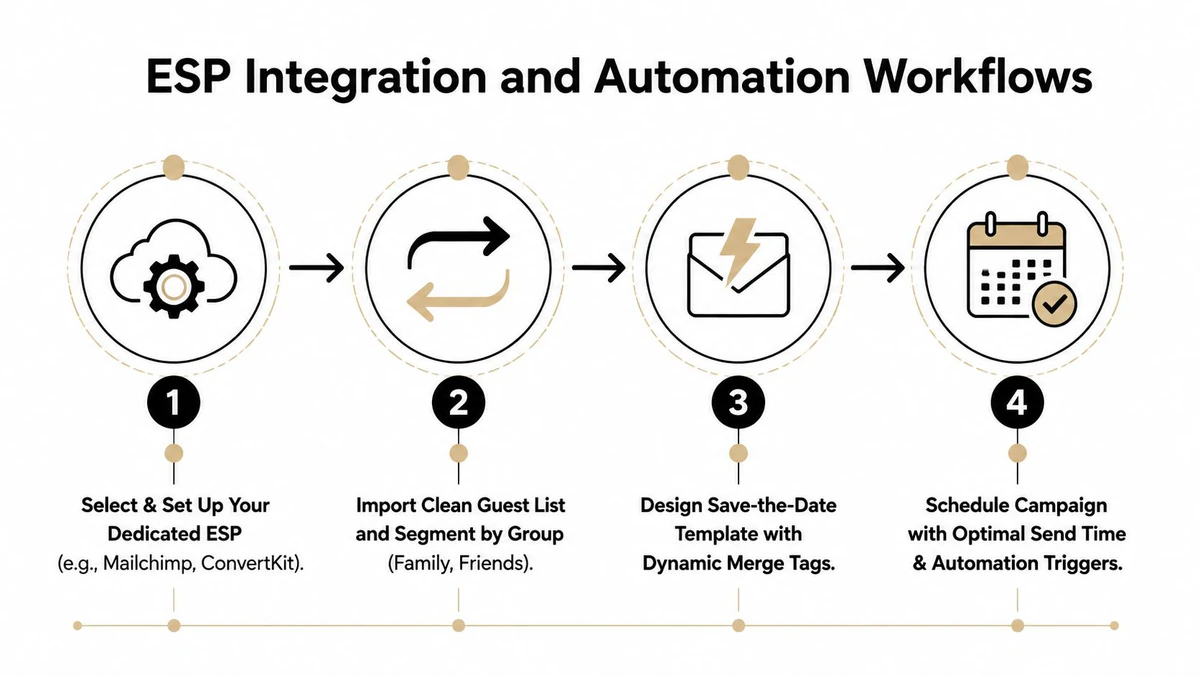
A personal Gmail account may be fine for writing to a few people individually, but it isn't a reliable operating model for a substantial guest list. A dedicated email service provider, CRM, or wedding invitation platform gives you household-level personalization, segmentation, tracking, scheduling, and a record of what happened.
Platforms such as Mailchimp, ConvertKit, and wedding-specific services can support a one-time campaign without turning the wedding into a permanent marketing program. The key is to treat the send as a controlled workflow, not as a mass BCC message.
Configure the sending foundation
Use a sending identity that guests recognize, ideally a wedding-specific address or a clearly named account. Authenticate the sending domain with SPF, DKIM, and DMARC through your email platform or domain administrator. These records help receiving providers evaluate whether the platform is authorized to send on your behalf.
Don't launch a large campaign from a brand-new setup without testing. Start with a verified internal group or a small, trusted segment, inspect the results, and correct any authentication, formatting, or list problems before continuing. Avoid abrupt changes in sender identity between the save-the-date and the formal invitation, because guests may not recognize the later message.
Import the master list only after household deduplication. Create fields for household name, guest tier, geography, plus-one status, and invitation status. If your wedding planning tool and ESP both store guest data, choose one system as the source of truth and synchronize deliberately. Manual copying between spreadsheets and platforms is where names, links, and household relationships get lost.
Build a modest automation sequence
A useful sequence has two messages:
- Initial announcement: Send the concise save-the-date with the date, location, website, and invitation-to-follow note.
- Reminder to non-openers: Send a shorter reminder to people whose first message wasn't opened, scheduled 7 days later.
Don't resend the same creative to everyone. A reminder should be a nudge, not duplicate inbox noise. If tracking is unavailable or privacy controls make open data unreliable, use clicks, delivery status, and a carefully selected secondary channel instead of treating every unrecorded open as a failure.
Read the metrics together
Wedding email engagement can look unusually healthy, but no single metric proves success. The Salesforce email benchmarks list general averages of 20.73% open rate, or 33.87% including Apple Mail Privacy Protection, 2.27% CTR, 0.15% unsubscribe rate, and 2.33% bounce rate. Event-style programs commonly use a 10% to 25% click-to-open range, while event-promotion data reports a 24.5% average click-to-open rate, also covered by Salesforce.
Use those figures as context, not wedding-specific promises. Review delivery, bounces, clicks, click-to-open rate, and unsubscribes together. A high open rate with weak clicks may mean guests saw the notice but didn't need the website yet. A high bounce rate indicates list or address problems, even if the platform accepted the campaign.
For real-time checks during signup or address collection, a structured Email Validation API can return fields such as status, reason, score, disposable, role, free, accept-all, MX records, and SMTP check. Batch workflows are better for the master list, while an API is useful when a guest submits an address through a form.
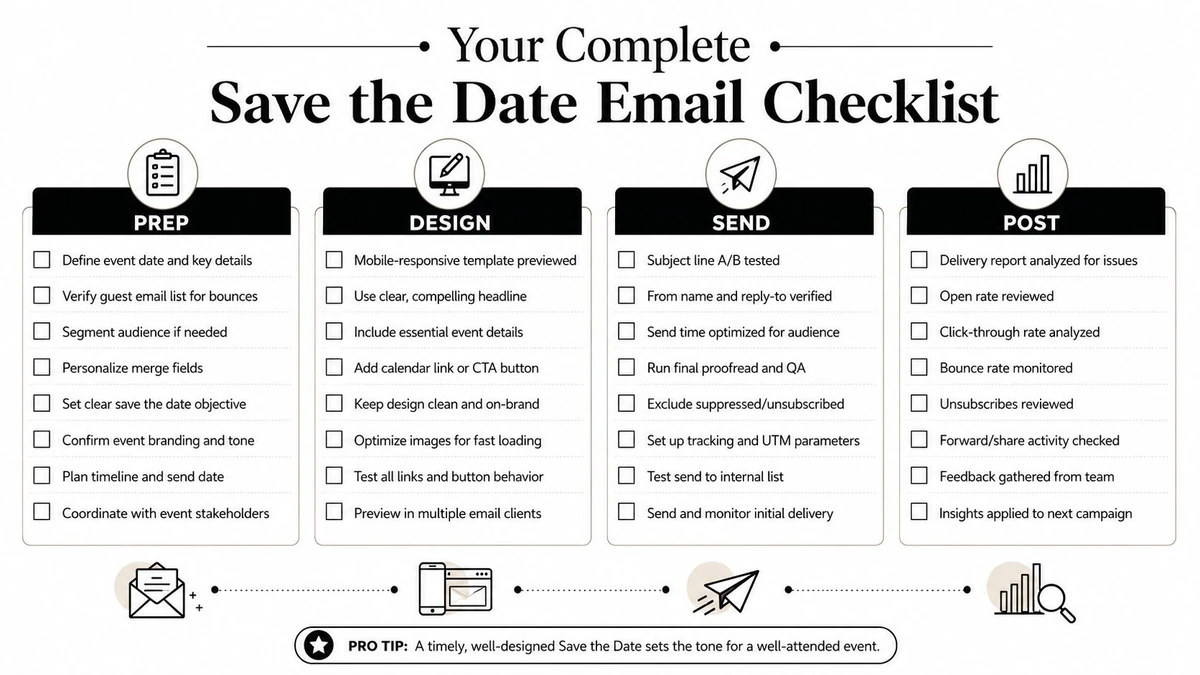
Your Complete Save the Date Email Checklist
A wedding email campaign becomes manageable when each decision has a place in the workflow. Use this checklist as a working document, and record the owner and completion date beside every item.
Prepare the guest data
- Confirm the date and location: Don't send before the core event details are stable.
- Collect addresses centrally: Combine partner, family, address-book, and website records.
- Create household rows: One sending record per household where appropriate.
- Record invitation intent: Exclude anyone who isn't certain to receive a formal invitation.
- Mark geography: Identify local, out-of-state, and international guests.
- Document plus-ones: Make the invitation scope clear without requesting an RSVP.
Verify and protect the list
- Remove duplicates: Prevent repeated messages to shared inboxes.
- Correct syntax errors: Confirm likely typos with the guest rather than guessing.
- Filter role accounts: Exclude organizational addresses such as
info@andadmin@. - Flag disposable domains: Treat temporary addresses as unsuitable until confirmed.
- Review catch-all results: Ask for confirmation where mailbox existence isn't clear.
- Archive the clean version: Preserve the verified list for later invitation work.
Design and test
- Write a direct subject line: Include names, the announcement, and a useful date or location cue.
- Keep the body brief: Add names, date, city or location, website, and invitation-to-follow wording.
- Use one dominant CTA: Send guests to the wedding website rather than asking for several actions.
- Add live text: Ensure the key details remain visible when images don't load.
- Preview on mobile: Check the subject, image scale, text, and link on a phone.
- Test merge fields: Look for missing names, broken personalization, and incorrect plus-one language.
Send and monitor
- Authenticate the sender: Confirm SPF, DKIM, and DMARC are configured for the sending identity.
- Use a dedicated ESP: Avoid an unmanaged BCC send from a personal inbox.
- Schedule by guest need: Follow the established window, with earlier planning for destination travel.
- Send a controlled first group: Inspect delivery before releasing later segments when risk is heightened.
- Prepare the reminder: Target non-openers rather than repeating the campaign to everyone.
- Review the report: Compare bounces, clicks, click-to-open rate, unsubscribes, and delivery outcomes.
A well-built checklist also protects etiquette. For wording, formality, and timeline questions that vary by family and culture, consult this wedding invite advice for couples. Then follow up with guests who still haven't seen the message through a suitable personal channel, and keep the verified master list ready for the formal invitation round.
BillionVerify helps planners and teams verify guest addresses through single checks, bulk list cleaning, and real-time validation workflows, with structured deliverability results for screening risky records. Visit BillionVerify before sending your wedding save-the-date emails, clean the household list, and give every later wedding message a better chance of reaching the inbox.