



A recent 2026 dataset of nearly 80,000 contact lookups found that 67.2% returned a verified work email, while 12.5% were undeliverable or risky. About 1 in 8 addresses can hurt deliverability if you send without checking first. That is the part often missed when trying to find someone's email. Discovery helps, but the send decision is where sender reputation lives or dies.
Email still operates at massive global scale. Forecasts place worldwide users at 4.48 billion in 2024, 4.73 billion in 2026, and 4.85 billion in 2027 (Indectron email statistics). Spam volume remains massive too, with one summary citing 162.7 billion spam emails per day and another citing 45.8% of emails sent in 2023 as spam, plus 82% of spam caught by filters. In that environment, a guessed address is a deliverability risk, not just an unverified lead.
Why Finding an Email Is Only Half the Battle
Discovery and delivery are separate jobs. An address can look right on paper, then bounce, hit a catch-all, or still route poorly enough to drag a campaign into spam. The operational mistake is treating a found address as a safe address.
The cost of a bad send
A small number of bad records creates outsized pain. Bounces tell mailbox providers that list hygiene is weak, and repeated weak signals make later campaigns harder to place. That is why structured lookup workflows matter, and the verification step after lookup matters just as much.
Practical rule: if the address hasn't been checked, it isn't outreach-ready.
As noted earlier in the 2026 dataset, 12.5% of lookups were undeliverable or risky, while 67.2% returned verified work emails. That ratio works only if you filter before sending, not after. In sales ops, I have seen teams celebrate “found” records, then spend the next week cleaning up the fallout from avoidable bounces.
Why verification is part of the search, not an add-on
Modern email discovery is a two-stage workflow. First, locate a candidate address from a name, company, or public signal. Then check whether the mailbox is likely deliverable, whether the domain behaves normally, and whether the address is safe to use in a campaign.
The verification-first mindset matters because public guides still spend most of their energy on the hunt and skip the final gate. That gap gets expensive in larger pipelines, where a few bad guesses can pollute a whole list. At scale, the cheapest record is the one you do not have to repair later.
The source mix matters too. As noted earlier, the 2026 dataset showed that 92.1% of contacts were captured in a LinkedIn context rather than inbox-based sources. It also showed activity clustering midweek, with Tuesday and Wednesday accounting for 45.3% of weekly contact adds and Wednesday 14:00 UTC as the busiest hour. That does not just describe behavior, it shows where much of the raw material for lookup comes from. The work starts after that raw material is found.
Proven Methods to Discover Email Addresses
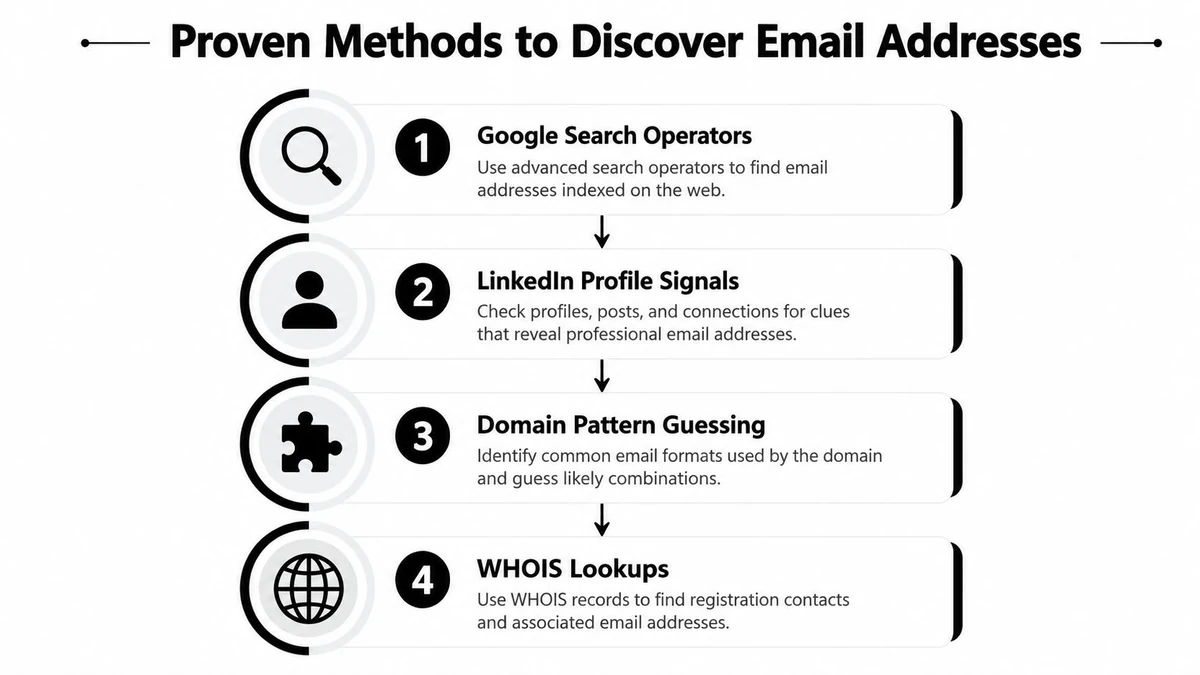
The cleanest discovery workflows start with public, defensible signals. If a person has published an address, linked a personal site, or left a company trail in a profile, use that first. If not, move from visible clues to pattern inference and then verify the result before you touch a CRM.
Start with public profile signals
LinkedIn is often the first stop because it exposes role, company, and sometimes contact hints. A practical search flow starts with the person's name, current company, and any public profile clues, then checks the Contact Info, About section, featured content, and linked website before jumping to guesses. That keeps the process grounded in what the person or company has already made visible.
Search operators help when the profile itself is sparse. Queries like company-domain searches, name-plus-domain searches, and page-specific searches can surface a public bio, media page, or team page that mentions the contact. The point is not volume, it is evidence. A single visible clue is better than a dozen random permutations.
Infer the company pattern carefully
Once you have the person's name and company domain, generate likely formats such as first.last or flast. A practical B2B workflow starts by extracting the person's name and company domain, then inferring the organization's email pattern, and finally testing candidates before outreach (DeepSearch guide). That sequence matters because pattern guessing without validation is just dressed-up guessing.
The safest pattern is the one you can defend with a second public signal.
That second signal can be a public contact page, a press mention, or another published employee address that reveals the company's naming style. I would rather use a slower, evidence-based guess than blast a list of fast wrong ones. At scale, speed only helps if the output survives verification.
Use tools when the list grows
Manual discovery works for a few high-value contacts. It breaks down when you need a repeatable workflow for a campaign, recruiting sprint, or pipeline build. BillionVerify is a professional email verification service built to solve one problem, bad email data costs businesses money.
An email extraction tool can help organize the public signals you've already found, but it should not replace judgment. The best use of these tools is to reduce manual copying, not to justify skipping the last check. That distinction keeps your prospecting defensible and your list cleaner.
How to Verify Emails Before You Send
A candidate address doesn't become useful until it passes deliverability checks. Verification has three jobs, confirm the domain can receive mail, check whether the mailbox looks real, and flag cases where the server won't give a definitive answer. If you skip any of those, you're trusting appearance over evidence.
What to check first
Start with the domain and then the mailbox. MX and SMTP-level checks tell you whether the server is set up to receive messages and whether the address responds like a real inbox. Catch-all detection matters too, because a domain can accept nearly anything while still hiding whether a specific mailbox exists.
Disposable and role-based addresses deserve special handling. A disposable inbox is usually not a real outreach target, and role accounts often create low-quality engagement for sales teams. Risky or ambiguous results shouldn't be forced into the same bucket as verified deliverable contacts.
The BillionVerify email checker fits this part of the workflow because it's built for single checks and structured verification, not just raw discovery. Use a verified result when you've got one, but keep unknown or catch-all statuses out of your primary send list unless the account is important enough to review manually (BillionVerify email checker).
If the checker can't support the address confidently, don't let the campaign be the place you “test” it.
How to read the result
A good verification flow gives you more than yes or no. It should separate strong deliverability from uncertain status so you can decide whether to send, suppress, or recheck later. That's especially useful when a record looks valid but the server behavior is incomplete or intentionally masked.
Structured output also makes QA easier. If your verification tool returns fields like status, SMTP result, MX record detail, catch-all signal, and deliverability insight, you can route each record based on risk instead of guesswork. That matters in outbound, where one questionable send can contaminate an otherwise clean sequence.
Why BillionVerify matters in the post-lookup gap
Most find-email workflows stop when they produce a string that looks right. The bottleneck is deciding whether that string is safe enough to send. Verification closes that gap by turning a candidate into a usable contact, or a suppressed record.
For teams moving from one-off lookups to repeatable operations, that shift changes the entire workflow. A list built from public signals becomes usable only after it's checked, tagged, and filtered. That's the point where verification stops being a nice-to-have and becomes the gate before outreach.
Choosing the Right Verification Approach for Your Workflow
Different teams need different levels of speed and automation. A signup flow can't wait for manual review, while a targeted prospect list might deserve a careful single-address check. The right approach depends on where the email enters your system and how much risk you can tolerate.
Match the method to the use case
Real-time API verification belongs in product and capture flows. If a user signs up with a bad address, you want the check to happen immediately so junk never enters the CRM or lifecycle stack. That's where the Email Validation API fits naturally, because it can sit inside registration or enrichment workflows without turning the process into a manual task.
Bulk list cleaning is different. If you're preparing a campaign list, onboarding a legacy database, or reconciling imported contacts, you want to sweep the whole file before it touches your sender reputation. Single-address checks sit between those extremes, useful when one account is important enough to inspect carefully but not important enough to slow down an entire batch.
| Workflow need | Best fit | Why it works |
|---|---|---|
| Signup or form capture | Real-time API | Fast validation before bad data spreads |
| Campaign prep | Bulk list cleaning | Cleans larger files before import |
| High-value prospect | Single-address check | Adds precision where each contact matters |
Where integrations help
Verification only helps if it lands in the systems people already use. Teams that work in HubSpot, Salesforce, Zapier, Mailchimp, SendGrid, Klaviyo, or Make need the output to move cleanly into suppression rules, segmentation, and campaign logic. If the result doesn't feed downstream tools, the process stalls in a spreadsheet.
This is also where catch-all scoring earns its keep. A record flagged as uncertain should not behave like a normal verified record inside automation. It needs a different path, often a slower manual review or a separate segment with conservative send logic.
A simple decision rule
Use API checks when data enters your product. Use bulk cleaning when you inherit a list. Use single checks when the contact value is high and the record deserves a closer look.
That rule keeps the workflow lean. It also prevents teams from using a heavy process where a light one would do, or a light process where the risk is too high. Precision beats enthusiasm when the mailbox is on the line.
Legal and Ethical Best Practices for Email Discovery
Finding an address doesn't give you a free pass to use it any way you want. Email discovery sits at the intersection of prospecting, privacy, and source quality. If the source chain is sloppy, the outreach looks sloppy too.
Use the least invasive source chain first
Public and intentionally published sources should come before aggressive collection methods. A public profile, a company contact page, a personal website, or an author bio is easier to defend than a scraped fragment buried in a directory. That's the source-quality tradeoff many teams ignore.
Some methods are technically possible but still poor choices in practice. LinkedIn scraping, WHOIS lookups, and social bios can be useful when handled carefully, but they're not equally appropriate for every scenario. The right question isn't only whether you can find an email, it's whether your path to that email is proportionate and defensible.
Compliance rule: the more sensitive the market, the more important the source trail.
Know the regulatory frame
GDPR and CAN-SPAM aren't optional decoration. They shape how you collect, store, and use contact data, especially when the recipient is in a jurisdiction with stricter privacy expectations. That means legitimate purpose, opt-out handling, and data minimization aren't abstract ideas, they're operational requirements.
For a practical reference point, BillionVerify's email compliance guide is useful when your team needs to pair verification with broader outreach hygiene. The value of that kind of guide is that it keeps compliance tied to workflow, not just legal language. Teams are safer when legal review, source quality, and deliverability are part of the same conversation.
The other rule is simple. Don't over-collect because the data is available. If a contact form, role account, or published business inbox is enough for the message you're sending, stop there. Excess data rarely improves response quality, but it often increases the chance you'll mis-handle the record.
Outreach Templates and QA Checklists for Verified Contacts
Verified contacts deserve cleaner outreach, not just a faster send. Once the address has passed review, the job is to make the email relevant, segmented, and easy to suppress later. That's where a practical QA step pays off.
Templates that stay short and specific
Cold outreach works better when it reads like a reply, not a pitch deck. Keep the opener tied to the person's role or company context, mention one reason you reached out, and make the ask small. If you need help connecting the list-building side with send setup, setting up email campaigns is a useful reference point for aligning the workflow before launch.
A simple cold email can look like this.
Subject: Quick question about your team's workflow
Hi [Name], I noticed your team is focused on [specific context]. I'm reaching out because we work with teams handling the same problem and I thought this might be relevant. If it's worth a look, I can send a short summary.
Follow-ups should be lighter than the first note. Don't repeat the same pitch, just add one new reason to reply, a clarifying detail, or a different use case. Re-engagement should be even narrower, aimed at people who were warm once and then went quiet.
A quick QA checklist before send
- Verification status checked: Send only to records that are verified or intentionally reviewed if the result is uncertain.
- Risky records suppressed: Keep catch-all, disposable, and role-based addresses out of the main blast unless there's a specific reason to keep them.
- Segmentation confirmed: Group contacts by relevance, not just by company size or source.
- Sender reputation reviewed: If recent sends already look weak, pause before adding more traffic.
- CRM fields cleaned: Make sure the verified result, source, and status tag are captured before launch.
Use the BillionVerify list cleaning service when you've got a batch that needs cleanup before it reaches a campaign tool. That keeps the send list aligned with the data you trust, rather than the data you hoped would work. The cleanest workflow is the one that makes bad records easy to quarantine.
BillionVerify helps teams verify discovered addresses before they hit a campaign, which is the part of the workflow most find-email guides skip. If you're building a cleaner prospecting process, visit BillionVerify and use it to check, clean, and route addresses with less risk to sender reputation.