


Most advice on how to make a professional email username stops at style. Use your name. Skip nicknames. Avoid weird symbols. That's fine as far as it goes, but it misses the part that matters in real inboxes: your username affects trust, filtering, and whether people take you seriously before they read a word.
A clean address can support a strong first impression. A sloppy one can undercut a proposal, a cold email, or a consulting pitch on arrival. If you're already working on email subject line best practices for B2B, don't ignore the sender identity that appears beside that subject line. The address itself is part of the message, and sender reputation factors that influence deliverability start long before campaign volume or authentication settings.
Your Email Username Is Your First Impression
A professional email username isn't a minor detail. It's your digital handshake.
When a prospect, recruiter, or partner sees your address in the inbox preview, they make a snap judgment. If the username looks rushed, childish, or disposable, they assume the same about the person behind it. That's why learning how to make a professional email username is really about managing perception.
A weak example looks like surferdude88@aol.com. A stronger one looks like james.wilson@domain.com. The difference isn't cosmetic. One suggests personal clutter and outdated habits. The other signals business intent, identity clarity, and lower friction.
Why this matters in real business communication
Your username does three jobs at once:
- It identifies you fast so people know who sent the message.
- It supports memorability when someone needs to type it, repeat it, or save it.
- It reduces suspicion when the address matches normal business patterns.
Practical rule: If your email address would make you hesitate before putting it on a proposal, invoice, or LinkedIn profile, it isn't ready.
New consultants often spend hours refining positioning, offers, and outreach copy while still sending from an address that looks amateur. That mismatch costs trust. A polished sender name and a professional username create a cleaner first impression before your credentials do the work.
The Unspoken Rules of Professional Usernames
The best professional usernames follow a few quiet rules. They build credibility, stay easy to remember, and still make sense years from now.
The first rule is simple. Don't make your address look machine-generated or disposable. The username should never include a birth year or a long string of numbers, as this pattern is statistically associated with spamming and disposable email accounts. Data shows that 40% of recipients may distrust an email address containing numbers, and outdated domains like Hotmail or AOL can make an individual appear behind the times in competitive business environments, according to GMass on professional email address practices.
That point matters for more than aesthetics. Spam filters and human readers both react to patterns. If your username looks random, cluttered, or throwaway, you're creating friction before the email body gets a chance.
Trust signals people notice immediately
Many recipients won't explain why an address feels off. They just react to it.
Common problems include:
- Random digits like
maria84729 - Multiple separators like
maria__lopez---biz - Nickname-driven identities like
mimirocks - Old provider baggage like
consultantname@aol.com
A cleaner structure tells the opposite story. It says you're established, organized, and reachable.
Addresses that look temporary often get treated like temporary senders.
Longevity matters more than cleverness
A professional username should survive career changes. If you bake your current role, favorite hobby, or a dated joke into the address, you'll outgrow it.
That's one reason I prefer neutral identity-based formats over trendy ones. Your address should still make sense if you move from freelance work into a firm, pivot services, or start speaking at events. If you're also trying to keep signup and list quality high, disposable email detection and deliverability hygiene matter for the same reason: temporary patterns create trust problems.
Proven Naming Formats and Conventions
The strongest naming formats are boring in the best way. They're clear, predictable, and easy to say out loud.
Start with the standard options below and only get more creative if availability forces the issue.
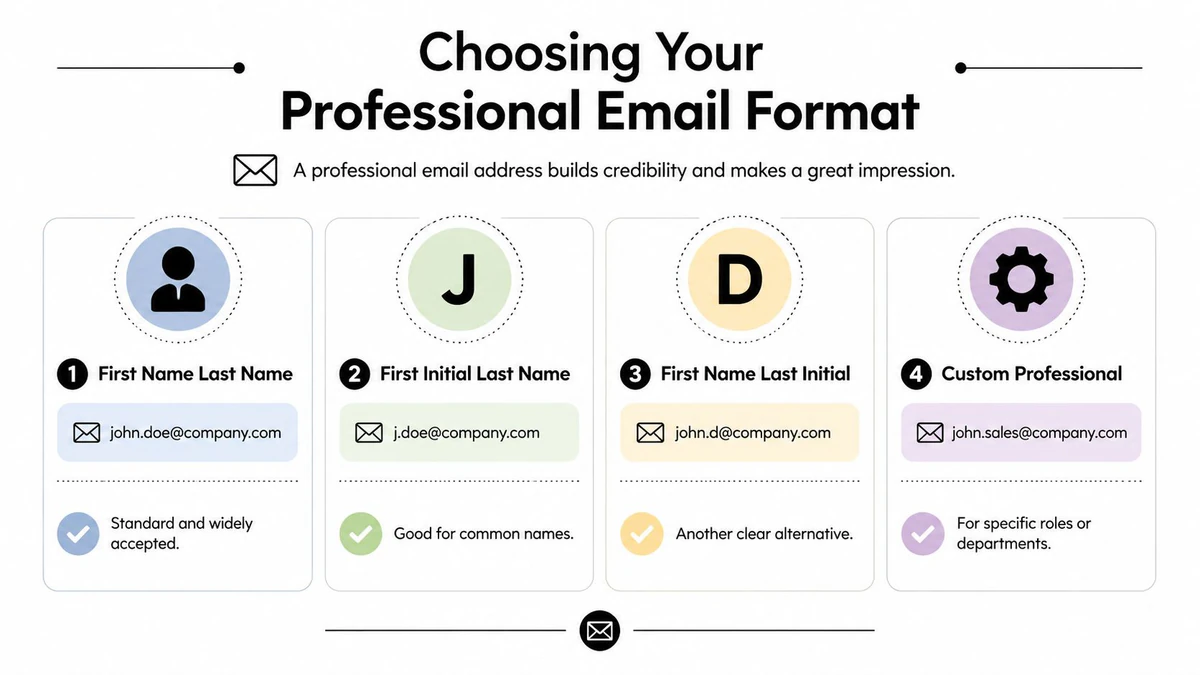
The top formats compared
The gold standard is using your first and last name, such as firstname.lastname@domain.com, while avoiding numbers and nicknames entirely. This format supports clarity and long-term career neutrality, and Instantly notes that name-based addresses with standard separators are the most consistently accepted, while formats with underscores or multiple dashes are flagged as unprofessional or spam-like in 78% of corporate email filtering systems.
| Format | Example | Best use | Trade-off |
|---|---|---|---|
| First name + last name | jane.doe@domain.com | Best all-purpose choice | May be taken for common names |
| First initial + last name | jdoe@domain.com | Useful in larger firms | Slightly less personal |
| First name + last initial | janed@domain.com | Good fallback | Can look less intuitive |
| First name + middle initial + last name | jane.m.doe@domain.com | Good when your name is taken | Slightly longer |
A few practical notes matter here.
- Dots are usually the cleanest separator because they improve readability without making the username noisy.
- Initial-based formats scale well across teams and are easier to standardize.
- Middle initials solve availability problems without making the address look improvised.
What works better than people expect
Consistency matters almost as much as the username format itself. If your email says jane.doe@domain.com but your website, LinkedIn, and pitch deck all use a different version of your name, people notice the mismatch.
One useful check is to say the address aloud. If it's awkward to pronounce or easy to mistype, it's not as strong as it looks on screen.
Later, once you've chosen a candidate, a tool like BillionVerify can help confirm whether the address is technically viable before you start using it everywhere. BillionVerify is a professional email verification service built to solve one problem: bad email data costs businesses money.
A quick walkthrough can help if you want visual examples of how these formats appear in practice.
Formats I would avoid
Some addresses look clever when you create them and weak when someone receives them.
Avoid patterns like:
- Nickname-based usernames such as
johnnybiz - Underscore-heavy formats such as
john_smith_consulting - Role-locked identities such as
janesalesif you may change roles - Mixed symbol formats that are hard to read, dictate, and remember
Custom Domain vs Free Provider A Strategic Choice
The part after the @ changes how the whole address is interpreted.
If you run a consultancy, agency, or business, a custom domain usually makes the stronger impression because it ties your identity to a real brand. It looks deliberate. It also keeps your email address aligned with your website, proposals, and public profile.
Mailchimp's business email guidance says success rates are highest when using custom domains such as @yourbusiness.com, which signal organizational legitimacy and reduce bounce rates by 40% in outbound marketing campaigns. The same source notes that Gmail or Outlook are acceptable neutral alternatives when a custom domain isn't available.
When a custom domain is the right move
A custom domain is the better choice if you:
- Sell services under a brand name
- Send outbound email regularly
- Want stronger alignment between website, email, and company identity
- Need more control over how your communication appears to clients
When Gmail or Outlook is perfectly fine
A clean Gmail or Outlook address is still professional if you're early-stage, testing a niche, or operating as an individual expert without a finished site.
firstname.lastname@gmail.com is credible.growthking247@gmail.com isn't.
Your provider can be simple. Your username can't be sloppy.
If you do use a custom domain, don't skip basic checks around email domain verification. A branded address only helps if the domain behind it is configured and usable.
What to Do When Your Ideal Username Is Taken
A common mistake occurs. They try their full name, find it's unavailable, then jump straight to a messy workaround.
You don't need to do that. There's a cleaner order of operations.
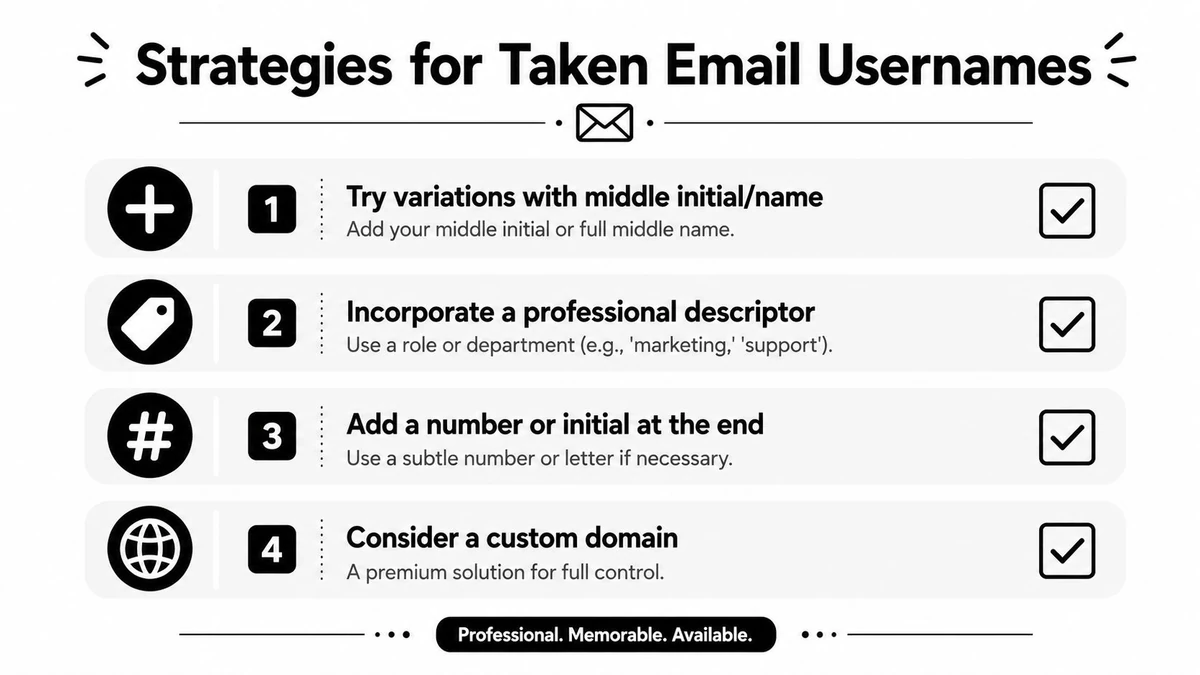
Start with the least disruptive fix
Try the closest professional variation first.
Add a dot or remove one
Ifjanedoeis taken, testjane.doe.Use your middle initial
jane.m.doestays professional and usually feels natural.Switch to an initial-based version
jdoeorjanedoften works well for common names.
These options preserve your real identity without adding visual clutter.
Use a functional identifier when it adds clarity
For individuals with common names, adding a birth year like jsmith95 or a functional identifier like jsmithEng can be a professional and memorable alternative, especially for tech professionals, SDRs, or niche consultants whose expertise is central to their brand, as noted by Indeed's professional email examples.
That doesn't mean every consultant should rush to add numbers. In most cases, a clean name-based format still looks stronger. But if your name is extremely common and every standard variation is gone, a restrained identifier can be the practical answer.
A simple decision ladder
Use this order before settling:
- First choice is your full name.
- Second choice is a name plus middle initial.
- Third choice is an initial-based variant.
- Fourth choice is a restrained professional descriptor like
Eng,Design, or a credential. - Last resort is a minimal number tied to identity, not a random sequence.
If you need extra differentiation, make it meaningful. Don't make it look autogenerated.
If you're testing variants inside Gmail or managing aliases for separate workflows, this Gmail alias system and list hygiene guide is useful for understanding what helps organization versus what only creates more confusion.
Final Step Verify Your Username Before You Use It
A professional-looking username isn't enough. It also has to work.
Before you print business cards, update LinkedIn, add the address to your website, or send outreach from it, verify that the address is technically valid and able to receive mail. This is a frequently overlooked step, and it's the one that saves embarrassment later.
What verification should confirm
A proper check should tell you whether the address syntax is valid, whether the domain can receive email, and whether the mailbox appears deliverable.
According to DokeyAI's BillionVerify listing, BillionVerify delivers 99.9% accuracy in email verification through real-time SMTP checks. The same source says its permanent free tier offers 100 verifications per day with no credit card required, allowing you to validate syntax, MX records, and deliverability for a new professional username.
That matters because username quality and deliverability quality aren't the same thing. A clean format can still fail in practice if the mailbox isn't ready.
A practical pre-launch checklist
Before you commit to a new address, confirm:
- Syntax is clean and free of formatting errors
- The domain accepts mail
- The mailbox can receive messages
- Your selected format matches your public-facing identity
If you're comparing checks at the address level, email syntax validation is one part of the process, but it shouldn't be the only one. Real-world viability matters more than appearance alone.
Key Takeaways and Common Questions
A professional email username should do four things well: identify you clearly, look trustworthy, stay usable over time, and hold up technically. In practice, that usually means a name-based format, a clean provider or custom domain, and a final verification step before use.
If you want a broader technical companion to this topic, this practical guide to email validation is worth reading alongside your naming decisions.
Common questions
What if my name is very long or hyphenated?
Shorten carefully. Use initials or a trimmed version that still sounds like your real identity.
Is a middle initial professional?
Yes. It's one of the cleanest ways to solve availability problems without making the username look forced.
Should I keep separate addresses for different purposes?
Yes, if the roles are distinct. A client-facing consulting address and a private personal address shouldn't be the same inbox.
Can I use a role in the username?
Sometimes. A restrained functional marker can work when your name is unavailable or your expertise is part of your brand. Keep it specific and professional.
If you're setting up a new address and want to confirm it's usable before you publish it anywhere, BillionVerify is a practical option for checking syntax, domain readiness, and deliverability in one place.