



Gmail has always been unique among email providers. Dots don't matter. Plus signs create unlimited aliases. And now, users can change their entire username while keeping the old address as an alias. For email marketers focused on list quality, understanding this system is essential.
This guide explains how Gmail's complete alias ecosystem works and provides practical strategies for maintaining a clean, effective email list. For a broader overview of list maintenance, see our email list hygiene guide.
Understanding Gmail's Full Alias System
Gmail has three distinct mechanisms that create multiple valid addresses for a single user. Let's break down each one.
Mechanism 1: Dot Insensitivity
Gmail completely ignores periods (dots) in the local part of email addresses.
How it works:
These all deliver to the same inbox:

johnsmith@gmail.com
john.smith@gmail.com
j.o.h.n.s.m.i.t.h@gmail.com
johns.mith@gmail.com
The number of possible dot combinations for a username is 2^(n-1), where n is the number of characters. For an 8-character username, that's 128 possible variations.
Why it exists: Google implemented this to prevent confusion and missed emails. Someone expecting mail at john.smith@gmail.com shouldn't miss it because the sender typed johnsmith@gmail.com.
Impact on your list: A single subscriber might appear as multiple entries with different dot placements.
Mechanism 2: Plus Addressing
Users can add +anything after their username to create unlimited aliases.
How it works:
All deliver to johnsmith@gmail.com:

johnsmith+newsletter@gmail.com
johnsmith+shopping@gmail.com
johnsmith+work@gmail.com
johnsmith+randomstring123@gmail.com
Why users do this:
- Track where they gave their email (if spam comes to
+shopping, they know the source) - Create filters (auto-label emails to specific plus addresses)
- Test sign-up flows without creating new accounts
- Organize incoming mail by category
Impact on your list: Users might sign up with plus addresses to track you or filter your emails to specific folders.
Mechanism 3: Address Changes (New)
As of late 2024, users can change their entire Gmail username while retaining the old address as an alias.
How it works:
Original: johnsmith@gmail.com
After change: john.doe@gmail.com

Both addresses:
- Remain active
- Receive all emails
- Can be used to sign in
Key constraints:
- Maximum 3 changes (4 total addresses)
- 12-month waiting period between changes
- Old addresses permanently reserved (never reassigned)
- All account data preserved
Impact on your list: A subscriber's primary address might change, but the old one they gave you remains technically valid—even if they no longer check it.
The Combined Effect
With all three mechanisms, a single Gmail user can have a vast number of valid addresses:
Original registration: john.smith+newsletter@gmail.com

Also valid:
- johnsmith@gmail.com (no dots, no plus)
- john.smith@gmail.com (dots only)
- johnsmith+newsletter@gmail.com (plus only)
- j.o.h.n.s.m.i.t.h+newsletter@gmail.com (extra dots)
- johnsmith+anythingatall@gmail.com (different plus tag)

After one address change to johndoe@gmail.com:
All of the above, PLUS:
- johndoe@gmail.com
- john.doe@gmail.com
- johndoe+newsletter@gmail.com
- j.o.h.n.d.o.e@gmail.com
... and so on
Each address is 100% deliverable. There's no technical way to know they're all the same person.
The List Quality Challenge
Problem 1: Duplicate Subscribers
Without proper normalization, your list might contain:
email,signup_date,source
john.smith@gmail.com,2024-01-15,website
johnsmith@gmail.com,2024-03-22,webinar
j.o.h.n.s.m.i.t.h@gmail.com,2024-05-10,lead_magnet
Three list entries. One person. Triple the emails. Triple the annoyance. Triple the unsubscribe risk.
Problem 2: Inconsistent Engagement Data
When the same person exists as multiple entries:
john.smith@gmail.com: 45% open rate (subscribed first, most interested)
johnsmith@gmail.com: 12% open rate (subscribed second, gets duplicate content)
j.o.h.n.s.m.i.t.h@gmail.com: 0% open rate (subscribed third, gave up opening)
Your analytics are corrupted. You can't accurately assess this subscriber's engagement.
Problem 3: The Address Change Blindspot
When a subscriber changes their Gmail address:
Before: john.smith@gmail.com opens 40% of emails
After address change: john.smith@gmail.com opens 0% of emails
The address still works. No bounce. No complaint. Just silence.
You have no way to know they changed addresses versus lost interest.
Problem 4: Segment Pollution
Subscribers end up in wrong segments:
Engaged segment: john.smith@gmail.com (the one they used to check)
Unengaged segment: johnsmith@gmail.com (duplicate entry)

Result: Same person receives both engaged and re-engagement campaigns
Solution Framework
Here's a comprehensive approach to managing Gmail complexity in your email list.
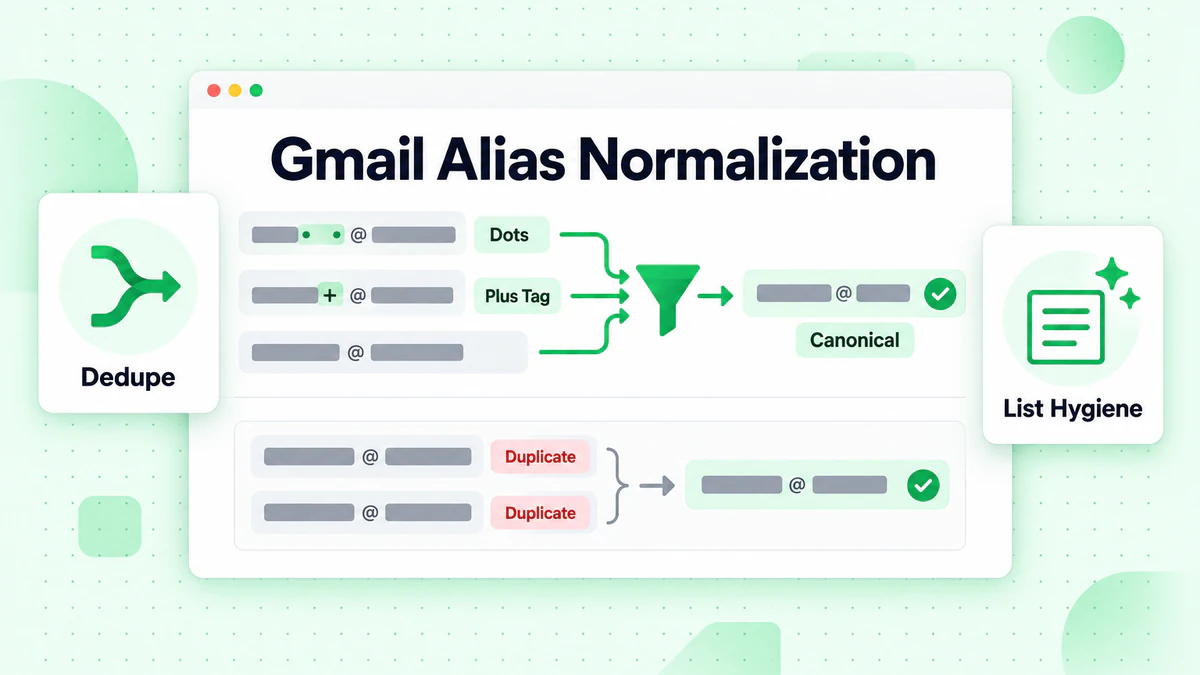
Step 1: Implement Gmail Normalization
Normalize Gmail addresses to detect dot variants and plus tags.
Normalization algorithm:
function normalizeGmailAddress(email) {
  const [localPart, domain] = email.toLowerCase().split('@');

  // Check if it's a Gmail address
  const gmailDomains = ['gmail.com', 'googlemail.com'];
  if (!gmailDomains.includes(domain)) {
    return email.toLowerCase(); // Return non-Gmail addresses as-is
  }

  // Remove dots from local part
  let normalized = localPart.replace(/\./g, '');

  // Remove plus tag and everything after
  normalized = normalized.split('+')[0];

  return `${normalized}@gmail.com`;
}

// Examples:
normalizeGmailAddress('john.smith@gmail.com')     // → johnsmith@gmail.com
normalizeGmailAddress('johnsmith+news@gmail.com') // → johnsmith@gmail.com
normalizeGmailAddress('j.o.h.n.s.m.i.t.h@gmail.com') // → johnsmith@gmail.com
Important: Store both the original and normalized versions:
- Original: For sending emails (respect user preference)
- Normalized: For duplicate detection and analytics
Step 2: Deduplicate at Entry
Prevent duplicates from entering your list in the first place.
At signup/import:
async function addSubscriber(email) {
  const normalized = normalizeGmailAddress(email);

  // Check if normalized version already exists
  const existing = await findSubscriberByNormalizedEmail(normalized);

  if (existing) {
    // Already subscribed—don't create duplicate
    return {
      success: false,
      message: 'This email (or a variant) is already subscribed',
      existingEmail: existing.email
    };
  }

  // New subscriber—proceed
  return createSubscriber({
    email: email,
    normalizedEmail: normalized,
    // ... other fields
  });
}
Step 3: Clean Existing Duplicates
For lists that already contain duplicates:
Identification query:
SELECT
  normalized_email,
  COUNT(*) as count,
  GROUP_CONCAT(email) as variants,
  MAX(last_engaged) as most_recent_engagement
FROM subscribers
WHERE email LIKE '%gmail.com' OR email LIKE '%googlemail.com'
GROUP BY normalized_email
HAVING COUNT(*) > 1
ORDER BY count DESC;
Merge strategy:
- Keep the address with the most recent engagement
- Merge engagement history from all variants
- Preserve the highest subscription level/permissions
- Remove duplicate entries
async function mergeDuplicateGmailSubscribers() {
  const duplicateGroups = await findDuplicatesByNormalizedEmail();

  for (const group of duplicateGroups) {
    // Sort by last engagement, most recent first
    const sorted = group.subscribers.sort((a, b) =>
      b.lastEngaged - a.lastEngaged
    );

    const primary = sorted[0]; // Keep the most recently engaged
    const duplicates = sorted.slice(1);

    // Merge engagement history
    const mergedHistory = combineEngagementHistory(group.subscribers);
    await updateSubscriber(primary.id, { engagementHistory: mergedHistory });

    // Remove duplicates
    for (const dup of duplicates) {
      await deleteSubscriber(dup.id);
    }

    logMerge(primary, duplicates);
  }
}
Step 4: Verify at Strategic Points
Use email verification to ensure address validity—but understand what verification can and cannot tell you. For a complete understanding of the verification process, see how email verification works.
What verification confirms:
- ✅ Address follows valid syntax
- ✅ Domain has valid MX records
- ✅ Mailbox exists and accepts mail
- ✅ Not a known disposable email
- ✅ Not a known spam trap
What verification cannot confirm:
- ❌ Whether this is the user's current primary address
- ❌ Whether the user actively checks this address
- ❌ Whether this is a pre-change alias they've abandoned
Verification timing:
| When | Why |
|---|---|
| At signup (real-time) | Prevent invalid addresses from entering |
| Before major campaigns | Catch addresses that became invalid |
| Quarterly (bulk) | General list hygiene |
| When engagement drops | Diagnose delivery issues |
Integrate with BillionVerify:
const { verifyEmail } = require('emailverify');

async function verifyAndCategorize(email) {
  const result = await verifyEmail(email);

  return {
    email,
    isValid: result.status === 'valid',
    isDeliverable: result.deliverable,
    isDisposable: result.disposable,
    isRoleBased: result.role,
    isCatchAll: result.catchAll,
    riskLevel: calculateRisk(result)
  };
}

function calculateRisk(result) {
  if (!result.deliverable) return 'high';
  if (result.disposable) return 'high';
  if (result.catchAll) return 'medium';
  if (result.role) return 'medium';
  return 'low';
}
Step 5: Monitor Gmail-Specific Engagement
Track engagement separately for Gmail versus other providers. Understanding email marketing metrics and email segmentation is crucial for this step.
Segmented analytics dashboard:
function getProviderEngagementReport(startDate, endDate) {
  return {
    gmail: {
      subscribers: countSubscribers('gmail'),
      avgOpenRate: calculateOpenRate('gmail', startDate, endDate),
      avgClickRate: calculateClickRate('gmail', startDate, endDate),
      unengaged30Days: countUnengaged('gmail', 30),
      unengaged90Days: countUnengaged('gmail', 90),
      trend: calculateTrend('gmail', startDate, endDate)
    },
    outlook: { /* ... */ },
    yahoo: { /* ... */ },
    other: { /* ... */ }
  };
}
Watch for warning signs:
- Gmail engagement declining while others stable
- Increasing gap between delivery rate and open rate (Gmail only)
- Growing "never engaged" segment among Gmail subscribers
Step 6: Implement Smart Sunset Policies
Adjust sunset policies to account for address changes. For detailed re-engagement tactics before sunsetting, see our email re-engagement strategies guide.
Traditional sunset:
No engagement in 180 days → Remove
Gmail-aware sunset:
No engagement in 90 days → Re-engagement campaign with "update email" option
No response in 30 days → Final "we're cleaning our list" notice
No response in 14 days → Move to suppression (don't delete—they might return)
Re-engagement email template:
Subject: Still the right inbox?

Hi [Name],

We noticed you haven't opened our emails lately.

If you've changed email addresses, you can update your subscription:
[Update Email Button]

If you're just busy, no worries—we'll keep your spot.

But if you'd prefer fewer emails (or none), you can:
[Manage Preferences] | [Unsubscribe]

Either way, we'd love to hear from you.

[Your Name]
Step 7: Enable Easy Email Updates
Make it trivially easy for subscribers to update their address.
In every email footer:
Changed email addresses? <a href="[update-link]">Update your subscription</a>
Preference center requirements:
- No login required (use secure tokens)
- Email change confirmation to both old and new addresses
- History/preferences transfer to new address
- Option to remove old address completely
Update flow:
1. User clicks "Update email" link
2. Lands on secure page (token-authenticated)
3. Enters new email address
4. System sends verification to new address
5. User clicks verification link
6. Old address deactivated, new address active
7. All preferences and history transferred
Putting It All Together
Here's a complete workflow for Gmail list management:
┌─────────────────────────────────────────────────────────────┐
│                    NEW SUBSCRIBER                            │
└─────────────────────────────────────────────────────────────┘
                              │
                              ▼
┌─────────────────────────────────────────────────────────────┐
│  1. Real-time verification (BillionVerify API)              │
│     - Syntax check                                           │
│     - Domain/MX verification                                 │
│     - Mailbox verification                                   │
│     - Disposable/spam trap detection                        │
└─────────────────────────────────────────────────────────────┘
                              │
                    Valid? ───┴─── Invalid?
                      │              │
                      ▼              ▼
               Continue         Reject with
                                helpful error
                              │
                              ▼
┌─────────────────────────────────────────────────────────────┐
│  2. Gmail normalization & duplicate check                    │
│     - Normalize address                                      │
│     - Check for existing normalized match                    │
│     - If match: reject or merge                             │
└─────────────────────────────────────────────────────────────┘
                              │
                              ▼
┌─────────────────────────────────────────────────────────────┐
│  3. Store both versions                                      │
│     - Original email (for sending)                          │
│     - Normalized email (for deduplication)                  │
└─────────────────────────────────────────────────────────────┘
                              │
                              ▼
┌─────────────────────────────────────────────────────────────┐
│  4. Ongoing monitoring                                       │
│     - Track engagement by provider                          │
│     - Flag declining Gmail engagement                       │
│     - Identify "valid but unengaged" patterns               │
└─────────────────────────────────────────────────────────────┘
                              │
                              ▼
┌─────────────────────────────────────────────────────────────┐
│  5. Proactive hygiene                                        │
│     - Quarterly bulk re-verification                        │
│     - Gmail-specific re-engagement campaigns                │
│     - Smart sunset with "update email" option               │
│     - Easy preference center access                         │
└─────────────────────────────────────────────────────────────┘
Tools and Resources
Email Verification
BillionVerify provides:
- Real-time API verification for signup forms
- Bulk verification for list cleaning
- Gmail-specific deliverability checks
- Disposable and spam trap detection
For developer integration guides, see our tutorials for Node.js and Python.
Normalization Libraries
For developers implementing Gmail normalization:
JavaScript/Node.js:
// Available via npm
const normalizeEmail = require('normalize-email');
Python:
# Custom implementation recommended for Gmail-specific logic
def normalize_gmail(email):
    local, domain = email.lower().split('@')
    if domain in ['gmail.com', 'googlemail.com']:
        local = local.replace('.', '').split('+')[0]
        domain = 'gmail.com'
    return f'{local}@{domain}'
Monitoring Dashboards
Configure your ESP or analytics tool to track:
- Engagement metrics segmented by email provider
- Delivery vs. engagement gap (especially for Gmail)
- Trend analysis for Gmail-specific metrics
- Sunset funnel conversion rates
Key Takeaways
Gmail's alias system is now more complex than ever. Here's what matters:
Three mechanisms: Dots (ignored), plus tags (aliases), and now username changes (permanent aliases) all create multiple valid addresses per user
Normalization is essential: Without it, duplicates will accumulate and corrupt your data
Verification confirms validity, not activity: A valid Gmail address might be an abandoned alias
Engagement trumps deliverability: A 100% deliverable list can have 50% abandoned addresses
Make updates easy: The best way to handle address changes is helping subscribers tell you about them
Gmail-specific monitoring: Track Gmail engagement separately to catch issues early
Smart sunset policies: Give subscribers a chance to update before removing them
The goal isn't just a clean list—it's an accurate, engaged list where every address represents an active relationship. Start with email verification to establish that foundation, then build engagement monitoring on top.
Your Gmail subscribers are worth the extra effort. They're a huge portion of your list, and with the right hygiene practices, they can be your most engaged audience.
Related Reading:
- Gmail Address Change Feature: New Verification Challenges for Email Marketers — Technical deep dive
- Google Allows Changing Gmail Addresses: What This Means for Your Email List — Industry impact analysis
- The Complete Guide to Email Verification in 2025
- Email Verification Best Practices
- How to Clean Your Email List
- Email List Cleaning Service Guide
- Email Deliverability: The Complete Guide