


The Vodafone mail login lives at mail.vodafone.de. That site says it is for accounts at Vodafone, Arcor, Kabel Deutschland and Unitymedia. So an old Arcor mail address or a kabelmail address signs in where a new Vodafone one does. The service itself is called Vodafone E-Mail & Cloud.
This guide lists every sign-in route we could check. It then covers sign up, a forgotten password, the app, server names and outages. Each fact comes from Vodafone's own sites, read in October 2026. We did not log in or register, and we are not affiliated with Vodafone. BillionVerify is an email verification service. If you want a short definition first, read what webmail is in our glossary.
Key facts (checked October 2026):
- Vodafone's mail portal names four brands it serves, and Arcor and Kabel Deutschland are two of them.
- The Arcor mail login and the kabelmail login both end at the same Vodafone form, as we saw when we opened them.
- Vodafone's service text says the web portal and the apps take the customer login or the mail login.
- Outlook and similar programs need the IMAP data, per Vodafone's help.
- The Freemail plan costs nothing and gives 1.5 GB of storage, according to the same help.
- A new account can hold up to 10 addresses ending in @vodafonemail.de, per Vodafone's help.
- BillionVerify gives 20 free credits on each day you use it, with no card needed, for checking addresses ahead of any send.
Where the Vodafone Mail Login Starts
Several links lead to one place. The table lists what we opened.
| Entry | What happens |
|---|---|
| mail.vodafone.de | Opens "Login mit E-Mail Zugangsdaten" with two boxes |
| Link "MeinVodafone Login" | Opens a form for your customer username |
| www.kabelmail.de | Forwards to the main form |
| www.vodafonemail.de, login.vodafonemail.de | Both lead there as well |
| www.arcor.de | Forwards to live.vodafone.de |
| live.vodafone.de/login | Offers a button for each type of login |
| App Store or Google Play | Installs the Vodafone app |
| Outlook, Thunderbird, Apple Mail | Connects over IMAP |
Vodafone's privacy notice names login.vodafonemail.de, www.vodafonemail.de, mail.vodafone.de and live.vodafone.de as places where the service can be reached.
The Main Login Form
The form has two boxes, "E-Mail-Adresse" and "E-Mail-Passwort". Two links sit under the red Login button: "MeinVodafone Login" and "Zugangsdaten vergessen". A line above the boxes says who it is for.
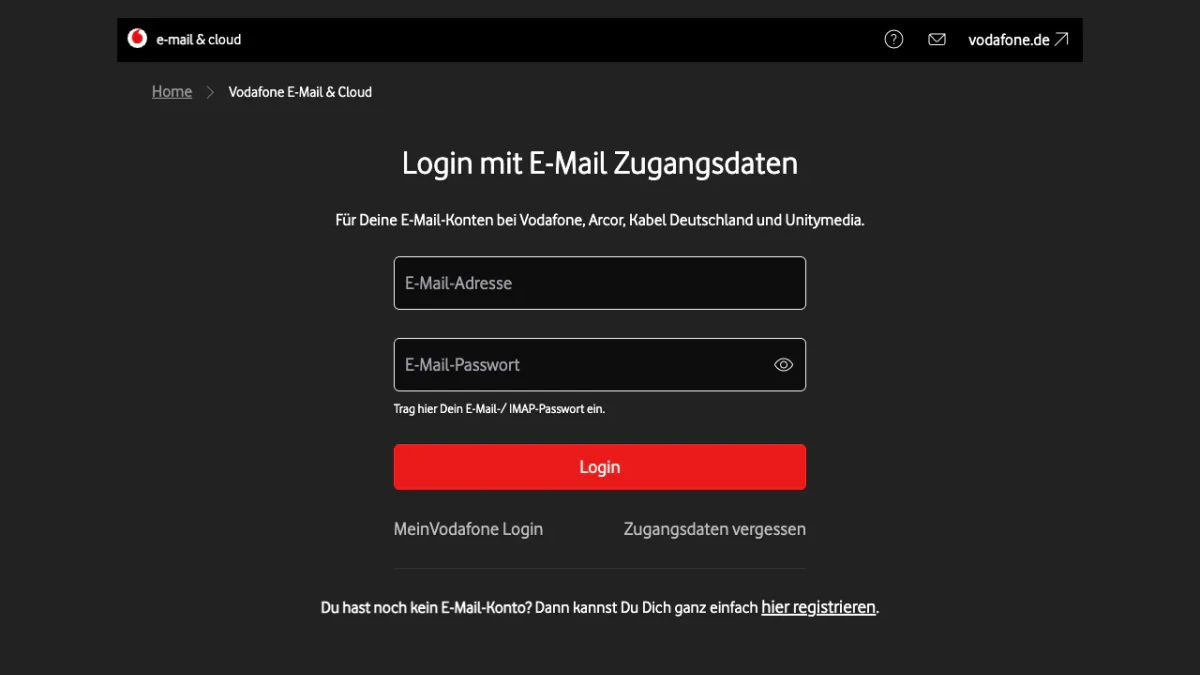
Screenshot: the Vodafone login form.
Below it, a line invites you to register if you have no account yet. The link "hier registrieren" leads to sign up.
Check the Domain
The sites we opened were mail.vodafone.de, live.vodafone.de, vodafone.de and status.vodafonemail.de. Type the link yourself rather than following one in a message. If a message claims to come from Vodafone, our reverse email lookup shows the domain behind the sender.
Arcor Mail Login
Arcor is one of the brands on Vodafone's form. An Arcor mailbox signs in at mail.vodafone.de, which names Arcor on its form. The site www.arcor.de forwards to Vodafone's live portal instead.
Use your whole Arcor address as the user name. The second box takes the password of that mailbox. Nothing else changes for Arcor in the apps or in a mail program.
Kabelmail Login
The kabelmail login works the same way. When we opened www.kabelmail.de, it forwarded to mail.vodafone.de. A kabelmail user fills in the same two boxes as everyone else. Update any old kabelmail bookmark to the new form.
Vodafone tells app users to sign in with a Vodafone, Kabel or Arcor address. A kabelmail user has a third option. Log in to MeinVodafone and click "Mein E-Mail-Konto" at the top right of the start screen.
Which Endings Belong to Which Login
Vodafone's sites name brands, not a list of endings. The help text gives one example, dein.name@vodafonemail.de.
We also looked up the mail servers of the common endings on 27 October 2026. The table below comes from DNS records, not from Vodafone.
| Ending | Brand | Mail servers in DNS (MX) |
|---|---|---|
| @vodafonemail.de | Vodafone | mx3, mx5 |
| @vodafone.de | Vodafone | mx1, mx2, mx3 |
| @arcor.de | Arcor | Same as above |
| @kabelmail.de | Kabelmail | Same as above |
| @unitybox.de | Unitymedia | Same as above |
| @kabelbw.de | Kabel BW | mx50 up to mx80 |
Every host sits under vodafonemail.de. All six endings thus deliver to Vodafone's own machines, which is why one form serves each of them.
Vodafone Mail Login on a Computer
- Open mail.vodafone.de.
- Type your full address.
- Type the password of the inbox. Vodafone also calls it the IMAP password.
- Press Login.
- If a second step is on, enter the code from your authenticator app.
Two Passwords, Two Logins
Vodafone keeps two secrets apart. One opens the mailbox. The other opens the customer area and is called the internet password. Vodafone says they differ.
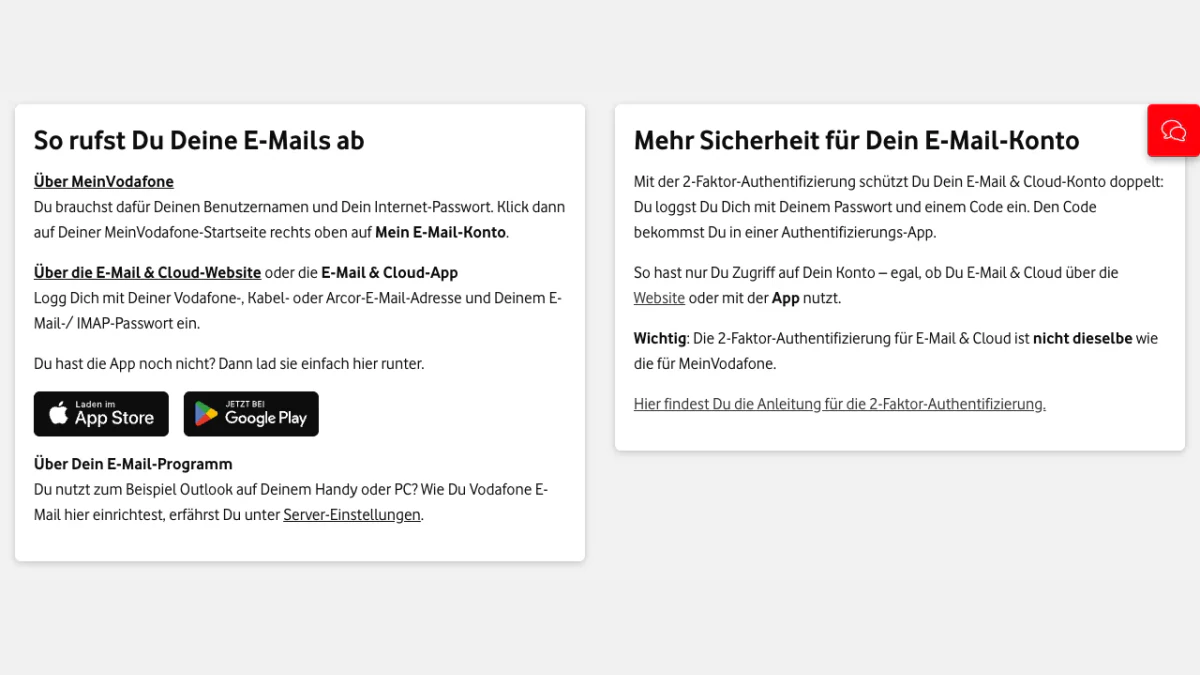
Screenshot: the help tab on how to retrieve mail.
The Second Step
Vodafone offers a two-factor login for mail. It needs an authenticator app, and Vodafone names Google Authenticator and Microsoft Authenticator. To turn it on:
- Click your name at the top right.
- Choose "Einstellungen".
- Choose "Sicherheit" in the left menu.
- Click "Aktivieren" and follow the prompts.
MeinVodafone has separate two-factor protection. If the app stops working, click "Kein Zugriff auf die Authentifizierungs-App" at the code prompt. A new QR code and a secret key follow.
Vodafone Mail Login in the App
The app, Vodafone E-Mail & Cloud, is in Google Play and the App Store. Sign in there as you would on the web. The service text adds that customer data works in the apps too.
Vodafone Mail Server Names
A mail program needs the IMAP data, not the customer data. Vodafone says the settings below fit every account that signs in through its portal.
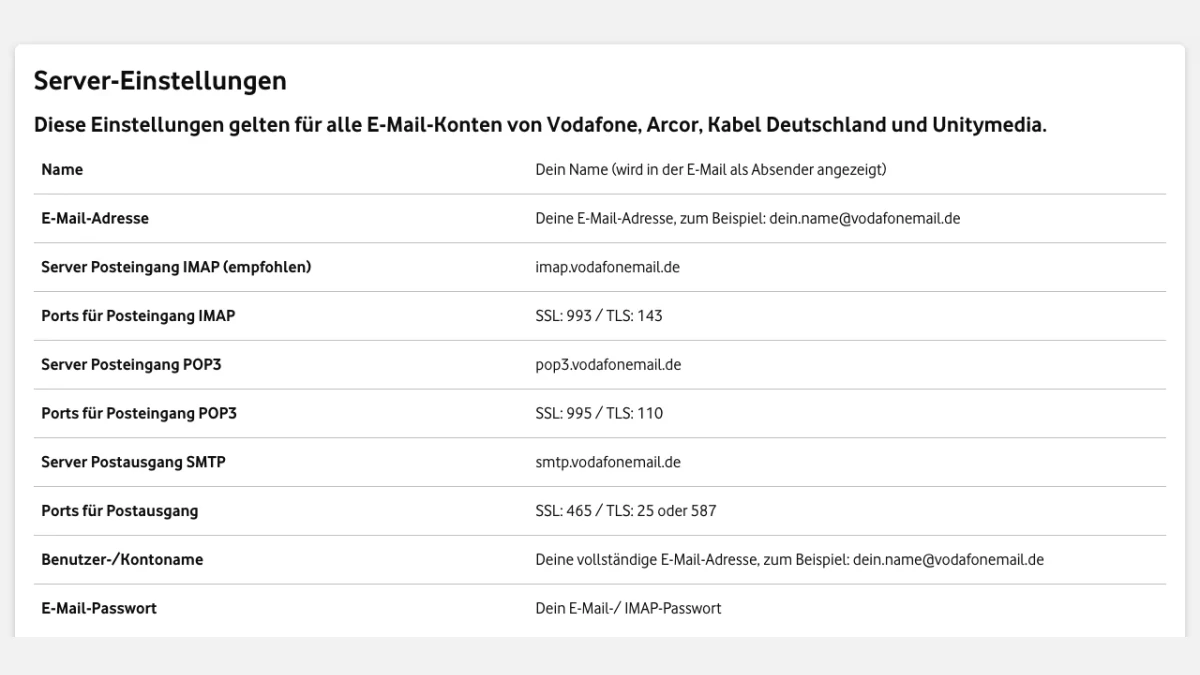
Screenshot: the settings table in Vodafone's help.
| Setting | Value |
|---|---|
| IMAP server (recommended) | imap.vodafonemail.de, port 993 with SSL or 143 with TLS |
| POP3 server | pop3.vodafonemail.de, port 995 with SSL or 110 with TLS |
| SMTP server | smtp.vodafonemail.de, port 465 with SSL, or 25 or 587 with TLS |
| User name | Your full login name |
| Secret | The IMAP password |
TLS encryption became mandatory in October 2024, per the same text. Without it, the mailbox no longer works. Vodafone links setup guides for Thunderbird, Outlook, Windows Mail and Apple Mail.
Forgot the Vodafone Mail Password?
Open mail.vodafone.de, click "Zugangsdaten vergessen" under the Login button and follow the steps.
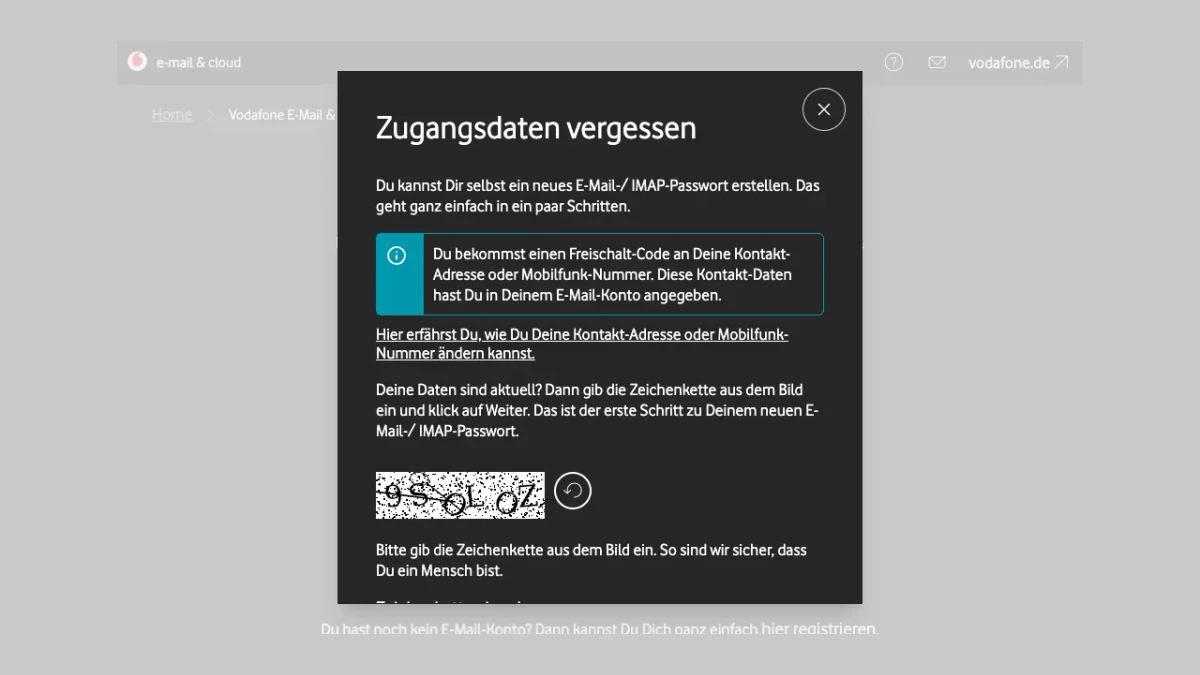
Screenshot: the window behind "Zugangsdaten vergessen".
The window says you can create a new secret yourself. An unlock code goes to the contact address or the mobile number saved in your account, so that data must be current. The first step asks for the characters from an image. Then press Weiter.
Change a Working Password
- Open the menu behind your name.
- Choose "Einstellungen".
- Open "Mein Konto" and then "Passwort".
- Click "Bearbeiten" and save.
The new one applies at once. Vodafone asks for at least 8 characters, with a letter, a number and a special character. It suggests a change about every 3 months.
Sign Up for Vodafone Mail
A new address needs a customer account first. Vodafone's help gives these steps:
- Click the button that sets up a mail account, then sign in to MeinVodafone.
- Enter your first and last name and the name you want before the @.
- Pick a password for the mailbox.
- Accept the terms, press Weiter, check the summary and press Speichern.
- Click "Zur Logout-Seite", log in again and open your mail account from the start screen.
- Enter a German mobile number and a contact address.
- Type the characters from the image and press "SMS-Freischaltcode anfordern".
- Enter the SMS code within 15 minutes and press "Freischaltcode bestätigen".
Your pick becomes the main address, and Vodafone says it cannot be changed later. You can add aliases. Use a contact that differs from the new one, since it helps when you forget the login.
Plans
| Freemail | Premium M | Premium L | |
|---|---|---|---|
| Price | free | €2.99 monthly | €4.99 monthly |
| Mail space | 1.5 GB | 5 GB | 15 GB |
| Cloud space | 3 GB | 10 GB | 25 GB |
| Extra aliases | 9 | 19 | 29 |
| Sent per day | 200 | 2,000 | 2,000 |
| Ads | yes | no | no |
The first month of Premium is free. Over the limit, your data stays safe, but nothing new can be sent or received.
Vodafone Mail Störung: Check the Status Site
Vodafone runs status.vodafonemail.de. On the day we checked, it listed four services: Mailversand/-empfang, Mailabruf, Webseite and the iOS-/Android-App. All four showed Operational. The help text links to it as well.
If it shows green and the login still fails, check these points:
- You did not use the internet password by mistake.
- Your program uses the IMAP data.
- Your storage is under its limit.
- Your authenticator code is current.
Still stuck? Vodafone lists two phone lines. Customers with a mobile or internet contract call 0800 172 1212, free from German networks. Customers with only mail call 0900 512 51 22, on weekdays from 8 am to 5 pm, at 1,99 € a minute from a German landline.
Delete a Vodafone Mail Account
Open MeinVodafone, go to Mein Konto, then Übersicht, then "Vodafone E-Mail löschen". Tick the box and click "Unwiderruflich löschen". Vodafone then removes every address in the account, plus all messages, calendar entries and contacts, for good. Deleting your MeinVodafone account removes the mailbox too.
Emailing Vodafone, Arcor or Kabelmail Users? Verify Before You Send
Not every reader owns an account here. Some of you send to people who do. A list with @vodafonemail.de, @arcor.de and @kabelmail.de entries delivers to one mail system, as the DNS table above shows. Check those entries before a campaign, and check any signup form that collects them.
Vodafone lists 200 sent messages a day for Freemail and 2,000 for Premium. A bulk send from such an account hits that cap fast.
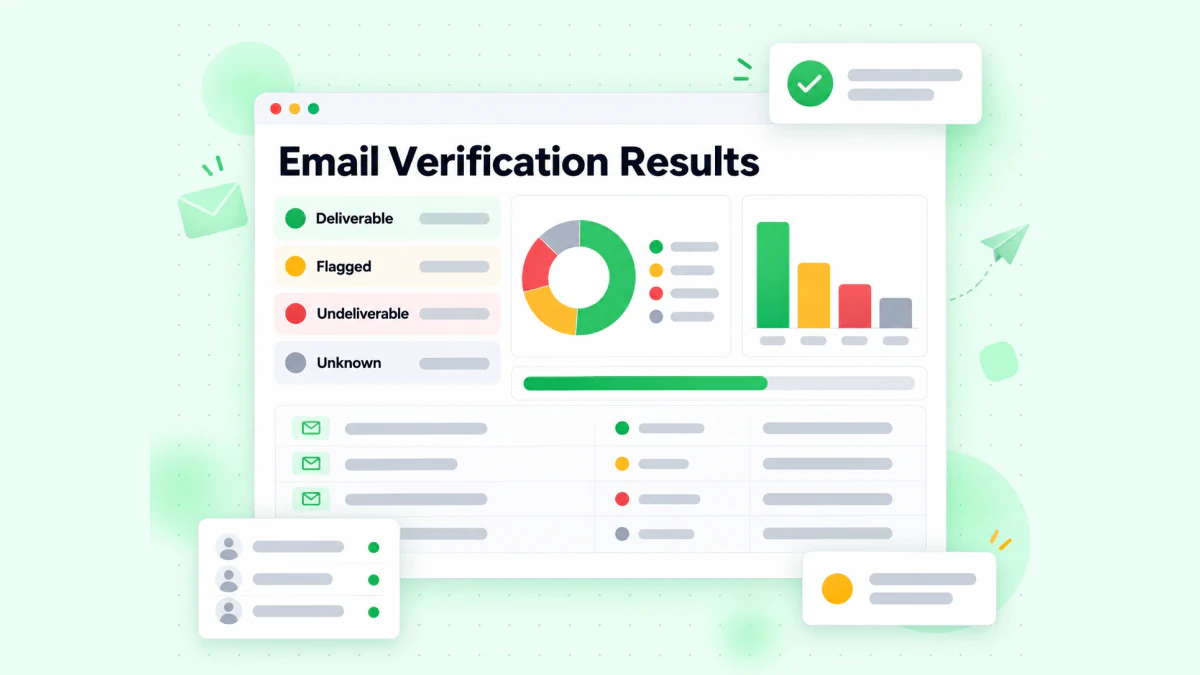
BillionVerify sorts every checked entry into a result group.
BillionVerify's email verifier works on single entries, and bulk email verification works on lists. What to know:
- valid and invalid results cost 1 credit each, and unknown results are free
- a free re-check is available within 24 hours
- catch-all entries get their own label and are not counted as valid
- the free allowance is 20 credits per day of use, up to 600 a month, and credits never expire
- our servers are in France (EU), and a DPA can be signed
- you can use a REST API, an MCP server or one of 25+ integrations
We make no claim about how Vodafone servers answer checks. If your signup form also collects mobile numbers, our phone number checker shows whether a number is valid for its country. For other German providers, see our guides to the GMX login, the Gmail login in Germany and the T-Online mail login.
FAQs
How do I log in to Vodafone Mail?
Vodafone mail login works through the form at mail.vodafone.de. Enter your user name and password, then press Login. MeinVodafone is a second way in.
Does the Arcor mail login still work?
Yes, mail.vodafone.de lists Arcor among its accounts, so the Arcor mail login runs there. The arcor.de site itself forwards to the live portal.
Is kabelmail the same as Vodafone mail?
Kabelmail is served by Vodafone: the kabelmail login is the Vodafone login. Its old web address leads to the Vodafone portal, and a DNS lookup shows that kabelmail.de delivers to the same servers.
Is Vodafone Mail free?
Vodafone Mail is free in the Freemail plan, per its help. Freemail includes 1.5 GB of mail space and 3 GB of cloud space, with ads. Premium M and Premium L are paid plans without ads.
Why can I not log in to my Vodafone account?
A common cause is mixing up the two Vodafone passwords. The mail login takes the IMAP password, while MeinVodafone takes the internet one. A full mailbox, an outdated authenticator code or a program with the wrong data can also block you.
Can I use Vodafone mail in Outlook or Thunderbird?
Yes, Vodafone supports the common mail programs. Enter imap.vodafonemail.de and smtp.vodafonemail.de, with the whole address as user name. Use the IMAP password, not the MeinVodafone one.
Does Vodafone mail need a German phone number?
Yes, Vodafone asks for a mobile number from Germany. The unlock code arrives there by SMS and stays valid for 15 minutes.