


To cancel BeenVerified, log in and open My Account. Under Edit My Account Information, click the cancel button. That is the fastest BeenVerified cancel subscription route. You can also cancel by live chat, web form, email or phone. Joined on a phone? Then Apple or Google handles the cancel.
This guide covers every way to cancel BeenVerified. It explains the $1 trial, refunds and the names that show up on card statements. It also covers one thing many people miss. Cancelling does not remove your own listing from search results. Every step comes from the company's own help pages, checked in October 2026.
We are not affiliated with BeenVerified. BillionVerify is an email verification service. For an overview of the company itself, read our BeenVerified guide.
Key facts (checked October 2026):
- BeenVerified lists five ways to cancel a membership: My Account, live chat, the contact form, email to support@beenverified.com and a phone call.
- The BeenVerified 7-day trial costs $1 and then renews at $32.89 per month, according to the offers page.
- BeenVerified phone staff answer on weekdays, while written support runs around the clock.
- An app store subscription to BeenVerified must be ended in the phone's store settings, because removing the app leaves billing active.
- BeenVerified reviews each refund request on its own merits, and a bank may need up to ten days to show the credit.
- Ending a BeenVerified membership leaves your own public listing in place; removal requires a separate opt-out request.
How to Cancel BeenVerified: The Quick Answer
There are five ways to cancel BeenVerified. Pick the one that fits. The BeenVerified cancel subscription online routes are usually quickest:
| Method | What to do | Best when |
|---|---|---|
| Your account | My Account, then the cancel button | You can log in |
| Live chat | Click "Chat With Us Live" | You want a written record |
| Web form | Pick the "Cancel Account" topic | You can't log in |
| Support inbox | Email support@beenverified.com | You prefer writing |
| Phone | Call the toll-free line | You want a person |
Each route lets you cancel BeenVerified account renewals. None of them deletes data. The company calls this "hassle-free online cancellation in many easy ways." Its own tip is short: "For best results, login to your account."
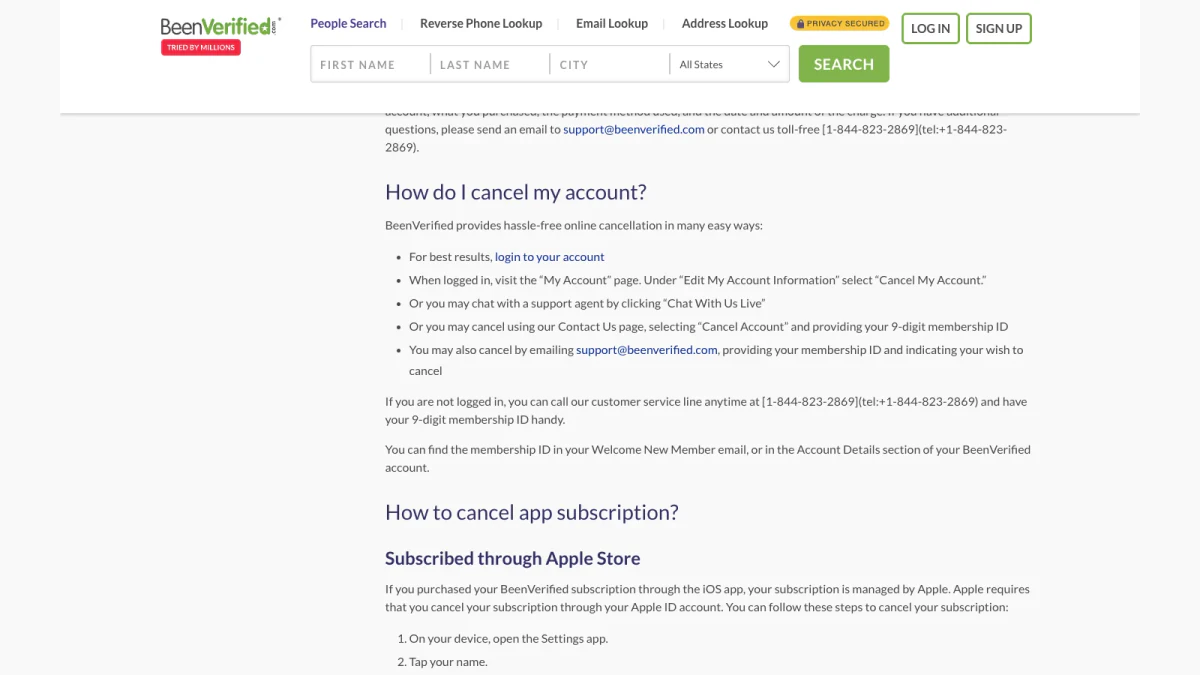
Screenshot: "How do I cancel my account?" in the billing help section.
Before You Cancel BeenVerified
A few facts help you cancel BeenVerified without surprises.
Your plan renews until you cancel
Memberships renew on their own. The Billing and Cancellation FAQ says your membership "will be automatically renewed to the same term until you cancel." A monthly plan renews monthly. A 3-month plan renews every three months.
You keep access until the term ends
A BeenVerified cancel subscription request stops the next renewal. It does not cut you off today. The FAQ promises "you'll enjoy remaining reports for the remainder of your paid term." After that, the plan simply ends.
You can come back later
The old account stays on file. You can "log into your cancelled account to reactivate your subscription." Past reports return when you reactivate.
Find your membership ID first
Some routes ask for a 9-digit membership ID. It sits "in your Welcome New Member email, or in the Account Details section" of your profile. Search your inbox for that welcome message before you start.
Save what you need
Want to keep a report? Open it and save a copy before the term ends. After that, you need an active plan to view old reports.
BeenVerified Cancel Subscription Online
Most people finish a BeenVerified cancel subscription online in a few minutes. There are four web routes. Each one ends your renewals.
Cancel in your account
This is the route the company recommends. It is the simplest way to stop future charges. Readers often ask, "How do I cancel my BeenVerified subscription online?" Follow these steps:
- Log in at beenverified.com.
- Open the My Account page from the menu or dashboard.
- Look under the account settings.
- Click Cancel My Account.
- Follow the prompts until you see a confirmation.
Take a screenshot of the confirmation. Keep it until your next billing date passes with no charge.
Cancel by live chat
You can also message a support agent. The contact page says chat is "available 24 hours a day through our AI assistant." Ask the agent to cancel BeenVerified subscription access at the end of the term. A chat is a BeenVerified cancel subscription online route with a written trail. Save the transcript if you can.
Cancel with the web form
The BeenVerified contact form has a topic menu. Choose "Cancel Account." Then add your name, email and member ID. The ID field says optional, yet the help page asks for it when you cancel. Add a short note, such as "Please end my membership."
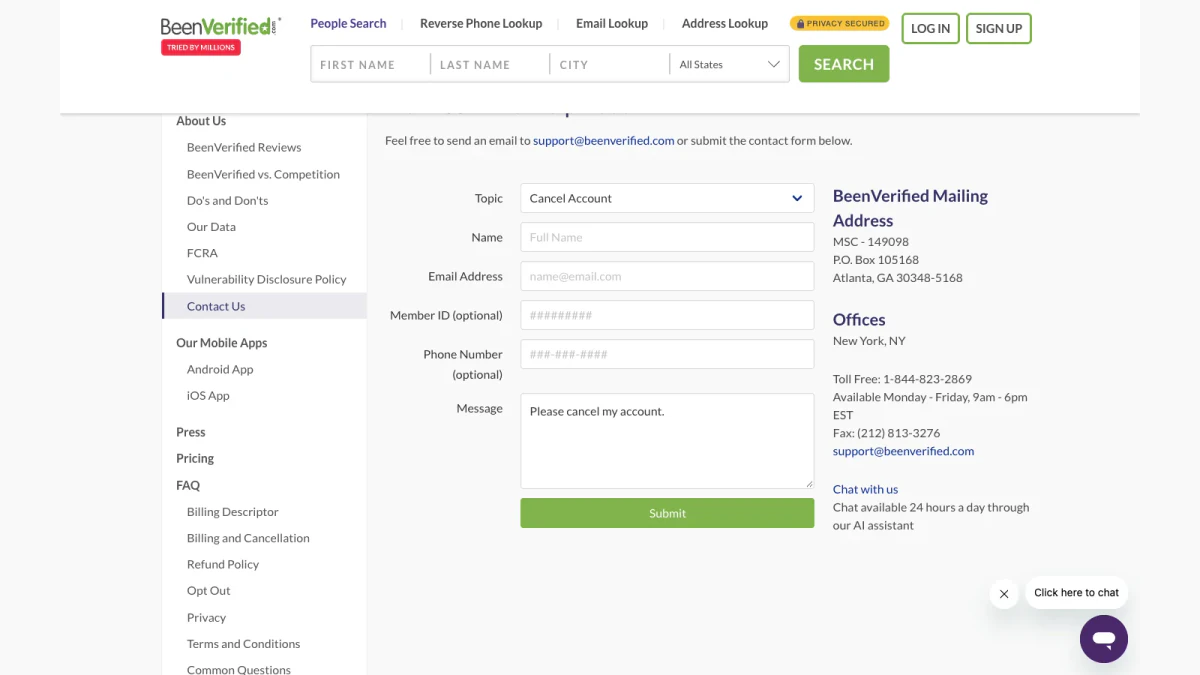
Screenshot: the contact form with "Cancel Account" selected.
Cancel by email
Write to support@beenverified.com. Include your membership ID. State clearly that this is a cancel request. Send it from the address you signed up with. That helps the team match your request fast.
A checklist for any online route
- Cancel BeenVerified subscription renewals before the billing date.
- Save the confirmation or a screenshot.
- Check your next statement.
- Check the store on your phone if you ever subscribed there.
BeenVerified Cancel Subscription Phone Number
Not logged in? The FAQ says "you can call our customer service line anytime." The number is 1-844-823-2869. Keep your member ID handy. A call suits people who would rather skip the BeenVerified cancel subscription online tools.
Phone staff work Monday to Friday, 9 AM to 6 PM EST. Written support, the site says, is open "24/7/365." So call on a weekday. On weekends, write or chat instead.
Ask the agent for a written confirmation. Then make sure it reaches your inbox.
Cancel BeenVerified Subscription Bought in the App
This is where many people get stuck. A plan bought in the mobile version is billed by the store. BeenVerified cannot stop that billing for you.
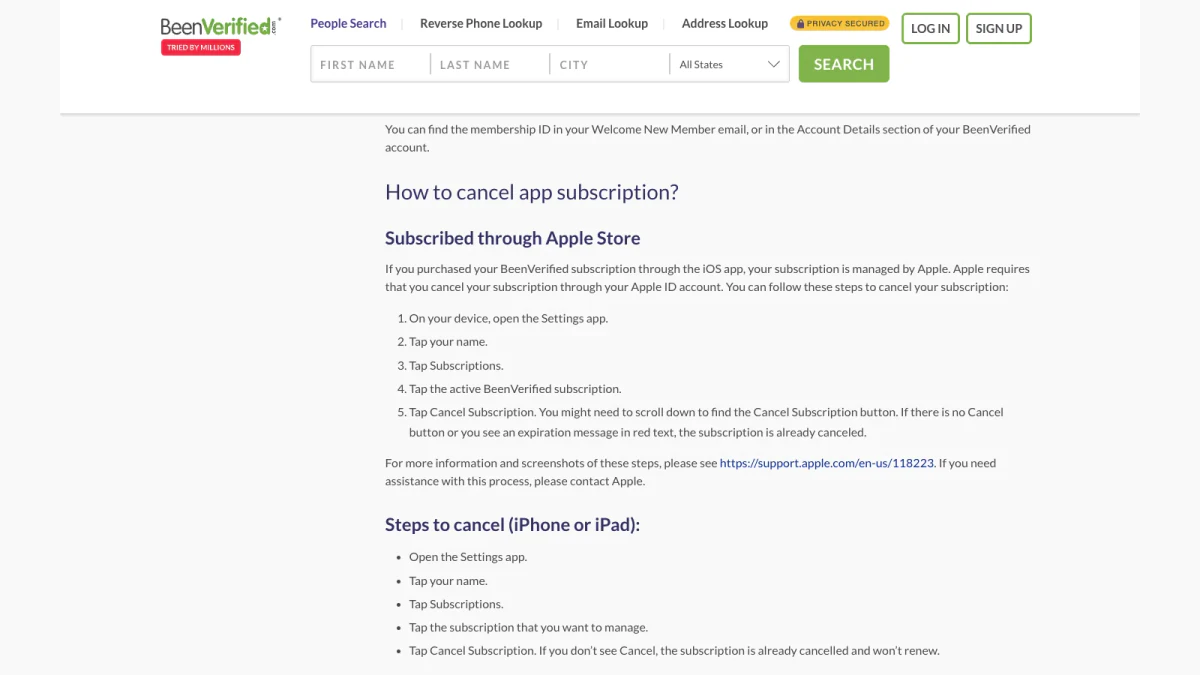
Screenshot: app subscription steps from the billing help section.
On iPhone or iPad
The help page says "your subscription is managed by Apple." To cancel BeenVerified subscription charges on Apple devices:
- Open the Settings app.
- Tap your name.
- Tap Subscriptions.
- Tap the active BeenVerified plan.
- Tap Cancel Subscription.
You may need to scroll to find the button. No button, or an expiry date in red, means it is already cancelled. Apple's own guide to cancelling a subscription shows the same steps with pictures.
On Android
For Google Play, the steps are:
- Open your subscriptions in Google Play.
- Select the BeenVerified plan.
- Tap Cancel subscription.
- Follow the instructions.
Google explains how to cancel a subscription on Google Play shows the same flow.
Deleting the app does not cancel anything
The FAQ warns that "uninstalling the app will not automatically stop the subscription." Cancel first. Delete the app afterwards if you like.
BeenVerified Cancel Free Trial
Many people search for the BeenVerified free trial. The offers page lists a "7-Day Trial for Only $1." The same page says the price after the trial is "$32.89/month."
So the BeenVerified free trial is not free. It also does not end on its own. It turns into a monthly plan unless you cancel. The BeenVerified cancel free trial steps are the same as for any plan. Just finish them before day 7. The BeenVerified cancel free trial deadline is the end of day 7, so aim for day 5.
A simple trial timeline
- Day 1: sign up and run your searches.
- Day 1: set a phone reminder for day 5.
- Day 5: cancel in My Account.
- Day 5: save the confirmation.
This BeenVerified free trial cancel subscription routine keeps you clear of the first monthly charge. Many readers search for "BeenVerified free trial cancel subscription" after the charge has already landed. A reminder means you never need to.
Why trials catch people out
Trials renew quietly. People sign up for one search, then forget. In public replies on Trustpilot, the company often points to a $1 trial that renewed into a monthly plan. A day-5 reminder avoids that.
Can you cancel the trial on day one?
Yes. The trial can end any time during the 7 days. Under the general renewal rule, you keep access until the paid period ends.
Missed the Trial Deadline?
The trial is a normal membership with a lower first price. There is no separate cancel page for the trial. Use the same routes as any member: My Account, chat, the contact form, written support or phone.
If you miss day 7, the first monthly charge posts. Cancel BeenVerified right away to stop the next one. Then ask for a refund. Support reviews each case, so explain that you meant to end the trial before it renewed. Keep the confirmation email from your cancel request. It is your proof of the date.
What the trial includes, what it costs and whether any part of BeenVerified is free are covered in our guide: is BeenVerified free?.
BeenVerified Cancel Subscription Online or by Phone?
Both routes work. They suit different people.
| Route | Speed | Proof you get |
|---|---|---|
| BeenVerified cancel subscription online, in My Account | Fastest | On-screen confirmation |
| Chat | Fast | A transcript |
| Web form | A day or two | A reply from support |
| Phone | Weekdays only | Ask for a written note |
Pick online when you can log in. Pick the web form when you can't. Pick the phone when you want to talk it through. Whichever you choose, act before the renewal date.
Cancel BeenVerified Account or Delete It?
Cancelling and deleting are not the same.
When you stop billing, the profile stays. You can log back in and reactivate later. Report history stays too.
The billing FAQ does not describe a separate delete button. If you want your member profile removed, ask in writing. Write through the web form. Request both a cancellation and deletion of the profile. Include your member ID.
Keep in mind: deleting your member profile does not remove you from search results. That is a separate process, covered below.
BeenVerified Cancel Subscription Refund
Cancelling stops future charges. It does not refund past ones. For that, you send a refund request.
The BeenVerified cancel subscription refund policy is on its refund policy page. It says: "If you are unhappy with our service or the data we provided and would like to request a refund, please email us." Requests are handled "on a case-by-case basis."
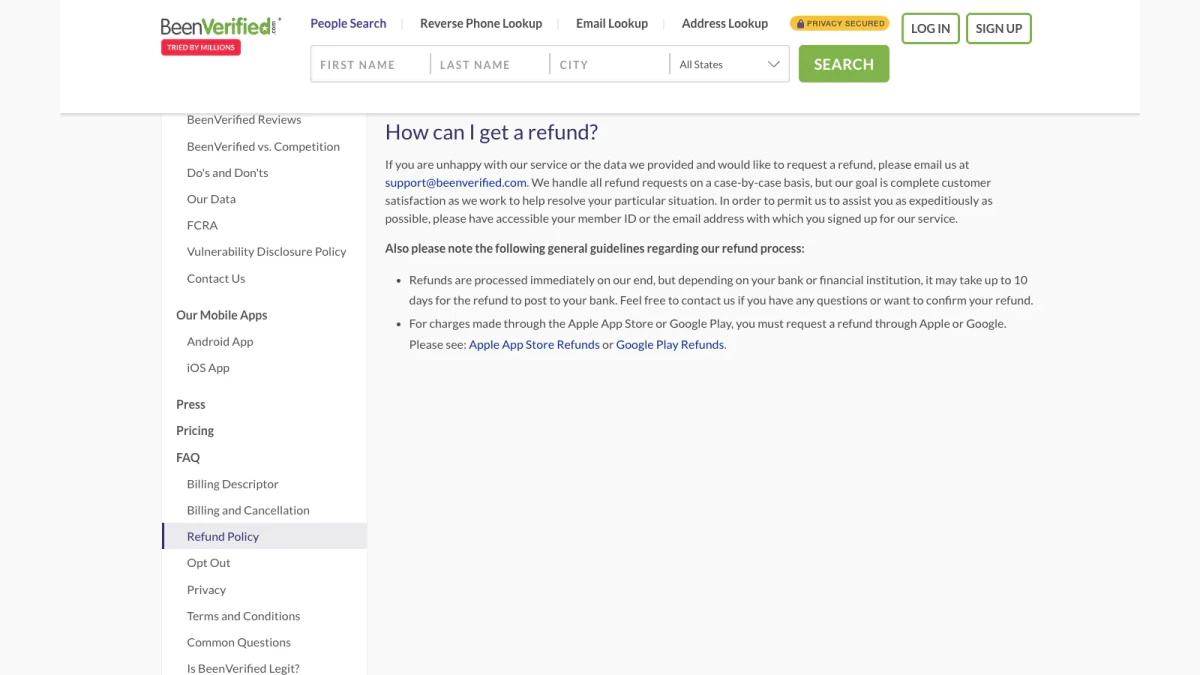
Screenshot: "How can I get a refund?" on the refund policy page.
How to ask for a refund
- Email the support inbox.
- Include your member ID or signup address.
- Name the charge, with its date and amount.
- Explain why in one or two sentences.
How long a refund takes
Refunds "are processed immediately on our end," the page says. Your bank may take "up to 10 days" to post the money.
Refunds for app purchases
App plans follow other rules. The page says: "For charges made through the Apple App Store or Google Play, you must request a refund through Apple or Google." So the refund rule splits in two. Web charges go to BeenVerified. App charges go to the app store.
How to Stop Marketing Messages
Unsubscribing and cancelling are two different actions. An unsubscribe link stops marketing messages. It does not stop billing.
Do it in this order:
- Cancel the membership.
- Wait for the confirmation.
- Then unsubscribe from promotions you no longer want.
Keep account and billing messages until your term ends. They prove what happened.
Cancelling Doesn't Remove Your Own Record
This surprises a lot of people. A membership covers the searches you run. Your own listing is the data others can find about you.
To cancel BeenVerified does nothing to that listing. To hide it, use the opt-out page at beenverified.com/app/optout/search. It is a separate request with its own email confirmation.
Still Seeing a Charge After You Cancel?
First, check the name on the charge. The billing descriptor page lists these names:
- BVD*BeenVerified.com
- BVC*BeenVerified.com
- BV*BeenVerified.com
- BEENVERIFIED INC.
- BeenVerified.com
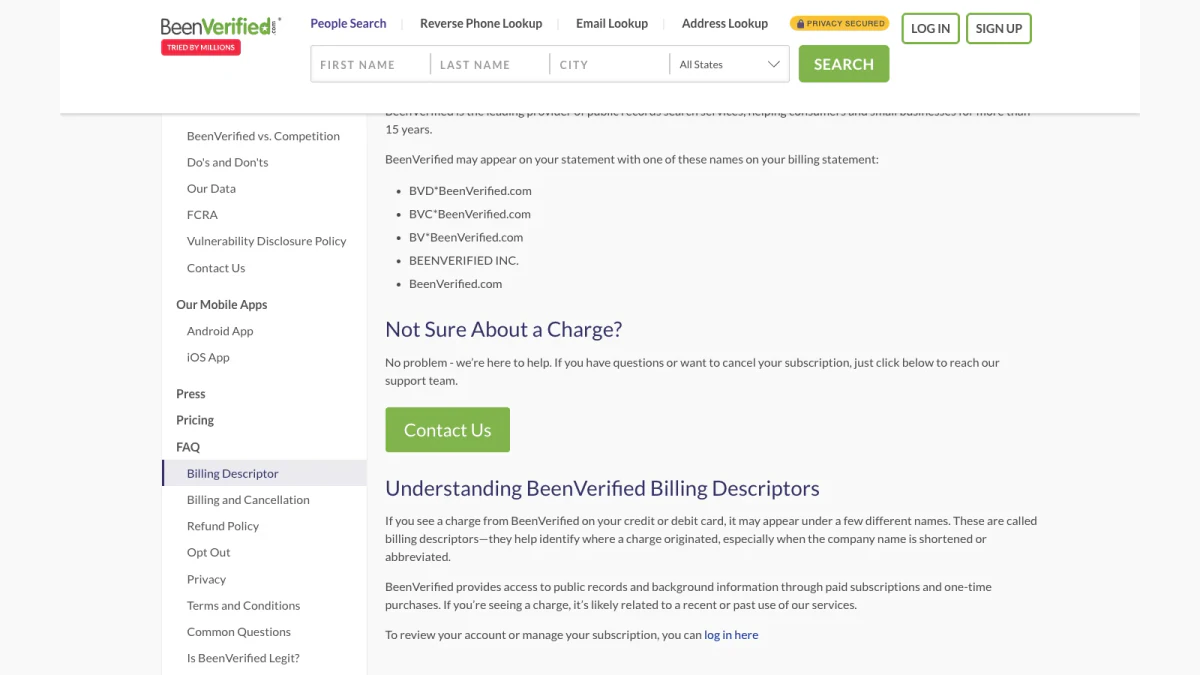
Screenshot: the billing descriptor list.
Common reasons for a charge
- The term already renewed. A renewal can land just before you cancel.
- A pending authorization. A failed signup can leave a hold that "will automatically drop off of your statement within a few business days."
- Someone else signed up. The FAQ notes that "usually, someone who is associated with you placed this order."
- A phone plan is still active. The store may still bill you.
Check your order history
Log in, open My Account and click "show order history." It lists every charge, with the date, amount and payment method.
Removing a card is not cancelling
The billing FAQ lists Visa, MasterCard, Discover, American Express, PayPal, Google Pay, Apple Pay and Venmo. Removing a card or unlinking PayPal does not end the plan. End the plan first. Then update payment details if you like.
Watch for fake billing messages
Scammers copy well-known brands. A message about a charge may not come from BeenVerified at all. Check the sender before you click any link. Our free reverse email lookup reads the domain, mail routing and public profiles behind an address, using public signals only. Got a call instead? Our phone number validator shows whether a number is valid for its country and what line type it is. When in doubt, contact BeenVerified through its own site.
Common Cancellation Problems
You can't log in
Use another route. You can still cancel by phone. The contact form and written support also work without a login. Our guide to BeenVerified login problems explains the four sign-in options and why accounts seem to vanish.
You signed up with a different email
Many "account not found" replies trace back to another address or sign-in method. Check every inbox you use. Search for the welcome message. If you signed in with Apple or Google, your account may sit under that login.
You lost your membership ID
Look for the welcome message. If you can log in, check Account Details. If neither works, give support your name and signup email.
The cancel button is missing in the app
That usually means the app store bills you. Cancel in Settings or Google Play, as shown above.
You cancelled but still got a message
Account messages can arrive after you cancel. Read them. A confirmation or receipt is normal. A new charge is not, so contact support.
Is It Hard to Cancel BeenVerified?
Usually not. The company offers five routes, and two of them work without a login. Trouble tends to come from three places:
- A phone plan. Only the store that bills you can stop it.
- A forgotten signup address. Support then can't find your BeenVerified account.
- A missed trial date. The $1 trial renews into a monthly plan.
Fix those three, and you can close the account in one sitting. Most people finish in under ten minutes.
Cancel BeenVerified Account Access for Someone Else
Sometimes the plan belongs to a relative. As noted above, a charge often traces back to family. If a relative signed up, ask them to cancel it themselves. They know the login and signup address.
If that is not possible, contact support with the card details and the charge date. Support can then find the right member and stop the renewals on that profile. Cancelling for a parent? Gather the signup address, the last four card digits and a recent charge date first. With those, support can find the account faster.
What Happens After You Cancel
Here is what to expect once you cancel BeenVerified:
- Right away: a confirmation on screen or by email.
- Until the term ends: full access to remaining reports.
- On the renewal date: no new charge.
- Later: the option to log in and reactivate.
If a charge appears on the renewal date anyway, contact support with your confirmation.
Pay Per Use Instead of a Subscription
Many people only need a search once. A recurring plan suits heavy users better. If you need email checks only now and then, look for pay-per-use pricing.
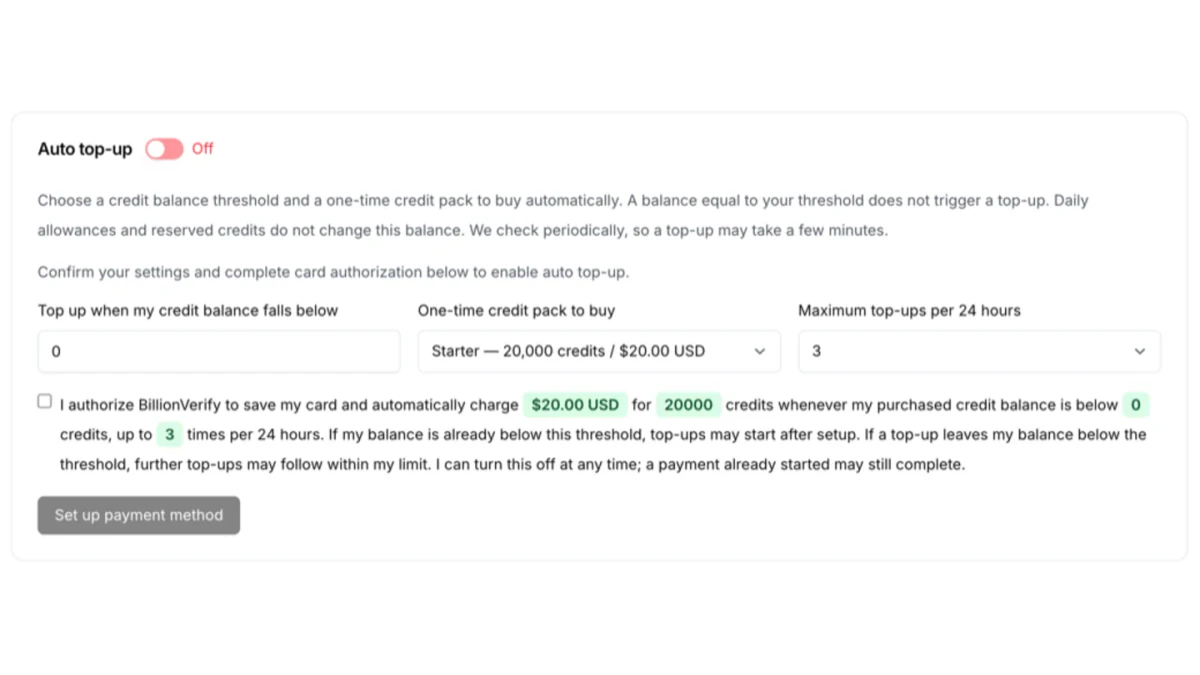
BillionVerify sells one-time credit packs. Auto top-up stays off unless you turn it on.
BillionVerify works that way for email verification. You get 20 free credits every day you use your account, up to 600 a month. Credits never expire, and no credit card is needed to start. A valid or invalid result uses one credit. Unknown results are free. Re-checks within 24 hours are free too. See BillionVerify pricing for one-time packs and plans.
FAQs
How do I cancel my BeenVerified subscription?
You cancel a BeenVerified subscription in My Account: sign in and press Cancel My Account. Chat, the contact page and phone also work.
How do I cancel my BeenVerified subscription online?
A BeenVerified subscription can be cancelled online through My Account, chat or the contact page. All three work in a browser. People also ask, "Can I cancel my BeenVerified account online?" Yes, with the same three routes.
What is the BeenVerified cancel subscription phone number?
The BeenVerified support line is (844) 823-2869, staffed on weekdays. Have your member ID ready.
How do I end the $1 trial?
To end the BeenVerified $1 trial, cancel before day 7 using any route above. After that, the monthly price applies.
Can I cancel my BeenVerified account online without logging in?
Yes, you can close a BeenVerified account without logging in by sending the contact page form or writing to support.
What is the BeenVerified cancel subscription refund policy?
The BeenVerified cancel subscription refund policy is case by case. Web charges go through support. Phone store charges go through Apple or Google.
Will I get a BeenVerified cancel subscription refund?
No, BeenVerified does not refund automatically. Ask support for a BeenVerified cancel subscription refund. Each request is reviewed case by case.
What is the refund rule for app purchases?
The phone's app store handles refunds for BeenVerified app purchases, so ask the store that charged you. BeenVerified cannot refund those.
Does deleting the app stop a BeenVerified subscription?
No, deleting the BeenVerified app leaves the subscription running. End it with the store that bills you.
Can I cancel BeenVerified account access by phone?
Yes, BeenVerified phone support can end your plan on a weekday if you give your member ID. Phone staff can cancel BeenVerified account renewals for you.
Can I cancel BeenVerified subscription access mid-term?
Yes, you can cancel BeenVerified subscription renewals at any point in the term. Access continues through the term you already paid for.
Can I still use BeenVerified after I cancel?
Yes, BeenVerified access lasts until the paid term ends. After that, you can reactivate by logging into your cancelled account.
Does cancelling remove my information from BeenVerified?
No, cancelling ends your BeenVerified membership only. To remove your own listing, submit a separate opt-out request.
What does BVC BeenVerified mean on my statement?
BVCBeenVerified.com is one of the billing names BeenVerified lists for card statements. Others include BVDBeenVerified.com, BV*BeenVerified.com and BEENVERIFIED INC.