

Mailchimp pricing starts at $0. The Free level costs nothing for up to 250 contacts, and the three paid plans start at $13 for Essentials, $20 for Standard and $350 for Premium each month. Those are starting prices for the smallest list. The cost of Mailchimp for a real list depends on how many contacts you store, so a plan that costs $20 for 500 contacts costs $230 once the list passes 10,000.
This guide walks through every plan the way Mailchimp lists it, then shows the Mailchimp price at each contact tier, how contacts are counted, what changes when a limit is passed, and which add-ons are billed separately. All figures come from Mailchimp's own site, read in November 2026. They are in US dollars, quoted per month and before tax. We have no connection with Mailchimp or Intuit, and BillionVerify is an email verification service.
Key facts (checked November 2026):
- The Mailchimp pricing lists four plans: Free at $0, Essentials from $13, Standard from $20 and Premium from $350 a month.
- The Free plan allows 250 contacts and 500 sends each month, with a daily limit of 250, according to the Mailchimp help center.
- A two-week trial applies to Standard and Essentials, and it asks for valid payment information at enrollment.
- Subscribed, unsubscribed and non-subscribed contacts all add to the contact total, while cleaned, archived and deleted contacts do not, per the Mailchimp help article about contacts.
- Mailchimp Transactional starts at $20 for each block of 25,000 emails, and Essentials is not eligible for it.
- BillionVerify can check an address list before it reaches Mailchimp, with 20 free credits per active day, so fewer dead addresses count toward the tier.
How Mailchimp Pricing Works
Two choices set the cost of Mailchimp: the plan and the contact tier. The plan decides which features you get. The tier decides how many contacts you can store and how many emails you can send in a month. The help center puts it in one line: your plan type plus your pricing tier determines the amount of your monthly bill.
The tier is picked with a contacts selector that runs from 0-500 up to 1,000,000+. Each step up raises the price, and each plan stops at a ceiling shown in the table below. Above that, Mailchimp asks you to contact sales for a custom plan.
Send limits follow the same pattern. Each paid option caps monthly sends at a multiple of the list size, and every Mailchimp email sent to one contact counts as one send. Test emails and transactional emails count too. The page also shows a currency menu, so the same plan can be quoted in euros, pounds and a dozen other currencies. The help center adds that taxes are extra.
Mailchimp Pricing at a Glance
The table shows the entry point of Mailchimp pricing for each plan. The starting price is the figure for the smallest tier, and the contact ceiling is the largest list the plan can hold before sales has to build a custom plan.
| Plan | Starting price | Contact ceiling | Monthly sends | Audiences and seats |
|---|---|---|---|---|
| Free | $0 | 250 | 500, up to 250 a day | 1 audience, 1 seat |
| Essentials | $13 | 50,000 | 10x contacts | 3 audiences, 3 seats |
| Standard | $20 | 100,000 | 12x contacts | 5 audiences, 5 seats |
| Premium | $350 | 200,000 | 15x contacts | Unlimited audiences and seats |
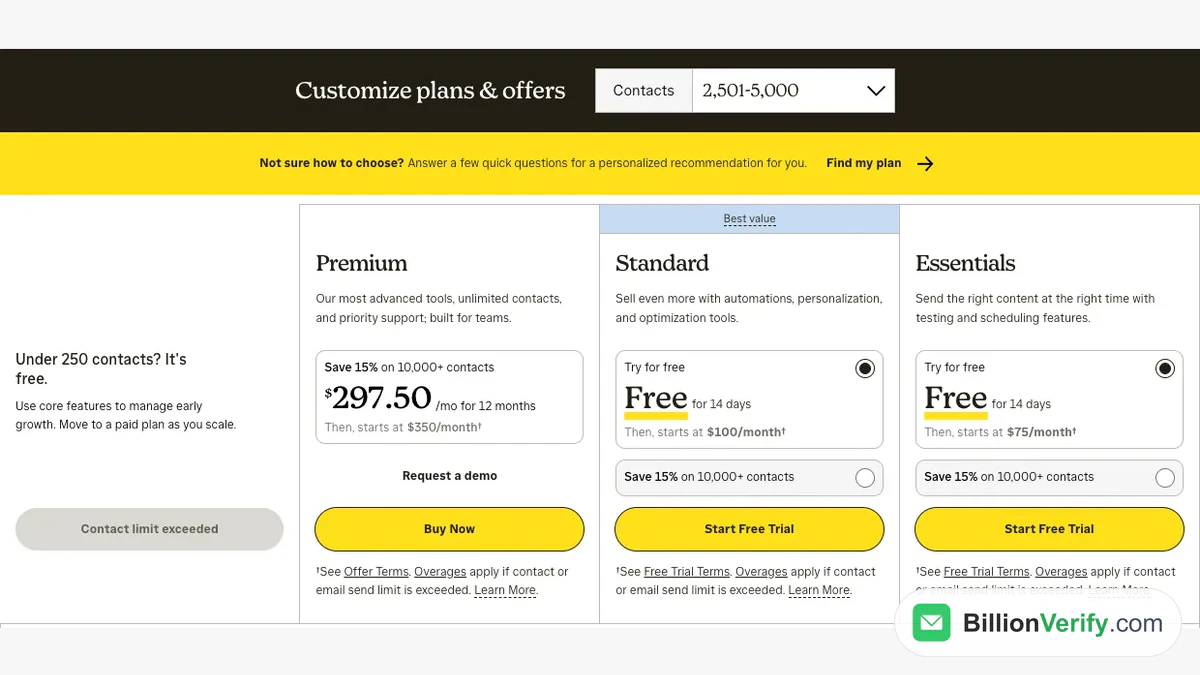
Screenshot: the three paid cards at the 2,501 to 5,000 tier, with the free level summarized on the left.
Mailchimp Free Plan
The Free plan is meant for beginners. It holds up to 250 contacts and sends up to 500 emails each month, capped at 250 on any single day. It includes one audience, one seat with Owner permissions, a limited set of templates, basic reporting, and tools such as landing pages and forms. The pricing table adds that Free accounts get email support for the first 30 days, no email scheduling and no way to remove Mailchimp branding.
When the contact total passes 250, Mailchimp places a hold on live and test sends. You can still work on emails and templates and keep collecting or importing contacts, but nothing goes out until you upgrade or trim the list. The Free card states it plainly: sending is paused if a contact or send limit is exceeded. Our guide to what is Mailchimp covers the free level in the context of the whole product.
Mailchimp Price of the Essentials Plan
Essentials is the cheapest paid plan, and the Mailchimp cost starts at $13 for up to 500 contacts. It is aimed at frequent senders who want more sending power and support. It adds three audiences, three seats with two roles, scheduled emails, A/B testing, all templates and 24/7 email and chat support. Branding on templates, reporting and dynamic content stay with the upper plans. Automations are capped at four steps per flow. Custom-coded templates can be created on Essentials but not sent before an upgrade, and generative AI features are not included.
Mailchimp Price of the Standard Plan
Standard starts at $20 and is the plan Mailchimp labels best value. Monthly sends are capped at 12x the list size. The plan raises automation to flows of up to 200 steps, adds custom-coded templates that can be created and sent, branded templates, custom reports, dynamic content and a no-cost generative AI add-on. It allows five seats with four roles and includes one personalized onboarding session. It also supports the MMS add-on in the US and Canada.
Mailchimp Price of the Premium Plan
The Mailchimp cost of Premium starts at $350 because its smallest tier is already 10,000 contacts. Sends are capped at 15x the list size, and seats and audiences are unlimited with five roles. Premium adds Enterprise SSO, phone and priority support, four onboarding sessions and a dedicated onboarding specialist. Migration services are available through sales for eligible new accounts.
Mailchimp Price by Contact Tier
The starting prices above are only the first row of a longer table. The next table lists the monthly cost of Mailchimp at every tier, as the site showed it in November 2026. A dash means the plan cannot hold that many contacts. Premium reads $350 for every tier below its minimum size.
| Contacts | Essentials | Standard | Premium |
|---|---|---|---|
| 0-500 | $13 | $20 | $350 |
| 501-1,500 | $26.50 | $45 | $350 |
| 1,501-2,500 | $45 | $60 | $350 |
| 2,501-5,000 | $75 | $100 | $350 |
| 5,001-10,000 | $110 | $135 | $350 |
| 10,001-15,000 | $180 | $230 | $465 |
| 15,001-20,000 | $230 | $285 | $535 |
| 20,001-25,000 | $270 | $310 | $620 |
| 25,001-30,000 | $300 | $340 | $685 |
| 30,001-40,000 | $340 | $410 | $750 |
| 40,001-50,000 | $385 | $450 | $815 |
| 50,001-75,000 | - | $630 | $900 |
| 75,001-100,000 | - | $800 | $1,025 |
| 100,001-130,000 | - | - | $1,150 |
| 130,001-150,000 | - | - | $1,325 |
| 150,001-200,000 | - | - | $1,600 |
Above the Premium ceiling, Mailchimp shows a Talk to Sales button instead of a price. Its FAQ says Mailchimp has a high-volume plan for lists of that size, and annual billing for the upper plans is arranged through sales for lists above 10,000.
Two patterns stand out in Mailchimp pricing. The gap between plans is small on a small list, with Standard $7 above Essentials at 500 contacts, and it widens as the list grows, to $70 for 30,001 to 40,000 contacts and $65 for 40,001 to 50,000. The second pattern is the send limit. Because it is a multiple of the top of each tier, a Standard account at 5,000 contacts can send up to 60,000 emails a month.
What Each Plan Adds
The Mailchimp price is only half of the comparison, since features change from plan to plan. The key plan table groups them into four blocks: key features, admin, services and support, and email marketing and segmentation. The headline differences are below.
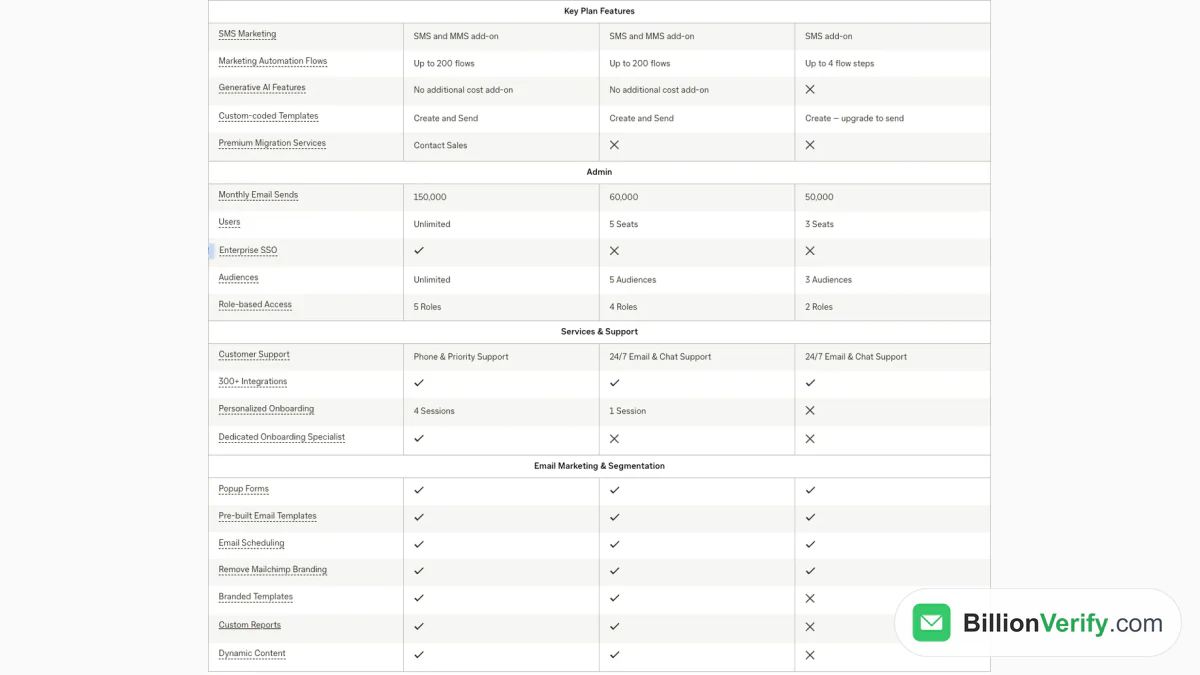
Screenshot: the Key Plan Features table, which lists limits and inclusions for each paid option.
- Automations: Essentials runs flows of up to four steps, while the two upper plans allow up to 200 steps, a limit its pricing table words as 200 flows. Mailchimp renamed its Customer Journey Builder to Marketing Automation Flows in June 2025.
- Generative AI features: not included on Essentials, and a no-additional-cost add-on above it. Mailchimp's disclaimers describe them as a beta in English only for certain users.
- Dynamic content, branded templates and custom reports: included from Standard up, not on Essentials.
- Roles and seats: two roles and three seats on Essentials, four roles and five seats on Standard, five roles and unlimited seats on Premium.
- Support and onboarding: every paid account has round-the-clock chat and email help. Standard adds one onboarding session, and Premium adds priority phone support, four sessions plus a named specialist.
- Included on every plan: 300+ integrations, popup forms, pre-built templates, scheduling and Mailchimp branding removal. The free level has limited templates and neither scheduling nor branding removal.
Mailchimp Free Trial, 15% Offer and Discounts
Mailchimp runs a few offers on top of its list prices, and each one has terms that change the Mailchimp cost in the first year.
The 14-Day Free Trial
Standard and Essentials each come with a two-week trial. The terms say the first fourteen days cost nothing, valid payment information must be provided at enrollment, and the offer is for new customers or Free accounts created in the last 90 days. It is limited to one per account and does not cover add-on fees such as transactional email, SMS and prepaid credits. If you cancel during the trial you are not charged. At the end of it you pay the then-current rate for the tier you chose, so Mailchimp will also send billing reminders before the trial ends.
The Mailchimp pricing FAQ adds that if your audience grows during the trial, Mailchimp may move you to a more economical contact tier when billing begins. A qualified new customer can also ask sales for a one-month Premium trial.
The 15% Offer for Larger Lists
Businesses with a list of at least 10,000 can cut the cost of Mailchimp by 15 percent for their first 12 months, and the discount stays if you switch between Standard, Essentials and Premium. On the page it shows up as a second price option on each card. In the first tier above that threshold, Standard falls from $230 to $195.50, Essentials from $180 to $153 and Premium from $465 to $395.25 for twelve months. The offer appears from the tier that tops out at that size and up, and Premium shows it at every tier. After the first year the list price applies.
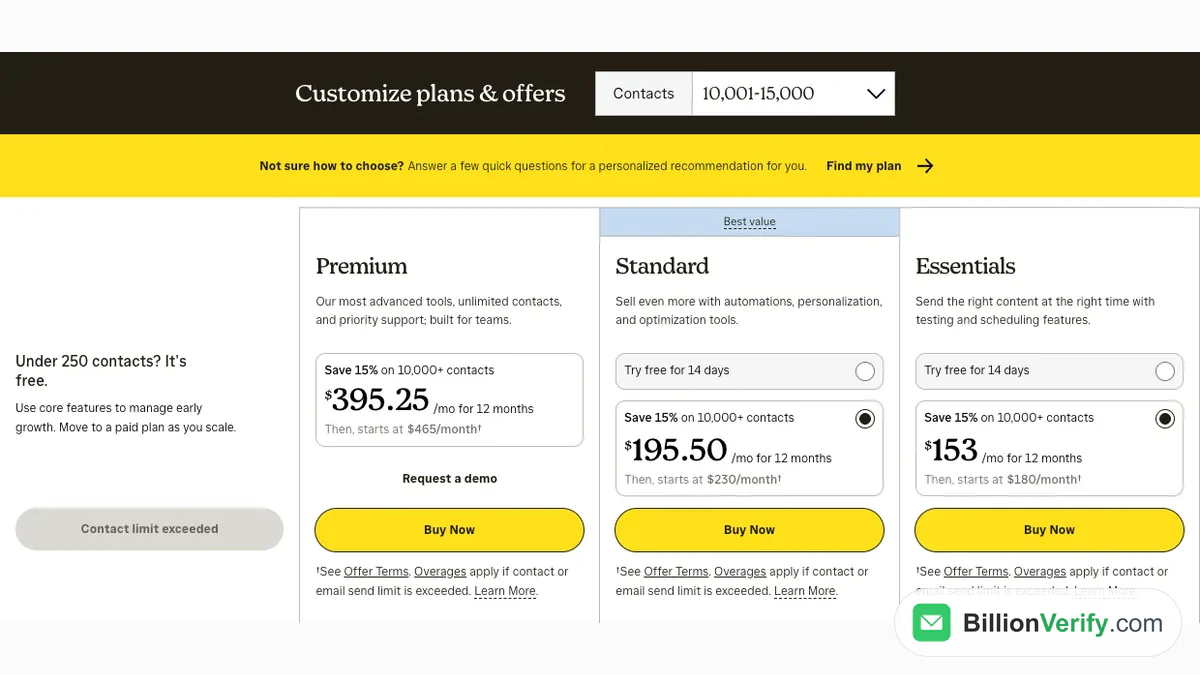
Screenshot: the plan cards in the first tier above the threshold, each showing the 12-month offer price above the list price.
Nonprofit and Charity Discount
Mailchimp offers a 15 percent discount to nonprofits and charities. To get it you sign up for a free account and contact the billing team with your username and a link to the organization's website.
Legacy Plans
Accounts that started a paid plan before May 15, 2019 may be on a legacy plan with different contact-limit rules. Mailchimp keeps a separate help article for them, and this guide covers only the current plans.
How Mailchimp Counts Contacts
The number that places you in a tier is the contact total, which Mailchimp defines as the contacts stored across all your audiences. Mailchimp's help article on contacts sorts them by marketing status, and only some statuses count.
| Contact status | Counts toward the limit? | What it means |
|---|---|---|
| Subscribed | Yes | Someone who opted in to your marketing content |
| Unsubscribed | Yes | Someone who opted out, still stored in your audience |
| Non-subscribed | Yes | Someone who interacted with you without opting in, such as a store customer |
| Cleaned | No | A hard bounce or repeated soft bounce with a non-deliverable address |
| Pending | No | A signup that has not confirmed its opt-in, deleted after 60 days |
| Archived | No | Removed from the audience but kept in a separate table |
| Deleted | No | Permanently removed, which cannot be undone |
The table has a consequence for anyone watching their bill. People who unsubscribed still count, because they stay in the audience until you archive them. Mailchimp's guidance is that outdated or inactive subscribers are better archived than deleted, and that deletion is for GDPR requests. Archived contacts keep their data in email reports but cannot be sent marketing.
Mailchimp costs nothing for a cleaned contact, but a contact gets that status only after the address bounces. An invalid address that has not been mailed yet is counted like any other contact. It takes a place in the tier and in the send, then bounces and leaves.
What Happens When You Pass a Limit
The Mailchimp cost of going over a limit on a paid plan is an overage, not a shutdown. The pricing FAQ says that after the free trial, Mailchimp automatically bills you for overages, and as long as you pay them on time it will not stop your campaigns or pause your account. The help center explains how to end the extra charge: if the increase is permanent, move to a bigger tier and the additional charges are removed. If it is temporary, reduce the audience and keep the lower total for a full billing cycle.
On the Free plan, Mailchimp costs no more because it has no overage billing, so passing 250 contacts or the send limit places a hold on sending until you upgrade or reduce the list. Mailchimp does not publish an overage rate, so the exact extra charge shows up on your bill, not in a table. The practical rule is to check the total before a large import or send.
Mailchimp Pay As You Go Credits
The credit option, described in its own help article, is the alternative to a monthly plan. Instead of a recurring charge, you buy Mailchimp email credits as you need them, and Mailchimp describes it as best for infrequent senders such as a quarterly newsletter or a seasonal promotion. It comes with the same set of features as Essentials.
Each recipient costs one credit. Credits are also used by test emails, automations, emails that bounced and emails stopped by compliance review, but not by signup form response emails. Credits expire after 12 months, and there are no refunds for unused ones except after a system malfunction. Blocks start at 5,000 credits and go up in steps to 25,000,000, and the localized price shows in the checkout. The plan is not available in every currency or region.
Buying credits while on the free tier moves you onto the credit option immediately, and the remaining free sends do not carry over. Credits cannot be used on any other Mailchimp plan. If you later upgrade, leftover credits turn into referral credits applied to the monthly bill.
Add-Ons Billed Separately
Two add-ons sit outside the plan price. Both have their own terms, and the free trial does not cover them.
Mailchimp Transactional Email
Mailchimp Transactional, formerly Mandrill, is an API for one-to-one messages such as password resets and order notifications. Its price list sells it in blocks, with each block covering 25,000 emails. The price per block falls as volume rises.
| Blocks | Emails a month | Price per block |
|---|---|---|
| 1 to 20 | 1 to 500,000 | $20 |
| 21 to 40 | 500,000 to 1 million | $18 |
| 41 to 80 | 1 to 2 million | $16 |
| 81 to 120 | 2 to 3 million | $14 |
| 121 to 160 | 3 to 4 million | $12 |
| 161 or more | 4 million and up | $10 |
Transactional is an add-on for the two upper monthly plans, and the disclaimers rule Essentials out. New users can send up to 500 free emails to a verified domain. Unused emails do not roll over, and sending stops when you run out of blocks unless you set the account to buy more automatically. A dedicated IP is optional and billed monthly.
SMS and MMS Credits
SMS is available as an add-on to paid plans in select countries. You must agree to the terms and be approved before you can buy credits. Credits are bought in blocks, repurchased each month on the billing date and do not roll over. MMS is limited to Standard and Premium plans and US and Canadian contacts. The pricing page says SMS pricing varies and does not print a flat rate.
How to Lower Your Mailchimp Bill
Since contacts set the price, the cost of Mailchimp falls when the list gets cleaner. Three habits make a difference, and none of them needs a plan change.
First, archive contacts who no longer receive marketing. Archived contacts do not count, and unsubscribed ones still do. Second, keep one primary audience, because the contact total is counted across all audiences. Third, check addresses before they are imported. The Mailchimp cleaned status helps only after a hard bounce, and the plan table lists no feature that tests whether a mailbox exists before the first send.
A worked example shows how this reaches the invoice. Suppose a shop has 10,500 contacts on Standard, which sits at $230 in its tier. If 600 of them are dead mailboxes, typos or disposable addresses, removing them brings the list to 9,900. That drops the Mailchimp cost one tier lower, to $135, which is $95 less a month at list price, or $1,140 over a year. The numbers are an illustration, since your own list decides where the tier boundary falls.
Our email verifier checks one address at a time, and bulk email verification cleans a whole file before the import. BillionVerify charges 1 credit for each valid or invalid result and nothing for unknown ones, rechecks within 24 hours are free, and catch-all addresses are reported as their own category instead of being counted as valid. A free account gets 20 credits on each day it is used, up to 600 a month. The Mailchimp integration page and our guides on BillionVerify and Mailchimp and Mailchimp email verification show the workflow in detail. To try one address first, run a quick check on an email address, which needs no signup.
Bounces matter outside the invoice too. Mailbox providers read a high bounce rate as a sign of a careless sender, which hurts delivery for the whole list. For numbers collected for the SMS add-on, a phone number validator shows whether a number is valid and what line type it is, and a reverse email lookup shows what is publicly tied to an address you do not recognize. One rule stays in place: Mailchimp prohibits purchased, rented and scraped lists, and verification does not make such a list allowed.
Comparing Mailchimp Pricing With Other Tools
Mailchimp pricing is built on contacts, and several rivals price by sends, by features or by a flat fee, so the same list can cost different amounts on each. Compare the Mailchimp cost at your own list size, not at the entry price. Our email marketing software guide lists the main platforms side by side with their free tiers. For a closer look, we compared ConvertKit vs Mailchimp and Mailchimp vs SendGrid in detail. For a HubSpot comparison point, see our HubSpot pricing breakdown, which is built the same way.
FAQs
How much does Mailchimp cost?
Mailchimp costs $0 on the Free plan and from $13, $20 and $350 a month on Essentials, Standard and Premium. The paid prices are the starting figures for the smallest contact tier, and they rise with the size of the list. A Standard plan with 5,000 contacts is $100 a month before any offer.
Is Mailchimp free?
Yes, up to a point. The free level stops at 250 contacts and allows 500 sends a month. Beyond that, sending is held until the list shrinks or the plan changes.
What is the cheapest paid Mailchimp plan?
Mailchimp costs least on Essentials, at $13 a month for up to 500 contacts. It tops out at 50,000. Buying credits is another low-commitment option for infrequent senders.
Does the cost of Mailchimp rise for unsubscribed contacts?
Yes, unsubscribed contacts stay in the contact total until you archive or delete them. Archived contacts leave the total and cannot receive marketing emails, and cleaned contacts leave it too.
Can Mailchimp's monthly price change without a plan change?
It can, since the number of contacts drives the tier. If the total passes your contact limit, Mailchimp bills the overage on your next invoice and does not interrupt your campaigns. Moving to a bigger tier removes the extra charges when the growth is permanent.
Does Mailchimp offer a free trial?
Yes. Mailchimp costs $0 during the 14-day trial of Standard or Essentials, which needs payment information at sign-up, and you are charged only if you do not cancel before it ends. Premium has a one-month trial for qualified new customers through sales.
Is there a discount on the Mailchimp price?
There are two. Larger lists earn 15 percent off for the first year, and nonprofits and charities can request a 15 percent discount through the billing team.
Can I pay for Mailchimp email by the credit instead of monthly?
Yes, with the credit option. You buy blocks of credits, each send uses one, and the feature set matches Essentials. It is not offered in every currency.
How much is Mailchimp Transactional?
It starts at $20 per block and drops to $10 a block above 4 million emails a month. Only accounts on the two upper plans can add it.
Does the plan price include SMS?
No. SMS is billed separately, is limited to some countries, needs approval, and its credits expire at the end of each month.
What happens to unused Mailchimp email credits?
Mailchimp email credits bought through the credit plan lapse a year after purchase, while text credits lapse every month.
Do Mailchimp costs include tax?
No. Taxes come on top of the quoted amount, according to the help center.
Watch: How to Validate a Phone Number: Free Phone Number Validator
Watch: Bulk Email Verification: How to Verify an Email List From a File
