


Transcription is the process of turning spoken words from audio or video into written text. A finished transcription, usually called a transcript, records what was said in a recording, often with timestamps and speaker turns, so people can read, search, quote and reuse it. The word has a second, scientific meaning: in biology, transcription is the step in which a cell copies a gene's DNA into RNA. This guide covers both, then focuses on the everyday one: what is transcription in audio and video work, the types of transcription, human and AI transcription, how to transcribe a recording, how to choose transcription software, and how marketing and sales teams use a transcript once they have it.
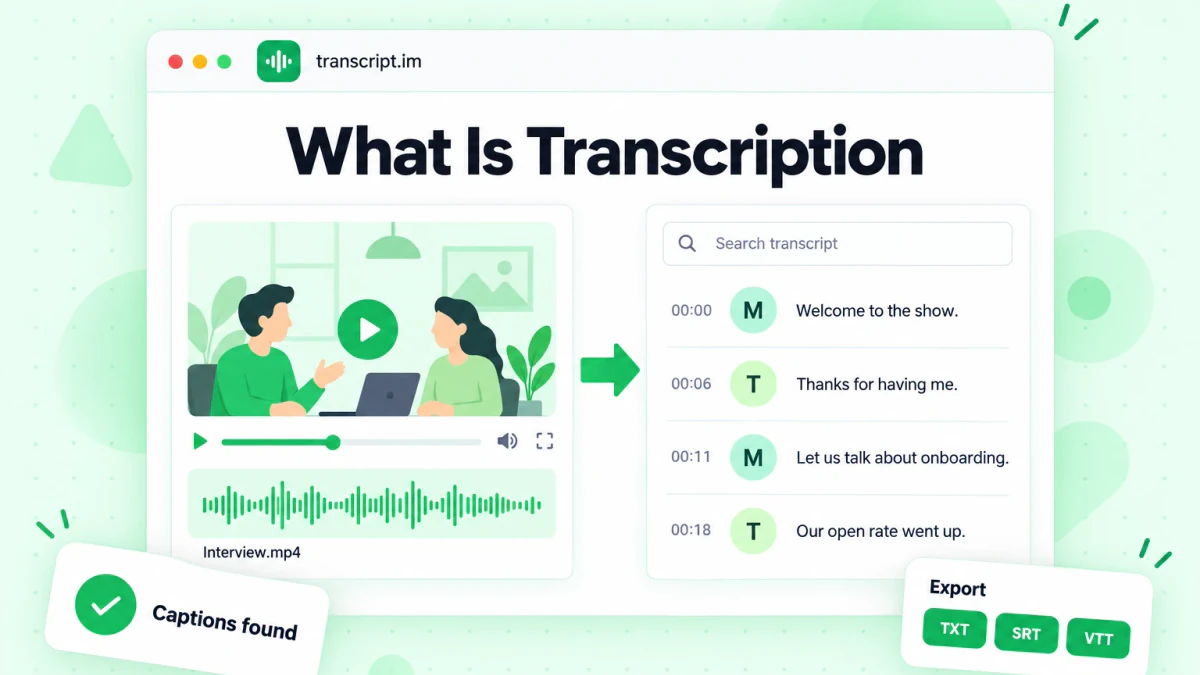
If you only need the short answer to what is transcription, it is this: someone, or a speech recognition system, listens to a recording and writes down the words. Everything else, from verbatim transcription rules to SRT caption files, is a decision about how faithfully to write those words down and what shape the text should take for the job it has to do next.
Transcription Meaning: What the Word Covers
The transcription meaning most people search for comes from the Latin transcribere, "to write across" or "to copy out". In general use, a transcription is a written copy of something that existed in another form. That other form is usually speech, but the same word is used for a few related tasks, and knowing which one someone means saves a lot of confusion.
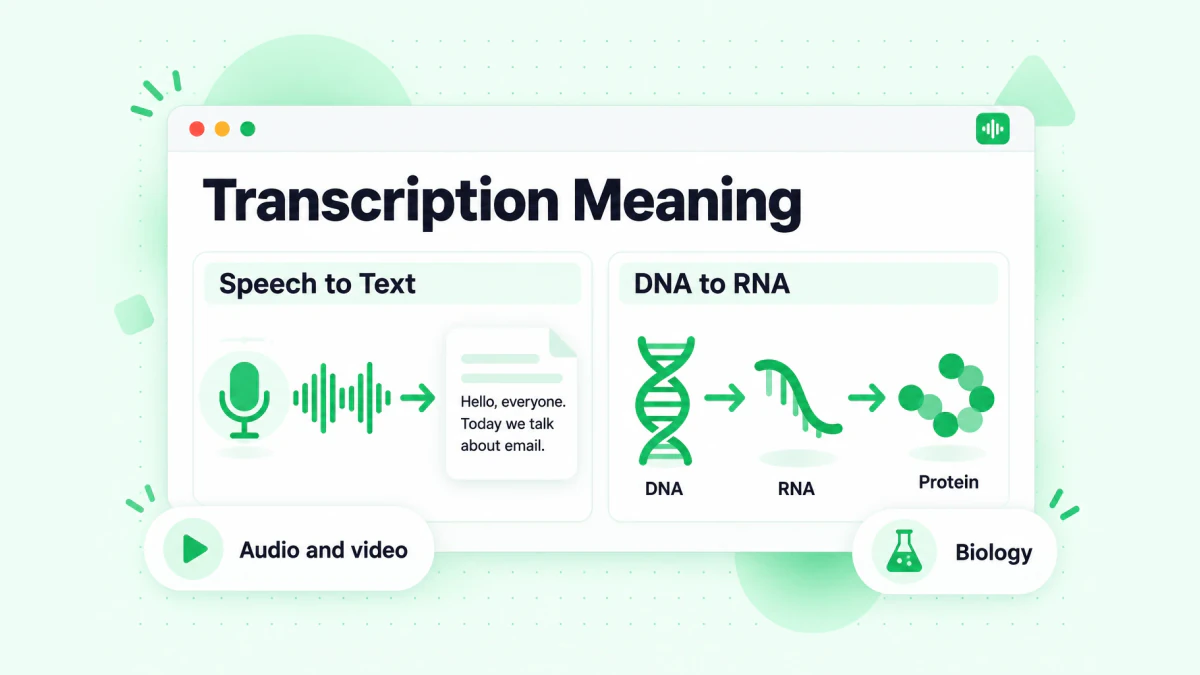
The transcription meaning that the picture above contrasts comes down to two fields. Here is the transcription definition in each of the contexts you are likely to meet:
- Speech to text. A transcription is the written record of spoken words in an audio or video recording: an interview, a meeting, a podcast, a lecture, a webinar, a YouTube video. This is the meaning used by journalists, researchers, marketers, court reporters and anyone who works with recordings.
- Linguistics. Phonetic or phonemic transcription writes down how words sound, using a notation such as the International Phonetic Alphabet. A linguist transcribing "water" cares about the vowels and the "t", not just the word. Wikipedia's entry on transcription in linguistics explains the difference between phonetic and orthographic transcription.
- Music. A transcription can mean writing down a piece of music in notation by listening to it, or arranging a piece for a different instrument.
- Medicine and law. Medical transcription turns a clinician's dictated notes into a written record; legal transcription produces written records of depositions, hearings and recorded statements. Both are speech-to-text work with stricter rules about accuracy and formatting.
- Biology. Gene transcription is the cellular process that copies DNA into RNA, covered in the next section.
So when a colleague asks for "a transcription of the call", they mean the first one. When a biology student asks what is transcription, they mean the last one. The rest of this article uses transcription in the speech-to-text sense unless it says otherwise.
Transcription in Biology: DNA to RNA
In molecular biology, transcription is the first step of gene expression. An enzyme called RNA polymerase reads one strand of a gene's DNA and builds a matching strand of messenger RNA (mRNA). That mRNA then leaves the nucleus and is used as a template to build a protein. The National Human Genome Research Institute's glossary entry on transcription gives a short, reliable explanation with a diagram.
The search "transcription vs translation" almost always comes from this context. Transcription rewrites the gene's information as RNA, in the same "language" of nucleic acids. Translation then reads the RNA and builds a chain of amino acids, which is a protein, so the information is converted into a different "language". A simple way to remember it: transcription copies, translation converts. Interestingly, the speech-to-text world uses the two words in nearly the same way. Transcribing a Spanish interview gives you Spanish text; translating that transcript gives you English text.
What Does Transcribe Mean?
To transcribe means to put spoken or recorded words into written form. You transcribe an interview by writing down what each person says, you transcribe a voicemail by typing it out, and you transcribe a video by producing the text of its soundtrack. The person who does it is a transcriber or transcriptionist; the result is a transcript, and the activity is transcription. If you want to know what the job involves day to day, transcript.im has a guide on what a transcriber does.
People often use "transcribe" and "dictate" loosely, but they are not the same. Dictation happens live: you speak, and words appear as you talk. Transcription usually works on a recording that already exists, which means you can pause, rewind, check a name, add timestamps and decide how clean the final text should be. The transcribe meaning also differs from "translate": transcribing keeps the original language, translating changes it.
Types of Transcription
There are several types of transcription, and any practical answer to what is transcription depends on which one you need. They differ in one main thing: how much of the raw speech the text keeps. Choosing the right type is the most important decision in any transcription job, because it decides how long the work takes, how the transcript reads and what it can be used for.
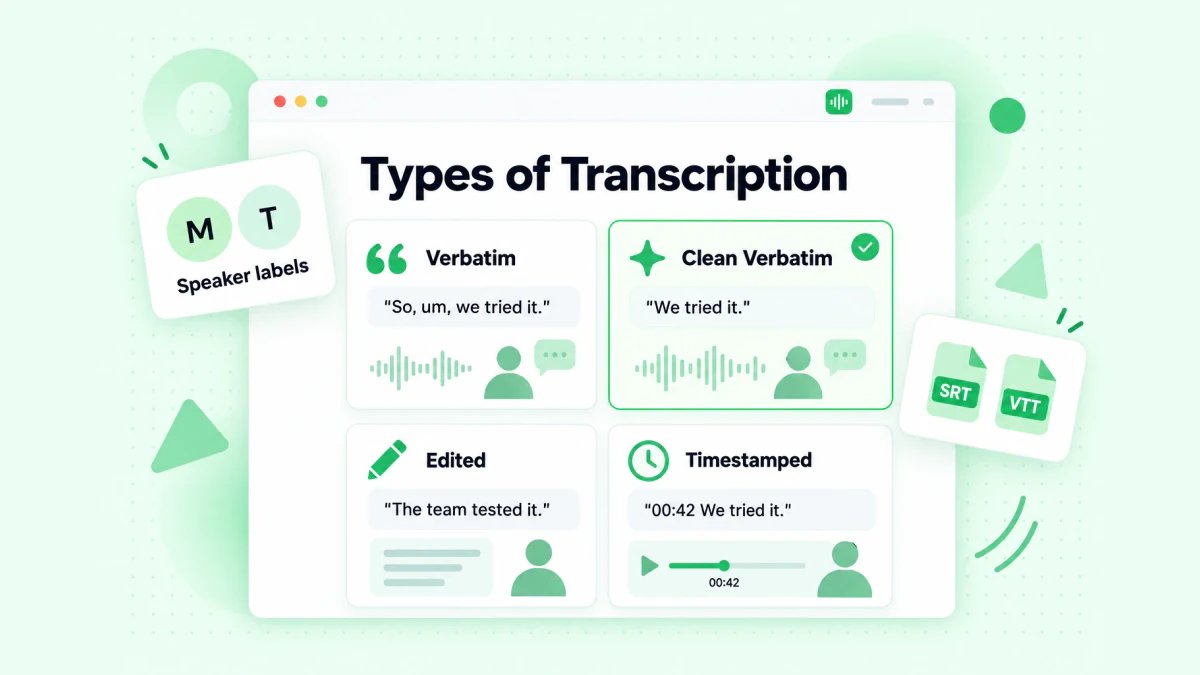
The four types of transcription in the illustration cover almost every real request. Here they are side by side:
| Type | What it keeps | What it removes | Typical use |
|---|---|---|---|
| Verbatim (full verbatim) | Every word, filler, false start, repetition, pause and audible sound such as laughter | Nothing | Legal records, research where how people speak matters, evidence |
| Clean verbatim | Every meaningful word, in the speaker's own phrasing | Fillers ("um", "you know"), stutters, false starts, repeated words | Interviews, meetings, podcasts, marketing content, most business use |
| Edited (intelligent) transcription | The meaning, tidied into readable sentences | Fillers, rambling, grammar slips; may restructure sentences | Articles, reports, quotes for publication |
| Timestamped transcription and subtitles | Text plus the time each line was spoken; subtitles split it into short cues | Depends on the style chosen | Captions, video editing, finding a moment in a long recording |
Two more terms come up often. Phonetic transcription records pronunciation rather than words, and is used in linguistics and language teaching. Speaker-labeled transcription marks who said what, which matters for interviews, panels and sales calls; it can be combined with any of the types above.
Verbatim Transcription vs Clean Verbatim
Verbatim transcription writes down exactly what was said, including the parts a reader normally skips. Clean verbatim keeps the speaker's words and meaning but removes the noise. The difference is easiest to see in an example.
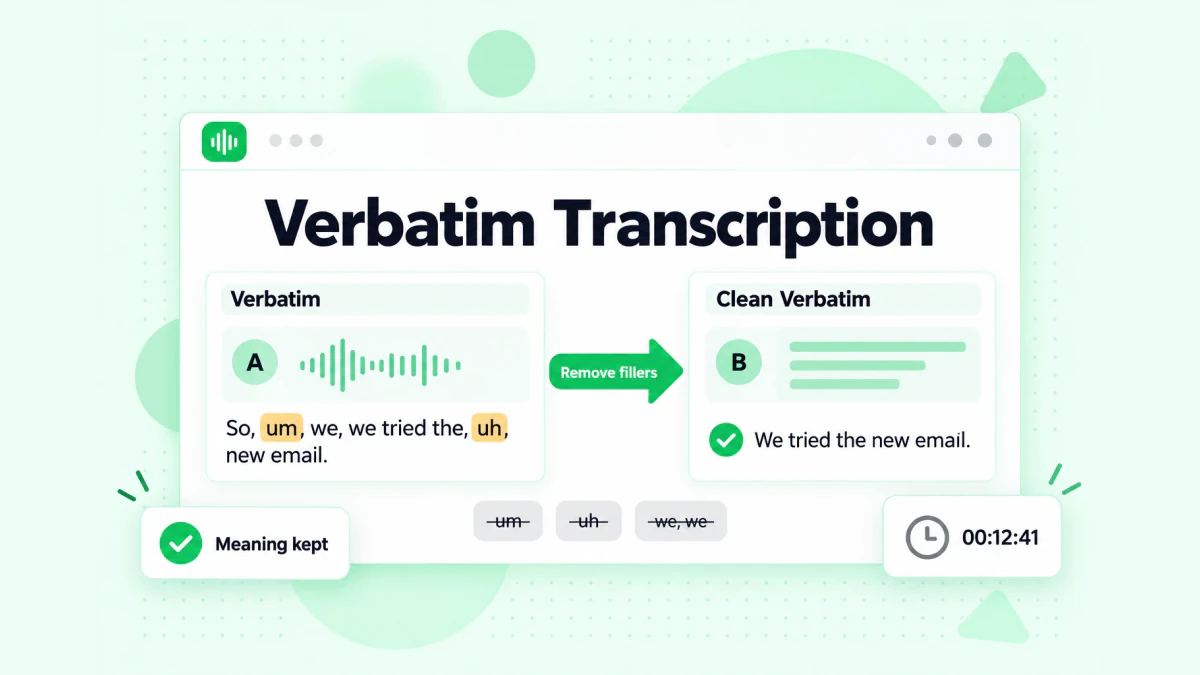
The verbatim transcription on the left of the image and the clean version on the right come from the same sentence:
- Verbatim: "So, um, we, we tried the, uh, the new onboarding email and, like, the open rate went up. It, it went up a lot, actually."
- Clean verbatim: "We tried the new onboarding email and the open rate went up. It went up a lot, actually."
- Edited: "The new onboarding email raised the open rate significantly."
The clean verbatim version says exactly what the speaker meant, in the speaker's words. The edited version is shorter, but "significantly" is the editor's word, not the speaker's, which is why edited transcripts should not be used for direct quotes. A useful test from the transcript.im guide to clean verbatim transcription: if removing a word changes what the speaker meant, leave it in; if it only makes the sentence smoother, it can go.
Use full verbatim when the way something was said is part of the evidence: legal work, conversation research, user research where hesitation tells you something. Use clean verbatim for nearly everything else. Most AI transcription produces something close to clean verbatim by default, because speech recognition models tend to drop many fillers.
Human Transcription vs AI Transcription
Transcription used to mean a person with headphones and a foot pedal. Today the answer to what is transcription in most workplaces is automatic speech recognition (ASR), sometimes followed by a human edit. Each approach has a clear place.
Human transcription is done by a trained transcriber who listens and types. A common rule of thumb is that clean audio takes about four hours of work per hour of recording, and difficult audio takes much longer. Humans handle heavy accents, crosstalk, industry jargon and poor recordings better than software, and they can follow strict style guides. The cost is time: a human transcript of a long recording takes days, not minutes.
AI transcription uses a speech recognition model to convert audio into text automatically. It is fast, it works on very long recordings, and it adds timestamps to every line without extra effort. Its errors cluster in predictable places: names and brand names, numbers, specialist terms, overlapping speakers and noisy audio. For clear speech in a common language, the result is usually good enough to use after a quick review.
Captions that already exist are a third source that people often forget. Many online videos already have a caption track written by the creator or generated by the platform. When those captions exist and are accurate, extracting them gives you a transcript without any new recognition step. This is exactly what transcript.im, a YouTube transcript and video transcription tool, does first: when a video has usable captions, it uses them; when it has none, AI transcribes the audio and puts a timestamp on every line.
| Human transcription | AI transcription | Existing captions | |
|---|---|---|---|
| Speed | Hours to days | Minutes for most recordings | Immediate |
| Best for | Legal, medical, poor audio, strict style | Interviews, meetings, podcasts, videos | Public videos that already have captions |
| Common errors | Rare, mostly hard-to-hear words | Names, numbers, jargon, crosstalk | Depends on who wrote the captions |
| Timestamps | Extra work | Automatic | Already in the caption track |
The practical answer for most teams is a hybrid: let AI transcription or existing captions produce the first draft, then have a person check the parts that matter, such as names, numbers and anything you will quote.
How to Transcribe Audio and Video
Whether you transcribe by hand or with software, the job has the same five steps: get the recording, decide on the transcription type, produce the text, check it, and export it in the format you need. Here is how each route works in practice.
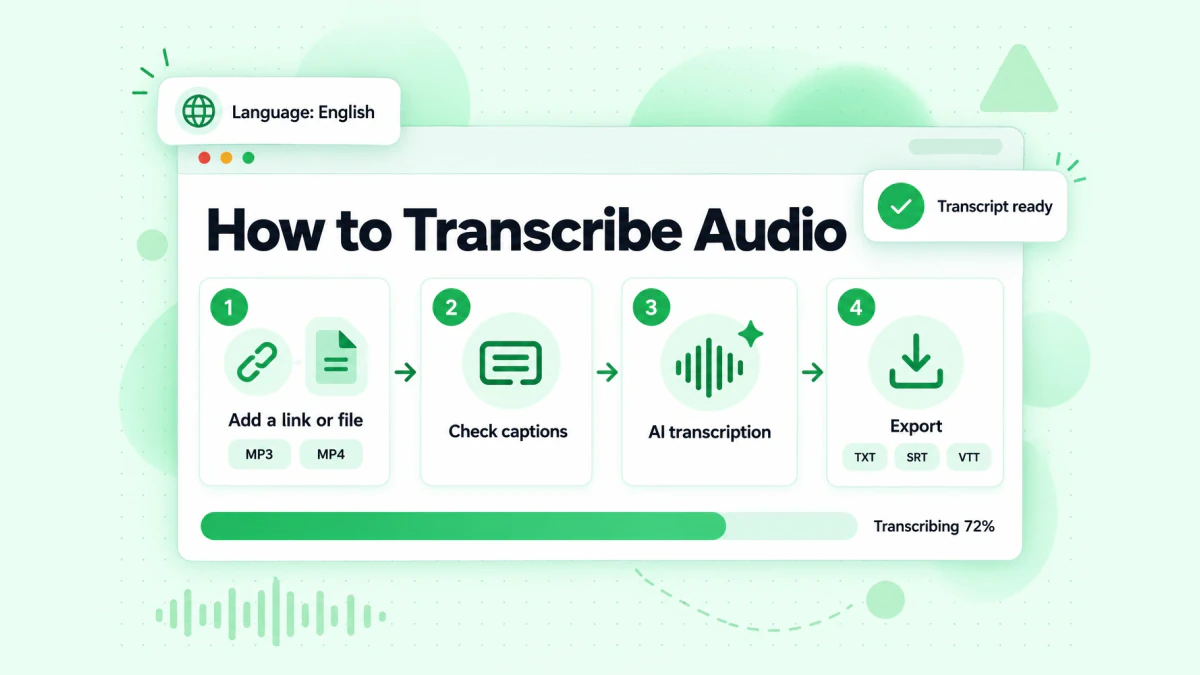
The workflow in the image shows how to transcribe audio and video with a tool. The steps below cover three common starting points and the manual route.
Transcribe a public video from a link
- Copy the link of the public video: a YouTube video, Short, playlist or channel, a TikTok, an Instagram Reel, or a Facebook, LinkedIn or X video.
- Paste it into a transcription tool that accepts links, such as transcript.im.
- The tool checks for an existing caption track and uses it when it is usable; otherwise it transcribes the audio with AI.
- Read the timestamped transcript, fix any names or terms, then copy it or download it.
For a platform-by-platform walkthrough, including playlists, channels and videos without captions, see our full guide to video transcription.
Transcribe your own video file
If the video lives on your computer, such as a recorded webinar, a Zoom export, a product demo or a phone recording, upload it instead of pasting a link. The video to text converter on transcript.im accepts MP4 and other common formats such as MOV, MKV, WebM and AVI, transcribes the speech, and returns a timestamped transcript you can export as TXT, SRT or VTT.
Transcribe an audio file
Podcasts, voice memos, phone recordings and interview audio go through the same process. Upload the file to an audio to text converter; transcript.im accepts WAV, MP3, FLAC, M4A, OGG and other common audio formats, detects the spoken language automatically (or lets you set it), and transcribes the recording with a timestamp on every line. For a podcast that is only available in a podcast app, download the episode file first and upload it.
Transcribe by hand
Manual transcription still makes sense for short, sensitive or very poor recordings. A workable setup:
- Use a player that slows down audio. Playing at 0.75x speed lets you type continuously instead of pausing every few seconds.
- Work in short loops. Listen to five to ten seconds, type it, replay to check, move on.
- Write timestamps as you go. Add a timestamp every 30 to 60 seconds, or at every speaker change, so you can find passages later.
- Mark what you cannot hear. Use a consistent tag such as
[inaudible 00:12:41]instead of guessing. - Do a final listen-through. Read the transcript while the audio plays at normal speed, and fix anything that does not match.
Even if you transcribe by hand, starting from an AI draft and correcting it is usually much faster than typing from a blank page.
What Affects Transcription Accuracy
Transcription accuracy depends far more on the recording than on the tool. The same speech recognition model can produce a nearly perfect transcript from a podcast microphone and a messy one from a phone in a noisy café. These are the factors that matter most:
- Audio quality. A close microphone, a quiet room and a single speaker give the best results. Echo, wind, music under speech and low volume all cause errors.
- Overlapping speakers. When two people talk at once, both humans and software lose words. Panels and heated sales calls are the hardest material.
- Accents and speaking speed. Strong accents and very fast speech raise the error rate, especially for less common languages.
- Names, numbers and jargon. Product names, company names, people's names, prices, dates and technical terms are the most frequent mistakes. Always check them.
- Language setting. If a tool guesses the wrong spoken language, the transcript can be badly wrong. Set the language yourself when you know it.
- The source of the text. Creator-written captions are usually accurate; auto-generated captions vary; AI transcription of clean audio is usually solid.
Because every line in a timestamped transcript points back to a moment in the recording, checking accuracy is quick: jump to the timestamp, listen, and fix the line. For anything you plan to quote publicly or send to a customer, that check is not optional.
How to Choose Transcription Software
Transcription software ranges from dictation features built into phones to dedicated web apps, desktop editors and developer APIs. Rather than chase a "best" list, choose by what your recordings and your next step look like.
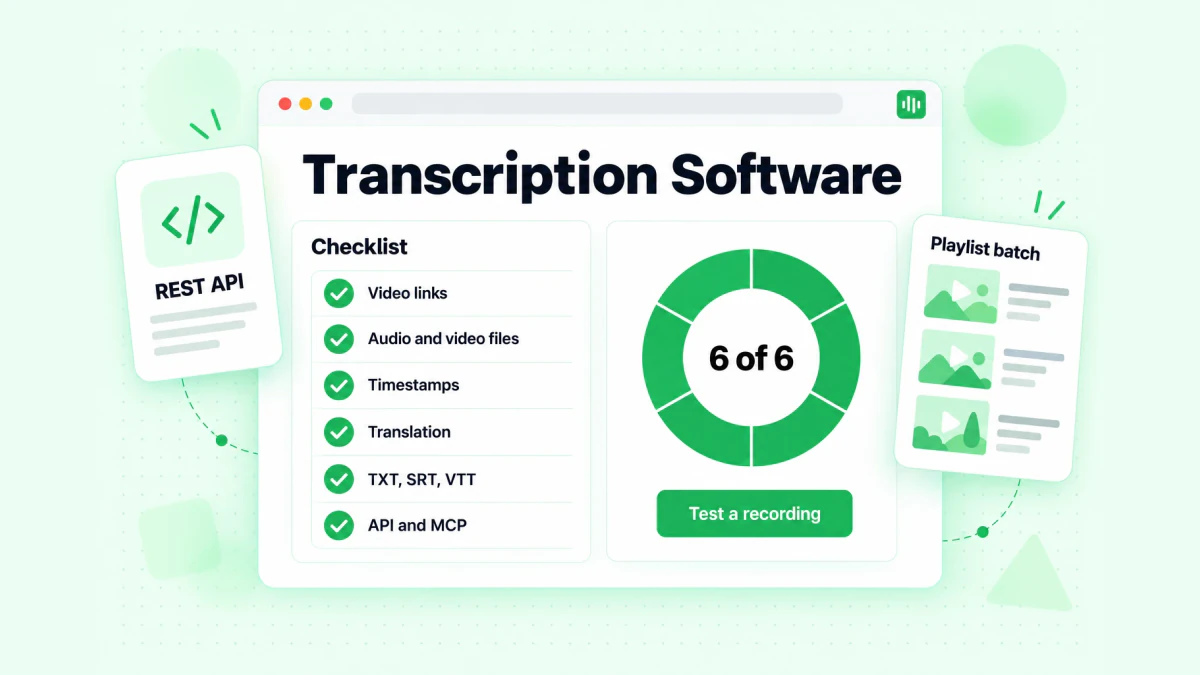
The checklist in the image is the set of questions worth asking any transcription software before you commit to it:
- What can it take in? Public video links (which platforms?), uploaded audio and video files (which formats, how large?), playlists or whole channels in one batch.
- Does it use existing captions? For online videos, a tool that reads the creator's captions first can be faster and more accurate than one that always re-transcribes.
- What happens when there are no captions? It should transcribe the audio automatically, not just report that no transcript is available.
- Timestamps and structure. Does every line keep its timestamp? Can you jump from a line to that moment?
- Languages. Which spoken languages does it recognize, and can it translate the transcript afterwards while keeping timestamps?
- Export formats. At minimum TXT for reading and SRT or VTT for captions. Check that you can copy the text cleanly too.
- What comes after the transcript? Summaries, chapters, notes and rewrites save time if the transcript is a means, not the end.
- Automation. If you transcribe regularly, an API, an MCP server for AI agents or a scripting option matters more than the web interface.
- Privacy and handling. Read how recordings and transcripts are stored and who can access them, especially for customer calls.
As a concrete reference point, transcript.im covers public video links from YouTube, TikTok, Instagram, Facebook, LinkedIn and X, uploaded audio and video files, captions first with AI transcription as the fallback, a timestamp on every line, TXT, SRT and VTT export, translation into 12 languages, AI summaries, chapters, notes and mind maps, and a REST API, MCP server and agent skills for automation. Whatever you choose, test it on one of your own typical recordings, not on a demo clip, before rolling it out to a team.
Transcription File Formats: TXT, SRT and VTT
A transcript is just text, but the file format decides where it can be used. The three formats you will meet most:
| Format | What it looks like | Best for |
|---|---|---|
| TXT | Plain text, often with timestamps at the start of lines | Reading, searching, pasting into documents, feeding into AI tools |
| SRT (SubRip) | Numbered caption blocks, each with a start and end time and one or two short lines of text | Subtitles in video editors and most video players and platforms |
| VTT (WebVTT) | Similar to SRT with a WEBVTT header and support for styling and positioning | Captions on web video players |
WebVTT is the caption format built into HTML video; MDN's WebVTT documentation shows the structure if you need to edit cue files by hand. If you are not sure which one you need: TXT for reading and reuse, SRT for uploading captions to a video platform or editor, VTT for a website video player.
What Is Transcription Used For?
A transcript is rarely the end product. Its value is that it turns something you can only watch or listen to into something you can search, quote, edit, translate and send. For the marketing, sales and creator teams who read this blog, these are the uses that pay off most.
Content repurposing and newsletters
One webinar, podcast episode or YouTube video contains enough material for a blog post, a handful of social posts, a newsletter issue and a set of quotes. The transcript is what makes that practical: instead of rewatching the recording, you scan the text, pick the strongest passages, and rewrite them for each channel. Creators who already publish video can use transcripts as the backbone of an email list; our guide on how to start a newsletter shows how to turn videos and podcasts into regular issues. The reverse also works: if you want to turn a written article back into a short video for social channels, an article to video tool can start from the text.
Sales calls, outreach and customer research
Recorded discovery calls and demos are full of the exact words customers use to describe their problems. Transcribing them lets you search across calls for objections, competitor mentions and feature requests, and quote real phrasing in your messaging. That phrasing is also what makes outreach feel relevant: a cold email that references what a prospect said in a public talk or podcast reads very differently from a template. Our article on cold email personalization covers how to use that kind of research without overdoing it. Before any of that outreach goes out, verify the addresses so the personalized emails actually reach an inbox instead of bouncing.
Research and AI analysis
Researchers transcribe interviews so they can code themes, compare answers and quote participants accurately. Marketing teams do the same with customer interviews, competitor webinars and industry talks. Transcripts are also the easiest way to give recordings to AI tools such as ChatGPT, Claude, Gemini or NotebookLM, which work far better on text than on a link to a video. We cover that workflow for marketing and sales work in our guide to NotebookLM.
Accessibility
Transcripts and captions make audio and video content usable for people who are deaf or hard of hearing, people who cannot play sound, and people who simply prefer reading. Web accessibility guidelines (WCAG) expect a text alternative for prerecorded audio, and captions for prerecorded video; the W3C Web Accessibility Initiative's guide to transcripts explains what a good transcript should include. Publishing a transcript next to a video also gives search engines text they can read and index.
Meetings, training and knowledge bases
Internal meetings, onboarding sessions and training videos become far more useful once they are searchable. A transcript lets a new hire find the five minutes that answer their question instead of watching an hour, and it lets teams keep decisions on record without relying on someone's notes.
A Simple Transcription Workflow for Marketing and Sales Teams
If your team records webinars, demos or podcasts, a small, repeatable process gets far more value out of each recording. Here is one that works without extra headcount:
- Collect. After each recording, save the file or the public link in one shared place.
- Transcribe. Run it through your transcription software the same day, following the steps in how to transcribe audio and video above. Use clean verbatim for most material, and keep timestamps on.
- Check the risky parts. Scan names, numbers, prices and product terms, and correct them against the recording.
- Tag. Mark the transcript with topic, speaker and use: "objection: pricing", "quote: onboarding", "newsletter idea".
- Reuse. Pull quotes into sales decks and outreach, outline a blog post or newsletter issue, and export SRT or VTT if the video will be published with captions.
- Store. Keep the final transcripts in a searchable folder or knowledge base, so the next person can find them.
A short template for the top of every transcript keeps the archive consistent:
Title: Q3 product webinar — onboarding emails
Date: 2026-09-14
Speakers: Maya (host), Tom (guest)
Source: webinar recording, 52 min
Type: clean verbatim, timestamped
Checked: names and numbers verified
Tags: onboarding, open rate, newsletter idea
When the transcript feeds an email campaign, the last step belongs to the list rather than the text: clean the list before you send, so the content you worked to produce reaches real subscribers. Our guide on how to clean an email list covers removing invalid, risky and inactive addresses before a send.
Transcription FAQs
What is transcription?
Transcription is the process of converting spoken words in audio or video into written text. The result is a transcript, which may include timestamps and speaker labels. In biology, transcription also names the process in which a cell makes an RNA copy of a gene.
What does transcription mean in biology?
In biology, transcription means copying a gene's DNA sequence into messenger RNA. The enzyme RNA polymerase reads the DNA and builds the RNA strand, which is later translated into a protein.
What is the difference between transcription and translation?
Transcription copies information into written form in the same language; translation converts it into another language. In biology, transcription makes RNA from a gene, and translation builds a protein from that RNA. In speech work, transcribing a French interview gives French text, and translating it gives text in another language.
What are the main types of transcription?
The main types of transcription are verbatim, clean verbatim, edited (intelligent) transcription, and timestamped transcription or subtitles. They differ in how much of the raw speech they keep, from every filler and pause in verbatim to polished sentences in edited transcripts.
What is verbatim transcription?
Verbatim transcription is a word-for-word written record of a recording that keeps every filler, false start, repetition and audible sound. It is used when how something was said matters, such as legal records and some research.
Is AI transcription accurate?
AI transcription is accurate on clear recordings in common languages, and its mistakes cluster around names, numbers, jargon, accents and overlapping speakers. Check those parts against the recording before you quote or publish the transcript.
What is transcription software?
Transcription software is a tool that turns audio and video into text, usually with speech recognition. Good transcription software accepts the sources you use, keeps timestamps, supports your languages and exports TXT, SRT or VTT.
How long does it take to transcribe one hour of audio?
By hand, one hour of clear audio commonly takes around four hours of work, and much longer for noisy or multi-speaker recordings. With AI transcription the draft takes minutes, plus whatever time you spend checking it.
Can I transcribe a YouTube video without captions?
Yes. A transcription tool that falls back to speech recognition can transcribe the audio when a video has no captions. transcript.im uses existing captions when they are usable and transcribes the audio with AI when they are not.
What file format should a transcript be in?
Use TXT for reading, searching and sharing; SRT for subtitles in video editors and on most video platforms; and VTT for captions on web video players. Many tools export all three from the same transcript.