



A sales rep pulls a fresh list of prospects, runs the names through an email finder, and loads every result into an outreach sequence. The list looks complete, but replies stay weak, bounces climb, and the sender reputation that took months to build starts to deteriorate. The problem usually isn't the absence of data. It's the assumption that a discovered address is automatically reachable, active, relevant, and safe to message.
To find email accounts that actually convert, treat discovery as the first step in a connected workflow. Enrichment adds context, verification tests technical reachability, and risk scoring determines whether an address belongs in a sequence, needs review, or should be suppressed. That distinction matters in a fragmented mailbox ecosystem where a 2024 global study across 15 email service providers reported average inbox placement of 83.1%, meaning 16.9% of legitimate emails failed to reach the inbox (EmailToolTester's deliverability statistics).
The 2026 Email Prospecting Reality Check
An SDR can build a large prospect file in an afternoon. Names come from a data provider, titles are enriched from professional profiles, and a finder generates a likely address for each person. The campaign may appear successful at first because the sequence is full and the data looks structured. Then the sending domain starts receiving deferrals, generic addresses absorb the messages, and the team discovers that many “valid” contacts were never good prospects in the first place.
Discovery-only workflows produce diminishing returns because mailbox providers judge more than whether an address exists. They evaluate sender history, engagement patterns, authentication signals, message content, and recipient behavior. A technically reachable mailbox can still route a message to spam, ignore it, or associate the sender with unwanted outreach.
Practical rule: A larger list is not a better list if the team can't explain why each address is reachable and worth contacting.
The older approach was simple: collect addresses, load them into a sequence, and remove bounces afterward. That process treats delivery problems as a reporting issue. A modern workflow treats them as a pre-send data problem. The useful record isn't just name + email. It includes the person's current role, company context, source, discovery method, verification result, catch-all status, role-account status, disposable-domain flag, and the buying signal that justifies contact.
The scale of modern email also explains why provider diversity matters. Gmail launched in 2004, Google reported 1 billion monthly active users in 2016, and Gmail later surpassed 1.8 billion users by 2020, according to the historical context summarized by EmailToolTester. Finding email accounts now means working across consumer and business providers with different filtering behavior, not matching a name to a familiar domain.
AI prospecting and real-time verification are becoming central to this shift, while privacy rules make indiscriminate collection harder to defend. Industry coverage identifies those changes as major developments in the email-finder market (current email finder workflow coverage). The practical conclusion is straightforward: discovery gets a candidate onto the list, but verification and risk scoring decide whether the candidate belongs in outreach. For a broader look at how automation is changing email operations, the BillionVerify AI email Bible is a useful companion resource.
Search Operators and Pattern Guessing as a Foundation
Search operators remain useful when they expose public professional context rather than private personal information. Start with the company domain and the person's role, then narrow the search:
site:linkedin.com "@company.com" intitle:"VP Operations"
Use quotation marks around exact names or domain fragments. Add a location, business unit, or previous employer when the result set is noisy. A filetype:pdf variation can surface conference biographies, speaker pages, investor documents, and other public material where a professional address may appear. Minus operators help exclude irrelevant results, such as:
site:example.com "@example.com" -jobs -careers
These queries don't prove that an address is active. They provide evidence for enrichment and help distinguish a named mailbox from a generic address such as info@, support@, or sales@.
Build the domain pattern
Pattern guessing works best when you already know the domain and have several confirmed examples. Collect five to ten known addresses from public company pages, previous conversations, or permitted data sources. Normalize capitalization, remove aliases, and group formats such as:
first.last@example.comflast@example.comfirstl@example.comfirst@example.com
Then rank the patterns by how often they appear. If one format dominates, use it to create a candidate address for a new contact. Don't treat the candidate as a result. Treat it as an input to verification.
A 2026 benchmark summary reported that pattern guessing alone reached about 60% when both the company domain and a person's name were known. The same summary found verified discovery rates ranging from 20% to 77.5% across standalone tools in a 5,000-contact test, which demonstrates how strongly results depend on enrichment quality and method (email-finding workflow benchmark).
Match expectations to evidence
| Pattern | Example | Avg. Match Rate |
|---|---|---|
| First and last name | first.last@example.com | Domain-dependent |
| First initial and last name | flast@example.com | Domain-dependent |
| First name and last initial | firstl@example.com | Domain-dependent |
| First name only | first@example.com | Domain-dependent |
| Role mailbox | sales@example.com | Not a personal match |
Catch-all domains limit what pattern testing can tell you because the mail server may accept nearly any recipient. Privacy-protected WHOIS records and privacy-first mail configurations create similar blind spots. In those cases, a guessed address can look plausible without providing useful confirmation.
The practical sequence is search, infer, verify, and classify. Use the bulk email extractor guide for a broader extraction workflow, but don't let extraction become the success metric. A candidate address has value only after the team knows its technical status, mailbox type, and outreach risk.
LinkedIn, Enrichment Tools, and Data Providers Compared
LinkedIn is strong for identity and context. It can show a current employer, title, geography, and career history, which makes it valuable for account-based prospecting. It generally doesn't give you a verified work address for every person, so teams pair it with enrichment or an email finder.
Enrichment platforms such as Apollo, Clearbit, and ZoomInfo-style systems can connect a person, company domain, and known profile URL to a likely business address. Their advantage is workflow speed and broader structured context. Their weakness is that coverage varies by market, company size, geography, and how recently each record was refreshed. Bulk data providers offer volume and convenient exports, but stale records create operational risk when teams upload them without a verification gate.
Compare the operating trade-offs
| Channel | Coverage | Cost/Record | Freshness | Compliance |
|---|---|---|---|---|
| LinkedIn research | Strong identity and role context, especially for visible professionals | Higher human effort | Often reflects current profile activity | Scraping can conflict with platform terms |
| Enrichment APIs | Useful for structured company and contact matching | Usage-based or platform-dependent | Depends on source refresh cycles | Requires lawful collection, use, and retention |
| Bulk data providers | Broad top-of-funnel coverage | Lower marginal effort at volume | Can decay quickly without verification | Requires careful provenance, suppression, and audit controls |
| Company websites and public documents | High relevance for published contacts | Low direct acquisition cost, higher research effort | Changes with site updates | Use only information appropriate for the intended contact |
For a deeper framework on choosing among these categories, data enrichment tools compared is a useful reference because the decision involves more than feature count. Coverage on small businesses differs from enterprise coverage, and a low apparent acquisition cost can disappear when a team pays for manual review, bounce handling, and list replacement.
LinkedIn's terms restrict certain forms of automated scraping. GDPR affects the lawful basis, transparency, storage, and use of personal data. CAN-SPAM governs commercial email practices in the United States, while CASL imposes stricter consent requirements for many Canadian commercial messages, particularly in consumer contexts. Legal review should reflect the recipient's location, the sender's role, the data source, and the campaign type.
The cheapest record is often the one that needs the least downstream correction.
Use LinkedIn plus enrichment for high-touch account-based work where role accuracy matters. Use a bulk provider for broad prospecting only when the workflow includes provenance checks, suppression logic, and verification. A BillionVerify LinkedIn email finder can fit into the discovery-to-verification path, but the decision should still be based on data quality and intended use rather than the source label alone.
How Verification Actually Works Under the Hood
Email verification isn't one yes-or-no question. It is a sequence of tests that answers different questions about the same address.
Layer one checks the address itself
Syntax validation checks whether the string follows an acceptable email format. It catches malformed addresses, accidental spaces, missing domain components, and other obvious errors before the system performs network checks. This layer should also identify role accounts such as info@, support@, and sales@.
A role account isn't necessarily undeliverable. It represents a different outreach decision. Route it to a shared-inbox or company-contact workflow rather than treating it like a named stakeholder.
Layer two checks the domain
DNS and MX checks determine whether the domain resolves and whether it has a mail exchanger capable of receiving email. A domain can exist without being a healthy destination for the address under review. Parked domains, misconfigured domains, and sinkhole hosts can make a candidate look more credible than it is.
Layer three probes mailbox behavior
An SMTP handshake connects to the receiving mail server, identifies the intended recipient, and reads the server response without sending the message. The standard flow checks syntax, domain health, and mailbox-level response (how email verification works).
Catch-all domains complicate the final layer. If a server accepts every recipient, the verifier may receive the same acceptance response for a real mailbox and a made-up one. That result should be classified as catch-all rather than upgraded to “safe.” Disposable domains also need a separate flag because temporary inboxes can be technically reachable while remaining unsuitable for durable sales or marketing communication.
A useful verification response should expose more than a single status. The BillionVerify API documentation describes structured fields for status, deliverability, quality score, risk level, reason codes, and separate disposable, role-account, catch-all, and free-webmail flags. It also states that the API responds in under 3 seconds (Email Validation API).
The verdict should trigger an action. Suppress invalid records, route role accounts for different handling, hold catch-alls for review, segment disposable addresses away from durable outreach, and pass low-risk named addresses into the next scoring stage.
Wiring Verification Into Your Outreach Stack
Verification works best as a checkpoint in motion, not as a cleanup task after a campaign fails. The right integration depends on where your team creates records and how quickly those records must move.
Real-time API checks
A scraper, enrichment service, or waterfall process can call a verification API immediately after producing an address. The system stores the response beside the contact and blocks invalid or high-risk records before they reach the CRM. This pattern suits high-volume operations because it prevents bad data from spreading into multiple downstream systems.
The trade-off is synchronous latency and usage cost. A real-time call adds a decision point to the enrichment flow, but it also avoids paying for the manual consequences of sending first and cleaning later.
CRM-side validation
A HubSpot or Salesforce workflow can run a verification step when a lead enters a qualified state or immediately before sequence enrollment. Custom code or an automation connector can write the result to fields such as verification_status, risk_level, catch_all, and last_verified_at.
This approach is useful when multiple acquisition channels feed one CRM. The risk is timing. If the same address was verified long ago, a pre-sequence check is more reliable than trusting an old field.
AI agent and MCP workflows
AI agents can use verification as a tool call during autonomous prospecting. The agent discovers a person, enriches the record, submits the candidate for verification, and stops or requests review when the response indicates catch-all, disposable, role-based, or high risk.
That pattern keeps the agent from treating a plausible email string as a finished result. It also creates a clear confidence boundary. The agent can continue only when the evidence meets the campaign's rules.
| Pattern | Trigger Point | Latency | Best For | Trade-off |
|---|---|---|---|---|
| API | Immediately after discovery or enrichment | Near real time | High-volume flows and waterfall enrichment | Adds a call and requires failure handling |
| MCP | During an AI agent's prospecting sequence | Tool-call dependent | Autonomous research with confidence gates | Requires carefully defined agent permissions |
| CRM | Before qualification or sequence enrollment | Workflow dependent | Centralized sales operations | Can be too late if bad data already spread |
Use three operational triggers: verify after scraping, verify immediately before sequencing, and re-verify aging records on a defined cadence. A practical email workflow should account for mailbox risk and inbox placement rather than relying on a single pass. Guidance on cold email deliverability can help teams connect technical checks with sending practices.
Pre-send verification is measurable. One 2026 benchmark reported hard bounce rates below 0.5% among marketers who verified lists before campaigns, compared with 1.8% to 3.2% for unverified sends in the same industries (email bounce rate benchmarks). Put verification upstream of warmup and sending, not after the first bounce report. For teams processing existing databases, bulk email list verification belongs before the sequencer receives the file.
Why a Valid Address Is Not a Safe Address
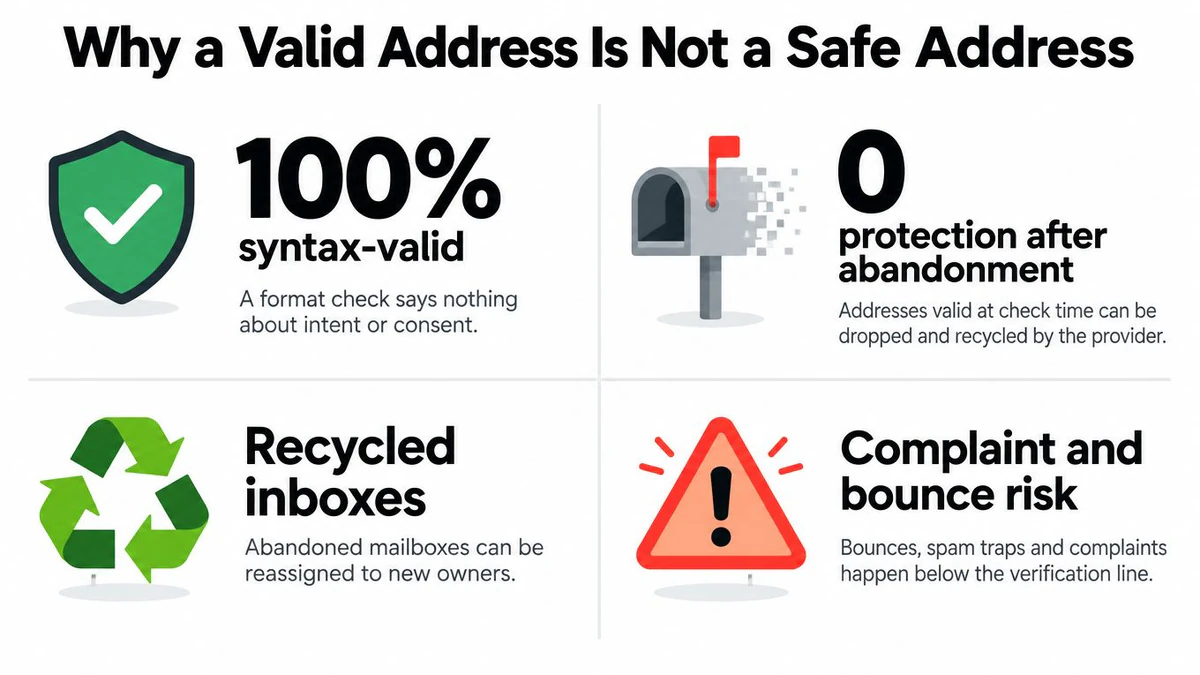
A green verification result answers a narrow question: the address appeared technically reachable when the test ran. It doesn't confirm that the person wants your message, that the mailbox remains active, or that the domain has a good reputation with your sender.
An address can pass syntax checks and still belong to a role account. A domain can accept SMTP traffic while filtering unknown senders aggressively. A mailbox can be valid today and abandoned later. A contact can also remain perfectly reachable while reporting your previous outreach as spam, which creates a sender-risk problem that no mailbox probe can solve.
Separate technical validity from campaign risk
Keep these concepts in separate fields:
- Mailbox status: Whether the receiving system accepted the verification probe.
- Address type: Whether the contact is a named person, role account, free webmail address, or disposable mailbox.
- Domain behavior: Whether the domain is catch-all or returns a response that limits certainty.
- Engagement risk: Whether prior sends produced no engagement, complaints, deferrals, or other negative signals.
- Permission status: Whether the recipient opted out or lacks a defensible lawful basis for the intended communication.
At scale, verification can observe much of the SMTP layer, but it can't guarantee future inbox placement. A 2026 benchmark covering 10,241,981 verifications across 293,934 domains found 12.3% invalid addresses, 33.1% catch-all domains, and only 19% of re-checked addresses still valid after 90 days (email deliverability benchmarks). Those figures make one operational point clear: an old pass result shouldn't live forever.
A valid address is a snapshot. A safe outreach decision is a maintained record.
Re-verification should be triggered by data age, campaign sensitivity, and risk category. Suppress addresses that fail later checks, isolate catch-alls for stricter review, and stop sending to contacts who opt out or generate complaint signals. Continuous hygiene doesn't eliminate every reputation problem, but it prevents the team from confusing a past technical response with a permanent guarantee.
The Complete Workflow and Compliance Checklist
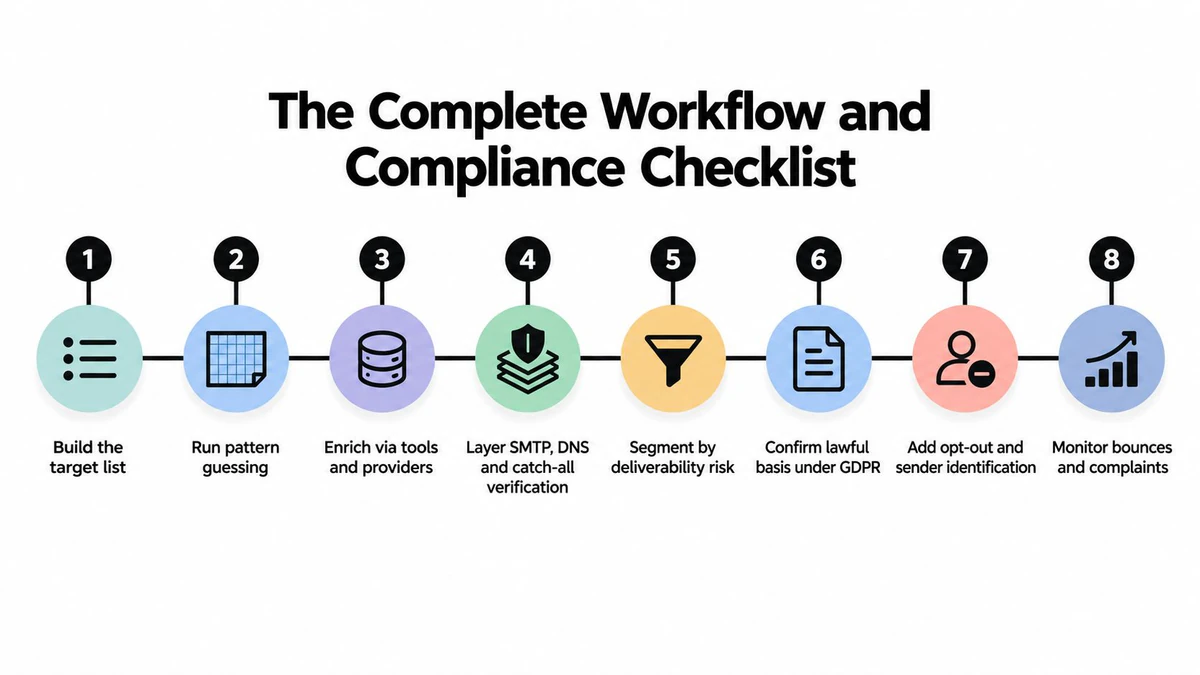
A dependable process moves each record through the same gates:
- Build the target list. Define the account, role, geography, and buying signal. Output a contact record with a source and reason for inclusion.
- Run pattern guessing. Use public evidence and known domain formats to create candidates. Output a candidate address, not an assumed truth.
- Enrich through permitted tools and providers. Add current company, role, source, and relevant context. Preserve provenance.
- Verify syntax, DNS, SMTP, and catch-all behavior. Store the result, reason codes, and timestamp.
- Segment by deliverability risk. Separate invalid, role-based, disposable, catch-all, free-webmail, and lower-risk named addresses.
- Confirm the lawful basis. Document the reason the team may process and use the contact under the relevant privacy framework.
- Apply suppression and sender controls. Honor opt-outs, identify the sender clearly, and keep suppression records from re-entering future campaigns.
- Monitor and re-verify. Track bounces, complaints, deferrals, and engagement, then refresh aging records before another sequence.
The compliance layer belongs inside the workflow, not in a policy document that the sending system never reads. Maintain a clear audit trail for every contact, suppress role-based and personal addresses that shouldn't receive the campaign, respect applicable DNSBL and spam-trap intelligence, and use double opt-in where the campaign or jurisdiction requires it. Teams should also review whether the data source permits the intended use and whether retention remains necessary.
Pin this short runbook beside the outbound process: source the record, infer carefully, enrich lawfully, verify immediately, score risk, suppress exceptions, sequence only eligible contacts, and re-check aging data. That sequence turns “find email accounts” from a scraping exercise into a controlled revenue operation.
BillionVerify provides professional email verification for single checks, bulk list cleaning, and real-time workflows, with structured deliverability and risk data that can support this discovery-to-verification process. Visit BillionVerify to evaluate how its validation tools can help your team remove risky addresses before they reach an outreach sequence.