

Chapter 1 of 6 · What a score means
About this video
File verification needs a paid account.
Video transcript
What a score means
A deliverability score isn't an official grade. Here's what it measures, and what actually moves it. Gmail, your sending platform and a placement tool can each show you a number for the same campaign. They aren't measuring the same thing. Even on the same scale, they can be answering different questions. Delivery rate asks one narrow question. Did the receiving server accept the message? Inbox placement asks the next one. Where did it go after that? An accepted message can land in the primary inbox, promotions, spam or quarantine. Most scores blend four kinds of signal. Engagement, like replies and clicks. Authentication. Reputation. And complaints with delivery errors. How much each one counts changes from tool to tool.
Sender reputation
Reputation sits on your domain and your sending IP. Gmail describes it as a quality rating for both, and higher-rated senders are more likely to reach the inbox. It's built from how you send over time. A spam report is the sharpest signal, because it comes straight from a recipient. So a low bounce rate alone doesn't make a campaign healthy. Bounces come in two kinds. A hard bounce is a lasting failure, and it points at your list. A soft bounce is temporary, like throttling or greylisting, and it usually calls for a retry. Read your bounce rate campaign by campaign. Under two percent is healthy. Two to five needs attention. Five to ten is dangerous. Over ten is an emergency. Authentication proves who sent the message. SPF lists the servers allowed to send for your domain. DKIM signs each message. DMARC tells receiving servers what to do when those checks fail. Gmail sets a floor here. All senders need SPF or DKIM. Bulk senders need all three, and their marketing mail must support one-click unsubscribe.
Blacklists
A blacklist is a DNS-based list of IP addresses with a bad record. If the receiving server trusts that list and your IP is on it, the connection can be refused. The message never gets as far as your content. When you're listed, work in order. Find which IP and which list. Read the reason. Fix the cause first. Then follow that list's removal process, and test again. A listing that comes back is harder than the first one. A clean result doesn't close the case. It only shows those lists don't have your IP. Gmail can still file you under spam because of reputation, complaints or a domain that doesn't align.
Spam rejections
A rejection shows up in the server's reply, so read the code. A two fifty means accepted. Codes starting with five are generally hard failures. Codes starting with four are temporary, and they're normally worth a retry. Then look for the pattern. If acceptance holds but placement falls, check content, reputation and complaints. If both fall, start with authentication, sending behavior and your list. Do all of this per stream. A password reset and a cold sequence can share a domain and behave very differently. A blended average hides that.
Where verification fits
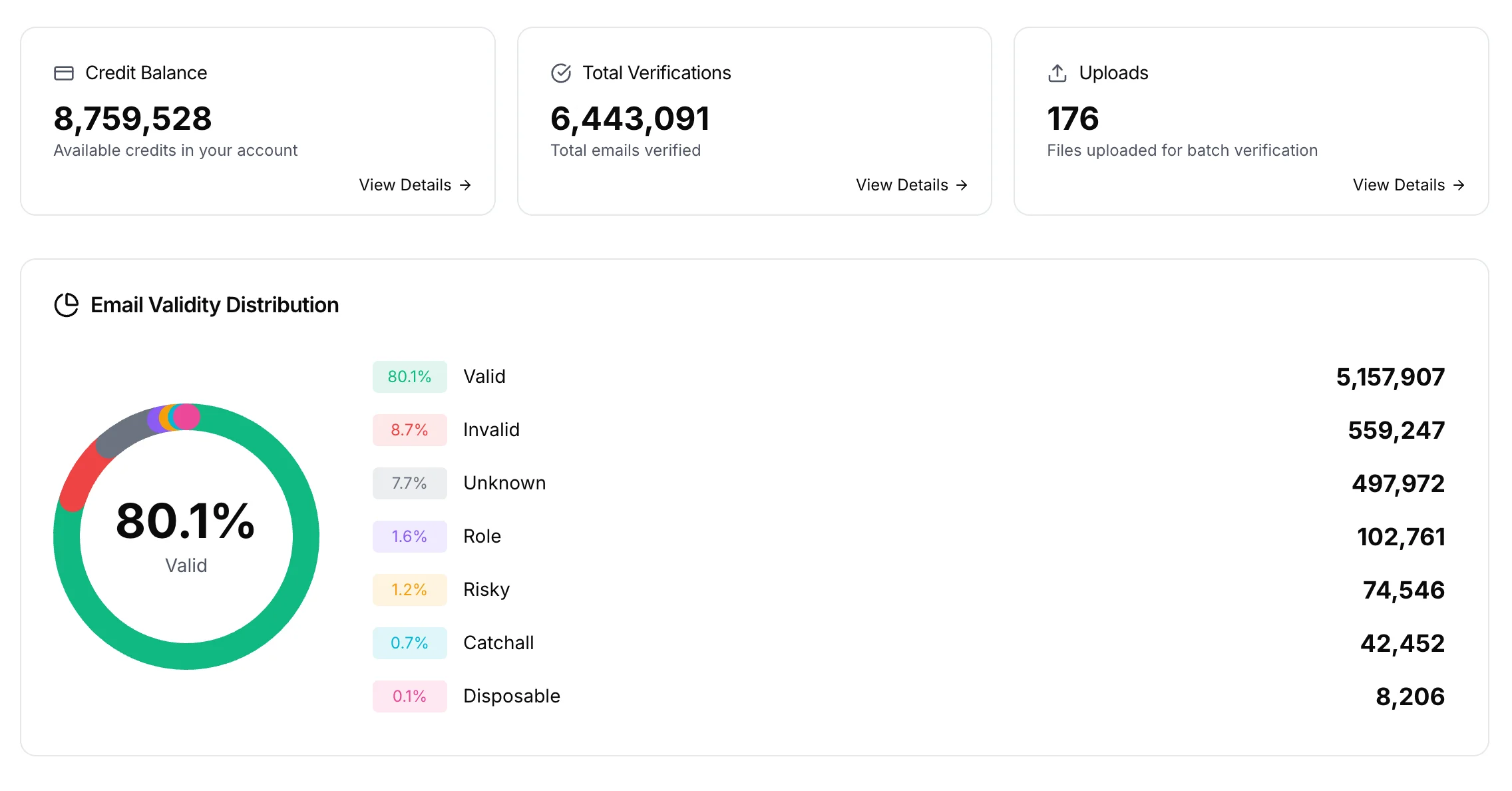
Address verification fixes one part of this. It catches addresses that would fail, before a provider records the failure. It can't repair a damaged domain, predict who'll complain, or promise the inbox. Use it four times. At capture, to stop typos and dead domains. Before an address goes active, for a mailbox-level check, with no email sent. Before a campaign, on the active segment. And after sending, compare your bounces with the results. BillionVerify gives each address one of six statuses. Drop invalid and disposable. Keep catch-all and unknown out of the main send until you've looked at them. Unknown is free, and file verification needs a paid account. A score tells you something moved. The signals behind it tell you what to fix.
Get started free
20 free credits every day you use your account, up to 600 a month. No credit card required. Start at billionverify.com.
Featured in this video
More in Cold Email Guides
All email verification videos
BillionVerify pricing
Start free, then pay for what you verify. Pick a plan or buy credits once.
billed yearly $96
Save 60%$0.0004 / per credit
All 240,000 credits arrive at once. Use them anytime.
Choose your credits
Included in every paid plan
- 240,000 credits / year
- Single email verification
- Bulk email verification
- Email Finder
- Bulk Email Finder
- Company Search
- Live SMTP mailbox check
- Real-time API + batch processing
- CSV & Excel upload support
- Comprehensive verification reports
- Workspaces and teams with spend limits
- Credits never expire
Try the AI email verification features
20 free credits every day you log in, up to 600 a month. Free AI first email verification across every feature, no credit card.
Native MCP Server integration · Catch-all reported separately · Free tier, no credit card