

Chapter 1 of 9 · Companies, not people
About this video
This video uses sample data, not real review site data. File verification, Email Finder, Bulk Finder and Company Search need a paid account.
Video transcript
Companies, not people
Here's how to turn a review site listing into a verified list of people you can email. Review sites and agency directories are great for picking accounts. You get the category, the reviews, and the website. What you don't get is a person. Three things are missing. The right person, their email address, and proof that address works.
Pick accounts and contacts
Step one. Filter by category, location and review count. Then dedupe by domain, because the same company often appears on several sites. Step two. Company size tells you who to write to: the founder, the CEO, or the head of growth.
Find the email
Step three, the address. Your scraper may pull some from team pages, and your finder tool can guess others from a name pattern. But a pattern match is still a guess. If you have a name and a domain, Email Finder returns one verified work email. Bulk Finder does that for a whole CSV. A match uses ten credits, and rows without a match are free. Don't have a name yet? Company Search finds the emails a company publishes.
Verify the list
Step four. Every address you found another way still needs a check. Open File List Verify, and drop in that CSV. You can see the unique address count and the credits it can use before anything runs. Start it, and go do something else. An email tells you when it's finished. These results are from larger sample lists, not review site leads, so expect a different mix.
Route every result
Each status has its own count, and each one gets its own route. Valid goes to your main sequence. Invalid and disposable go to a suppression file. Unknown waits for review. Role gets a shared-inbox message. Catch-all gets a small segment.
Handle catch-all
Here's why catch-all is separate. The domain accepts any address, so all three guesses get the same yes. Small agencies often run domains like this. That's why it never counts as valid. So you run three sends. Valid at full volume. Catch-all smaller, with its bounces tracked separately. And role with no first name, just who you are and why you're writing.
Export and import
Export each segment on its own. Choose a status, then click Export Results. The file keeps your columns, so job titles and company names stay with each address. The verification columns go on the end. Import into your sending tool, and keep that suppression file. Review sites overlap, so check each new batch against it first.
What it costs
On cost, verification uses one credit per result, including catch-all and role. Unknown, bad syntax and disposable are free. A Finder match uses ten. File uploads and Finder need a paid account.
Get started free
20 free credits every day you use your account, up to 600 a month. No credit card required. Start at billionverify.com.
Featured in this video
B2B Agency Email VerificationVerify emails sourced from Clutch, DesignRush, G2, and other agency directories. Agency listing data requires email discovery and verification before outreach.Try B2B Agency Email VerificationMore in Agency Leads
All email verification videos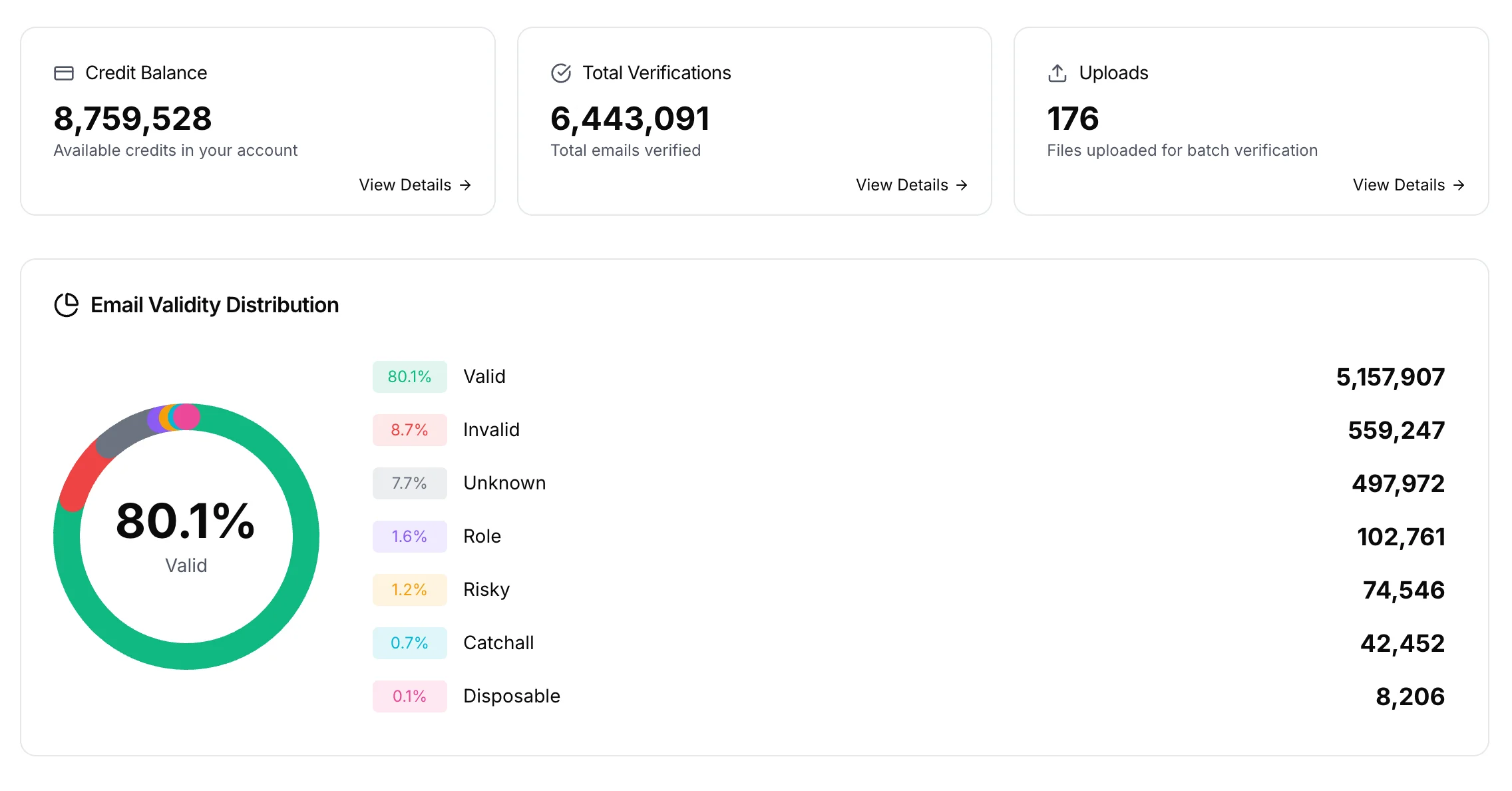

BillionVerify pricing
Start free, then pay for what you verify. Pick a plan or buy credits once.
billed yearly $96
Save 60%$0.0004 / per credit
All 240,000 credits arrive at once. Use them anytime.
Choose your credits
Included in every paid plan
- 240,000 credits / year
- Single email verification
- Bulk email verification
- Email Finder
- Bulk Email Finder
- Company Search
- Live SMTP mailbox check
- Real-time API + batch processing
- CSV & Excel upload support
- Comprehensive verification reports
- Workspaces and teams with spend limits
- Credits never expire
Try the AI email verification features
20 free credits every day you log in, up to 600 a month. Free AI first email verification across every feature, no credit card.
Native MCP Server integration · Catch-all reported separately · Free tier, no credit card