

Chapter 1 of 9 · Why local lists are different
About this video
This video uses sample data, not real directory data. File verification needs a paid account.
Video transcript
Why local lists are different
Here's how to clean a local business list without losing the inboxes these businesses really use. Open a local directory list and read the emails. info@, office@, hello@, service@. In a small business, the owner and front desk often share one inbox. Don't delete them on sight. A prefix tells you who reads the mail, not whether it arrives. A closed shop's named address still bounces. Source matters too. A listing's email can sit for years. One your scraper pulls from a website can be just as old, or belong to former staff, or whoever built the site. Verification finds dead mailboxes. It can't tell you a live one belongs to the web designer, so check the domain. Small businesses move, too. A shop closes or switches domains, and the listing stays the same.
Merge your sources
Step one. Merge every source into one file. One shop can appear in several directories. Step two. Remove anyone who unsubscribed, complained or bounced before. A new pull can bring them back.
Verify the file
Step three. Open File List Verify, and add the merged file. Repeated addresses count once, and you see the credits before anything runs. Start the job, and you'll get an email when it finishes.
Read the results
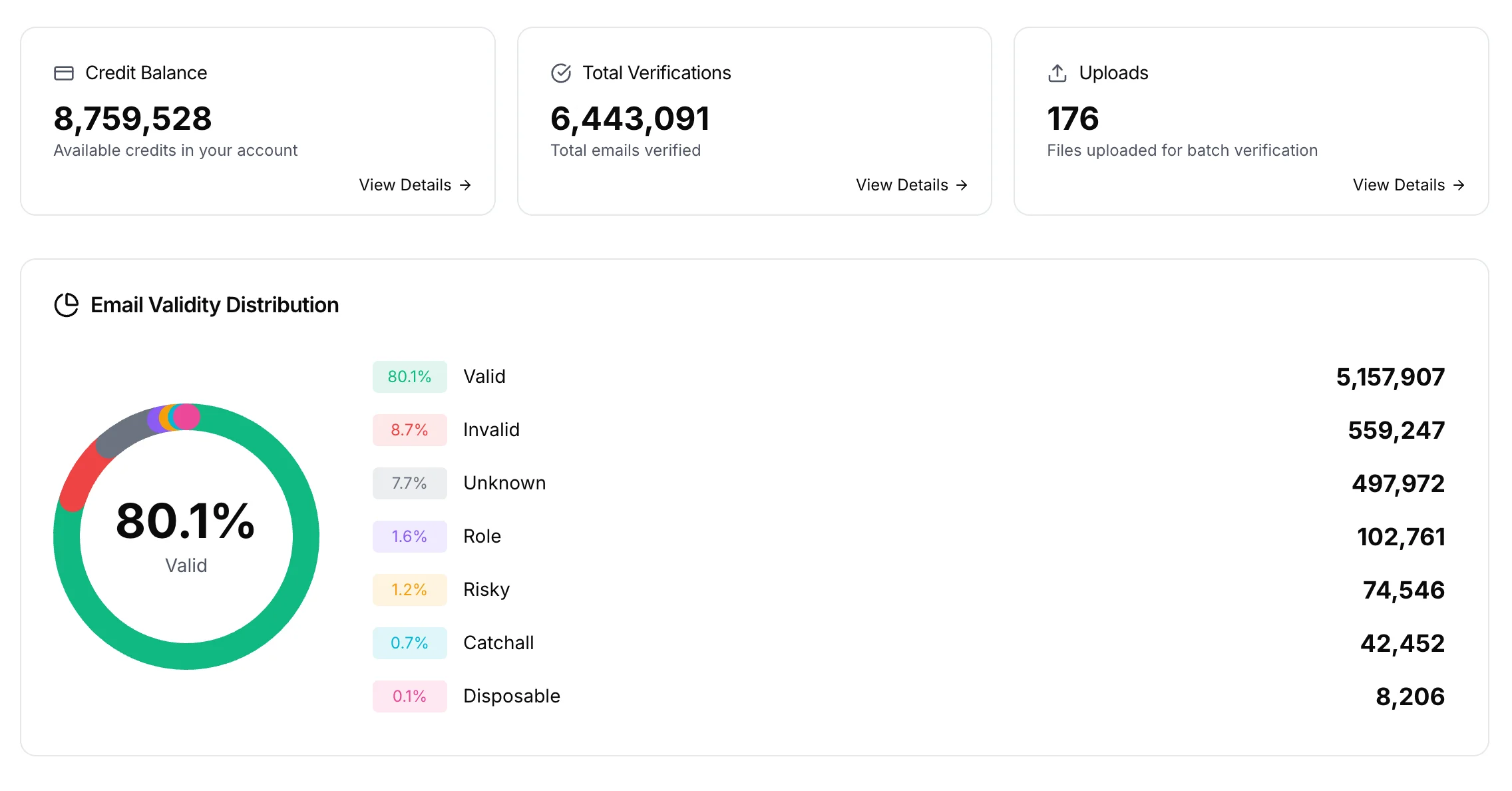
These results come from a sample list, not a real directory. On a local list, check Role Email and Catch-all first. They tend to run high. A working info address comes back as role, even on a catch-all domain. So check two columns in your download.
Route each group
Now route each group. Valid goes to your main campaign. Role gets its own campaign. Catch-all gets a smaller test. Role on catch-all gets the smallest test, or none. Invalid and disposable go to suppression. Unknown waits. Role needs its own copy. A first-name merge tag turns into Hi info, so use a plain greeting, and say who you are first. Catch-all domains accept mail for any address. Send a small batch, and watch bounces for a day or two.
Export each group
Back in your file, tick one status, and click Export Results. Repeat for each campaign. Each download keeps your columns, so business names stay with each address.
Keep the list clean
Add invalid addresses and hard bounces to your suppression file, so your next pull can't bring them back. Recheck before you reuse a list. Every 3 to 4 months for restaurants, salons and home services. At least every 6 for professional services.
What it costs
On cost, it's one credit per result, role and catch-all included. Unknown, bad syntax and disposable are free. File uploads need a paid account, and any credit purchase unlocks them.
Get started free
20 free credits every day you use your account, up to 600 a month. No credit card required. Start at billionverify.com.
Featured in this video
Local Business Email VerificationVerify emails from Yellow Pages, Yelp, BBB, and other local directories. Local business email lists have many shared inboxes and risky catch-all domains.Try Local Business Email VerificationMore in Local Business
All email verification videos
BillionVerify pricing
Start free, then pay for what you verify. Pick a plan or buy credits once.
billed yearly $96
Save 60%$0.0004 / per credit
All 240,000 credits arrive at once. Use them anytime.
Choose your credits
Included in every paid plan
- 240,000 credits / year
- Single email verification
- Bulk email verification
- Email Finder
- Bulk Email Finder
- Company Search
- Live SMTP mailbox check
- Real-time API + batch processing
- CSV & Excel upload support
- Comprehensive verification reports
- Workspaces and teams with spend limits
- Credits never expire
Try the AI email verification features
20 free credits every day you log in, up to 600 a month. Free AI first email verification across every feature, no credit card.
Native MCP Server integration · Catch-all reported separately · Free tier, no credit card