



What is HubSpot?
HubSpot is a leading customer relationship management (CRM) platform and inbound marketing powerhouse used by over 200,000 businesses across 120+ countries. Founded in 2006, HubSpot pioneered the inbound methodology and has grown into a comprehensive platform that unifies marketing, sales, customer service, content management, and operations.
Core Platform Components:
- Marketing Hub: Complete marketing automation platform with email campaigns, landing pages, social media management, SEO tools, and analytics
- Sales Hub: Sales CRM with pipeline management, email tracking, meeting scheduling, and sales automation
- Service Hub: Customer support tools including ticketing, knowledge base, customer feedback, and live chat
- CMS Hub: Content management system for building and managing websites
- Operations Hub: Data synchronization, automation, and programmable workflows
- Free CRM: Robust free tier with unlimited users and core CRM features
Why Businesses Choose HubSpot:
- All-in-one platform eliminates need for multiple tools
- Intuitive interface designed for marketers and sales teams
- Powerful automation capabilities without coding
- Deep analytics and attribution reporting
- Extensive integration marketplace (1,500+ apps)
- Free CRM tier perfect for startups and small businesses
- Scalable from solopreneurs to enterprise organizations
Popular Use Cases:
- Inbound Marketing: Attract, engage, and delight customers through content and automation
- Lead Generation: Landing pages, forms, and CTAs optimized for conversions
- Email Marketing: Personalized email campaigns with advanced segmentation
- Sales Pipeline Management: Track deals from first contact to closed-won
- Customer Lifecycle Marketing: Nurture contacts through automated workflows
- Account-Based Marketing (ABM): Target and engage high-value accounts
HubSpot's Market Position: With a market cap exceeding $30 billion, HubSpot serves businesses ranging from startups to Fortune 500 companies. Its user-friendly approach combined with enterprise-grade capabilities makes it the go-to choice for companies embracing inbound marketing and modern sales methodologies.
However, HubSpot's effectiveness depends entirely on contact data quality. Invalid email addresses in your CRM create multiple problems: bounced emails damage sender reputation, skewed analytics misguide marketing decisions, and sales teams waste time on non-existent prospects. This is precisely where our email verification service becomes essential to maintaining a healthy, actionable HubSpot database.
Why Integrate BillionVerify with HubSpot?
While HubSpot excels at managing customer relationships and automating marketing, it doesn't verify email addresses before they enter your CRM. Poor email data quality creates cascading problems:
- ❌ Damaged Sender Reputation: High bounce rates from invalid emails can blacklist your domain with ISPs
- ❌ Wasted Resources: You're paying HubSpot for contacts that don't exist or can't be reached
- ❌ Inaccurate Analytics: Bad data corrupts your campaign performance metrics and attribution reports
- ❌ Lower Lead Scores: Invalid contacts artificially inflate your database size and skew lead scoring
- ❌ Sales Team Frustration: Reps waste time calling or emailing non-existent prospects
- ❌ Marketing Hub Limits: HubSpot's pricing tiers are based on contact count—why pay for invalid contacts?
The Solution
BillionVerify + HubSpot integration delivers clean, verified contact data:
- ✅ Real-time Form Validation: Verify emails instantly as they submit HubSpot forms
- ✅ Automated Workflow Triggers: Enrich contacts with verification data automatically
- ✅ Bulk Database Cleaning: Verify thousands of existing contacts in minutes
- ✅ Lead Quality Scoring: Enhance lead scores based on email validity and risk level
- ✅ Segment with Confidence: Create reliable segments based on verified contact data
- ✅ Protect Deliverability: Maintain sender reputation by eliminating invalid addresses
How It Works
The integration follows this intelligent workflow:
- Contact Entry: A prospect submits email via HubSpot form, chat, or manual import
- HubSpot Creates Contact: Contact record is created or updated in HubSpot CRM
- BillionVerify Validation: Our API performs comprehensive email verification
- Syntax Check: RFC 5322 compliance validation
- DNS Lookup: Verify domain exists and is configured
- MX Record Verification: Confirm mail server is active
- SMTP Handshake: Validate mailbox actually exists
- Risk Detection: Identify disposable, catch-all, and role-based addresses
- HubSpot Contact Update:
- ✅ Valid emails: Update with "Verified" status, add to active segments
- ❌ Invalid emails: Mark as "Invalid", suppress from campaigns
- ⚠️ Risky emails: Flag for review, adjust lead score accordingly
- Workflow Actions:
- Trigger appropriate nurture sequences for verified contacts
- Send internal notifications for high-risk contacts
- Update lead scoring and contact properties automatically
Integration Methods
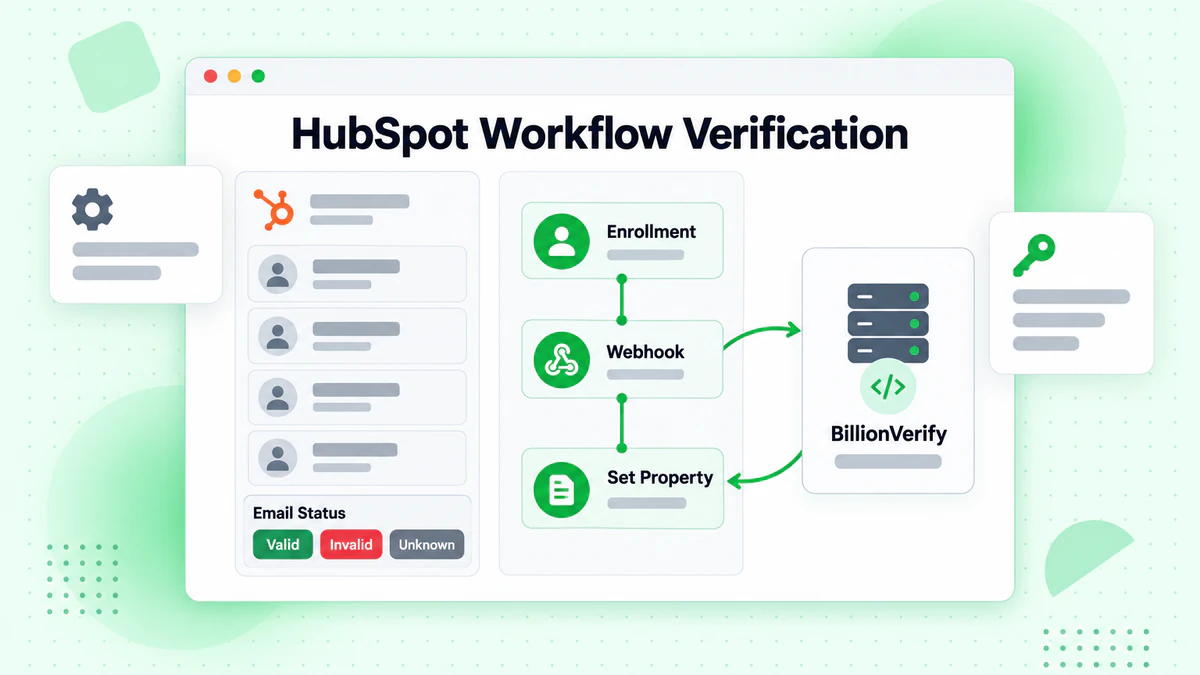
Method 1: HubSpot Workflows + API (Recommended)
Leverage HubSpot's native workflow automation to verify contacts using BillionVerify's API.
Prerequisites
- BillionVerify API key (get yours here)
- HubSpot Professional or Enterprise account (required for webhooks)
- Custom contact properties set up in HubSpot
Architecture
HubSpot Form Submission
      ↓
Contact Created/Updated
      ↓
Workflow Trigger
      ↓
Webhook to Your Server
      ↓
BillionVerify API Verification
      ↓
HubSpot API (Update Contact)
Setup Steps
Create Custom Contact Properties in HubSpot
email_verification_status(Single-line text): verified, invalid, risky, pendingemail_risk_level(Single-line text): low, medium, highis_disposable(Single checkbox): Yes/Nois_catch_all(Single checkbox): Yes/Nois_role_based(Single checkbox): Yes/Noverification_date(Date): Last verification timestamp
Create HubSpot Workflow
- Navigate to: Automation > Workflows
- Create contact-based workflow
- Enrollment trigger: "Contact is created" or "Email is updated"
- Add filter: "Email verification status is unknown or was updated more than 90 days ago"
Add Webhook Action
- Add action: "Send webhook"
- Method: POST
- URL: Your server endpoint (e.g.,
https://yourserver.com/verify-hubspot-contact) - Include contact properties: email, hs_object_id
Node.js/Express Example
// Server endpoint to handle HubSpot webhook and verify emails

const express = require('express');
const axios = require('axios');

const app = express();
app.use(express.json());

const BILLIONVERIFY_API_KEY = process.env.BILLIONVERIFY_API_KEY;
const HUBSPOT_API_KEY = process.env.HUBSPOT_API_KEY;

app.post('/verify-hubspot-contact', async (req, res) => {
  try {
    const { email, hs_object_id } = req.body;

    // Step 1: Verify email with BillionVerify
    const verificationResponse = await axios.post(
      'https://api.billionverify.com/v1/verify',
      { email },
      {
        headers: {
          'Authorization': `Bearer ${BILLIONVERIFY_API_KEY}`,
          'Content-Type': 'application/json'
        }
      }
    );

    const {
      status,
      risk_level,
      is_disposable,
      is_catch_all,
      is_role_based
    } = verificationResponse.data;

    // Step 2: Update HubSpot contact with verification results
    const hubspotUpdatePayload = {
      properties: {
        email_verification_status: status,
        email_risk_level: risk_level,
        is_disposable: is_disposable ? 'Yes' : 'No',
        is_catch_all: is_catch_all ? 'Yes' : 'No',
        is_role_based: is_role_based ? 'Yes' : 'No',
        verification_date: new Date().toISOString().split('T')[0]
      }
    };

    // Additional logic based on verification result
    if (status === 'valid' && risk_level === 'low') {
      // High-quality contact - boost lead score
      hubspotUpdatePayload.properties.hs_lead_score = '10'; // Add 10 points
    } else if (status === 'invalid') {
      // Invalid contact - suppress from marketing
      hubspotUpdatePayload.properties.hs_marketable_status = 'Non-marketable';
      hubspotUpdatePayload.properties.hs_lead_score = '-20'; // Reduce score
    } else if (is_disposable || is_role_based) {
      // Risky contact - flag for review
      hubspotUpdatePayload.properties.hs_lead_score = '-5'; // Slight penalty
    }

    await axios.patch(
      `https://api.hubapi.com/crm/v3/objects/contacts/${hs_object_id}`,
      hubspotUpdatePayload,
      {
        headers: {
          'Authorization': `Bearer ${HUBSPOT_API_KEY}`,
          'Content-Type': 'application/json'
        }
      }
    );

    res.status(200).json({ success: true, status, risk_level });
  } catch (error) {
    console.error('Verification error:', error.response?.data || error.message);
    res.status(500).json({ success: false, error: 'Verification failed' });
  }
});

app.listen(3000, () => {
  console.log('HubSpot verification server running on port 3000');
});
Python/Flask Example
import os
import requests
from flask import Flask, request, jsonify
from datetime import datetime

app = Flask(__name__)

BILLIONVERIFY_API_KEY = os.getenv('BILLIONVERIFY_API_KEY')
HUBSPOT_API_KEY = os.getenv('HUBSPOT_API_KEY')

@app.route('/verify-hubspot-contact', methods=['POST'])
def verify_hubspot_contact():
    try:
        data = request.json
        email = data.get('email')
        hs_object_id = data.get('hs_object_id')

        # Step 1: Verify email with BillionVerify
        verification_response = requests.post(
            'https://api.billionverify.com/v1/verify',
            json={'email': email},
            headers={
                'Authorization': f'Bearer {BILLIONVERIFY_API_KEY}',
                'Content-Type': 'application/json'
            }
        )
        result = verification_response.json()

        # Step 2: Prepare HubSpot update payload
        properties = {
            'email_verification_status': result['status'],
            'email_risk_level': result['risk_level'],
            'is_disposable': 'Yes' if result.get('is_disposable') else 'No',
            'is_catch_all': 'Yes' if result.get('is_catch_all') else 'No',
            'is_role_based': 'Yes' if result.get('is_role_based') else 'No',
            'verification_date': datetime.now().strftime('%Y-%m-%d')
        }

        # Adjust lead score based on verification
        if result['status'] == 'valid' and result['risk_level'] == 'low':
            properties['hs_lead_score'] = '10'  # Boost score
        elif result['status'] == 'invalid':
            properties['hs_marketable_status'] = 'Non-marketable'
            properties['hs_lead_score'] = '-20'  # Penalize
        elif result.get('is_disposable') or result.get('is_role_based'):
            properties['hs_lead_score'] = '-5'  # Minor penalty

        # Step 3: Update HubSpot contact
        hubspot_url = f'https://api.hubapi.com/crm/v3/objects/contacts/{hs_object_id}'
        requests.patch(
            hubspot_url,
            json={'properties': properties},
            headers={
                'Authorization': f'Bearer {HUBSPOT_API_KEY}',
                'Content-Type': 'application/json'
            }
        )

        return jsonify({
            'success': True,
            'status': result['status'],
            'risk_level': result['risk_level']
        }), 200

    except Exception as e:
        print(f'Verification error: {str(e)}')
        return jsonify({'success': False, 'error': 'Verification failed'}), 500

if __name__ == '__main__':
    app.run(port=3000)
Method 2: Zapier Integration (No-Code)
Connect HubSpot and BillionVerify using Zapier for automated workflows without coding.
Example Zap Workflow
Trigger: New Contact in HubSpot ↓ Action: Verify Email with BillionVerify (Webhooks) ↓ Action: Update Contact in HubSpot
- Add verification status to custom property
- Update lead score
- Add contact to appropriate list
Setup Steps
Connect HubSpot to Zapier
- Log in to Zapier
- Create new Zap
- Choose "HubSpot" as trigger
- Select "New Contact" or "Updated Contact Property" event
- Connect your HubSpot account
- Choose contact properties to watch
Add BillionVerify Verification
- Click "+" to add action
- Search for "Webhooks by Zapier"
- Choose "POST" request
- Configure:
- URL:
https://api.billionverify.com/v1/verify - Headers:
Authorization: Bearer YOUR_BILLIONVERIFY_API_KEY - Data:
{"email": "{{contact_email}}"}
- URL:
Update HubSpot Contact
- Add another HubSpot action
- Choose "Update Contact"
- Map verification results to custom properties:
- Email Verification Status:
{{status}} - Email Risk Level:
{{risk_level}} - Is Disposable:
{{is_disposable}} - Is Catch-all:
{{is_catch_all}}
- Email Verification Status:
Add Conditional Logic (Optional)
- Use Zapier Filters to route contacts based on status
- Example: If status = "invalid", add to "Do Not Contact" list
- Example: If status = "valid", enroll in welcome workflow
Test and Activate
- Test with a sample contact
- Verify all fields are updated correctly
- Turn on the Zap
Method 3: Make (Integromat) Integration
Use Make (formerly Integromat) for more complex automation scenarios.
Example Scenario
Trigger: HubSpot - Watch Contacts (instant) ↓ Router: Split flow based on verification needs ↓ Action: BillionVerify API - Verify Email ↓ Action: HubSpot - Update Contact ↓ Action: Conditional workflows based on results
Key Features
🔄 Real-time Form Validation
Verify emails instantly as prospects submit HubSpot forms using our email validation API:
- Prevent Invalid Entries: Block fake emails before they enter your CRM
- Instant Feedback: Show error messages to users in real-time on forms
- Improved Lead Quality: Ensure every contact in your database is reachable
- Form Submission Filtering: Automatically route verified contacts to different workflows
Use case: Landing pages, popup forms, chatbot email collection, event registration
🧹 Bulk Contact List Cleaning
Clean your entire HubSpot contact database with our bulk email verification service:
- Verify Millions: Process up to 1M contacts per batch
- Fast Processing: Verify 100,000+ emails per hour
- Comprehensive Results: Download detailed reports with verification status
- Easy Re-import: Update HubSpot contacts via CSV import or API
Use case: Database hygiene audits, pre-campaign cleaning, list reactivation
⏰ Automated Workflow Triggers
Use HubSpot workflows to automate verification and data enrichment:
- New Contact Verification: Auto-verify every new contact within seconds
- Scheduled Re-verification: Periodically re-check contacts older than 90 days
- List Segmentation: Create smart lists based on verification status
- Lead Scoring Integration: Adjust scores based on email quality and risk
Use case: Continuous data hygiene, lead qualification, campaign targeting
🎯 Advanced Risk Detection
Go beyond basic validation with specialized detection using our email verification service:
- Catch-all detection: Identify accept-all domains that reduce deliverability
- Disposable email detection: Block temporary emails (mailinator.com, 10minutemail.com)
- Role account detection: Flag generic emails (info@, admin@, support@, sales@)
- Syntax validation: Ensure RFC 5322 compliance
- Domain health check: Verify mail server configuration
Use case: Fraud prevention, lead quality scoring, sales prioritization
📊 Lead Scoring Enhancement
Enrich HubSpot's native lead scoring with email quality data:
- Positive Score Adjustments: +10 points for verified, low-risk emails
- Negative Score Adjustments: -20 points for invalid or high-risk emails
- Risk-based Segmentation: Create contact lists by risk level (low, medium, high)
- Sales Prioritization: Help sales teams focus on high-quality, verified leads
Use case: Marketing qualified lead (MQL) identification, sales pipeline optimization
🔐 Data Security & Compliance
Maintain data security and regulatory compliance:
- GDPR Compliant: We don't store or share your contact data
- SOC 2 Certified: Enterprise-grade security standards
- Encrypted Transmission: All API calls use HTTPS/TLS 1.3
- Audit Logs: Complete verification history for compliance reporting
Use case: Enterprise data governance, regulatory compliance, data protection
Pricing
BillionVerify offers flexible pricing that scales with your HubSpot usage:
| Plan | Credits | Price | Price per Email | Best For |
|---|---|---|---|---|
| Free Trial | 100 | $0 | Free | Testing the integration |
| Starter | 1,000 | $5 | $0.005 | Small contact databases |
| Growth | 10,000 | $40 | $0.004 | Growing HubSpot users |
| Professional | 50,000 | $175 | $0.0035 | Marketing teams |
| Business | 100,000 | $300 | $0.003 | Large databases |
| Enterprise | Custom | Custom | From $0.002 | High-volume CRM users |
Special Offer for HubSpot Users
Get started with BillionVerify and save:
- ✅ 100 free verification credits (no credit card required)
- ✅ 20% off your first month (any monthly plan)
- ✅ Free integration setup support (we'll help you configure workflows)
- ✅ Custom HubSpot properties template (pre-built field mapping)
To claim: Sign up and email support@billionverify.com with your HubSpot portal ID. Learn more about our pricing plans.
Use Cases
Use Case 1: SaaS Lead Qualification Automation
Challenge: A B2B SaaS company generates 8,000 leads per month via HubSpot landing pages and ads, but 35% are invalid or low-quality (disposable, role-based, or fake emails).
Solution: Implement real-time verification on all HubSpot forms with automated lead scoring adjustments.
Results:
- ✅ Lead quality improved by 48% (verified contacts only)
- ✅ Sales team efficiency increased by 32% (fewer bad leads)
- ✅ Marketing qualified leads (MQL) conversion rate up 41%
- ✅ Reduced HubSpot contact tier costs by eliminating 2,800 invalid contacts
Use Case 2: E-commerce Email Campaign Optimization
Challenge: An online retailer has 150,000 contacts in HubSpot but experiences 14% bounce rates on promotional emails, damaging sender reputation.
Solution: Bulk verify entire database and implement scheduled re-verification every quarter.
Results:
- ✅ Identified and removed 21,000 invalid emails (14%)
- ✅ Email bounce rate reduced from 14% to 0.8%
- ✅ Email deliverability increased to 98.5%
- ✅ Sender reputation score improved from 72 to 94
- ✅ Campaign ROI increased by 26%
Use Case 3: Event Registration Data Quality
Challenge: A conference organizer collects 12,000 registrations via HubSpot forms, but 28% provide fake emails to avoid follow-up, leading to wasted marketing spend.
Solution: Enable real-time email verification on registration forms with instant validation feedback.
Results:
- ✅ Fake email submissions reduced by 85%
- ✅ Actual attendee conversion rate increased by 38%
- ✅ Post-event nurture campaign engagement up 52%
- ✅ Saved $4,200 in wasted email send costs
- ✅ Improved event sponsor lead quality perception
Use Case 4: Sales Outreach Efficiency
Challenge: A sales team using HubSpot Sales Hub wastes 15+ hours per week contacting invalid or role-based email addresses.
Solution: Verify all new contacts automatically and flag role-based accounts for manual review before sales outreach.
Results:
- ✅ Sales team productivity increased by 22% (less wasted time)
- ✅ Email reply rates improved from 8% to 14%
- ✅ Deals created from email outreach increased by 31%
- ✅ Salesperson satisfaction improved (higher quality leads)
FAQ About HubSpot Integration
How does this integration work with HubSpot?
The BillionVerify + HubSpot integration works through HubSpot workflows and webhooks (for Professional/Enterprise plans) or via third-party automation tools like Zapier and Make. When a contact is created or updated in HubSpot, our API verifies the email in real-time (typically under 1 second) and updates the contact record with verification results through custom properties.
Do I need HubSpot Professional or Enterprise?
For native workflow automation with webhooks, you need HubSpot Professional or Enterprise. However, you can use our integration with any HubSpot plan (including Free CRM) by using Zapier, Make (Integromat), or direct API integration. The core verification functionality works regardless of your HubSpot tier.
Will it slow down my HubSpot forms?
No. BillionVerify's API responds in less than 1 second on average. For real-time form validation, the verification happens instantly as users submit. For background verification (recommended), the workflow processes contacts asynchronously after form submission with no impact on user experience. You can also enable result caching for previously verified emails to speed up repeat submissions.
Can I verify my existing HubSpot contacts?
Yes! You have multiple options:
Bulk CSV Export/Import:
- Export contacts from HubSpot as CSV
- Upload to BillionVerify's bulk verification tool
- Download verified results with status columns
- Re-import to HubSpot to update contact properties
API Automation:
- Use our API to programmatically verify all contacts
- Update HubSpot via API with verification results
- Fully automated, no manual CSV handling
Workflow-Based Gradual Verification:
- Create workflow that enrolls all contacts (or contacts not verified in X days)
- Process contacts in batches via webhook
- Gradual, automated verification of entire database
What happens to invalid contacts?
You have complete control over how invalid contacts are handled:
- Suppress from Marketing: Update
hs_marketable_statusto "Non-marketable" - Add to Exclusion Lists: Create smart lists of invalid contacts to exclude from campaigns
- Adjust Lead Scores: Reduce lead scores to deprioritize for sales
- Delete or Archive: Remove from active database (not recommended—keep for historical reference)
- Flag for Review: Tag contacts for manual verification by your team
We recommend suppressing from marketing while keeping the records for compliance and historical tracking.
How accurate is the verification?
BillionVerify maintains 99.9% accuracy through comprehensive, multi-layered verification:
- Syntax Validation: RFC 5322 compliance check
- DNS Lookup: Verify domain exists and has valid records
- MX Record Verification: Confirm mail server is configured
- SMTP Handshake: Validate that the mailbox actually exists on the server
- Risk Detection: Identify catch-all, disposable, role-based, and recently created addresses
- Deliverability Analysis: Check sender reputation and domain health
Our verification process connects directly to mail servers without sending actual emails, ensuring accuracy without triggering spam filters.
Can I update HubSpot contact properties automatically?
Yes! The integration can update any custom contact properties you create in HubSpot:
Recommended Custom Properties:
email_verification_status(Single-line text): verified, invalid, risky, pendingemail_risk_level(Dropdown): low, medium, highis_disposable(Single checkbox): Yes/Nois_catch_all(Single checkbox): Yes/Nois_role_based(Single checkbox): Yes/Noverification_date(Date): Last verification timestampverification_api_response(Long text): Full JSON response for debugging
You can map BillionVerify API responses to any property during integration setup.
Is there a free trial?
Yes! BillionVerify offers a generous free trial:
- ✅ 100 free verification credits (no credit card required)
- ✅ Full access to all features (no limitations during trial)
- ✅ 30-day money-back guarantee on all paid plans
- ✅ Free setup assistance (we'll help you configure HubSpot workflows)
- ✅ Custom properties template (pre-built field mapping for HubSpot)
How secure is the integration?
BillionVerify takes security and compliance seriously:
- 🔒 Encryption: All API calls use HTTPS with TLS 1.3
- 🔒 GDPR Compliant: Emails are processed in real-time and not permanently stored
- 🔒 SOC 2 Type II Certified: Industry-leading security standards
- 🔒 API Key Security: Keys are encrypted at rest and can be rotated anytime
- 🔒 No Data Sharing: We never sell or share your contact data with third parties
- 🔒 Audit Logs: Complete verification history available for compliance reporting
- 🔒 HIPAA Compliance: Available for healthcare customers on Enterprise plans
All integrations follow HubSpot's security best practices and use OAuth or API key authentication.
Does it work with HubSpot workflows?
Yes! The integration is designed to work seamlessly with HubSpot workflows:
Workflow Trigger Options:
- Contact is created
- Contact property changes (email updated)
- Contact is added to a list
- Form submission
Workflow Actions:
- Send webhook to verify email via BillionVerify
- Update contact properties with results
- Add/remove from lists based on verification status
- Adjust lead score
- Send internal notifications
- Enroll in different nurture tracks based on email quality
For HubSpot Professional/Enterprise users, workflows provide the most native, automated integration experience.
Can I use this for HubSpot Forms?
Absolutely! You can integrate verification at the form level:
Option 1: Client-side Validation (JavaScript)
- Add BillionVerify validation to form submission
- Show instant feedback if email is invalid
- Prevent form submission for bad emails
Option 2: Server-side Validation (Workflows)
- Allow form submission
- Verify email via workflow webhook immediately after
- Update contact properties based on results
Option 3: Hybrid Approach
- Basic client-side syntax check for UX
- Full server-side verification for comprehensive validation
We recommend the hybrid approach for best user experience and data quality.
Ready to Get Started?
Improve your HubSpot data quality and marketing ROI with BillionVerify today:
- ✅ 99.9% verification accuracy - Industry-leading precision
- ✅ <1 second verification speed - Real-time results
- ✅ Seamless HubSpot integration - Set up in 15 minutes
- ✅ Flexible pricing - Pay only for what you verify
- ✅ 24/7 expert support - We're here to help you succeed
- ✅ Free custom properties template - Quick HubSpot setup
Ready to supercharge your HubSpot CRM? Start your free trial today with 100 free verification credits - no credit card required.