



You've probably lived this already. A team buys an email verification platform, runs a few test addresses, and declares the rollout done. Then the genuine work starts, because the verification step has to fit into signup forms, CRM hygiene, campaign prep, and the way your team ships work.
That gap is where implementation support matters. In practice, it's the structured layer between purchase and production, the part that turns a tool into an operating process. If that layer is weak, the tool can be technically integrated and still fail to reduce bounces, protect sender reputation, or keep bad data out of the system.
Why Email Verification Rollouts Stall Without Real Support
A marketing lead buys a verification platform on Monday, uploads a CSV on Tuesday, and sees clean results. By Friday, the same team is still deciding who owns the API key, how the CRM should handle rejects, and whether the signup form should block, warn, or pass borderline addresses. The platform works, but the workflow doesn't.
That stall is the classic failure mode. Implementation support exists because adoption is never just a product decision, it's an operational change that has to be wired into live systems, team habits, and escalation paths. The broader implementation science literature treats support as a structured set of functions tied to adoption and sustainment, not a one-time handoff or a generic help desk touchpoint. The same idea appears in practical guidance for software and human-service systems, where readiness, assisted integration, monitoring, and sustainment are all distinct jobs, not afterthoughts implementation support review.
Practical rule: if the team can't name the owner, the fallback, and the monitoring signal, the rollout isn't actually live yet.
The business cost shows up fast. Strong implementation capability is associated with better execution outcomes, stronger value retention, and better financial performance than weak implementation, according to a global implementation survey McKinsey global implementation survey. That's why bounce rates often stay high after a tool is “integrated”, the team connected the software, but never built the operating layer around it.
Email verification rollouts also fail when teams underestimate how many places bad data enters the stack. Signup forms, imported lists, partner leads, and outbound sequences all create different failure points. The rest of this guide maps the abstract idea of implementation support directly onto those touchpoints, so the rollout stops being a purchase event and starts behaving like a controlled system.
What Implementation Support Means in This Context
Implementation support is a set of operating functions that turns a verification tool into a working part of the process. It covers readiness assessment, integration help, team training, production monitoring, and sustainment planning. That matters because email verification only changes outcomes when the support model reaches the points where bad data enters the stack and keeps moving if nobody stops it.
What the operating functions look like in practice
A building inspector offers a useful comparison. A polished lobby may look finished, but the permit, inspection records, and code compliance decide whether the building can open safely. In verification, the visible part is the result screen. The work that matters sits behind it in acceptance criteria, testable statuses, SMTP results, catch-all scoring, and production monitoring. For teams comparing product surfaces, the features overview shows how those pieces map to real rollout tasks, and BillionVerify provides the service layer behind them.
Readiness assessment starts with where verification has to live. A signup form needs different rules than a cold outbound list, and a CRM cleanup job needs different filters than an agency portal. Assisted integration means wiring the service into the actual stack, then checking the outputs against the workflow instead of stopping at a passing test request. Training means the team can interpret status codes, catch-all signals, and SMTP results without guessing. Sustainment means those controls keep working after launch, which is the part many teams underplan.
The practical split is straightforward. Generic onboarding shows people where the buttons are. Implementation support keeps the workflow working under real traffic, messy edge cases, and handoffs between systems. Whitelabel setup matters here because client-facing output has to match the agency process, not feel like a detached vendor demo. MCP server integration matters for teams that want verification to sit inside a broader operating environment without extra manual steps.
The point is to redesign the workflow so bad addresses do not move downstream unnoticed.
Core Offerings Teams Should Expect From a Verification Vendor
A vendor's feature list only matters if it solves rollout friction. Onboarding should shorten the path to a meaningful first result. API integration should protect live acquisition flows. Bulk imports should make campaign hygiene realistic. Training should reduce interpretation errors. SLAs should define what happens when production behavior drifts.
How the offer maps to rollout risk
Real-time API verification matters most at the point of entry. If a signup form accepts bad addresses, the cleanup job becomes a repair mechanism instead of a prevention layer. Bulk cleaning matters before launches, imports, and reactivation campaigns, because those are the moments when stale data spreads fastest. For list operations, BillionVerify's bulk checker is the kind of artifact teams need when they're trying to clean a file, export the result, and hand it back to marketing without manual patchwork.
Whitelabel setup matters for agencies because the client-facing experience has to look and behave like an agency process, not a detached vendor demo. CSV uploads with live progress matter because operations teams need visibility while a file is running, not just a finished output after the fact. Structured SLAs matter when finance, legal, or compliance teams want a clear answer on support coverage, response expectations, and ownership boundaries.
The practical trade-off is simple:
- Marketing-heavy teams usually care most about bulk cleaning, campaign exports, and list segmentation.
- Developer-heavy teams usually care most about API behavior, error handling, and integration stability.
- Agencies usually care most about whitelabel presentation, client separation, and repeatable workflows.
That framing is more useful than asking how many features a vendor has. A smaller set of well-supported functions can outperform a broader set of features if the rollout team can run them in production.
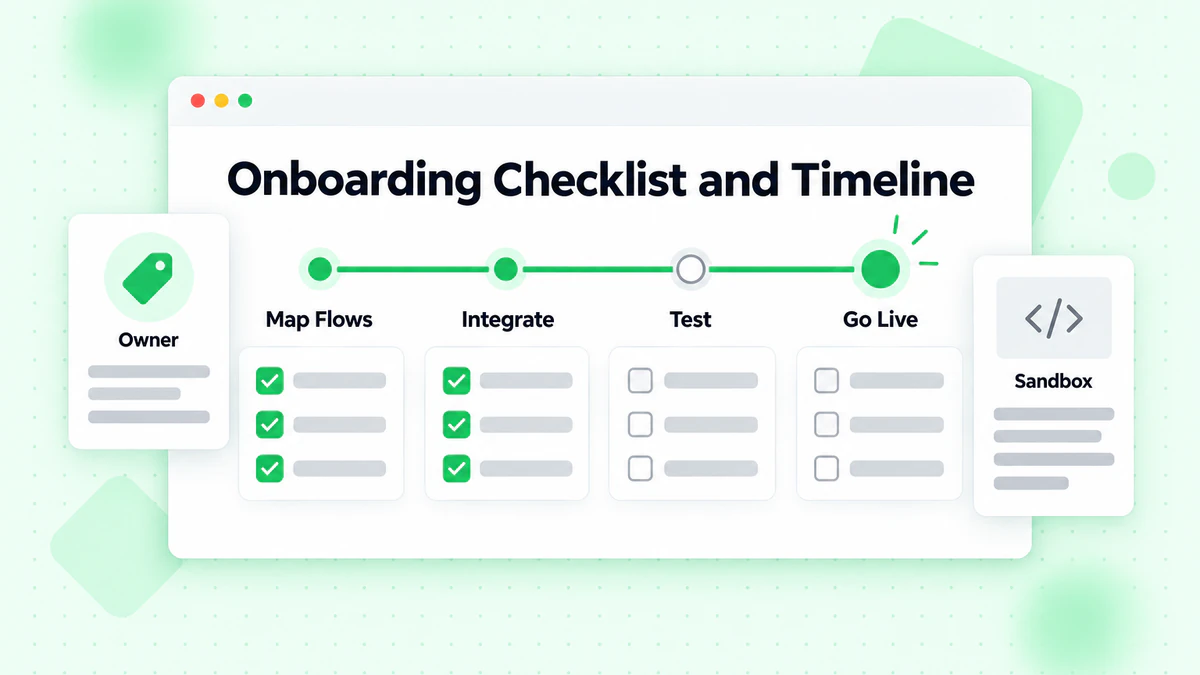
A Practical Onboarding Checklist and Timeline
A realistic onboarding plan doesn't start with code. It starts with mapping the flows that matter, then deciding where verification belongs and what success looks like. That first step is easier when a vendor removes friction early, and a free tier with no credit card requirement lowers the barrier for discovery because the team can test behavior before making procurement decisions.
A week-by-week sequence that avoids the usual stalls
Week one should cover discovery and requirements. Document the systems that need verification, the teams that own them, and the fields that will be accepted, blocked, or routed for review. Week two is API key provisioning and sandbox testing on synthetic addresses, where the team checks status outputs, error handling, and the shape of responses.
Week three should be a pilot. Run a single-check workflow on a small registration path and a bulk-clean workflow on a real but limited list. The goal is not volume, it's observability. If the team can't tell how rejects move through the stack, that's the problem to fix before broader launch.
By week four, connect the CRM and automation layer, then configure whitelabel elements if the use case needs client-facing branding. Production cutover should happen only after the pilot shows stable behavior and the team has a monitoring owner. The real-time API and bulk uploader matter here because they give immediate artifacts to evaluate instead of forcing teams to guess at fit.
If you need a visual reference for a typical sequencing model, this video helps anchor the flow:
A common slip point is overconfidence after the first clean test. A clean sandbox run doesn't prove the CRM mapping is correct, and a clean CSV upload doesn't prove the signup form behaves the same way. The safest rollout is the one where each phase has one owner, one acceptance check, and one visible rollback path.
Integration Best Practices and Common Pitfalls
A verification rollout breaks fastest when teams treat it like a simple API call instead of a production dependency. The teams that avoid rework document prerequisites, define acceptance criteria, and test each layer before launch. That sounds basic, but many projects still skip the controlled path and move straight from vendor demo to live traffic.
What to test before production
Start with the contract the application will depend on. Document the required fields, permissions, and upstream or downstream systems before the first live request leaves staging. Define what counts as valid, invalid, catch-all, disposable, or role-based before anyone reviews production data, because those labels drive routing, suppression, and review logic.
Test the flow in layers. Unit checks confirm the client parses the response correctly. Integration checks confirm the app can send requests, receive a response, and keep the surrounding workflow intact. End-to-end checks confirm the signup form, CRM mapping, and downstream automation behave the same way under realistic input.
The common mistakes are usually operational, not technical. Teams skip the sandbox and jump into production. They ignore catch-all and disposable detection, then wonder why list quality still feels noisy. They fail to filter role accounts, so generic inboxes remain in the pipeline. They also forget to instrument the fields they will need later, which makes troubleshooting slower than it should be.
Structured output prevents a lot of that drift. BillionVerify's JSON response fields, including status, SMTP results, MX records, and catch-all scoring, give engineers concrete values to build testable rules around. The Email Validation API is easier to integrate cleanly when the response shape is predictable, because the team can map each field to a decision before launch instead of trying to infer behavior after users hit the form.
For a broader testing mindset, the SMS Activate integration testing guide is a useful companion resource because it reinforces controlled validation before broad rollout. The same discipline applies whether you are testing SMS flows or email verification behavior.
Short version: if the rollout cannot be tested, observed, and rolled back, it does not belong in production yet.
Teams using AI agents or orchestration layers should also pay attention to standardized contracts. MCP Server integration gives developers and agents a consistent way to consume verification, which reduces the chance that every workflow becomes a custom exception.
KPIs That Prove Implementation Support Is Working
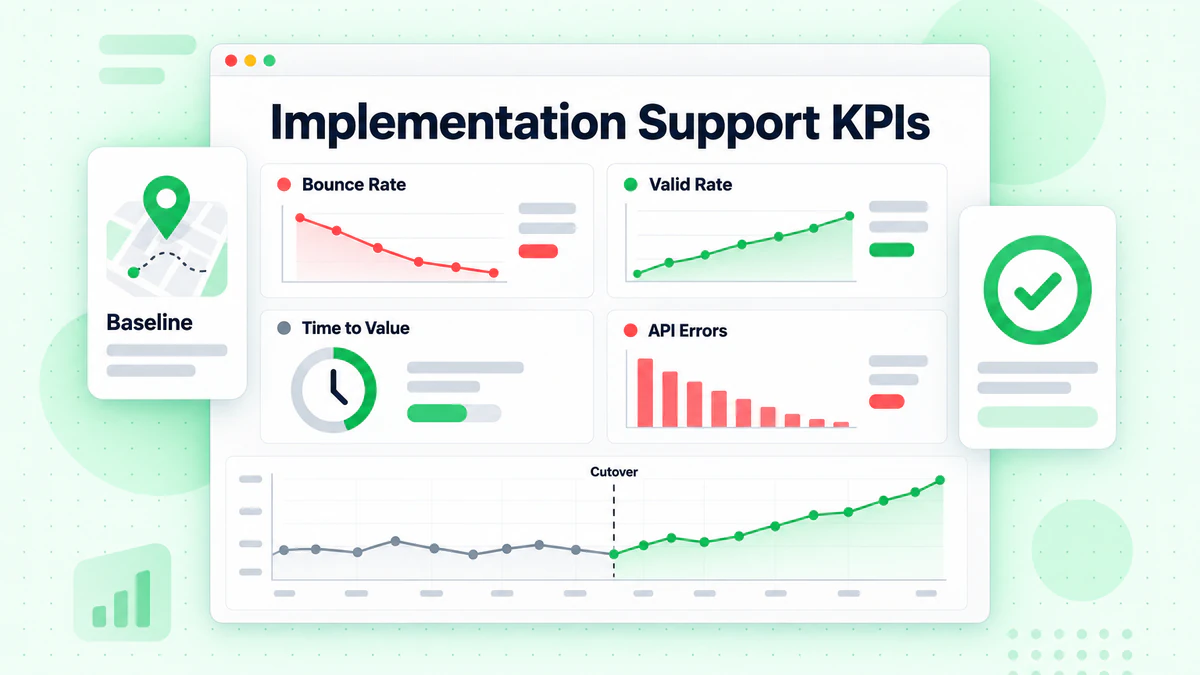
A rollout isn't healthy because it's live. It's healthy because the numbers improve in the places that matter. The measurement layer should start before cutover and continue after launch, with weekly reviews during pilot and monthly reviews in production.
What to measure during pilot and production
The most useful KPIs are the ones that connect directly to workflow behavior:
- Bounce rate before and after cutover: the clearest signal that list hygiene and validation are affecting delivery outcomes.
- Hard-bounce reduction: a strong indicator that bad addresses are being stopped earlier.
- Inbox placement: useful when the team wants to see whether cleaner data is supporting better sender reputation.
- Signup rejection rate: important for understanding how often bad addresses are blocked at the point of entry.
- Role-account removal counts: useful for list quality and outbound segmentation.
- Disposable address removal counts: helpful for fraud prevention and lead-quality controls.
Those metrics only work if the team knows which feature drives which signal. SMTP-level verification supports bounce reduction. Catch-all scoring helps segmentation. Role and disposable detection supports suppression rules. The real-time API protects signup funnels, which means the KPI needs to be read at the point where the address is first collected, not only in the campaign report.
For teams trying to benchmark a baseline, a bounce rate calculator for email marketers can help frame the before-and-after discussion in plain operational terms. That's especially useful when product, marketing, and operations need a shared language for the same issue.
Equity in outcomes matters too. If one segment still sees poor addresses more often than another, the average can look fine while the problem stays concentrated. Implementation support is working only when the process improves results for the contacts and teams that were most at risk in the first place.
How BillionVerify Fits the Implementation Support Model
A rollout only works if the verification tool fits the way the team already operates. BillionVerify maps well to that reality because its support surface lines up with the phases that usually make or break adoption. Single checks, bulk list cleaning, and the real-time API support readiness and integration. CSV uploads with live progress and export-ready filters support day-to-day operations. Structured JSON, including status, SMTP results, MX records, and catch-all scoring, supports monitoring. Whitelabel portals support sustainment for agencies. MCP Server integration supports teams building with AI agents.
That mapping matters because verification software is usually judged like a utility, while implementation support is really a rollout problem. A marketing team in Mailchimp or HubSpot needs list cleaning and campaign hygiene. A sales team in Salesforce cares about outbound integrity and routing. Automation teams using Zapier or Make need predictable responses that do not break downstream logic. Ecommerce teams in Klaviyo need signup and lifecycle protection. BillionVerify Email Verification fits inside that operating model rather than sitting outside it.
Support is not just about whether an address verifies. It is about whether the team can deploy verification, observe what is happening, and keep the workflow stable after launch. The difference shows up in production when bounce reduction holds, routing rules still behave, and reviewers can trace each result back to SMTP status, catch-all scoring, or the list-cleaning step that produced it.
A verification platform earns its keep when the team can run it without heroics, not when the demo looks clean.
Teams also need support for cases that sit outside standard marketing cleanup. If a workflow includes enrichment, reverse lookup, or research on a suspicious contact, the handoff needs to stay controlled so the team can navigate this sensitive email search without confusing it with ordinary verification work. BillionVerify is better suited to that kind of operational discipline when the rollout needs both clear outputs and a clean path from testing to live use.
Common Questions About Implementation Support
A rollout usually starts to wobble when teams treat verification like a one-time switch instead of a workflow with moving parts. For a mid-sized team, implementation support should map to discovery, sandbox testing, pilot validation, and production cutover, with each phase tied to a clear owner and a clear handoff. The schedule is driven less by the vendor's tooling than by how many systems need to change and how much internal coordination the team can hold together.
How long should a realistic implementation take?
The honest answer is that it depends on scope and internal readiness. If the team only needs one form and one CRM field updated, the work is straightforward. If the rollout touches multiple apps, routing rules, and downstream automations, expect more time in testing and more back-and-forth on edge cases before anyone trusts production results.
What's the difference between real-time API verification and bulk list cleaning?
Real-time API verification protects the signup flow at the point of entry. Bulk list cleaning fixes records that already sit in your database. Teams usually need both because they solve different problems, and the failure modes are different too. Real-time API keeps bad addresses from entering the funnel, while bulk jobs help reduce bounce risk in older lists, imported files, and stale CRM records.
Are whitelabel portals worth the setup effort for agencies?
They are worth it when clients expect branded reporting, private access, or a workflow that feels like part of the agency's own service. The setup takes more coordination than a standard internal rollout because you need to align branding, access control, and how results are presented. If the agency only needs a cleanup pass for its own team, that overhead may not pay back quickly.
What should teams look for in an SLA before signing?
Ask for clear response ownership, monitoring scope, and escalation paths for failures that hit a live workflow. The useful SLAs are the ones that spell out what gets watched, how fast someone responds, and what happens when a verification step starts returning unexpected SMTP results or catch-all behavior. If your process also includes enrichment or a reverse lookup workflow, keep that work controlled so the team can navigate this sensitive email search without mixing it up with standard verification.
How does implementation support help after launch?
After cutover, the value shifts to monitoring, coaching, and sustainment. That means watching rejection rates, checking whether catch-all scoring still matches real inbox behavior, confirming that whitelist or branding settings stay intact, and making sure the team can interpret results without guessing. The rollout only holds if the vendor helps the team spot drift early and fix the part of the workflow that broke, instead of treating launch day as the finish line.
If your team is still juggling signup protection, campaign hygiene, and API rollout in separate silos, the cleaner path is to bring those pieces into one operating model. BillionVerify fits that model with verification workflow support, structured outputs, and integration help that shorten the time between testing and stable production use.