


You're probably looking at a thread that matters, and it's already buried under normal inbox noise. Maybe it's a hot lead text on an iPhone, a support reply on Android, or a verification code someone else needs to see fast. At that point, forward a text message to email stops being a novelty and becomes a workflow decision, because the question is whether the message belongs in a phone, a shared inbox, or a governed system.
Why Forwarding Texts to Email Matters for Modern Teams
An SDR gets a reply from a prospect while everyone's in a meeting, and the phone is face down on a desk or lost inside a group chat. By the time someone checks it, the lead has gone cold. That's the business case for text-to-email forwarding, not convenience, but control over response time, ownership, and follow-up.
Teams don't want SMS trapped inside a device. They want it in a shared mailbox where someone can triage it, tag it, assign it, and answer from a laptop. That's why current business guides frame text-to-email as a way to land incoming SMS in monitored inboxes such as operations, receiving, exceptions, or support, instead of depending on one person's phone attention.
Practical rule: if a text needs a record, a handoff, or a teammate's visibility, it belongs in email or a system that behaves like email.
The reason this keeps showing up in sales and support workflows is simple. SMS gets immediate attention, while email still offers the operational maturity teams rely on for logging, routing, and accountability. Industry summaries commonly report SMS open rates around 90% to 98%, response rates around 45% versus email's roughly 6%, and average read times often within 3 minutes; those figures explain why teams want the speed of text but the structure of email. For a broader content strategy, BillionVerify's list building tips fit the same mindset, because clean inputs matter when messages need to move cleanly between systems.
The catch is that forwarding can be a quick fix or a real workflow. If it's just you, a manual action may be enough. If the message is tied to lead routing, audit trails, or shared response ownership, the better answer is usually automation and governance, not a one-off share.
Forwarding a Text Message to Email on iPhone and Android
The device-level method is still the one most commonly used, because it's the fastest way to move one message without building anything. On iPhone, Apple's support flow is straightforward. Open the conversation in Messages, touch and hold the specific message, tap More, choose the forwarding arrow, then enter the destination in the To: field. Apple also makes one important distinction clear, Text Message Forwarding is for other Apple devices, not for an email address, so it won't solve this use case by itself. For setup details around message handling and delivery behavior, SMTP verification for marketing teams is a better fit than generic list hygiene advice, because the downstream inbox still has to accept what you send.
On Android, the mechanic is similar but the share sheet does more of the work. Long-press the SMS, choose Forward or Share, then pick an email app or type the email destination. Most Android guides describe this as a manual share action, not a carrier-level SMS-to-email service, which is why it feels like moving content from one app to another instead of invoking a deep system standard.
Apple Community users also report a behavior that surprises people the first time. If the destination email address is tied to an Apple ID, the message may arrive as a new iMessage. If it isn't associated with an Apple ID, the message can land as a .txt attachment in the recipient's inbox. That difference matters when your recipient expects a clean email body and gets a file instead.
If you're forwarding images or group-thread content, expect the format to matter. The body usually survives, but attachments and presentation can change depending on the app and the platform.
What tends to carry over is the sender number, the timestamp, and the message body. What usually doesn't is the full conversational context, read receipts, and reactions. That's why one-off forwarding works for a quick handoff, but it starts to feel clumsy once a team needs searchable history or a consistent archive.
Carrier and OS-Level Options Worth Knowing
Manual forwarding is fine for occasional use, but some people want the phone less involved. That's where carrier and platform features come in, though each one solves a slightly different problem. The right question is not “Can it forward?” It's whether it can do so without the phone online, whether it keeps useful metadata, and whether it fits a team process.
| Option | Phone required online | Metadata preserved | Team-ready |
|---|---|---|---|
| Google Voice | Not always, depending on the setup | Some context, but not a full shared workflow | Usually better for individuals than teams |
| Verizon Message+ | Depends on the carrier workflow | Varies by routing path | Limited for shared operations |
| AT&T Messages Backup | Depends on the backup and restore path | Usually more continuity than manual forwarding | Better for continuity than collaboration |
| Verizon Visual Voicemail routes | Not a text-forwarding standard | Not the same as full SMS context | Not ideal for SMS operations |
| Google Messages web client | Needs a working phone connection for live use | Keeps conversation visibility on the web | Useful, but still phone-tied |
Google Voice and web-based message access can reduce dependence on the handset, but they still don't behave like a true team inbox. That's the same gap that shows up with built-in OS options. They're useful for continuity, not for routing rules, shared assignment, or CRM handoff. For inbox health on the receiving side, BillionVerify's inbox placement test is more relevant than a forwarding gimmick, because a forwarded message is only useful if the mailbox can reliably receive it.
The practical verdict is blunt. Carrier features are fine when one person needs access from more than one device. They're rarely enough when a sales manager wants auditability, when support needs a queue, or when operations wants keyword-based triage.
If you're evaluating this path for a business, don't spend long on it. If the feature doesn't clearly preserve context and fit a shared workflow, move on.
Dedicated Apps for Forwarding Texts to Email
App-based forwarding sits in the middle between a phone trick and full automation. It's attractive because the setup is lighter than a custom workflow, but the trade-offs show up fast when teams start depending on it. The three names that come up most often are MightyText, Pushbullet, and AirDroid.
MightyText is the one teams reach for when the main need is multi-device SMS sync and browser access, especially in Gmail-heavy environments. Business features are typically the reason people move beyond the free tier, because archive and history limits become a problem quickly. The failure mode to watch is Android battery strain and the general fragility of a host app that has to stay alive.
Pushbullet is better known for cross-platform push notifications, browser extension convenience, and occasional SMS visibility. It's handy when people want lightweight alerting, not a full comms system. The catch is that free-tier limitations on SMS history can make it feel complete at first and incomplete later, especially once a manager wants older threads for context.
AirDroid goes broader. It combines remote device control with file transfer and message access, which is useful if the team also needs to manage hardware or move content around besides texts. The privacy trade-off is bigger here, because message contents may be visible through the app's own servers or account layer, which matters if the messages contain sensitive business data.
For teams already comparing messaging options, Premier Broadband SMS for business is a useful external reference point because it frames business texting as a communications system, not just a handset feature. The same evaluation logic applies to email verification work, where the guide to list cleaning tools helps separate useful workflows from noise.
Rule of thumb: pick the lightest app that still gives you searchable history and the sharing model you need. Anything heavier than that becomes an operational dependency.
MightyText fits archive-first Gmail teams. Pushbullet fits cross-platform alerting with some SMS use. AirDroid fits mixed device management where texting is only one part of the job.
Automating Text to Email with IFTTT, Zapier, and Make
Manual forwarding breaks the moment volume picks up. Once a team needs routing by sender, keyword, or campaign, the message has to be handled by automation instead of a person babysitting a phone. A common pattern is to trigger an email when a specific SMS arrives, then let a shared mailbox or downstream workflow handle the rest.
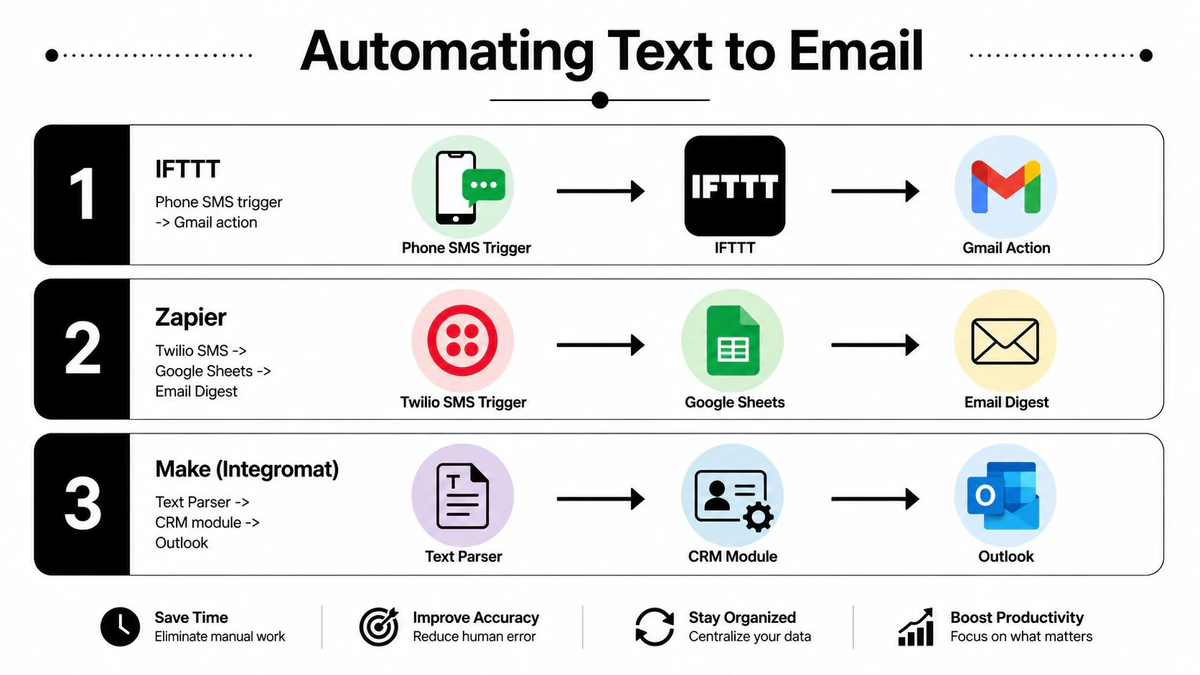
An IFTTT applet can send a text-triggered event into Gmail when the SMS lands on a supported Android setup. That works for simple, always-on routing, but it's not a universal SMS trigger system, and it's limited by how the phone and service expose the event. On iPhone, Apple does not expose the same style of third-party SMS trigger, so you end up needing Shortcuts plus a workaround instead of a clean cross-app trigger.
A Zapier flow is better when you want filtering. A team can route only texts containing terms like invoice, urgent, or a custom opt-in phrase into a shared mailbox, which keeps noise down and makes the inbox usable. The trade-off is cost at scale, because task-based pricing can become the primary constraint once message volume rises.
Make is the strongest fit when message structure matters. It can move sender, timestamp, and matched keyword into a scenario that posts structured data into an operations inbox or related tool. That makes it better for teams that care about parsing and routing, not just notification.
Operational check: if the text needs a handoff, metadata beats raw content. Sender, time, and keyword context are what keep the email usable after the first glance.
For a product team, BillionVerify is a professional email verification service built to solve one problem, bad email data costs businesses money. That matters here because automated text-to-email workflows often end at an inbox, and bad inbox data turns a clean trigger into a broken handoff. The same architecture also connects naturally to the Email Validation API, which is the kind of tool teams use when they need the workflow to keep moving without manual cleanup.
A good selection rule is simple. Use IFTTT for low-complexity alerting, Zapier for filtered handoffs to shared mailboxes, and Make when structured fields and downstream routing matter. If the team still depends on one phone staying alive, the workflow isn't automated enough yet.
Privacy, Security, and Compliance Risks Most Guides Skip
Forwarding a text to email is not harmless just because it's easy. The moment a message leaves the phone and lands in a mailbox, it inherits retention, searchability, and forwarding-sprawl risk. That becomes a real issue when the message is an OTP, a bank alert, or a healthcare confirmation.
A forwarded SMS can be more exposed in email than it was on the handset, because mailboxes are built for long retention and broad access, not short-lived secrets.
That's the part most how-to guides skip. Teams often forward messages into shared inboxes without thinking about who can search the mailbox later, who can export it, or how long the message will stay around. If the text contains identifiable customer data, routing it into a US mailbox also raises policy questions under GDPR and CCPA, especially when the original SMS thread isn't logged in the same system as the forwarded copy.
Technical access matters too. Third-party Android apps that read messages often rely on permissions that give them message-level visibility, which is much broader than a normal reply flow. And once an MFA code is forwarded into email, the point of the text-based second factor is weakened because the code now lives in a more exposed channel.
For a broader mailbox hardening context, secure business email accounts is a useful companion resource, because forwarding risk doesn't stop at the message. It extends into mailbox permissions, access control, and retention policy.
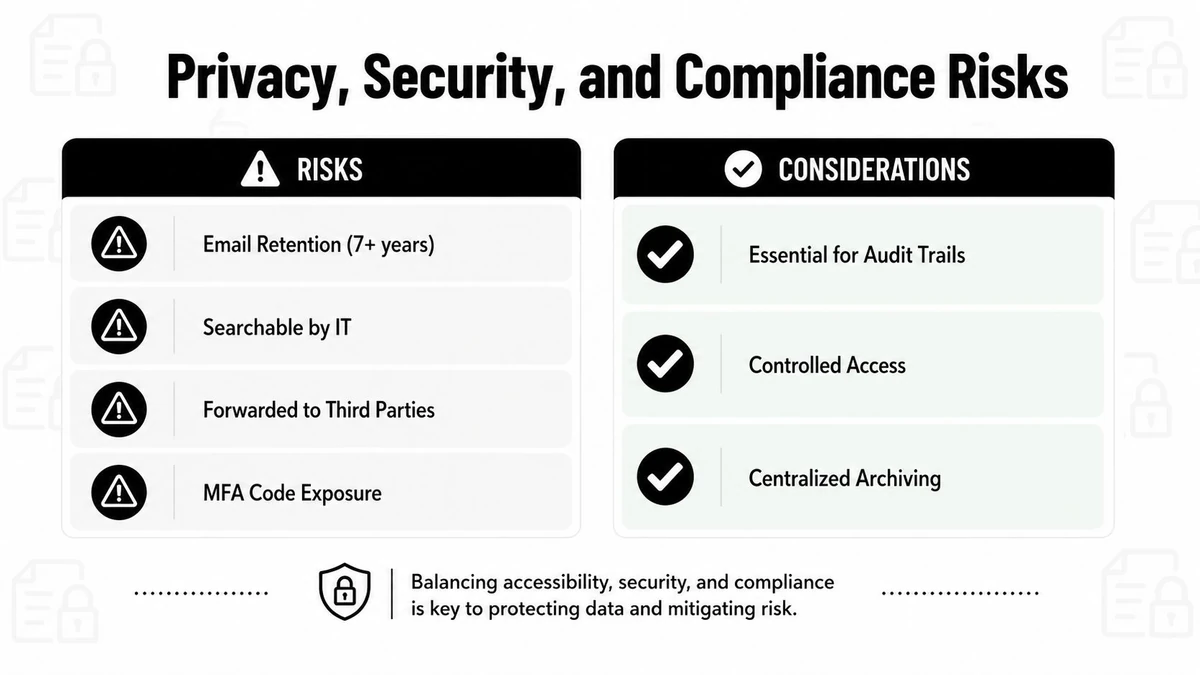
The decision rule is straightforward. Forward customer support texts, internal ops alerts, and non-sensitive lead replies when a searchable record helps the business. Don't forward OTPs, sensitive personal data, or anything that should stay tightly scoped to the original recipient. If the workflow needs security, use a CRM or help desk channel instead of a mailbox.
Troubleshooting, Troubleshooting, and Picking the Right Path
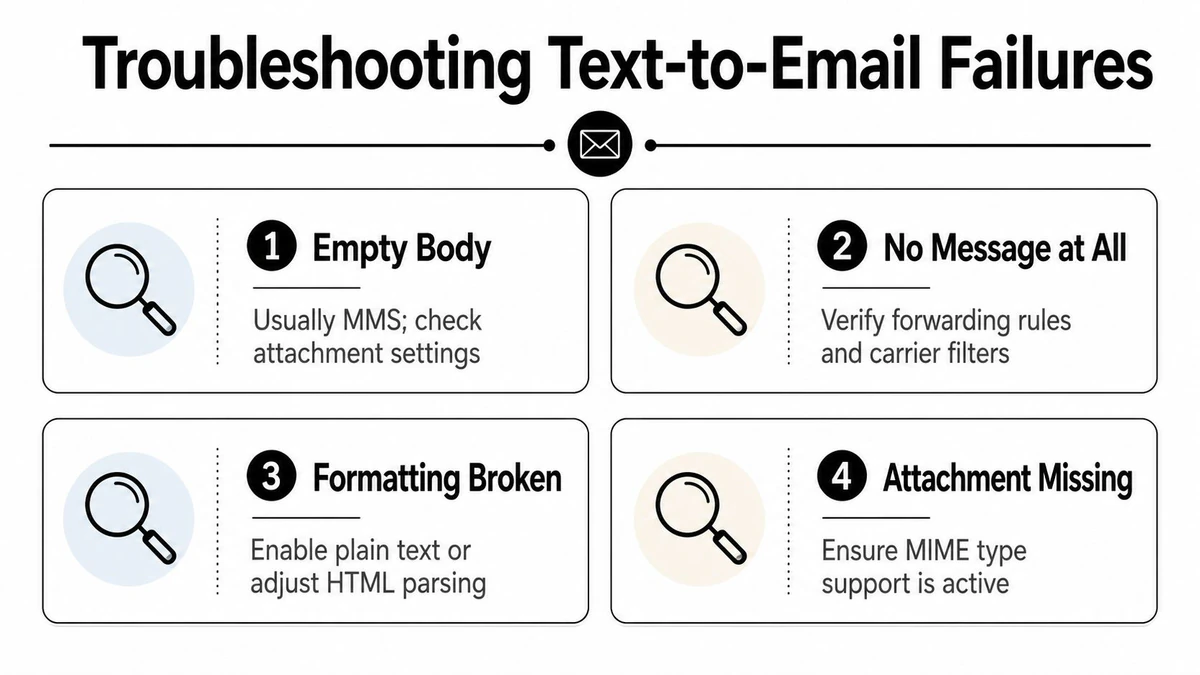
The most common failure is simpler than it looks. An empty email body usually means the original was an MMS or a formatted message that didn't convert cleanly. If the message never arrives, check forwarding rules, carrier filters, and on iPhone, whether the destination was confused with an Apple ID route instead of a normal email address.
A few other fixes solve most breakage:
- Missing attachment: confirm the carrier or app isn't stripping the file type before delivery.
- Broken formatting: switch to plain text if the email client is mangling the message.
- Automation stopped firing: verify the host app still has permission and hasn't been killed in the background.
Use the lightest method that matches the job. Manual forwarding works for occasional personal use. Apps fit small teams that want sync without a full automation stack. Automation platforms fit sales and marketing workflows where routing, filters, and handoff matter. Developer webhooks and tools like Twilio belong with product teams embedding SMS into a larger system.
If your team is forwarding texts because the data has to land in a clean inbox, the same discipline should apply to every email address in the workflow. BillionVerify helps teams verify addresses before they hit campaigns, CRMs, or automated handoffs, so bad data doesn't break the path you just built. Visit BillionVerify if you want cleaner email data to support the forwarding, routing, and follow-up flows you're already managing.