


Many teams still treat CRM as a place to store contacts, but that misses the core purpose. A CRM should help people decide who to contact, when to contact them, and which records are worth trusting. When bad addresses slip in, the system stops being a growth engine and starts becoming a noisy archive, which is why crm best practices in 2026 have to start with data quality and verification, not more reminders for reps. That shift matters even more now that CRM has moved from a niche sales tool into mainstream infrastructure, with market reporting showing the category's growth from about $14 billion in 2010 to an expected $80 billion by 2025, and a separate estimate projecting $126.17 billion in 2026 and $320.99 billion by 2034 at a 12.4% CAGR (Breakcold CRM statistics). It also matters that about 87% of CRM systems are cloud-based, compared with 12% in 2008, because shared, live data has become the default operating model, not a nice-to-have.
If you want the strategic reason marketers and ops teams keep talking about verification, it's simple. CRM users are widely adopted, and disciplined execution pays off. Businesses using CRM are reported to be 86% more likely to exceed sales goals, users typically see a 21% to 30% increase in sales revenue, and teams often save 5 to 10 hours per employee each week when the system is implemented well (Freshworks CRM statistics). That's the backdrop for this list. The strongest CRM programs don't just collect more records, they keep bad records out, clean legacy data, and connect verification to the exact workflows that drive campaigns and pipeline.
2. Bulk List Cleaning and Periodic CRM Hygiene Audits
Point-of-entry checks reduce bad captures, but older CRM records still drift out of date. Addresses change, domains expire, and roles shift, so a list that looked healthy last quarter can start producing bounces, weak segmentation, and noisy sales alerts. For teams that manage large databases, periodic hygiene is not a nice-to-have task, it is part of keeping the CRM usable.
A clean list is easier to trust. That matters because a CRM is often treated like a source of truth, and once stale contacts pile up, every downstream report inherits the clutter.
For a detailed guide on the process, see email list cleaning by BillionVerify.
Bulk cleaning works best as a repeatable workflow, not a one-off purge. Start with a baseline export of the records you want to review, then send that file through the bulk verification process. Teams can use the bulk API endpoint to upload a CSV, receive a job ID, and poll for status updates, then use the returned JSON to filter records by deliverable or risky status before re-importing into the CRM. That gives operations teams a direct path from file upload to CRM update, without relying on manual judgment to sort valid contacts from weak ones.
{
  "job_id": "abc123",
  "status": "completed",
  "results": [
    { "email": "alex@example.com", "status": "deliverable" },
    { "email": "sales@domain.com", "status": "risky" },
    { "email": "old@bad-domain.com", "status": "undeliverable" }
  ]
}
The practical question is what to do with each result. Deliverable records can stay active, risky records can move into a review queue, and undeliverable records can be suppressed or archived so they do not re-enter future sends. That approach keeps compliance records intact while reducing the chance that a sales rep or automation flow keeps working dead addresses.
A simple audit rhythm helps teams avoid cleanup debt. Export the list, run verification, map the returned status values to CRM fields, then update suppression or archival rules based on those fields. If your CRM supports a custom verification flag, store the status there so campaign managers can segment by data quality instead of guessing which contacts deserve another send. That is especially useful when a list contains a mix of old inquiries, imported events, and contacts that have not engaged for months.
Short review cycles also make errors easier to spot. If a batch suddenly returns a higher share of risky or undeliverable records, that is a sign the source list, acquisition channel, or import process needs attention. Cleaned records do not have to disappear from the system, either. Many teams keep them archived for troubleshooting, reporting, and audit trails, which helps preserve the history behind each contact while preventing low-quality addresses from polluting active workflows.
2. Bulk List Cleaning and Periodic CRM Hygiene Audits
Point-of-entry checks catch fresh errors, but legacy data still needs regular attention. CRM databases age quickly, and data decay is an ongoing process, not a one-time project. One CRM best-practices source notes that business data decays at about 30% per year, which is why scheduled audits matter more than occasional cleanup work (Salesforce CRM best practices). If old lists have been sitting untouched, they are already affecting deliverability, segmentation, and forecast quality.
Bulk cleaning works best as a recurring operating habit. Quarterly audits fit many healthy systems, while bi-annual reviews can work for smaller teams with lighter send volume. The goal is to remove bounced addresses, identify role accounts, spot disposable domains, and flag records that no longer belong in active campaigns. BillionVerify's bulk verification flow supports this maintenance work, so teams can upload large lists, review exportable status filters, and separate high-value contacts from risky ones without relying on guesswork.
Cleaning is not deletion. Many teams archive cleaned records so compliance and troubleshooting stay intact.
A practical audit rhythm
Start with a baseline audit so you know what clean data looks like before the ongoing cycle begins. Then decide how cleaned records should flow back into your CRM, whether that means suppression, archiving, or later re-verification. Email marketing agencies often use this process before large client sends, while SaaS teams apply it to remove churned user accounts from active nurture paths and B2B sales teams use it before outbound pushes.
BillionVerify fits into that rhythm through list-level verification rather than one-off manual checks. A common setup is to upload a CRM export, receive status values such as deliverable, risky, or undeliverable, and map those values into CRM fields or campaign rules. That lets operations teams keep the contact history while giving marketing teams a clear action path for each record. For example, a deliverable contact can remain active, a risky contact can move into review, and an undeliverable record can be suppressed or archived so it does not re-enter future sends.
- Schedule by business cycle: Clean before peak campaigns, not after a deliverability problem surfaces.
- Prioritize high-value segments first: If an account tier or audience segment drives more revenue, verify that list before broader housekeeping.
- Record removal reasons: Keep a simple audit trail so sales and support can understand why contacts were suppressed.
- Sync the result back to CRM tools: Integrations with Salesforce, HubSpot, or Mailchimp help the cleaned status travel with the record.
- Measure before and after: Track bounce-rate movement and list health changes across each audit cycle.
A short review cycle also makes pattern shifts easier to spot. If a batch returns more risky or undeliverable records than usual, the source list, acquisition channel, or import process likely needs attention. Cleaned records do not need to disappear from the system. Many teams keep them archived for troubleshooting, reporting, and audit trails, which preserves the history behind each contact while keeping low-quality addresses out of active workflows.
4. Role Account Detection and Segmentation
Role accounts look harmless until they start blurring your CRM data. Addresses like info@, support@, sales@, hello@, and contact@ usually belong to shared inboxes, not to a single buyer with a clear role in the purchase process. If a team scores them the same way it scores named contacts, engagement reports get noisier, routing rules become less precise, and it gets harder to tell which person responded.
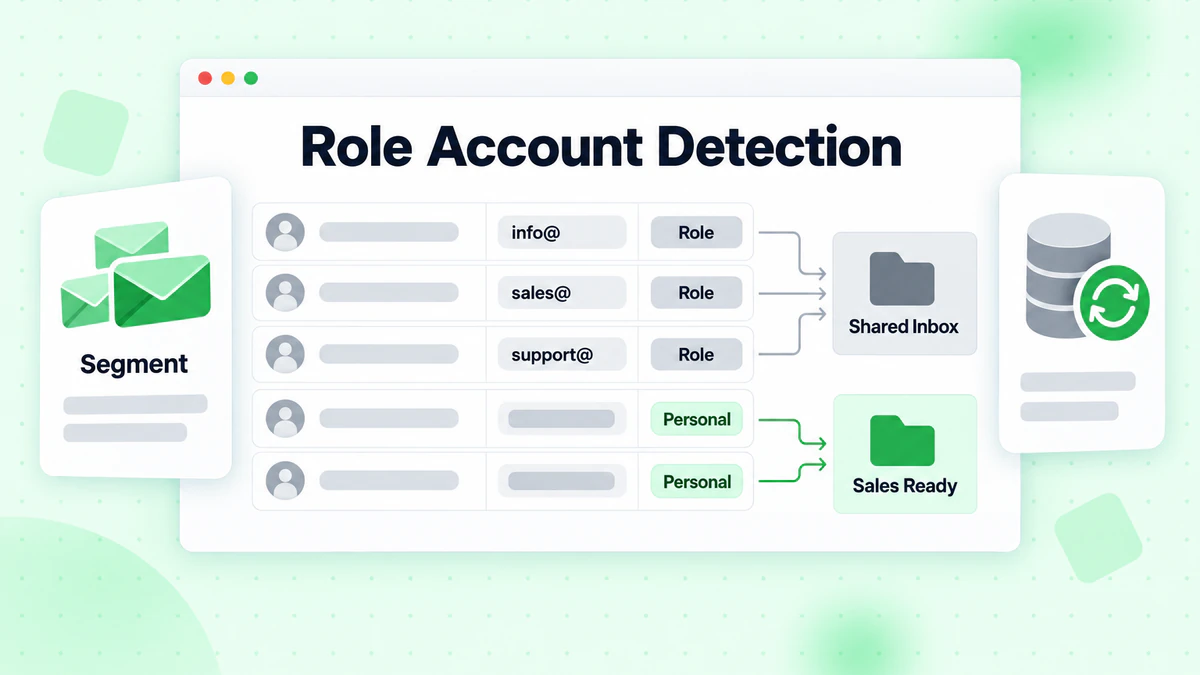
Segmentation is usually the better move than deletion. Role accounts can still support specific workflows, but they should not sit in the same audience bucket as named contacts during cold outreach or lifecycle nurture. BillionVerify flags role accounts during verification, which gives marketers and ops teams a clean way to separate them instead of guessing from the address alone.
That separation changes the CRM from a blunt list into a working map. A shared inbox may be useful for research, vendor intake, or internal routing, while a named contact is usually the better fit for personalization, scoring, and automated follow-up. If the record stays in the database, the CRM still keeps the history. If the record is tagged correctly, campaigns and workflows can handle it with the right level of attention.
The email segmentation guide fits this approach because role accounts often need a different engagement strategy. A B2B sales team may suppress them from prospecting while keeping them available for account research. An agency may isolate them for outreach that is meant for generic inboxes rather than individual decision-makers. A publisher may remove them from a subscriber newsletter while retaining the record for reporting or compliance review.
The practical setup is straightforward. Send the verification result into a CRM field that marks the address as role-based, then use that field in campaign rules, lead scoring, and routing logic. If the status code shows a role account, the system can route it to a separate list, reduce personalization assumptions, or exclude it from sequences that depend on individual ownership. That keeps shared inboxes visible without letting them distort performance metrics.
- Mark the account type in CRM fields: Save a role flag so sales, marketing, and ops can read the same status.
- Separate outreach paths: Use one journey for named contacts and another for shared inboxes.
- Adjust scoring rules: Lower the weight of role accounts if the score depends on individual intent signals.
- Review high-value exceptions: Keep role inboxes visible for target accounts where a shared address still helps with access.
- Keep the logic documented: Make sure the team knows why a role account was routed, suppressed, or retained.
A simple rule set like this helps teams keep the database honest. Shared inboxes remain in the system, but they stop masking who is ready for a direct conversation.
5. Disposable Email Detection and Fraud Prevention
Disposable addresses are a direct threat to both data quality and trust. They appear in free trials, gated content forms, contest signups, and low-friction registrations, then disappear before a team can do anything useful with them. That hurts CRM hygiene, and it can also hide fraud or multi-account abuse.
Disposable email detection works best as a prevention layer, not just a cleanup task. If a business is exposed to trial abuse, fake accounts, or promotional spam, screening disposable domains at the point of entry protects the rest of the workflow. BillionVerify's SMTP-level fake email detection helps teams classify these addresses in real time, so they can decide whether to block, warn, or isolate them before bad records spread into the CRM.
The right action depends on the risk. A SaaS product may hard-block disposable emails on trial signup. An e-commerce site may stop them at account creation. A marketplace may flag them for review when the signal is borderline. The choice should match the cost of letting bad records through and the risk of false positives.
Operations teams should also watch the pattern behind the addresses. If disposable usage rises around one campaign or one acquisition source, that points to traffic quality, form friction, or referral abuse. The CRM should not just store the record. It should help explain why the record appeared in the first place.
Set the response by risk level
Treat disposable-email status as a routing signal, not a label that sits unused in a field. Save the verification result in the CRM, then map each status to a different response path. A verified disposable domain can go straight to suppression, while a borderline case can move into a review queue for ops or fraud checks.
That setup also helps teams keep decisions consistent. If support, growth, and operations all read the same status code, they can apply the same rule without rechecking the inbox manually. A clean rule set is easier to audit, and it keeps edge cases from turning into hidden exceptions.
- Block high-risk signups: Stop disposable addresses at trial or account creation when abuse risk is high.
- Route borderline cases to review: Send uncertain records to an ops queue instead of letting them into active campaigns.
- Separate source-level reporting: Compare disposable-email rates by campaign, referral source, or form type to spot abuse patterns.
- Keep the verification status visible: Store the result in a CRM field so sales, marketing, and ops all see the same signal.
- Tie suppression to a documented rule: Make the action clear so the team knows why a record was blocked, flagged, or retained.
A setup like this protects both performance and trust. The CRM keeps the record, but only if that record can stand up to scrutiny.
5. Disposable Email Detection and Fraud Prevention
Disposable addresses are a direct threat to both data quality and trust. They show up in free trials, gated content forms, contest signups, and low-friction registrations, then disappear before your team can do anything useful with them. That's bad for CRM hygiene, and it can also mask fraud or multi-account abuse.
Disposable email detection should be treated like a prevention layer, not just a cleanup tool. If your business model is exposed to trial abuse, fake accounts, or promotional spam, blocking or flagging disposable domains at the point of entry protects downstream workflows. BillionVerify's SMTP-level fake email detection helps teams classify these addresses in real time, so they can decide whether to block, warn, or isolate them.
Use the right action for the risk
A SaaS product may hard-block disposable emails on trial signup. An e-commerce site may stop them at account creation. A marketplace may flag them for review if the risk is borderline. The best choice depends on your tolerance for false positives and the cost of letting bad records through.
This is also where operations teams should watch trends. If disposable usage spikes around one campaign or one acquisition source, that's a signal to inspect traffic quality, form friction, or referral abuse. The CRM shouldn't just absorb the record, it should help explain the pattern.
- Block when the risk is obvious: High-confidence disposable addresses shouldn't reach the CRM.
- Review flagged patterns regularly: Repeated abuse from the same source deserves attention.
- Track separate conversion paths: Compare disposable and legitimate signups so you can see the cost of fraud.
- Document false positives: If a legitimate user gets flagged, refine the rule set instead of ignoring the problem.
- Use confidence tiers: Hard blocks and soft warnings don't need to work the same way.
6. MX Record Validation and Domain Reputation Scoring
Syntax checks can tell you whether an address looks right. MX validation tells you whether the domain can receive mail. That difference matters because a perfectly formatted address can still point to an empty, broken, or suspicious mail setup. For CRM teams, verification becomes a quality gate instead of a cosmetic check.
Domain reputation scoring adds another layer. If a domain looks operational but has weak trust signals, your team may want to place it in a lower-confidence segment before sending campaigns. BillionVerify returns MX record details and domain reputation insights alongside its verification results, which helps marketers decide whether to send, delay, or suppress.
Why domain-level checks change the workflow
B2B sales teams use this to separate typo-ridden addresses from real corporate domains. Agencies use it for brand safety before sending campaigns on behalf of clients. SaaS teams use it to screen enterprise signup domains, and publishers can use it to keep suspicious domains out of subscriber lists. The point is not to overcomplicate the database, it's to avoid treating all verified-looking records as equally safe.
Practical rule: when the domain looks new, unstable, or suspicious, keep the record visible but lower its priority until it proves itself.
A good CRM setup keeps domain reputation in a field that automations can read. That makes it possible to pause high-risk addresses, alert account owners, or route them into a manual review queue. It also helps ops teams monitor changes over time instead of discovering problems only after bounce rates climb.
7. CRM-Native Verification via Whitelabel Portals and Branded Verification
Agencies and service teams often manage verification across multiple clients, and jumping between tools wastes time. A branded portal solves that by bringing verification into a familiar environment, so the process feels like part of the client's own system instead of an external add-on. BillionVerify supports whitelabel portal capabilities, which makes it a practical fit for teams that want to offer verification under their own brand.
The main advantage here is consistency. When client teams, sales teams, or internal departments use the same branded flow, the rules around verification, review, and export stay easier to follow. That reduces confusion when one team uploads lists, another team cleans them, and a third team runs campaigns from the same CRM.
Where branded verification fits
Digital marketing agencies can bundle verification into their managed services. MSPs can include it as part of email operations. Enterprise CRM teams can roll it out across departments without changing the user experience. Consulting firms can use it as a client-facing data-quality service, and in-house teams can keep the workflow visually aligned with the rest of their platform.
- Match the branding: Use the client's or agency's visual identity so adoption feels natural.
- Set role-based permissions: Control who can upload, export, approve, and review.
- Document the operating workflow: Make client onboarding and provisioning consistent.
- Track usage by team: Adoption data helps you see where the process is helping and where training is needed.
- Plan for scaling early: If the client base grows, the portal should grow without forcing a process rewrite.
8. Deliverability Insights and Predictive Bounce Scoring
Binary valid or invalid results are useful, but they don't tell the whole story. A CRM gets much stronger when it can use SMTP responses, MX records, catch-all scoring, and domain reputation together to estimate deliverability risk. That's the difference between knowing an address exists and knowing whether it deserves an immediate send.
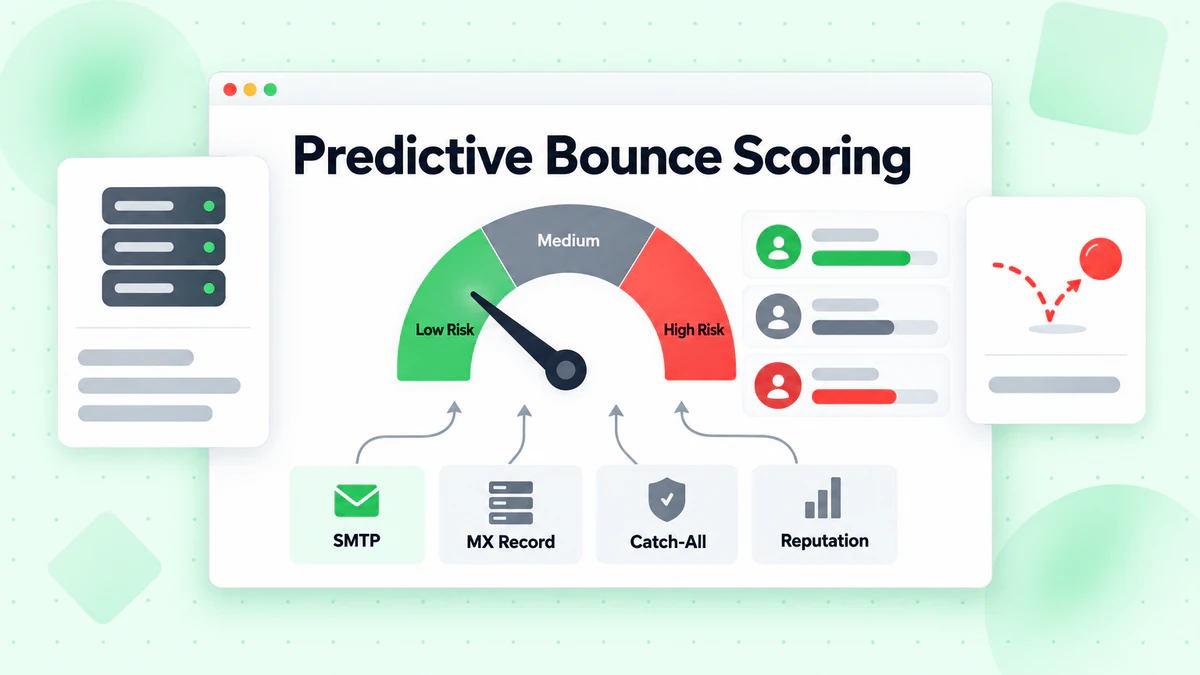
BillionVerify returns structured JSON with SMTP-level details and scoring, which gives teams room to segment audiences by confidence instead of treating every contact the same. For marketers, that means better timing and fewer surprises. For ops teams, it means deliverability decisions can be standardized instead of made case by case.
Turn verification data into send strategy
High-risk addresses can be placed into a slower or separate send path. Safer addresses can move through normal campaigns. Catch-all domains can be handled with more caution, especially if past sends show mixed results. The goal is to use verification data to shape audience strategy before a campaign goes out.
An email marketer might split one list into safe, medium-risk, and high-risk groups. A SaaS team might use that split to decide which onboarding sequence gets the faster path. A publisher might use the same logic to protect inbox placement before a major newsletter drop.
Verification is most valuable when it changes a decision. If the result doesn't alter segmentation, timing, or suppression, it's just extra data.
Track bounce rates by risk tier, not just by campaign. That gives your team a cleaner read on whether the scoring logic is useful. It also helps you explain ROI to leadership in a way that connects directly to inbox performance and conversion behavior.
8-Point CRM Email Verification Best Practices Comparison
| Item | Implementation Complexity 🔄 | Resource Requirements ⚡ | Expected Outcomes 📊 | Ideal Use Cases 💡 | Key Advantages ⭐ |
|---|---|---|---|---|---|
| Real-Time Email Verification at Point of Entry | Medium‑High 🔄, API integration + UX design | Moderate ⚡, realtime API calls, uptime needs | High 📊, fewer invalid records, better sender reputation | Signup forms, checkout, lead capture | Prevents bad data at source; instant feedback |
| Bulk List Cleaning and Periodic CRM Hygiene Audits | Medium 🔄, batch workflows, team coordination | Moderate‑High ⚡, large volume processing, scheduled budgets | High 📊, sustained CRM health, lower bounce rates | Quarterly audits, pre‑campaign cleanups, migrations | Scales to millions; precise status classifications |
| Email Verification Integration with Marketing Automation Workflows | Medium 🔄, connector setup & field mapping | Low‑Moderate ⚡, leverages existing platform integrations | High 📊, fewer campaign bounces; automated gating | Imports, pre‑send checks, nurture sequences | Automates verification within existing workflows |
| Role Account Detection and Segmentation | Low 🔄, pattern detection & tagging | Low ⚡, simple rules & CRM flags | Medium 📊, reduced bounce spikes; clearer metrics | B2B outreach, prospect lists, suppression strategies | Protects reputation; enables targeted handling of role addresses |
| Disposable Email Detection and Fraud Prevention | Low‑Medium 🔄, blacklist checks & blocking rules | Low ⚡, DB lookups, frequent updates | High 📊, fewer fake signups, lower fraud/abuse | Free trials, signup flows, marketplaces | Prevents trial abuse and low‑quality leads |
| MX Record Validation and Domain Reputation Scoring | Medium‑High 🔄, DNS checks + reputation lookups | Moderate ⚡, DNS queries, blacklist databases | High 📊, avoids typos/blacklisted domains; domain trust insight | Enterprise signups, brand safety checks, B2B validation | Detects suspicious domains and improves deliverability decisions |
| CRM‑Native Verification via Whitelabel Portals and Branded Verification | High 🔄, customization, provisioning, branding | Moderate‑High ⚡, portal hosting, account management | Medium‑High 📊, unified UX; client‑facing reporting | Agencies, MSPs, multi‑client environments | Branded experience; centralized client management and billing |
| Deliverability Insights and Predictive Bounce Scoring | High 🔄, analytics, scoring models, tuning | High ⚡, data processing, historical modeling | High 📊, predictive segmentation; improved inbox placement | Performance marketing, send optimization, ML use cases | Nuanced risk scoring; enables data‑driven send strategies |
Your CRM Optimization Roadmap for 2026
These eight CRM best practices work best when they're sequenced. Start with real-time verification at entry so new bad data never gets a foothold. Then add bulk cleaning for the records already in your system, because the legacy problem won't fix itself. From there, connect verification to automation, role-account segmentation, disposable-email filtering, MX validation, branded portals, and predictive scoring so the CRM becomes a controlled system instead of a loose collection of contacts.
The best teams don't stop at list hygiene. They turn hygiene into a process with owners, timing, and metrics. That lines up with CRM guidance that says the first priorities should be clear and measurable business goals, a small set of metrics to track consistently, and strong leadership support with training (Zeeg CRM best practices). It also lines up with the operational cadence recommended in CRM data-quality guidance, which calls for weekly checks on bounced emails and new imports, monthly deduplication and domain verification, and quarterly refreshes of automations, field rules, and dashboards (Artisan CRM best practices). If your CRM review cycle already exists, verification belongs inside it, not beside it.
That's the upside of a tool like BillionVerify. It gives marketers and ops teams a way to move from reactive cleanup to structured prevention, while keeping the CRM fields, workflows, and send logic tied to the same data standard. The result is easier to defend to leadership because you can tie it to bounce reduction, inbox placement, and conversion lift without relying on vague promises. For teams driving growth with CRM marketing, that's the difference between a database and a decision engine (driving growth with CRM marketing).
If your CRM still carries stale, risky, or disposable addresses, start by cleaning the data that's already costing you sends and pipeline time. BillionVerify gives teams a practical way to verify records in real time, clean lists in bulk, and segment by deliverability risk inside the workflows they already use. Visit BillionVerify and put email verification into the same system that powers your CRM, campaigns, and outbound process.