


You can feel the stall before you ever send the email. You've found a company you'd work for, the role page is either vague or missing, and your draft keeps drifting between polite, desperate, and too long. That's the point where most cold email for job attempts die, not because the writer lacks talent, but because the message wasn't built for the way hiring inboxes work.
What lands best is narrower than many assume. A job-seeking cold email isn't a sales blast, it's a precision note aimed at one person, with one relevant proof point, and one easy next step. If the address is bad, the recipient is wrong, or the wording feels generic, the email disappears into the same pile as everything else.
Why Most Cold Emails for Jobs Get Ignored
A recent grad gets a job lead through a friend, finds no posting, and sends a long email to the company's “info@” address with a resume attached. The message may look fine on paper. In practice, it lands in a crowded inbox, carries little trust, and reaches a recipient who has already seen enough outreach to ignore a stranger by default.
That's the environment job seekers are up against. One 2026 benchmark puts the platform-wide average cold-email response rate at 3.43%, down from 5.1% in 2024, and another analysis says 58% of all replies come from the first email, while follow-ups produce the other 42%. The trend from about 7% in 2023 to 3.43% in 2026 shows a sustained drop, not a random dip, which is why the average campaign and a strong one can differ by only a few percentage points (reply rate benchmark).
The inbox is already crowded
Decision-makers are not waiting around for your message. A survey cited in 2026 email statistics says people receive an average of 15 cold emails per week, or about 780 per year, and 6.7% receive more than 30 per week. In the same data set, 50.9% usually don't engage with cold emails, 13.7% delete them immediately, and 10.3% mark them as junk, which shows how much trust has to be earned before a reply even becomes possible (cold email statistics).
The practical takeaway is simple. A job email works more like a short outbound sequence than a one-off note. If the first message does not feel tightly matched to the person and the role, the odds are already bad, because broad cold outreach sits in a low-response environment where weak targeting gets punished fast.
Practical rule: If your email could be sent to five unrelated companies with only the name swapped, it is too generic.
The first fix is not better prose, it is better targeting. That means deciding who should receive the note before you refine the wording, and in many cases you also need to find role account addresses so the email reaches someone tied to hiring instead of a shared inbox.
Researching the Target and Picking the Right Recipient
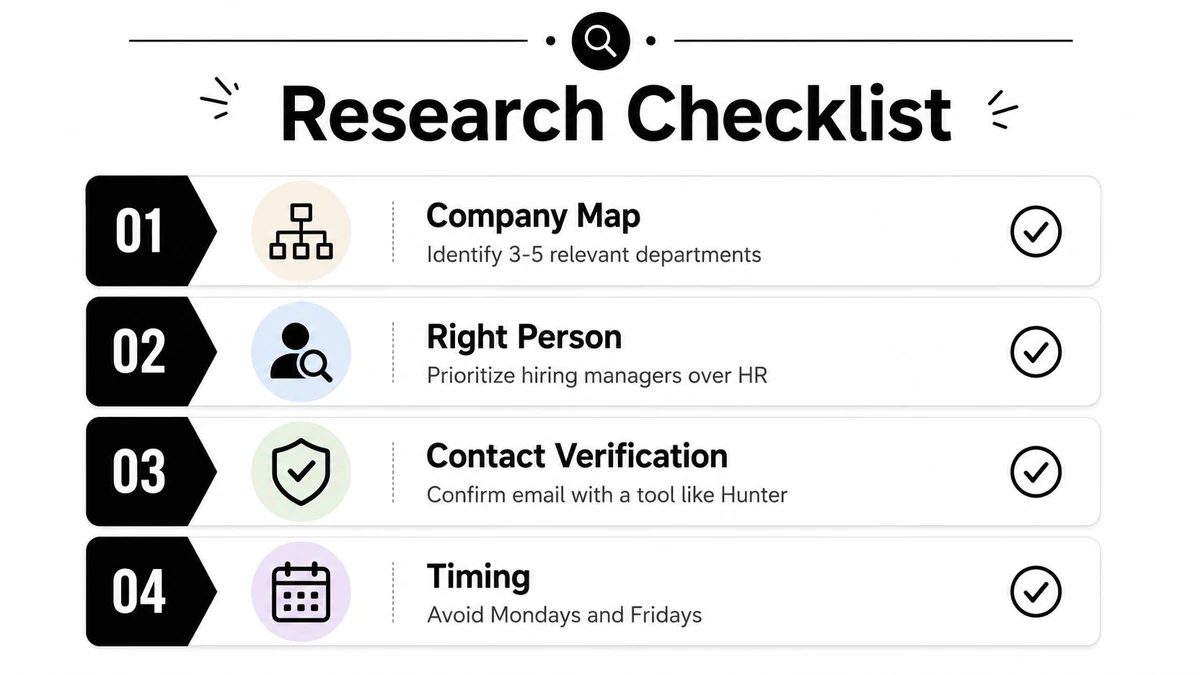
Start with the company, not the template. Look at the org chart in your head before you look at your draft, because the person who can act on your email is often not the first person you'd guess. If there's no opening posted, the goal is to find the highest-probability recipient, not the most impressive title.
Choose the person who can say yes, or route the email correctly
For smaller companies, a CEO, CTO, or department lead can be the right first contact because the hiring chain is shorter and the person closer to the work may also be closer to the decision. For larger organizations, a direct team lead, hiring manager, or recruiter usually makes more sense because the process is formal and the email needs to fit a live hiring path. The gap in most advice is that it treats every company the same, which is why so many job seekers spray one message at executives and hope for the best.
A smarter approach is to map 10 to 15 professionals connected to the role, then narrow to the one or two most relevant people. That doesn't mean blind blasting. It means building a small target set that reflects the function, company size, and hiring stage, then sending the first note to the person most likely to understand the value quickly.
The best first recipient is usually the one who can either move the conversation forward or recognize the fit without extra translation.
When there's no posted opening, many job seekers get stuck. They ask who to contact, and that question is the core problem, not the wording. A useful comparison is the email finder workflow for B2B teams, because the logic is similar, identify the likely owner, verify the address, and avoid sending to a dead end.
Verify before you send
The address matters as much as the contact. A message to the wrong inbox is wasted effort even if the copy is strong. Before you send, confirm the role, check the name, and make sure you're not relying on a generic catch-all address when a direct contact is available.
That's also the point where timing matters. Avoiding the obvious rush periods can help the email feel less like noise. The message should arrive as a concise professional note, not as part of a pile of sloppy outreach.
Subject Lines That Survive the Inbox Filter
The subject line isn't where you prove your value, it's where you prove you're not wasting the reader's time. Weak subject lines feel vague, promotional, or manipulative. Strong ones sound like a normal professional note from someone who has done their homework.
What weak subject lines look like
“Opportunity” tells the recipient nothing. “Job inquiry” is still too broad. “Resume attached” is worse, because it signals extra work before the email has earned any attention.
Better subject lines are short and specific. They name the role, the context, or the reason for the note. For speculative outreach, “Question about your [team or function]” is cleaner than a generic pitch. For a referral-warm intro, “Referred by [Name] for [Role]” gives the reader a quick trust cue. For a follow-up, the best subject usually echoes the original thread instead of trying to reinvent it.
Model the best pattern, not the flashiest one
If you want a broader collection of subject line and intro styles, the cold outreach letter examples page is useful because it shows how simple openings keep the message readable. The point isn't to copy a script. It's to see how direct wording reduces friction before the first line of the body even loads.
Strong subject lines do one job well, they tell the reader why this email exists.
The same principle should guide your optimization process. The BillionVerify optimisation guide is relevant here because subject-line testing and list quality belong in the same workflow, not separate ones. If the address list is weak, the subject line never gets a fair shot.
Good examples tend to be plain, not cute:
- Weak: “Opportunity”
- Stronger: “Quick question about the product design role”
- Weak: “Application”
- Stronger: “Referred by Maya for the data role”
- Weak: “Following up”
- Stronger: “Re: marketing manager conversation”
The pattern is consistent. Keep the wording plain, keep the hook tied to the person or role, and don't try to manufacture curiosity with gimmicks.
Writing the Body That Earns the Reply
A good body reads like a clean handoff, not a pitch deck. The reader should be able to scan it once and understand who you are, why you're reaching out, why this person should care, and what you want them to do next. That's harder than it sounds, because most job emails collapse into background, flattery, and a vague ask.
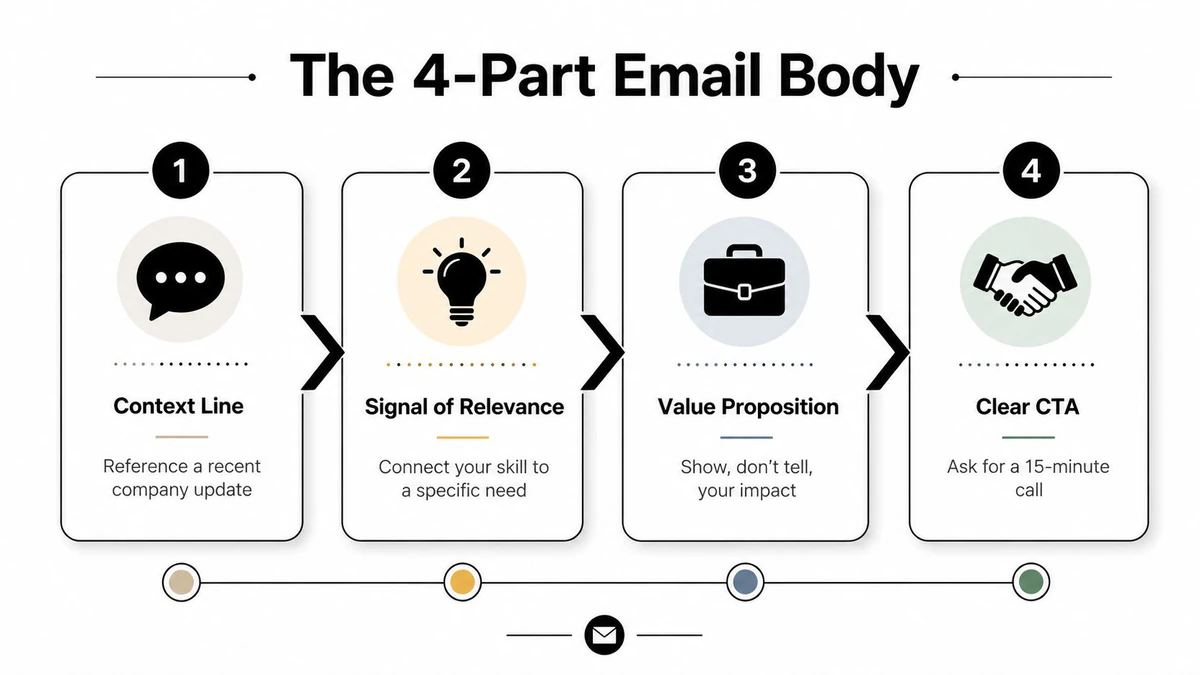
Use four parts, and keep each one doing a separate job
The first line gives context. The second line signals relevance. The third line states value. The fourth line makes the ask easy.
Here's the practical shape:
- Context line, mention the company, role, or recent update.
- Signal of relevance, connect your background to one real need.
- Value proposition, show one concrete result or capability.
- Clear CTA, ask for a short conversation or one specific next step.
A no-posted-opening email might look like this:
Hi [Name], I'm reaching out because I've been following [Company]’s work in [area].
I've spent the last [type of experience] working on [specific skill or problem], and that maps closely to the kind of work your team is doing.
If you're the right person to speak with, I'd love to ask whether there's room to consider someone with that background.
That version works because it's short, specific, and doesn't pretend there's a formal opening when there isn't one.
A referral reply should sound warmer and more anchored:
Hi [Name], [Referrer] suggested I reach out after we talked about your team's work on [topic].
I've done [proof point], and I think that experience may be relevant to what you're building.
If useful, I'd be glad to send a brief summary or chat for 15 minutes.
A niche-role pitch should keep the skill set narrow:
Hi [Name], I saw your team is hiring for [role].
I've worked on [specific niche], including [proof point], and that's the part of the role I'd be strongest in.
If it's helpful, I can share a focused example from similar work.
A tool like AIApply for job seekers can help you draft faster, but the structure still has to stay human and role-specific. A generic AI draft usually sounds like it was written for no one in particular.
For copy discipline, the copywriting bible for email marketers is useful as a reference point because the same core rule applies here, every sentence should reduce effort for the reader. BillionVerify is a professional email verification service built to solve one problem, bad email data costs businesses money.
The draft is ready when every line passes a simple test:
- Does it explain why I'm emailing this person?
- Does it show one real reason I fit?
- Does it avoid resume repetition?
- Does the CTA ask for one easy response, not a life decision?
If any answer is no, the message still needs work.
Follow-Up Sequences That Add Replies Without Annoying
The follow-up debate is messy because job email and sales email aren't the same thing. In job outreach, you're not trying to push a pipeline forward. You're trying to stay visible without sounding entitled, and you're doing it in a market where response rates are already thin. The safest default is a short sequence that changes angle slightly each time instead of repeating the same ask.
A simple sequence that respects inbox fatigue
The evidence on length points in one direction. Broader cold-email research says replies improve around 50 to 125 words, while many job-search guides still recommend keeping messages under 150 to 200 words. That gap matters because your follow-up shouldn't become a bigger essay than the first email, especially when the first touch usually carries the most replies (job search cold email guide).
A practical three-step sequence looks like this:
| Touch | Day | Subject Angle | Goal |
|---|---|---|---|
| Initial email | 1 | Role, referral, or context | Earn the first reply |
| Follow-up 1 | 7 | Same thread, narrower question | Re-open the conversation |
| Follow-up 2 | 14 | New angle, brief value reminder | Give one last clean chance |
The stop rule is simple. If there's no response after the second follow-up, stop. More messages usually read like pressure, not interest. The only exception is when you have a genuine new reason to reach out, such as a new project, new hire, or direct referral.
What to change in each follow-up
The first follow-up should be smaller than the original. One or two sentences is enough. The second should introduce a new angle, not a copy of the first note with a different greeting.
This is also where role fatigue matters. A recruiter may tolerate a short reminder more easily than a busy team lead. A CEO at a small company may respond differently than a recruiter at a larger one. That's why the best sequence is a default, not a rigid rulebook.
Practical rule: If the follow-up takes longer to read than the original note, it's probably too long.
Keep your ask consistent, but not stale. If the first email asked about fit, the follow-up can ask whether you should send a short sample. If the first asked for routing advice, the second can check whether there's a better contact. The point is to make replying easy, not to win a persistence contest.
Deliverability Essentials Before You Hit Send
A strong email on a broken address is still a dead email. That's why verification has to be part of the process, not an afterthought. The job seeker who skips this step is often sending into a mailbox that was never going to help them, which is a waste of time and can also hurt sender reputation if bounce rates climb.
Treat verification as part of the job search workflow
A verification tool like BillionVerify proves its value here. It handles single checks, bulk list cleaning, a real-time API, catch-all scoring, role-account detection, and disposable-email flagging, which makes it useful for job seekers who are cleaning a small contact list before sending. That matters because role accounts and disposable addresses can drain a campaign before the message even has a chance to compete.
If you're comparing verification options in a broader outbound workflow, the email marketing deliverability bible is the right place to look for the mechanics behind bounce control and inbox placement. The principle is the same for job outreach, a verified address list removes avoidable failure before you ever press send.
A helpful external reference point is the Fullstack role at Proton on Blockchain Jobs, which is a good reminder that companies in email-sensitive environments take deliverability seriously. That makes it even more important to avoid sending from a shaky account with an unverified recipient.
Keep the sending setup clean
Use a stable sender identity. Don't bounce between addresses, and don't send from a newly created inbox as if it were a trusted one. If you're contacting several people at the same company, keep the volume reasonable and verify each address before it leaves your draft folder.
A solid pre-send check looks like this:
- Confirm the recipient, make sure the person can plausibly act on the note.
- Verify the address, especially if the contact came from a finder tool.
- Review the CTA, keep it short and easy to answer.
- Send only after the message is trimmed, because long drafts are usually weaker drafts.
The technical layer isn't glamorous, but it protects the whole effort. When the address is real, the sender is stable, and the note is narrow, the email has a chance to do its actual job.
Putting It All Together and Common Questions
The cleanest job-search email is rarely the most elaborate one. It's the one sent to the right person, with a short subject line, one relevant proof point, and a simple ask that doesn't create work for the reader. If the address hasn't been verified, the target isn't specific, or the email reads like a recycled template, the odds drop fast.
Pre-send checklist
- Pick one recipient, not a random list.
- Write a subject line that names the reason for contact.
- Keep the body tight, with context, relevance, value, and CTA.
- Verify the address before sending.
- Plan one or two follow-ups, then stop.
Quick FAQ
What if there's no posted opening?
Email the person most likely to own the problem, not the title that sounds biggest. In smaller companies that may be a founder or department lead, while in larger ones it's usually a hiring manager, recruiter, or direct team lead.
How many follow-ups is enough?
One follow-up is the minimum useful standard, and two is usually enough if the message is well targeted. After that, move on unless you have a new reason to write again.
Should I attach my resume?
Usually not. If you already applied, they can access it elsewhere, and if you haven't applied yet, a link or short summary is safer than a file that adds friction.
How do I measure success beyond opens?
Measure replies, quality of conversation, and whether the message got you routed to the right person. Opens are a weak signal, especially when privacy features muddy the data.
BillionVerify helps you clean the email data before you send, which matters when every cold job email has to earn its chance. If you're building a job outreach list and want to reduce bad addresses, role accounts, and disposable inboxes, visit BillionVerify and make the sending step less risky.