



What is Salesforce?
Salesforce is the world's #1 customer relationship management (CRM) platform, powering businesses of all sizes across every industry. Since its founding in 1999, Salesforce has revolutionized how companies manage customer relationships, sales processes, marketing campaigns, and service operations through cloud-based solutions.
Core Capabilities:
- Sales Cloud: Complete sales force automation with lead management, opportunity tracking, contact management, and sales forecasting
- Marketing Cloud: Multi-channel marketing automation with email campaigns, journey builder, social media management, and analytics
- Service Cloud: Customer service and support platform with case management, knowledge base, and omnichannel support
- Commerce Cloud: E-commerce platform for B2C and B2B digital commerce experiences
- Platform & Apps: Custom app development with AppExchange marketplace containing 5,000+ pre-built integrations
Why Enterprises Trust Salesforce:
- Industry-leading market share with 23% of global CRM market
- Scalable architecture supporting companies from startups to Fortune 500
- Comprehensive ecosystem with 150,000+ customers worldwide
- AI-powered insights through Einstein Analytics
- Mobile-first approach with native iOS and Android apps
- Robust security with SOC 2, ISO 27001, and GDPR compliance
Popular Use Cases:
- B2B lead generation and qualification
- Account-based marketing (ABM) campaigns
- Sales pipeline management and forecasting
- Customer 360-degree view across touchpoints
- Marketing attribution and ROI tracking
- Customer service case resolution
The Critical Challenge: Contact Data Decay
Salesforce is only as powerful as the data it contains. Studies show that B2B contact data decays at 22.5% annually—email addresses change jobs, domains expire, and contacts become invalid. Poor email data quality in Salesforce leads to:
- High bounce rates damaging sender reputation
- Wasted sales effort on non-existent leads
- Inaccurate marketing analytics and ROI calculations
- Low email campaign deliverability (often below 85%)
- Compliance risks with outdated contact information
This is where our email verification service becomes essential—ensuring every contact record in Salesforce contains valid, deliverable email addresses.
Why Integrate BillionVerify with Salesforce?
While Salesforce excels at managing customer relationships, it doesn't verify email addresses before or after they enter your CRM. If your Salesforce org contains invalid contact data, you'll encounter critical problems:
- ❌ Lead Quality Issues: Sales teams waste time pursuing invalid or fake leads
- ❌ High Bounce Rates: Marketing Cloud campaigns suffer from 15-30% bounce rates
- ❌ Sender Reputation Damage: ISPs flag your domain as spam due to bounces
- ❌ Wasted License Costs: Paying for storage and user licenses on junk data
- ❌ Poor Analytics: Inaccurate reporting due to bad contact data
- ❌ Compliance Risks: GDPR/CAN-SPAM violations from outdated emails
The Solution
BillionVerify + Salesforce integration helps you:
- ✅ Verify Leads in Real-Time: Validate email addresses as they're created via web-to-lead forms or API
- ✅ Clean Existing Contacts: Bulk verify your entire Salesforce database (Leads, Contacts, Accounts)
- ✅ Automate Data Hygiene: Schedule regular verification to combat data decay
- ✅ Improve Campaign ROI: Boost Marketing Cloud deliverability from 70% to 98%+
- ✅ Enhance Lead Scoring: Flag risky emails (disposable, catch-all, role-based) for better qualification
- ✅ Maintain Compliance: Keep contact data accurate for GDPR and privacy regulations
How It Works
The integration follows this workflow:
- Data Entry: A lead/contact is created in Salesforce (web-to-lead, import, API, manual)
- Trigger Activation: Salesforce Process Builder, Flow, or Apex trigger fires
- BillionVerify Validation: Our API verifies the email in real-time (< 1 second)
- Syntax check (RFC 5322 compliance)
- DNS lookup (domain exists and has MX records)
- MX record verification (mail server configured)
- SMTP handshake (mailbox exists and accepts mail)
- Risk detection (disposable, catch-all, role-based emails)
- Result Processing:
- ✅ Valid emails: Update custom fields (Email_Status__c = "Valid", Risk_Level__c = "Low")
- ❌ Invalid emails: Flag for review or prevent creation
- ⚠️ Risky emails: Mark with specific tags (Disposable, Catch-All, Role Account)
- Action Automation: Route high-quality leads to sales, suppress invalid contacts from campaigns
Integration Methods
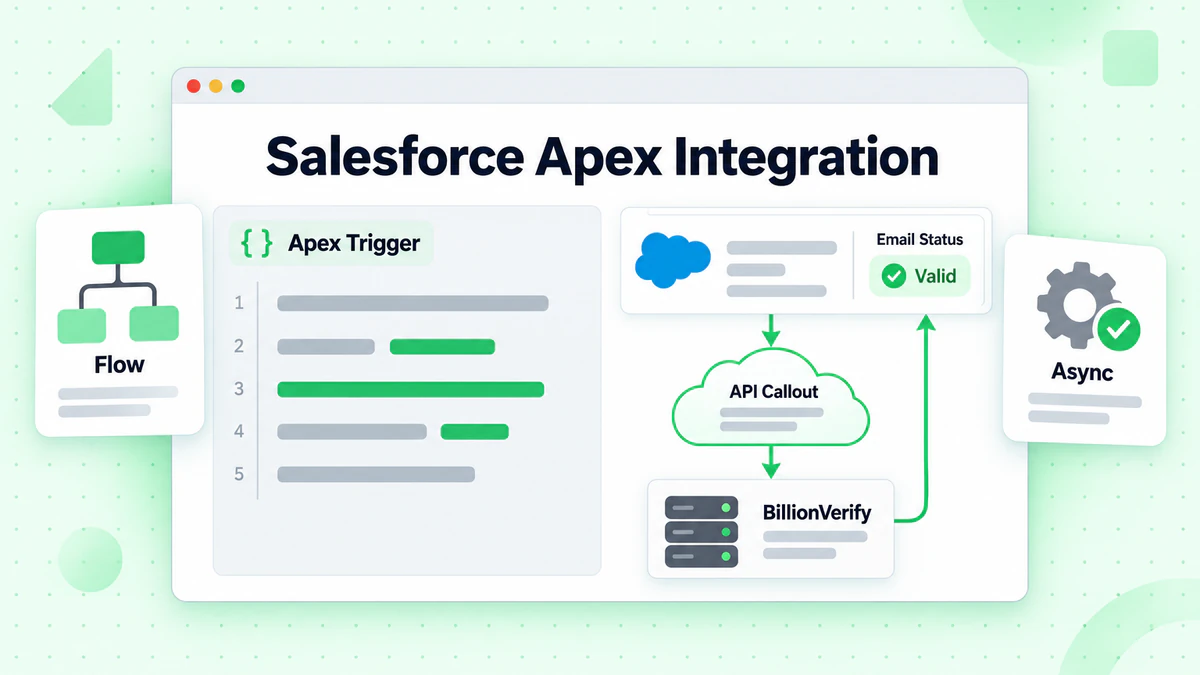
Method 1: API Integration via Apex (Recommended)
Use Salesforce Apex to call the BillionVerify API for real-time verification on record creation or update.
Prerequisites
- BillionVerify API key (get yours here)
- Salesforce Developer or higher edition
- System Administrator permission
- Basic Apex knowledge (or use our pre-built package)
Architecture
Salesforce Web-to-Lead Form
         ↓
Lead/Contact Created
         ↓
Apex Trigger/Flow
         ↓
BillionVerify API
         ↓
Update Salesforce Record
Apex Code Example
// BillionVerifyService.cls
public class BillionVerifyService {

    private static final String API_ENDPOINT = 'https://api.billionverify.com/v1/verify';
    private static final String API_KEY = '{!$Credential.BillionVerify_API_Key}'; // Store in Named Credentials

    @future(callout=true)
    public static void verifyEmail(String recordId, String email, String objectType) {
        try {
            // Step 1: Call BillionVerify API
            HttpRequest req = new HttpRequest();
            req.setEndpoint(API_ENDPOINT);
            req.setMethod('POST');
            req.setHeader('Authorization', 'Bearer ' + API_KEY);
            req.setHeader('Content-Type', 'application/json');
            req.setBody('{"email":"' + email + '"}');

            Http http = new Http();
            HttpResponse res = http.send(req);

            // Step 2: Parse response
            if (res.getStatusCode() == 200) {
                Map<String, Object> result = (Map<String, Object>) JSON.deserializeUntyped(res.getBody());

                String status = (String) result.get('status');
                String riskLevel = (String) result.get('risk_level');
                Boolean isDisposable = (Boolean) result.get('is_disposable');
                Boolean isCatchAll = (Boolean) result.get('is_catch_all');
                Boolean isRoleBased = (Boolean) result.get('is_role_based');

                // Step 3: Update Salesforce record
                updateRecord(recordId, objectType, status, riskLevel, isDisposable, isCatchAll, isRoleBased);
            } else {
                System.debug('Error: ' + res.getStatus() + ' - ' + res.getBody());
            }
        } catch (Exception e) {
            System.debug('Exception: ' + e.getMessage());
        }
    }

    private static void updateRecord(String recordId, String objectType, String status, String riskLevel,
                                     Boolean isDisposable, Boolean isCatchAll, Boolean isRoleBased) {
        // Update Lead or Contact
        if (objectType == 'Lead') {
            Lead lead = new Lead(
                Id = recordId,
                Email_Status__c = status,
                Email_Risk_Level__c = riskLevel,
                Email_Is_Disposable__c = isDisposable,
                Email_Is_Catch_All__c = isCatchAll,
                Email_Is_Role_Based__c = isRoleBased,
                Email_Verified_Date__c = System.now()
            );
            update lead;
        } else if (objectType == 'Contact') {
            Contact contact = new Contact(
                Id = recordId,
                Email_Status__c = status,
                Email_Risk_Level__c = riskLevel,
                Email_Is_Disposable__c = isDisposable,
                Email_Is_Catch_All__c = isCatchAll,
                Email_Is_Role_Based__c = isRoleBased,
                Email_Verified_Date__c = System.now()
            );
            update contact;
        }
    }
}
Trigger Example
// LeadTrigger.trigger
trigger LeadTrigger on Lead (after insert, after update) {
    List<String> leadsToVerify = new List<String>();

    for (Lead lead : Trigger.new) {
        // Verify only if email changed or is new
        if (Trigger.isInsert || (Trigger.isUpdate && lead.Email != Trigger.oldMap.get(lead.Id).Email)) {
            if (String.isNotBlank(lead.Email)) {
                BillionVerifyService.verifyEmail(lead.Id, lead.Email, 'Lead');
            }
        }
    }
}
Required Custom Fields
Create these custom fields on Lead and Contact objects:
Email_Status__c(Picklist): Valid, Invalid, Unknown, RiskyEmail_Risk_Level__c(Picklist): Low, Medium, HighEmail_Is_Disposable__c(Checkbox)Email_Is_Catch_All__c(Checkbox)Email_Is_Role_Based__c(Checkbox)Email_Verified_Date__c(Date/Time)
Method 2: Salesforce Flow (No-Code)
Use Salesforce Flow Builder to verify emails without writing Apex code.
Setup Steps
Create Named Credential
- Setup → Named Credentials
- Name: BillionVerify_API
- URL:
https://api.billionverify.com - Identity Type: Named Principal
- Authentication Protocol: Custom
- Add Header:
Authorization: Bearer YOUR_API_KEY
Create Record-Triggered Flow
- Flow Type: Record-Triggered Flow
- Object: Lead (or Contact)
- Trigger: Created or Updated
- Condition: Email field is changed
Add HTTP Callout Action
- Action: HTTP Callout
- Named Credential: BillionVerify_API
- Method: POST
- Endpoint:
/v1/verify - Body:
{"email": "{!$Record.Email}"}
Parse JSON Response
- Add Decision Element
- Check
statusfield from response - Route to different update actions
Update Record
- Update Records element
- Set custom fields based on verification result
Activate Flow
Method 3: Zapier/Workato Integration (Low-Code)
Connect Salesforce and BillionVerify using automation platforms.
Zapier Example Workflow
Trigger: New Lead in Salesforce ↓ Action: Verify Email with BillionVerify (Webhooks) ↓ Action: Update Lead in Salesforce
- Set Email_Status__c field
- Add tags to campaign members
- Route to appropriate queue
Setup Steps
Connect Salesforce to Zapier
- Choose "Salesforce" trigger
- Select "New Lead" or "Updated Lead"
- Authenticate Salesforce account
Add BillionVerify Webhook
- Add "Webhooks by Zapier" action
- Method: POST
- URL:
https://api.billionverify.com/v1/verify - Headers:
Authorization: Bearer YOUR_API_KEY - Body:
{"email": "{{Lead.Email}}"}
Update Salesforce Record
- Add "Salesforce" action
- Choose "Update Record"
- Map verification fields
- Set Email_Status__c based on result
Add Conditional Logic
- Use Zapier Paths or Filters
- Route invalid emails to review queue
- Auto-convert high-quality leads
Key Features
🔄 Real-time Lead Validation
Verify email addresses instantly as leads are created via web-to-lead forms using our email validation API:
- Prevent invalid emails from entering Salesforce
- Reduce bounce rates on first-touch campaigns
- Improve lead quality from day one
- Save sales team time on fake leads
Use case: Web-to-lead forms, marketing landing pages, event registrations
🧹 Bulk Contact Database Cleaning
Clean your entire Salesforce org with our bulk email verification service:
- Verify up to 1M contact/lead records
- Process 100,000+ records per hour
- Download results with detailed verification data
- Re-import to Salesforce via Data Loader
Use case: Annual data hygiene, CRM migration, compliance audits
⏰ Scheduled Automated Verification
Combat data decay with automated verification using our email list cleaning automation:
- Weekly/monthly verification of new records
- Re-verify contacts older than 6 months
- Auto-flag changed or invalid emails
- Maintain 95%+ data accuracy year-round
Use case: Ongoing data maintenance, prevent CRM rot
🎯 Advanced Risk Detection
Go beyond basic validation with specialized detection features:
- Catch-all detection: Identify accept-all domains (reduce false positives)
- Disposable email detection: Block temporary emails (mailinator.com, 10minutemail.com)
- Role account detection: Flag generic emails (info@, sales@, noreply@)
- Syntax validation: Ensure RFC 5322 compliance
- Domain age check: Detect newly registered domains (fraud indicator)
- MX record verification: Confirm mail server configuration
Use case: Lead scoring, fraud prevention, marketing segmentation
📊 Salesforce Dashboard Integration
Visualize email data quality with custom Salesforce reports and dashboards:
- Email Verification Status report (Valid vs. Invalid vs. Unknown)
- Risk Level distribution chart
- Disposable/Catch-all email trends
- Verification date tracking
- Campaign deliverability correlation
Use case: Data quality monitoring, marketing attribution
Pricing
BillionVerify offers flexible pricing that scales with your Salesforce usage:
| Plan | Credits | Price | Price per Email | Best For |
|---|---|---|---|---|
| Free Trial | 100 | $0 | Free | Testing the integration |
| Starter | 1,000 | $5 | $0.005 | Small sales teams |
| Growth | 10,000 | $40 | $0.004 | Growing businesses |
| Professional | 50,000 | $175 | $0.0035 | Marketing teams |
| Business | 100,000 | $300 | $0.003 | Large enterprises |
| Enterprise | Custom | Custom | From $0.002 | High-volume orgs |
Special Offer for Salesforce Users
Get started with BillionVerify and save:
- ✅ 100 free verification credits (no credit card required)
- ✅ 20% off your first month (any monthly plan)
- ✅ Free implementation support (we'll help you set up the integration)
- ✅ Custom Salesforce package (pre-built Apex classes and triggers)
To claim: Sign up and email support@billionverify.com with your Salesforce org ID. Learn more about our pricing plans.
Use Cases
Use Case 1: B2B Lead Quality Improvement
Challenge: A SaaS company generates 8,000 leads per month via Salesforce web-to-lead forms, but 35% are invalid or low-quality (disposable emails, typos, fake addresses).
Solution: Implement real-time BillionVerify validation on all lead creation events with disposable and role account detection.
Results:
- ✅ Lead quality improved by 42%
- ✅ Sales team efficiency increased (30% less time on junk leads)
- ✅ Marketing Qualified Lead (MQL) rate increased from 15% to 24%
- ✅ Sales cycle shortened by 18 days
- ✅ Reduced CRM clutter and storage costs
Use Case 2: Marketing Cloud Email Campaign Optimization
Challenge: An enterprise runs Marketing Cloud campaigns to 150,000 contacts, but experiences 22% bounce rate, damaging sender reputation and deliverability.
Solution: Bulk verify entire Salesforce contact database quarterly, plus real-time validation on new contacts.
Results:
- ✅ Bounce rate reduced from 22% to 0.8%
- ✅ Email deliverability increased from 68% to 97%
- ✅ Sender reputation improved (spam score dropped)
- ✅ Campaign ROI increased by 34%
- ✅ Removed 28,000 invalid contacts (saved $4,200/year on Marketing Cloud licenses)
Use Case 3: Account-Based Marketing (ABM) Data Accuracy
Challenge: A B2B company runs ABM campaigns targeting 500 high-value accounts, but 18% of key contacts have invalid emails, resulting in failed outreach.
Solution: Verify all contacts in target accounts before launching campaigns, with catch-all and role account detection for better targeting.
Results:
- ✅ Contact accuracy increased from 82% to 99.2%
- ✅ Email engagement rate improved by 45%
- ✅ ABM pipeline value increased by $2.1M
- ✅ Sales team confidence in CRM data restored
- ✅ Reduced embarrassing bounces to executive contacts
Use Case 4: Salesforce Data Migration Cleanup
Challenge: A company migrating from HubSpot to Salesforce needs to clean 250,000 legacy contact records before import.
Solution: Use BillionVerify bulk verification to clean entire database before migration.
Results:
- ✅ Identified and removed 62,000 invalid contacts (25%)
- ✅ Clean migration with 99% data accuracy
- ✅ Avoided importing junk data into new Salesforce org
- ✅ Saved $18,000 on Salesforce storage and licenses
- ✅ Improved user adoption with clean CRM
FAQ About Salesforce Integration
How does this integration work with Salesforce?
The BillionVerify + Salesforce integration works via API using Apex triggers, Salesforce Flow, or third-party automation tools like Zapier. When a lead or contact is created/updated in Salesforce, our API verifies the email in real-time (< 1 second) and updates custom fields with verification results.
Will it slow down my Salesforce processes?
No. BillionVerify's API responds in less than 1 second on average. We use Salesforce @future methods (asynchronous callouts) to prevent blocking user workflows. For bulk operations, verification happens in the background without impacting user experience.
Can I verify my existing Salesforce contacts and leads?
Yes! You can:
- Export contacts/leads via Salesforce Data Loader or Reports
- Upload CSV to BillionVerify's bulk verification tool
- Download verified results with status fields
- Re-import to Salesforce using Data Loader (update existing records)
Or use our API to automate bulk verification via Apex batch jobs.
What happens to invalid emails?
You have full control over invalid email handling:
- Update Lead/Contact Status: Set Email_Status__c to "Invalid"
- Prevent campaign inclusion: Exclude from Marketing Cloud sends
- Route to review queue: Assign to data quality team
- Auto-archive: Remove from active lists
- Flag for sales follow-up: Ask sales to verify contact info
We recommend updating custom fields rather than deleting records to maintain data history and attribution.
How accurate is the verification?
BillionVerify maintains 99.9% accuracy through multi-layered verification:
- Syntax validation (RFC 5322 standard)
- DNS lookup (domain exists and is active)
- MX record verification (mail server configured)
- SMTP handshake (mailbox exists and accepts mail)
- Risk detection (catch-all, disposable, role-based, domain age)
- Mailbox capacity check (inbox full detection)
Does this work with Marketing Cloud?
Yes! BillionVerify integrates seamlessly with Salesforce Marketing Cloud:
- Verify contacts before adding to Marketing Cloud sends
- Use Email_Status__c field in Marketing Cloud filters
- Exclude invalid/risky emails from campaigns
- Improve deliverability and sender reputation
- Sync verification data via Marketing Cloud Connect
How do I handle catch-all domains?
Catch-all domains accept all email addresses, making validation difficult. BillionVerify uses advanced techniques to detect catch-all behavior and assigns a risk score. You can:
- Tag catch-all emails in Salesforce (Email_Is_Catch_All__c = true)
- Lower lead score for catch-all addresses
- Require additional verification (phone, social proof)
- Use our catch-all verifier for deeper analysis
Is there a free trial?
Yes! BillionVerify offers:
- ✅ 100 free verification credits (no credit card required)
- ✅ Full access to all features (including API, bulk verification)
- ✅ Pre-built Salesforce package (Apex classes and custom fields)
- ✅ 30-day money-back guarantee on paid plans
- ✅ Free implementation support (1-hour consultation)
How secure is the integration?
BillionVerify takes security seriously:
- 🔒 Encryption: All API calls use HTTPS/TLS 1.3
- 🔒 GDPR Compliant: We don't store or share your email data
- 🔒 SOC 2 Type II Certified: Annual third-party security audits
- 🔒 ISO 27001 Certified: Information security management
- 🔒 API Key Security: Keys are encrypted and can be rotated anytime
- 🔒 Salesforce Shield Compatible: Supports Platform Encryption
Emails are processed in real-time and not permanently stored. Full audit logs available for compliance.
Can I verify emails in Salesforce sandboxes?
Yes! You can use BillionVerify in Salesforce sandboxes for testing:
- Use the same API key as production (or create a separate test key)
- Test integration with sample data before deploying to production
- Verify integration logic without consuming production credits
- We recommend using our free trial credits for sandbox testing
Does this support multi-currency and international emails?
Yes! BillionVerify supports:
- International domains: Verify emails from any country (.uk, .de, .jp, etc.)
- IDN (Internationalized Domain Names): Verify non-Latin characters
- Multi-language: API works with all languages
- Global infrastructure: Servers in US, EU, and Asia for low latency
All pricing is in USD but works with Salesforce multi-currency orgs.
Ready to Get Started?
Improve your Salesforce data quality and email deliverability with BillionVerify today:
- ✅ 99.9% verification accuracy - Industry-leading precision
- ✅ <1 second verification speed - Real-time validation
- ✅ Seamless Salesforce integration - Pre-built Apex package
- ✅ Flexible pricing - Pay only for what you use
- ✅ 24/7 support - We're here to help
Ready to enhance your Salesforce data quality? Start your free trial today with 100 free verification credits - no credit card required.