



Most advice about how to verify email addresses online is too narrow. It treats verification as a last-minute cleanup step before a send. That misses where the primary value sits.
Strong teams use verification earlier and more often. They check addresses when they enter the system, again before campaigns go out, and they don't stop at a binary valid or invalid label. They look at risky statuses, role accounts, catch-all domains, and unknown results because those are the records that subtly erode deliverability, waste paid acquisition, and pollute CRM reporting.
The shift matters because modern tools don't just test syntax anymore. They combine layered checks such as domain, MX, SMTP, disposable detection, and role-account analysis to estimate whether an address is likely to receive mail in a live environment. That's a very different job than spotting whether an address merely looks formatted correctly.
Why and When You Must Verify Email Addresses
Email verification isn't a cost center. It's a control point for revenue quality.
When teams skip it, they pay twice. First, they waste money acquiring or importing bad records. Then they send to those records and absorb the follow-on damage in bounce handling, list quality, skewed reporting, and weaker sender reputation. If you're running outbound, lifecycle, or promotional email, bad data doesn't stay isolated. It spreads into campaign decisions, lead scoring, and attribution.
A bigger issue is timing. Email data decays at 22–30% per year, which works out to roughly 2% of valid addresses lost per month, so a list that looked fine earlier can still create predictable bounce problems later if you wait too long to check it (Scrap.io on email list decay and send-time verification).
Verification is a revenue control, not a cleanup task
The most practical way to think about verification is this. Every email address is an asset only if it can receive mail and fit your sending policy. If it can't, it becomes a liability.
That's why teams that routinely verify email addresses before they launch campaigns usually make better decisions upstream too. They spot fake signups earlier, remove obvious junk before routing leads, and avoid inflating audience counts with records that were never usable in the first place.
Practical rule: Verify as close to send time as possible, and verify earlier at the point of capture when the address enters a form, trial flow, or CRM.
If your operation includes registrations, free tools, gated assets, or SDR prospecting, this isn't optional. A lot of damage comes from data that should never have made it into your systems.
For teams thinking beyond campaign cleanup, BillionVerify's guidance on why user registration emails should be verified is the right operational frame. The point isn't only to reduce bounces later. It's to stop bad records from becoming part of your funnel at all.
Moments when verification should be mandatory
Some triggers should automatically move verification into the workflow:
- Before a major campaign: If the send matters, stale list assumptions are too risky.
- After importing any external list: New data sources carry unknown quality and formatting standards.
- When engagement trends soften: Sometimes the issue isn't creative. It's audience quality.
- After long CRM inactivity: Dormant records often age out or become operationally risky.
- At form submission: This is the cheapest place to block fake, disposable, or mistyped addresses.
What doesn't work is treating list cleaning as a quarterly ritual and assuming the problem is solved. Verification only produces value when it influences sending decisions in real time.
Choosing Your Verification Workflow Single vs Bulk
Not every verification task should go through the same pipeline. Sales reps checking one prospect, support teams confirming a customer contact, and marketing ops cleaning a launch list all need different workflows.
The useful split is simple. Use single verification when one address needs a fast decision. Use bulk verification when you need to clean, segment, and export a file for action.
Use single verification for one-off decisions
Single checks are operational. A rep has a lead from LinkedIn, a partner sends over a contact, or a support agent wants to confirm a replacement address before updating a record.
In those cases, speed matters more than file handling. The workflow should be:
- Paste the address
- Run the check
- Review status and flags
- Decide whether to send, suppress, or request a different address
This works because reputable tools use layered validation rather than a superficial format test. Snov.io describes a 7-tier process that includes syntax validation, disposable-email detection, domain existence, MX checks, SMTP pings, and greylisting bypass, and it claims 98%+ accuracy with verified-list bounce rates as low as 1.72% (Snov.io email verifier process and benchmarks). That doesn't guarantee delivery, but it does create a stronger basis for action than guessing.
If your team needs a structured comparison of the two approaches, BillionVerify's article on real-time vs bulk email validation lays out the operational differences clearly.
Use bulk verification for database hygiene
Bulk verification is where list quality becomes a systems problem. Marketing ops, sales ops, and revops teams should treat this like a data preparation step, not an afterthought.
A practical bulk workflow usually looks like this:
| Stage | What the team does | Why it matters |
|---|---|---|
| File prep | Export a CSV and isolate the email field | Prevents column-mapping issues and duplicate handling problems |
| Upload | Load the file into the verifier | Creates a controlled review point before any send |
| Review statuses | Separate deliverable, risky, invalid, and unknown records | Lets you segment instead of deleting blindly |
| Export filtered lists | Send only approved segments to your ESP or sequencing tool | Preserves sender reputation and campaign efficiency |
One factual example of a tool used for this purpose is BillionVerify, a professional email verification service built to solve one problem: bad email data costs businesses money.
Bulk verification should happen before the list reaches your sending platform, not after your ESP tells you what bounced.
What doesn't work is uploading an entire database, deleting only obvious invalids, and mailing everything else the same way. Bulk verification gives you better options than that. Use them.
How to Interpret Verification Results for Better Decisions
Many organizations lose value after the check is complete. They run verification, export a file, and look for one column that says valid or invalid. That wastes the most useful part of the process.
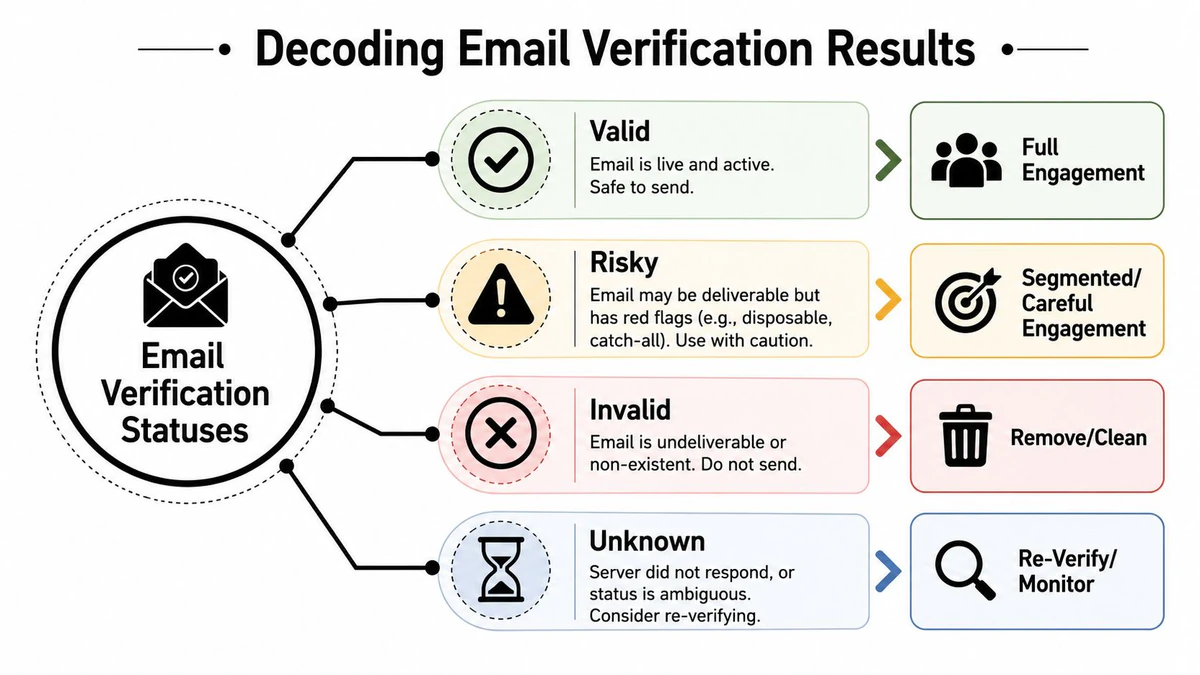
The hard part isn't identifying obvious junk. It's knowing what to do with ambiguous outcomes such as catch-all domains, greylisting, and role-based accounts. That's where risk-based policy matters, and it's still underexplained in most public content (Clearout on ambiguous statuses and risk-based hygiene).
A practical decision model for every status
A useful policy framework looks like this:
- Deliverable: Send normally. These addresses passed the relevant checks and fit standard campaign treatment.
- Invalid or undeliverable: Suppress immediately. Don't retry. Don't keep them in active segments for future sends.
- Role-based: Decide by campaign type. A newsletter to
info@orsupport@may be acceptable in some B2B contexts, but cold outbound to generic inboxes often performs poorly and can create relevance issues. - Disposable: Exclude from most long-term lifecycle or sales workflows. These addresses are often a poor fit for retention, enrichment, and attribution.
That policy works because each result means something different operationally. “Can this mailbox exist?” and “Should we include it in this sequence?” are not the same question.
What to do with risky and unknown results
Experienced teams clearly differentiate from careless ones.
A risky result often means the address might receive mail, but the environment around it creates uncertainty. Catch-all domains are the classic example. The server may accept many addresses at the domain level, but that doesn't mean the intended person will see the message. Treat those records as lower-confidence inventory.
An unknown result usually means the verifier couldn't obtain a decisive answer because of timeout behavior, temporary server controls, or greylisting. Don't dump these straight into a campaign.
Use a simple decision ladder:
- Re-check unknowns later if the address matters.
- Segment risky addresses into lower-volume or lower-stakes sends.
- Keep high-value workflows strict by limiting them to clearly deliverable records.
- Review role and disposable flags separately instead of burying them inside a broad risky bucket.
If your policy for catch-alls is “send and hope,” you don't have a policy.
The practical goal is not perfect certainty. It's controlled risk. Verification becomes much more useful once every status maps to a sending rule.
Protecting Signups with Real-Time API Verification
The biggest improvement many teams can make isn't another list-cleaning pass. It's preventing bad addresses from entering the system at all.
That's why the market is shifting toward embedded, real-time API checks inside signup and registration flows. Verifalia describes this as a move toward low-latency validation within product flows to block fake registrations instantly, which reflects how email verification is now used beyond campaign prep (Verifalia on embedded real-time email validation).
Why form-level verification changes the economics
When verification sits inside a form flow, your team stops paying downstream cleanup costs for upstream capture mistakes.
That affects several parts of the business at once:
- Product and growth teams block fake or disposable registrations before they hit onboarding.
- Sales teams avoid routing junk leads into SDR queues.
- Marketing teams start with cleaner lifecycle audiences.
- Ops teams spend less time repairing records later.
The strategic shift is simple. Manual verification reacts to data quality problems. API verification prevents them.
If you're building forms, onboarding paths, or internal enrichment workflows, BillionVerify's overview of an email validation API is the relevant model. The useful output in these setups isn't just pass or fail. It's structured response data that lets the application decide whether to allow, warn, retry, or queue a review.
How to use API results inside product flows
The best implementations don't block every edge case aggressively. They apply business logic.
A practical pattern looks like this:
| Result pattern | Recommended product action |
|---|---|
| Clearly deliverable | Accept the signup and continue onboarding |
| Disposable or obviously bad | Block or ask for another address |
| Role-based in a consumer flow | Prompt for a personal address if required |
| Unknown or temporary issue | Allow a retry path instead of hard failure |
| Catch-all or borderline | Accept conditionally, then monitor downstream engagement |
False positives can create their own conversion problem. Teams often overcorrect by rejecting too much at the form layer, especially when a real address sits behind a cautious mail server.
The best API workflow balances fraud prevention, deliverability, and user experience. It doesn't treat every uncertain result as abuse.
Automating Email Hygiene in Your CRM and Marketing Tools
Once verification proves useful, many organizations make the same mistake. They keep it manual.
That creates drift fast. New leads enter from forms, imports arrive from partners, SDRs append contacts, and lifecycle systems recycle old records. If no automation sits between data capture and activation, quality degrades gradually and then shows up as bounce pain later.
Modern verification tools are built for this broader role. Mailmeteor notes that its checker runs 15+ technical checks, including syntax, disposable-domain detection, role-based account detection, DNS, MX records, and SMTP validation, which reflects the layered approach current tools use to judge likely deliverability rather than mere formatting (Mailmeteor on modern multi-check email verification).
Build a hygiene workflow that runs without reminders
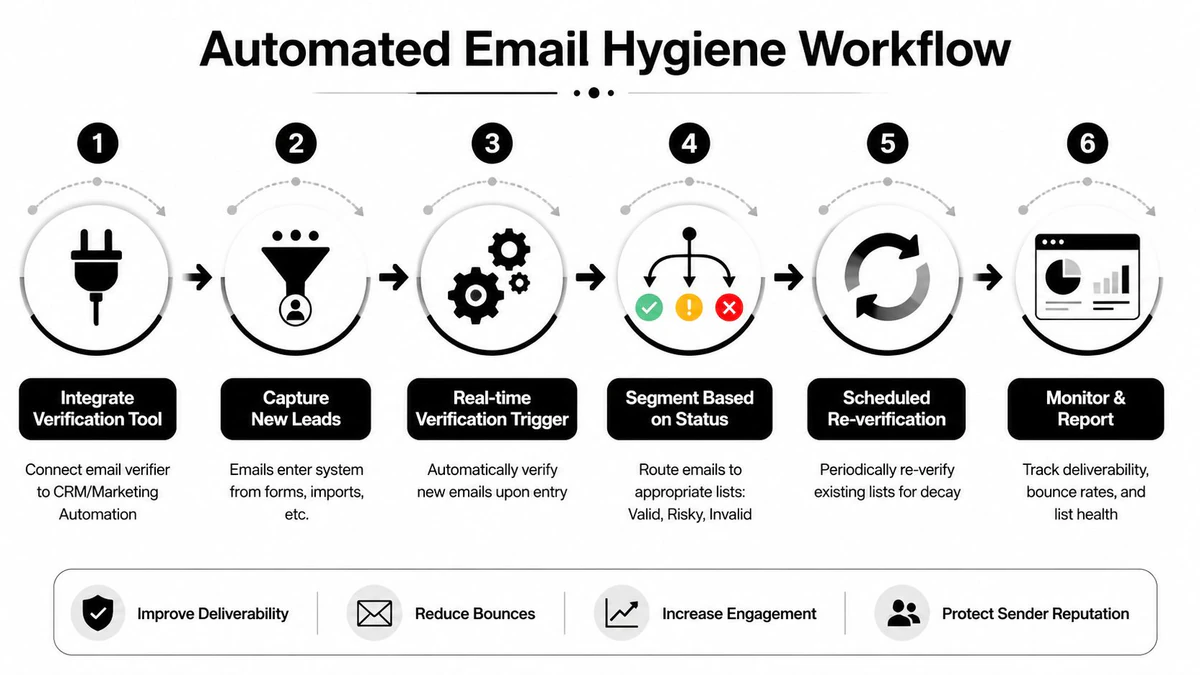
For ops teams, the right model is an automated control layer across capture, sync, and send.
A practical setup often includes:
- New lead verification: Trigger a check when a record enters HubSpot, Salesforce, or a form collector.
- Status-based routing: Send deliverable records forward, hold risky records for segmentation, and suppress invalid ones before sync to the ESP.
- Recurring database maintenance: Re-verify older segments on a schedule so aging records don't accumulate unnoticed.
- Reporting feedback loops: Compare verification outputs with actual bounce patterns and complaint trends.
That kind of discipline pairs well with broader outbound process design. If your team is also tightening prospecting workflows, this sales productivity framework is a useful companion read because clean data and efficient sales motion usually rise or fall together.
Where ops teams usually get the workflow wrong
Most failures come from one of three choices.
First, teams verify only on import and ignore what enters later through forms, integrations, or manual entry. Second, they collapse all non-invalid results into one sendable segment. Third, they don't feed verification status back into CRM fields that downstream teams can use.
Good automation doesn't just clean records. It changes routing, segmentation, and send eligibility.
If you're wiring this into HubSpot-centric workflows, BillionVerify's notes on its HubSpot integration show the operational idea well. Verification should be close enough to the CRM that statuses become actionable fields, not buried exports that someone reviews once and forgets.
Best Practices for Cost Performance and Compliance
A verification workflow is only sustainable if it fits how your team buys, sends, and governs data. Cheap checks that create bad decisions aren't cheap. Expensive checks that no one runs consistently aren't useful either.
The practical target is decision quality. You want enough technical depth to support segmentation and suppression rules, but you also need workflows people will use. That usually means choosing a verifier that supports single lookups, bulk processing, and real-time API use in one operating model instead of forcing separate tools for each job.
Choose for decision quality, not just list cleaning
When teams compare providers, the wrong question is “How many invalids does it catch?” The better question is “What can my team decide after the check?”
Look for output that supports policy, such as:
- Deliverability-oriented statuses: Not just pass or fail, but distinctions your team can route on
- Operational flags: Role-based, disposable, catch-all, and similar signals that affect campaign treatment
- Workflow fit: Exports, API responses, and CRM compatibility that remove manual work
- Repeatability: A process people can run before sends and at capture points without friction
That's also where compliance and deliverability intersect. If your team needs a framework for the governance side, BillionVerify's article on deliverability compliance is a useful reference point.
Keep compliance and deliverability aligned
Verification should support privacy-conscious operations, not bypass them. Reputable tools validate through technical checks and inference methods rather than sending live outreach just to see what bounces later. That matters for user trust, internal governance, and auditability.
A few rules hold up well across various teams:
- Verify before use, not after failure: Don't treat bounced mail as your primary validation method.
- Store statuses clearly: Sales, marketing, and support should know whether an address is suppressed, risky, or approved.
- Separate uncertainty from invalidity: Unknown doesn't mean fake. It means you need another decision step.
- Review policy by use case: A support inbox, a newsletter signup, and a cold outbound lead should not all follow the same rules.
The teams that do this well don't obsess over verification as a standalone task. They use it as part of a broader data quality system that protects sender reputation and keeps email tied to real business outcomes.
If you need a practical platform to handle single checks, bulk list cleaning, and API-based verification in one workflow, BillionVerify is built for that operational use case. It's a straightforward option for teams that want to stop bad data at signup, segment ambiguous results more carefully, and keep deliverability decisions tied to real workflow rules instead of guesswork.