


Most advice about email tracker freeware starts with open notifications. That's backwards. If the address is bad, the cleanest tracker in the world still tells you nothing useful, because the message never had a fair shot at landing. Tracking is downstream of deliverability, and too many free-tool roundups skip that part entirely.
That's why the smarter workflow is simple. Verify first, send second, track third. Once you look at outreach that way, free trackers become what they are: lightweight visibility tools, not full outreach systems. They can help with timing and follow-ups, but they won't fix poor list quality, weak CRM hygiene, or misleading open data.
For solo reps, founders, and lean teams, email tracker freeware still has a place. It's useful when you need a quick signal inside Gmail without committing to a bigger sales stack. But if you're sending campaigns at any meaningful volume, the hidden cost usually shows up in bounces, manual cleanup, and noisy data. If you also want a stronger process after the first send, this guide on automating email follow-ups is a good next step.
1. BillionVerify
The strongest addition to an email tracker freeware stack often isn't another tracker. It's verification. BillionVerify is a professional email verification service built to solve one problem: bad email data costs businesses money.
That matters because tracking pixels and open alerts only help after a message reaches a valid inbox. If your list contains invalid addresses, disposable signups, or risky records, you end up measuring failure after the fact. Verification changes that sequence.
Why verification belongs in an email tracker freeware guide
A lot of free tracker roundups treat tracking as the starting point. In practice, it's the middle of the process. First you need a deliverable address, then a sent email, then an open event you can interpret.
That order matters more now because open data itself isn't perfect. Ramp's email marketing category analysis notes that Mailchimp leads small business email marketing adoption at 66%, followed by Klaviyo at 18%, and it also highlights that MPP-adjusted 2026 average open rates sit at 21–25% versus 30.7% unadjusted. That's a useful reminder that open tracking can be noisy even when your send succeeds.
Practical rule: If you haven't cleaned the list, don't spend much time debating which free tracker gives the prettiest notification.
The market direction points the same way. FactMR's email tracking software market projection estimates the category will grow from USD 12.67 billion in 2024 to USD 33.16 billion by 2035, with 2.4X growth and an incremental opportunity of USD 19.28 billion. More tracking software will enter the market, but more tracking options don't remove the need for clean recipient data.
What BillionVerify does before tracking even starts
BillionVerify's main value is that it handles the layer most free trackers ignore. Instead of asking whether a recipient opened your email, it asks whether the address should be mailed in the first place.
Its core accuracy claim is specific. Comparateur IA's BillionVerify profile states that BillionVerify achieves 99.9% accuracy through real-time SMTP verification that directly queries receiving servers, compared with basic syntax and DNS-only tools that average 92% accuracy by the same benchmark. For teams that care about deliverability, that difference is more important than another desktop pop-up telling you an email was opened.
You also get protection against low-quality signups and list contamination. A BillionVerify benchmark post on Reddit says the service checks disposable emails against a database covering 50,000+ known disposable domains and uses 1M+ known spam traps updated via real-time machine learning.
That's the kind of filtering that changes campaign quality before the first send. Free trackers rarely address it because it sits outside the tracking event itself, but it directly affects whether your tracker data means anything.
Where it fits in a real outreach workflow
For outbound teams, the cleanest workflow is straightforward. Verify the list in bulk, validate incoming form fills in real time, push clean records into the CRM, then use tracking only for prioritization and follow-up timing.
That sequence reduces a common mistake in email tracker freeware setups. Teams install a Gmail extension, start sending, and only later realize they're tracking a list with junk records, throwaway addresses, or role accounts that distort results. By then, the open data already reflects a damaged send.
A practical use case looks like this:
- Before campaign launch: Clean a prospect list so invalid and risky addresses don't enter the sequence.
- At signup: Screen registrations before fake or disposable emails hit your product database.
- Inside operations: Keep CRM data cleaner so reps aren't following up with dead records.
- Before analysis: Make tracking reports more trustworthy because the underlying send pool is better.
Clean data doesn't make a weak message strong. It does stop you from blaming copy, timing, or subject lines for a problem that started with bad addresses.
For teams that want the background on the process itself, BillionVerify's own explanation of what email verification is is a useful reference.
What stands out operationally
Some tools look good in a product demo but create friction once you try to plug them into actual workflows. BillionVerify stands out because the operational side is built for ongoing use, not one-off list cleanup.
According to its Trustpilot review profile, the service offers a permanent free tier of 100+ verifications per day with no credit card required, credits that never expire, and integrations with 25+ platforms including Mailchimp, Salesforce, and HubSpot via a REST API with webhook support for custom workflows. That combination matters because verification is most valuable when it's embedded early and consistently.
Free email tracker tools usually live at the inbox layer. Verification tools like this belong one step upstream. They support bulk cleaning, signup validation, and CRM hygiene, which is exactly where many outreach problems start.
Here's the practical difference between a tracker-first setup and a verification-first setup:
- Tracker-first approach: You send first, then discover issues through weak engagement, odd bounce patterns, or inconsistent reporting.
- Verification-first approach: You remove obvious address quality problems before sending, so tracking data becomes more useful.
- Hybrid approach: You verify records before launch, then use a simple tracker for follow-up timing rather than as your only signal.
Best fit and real trade-offs
BillionVerify isn't a replacement for an email tracker. It doesn't try to be. It solves the problem that makes tracking unreliable in the first place. That makes it a strong fit for sales teams, agencies, SaaS products handling registrations, and marketers who care more about deliverability than novelty.
The trade-off is simple. If all you want is a Gmail notification when one person opens one email, a free tracker is faster to install. If you care about list quality, sender reputation, and reducing waste before a campaign goes out, verification gives you more advantage.
It's also worth being clear about the limits of free trackers in general. Salesflare's review of free email trackers points out recurring freeware trade-offs such as branded signatures, missing CRM sync, lack of advanced analytics, and the absence of cross-platform mobile tracking across major free options. Those are usability issues, but the deeper problem is that none of them fixes bad data.
So the right framing isn't “Which free tracker should I trust with my whole outreach process?” The better question is “Which light tracker should I pair with a verification layer so my send quality and tracking quality both improve?” On that question, BillionVerify is the strongest tool in this list because it addresses the root issue instead of the symptom.
2. Mailtrack
Mailtrack became popular for a reason. It's easy to understand, easy to install, and its interface inside Gmail is intuitive enough that most users don't need a tutorial.
Why people still install it first
The appeal is the free tier. Mixmax's review of free Gmail trackers notes that Mailtrack offers unlimited open tracking completely free without requiring a user account, and its double-check mark system mirrors WhatsApp's logic: one check means sent, two checks mean opened. For people who want immediate visibility in Gmail, that simplicity works.
That same review also places Mailtrack as the most popular choice for basic free tracking. If you only need to know whether a message was opened, the product makes that signal easy to read in the sent folder.
Where the free plan stops being enough
The downside with Mailtrack is that “unlimited” can still be narrow in practice. Open alerts are useful, but they aren't a full outreach system, and they aren't a deliverability safeguard.
The broader freeware pattern matters here. Free plans often trade depth for convenience, which means you may get the open signal while missing the context needed for smarter decisions. For an individual user, that can be fine. For a team, it quickly turns into manual work and partial visibility.
A free tracker is helpful when you need confirmation. It's weak when you need analysis.
Mailtrack makes sense for one inbox, one-off follow-ups, and users who value speed over sophistication. It makes less sense as the center of a serious outbound process, especially if your list quality is uncertain or your reporting needs go beyond “opened” and “not opened.”
3. Streak
Streak is the option I'd put in front of users who live inside Gmail and want tracking without bolting on a separate workflow. It isn't just a tracker. It sits closer to a lightweight CRM experience.
The appeal of tracking inside a Gmail workflow
That matters because some users don't want another dashboard. They want pipeline context where they already work. Streak's free plan is notable because it includes unlimited tracking without branding, which immediately removes one of the biggest annoyances found in other free tools.
For freelancers, consultants, and small teams, that can be a practical sweet spot. You get open tracking without adding a promotional signature to your emails, and the Gmail-native feel is cleaner than many Chrome-only utilities.
The practical ceiling
The trade-off is depth. As noted earlier in the article, free tracker tools often remove the advanced analytics and cross-platform visibility that sales teams eventually need. Streak follows that pattern. It's useful when you want simple tracking in a familiar interface, but it's not the tool I'd choose if I needed more detailed engagement data or a stronger deliverability workflow.
Many teams misread what “free” really buys them. It buys convenience. It rarely buys full operational coverage.
A good use case for Streak is founder-led sales, personal outreach, and lightweight business development where Gmail is the main workspace. A weaker use case is agency-scale outreach or any environment where data has to sync cleanly across systems.
4. Hunter Mailtracker
Hunter Mailtracker is the minimalist's option. It doesn't try to be a sales platform, and that's part of its appeal.
A lean option for basic open alerts
For users who want a lightweight extension and not much else, Hunter Mailtracker fits. Earlier research cited in this article notes that it serves a niche need well: simple, unlimited free tracking for users who care about straightforward open alerts more than layered analytics.
That kind of simplicity is useful when your workflow is already defined elsewhere. If your CRM, spreadsheet, or outbound process lives outside the tracker, a lean utility can be enough.
Where it works and where it does not
Hunter Mailtracker is best when the job is narrow. Send an email. See whether it was opened. Move on.
It becomes less attractive when you need click tracking depth, CRM synchronization, or richer reporting. Those gaps are common across free email tracker freeware, not unique to Hunter. The issue is that minimal tools rarely scale with your process.
If your outreach volume is low, basic tracking can feel efficient. Once multiple inboxes and client accounts enter the picture, “lightweight” often turns into “manual.”
I'd put Hunter Mailtracker in the same bucket as other clean starter tools. Good for individual users. Limited for teams trying to manage outreach as a repeatable system.
5. HubSpot Sales
HubSpot Sales sits in a different category from the simpler Gmail extensions. People consider it because they expect a path from free tracking to a fuller sales workflow.
Why teams consider it
That expectation isn't unreasonable. HubSpot has a familiar ecosystem, and for users already inside its CRM, the tracking feature can feel like a natural extension rather than a standalone utility.
But the free version has real limits. Earlier in this article, the broader freeware trade-offs showed up around caps and missing depth. HubSpot is one of the clearest examples of that pattern in practice.
When the free version creates friction
The free plan limits tracking notifications to 200 per month, which is roughly 6–7 per day under the benchmark cited earlier. For a casual user, that might be enough. For an SDR, agency operator, or founder sending consistent outreach, it isn't much room.
The economics also shift quickly once teams move beyond freeware. Earlier reporting referenced in this article notes that paid per-seat tools like HubSpot Sales Hub and Yesware can reach $750 to $1,000+ monthly for 50 inboxes, while a unified reporting platform like Instantly starts at $47 per month with unlimited email accounts. The exact choice depends on workflow, but the strategic lesson is clear: free tracking inside a major platform can be useful, yet it often nudges teams toward a much larger software commitment.
HubSpot makes the most sense when you already use the broader ecosystem and accept the free tier as a temporary on-ramp. It makes less sense if you only want durable, low-friction email tracker freeware with room to grow.
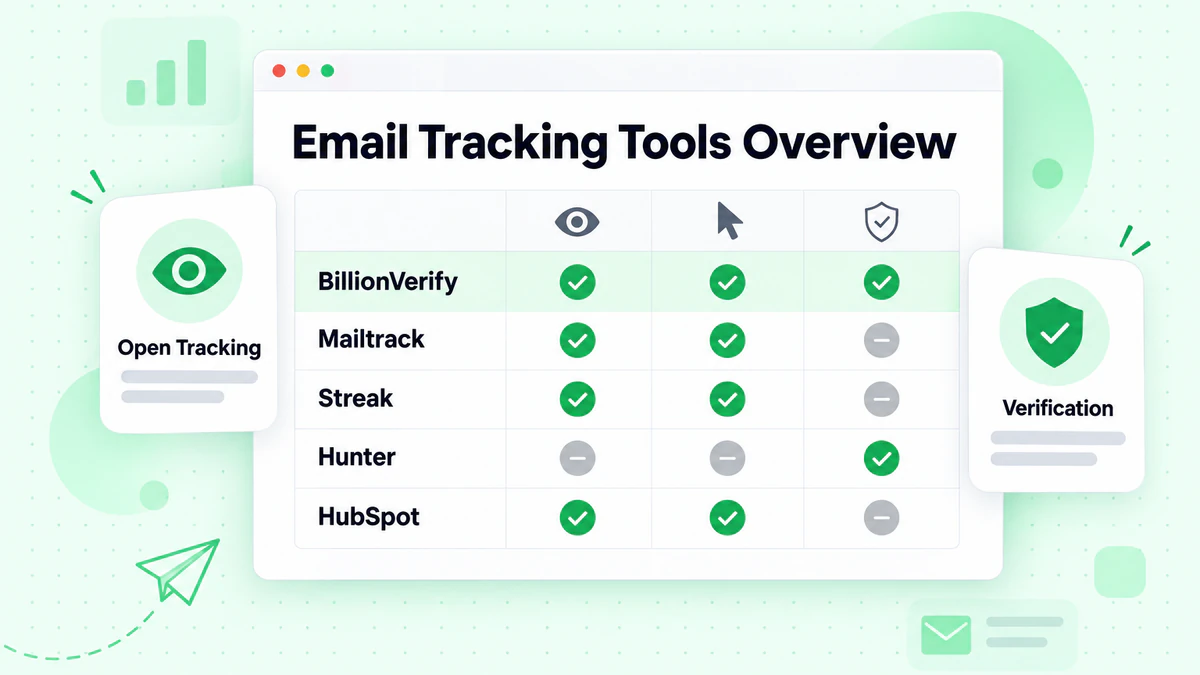
BillionVerify, Email Tracker Freeware Overview
| Product | Core Features | Quality & UX | Value & Pricing | Target Audience | Unique Selling Points |
|---|---|---|---|---|---|
| BillionVerify 🏆 | Bulk list cleaning, single checks, real-time API, CSV uploads, structured JSON (status, SMTP, MX, catch‑all) | ★★★★★ 99.9% SMTP‑level accuracy; fast, scalable; live progress & notifications; bounce rates <1% reported | 💰 Cost‑efficient vs legacy; free tier (no CC); volume & pay‑as‑you‑go options | 👥 Sales & Marketing, Product teams, Agencies, Devs/CRM integrators | ✨ AI‑first platform, whitelabel portal, MCP Server & AI agent support, deep integrations (Mailchimp, HubSpot, SendGrid), deliverability insights |
Final Thoughts
Email tracker freeware is easy to install and easy to overestimate. That's the pattern behind almost every tool on this list. The free versions are good at one narrow job: telling you that an email was opened. They're much less reliable as complete systems for outreach, reporting, or deliverability management.
That's why the best decision usually isn't choosing the “smartest” free tracker. It's choosing the right sequence. Start by verifying addresses so you're not sending to junk data. Then use a simple tracker where it helps, mainly for timing follow-ups and spotting engagement. If you need more than that, move to a platform with stronger analytics and CRM support instead of trying to force freeware to do enterprise work.
Privacy and compliance also deserve more attention than most free-tool lists give them. Some free tracking tools create exposure around third-party data collection and consent, especially if teams assume “free” also means low-risk. If you work in a regulated environment or manage client campaigns, that question matters as much as features.
The tools here fit different needs. Mailtrack is simple and familiar. Streak works well for Gmail-centric users who want tracking without branding. Hunter Mailtracker stays lightweight. HubSpot Sales is best understood as an ecosystem entry point, not just a tracker. BillionVerify stands apart because it improves the quality of the send before tracking even begins.
If you want a related workflow after validation and tracking, these free reverse email lookup tools can help with prospect research and contact context.
If you want to improve outreach before the first email goes out, BillionVerify is the most practical place to start. Verification won't replace tracking, but it will make every tracker you use more meaningful by filtering bad addresses, protecting sender reputation, and giving your campaigns a cleaner foundation.