



A sender can sit at an average bounce rate of 1.06% and still be outside the profile of stronger programs, because the median was only 0.21% in Twilio's 2023 benchmark, with the 75th percentile at 0.61% (Benchmark Email summary of the benchmark). That gap changes how I look at high bounce vs low bounce email lists. The question isn't whether mail merely “goes out.” It's whether your bounce pattern says your data, authentication, and sending discipline are holding up under mailbox scrutiny.
That's where email verification matters. The practical job of a verification platform isn't just to remove obvious invalids. It's to give operators a cleaner decision layer before a campaign, at signup, and during suppression review. BillionVerify's feature set fits that use case because the work that reduces bounce risk happens at the SMTP level, in structured outputs, and in how those results feed CRM and sending logic rather than living in a spreadsheet.
What Bounce Rate Actually Tells You
Twilio's 2023 benchmark put the average bounce rate at 1.06%, while the median sat at 0.21% and the 75th percentile at 0.61%, according to the Benchmark Email summary of the benchmark. That spread matters because bounce rate is less useful as a pass or fail score than as a read on how clean your data and sending setup really are.
I treat bounce rate the way I treat inbox placement drift or an authentication failure spike. It is a diagnostic. On its own, it only answers one question: how often recipient servers refused the mail. The operational value comes from pairing that signal with SPF, DKIM, and DMARC alignment, complaint rates, and placement by provider. A list can post an acceptable bounce number and still miss the inbox. A list can also bounce above target because acquisition quality slipped, suppression logic broke, or SMTP checks were skipped before send.
That distinction matters in production environments. Teams that judge list health on bounce rate alone usually suppress too late, or they suppress too aggressively and cut reachable addresses that only needed better classification. The right response depends on the band.
What the band usually means
I use three practical ranges in audits:
- Healthy: Bounce stays low enough that I look elsewhere first, usually inbox placement, engagement decay, or authentication alignment.
- Warning: Bounce is high enough to point to list aging, poor source quality, weak suppression hygiene, or gaps in pre-send verification.
- Critical: Bounce is high enough that reputation risk moves from a background concern to an active sending problem.
Operationally, I treat anything under about 1% as controlled, 2% and above as a warning, and 5% and above as a recovery scenario, based on Twilio email marketing benchmark guidance. Those are not abstract labels. Each one should trigger a different workflow.
A healthy band usually means the list is being screened before launch and bad records are leaving the file quickly. A warning band calls for source-level review, SMTP verification depth checks, and a close look at whether repeated soft failures are being retried too long. A critical band usually means stopping broad sends, isolating acquisition sources, and re-verifying at the mailbox level before the next campaign leaves the platform.
For outbound teams, the same principle shows up in how agencies qualify revenue data. This explanation of bounce rate for pipeline agencies gets at the point. Bounce is an efficiency metric tied to data quality and conversion potential, not just a reporting line in the ESP dashboard.
The practical mistake is treating bounce as a cleanup task after deployment. By the time a bad segment produces a visible bounce spike, the issue has already touched reputation. AI-assisted SMTP verification changes that workflow because it can sort obvious invalids, role accounts, catch-alls, and risky unknowns before they hit your sender infrastructure. BillionVerify and similar tools are useful here when their outputs feed suppression rules, routing, and CRM status fields instead of living in a CSV nobody acts on.
That is why bounce belongs inside a broader email analytics and measurement process. The metric matters. The diagnosis matters more.
Hard Bounce vs Soft Bounce and the Low vs High Split
A list can post a tolerable total bounce rate and still be moving toward a deliverability problem. The split between hard and soft bounces is what shows whether you have simple list decay, retry noise, or the early signs of filtering and throttling.
What hard bounces mean
Hard bounces are permanent failures. The mailbox does not exist, the domain is invalid, or the receiving server rejects the address in a way that should not be retried.
This is the clearest bad-data signal in the file.
On a disciplined program, hard bounces are removed after the first failure and usually traced back to a specific source problem: stale CRM imports, weak form validation, purchased data, or old event lists that were never re-verified. If hard bounces keep reappearing, the issue is upstream. Suppression is not being applied consistently, or new bad records are entering faster than they are being removed.
What soft bounces mean
Soft bounces start as temporary failures. Full inboxes, graylisting, server timeouts, and temporary policy blocks all show up here.
The trade-off is retry tolerance. Retry too aggressively and temporary failures pile up into reputation drag. Suppress too quickly and you lose recoverable addresses that would have delivered on the next attempt. Mailchimp notes that repeated soft bounces are commonly treated as hard bounces after several consecutive failures in order to protect sender reputation (Mailchimp bounce guidance).
That is why soft bounces need address-level tracking, not just campaign-level reporting.
Here is the operational split I use:
- Low-bounce profile: Hard bounces are rare, soft bounces clear on retry, and the same addresses do not keep failing across sends.
- High-bounce profile: Invalid addresses are getting through, soft bounces repeat across campaigns, and suppression volume rises every week.
- Escalating profile: Soft and hard bounces are mixed with block-style SMTP responses, which usually means mailbox providers are reacting to both data quality and sender reputation.
A low headline bounce rate can still hide risk if soft bounces are concentrated on one domain group, one acquisition source, or one segment that keeps cycling through retries.
SMTP-level verification helps sort that risk before the send. A trim-only process removes obvious invalids, but it does not separate catch-all domains, accept-all behavior, or risky unknowns that need a different retry policy. A bounce checker for marketing teams helps teams decide which records to suppress immediately, which to quarantine, and which to retest under controlled volume.
Used this way, BillionVerify is a professional email verification service for one specific job: reducing bad records before they create avoidable bounce and reputation problems.
Side-by-Side Comparison of High Bounce vs Low Bounce Lists
A list can post acceptable opens and still be risky if bounce activity is concentrated in the wrong places. The useful comparison is not just low bounce versus high bounce. It is whether bounce patterns support the rest of your diagnostics, including inbox placement, domain reputation, and authentication alignment.
High Bounce vs Low Bounce Email Lists Operational Criteria
| Criterion | Low Bounce List | High Bounce List |
|---|---|---|
| Bounce rate band | Stays inside a healthy operating range and does not spike when volume shifts between segments or domains | Sits in a warning or critical band, or swings sharply by source, domain group, or campaign type |
| Hard bounce profile | Invalid addresses are rare because suppression is working and new records are screened before launch | Invalid addresses keep entering the file through stale imports, weak form controls, or poor source governance |
| Soft bounce profile | Temporary failures clear quickly and do not cluster on the same addresses across multiple sends | Temporary failures repeat on the same recipients, pile up by domain, or start blending with block-style responses |
| Sender reputation signal | Mailbox providers see stable list hygiene, which makes other signals easier to interpret | Mailbox providers see avoidable delivery failures, which raises scrutiny on the sending domain and IPs |
| Inbox placement outlook | Placement issues usually point to authentication, content, or engagement segmentation because list quality is not the main variable | Placement analysis gets harder because data-quality failures and reputation issues are now mixed together |
| Analytics reliability | Delivery, engagement, and conversion reporting reflect reachable users with fewer distortions in the denominator | Reporting gets noisy because a growing share of sends never had a chance to reach an inbox |
| Recommended action | Maintain suppression discipline, re-verify aging segments, and watch domain-level outliers | Pause risky segments, trace failures back to source, and run SMTP-level verification to separate invalids, accept-all records, and unknowns |
Table note: benchmark bands are referenced once in the article from the VerifiedEmail benchmark.
Why the gap matters
Low-bounce files are easier to operate because the rest of the dashboard is cleaner. If Microsoft placement drops while bounce stays controlled, the next check is usually SPF, DKIM, DMARC alignment, throttling behavior, or content targeting. Time is not wasted arguing about whether the underlying file is broken.
High-bounce files create a different workflow. The first job is triage. Identify whether failures are concentrated in one acquisition source, one CRM sync, one old segment, or one mailbox provider. Then verify at the SMTP level so the team can suppress confirmed invalids, quarantine risky unknowns, and retest borderline records under lower volume. Generic list cleaning is too blunt for that job.
I treat bounce rate as a diagnostic signal, not a score to chase on its own. A 1.8% bounce rate with stable placement and clean authentication is manageable. A similar rate paired with repeated soft bounces at one major provider and a placement drop needs investigation right away.
For teams that want a reference point for how their file compares by risk band, the Email Verification Benchmark is a useful starting point.
Industry Benchmarks That Define Each Band
Less than 2% total bounce is the operating line many deliverability teams use for a healthy file. Once a program moves past 5%, the problem usually extends beyond hygiene into reputation, placement, and provider trust.
Healthy, warning, and critical
The practical bands are straightforward. Below 2% total bounce is healthy for a maintained program. 2% to 5% is a warning range that deserves investigation. Above 5% is critical and usually points to source, sync, or suppression failures that should be addressed before volume scales further.
For component metrics, well-maintained lists usually keep hard bounces under 0.3% to 0.5% and soft bounces under 1% to 1.5%, as noted earlier in the article.
Those numbers matter because bounce rate works best as a diagnostic signal alongside inbox placement and authentication. A sender at 1.6% total bounce with stable placement and aligned SPF, DKIM, and DMARC is in a very different position from a sender at the same bounce rate with Gmail tabbing issues or Microsoft filtering. The top-line percentage may match. The remediation path does not.
Bounce Rate Bands and Sender Reputation Impact
| Band | Overall Bounce | Hard Bounce | Soft Bounce | Reputation Signal | What to do |
|---|---|---|---|---|---|
| Healthy | Below 2% | Below 0.3% to 0.5% | Below 1% to 1.5% | Low invalid pressure, stable hygiene | Monitor by source and domain. Reverify aging segments and watch unknown results before they accumulate. |
| Warning | 2% to 5% | Above the maintained-list range or climbing week over week | Temporary failures are repeating, or concentrated at one provider | Early reputation drift, more filtering risk | Run SMTP-level verification on the exposed segments. Suppress confirmed invalids, separate accept-all domains, and hold unknowns for lower-risk retesting. |
| Critical | Above 5% | Persistent invalids or broken suppression logic | Soft failures behave like undeliverables in practice | High risk of blocking, throttling, and placement loss | Pause the affected sources, trace the failure path, and verify before the next send. Fix acquisition or CRM sync issues before restoring volume. |
Healthy means bounce is not the first issue limiting delivery. It does not guarantee inbox placement.
What normal actually looks like
Analysts at Validity reported permission-based marketing programs averaging about 1.5% combined bounce rate, while a B2B cold-email dataset covering 7.5 million emails showed a 1.71% bounce rate. The same benchmark linked bounce rates under 1.5% with 10% to 12% higher inbox placement (Validity deliverability benchmark).
That matches what I see in enterprise audits. The difference between 1.4% and 2.6% bounce is rarely cosmetic. At 1.4%, the team can usually spend its time on placement, authentication alignment, and provider-specific filtering. At 2.6%, the first job is often record-level triage with AI-powered SMTP checks, because generic cleaning will not tell you which addresses are invalid, which are accept-all, and which are unresolved but still salvageable.
Low bounce gives the rest of the diagnostics room to speak clearly. High bounce distorts them.
When Soft Bounces Become a Reputation Liability
Repeated soft bounces are often the first visible sign that a sender is drifting from a list-quality problem into a reputation problem.
A single soft bounce does not justify suppression. Three consecutive soft failures on the same record usually do. By that point, the question is no longer whether the mailbox might recover. The operational question is whether continued retries are worth the reputation cost.
I treat soft bounces as a diagnostic signal, not a standalone metric. If soft failures rise while SPF, DKIM, and DMARC are aligned and inbox placement is slipping, the issue is often not temporary mailbox congestion. It is more likely throttling, filtering, poor source quality, or stale records that your suppression logic has failed to retire.
How soft bounces turn into a liability
Mailbox full, greylisting, and temporary server errors are legitimate on first occurrence. They stop being benign when the same addresses fail across separate campaigns or the same domain starts producing the same temporary response at scale.
That pattern matters because mailbox providers evaluate sender behavior, not sender intent. Repeatedly mailing records that continue to defer or reject tells receiving systems your data controls are weak. The result is usually slower acceptance first, then more filtering, and eventually lower inbox placement on mail that would otherwise have reached active users.
A practical suppression sequence
- First soft bounce: Hold the address for review and retry only if the SMTP reason suggests a temporary condition.
- Second consecutive soft bounce: Check for clustering by domain, campaign, acquisition source, and authentication status. Diagnosis matters more than blanket cleaning.
- Third consecutive soft bounce: Suppress by default unless there is a specific business reason to preserve the record, such as a recent conversion event or a known recipient-side outage.
For enterprise programs, I also separate soft bounces by cause before making suppression decisions. A mailbox-full response from a previously engaged customer is different from repeated deferrals on a newly acquired B2B contact. One may justify a short retest window. The other usually belongs in verification before it sees another campaign.
Why generic retries are expensive
The cost is not just another failed send.
- Deferred records consume reputation headroom: repeated temporary failures can drag down domain and IP trust even without a clean hard-bounce event.
- Source issues hide inside soft-bounce buckets: bad CRM syncs, expired enrichment data, and role-account heavy lists often surface as temporary failures before they show up as obvious invalids.
- Placement analysis gets harder: once soft-bounce pressure rises, it becomes harder to tell whether inbox loss is coming from content, authentication, or list decay.
AI-powered SMTP-level verification helps here because it sorts records into operational buckets you can act on. Invalids should be suppressed. Accept-all domains need separate risk handling. Temporarily unavailable mailboxes can go to retest. Domain-level failure patterns should trigger source or infrastructure review, not endless retries.
When the same address soft-bounces across multiple sends, treat it as a live hygiene decision with reputation consequences, not as harmless delay.
Use Cases Where the Same Threshold Behaves Differently
The same bounce threshold doesn't mean the same thing for every sender. Context matters. Consent quality, domain mix, cadence, and infrastructure all change how much bounce pressure a program can absorb.
Bounce Tolerance by Sender Profile
| Dimension | E-commerce Retention | B2B Cold Outbound |
|---|---|---|
| List source quality | Usually permission-based and tied to prior customer or subscriber action | Often mixed-quality, especially when sourced from enrichment, scraping, or old prospect databases |
| Healthy bounce expectation | Strong programs can run very low because the audience is recognized and engaged | A result that looks mediocre in retention can be acceptable in prospecting if acquisition controls are tighter than the market norm |
| Soft-bounce interpretation | More likely to reflect temporary mailbox conditions or timing issues | More likely to reflect domain-level filtering, throttling, or skeptical recipient infrastructure |
| Hard-bounce tolerance | Very low tolerance because the sender should already know the contact quality | Slightly more operational tolerance, but only if invalids are aggressively suppressed before scale |
| Complaint interaction | Even modest complaint pressure can outweigh a decent bounce profile | Complaints and bounces often rise together when targeting and sourcing are weak |
| Infrastructure sensitivity | Shared ESP pools and promotional patterns create different pressure points | Dedicated outbound infrastructure and domain segmentation often matter more |
| Remediation style | Focus on lifecycle hygiene, signup verification, and suppression discipline | Focus on source screening, SMTP verification, and segmentation by risk before sending |
Why outbound and retention behave differently
Permission-based retention lists usually have better starting conditions. If a known buyer or subscriber hits a temporary mailbox issue, the relationship itself often offsets some friction because the domain has seen your mail before.
Cold outbound lives under a stricter microscope. A bounce rate that might be manageable in prospecting would be unacceptable in a mature retention stream. That doesn't excuse poor hygiene. It means the operator has to read bounce in context, especially when custom recipient infrastructure inflates soft failures or when catch-all domains hide invalid users until send time.
Teams get misled by rigid rules. The threshold matters, but the source of the address matters more.
Remediation Workflow With AI Verification
Generic advice says to “clean your list.” That's too shallow for high-bounce recovery. What works is a layered workflow that separates invalids, uncertain records, and temporary failures before the next send.
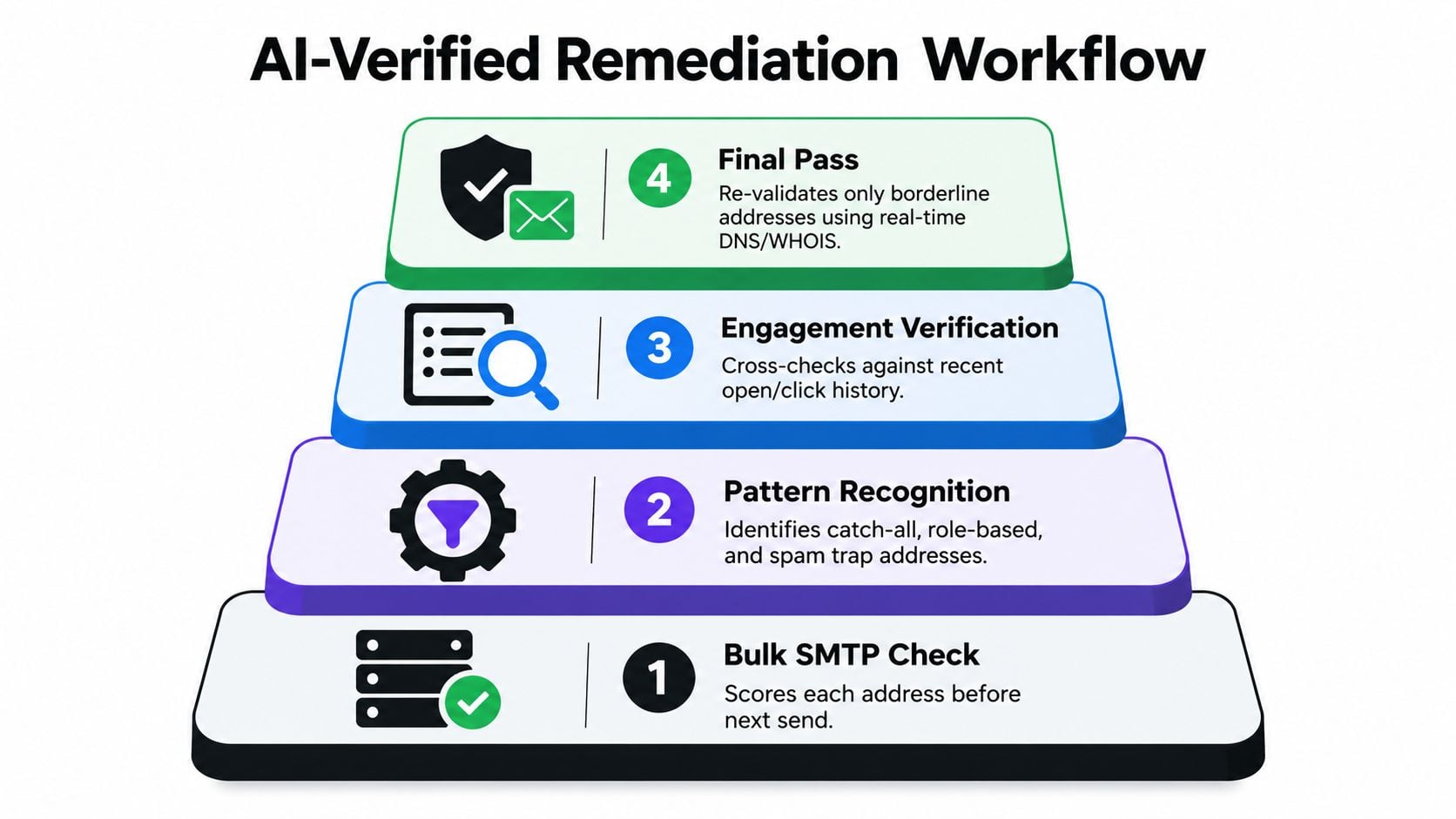
Layer one before-send SMTP verification
Start with a bulk pass across the full file. Email verification is the pre-send process of confirming whether an address exists and can accept mail, which helps prevent hard bounces, spam-trap hits, and reputation damage (SMTPedia on email verification).
The goal here isn't only valid versus invalid. It's categorization:
- Valid: Safe to send under your normal policy.
- Risky: Catch-all, inconsistent SMTP behavior, or patterns that need extra caution.
- Invalid: Suppress before launch.
For borderline records, keep timeout windows controlled and don't let retries sprawl. Long retry chains create operational noise and rarely improve final list quality.
Layer two at the point of capture
Real-time API checks stop damage before it enters the CRM. Disposable detection is part of that. Verification tools commonly flag throwaway addresses before they get into a registration flow or campaign list (Apify SMTP verifier overview).
A real-time Email Validation API is useful. The practical win is simple. You stop role accounts, typo-heavy signups, and disposable records before your next campaign has to clean them up.
Layer three controlled re-verification
Not every uncertain address should be burned immediately. Greylisted responses and some soft-bounce cases belong in a recheck pool rather than a permanent blocklist.
A disciplined queue usually works better than ad hoc retries:
- Recent softs: Hold for scheduled re-verification.
- Ambiguous SMTP responses: Recheck later instead of forcing a deliverability decision too early.
- Pattern-based risk: Separate catch-all or edge cases into their own campaign logic.
Layer four structured output into operations
The best verification workflows are machine-readable. One documented bulk verifier returns JSON per record with a decision, trigger flags, and next-step pointers, showing how verification systems can feed CRM and campaign workflows without manual review (ApifyForge bulk verifier example).
That output matters because workflow isn't “verify and export.” It's:
- Suppress clear invalids.
- Route risky contacts to monitored segments.
- Retry only where the bounce pattern justifies it.
- Keep signup filters active so the same data quality problem doesn't return next month.
If your list is dirty and your domain is also under strain, verification alone won't solve the whole issue. In those cases, warm-up and reputation repair have to run alongside hygiene work. Teams dealing with that side of the stack often compare best email warmup tools because list quality and sender conditioning usually need to improve together.
Measuring Progress and Choosing the Right Diagnostic
Bounce reduction is only meaningful if you measure it against the right companion signals. The one metric I trust most after cleanup is still inbox placement. A list can bounce low and still miss the inbox if authentication or complaint pressure is off.
30-60-90 Day Targets for Bounce Reduction
| Metric | 30 Days | 60 Days | 90 Days |
|---|---|---|---|
| Overall bounce rate | Move into the healthy band | Push toward the stronger end of the healthy band | Sustain a low-bounce operating profile |
| Hard-bounce trend | Clear downward movement after suppression | Stabilized at tightly controlled levels | Consistently low and predictable |
| Soft-bounce repeat rate | Fewer addresses failing across multiple sends | Retry pool becomes smaller and more selective | Most repeat softs already suppressed or resolved |
| Inbox placement | Improvement should be visible in seed tests if bounce was part of the problem | Stabilization across major mailbox providers | Inboxing holds without unusual volatility |
| Authentication pass rate | Verify alignment and consistency | Confirm failures are exceptions, not patterns | Maintain clean pass behavior over time |
| Complaint pressure | Watch for divergence between cleaner data and recipient relevance | Keep complaint trends stable while list size adjusts | Complaints remain controlled as volume normalizes |
The diagnostic stack that matters
Review these together each cycle:
- Bounce rate: Useful for hygiene and early warning.
- Inbox placement: The lead diagnostic for whether mail is landing where it should.
- Complaint rates: Tells you whether “deliverable” recipients want the mail.
- Authentication pass rates: Confirms technical alignment is supporting reputation rather than undermining it.
A practical way to keep this visible is to pair your suppression reviews with a tool that helps you improve deliverability with bounce rate analysis. But keep the hierarchy straight. Bounce is the warning light. Inbox placement tells you whether the engine is still running properly.
If placement is holding, complaints are controlled, and authentication is clean, a temporary bounce increase is usually a data refresh problem. If placement drops while bounce rises, that's a sender reputation problem.
BillionVerify gives teams a way to handle both sides of this issue: pre-send verification for list cleaning and real-time validation that stops bad addresses before they enter the database. If you're working through high bounce vs low bounce decisions and need cleaner suppression logic, SMTP-level checks, and structured results that fit campaign workflows, visit BillionVerify.